Show Us Your Rig [3]

Status
Not open for further replies.
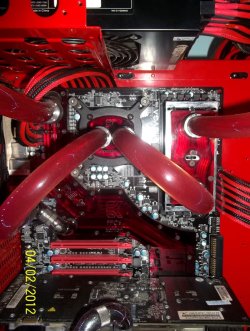
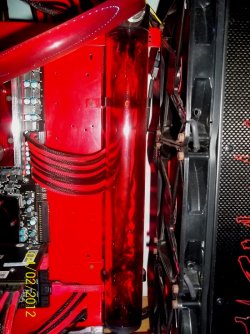
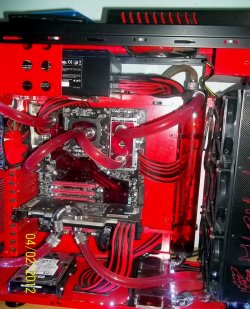
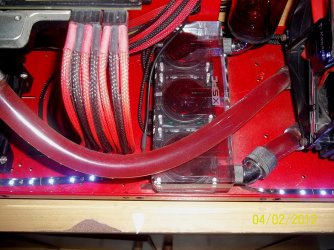
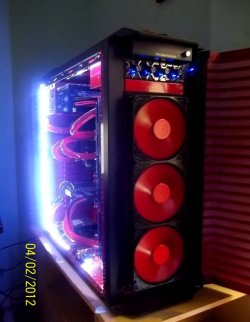
Peaceful it's really clean and I love it.........but the huge CM......yikes! Not my cup of tea, but with the side on I'm hoping you don't even see that and all you see is the great lengths you went to clean, clean and more clean !
Outstanding, excuse me while I go and kick my Thermaltake case !
 

My Computer My Computer

At a glance

Windows 7 Ultimate 64i7 3770k OC'd 4.6 @ 1.17v, also FX 8120 & i5 ...32 gb G.Skill Sniper DDR3 10-12-12-31 @ 2133XFX Radeon 7870 2GB DDR5
Computer type
PC/Desktop
Computer Manufacturer/Model Number
A blend of brains, brawn and dumb luck.
OS
Windows 7 Ultimate 64
CPU
i7 3770k OC'd 4.6 @ 1.17v, also FX 8120 & i5 miniITX
Motherboard
MSI P67A-GD80 b3
Memory
32 gb G.Skill Sniper DDR3 10-12-12-31 @ 2133
Graphics Card(s)
XFX Radeon 7870 2GB DDR5
Sound Card
Sound Blaster Z Series Card
Monitor(s) Displays
(2) LG LED 23" 1920 x 1080 2ms Monitors via mini d-port
Screen Resolution
1680 X 1050 p
Hard Drives
Samsung 256 gb 830 SSD sata III
(1) 1 tb WD Black
(2) 1 tb Hitachi deskmates/sata II
(2) 1 tb WD green/sata II
(2) 3 tb Seagate Barracuda
(1) 120 gb OCZ Vertex SS
(1) Drobo 5N w/5 Seagate 3tb
PSU
EVGA modular 1000G2 80% gold rating & APC 1200 RS
Case
CoolerMaster Storm Styker
Cooling
7 case fans 140mm & 120mm, NZXT Kraken X60
Keyboard
(2) Logitech Illuminated Keyboards (1) usb (1) wireless
Mouse
Logitech G700 & T-BC21 - nano nx for the laptop
Internet Speed
Basic 120mbps down
Antivirus
Trend Micro Titanium Max Security & Malwarebytes Premium
Browser
Chrome and IE 10
Other Info
5 Noctua case fans + 3 Noctua in p/p on NZXT cooler
Integrated hot swap drive bays for 2.5" Drives
(2) Lite-on dvd/cd/Blu Ray optical 22X
Integrated fan controller and led on/off
HP Officejet Pro 8630 all-n-one
Hot-swappable 3.5" hard drive bay
Netgear Nighthawk router
Asus USB 3 & sata 6 PCIe card
Vantec IDE to sata adptr./Ultra sata adptr
Lenovo L420 i5 lappy with m sata
Drobo 5N advanced NAS
Can anyone tell me how to position the fans, to help prevent dust gathering? the only 2 fans i have for intake have a filter. im sure there is some kind of scientific way to go about this. the picture below is my current set up. (please excuse the MS paint mock up)

View attachment 196282


I like to have more intakes than exhaust to keep positive air pressure.
Good example here...link.
Keep your case off the floor get a small stand, it will cut the dust by 50%.
 

My Computer My Computer

At a glance

Windows 7 Ultimate 64bitIntel Core i7-2600K Sandy Bridge 3.4GHz (@4.5...G.SKILL Ripjaws X Series 16GB 1600Mhz (4 x 4G...x2 EVGA GeForce GTX 760's w/ACXCoolers in SLI...
Computer type
PC/Desktop
Computer Manufacturer/Model Number
Jeepmann/Custom Built
OS
Windows 7 Ultimate 64bit
CPU
Intel Core i7-2600K Sandy Bridge 3.4GHz (@[email protected])
Motherboard
Asus Maximus IV Extreme LGA 1155 Intel P67
Memory
G.SKILL Ripjaws X Series 16GB 1600Mhz (4 x 4GB) (Stock)
Graphics Card(s)
x2 EVGA GeForce GTX 760's w/ACXCoolers in SLI Surround
Sound Card
On-Board
Monitor(s) Displays
3x Acer 24" HDMI Widescreen LCD Monitor
Screen Resolution
3@ 1920x1080 (5760x1080 In Surround)
Hard Drives
Samsung 830 128gb ssd
Western Digital Caviar Black 640GB 7200 RPM
Western Digital Caviar Black 500GB 7200 RPM
Seagate 2tb 7200 RPM
PSU
COOLER MASTER Silent Pro 1000W
Case
COOLER MASTER HAF X Black
Cooling
CORSAIR Hydro H70
Keyboard
Logitech G510
Mouse
Zalman M300
Internet Speed
100mbps-ish Down & 5mbps-ish Up
Other Info
I installed the stock 140mm case fan outside of case then installed the H70+ 1 of its 120mm fans inside case. Used the 2nd 120mm from the H70 to go in the Gpu tunnel.
230mm Front,200mm side,200mm top,120mm Gpu tunnel,120mm&140mm on H70.
I like to have more intakes than exhaust to keep positive air pressure.
Good example here...link.
Keep your case off the floor get a small stand, it will cut the dust by 50%.

Cool link. So all Id have to do is flip both my top 200m, so they could serve as intake? I got the second part covered, a case like mine would Never touch the floor.
 

My Computer My Computer

At a glance

Windows 7 UltimateIntel i5 2500k @ 3.30G.Skill Ripjaws 1600 2x4 GbBFG GTX 260 MAXCORE 55 OC 896MB GDDR3
Computer Manufacturer/Model Number
The Vampire
OS
Windows 7 Ultimate
CPU
Intel i5 2500k @ 3.30
Motherboard
P8Z68 V-Pro
Memory
G.Skill Ripjaws 1600 2x4 Gb
Graphics Card(s)
BFG GTX 260 MAXCORE 55 OC 896MB GDDR3
Sound Card
Onboard
Monitor(s) Displays
50'' Sony Display Panel
Screen Resolution
1360 x 768
Hard Drives
Seagate 750 GB
WD 160 GB
PSU
OCZ 750 Watts ZT Series Fully Modular PSU 80 Plus Bronze
Case
NZXT Red Phantom
Cooling
120mm x2 Intake, 120mm x 1 and 200mm x2 Exhaust
Keyboard
LX710 Logitech Wireless Keyboard
Mouse
Logitech Wireless Mouse
Can anyone tell me how to position the fans, to help prevent dust gathering? the only 2 fans i have for intake have a filter. im sure there is some kind of scientific way to go about this. the picture below is my current set up. (please excuse the MS paint mock up)

View attachment 196282


Positive airflow is the best to keep the dust down. Add up the CFM from you intake fans and just make sure it is higher than the CFM of the exhaust fans.

Still a good idea to open up the case and blow it out with a can of compressed air, not an air compressor though.
 

My Computer My Computer

At a glance

win7 Ult 64i7 3930K & 3960X16GB G-Skill 2133MHzSapphire HD 7970
Computer Manufacturer/Model Number
My Build
OS
win7 Ult 64
CPU
i7 3930K & 3960X
Motherboard
ASUS P9X79 Deluxe
Memory
16GB G-Skill 2133MHz
Graphics Card(s)
Sapphire HD 7970
Sound Card
On-board
Monitor(s) Displays
ASUS 27 inch
Screen Resolution
1920X1080
Hard Drives
Crucial M4 256GB, 1.5TB WD Black for Data/Images
PSU
Corsair AX1200
Case
NZXT 810
Cooling
Custom Loop, Swiftech HDBlock
Keyboard
Mionix
Mouse
Mionix
Internet Speed
Cable
It's so clean...I can't look away....:drool:
Well done!!

Thanks Alsisgevat ... btw, how far are you with your WC build ?

Peaceful it's really clean and I love it.........but the huge CM......yikes! Not my cup of tea, but with the side on I'm hoping you don't even see that and all you see is the great lengths you went to clean, clean and more clean !
Outstanding, excuse me while I go and kick my Thermaltake case !

Hahaha ... thanks, i'm thinking of making full side panel window from fiberglass and use the existing side panel as a molding, but i'm not quite sure whether it could be as clear as acrylic though.
 

My Computer My Computer

At a glance

Win7 Ult x64 SP1i7 920 / i5 2500KCorsair 6 gb Triple Channel / Corsair 8 GB Du...Nvidia DA GTX 295 / MSI HD 5850 TF II
OS
Win7 Ult x64 SP1
CPU
i7 920 / i5 2500K
Motherboard
eVGA Classified / As Rock Z68 X3 G3
Memory
Corsair 6 gb Triple Channel / Corsair 8 GB Dual Channel
Graphics Card(s)
Nvidia DA GTX 295 / MSI HD 5850 TF II
Sound Card
X-Fi Xtreme Fatality Gamer
Monitor(s) Displays
2 x 22 inch Samsung / LG
Screen Resolution
1680 * 1050
PSU
Silverstone 1500 Watt / Antec NeoPower 650 Watt
Case
Lian Li / CM Scout
Cooling
WC / Corsair Hydro H60
Keyboard
Razer Lycosa Mirror
Mouse
Razer DA Blue
Other Info
Mousepad:

Razer Destructor White Edition
Mionix Propuse 380
Positive airflow is the best to keep the dust down. Add up the CFM from you intake fans and just make sure it is higher than the CFM of the exhaust fans.

Still a good idea to open up the case and blow it out with a can of compressed air, not an air compressor though.

whoa, im screwed? according my math (useless) the CFM of my 2 120 intakes is 94. however the CFM of my exhaust is 379. this is bad? i never really paid attention to CFM this, CFM That. i was under the impression that more fans = Cooler . am i missing something here?
 

My Computer My Computer

At a glance

Windows 7 UltimateIntel i5 2500k @ 3.30G.Skill Ripjaws 1600 2x4 GbBFG GTX 260 MAXCORE 55 OC 896MB GDDR3
Computer Manufacturer/Model Number
The Vampire
OS
Windows 7 Ultimate
CPU
Intel i5 2500k @ 3.30
Motherboard
P8Z68 V-Pro
Memory
G.Skill Ripjaws 1600 2x4 Gb
Graphics Card(s)
BFG GTX 260 MAXCORE 55 OC 896MB GDDR3
Sound Card
Onboard
Monitor(s) Displays
50'' Sony Display Panel
Screen Resolution
1360 x 768
Hard Drives
Seagate 750 GB
WD 160 GB
PSU
OCZ 750 Watts ZT Series Fully Modular PSU 80 Plus Bronze
Case
NZXT Red Phantom
Cooling
120mm x2 Intake, 120mm x 1 and 200mm x2 Exhaust
Keyboard
LX710 Logitech Wireless Keyboard
Mouse
Logitech Wireless Mouse
Positive airflow is the best to keep the dust down. Add up the CFM from you intake fans and just make sure it is higher than the CFM of the exhaust fans.

Still a good idea to open up the case and blow it out with a can of compressed air, not an air compressor though.

whoa, im screwed? according my math (useless) the CFM of my 2 120 intakes is 94. however the CFM of my exhaust is 379. this is bad? i never really paid attention to CFM this, CFM That. i was under the impression that more fans = Cooler . am i missing something here?
More fans are cooler (if setup right) but we are talking dust here, Go with Positive Air Flow and you will stay less dusty. Clean your filters (if you have them). I myself use compressed air about once a month-ish. Keep off the floor. My case has wheels on it that give it a few inch's but I also have it on a 8in stand. Cooler is a by-product of all the above.
 

My Computer My Computer

At a glance

Windows 7 Ultimate 64bitIntel Core i7-2600K Sandy Bridge 3.4GHz (@4.5...G.SKILL Ripjaws X Series 16GB 1600Mhz (4 x 4G...x2 EVGA GeForce GTX 760's w/ACXCoolers in SLI...
Computer type
PC/Desktop
Computer Manufacturer/Model Number
Jeepmann/Custom Built
OS
Windows 7 Ultimate 64bit
CPU
Intel Core i7-2600K Sandy Bridge 3.4GHz (@[email protected])
Motherboard
Asus Maximus IV Extreme LGA 1155 Intel P67
Memory
G.SKILL Ripjaws X Series 16GB 1600Mhz (4 x 4GB) (Stock)
Graphics Card(s)
x2 EVGA GeForce GTX 760's w/ACXCoolers in SLI Surround
Sound Card
On-Board
Monitor(s) Displays
3x Acer 24" HDMI Widescreen LCD Monitor
Screen Resolution
3@ 1920x1080 (5760x1080 In Surround)
Hard Drives
Samsung 830 128gb ssd
Western Digital Caviar Black 640GB 7200 RPM
Western Digital Caviar Black 500GB 7200 RPM
Seagate 2tb 7200 RPM
PSU
COOLER MASTER Silent Pro 1000W
Case
COOLER MASTER HAF X Black
Cooling
CORSAIR Hydro H70
Keyboard
Logitech G510
Mouse
Zalman M300
Internet Speed
100mbps-ish Down & 5mbps-ish Up
Other Info
I installed the stock 140mm case fan outside of case then installed the H70+ 1 of its 120mm fans inside case. Used the 2nd 120mm from the H70 to go in the Gpu tunnel.
230mm Front,200mm side,200mm top,120mm Gpu tunnel,120mm&140mm on H70.
Soon my case will be Noc'ed up. 3 120mm and 1 140mm should arrive next wed. Got good prices at Directron.com $16 and $23 respectively. Will be interested to see if they are indeed quieter then the Tri-Cools (damn the color! :))

A Guy
 

My Computer My Computer

At a glance

Windows 10 Home x64INTEL Core i5-750 Quad-Core 3.37GHzHyperX Fury Black Series 8GB (2 x 4GB) 1866MhzEVGA GeForce GTX 750 Superclocked 1GB 128-Bit...
Computer type
PC/Desktop
OS
Windows 10 Home x64
CPU
INTEL Core i5-750 Quad-Core 3.37GHz
Motherboard
ASUS P7P55D
Memory
HyperX Fury Black Series 8GB (2 x 4GB) 1866Mhz
Graphics Card(s)
EVGA GeForce GTX 750 Superclocked 1GB 128-Bit GDDR5
Monitor(s) Displays
LG 32MA68HY 32" IPS
Screen Resolution
1920 x 1080
Hard Drives
Samsung 840 Evo 120GB, SEAGATE 500GB Barracuda® 7200.12, SATA 3 Gb/s, 7200 RPM, 16MB cache
PSU
ANTEC TruePower New TP-550, 80 PLUS, 550W
Case
ANTEC Three Hundred Illusion
Cooling
COOLER MASTER Hyper 212 Plus, 4 x 120mm 1 x 140mm Noctua's
Internet Speed
85 + Mbps
Antivirus
Avast
Browser
Vivaldi
Soon my case will be Noc'ed up. 3 120mm and 1 140mm should arrive next wed. Got good prices at Directron.com $16 and $23 respectively. Will be interested to see if they are indeed quieter then the Tri-Cools (damn the color! :))

A Guy


Congrats mate! Remember to post some pics.
 

My Computer My Computer

At a glance

64bit Windows 10Intel i964g-8x8gig DDR4 3600Asus ROg Strix 1080ti
Computer type
PC/Desktop
Computer Manufacturer/Model Number
Custom built
OS
64bit Windows 10
CPU
Intel i9
Motherboard
MSI X299 Carbon pro
Memory
64g-8x8gig DDR4 3600
Graphics Card(s)
Asus ROg Strix 1080ti
Monitor(s) Displays
Samsung 49" Odyssey g9
Screen Resolution
5210x1440
Hard Drives
1 x 512GB m.2 OS Drive
2 x 512gb ssd
1 x 2tb

4x 1TB's
PSU
Corsair AX1200w
Case
Silverstone TJ11 B-W
Cooling
AIC
Keyboard
Asus Rog Claymore 2
Mouse
Asus Rog Apatha
Internet Speed
1gb Fibre
Positive airflow is the best to keep the dust down. Add up the CFM from you intake fans and just make sure it is higher than the CFM of the exhaust fans.

Still a good idea to open up the case and blow it out with a can of compressed air, not an air compressor though.

whoa, im screwed? according my math (useless) the CFM of my 2 120 intakes is 94. however the CFM of my exhaust is 379. this is bad? i never really paid attention to CFM this, CFM That. i was under the impression that more fans = Cooler . am i missing something here?
More fans are cooler (if setup right) but we are talking dust here, Go with Positive Air Flow and you will stay less dusty. Clean your filters (if you have them). I myself use compressed air about once a month-ish. Keep off the floor. My case has wheels on it that give it a few inch's but I also have it on a 8in stand. Cooler is a by-product of all the above.

K, guess ill flip my 2 200m. later tho lol
 

My Computer My Computer

At a glance

Windows 7 UltimateIntel i5 2500k @ 3.30G.Skill Ripjaws 1600 2x4 GbBFG GTX 260 MAXCORE 55 OC 896MB GDDR3
Computer Manufacturer/Model Number
The Vampire
OS
Windows 7 Ultimate
CPU
Intel i5 2500k @ 3.30
Motherboard
P8Z68 V-Pro
Memory
G.Skill Ripjaws 1600 2x4 Gb
Graphics Card(s)
BFG GTX 260 MAXCORE 55 OC 896MB GDDR3
Sound Card
Onboard
Monitor(s) Displays
50'' Sony Display Panel
Screen Resolution
1360 x 768
Hard Drives
Seagate 750 GB
WD 160 GB
PSU
OCZ 750 Watts ZT Series Fully Modular PSU 80 Plus Bronze
Case
NZXT Red Phantom
Cooling
120mm x2 Intake, 120mm x 1 and 200mm x2 Exhaust
Keyboard
LX710 Logitech Wireless Keyboard
Mouse
Logitech Wireless Mouse
Positive airflow is the best to keep the dust down. Add up the CFM from you intake fans and just make sure it is higher than the CFM of the exhaust fans.

Still a good idea to open up the case and blow it out with a can of compressed air, not an air compressor though.

whoa, im screwed? according my math (useless) the CFM of my 2 120 intakes is 94. however the CFM of my exhaust is 379. this is bad? i never really paid attention to CFM this, CFM That. i was under the impression that more fans = Cooler . am i missing something here?

Just means you will have negative air-flow. All you would need to do if you want better control of the dust is to remove a couple fans, turn them around so they are bringing air into the case and put the fan screws back in.

Best to have some of those fans blowing right onto your components, like the GPU to help move the heat buildup away from the cards.
 

My Computer My Computer

At a glance

win7 Ult 64i7 3930K & 3960X16GB G-Skill 2133MHzSapphire HD 7970
Computer Manufacturer/Model Number
My Build
OS
win7 Ult 64
CPU
i7 3930K & 3960X
Motherboard
ASUS P9X79 Deluxe
Memory
16GB G-Skill 2133MHz
Graphics Card(s)
Sapphire HD 7970
Sound Card
On-board
Monitor(s) Displays
ASUS 27 inch
Screen Resolution
1920X1080
Hard Drives
Crucial M4 256GB, 1.5TB WD Black for Data/Images
PSU
Corsair AX1200
Case
NZXT 810
Cooling
Custom Loop, Swiftech HDBlock
Keyboard
Mionix
Mouse
Mionix
Internet Speed
Cable
Can anyone tell me how to position the fans, to help prevent dust gathering? the only 2 fans i have for intake have a filter. im sure there is some kind of scientific way to go about this. the picture below is my current set up. (please excuse the MS paint mock up)

View attachment 196282


Positive airflow is the best to keep the dust down. Add up the CFM from you intake fans and just make sure it is higher than the CFM of the exhaust fans.

Still a good idea to open up the case and blow it out with a can of compressed air, not an air compressor though.

Why not use an air compressor, I am using one of the weaker ones there is and its doing a great job and it will save me money in the longer run, buying compressed air cans where I am is rather expensive, I just make sure that I dont use the nozzle to close to the components,hold the fans downs and let it sit for a while before I plug it back in
 

My Computer My Computer

At a glance

Windows 7 Home Premium x64Intel Core i7 860 (Lynnfield)Corsair Vengeance 9,9,9,24 1600Mhz 1.50v 2x4GAsus nVidia 560 GTX
Computer type
PC/Desktop
OS
Windows 7 Home Premium x64
CPU
Intel Core i7 860 (Lynnfield)
Motherboard
Asus P7P55D (LGA1156)
Memory
Corsair Vengeance 9,9,9,24 1600Mhz 1.50v 2x4G
Graphics Card(s)
Asus nVidia 560 GTX
Sound Card
Asus Xonar DG
Monitor(s) Displays
Acer P235H & NEC E201W
Screen Resolution
1920x1080 & 900x1600
Hard Drives
2
PSU
Corsair 650 Modular
Case
Corsair 800D
Cooling
Corsair H80 with Noctua fans
Keyboard
Ducky Shine
Mouse
tT Theron
Internet Speed
100/100
Browser
IE10
The problem with air compressors is moisture.

When air is compressed the water in the air will condense and settle in the air tank and can be blown into your computer, which is a bad thing.

The canned air you buy is put through a drying process before it's put in the can, giving you dry air.
 

My Computer My Computer

At a glance

Windows 7 Ult x64 - SP1/ Windows 8 Pro x64Intel Core i5-3570K 4.6GHz8GB (2X4GB) DDR3 1600 Corsair Vengeance CL8 1.5vSapphire HD 7770 Vapor-X OC 1GB DDR5
Computer type
PC/Desktop
Computer Manufacturer/Model Number
76~2.0
OS
Windows 7 Ult x64 - SP1/ Windows 8 Pro x64
CPU
Intel Core i5-3570K 4.6GHz
Motherboard
Gigabyte GA-Z77X UD3H, f18
Memory
8GB (2X4GB) DDR3 1600 Corsair Vengeance CL8 1.5v
Graphics Card(s)
Sapphire HD 7770 Vapor-X OC 1GB DDR5
Sound Card
Onboard VIA VT2021
Monitor(s) Displays
22" LCD Dell
Screen Resolution
1680x1050
Hard Drives
Samsung 840Pro 128GB SSD,
Seagate Barracuda 500GB SATA2 7200rpm 32MB cache, Seagate Barracuda 1TB SATA2 7200rpm 32MB cache,
PSU
Corsair HX650W
Case
Cooler Master Storm Scout
Cooling
Corsair H80 2x12cm Noctua NF P12 , 2x14cm case fans
Keyboard
Logitech Wave
Mouse
CM Sentinel
Internet Speed
Dismal
Antivirus
Avast
Browser
Opera Next
Other Info
Haswell laptop: HP Envy 17t-j, i7-4700MQ, GeForce 740M 2GB DDR3, 17.3" Full HD 1920x1080, 16GB RAM, Samsung 840 Pro 128GB, 1TB Hitachi 7200 HDD,
Desktop: eSATA ports,
External eSATA Seagate 500GB SATA2 7200rpm,
External WD USB 500GB
The problem with air compressors is moisture.

When air is compressed the water in the air will condense and settle in the air tank and can be blown into your computer, which is a bad thing.

The canned air you buy is put through a drying process before it's put in the can, giving you dry air.

Thats why I let the computer sit for a while before I plug it in to get rid of the possible small water particles that might get on there, since the water does nothing as long as the computer is turned of and have no power, but I guess its how you want to do it, I did it to save money, and it can be used for a whole other things
 

My Computer My Computer

At a glance

Windows 7 Home Premium x64Intel Core i7 860 (Lynnfield)Corsair Vengeance 9,9,9,24 1600Mhz 1.50v 2x4GAsus nVidia 560 GTX
Computer type
PC/Desktop
OS
Windows 7 Home Premium x64
CPU
Intel Core i7 860 (Lynnfield)
Motherboard
Asus P7P55D (LGA1156)
Memory
Corsair Vengeance 9,9,9,24 1600Mhz 1.50v 2x4G
Graphics Card(s)
Asus nVidia 560 GTX
Sound Card
Asus Xonar DG
Monitor(s) Displays
Acer P235H & NEC E201W
Screen Resolution
1920x1080 & 900x1600
Hard Drives
2
PSU
Corsair 650 Modular
Case
Corsair 800D
Cooling
Corsair H80 with Noctua fans
Keyboard
Ducky Shine
Mouse
tT Theron
Internet Speed
100/100
Browser
IE10

My Computer My Computer

At a glance

Windows 7 Ultimate (x64) SP1Intel 3770k 4.6GHz8GB (2x 4GB) Crucial BallistixSapphire 7950 (1060/1600)
Computer Manufacturer/Model Number
tw33k
OS
Windows 7 Ultimate (x64) SP1
CPU
Intel 3770k 4.6GHz
Motherboard
ASUS Maximus V Formula
Memory
8GB (2x 4GB) Crucial Ballistix
Graphics Card(s)
Sapphire 7950 (1060/1600)
Sound Card
On Board Realtek HD Audio
Monitor(s) Displays
27" Acer B273HU (via HDMI)
Screen Resolution
2048 x 1152
Hard Drives
Crucial M4 128GB
2TB WD Black
1TB Samsung F3 SATA
1TB WD Elite External
2TB WD USB 3.0
PSU
Corsair AX750 Gold
Case
Corsair Obsidian 800DW
Cooling
Corsair H100 (2x AP-121/2x UK-3000 push/pull)
Keyboard
Microsoft Wireless 5000
Mouse
Microsoft Wireless 5000
Internet Speed
5mb/s
Other Info
Logitech z-2300 2.1 speakers
Lamptron FC-5 v2
Thanks Alsisgevat ... btw, how far are you with your WC build ?.


Well....I still haven't recieved my new chassis yet, so I had to put the WC on hold, asoon as I get my chassis I can order the parts, I wanted to order the parts first,seeing as I allready have a good idea of what I wan't, but after seeing some other WC builds, I desided to rather wait for the chassis,and plan acordingly.:D
 

My Computer My Computer

At a glance

64bit Windows 10Intel i964g-8x8gig DDR4 3600Asus ROg Strix 1080ti
Computer type
PC/Desktop
Computer Manufacturer/Model Number
Custom built
OS
64bit Windows 10
CPU
Intel i9
Motherboard
MSI X299 Carbon pro
Memory
64g-8x8gig DDR4 3600
Graphics Card(s)
Asus ROg Strix 1080ti
Monitor(s) Displays
Samsung 49" Odyssey g9
Screen Resolution
5210x1440
Hard Drives
1 x 512GB m.2 OS Drive
2 x 512gb ssd
1 x 2tb

4x 1TB's
PSU
Corsair AX1200w
Case
Silverstone TJ11 B-W
Cooling
AIC
Keyboard
Asus Rog Claymore 2
Mouse
Asus Rog Apatha
Internet Speed
1gb Fibre
I use a Metro DataVac. Never need to buy canned air again


I have looked at that little gadget but wondered how powerful this little blower is.

So, would you say it is at least as powerful as a can of compressed air.

Thanks
 

My Computer My Computer

At a glance

win7 Ult 64i7 3930K & 3960X16GB G-Skill 2133MHzSapphire HD 7970
Computer Manufacturer/Model Number
My Build
OS
win7 Ult 64
CPU
i7 3930K & 3960X
Motherboard
ASUS P9X79 Deluxe
Memory
16GB G-Skill 2133MHz
Graphics Card(s)
Sapphire HD 7970
Sound Card
On-board
Monitor(s) Displays
ASUS 27 inch
Screen Resolution
1920X1080
Hard Drives
Crucial M4 256GB, 1.5TB WD Black for Data/Images
PSU
Corsair AX1200
Case
NZXT 810
Cooling
Custom Loop, Swiftech HDBlock
Keyboard
Mionix
Mouse
Mionix
Internet Speed
Cable
Thanks Alsisgevat ... btw, how far are you with your WC build ?.

Well....I still haven't recieved my new chassis yet, so I had to put the WC on hold, asoon as I get my chassis I can order the parts, I wanted to order the parts first,seeing as I allready have a good idea of what I wan't, but after seeing some other WC builds, I desided to rather wait for the chassis,and plan acordingly.:D

It'd be much better ...once your chassis comes, then it's time to design how you'd want your wc setup to be. Don't forget to update the picts lol ...
 

My Computer My Computer

At a glance

Win7 Ult x64 SP1i7 920 / i5 2500KCorsair 6 gb Triple Channel / Corsair 8 GB Du...Nvidia DA GTX 295 / MSI HD 5850 TF II
OS
Win7 Ult x64 SP1
CPU
i7 920 / i5 2500K
Motherboard
eVGA Classified / As Rock Z68 X3 G3
Memory
Corsair 6 gb Triple Channel / Corsair 8 GB Dual Channel
Graphics Card(s)
Nvidia DA GTX 295 / MSI HD 5850 TF II
Sound Card
X-Fi Xtreme Fatality Gamer
Monitor(s) Displays
2 x 22 inch Samsung / LG
Screen Resolution
1680 * 1050
PSU
Silverstone 1500 Watt / Antec NeoPower 650 Watt
Case
Lian Li / CM Scout
Cooling
WC / Corsair Hydro H60
Keyboard
Razer Lycosa Mirror
Mouse
Razer DA Blue
Other Info
Mousepad:

Razer Destructor White Edition
Mionix Propuse 380
Haha, i will over post with pics,but it wont be watercooled till the end of the month
 

My Computer My Computer

At a glance

64bit Windows 10Intel i964g-8x8gig DDR4 3600Asus ROg Strix 1080ti
Computer type
PC/Desktop
Computer Manufacturer/Model Number
Custom built
OS
64bit Windows 10
CPU
Intel i9
Motherboard
MSI X299 Carbon pro
Memory
64g-8x8gig DDR4 3600
Graphics Card(s)
Asus ROg Strix 1080ti
Monitor(s) Displays
Samsung 49" Odyssey g9
Screen Resolution
5210x1440
Hard Drives
1 x 512GB m.2 OS Drive
2 x 512gb ssd
1 x 2tb

4x 1TB's
PSU
Corsair AX1200w
Case
Silverstone TJ11 B-W
Cooling
AIC
Keyboard
Asus Rog Claymore 2
Mouse
Asus Rog Apatha
Internet Speed
1gb Fibre
Haha, i will over post with pics,but it wont be watercooled till the end of the month

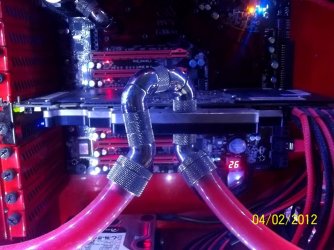
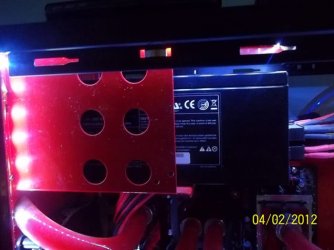
ok, before you show off your WC, here i post more of mine.
 

Attachments

  • Chipset block.jpg
    Chipset block.jpg
    144 KB · Views: 17
  • Reservoir.jpg
    Reservoir.jpg
    140 KB · Views: 15
  • All in 1.jpg
    All in 1.jpg
    158.3 KB · Views: 17
  • Pump.jpg
    Pump.jpg
    147.5 KB · Views: 13
  • VGA.jpg
    VGA.jpg
    111.1 KB · Views: 18
  • D.jpg
    D.jpg
    69.5 KB · Views: 15
  • PSU.jpg
    PSU.jpg
    60.1 KB · Views: 12
Last edited:

My Computer My Computer

At a glance

Win7 Ult x64 SP1i7 920 / i5 2500KCorsair 6 gb Triple Channel / Corsair 8 GB Du...Nvidia DA GTX 295 / MSI HD 5850 TF II
OS
Win7 Ult x64 SP1
CPU
i7 920 / i5 2500K
Motherboard
eVGA Classified / As Rock Z68 X3 G3
Memory
Corsair 6 gb Triple Channel / Corsair 8 GB Dual Channel
Graphics Card(s)
Nvidia DA GTX 295 / MSI HD 5850 TF II
Sound Card
X-Fi Xtreme Fatality Gamer
Monitor(s) Displays
2 x 22 inch Samsung / LG
Screen Resolution
1680 * 1050
PSU
Silverstone 1500 Watt / Antec NeoPower 650 Watt
Case
Lian Li / CM Scout
Cooling
WC / Corsair Hydro H60
Keyboard
Razer Lycosa Mirror
Mouse
Razer DA Blue
Other Info
Mousepad:

Razer Destructor White Edition
Mionix Propuse 380
Status
Not open for further replies.
Back
Top