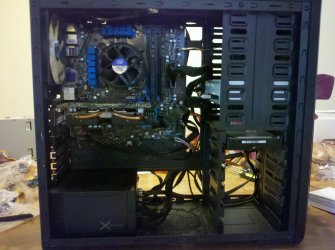
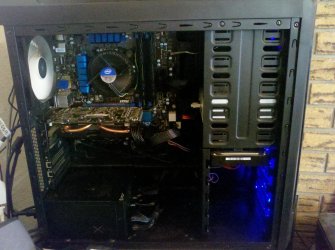
Show Us Your Rig [5]

Status
Not open for further replies.
Paul do you have you Kuhler rad mounted to the front of your case somehow?

Yes Gary, it's a paulpicks21 specialist modification, it draws cool air in from the front strait through and gets sucked out the top and back of the case.
 

My Computer My Computer

At a glance

Windows 7 Professional 64 bit
OS
Windows 7 Professional 64 bit
That's pretty awesome.....I like that. It's a good idea.
 

My Computer My Computer

At a glance

Windows 10 ProAMD Ryzen 5 2400G Processor with Radeon RX Ve...G.SKILL Ripjaws V Series 16GB (2 x 8GB) 288-P...2047MB NVIDIA GeForce GTX 1060 6GB (EVGA)
Computer type
PC/Desktop
Computer Manufacturer/Model Number
Custom Built
OS
Windows 10 Pro
CPU
AMD Ryzen 5 2400G Processor with Radeon RX Vega 11 Graphics
Motherboard
ASRock X470 Master SLI/AC AM4 AMD Promontory X470 SATA 6Gb/s
Memory
G.SKILL Ripjaws V Series 16GB (2 x 8GB) 288-Pin DDR4 SDRAM D
Graphics Card(s)
2047MB NVIDIA GeForce GTX 1060 6GB (EVGA)
Sound Card
Motherboard Built in
Monitor(s) Displays
Acer R240HY bidx 23.8-Inch IPS HDMI DVI VGA (1920 x 1080) Wi
Screen Resolution
1920 x 1080
Hard Drives
1TB Sandisk SSD PLUS (Main drive)
500 GB Seagate 7200 RPM (Games)
500 GB Western Digital 7200 RPM (Virtual Machines)
PSU
CORSAIR TX Series TX650M 650W 80+ Gold Modular Power Supply
Case
CORSAIR CARBIDE SPEC-02 Mid-Tower Gaming Case, Red LED Fan
Cooling
220mm, two 120mm, and four 60mm fans
Keyboard
Wired Dell keyboard
Mouse
Wireless Logitech mouse
Internet Speed
250mb down, 30mb up
Antivirus
Panda Cloud Antivirus
Browser
Chrome-ish x64
Other Info
Your awesome for reading this.
Not that I'm an expert in cable routing, but in cabling, the shortest distance between 2 points is not always a straight line.

You also asked about fans. I believe in positive air flow. More intake fans than outtake fans. All of the pcie cut outs and a lot of the back of the case is made to allow for airflow. Positive air pressure uses those to push air and dust out. Negative air flow uses them to pull air and dust in. Tests have shown that positive air flow reduces dust by 30%. It also pushes hot air out while bringing cooler air in. Even the U S Navy, because of chemical warfare, have all their ships with positive air flow, to push any chemicals out of the ship. Silverstone has a good explanation of it. All of my fans are intakes except the rear fan.
http://silverstonetek.com/techtalk_cont.php?tid=wh_positive&area=usa
 

My Computers My Computers

  • At a glance

    Windows 11 ProRyzen 9 5900X32GB G Skill DDR4-3600EVGA RTX 3080 FTW 3 Ultra
    Computer type
    PC/Desktop
    Computer Manufacturer/Model Number
    ALWAYS UNDER CONSTRUCTION
    OS
    Windows 11 Pro
    CPU
    Ryzen 9 5900X
    Motherboard
    Asus X570 Crosshair Viii Hero
    Memory
    32GB G Skill DDR4-3600
    Graphics Card(s)
    EVGA RTX 3080 FTW 3 Ultra
    Sound Card
    On Board/Sennheiser PC37X Headset
    Monitor(s) Displays
    3 X Asus 27"
    Screen Resolution
    2560x1440
    Hard Drives
    2 X 1 TB NVME drives
    PSU
    EVGA 850
    Case
    Phanteks Eclipse P400A
    Cooling
    EVGA 280 AIO
    Keyboard
    Logitech G510s/ Logitech G13
    Mouse
    Logitech G502
    Internet Speed
    24/1
    Antivirus
    ESET/MBAM Pro/SAS Pro
    Browser
    Chrome/ Firefox/ Edge
  • At a glance

    Windows 11 ProIntel Ultra 9 288V32 GB LPDDR5X 8533
    Computer type
    Laptop
    System Manufacturer/Model Number
    Dell 16 Plus
    OS
    Windows 11 Pro
    CPU
    Intel Ultra 9 288V
    Memory
    32 GB LPDDR5X 8533
    Monitor(s) Displays
    16" Mini-LED HDR600 Touch 90 Hz
    Screen Resolution
    2560X1600
    Hard Drives
    1 TB NVME
@Andrew
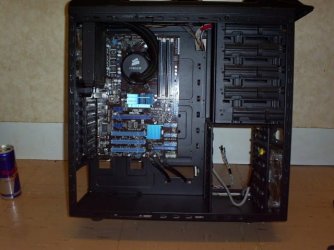
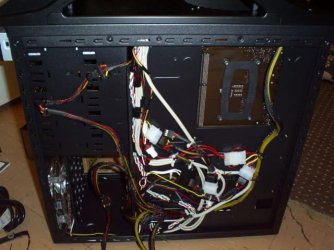
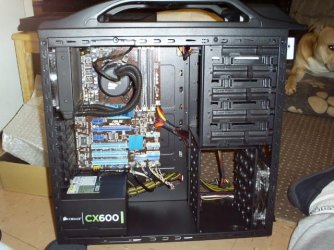
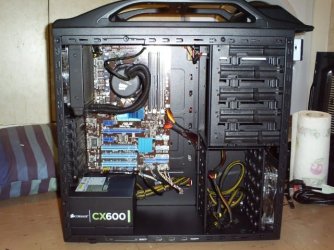
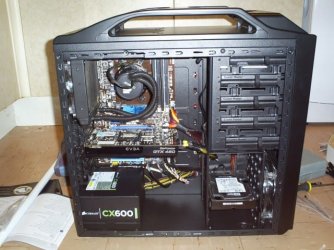
Here's a couple of pic's of the rig i built my daughter, The case has absolutely nothing in the way of cable management features except one hole near the psu so i had to get busy with the cable tie's. If you put an hour or so into it you can get it pretty tidy ;)
 

Attachments

  • 3 Asus Mobo N Corsair H50.JPG
    3 Asus Mobo N Corsair H50.JPG
    88.2 KB · Views: 27
  • 4 Corsair Cx 600 Power Supply .JPG
    4 Corsair Cx 600 Power Supply .JPG
    109.5 KB · Views: 25
  • 5 Tidy Cables.JPG
    5 Tidy Cables.JPG
    92.3 KB · Views: 24
  • 6 Not So Tidy Cables.JPG
    6 Not So Tidy Cables.JPG
    92.9 KB · Views: 26
  • 7 Nice N Neat.JPG
    7 Nice N Neat.JPG
    107.3 KB · Views: 27
  • 8  Side panel On.JPG
    8 Side panel On.JPG
    105.2 KB · Views: 25
  • 9 EVGA GTX 460 Superclock.JPG
    9 EVGA GTX 460 Superclock.JPG
    104 KB · Views: 26

My Computer My Computer

At a glance

Win7 Home Premium x64 SP1i7 4770k8Gb Kingston HyperX Beast 2400MHz @2133MHz 11...MSI GTX 780ti Gaming Oc x2
Computer type
PC/Desktop
Computer Manufacturer/Model Number
Custom build
OS
Win7 Home Premium x64 SP1
CPU
i7 4770k
Motherboard
Asus maximus VI Hero
Memory
8Gb Kingston HyperX Beast 2400MHz @2133MHz 11-12-11-30
Graphics Card(s)
MSI GTX 780ti Gaming Oc x2
Sound Card
Onboard ROG SupremeFX
Monitor(s) Displays
Asus VG248QE
Screen Resolution
3840X1080 144Hz
Hard Drives
Samung Evo 256Gb, OCZ Agility4 128Gb
1x1TB hitachi storage
PSU
EVGA Supernova 1000w Platinum
Case
Corsair Air 540
Cooling
Corsair H100i
Keyboard
Coolermaster Quickfire Pro
Mouse
Corsair M65 RGB
Internet Speed
74mb dwn/16up
Antivirus
MSE,Malwarebytes
Browser
Chrome
Andrew those cables restricting airflow may well be a factor in the high temps you mention on the temp thread you started.
 

My Computer My Computer

At a glance

Windows 7 Ultimate X64 SP1Intel i5-2550K, Differing ~4.4-4.8GHz No buil...16GB G.Skill Sniper 1866MHz @ 2133MHz 2x8GBASUS GTX650TIB-DC2OC-2GD5, (650TI Boost)
Computer type
PC/Desktop
Computer Manufacturer/Model Number
Home Built Desktop By DataTech
OS
Windows 7 Ultimate X64 SP1
CPU
Intel i5-2550K, Differing ~4.4-4.8GHz No built in GPU
Motherboard
ASUS P8Z68-V PRO/GEN3
Memory
16GB G.Skill Sniper 1866MHz @ 2133MHz 2x8GB
Graphics Card(s)
ASUS GTX650TIB-DC2OC-2GD5, (650TI Boost)
Sound Card
Onboard Realtek 5-1
Monitor(s) Displays
Samsung P2570HD
Screen Resolution
1920x1080
Hard Drives
Samsung 840 Pro 256GB SSD for OS, 500GB Seagate Constellation (Enterprise drive) for Data
PSU
Corsair HX650W
Case
Inwin Dragon Rider
Cooling
Hyper 212 EVO w/two Noctua fans, push-pull, @1300 RPM
Keyboard
E-Z Eyes, bright yellow keys with large characters
Mouse
steelseries SENSEI Laser Pro Gaming
Internet Speed
48-51Mbs Mbs down, 11 Mbs up Xfinity Cable
Antivirus
Norton Internet Security 2013
Browser
IE 10, Opera, Pale Moon if needed
Other Info
4 case fans, LG BluRay-RE, ASUS DVD-RW, Mr. Fusion power supply, 1.21 gigawatts.
Your probably right.

Andrew those cables restricting airflow may well be a factor in the high temps you mention on the temp thread you started.

But it still makes me wonder though why my water cooler was mad cold at first, and now its back to the same old same old. I mean it does not make any sense. If the cables are a problem, it would be consistent problem. It wouldn't be cool and then go to hot.

At least I think. I don't know.

Tell you what, I'll spend a hour or two today and try to get it tidier :)

Probably better in the long run anyway. Thanks guys. I'll attempt to get 2 people to close the back side of the case haha.

See here: http://www.sevenforums.com/pc-custo...303475-temps-problem-again-3.html#post2523777
 

My Computer My Computer

At a glance

Windows 10 ProAMD Ryzen 5 2400G Processor with Radeon RX Ve...G.SKILL Ripjaws V Series 16GB (2 x 8GB) 288-P...2047MB NVIDIA GeForce GTX 1060 6GB (EVGA)
Computer type
PC/Desktop
Computer Manufacturer/Model Number
Custom Built
OS
Windows 10 Pro
CPU
AMD Ryzen 5 2400G Processor with Radeon RX Vega 11 Graphics
Motherboard
ASRock X470 Master SLI/AC AM4 AMD Promontory X470 SATA 6Gb/s
Memory
G.SKILL Ripjaws V Series 16GB (2 x 8GB) 288-Pin DDR4 SDRAM D
Graphics Card(s)
2047MB NVIDIA GeForce GTX 1060 6GB (EVGA)
Sound Card
Motherboard Built in
Monitor(s) Displays
Acer R240HY bidx 23.8-Inch IPS HDMI DVI VGA (1920 x 1080) Wi
Screen Resolution
1920 x 1080
Hard Drives
1TB Sandisk SSD PLUS (Main drive)
500 GB Seagate 7200 RPM (Games)
500 GB Western Digital 7200 RPM (Virtual Machines)
PSU
CORSAIR TX Series TX650M 650W 80+ Gold Modular Power Supply
Case
CORSAIR CARBIDE SPEC-02 Mid-Tower Gaming Case, Red LED Fan
Cooling
220mm, two 120mm, and four 60mm fans
Keyboard
Wired Dell keyboard
Mouse
Wireless Logitech mouse
Internet Speed
250mb down, 30mb up
Antivirus
Panda Cloud Antivirus
Browser
Chrome-ish x64
Other Info
Your awesome for reading this.
ganjiry, considering what you had to work with (the case) you did an excellent job. I don't see any options to do it much better other tha a modular PSU. But, even with that, you have few ways of bringing cables back in the case.
 

My Computers My Computers

  • At a glance

    Windows 11 ProRyzen 9 5900X32GB G Skill DDR4-3600EVGA RTX 3080 FTW 3 Ultra
    Computer type
    PC/Desktop
    Computer Manufacturer/Model Number
    ALWAYS UNDER CONSTRUCTION
    OS
    Windows 11 Pro
    CPU
    Ryzen 9 5900X
    Motherboard
    Asus X570 Crosshair Viii Hero
    Memory
    32GB G Skill DDR4-3600
    Graphics Card(s)
    EVGA RTX 3080 FTW 3 Ultra
    Sound Card
    On Board/Sennheiser PC37X Headset
    Monitor(s) Displays
    3 X Asus 27"
    Screen Resolution
    2560x1440
    Hard Drives
    2 X 1 TB NVME drives
    PSU
    EVGA 850
    Case
    Phanteks Eclipse P400A
    Cooling
    EVGA 280 AIO
    Keyboard
    Logitech G510s/ Logitech G13
    Mouse
    Logitech G502
    Internet Speed
    24/1
    Antivirus
    ESET/MBAM Pro/SAS Pro
    Browser
    Chrome/ Firefox/ Edge
  • At a glance

    Windows 11 ProIntel Ultra 9 288V32 GB LPDDR5X 8533
    Computer type
    Laptop
    System Manufacturer/Model Number
    Dell 16 Plus
    OS
    Windows 11 Pro
    CPU
    Intel Ultra 9 288V
    Memory
    32 GB LPDDR5X 8533
    Monitor(s) Displays
    16" Mini-LED HDR600 Touch 90 Hz
    Screen Resolution
    2560X1600
    Hard Drives
    1 TB NVME
ganjiry, considering what you had to work with (the case) you did an excellent job. I don't see any options to do it much better other tha a modular PSU. But, even with that, you have few ways of bringing cables back in the case.

Cheers Steve :thumbsup:
It was the build i did for my daughter last xmas.
It was a pretty good case to work with considering the amount of hiding place's it didn't have lol. The psu was the only thing i didn't test when i built it( i just overlooked it) but recently found it's only putting 10v out on the 12v rail so it needs rma'ing. Hopefully i can get Corsair to sort the shipping again otherwise it will be cheaper to just replace it :(
 

My Computer My Computer

At a glance

Win7 Home Premium x64 SP1i7 4770k8Gb Kingston HyperX Beast 2400MHz @2133MHz 11...MSI GTX 780ti Gaming Oc x2
Computer type
PC/Desktop
Computer Manufacturer/Model Number
Custom build
OS
Win7 Home Premium x64 SP1
CPU
i7 4770k
Motherboard
Asus maximus VI Hero
Memory
8Gb Kingston HyperX Beast 2400MHz @2133MHz 11-12-11-30
Graphics Card(s)
MSI GTX 780ti Gaming Oc x2
Sound Card
Onboard ROG SupremeFX
Monitor(s) Displays
Asus VG248QE
Screen Resolution
3840X1080 144Hz
Hard Drives
Samung Evo 256Gb, OCZ Agility4 128Gb
1x1TB hitachi storage
PSU
EVGA Supernova 1000w Platinum
Case
Corsair Air 540
Cooling
Corsair H100i
Keyboard
Coolermaster Quickfire Pro
Mouse
Corsair M65 RGB
Internet Speed
74mb dwn/16up
Antivirus
MSE,Malwarebytes
Browser
Chrome
Andrew those cables restricting airflow may well be a factor in the high temps you mention on the temp thread you started.

But it still makes me wonder though why my water cooler was mad cold at first, and now its back to the same old same old. I mean it does not make any sense. If the cables are a problem, it would be consistent problem. It wouldn't be cool and then go to hot.

At least I think. I don't know.

Tell you what, I'll spend a hour or two today and try to get it tidier :)

Probably better in the long run anyway. Thanks guys. I'll attempt to get 2 people to close the back side of the case haha.

See here: http://www.sevenforums.com/pc-custo...303475-temps-problem-again-3.html#post2523777

Andrew, with water, when you first start up, your water is at room temp so the temps are cooler. After a few minutes with the water absorbing the heat from the CPU, the water heats up. Once the water heats up you are trying to cool your CPU with already warmer water, so it does not absorb as much heat from it and therefore your temps go up. That is why. The radiator can cool your water down to some degree, but it will never cool it down to ambient temps (room temp). That's why the temps go up after a few minutes. I hope that explanation makes sense. But, it's the same with air too, just water absorbs temps better than air, but the principle is the same. With air, once the computer has been running, the heat builds up inside the case, so you are using warmer air to try to cool the CPU, and it won't absorb as much heat.
 

My Computers My Computers

  • At a glance

    Windows 11 ProRyzen 9 5900X32GB G Skill DDR4-3600EVGA RTX 3080 FTW 3 Ultra
    Computer type
    PC/Desktop
    Computer Manufacturer/Model Number
    ALWAYS UNDER CONSTRUCTION
    OS
    Windows 11 Pro
    CPU
    Ryzen 9 5900X
    Motherboard
    Asus X570 Crosshair Viii Hero
    Memory
    32GB G Skill DDR4-3600
    Graphics Card(s)
    EVGA RTX 3080 FTW 3 Ultra
    Sound Card
    On Board/Sennheiser PC37X Headset
    Monitor(s) Displays
    3 X Asus 27"
    Screen Resolution
    2560x1440
    Hard Drives
    2 X 1 TB NVME drives
    PSU
    EVGA 850
    Case
    Phanteks Eclipse P400A
    Cooling
    EVGA 280 AIO
    Keyboard
    Logitech G510s/ Logitech G13
    Mouse
    Logitech G502
    Internet Speed
    24/1
    Antivirus
    ESET/MBAM Pro/SAS Pro
    Browser
    Chrome/ Firefox/ Edge
  • At a glance

    Windows 11 ProIntel Ultra 9 288V32 GB LPDDR5X 8533
    Computer type
    Laptop
    System Manufacturer/Model Number
    Dell 16 Plus
    OS
    Windows 11 Pro
    CPU
    Intel Ultra 9 288V
    Memory
    32 GB LPDDR5X 8533
    Monitor(s) Displays
    16" Mini-LED HDR600 Touch 90 Hz
    Screen Resolution
    2560X1600
    Hard Drives
    1 TB NVME
Thank you

Andrew those cables restricting airflow may well be a factor in the high temps you mention on the temp thread you started.

But it still makes me wonder though why my water cooler was mad cold at first, and now its back to the same old same old. I mean it does not make any sense. If the cables are a problem, it would be consistent problem. It wouldn't be cool and then go to hot.

At least I think. I don't know.

Tell you what, I'll spend a hour or two today and try to get it tidier :)

Probably better in the long run anyway. Thanks guys. I'll attempt to get 2 people to close the back side of the case haha.

See here: http://www.sevenforums.com/pc-custo...303475-temps-problem-again-3.html#post2523777

Andrew, with water, when you first start up, your water is at room temp so the temps are cooler. After a few minutes with the water absorbing the heat from the CPU, the water heats up. Once the water heats up you are trying to cool your CPU with already warmer water, so it does not absorb as much heat from it and therefore your temps go up. That is why. The radiator can cool your water down to some degree, but it will never cool it down to ambient temps (room temp). That's why the temps go up after a few minutes. I hope that explanation makes sense. But, it's the same with air too, just water absorbs temps better than air, but the principle is the same. With air, once the computer has been running, the heat builds up inside the case, so you are using warmer air to try to cool the CPU, and it won't absorb as much heat.

Thank you very much for the explanation. That makes sense. Durp. I kinda feel dumb now :)

So question then, I am running at stock at 4.0 GHZ (4.2) with turbo. How in the world do people overclock then? Especially this chip? I know someone who is running this at 5.5ghz.
I don't know what their temps are though...
I mean jeez, the temps now I have are sometimes really bad.
 

My Computer My Computer

At a glance

Windows 10 ProAMD Ryzen 5 2400G Processor with Radeon RX Ve...G.SKILL Ripjaws V Series 16GB (2 x 8GB) 288-P...2047MB NVIDIA GeForce GTX 1060 6GB (EVGA)
Computer type
PC/Desktop
Computer Manufacturer/Model Number
Custom Built
OS
Windows 10 Pro
CPU
AMD Ryzen 5 2400G Processor with Radeon RX Vega 11 Graphics
Motherboard
ASRock X470 Master SLI/AC AM4 AMD Promontory X470 SATA 6Gb/s
Memory
G.SKILL Ripjaws V Series 16GB (2 x 8GB) 288-Pin DDR4 SDRAM D
Graphics Card(s)
2047MB NVIDIA GeForce GTX 1060 6GB (EVGA)
Sound Card
Motherboard Built in
Monitor(s) Displays
Acer R240HY bidx 23.8-Inch IPS HDMI DVI VGA (1920 x 1080) Wi
Screen Resolution
1920 x 1080
Hard Drives
1TB Sandisk SSD PLUS (Main drive)
500 GB Seagate 7200 RPM (Games)
500 GB Western Digital 7200 RPM (Virtual Machines)
PSU
CORSAIR TX Series TX650M 650W 80+ Gold Modular Power Supply
Case
CORSAIR CARBIDE SPEC-02 Mid-Tower Gaming Case, Red LED Fan
Cooling
220mm, two 120mm, and four 60mm fans
Keyboard
Wired Dell keyboard
Mouse
Wireless Logitech mouse
Internet Speed
250mb down, 30mb up
Antivirus
Panda Cloud Antivirus
Browser
Chrome-ish x64
Other Info
Your awesome for reading this.
Ryan,
Great build and I think as long as the back panel closes "It's All Good". It's the front side that really matters and it looks fantastic.
 

My Computer My Computer

At a glance

Windows 7 Ultimate 64i7 3770k OC'd 4.6 @ 1.17v, also FX 8120 & i5 ...32 gb G.Skill Sniper DDR3 10-12-12-31 @ 2133XFX Radeon 7870 2GB DDR5
Computer type
PC/Desktop
Computer Manufacturer/Model Number
A blend of brains, brawn and dumb luck.
OS
Windows 7 Ultimate 64
CPU
i7 3770k OC'd 4.6 @ 1.17v, also FX 8120 & i5 miniITX
Motherboard
MSI P67A-GD80 b3
Memory
32 gb G.Skill Sniper DDR3 10-12-12-31 @ 2133
Graphics Card(s)
XFX Radeon 7870 2GB DDR5
Sound Card
Sound Blaster Z Series Card
Monitor(s) Displays
(2) LG LED 23" 1920 x 1080 2ms Monitors via mini d-port
Screen Resolution
1680 X 1050 p
Hard Drives
Samsung 256 gb 830 SSD sata III
(1) 1 tb WD Black
(2) 1 tb Hitachi deskmates/sata II
(2) 1 tb WD green/sata II
(2) 3 tb Seagate Barracuda
(1) 120 gb OCZ Vertex SS
(1) Drobo 5N w/5 Seagate 3tb
PSU
EVGA modular 1000G2 80% gold rating & APC 1200 RS
Case
CoolerMaster Storm Styker
Cooling
7 case fans 140mm & 120mm, NZXT Kraken X60
Keyboard
(2) Logitech Illuminated Keyboards (1) usb (1) wireless
Mouse
Logitech G700 & T-BC21 - nano nx for the laptop
Internet Speed
Basic 120mbps down
Antivirus
Trend Micro Titanium Max Security & Malwarebytes Premium
Browser
Chrome and IE 10
Other Info
5 Noctua case fans + 3 Noctua in p/p on NZXT cooler
Integrated hot swap drive bays for 2.5" Drives
(2) Lite-on dvd/cd/Blu Ray optical 22X
Integrated fan controller and led on/off
HP Officejet Pro 8630 all-n-one
Hot-swappable 3.5" hard drive bay
Netgear Nighthawk router
Asus USB 3 & sata 6 PCIe card
Vantec IDE to sata adptr./Ultra sata adptr
Lenovo L420 i5 lappy with m sata
Drobo 5N advanced NAS
...But it still makes me wonder though why my water cooler was mad cold at first, and now its back to the same old same old. I mean it does not make any sense. If the cables are a problem, it would be consistent problem. It wouldn't be cool and then go to hot.

At least I think. I don't know.

Tell you what, I'll spend a hour or two today and try to get it tidier :)

Probably better in the long run anyway. Thanks guys. I'll attempt to get 2 people to close the back side of the case haha.

See here: http://www.sevenforums.com/pc-custo...303475-temps-problem-again-3.html#post2523777

The bulk of the temperature problem could be the cooler itself isn't pumping properly (all components are subject to early failure or being DOA; some just do it more often than others), the pump may be running too slow because the fan header it is connected to is throttling it, or it might be a problem with the thermal paste. I recommend Arctic MX-4 because it lasts a long time, spreads easily, and doesn't require a burn in time. Also, make sure the filter at the front of the case is clean.


On to the cable management. I checked out your photos and looked up the case on NewEgg (it's discontinued there but they still have excellent photos of it) and you have plenty of room in that case (heck, it's huge!). The biggest offenders are your front panel cables. An excellent feature of your case are long front panel cables; too many cases have cables that are too short. Unfortunately, that length can also be a problem. You do have room for those cables behind the MOBO plate. Look at this illustration I found of your case:

Large%20(5%20of%209).jpg


Note where the front panel cables duck behind the MOBO plate through that top grommet. They reappear through the grommet below the MOBO (the MOBO pictured is smaller that yours so the distance from the grommet to the MOBO will be much shorter). Once the cables have been connected to the MOBO, you can bundle them together behind the MOBO plate, route them neatly and tie them down. Any excess length (and you probably will have some) can be pulled back through the top grommet and stuffed on top of the optical drive where it won't be seen (that's where I stuffed my excess front panel cables).

The power supply cables on your rig are all on the front side of the MOBO plate. You have room behind the MOBO plate for them. The previous picture shows them ducking through the nearest bottom grommet. The picture below shows the cables behind the MOBO plate:

Large%20(6%20of%209).jpg


The PSU cables can be fitted back there so you can still get the side cover back on without using two men and a boy sitting on it. The cables here haven't been completely routed yet. The picture below is of a finished MOBO backside showing how the cables were run:

Rosewill_ArmorEVO_CableManagement.JPG


The idea is to avoid having too many cables crossing each other because that adds thickness that could interfere with the case side panel. I personally feel too many cables here are crossing each other in this photo and some careful rearranging would eliminate much of that but, as long as the side panel still fits without the assistance of two men and a boy, it will be fine. I would prefer to see the cables tied down in more places. One can always buy stick on cable clamps if not enough built in tie down points are provided. Cables can also be tied to each others. Zip ties are convenient but twist ties also work and can be reused. While somewhat less than elegant, "duct" tape will also help secure the cables.

I'm also uncomfortable with cables crossing over the opening in the MOBO plate behind the CPU, especially over the CPU cooler back plate. A lot of heat can be generated there that could eventually damage the cables. Also, there are often sharp points sticking up from the printed circuit board that could eventually work through the cable insulation. I'll admit I'm probably excessively anal on this point but all it would take to avoid this would be some cable extensions and some careful rerouting.

With a bit of creative planning, you can also get your SATA data cables behind the MOBO plate. Don't be afraid to get cables that are longer or shorter to accomplish that.

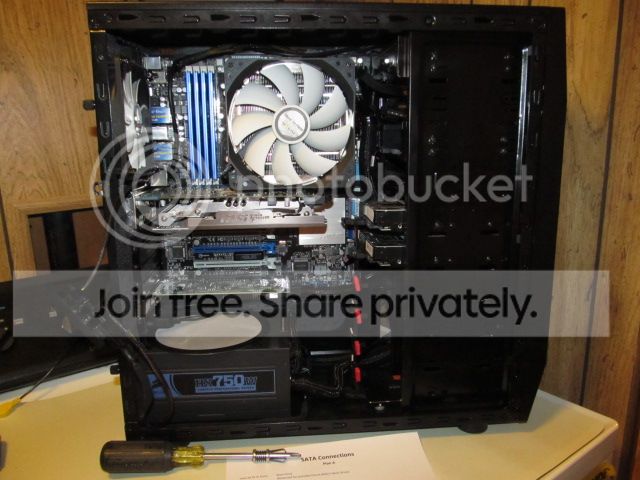
Here is a picture of the backside of my rig:
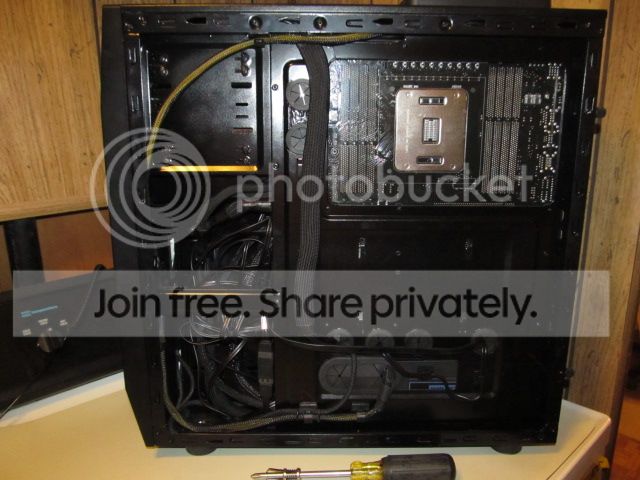
IMG_0113_zps7bc86f32.jpg


I ran my front panel cables through that big vertical sleeve. The sleeve is secured with 3M mounting tape and is oversized so I could flatten it out some so I could get the side panel on since I don't have as much room as you do and, being a single Lesbian, don't have access to the aforementioned two men and a boy. I had to add some cable management holes and grommets but your case has plenty of them. Note how the 8 pin ATX PSU cable has an extension added so I could route it around that big hole behind the MOBO. I had a space I could stuff any excess cables but you can avoid having all that by using different length SATA data cables. One reason I have so much to stuff in that space is the amount of SATA cables I have; a total of eleven (yes, it all fits in that case, along with an e-ATX MOBO). Eight of those are break out cables from the HBA card so I had no choice of individual SATA cable length. I custom made most of my PSU cables but, with a case as big as yours, you shouldn't need to do that.

This is the front side of my rig before I put the sound card in (I haven't taken a picture of it yet):

IMG_0110_zps1eae586d.jpg


I still haven't reinstalled the fan hub yet in this picture (I had to temporarily remove it to install the HBA card). Even as tight and full as my case is, I still managed to keep my cables out of the way. I already have the cables in place for future HDDs (those little red thingies are dust caps on ends of the SATA data cables temporarily twist tied to the SATA power cable).

 
Last edited:

My Computer My Computer

At a glance

Win 7 Ultimate 64 bitIntel i7-3930KKingston HyperX Genesis 32GB Kit (8x4GB Modul...MSI R7850 Twin Frozr 2GD5/OC Radeon HD 7850 2...
Computer type
PC/Desktop
Computer Manufacturer/Model Number
Custom Build
OS
Win 7 Ultimate 64 bit
CPU
Intel i7-3930K
Motherboard
ASUS P9X79 WS
Memory
Kingston HyperX Genesis 32GB Kit (8x4GB Modules) 1600MHz DDR
Graphics Card(s)
MSI R7850 Twin Frozr 2GD5/OC Radeon HD 7850 2GB 256-bit GDDR
Sound Card
Asus Xonar Essence STX
Monitor(s) Displays
3x Asus VG248QE 24", Vizio 32" TV
Screen Resolution
1920 x 1080, ?
Hard Drives
Samsung 128GB 840 Pro SSD (1),
Samsung 4TB 850 EVO SSDs (4)
Samsung 4TB 850 EVO SSDs (16) external backup drives used in 2.5" hot swap bays in the computer.
PSU
Corsair HX750w
Case
Antec Two Hundred v2 (modified)
Cooling
Cooler Master GeminII S524 120mm (fan replaced with a 140mm)
Keyboard
Logitech G510s
Mouse
Logitech M525 (two in use)
Internet Speed
=< 32Mbps down, 8Mbps up
Antivirus
AVAST!, MBAM, SAS, Spybot S&D (all but MBAM free) Glary Util
Browser
IE11
Other Info
LSI 9211-8i HBA card (8 SATA III ports), 2.5" & 3.5" Hot Swap Bays, HooToo HT-CR001 PCI-E to USB 3.0 Internal Hub + 6 Slot Card Reader, and LG Model CH12LS28 BD-ROM Optical Drive. Also, ScanSnap S1500 ADF duplexing scanner, Canon 9000F flat bed scanner, Corsair SP2500 2.1 speakers, Samsung CLP 415nw laser color printer, Cyberpower PP2200SW UPS
Wow lady! Rep times 1,000! Unfortunately it says I need to spread some around. But I will as soon as I get the chance. Ill try sometime today and see what I can do. :) I really appreciate all the pics and everything. Looks awesome. I'll have to try it again. I just for some reason remember trying to do that before and could not get it to fit.

BTW, the water cooler was just bought. Everyone is saying to wait a week or so for the thermal paste and all that to settle. I am going to run a stress test today and see what happens.

About the throttling. How would I know? What numbers in the bios should I look for?

This is random, but The water cooler did suggest to have the fan in the back be a intake to the radiator and not an external. (although it said you can do it this way) I chose to have it be external like it was before, as I have 2 80mm intake in front, an 230mm intake on the side, and two 120mm fans at the top being external. I am wondering if maybe I should make the back an internal. I just feel like that is 4 internals and only 2 externals. I feel like I should have 3 externals. What do you guys think?


My thread: http://www.sevenforums.com/pc-custom-builds-overclocking/303475-temps-problem-again-3.html

Anyone that answers would you please reply to my thread above? That way it stays in one thread? Thank you :)
 

My Computer My Computer

At a glance

Windows 10 ProAMD Ryzen 5 2400G Processor with Radeon RX Ve...G.SKILL Ripjaws V Series 16GB (2 x 8GB) 288-P...2047MB NVIDIA GeForce GTX 1060 6GB (EVGA)
Computer type
PC/Desktop
Computer Manufacturer/Model Number
Custom Built
OS
Windows 10 Pro
CPU
AMD Ryzen 5 2400G Processor with Radeon RX Vega 11 Graphics
Motherboard
ASRock X470 Master SLI/AC AM4 AMD Promontory X470 SATA 6Gb/s
Memory
G.SKILL Ripjaws V Series 16GB (2 x 8GB) 288-Pin DDR4 SDRAM D
Graphics Card(s)
2047MB NVIDIA GeForce GTX 1060 6GB (EVGA)
Sound Card
Motherboard Built in
Monitor(s) Displays
Acer R240HY bidx 23.8-Inch IPS HDMI DVI VGA (1920 x 1080) Wi
Screen Resolution
1920 x 1080
Hard Drives
1TB Sandisk SSD PLUS (Main drive)
500 GB Seagate 7200 RPM (Games)
500 GB Western Digital 7200 RPM (Virtual Machines)
PSU
CORSAIR TX Series TX650M 650W 80+ Gold Modular Power Supply
Case
CORSAIR CARBIDE SPEC-02 Mid-Tower Gaming Case, Red LED Fan
Cooling
220mm, two 120mm, and four 60mm fans
Keyboard
Wired Dell keyboard
Mouse
Wireless Logitech mouse
Internet Speed
250mb down, 30mb up
Antivirus
Panda Cloud Antivirus
Browser
Chrome-ish x64
Other Info
Your awesome for reading this.
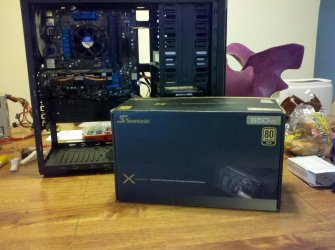
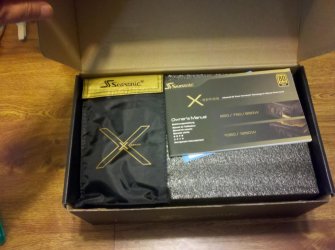
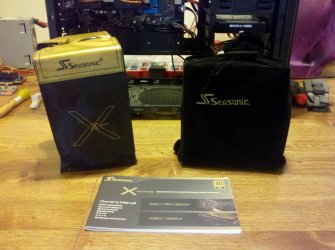
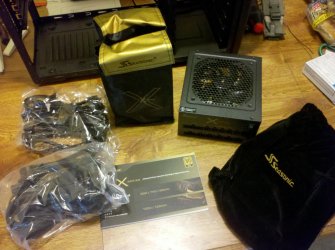
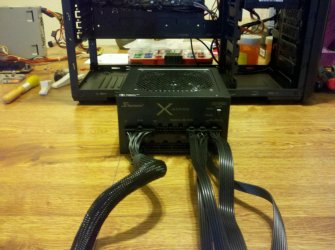
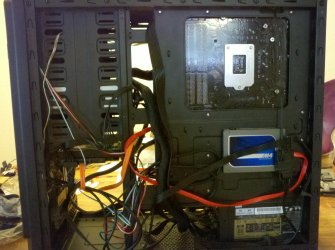
X650 Arrived

My new PSU finally came! I tried something different, I mounted it fan up just so I can see the x when I open the case. I've read it works both ways, what are your opinions? I am happy with it, it is really quiet and I like the full modular and cable design. I was even happy with the packing it came in :D

1 (0).jpg 1 (1).jpg

1 (2).jpg 1 (3).jpg

1 (4).jpg 1 (5).jpg

1 (6).jpg 1 (7).jpg

running.jpg
 

My Computer My Computer

At a glance

Windows 10 Pro X64Intel(R) Core(TM) i5-3570K CPU OC@ 4.5GHZ Turbo8.00 GB DDR3 1600MhzMSI Gaming X GTX 1070
Computer type
PC/Desktop
Computer Manufacturer/Model Number
Dude Build
OS
Windows 10 Pro X64
CPU
Intel(R) Core(TM) i5-3570K CPU OC@ 4.5GHZ Turbo
Motherboard
MSI Z77A-G45 Gaming
Memory
8.00 GB DDR3 1600Mhz
Graphics Card(s)
MSI Gaming X GTX 1070
Sound Card
Realtek High Definition
Monitor(s) Displays
Dell S23O9W, HP L1710
Screen Resolution
DELL-1920 x 1080 HP-1280 x1024
Hard Drives
Crucial m4 256 SSD, WD 7200RPM 500GB WD 1TB
PSU
Seasonic X650 GOLD
Case
Zalman Z12
Cooling
Antec Kuhler 920
Keyboard
Logitech
Mouse
MSI DS100 Interceptor
Internet Speed
50 down and 5 up
Antivirus
MSE
Browser
Chrome, IE 11
Other Info
Logitech X-620 Speakers
My Corsair HX750 is made by Seasonic and came packaged the same way; in a flocked bag with a nice pouch to corral the cables. The modular cables are also ribbon cables.

The only possible downside to mounting your PSU with the fan up is it will be pulling its cooling air from the warmer air inside the case instead of cooler outside air. It also makes it harder to achieve positive case pressure. However, the difference probably wouldn't be enough to worry about. Other than that, it looks sweet in there.
 

My Computer My Computer

At a glance

Win 7 Ultimate 64 bitIntel i7-3930KKingston HyperX Genesis 32GB Kit (8x4GB Modul...MSI R7850 Twin Frozr 2GD5/OC Radeon HD 7850 2...
Computer type
PC/Desktop
Computer Manufacturer/Model Number
Custom Build
OS
Win 7 Ultimate 64 bit
CPU
Intel i7-3930K
Motherboard
ASUS P9X79 WS
Memory
Kingston HyperX Genesis 32GB Kit (8x4GB Modules) 1600MHz DDR
Graphics Card(s)
MSI R7850 Twin Frozr 2GD5/OC Radeon HD 7850 2GB 256-bit GDDR
Sound Card
Asus Xonar Essence STX
Monitor(s) Displays
3x Asus VG248QE 24", Vizio 32" TV
Screen Resolution
1920 x 1080, ?
Hard Drives
Samsung 128GB 840 Pro SSD (1),
Samsung 4TB 850 EVO SSDs (4)
Samsung 4TB 850 EVO SSDs (16) external backup drives used in 2.5" hot swap bays in the computer.
PSU
Corsair HX750w
Case
Antec Two Hundred v2 (modified)
Cooling
Cooler Master GeminII S524 120mm (fan replaced with a 140mm)
Keyboard
Logitech G510s
Mouse
Logitech M525 (two in use)
Internet Speed
=< 32Mbps down, 8Mbps up
Antivirus
AVAST!, MBAM, SAS, Spybot S&D (all but MBAM free) Glary Util
Browser
IE11
Other Info
LSI 9211-8i HBA card (8 SATA III ports), 2.5" & 3.5" Hot Swap Bays, HooToo HT-CR001 PCI-E to USB 3.0 Internal Hub + 6 Slot Card Reader, and LG Model CH12LS28 BD-ROM Optical Drive. Also, ScanSnap S1500 ADF duplexing scanner, Canon 9000F flat bed scanner, Corsair SP2500 2.1 speakers, Samsung CLP 415nw laser color printer, Cyberpower PP2200SW UPS
When you consider the filter on the bottom of most cases and the less then half inch air space between the case feet and the case it's been my experience that the PSU performs at least as well if not better with it's intake pulling case air.
 

My Computer My Computer

At a glance

Windows 7 Ultimate 64i7 3770k OC'd 4.6 @ 1.17v, also FX 8120 & i5 ...32 gb G.Skill Sniper DDR3 10-12-12-31 @ 2133XFX Radeon 7870 2GB DDR5
Computer type
PC/Desktop
Computer Manufacturer/Model Number
A blend of brains, brawn and dumb luck.
OS
Windows 7 Ultimate 64
CPU
i7 3770k OC'd 4.6 @ 1.17v, also FX 8120 & i5 miniITX
Motherboard
MSI P67A-GD80 b3
Memory
32 gb G.Skill Sniper DDR3 10-12-12-31 @ 2133
Graphics Card(s)
XFX Radeon 7870 2GB DDR5
Sound Card
Sound Blaster Z Series Card
Monitor(s) Displays
(2) LG LED 23" 1920 x 1080 2ms Monitors via mini d-port
Screen Resolution
1680 X 1050 p
Hard Drives
Samsung 256 gb 830 SSD sata III
(1) 1 tb WD Black
(2) 1 tb Hitachi deskmates/sata II
(2) 1 tb WD green/sata II
(2) 3 tb Seagate Barracuda
(1) 120 gb OCZ Vertex SS
(1) Drobo 5N w/5 Seagate 3tb
PSU
EVGA modular 1000G2 80% gold rating & APC 1200 RS
Case
CoolerMaster Storm Styker
Cooling
7 case fans 140mm & 120mm, NZXT Kraken X60
Keyboard
(2) Logitech Illuminated Keyboards (1) usb (1) wireless
Mouse
Logitech G700 & T-BC21 - nano nx for the laptop
Internet Speed
Basic 120mbps down
Antivirus
Trend Micro Titanium Max Security & Malwarebytes Premium
Browser
Chrome and IE 10
Other Info
5 Noctua case fans + 3 Noctua in p/p on NZXT cooler
Integrated hot swap drive bays for 2.5" Drives
(2) Lite-on dvd/cd/Blu Ray optical 22X
Integrated fan controller and led on/off
HP Officejet Pro 8630 all-n-one
Hot-swappable 3.5" hard drive bay
Netgear Nighthawk router
Asus USB 3 & sata 6 PCIe card
Vantec IDE to sata adptr./Ultra sata adptr
Lenovo L420 i5 lappy with m sata
Drobo 5N advanced NAS
Thanks Lady F and linnemeyerhere, I will leave it that way for a while and see how it goes.
 

My Computer My Computer

At a glance

Windows 10 Pro X64Intel(R) Core(TM) i5-3570K CPU OC@ 4.5GHZ Turbo8.00 GB DDR3 1600MhzMSI Gaming X GTX 1070
Computer type
PC/Desktop
Computer Manufacturer/Model Number
Dude Build
OS
Windows 10 Pro X64
CPU
Intel(R) Core(TM) i5-3570K CPU OC@ 4.5GHZ Turbo
Motherboard
MSI Z77A-G45 Gaming
Memory
8.00 GB DDR3 1600Mhz
Graphics Card(s)
MSI Gaming X GTX 1070
Sound Card
Realtek High Definition
Monitor(s) Displays
Dell S23O9W, HP L1710
Screen Resolution
DELL-1920 x 1080 HP-1280 x1024
Hard Drives
Crucial m4 256 SSD, WD 7200RPM 500GB WD 1TB
PSU
Seasonic X650 GOLD
Case
Zalman Z12
Cooling
Antec Kuhler 920
Keyboard
Logitech
Mouse
MSI DS100 Interceptor
Internet Speed
50 down and 5 up
Antivirus
MSE
Browser
Chrome, IE 11
Other Info
Logitech X-620 Speakers
Looks like a very nice PSU Doug and the rig is looking clean :cool:
 

My Computer My Computer

At a glance

Windows 7 Professional 64 bit
OS
Windows 7 Professional 64 bit
Nice Psu Doug i'm looking into a 600w for my 8350 Rig
 

My Computer My Computer

At a glance

Windows 10 Home Premium 64bit sp1Intel I7-6700K @ 4.6 Ghz 1.344 volts everyday OC32GB G-Skill TridentZ 3200mhz 16-18-18-38 DDR4Sli Gigabyte Windforce GTX 980 G1
Computer type
PC/Desktop
Computer Manufacturer/Model Number
CoreI7-6700K MrFingerIII Special Builds
OS
Windows 10 Home Premium 64bit sp1
CPU
Intel I7-6700K @ 4.6 Ghz 1.344 volts everyday OC
Motherboard
Asrock Fatality K6 Z170 Socket 1151
Memory
32GB G-Skill TridentZ 3200mhz 16-18-18-38 DDR4
Graphics Card(s)
Sli Gigabyte Windforce GTX 980 G1
Sound Card
AC97 Creative Rage Tactic 3D Headphones Bluetooth
Monitor(s) Displays
27" Asus ROG Swift PG278Q G-Sync 48" Vizio Smart HD TV
Screen Resolution
2560x1440p 27"- 48" Currently Gaming at 2560x1440p Res 2K
Hard Drives
250GB Samsung Evo840SSD Seagate baracuda 500 GB WD Mybook 500Gb 1TB Seagate Barracuda
PSU
HX1050w Corsair Silver 80plus certified crosfire/sli
Case
Enthod Pro Full Tower
Cooling
Corsair H110i GT 280 mm High Performance WaterBlock
Keyboard
Logitech wireless keyboard
Mouse
Logitech wireless mouse
Internet Speed
Cox Cable 100+ mb
Antivirus
WebRoot Spysweeper with Antivirus
Browser
IE-10, Chrome, Opera
Other Info
My Other Rig is a AMD FX8320E @4.6Ghz 16GB Ballistic Sport Ram
Mobo Asrock Fatality 990FX 120GB OCZ SSD 1TB Seagate Barracuda Corsair H75 Cooling PSU Corsair CX750
GPU GTX Gigabyte 970G1
Good choice in psu Doug and your rig looks really tidy mate. Nice job :thumbsup:
 

My Computer My Computer

At a glance

Win7 Home Premium x64 SP1i7 4770k8Gb Kingston HyperX Beast 2400MHz @2133MHz 11...MSI GTX 780ti Gaming Oc x2
Computer type
PC/Desktop
Computer Manufacturer/Model Number
Custom build
OS
Win7 Home Premium x64 SP1
CPU
i7 4770k
Motherboard
Asus maximus VI Hero
Memory
8Gb Kingston HyperX Beast 2400MHz @2133MHz 11-12-11-30
Graphics Card(s)
MSI GTX 780ti Gaming Oc x2
Sound Card
Onboard ROG SupremeFX
Monitor(s) Displays
Asus VG248QE
Screen Resolution
3840X1080 144Hz
Hard Drives
Samung Evo 256Gb, OCZ Agility4 128Gb
1x1TB hitachi storage
PSU
EVGA Supernova 1000w Platinum
Case
Corsair Air 540
Cooling
Corsair H100i
Keyboard
Coolermaster Quickfire Pro
Mouse
Corsair M65 RGB
Internet Speed
74mb dwn/16up
Antivirus
MSE,Malwarebytes
Browser
Chrome
Status
Not open for further replies.
Back
Top