Show us your SSD performance 2

jonnyhillow, That's not too bad, don't worry much about it, it's still 10 times faster than a mechanical hard drive.
 

My Computers My Computers

System One System Two

  • Computer type
    PC/Desktop
    Computer Manufacturer/Model Number
    ALWAYS UNDER CONSTRUCTION
    OS
    Windows 11 Pro
    CPU
    Ryzen 9 5900X
    Motherboard
    Asus X570 Crosshair Viii Hero
    Memory
    32GB G Skill DDR4-3600
    Graphics Card(s)
    EVGA RTX 3080 FTW 3 Ultra
    Sound Card
    On Board/Sennheiser PC37X Headset
    Monitor(s) Displays
    3 X Asus 27"
    Screen Resolution
    2560x1440
    Hard Drives
    2 X 1 TB NVME drives
    PSU
    EVGA 850
    Case
    Phanteks Eclipse P400A
    Cooling
    EVGA 280 AIO
    Keyboard
    Logitech G510s/ Logitech G13
    Mouse
    Logitech G502
    Internet Speed
    24/1
    Antivirus
    ESET/MBAM Pro/SAS Pro
    Browser
    Chrome/ Firefox/ Edge
  • Computer type
    Laptop
    System Manufacturer/Model Number
    Dell 16 Plus
    OS
    Windows 11 Pro
    CPU
    Intel Ultra 9 288V
    Memory
    32 GB LPDDR5X 8533
    Monitor(s) Displays
    16" Mini-LED HDR600 Touch 90 Hz
    Screen Resolution
    2560X1600
    Hard Drives
    1 TB NVME
jonnyhillow, That's not too bad, don't worry much about it, it's still 10 times faster than a mechanical hard drive.


You sure about that , maybe i'm wrong but comparing the below to mine is depressing to say the least .

I mean i'm not even remotely close , man this sucks.
 

Attachments

  • samsun rapid.JPG
    samsun rapid.JPG
    64.3 KB · Views: 36
  • as-ssd-bench INTEL SSDSC2BW24 9.22.2014 6-58-03 PM.png
    as-ssd-bench INTEL SSDSC2BW24 9.22.2014 6-58-03 PM.png
    13.1 KB · Views: 36

My Computer My Computer

Computer type
Laptop
Computer Manufacturer/Model Number
Asus laptop U56E
OS
Microsoft Windows 7 Home Premium 64-bit 7601 Multiprocessor Free Service Pack 1
CPU
Intel(R) Core(TM) i5-2430M CPU @ 2.40GHz
Motherboard
ASUSTeK Computer Inc. U56E
Memory
6.00 GB
Graphics Card(s)
Intel(R) HD Graphics 3000
Sound Card
(1) High Definition Audio Device (2) High Definition Audio
Screen Resolution
1366 x 768 x 32 bits (4294967296 colors) @ 60 Hz
Hard Drives
WDC WD6400BPVT-80HXZT3
If you guys are worried yours is slow, do you have rapid mode enabled?

There is a tutorial on optimizing your ssd but I'm at work so I will post the link later!
 

My Computer My Computer

Computer type
PC/Desktop
Computer Manufacturer/Model Number
Custom Build
OS
Windows 7 Ultimate 64-bit
CPU
Intel G3420 3.2GHZ Dual Core
Motherboard
Gigabyte H87-HD3
Memory
Kingson 8GB 1600mhz
Graphics Card(s)
MSI R7970 TF 3GD5/OC BE
Monitor(s) Displays
21" LG & "19 Vertical Samsung
Hard Drives
120GB SSD - Boot
1TB WD
350GB External
2TB External (Wireless)
PSU
Corsair CX 500 modular
Case
Zalman Z11 Plus (modified)
Cooling
Corsair H55, 2x 120mm SP Corsair, 1x 140 Coolermaster
Keyboard
Corsair K50
Mouse
CSL Gaming
Internet Speed
164Mbps
Antivirus
Avast, Malwarebytes
Browser
Google Chrome, IE, Firefox
jonnyhillow, That's not too bad, don't worry much about it, it's still 10 times faster than a mechanical hard drive.


You sure about that , maybe i'm wrong but comparing the below to mine is depressing to say the least .

I mean i'm not even remotely close , man this sucks.

Jonny, your score is completely fine and normal.

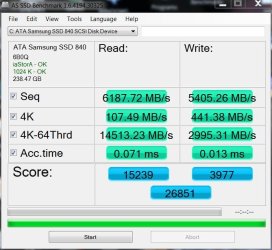
Steve's score and many of the recent ones on here are not normal. Steve is running Raid0 on 2 Samsung drives with something called "Rapid mode" enabled, this uses the Ram as a kind of cache disk. The numbers are massively inflated due to this. The same with most of the recent high scores, we all have Samsung drives with Rapid mode enabled. My drive for example will score around 900ish with Rapid mode disabled.

Harry, looking at his screetshot he has an Intel drive. Rapid mode comes with Samsung SSD's only.
 

My Computer My Computer

OS
Windows 7 Professional 64 bit
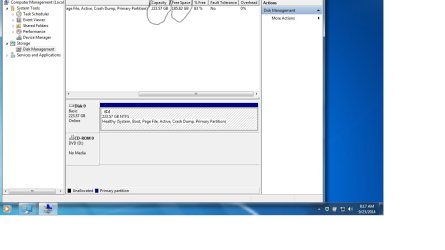
I have a question, as you can see i always have the same amount of disk space taken up over the years , it never grows and always stays the same . Even on my standard non SSD drive i always had tons and tons of space available.

This being the case would a 128 gb SSD be appropriate or should i always opt for a 240 or larger, any performance differences.

I see a Samsung 128 EVO for $69.00 online.
 

Attachments

  • Untitled.jpg
    Untitled.jpg
    64 KB · Views: 3

My Computer My Computer

Computer type
Laptop
Computer Manufacturer/Model Number
Asus laptop U56E
OS
Microsoft Windows 7 Home Premium 64-bit 7601 Multiprocessor Free Service Pack 1
CPU
Intel(R) Core(TM) i5-2430M CPU @ 2.40GHz
Motherboard
ASUSTeK Computer Inc. U56E
Memory
6.00 GB
Graphics Card(s)
Intel(R) HD Graphics 3000
Sound Card
(1) High Definition Audio Device (2) High Definition Audio
Screen Resolution
1366 x 768 x 32 bits (4294967296 colors) @ 60 Hz
Hard Drives
WDC WD6400BPVT-80HXZT3
jonnyhillow, That's not too bad, don't worry much about it, it's still 10 times faster than a mechanical hard drive.


You sure about that , maybe i'm wrong but comparing the below to mine is depressing to say the least .

I mean i'm not even remotely close , man this sucks.

Jonny, your score is completely fine and normal.

Steve's score and many of the recent ones on here are not normal. Steve is running Raid0 on 2 Samsung drives with something called "Rapid mode" enabled, this uses the Ram as a kind of cache disk. The numbers are massively inflated due to this. The same with most of the recent high scores, we all have Samsung drives with Rapid mode enabled. My drive for example will score around 900ish with Rapid mode disabled.

Harry, looking at his screetshot he has an Intel drive. Rapid mode comes with Samsung SSD's only.

Ops sorry, i was at work and i couldn't see the image :)
 

My Computer My Computer

Computer type
PC/Desktop
Computer Manufacturer/Model Number
Custom Build
OS
Windows 7 Ultimate 64-bit
CPU
Intel G3420 3.2GHZ Dual Core
Motherboard
Gigabyte H87-HD3
Memory
Kingson 8GB 1600mhz
Graphics Card(s)
MSI R7970 TF 3GD5/OC BE
Monitor(s) Displays
21" LG & "19 Vertical Samsung
Hard Drives
120GB SSD - Boot
1TB WD
350GB External
2TB External (Wireless)
PSU
Corsair CX 500 modular
Case
Zalman Z11 Plus (modified)
Cooling
Corsair H55, 2x 120mm SP Corsair, 1x 140 Coolermaster
Keyboard
Corsair K50
Mouse
CSL Gaming
Internet Speed
164Mbps
Antivirus
Avast, Malwarebytes
Browser
Google Chrome, IE, Firefox
This being the case would a 128 gb SSD be appropriate or should i always opt for a 240 or larger, any performance differences.

Not sure if the same logic applies to all SSDs, but with Crucial's M500 range, the only performance difference between the different sizes is the faster write speeds. I suspect this may have something to do with the overall density of the data storage, but that's just my best guess..
 

My Computer My Computer

Computer type
PC/Desktop
OS
Win 10 x64 Pro x64 / Ubuntu 15.10 x64
CPU
Intel i7-4960X
Motherboard
Asus Rampage IV Black Edition
Memory
4x8GB Corsair Dominator Platinum @2400MHz 10-12-12-31
Graphics Card(s)
2x MSI GTX780Ti 3GB (SLI)
Sound Card
Onboard SupremeFX (Cirrus Logic CS4398)
Monitor(s) Displays
3x LG Cinema 27" IPS LED (27MP65)
Screen Resolution
[1920x1080]x3
Hard Drives
Crucial M500 120GB, Crucial M500 480GB, Toshiba DT01ACA200 2TB
PSU
CoolerMaster V1000
Case
Corsair Obsidian 750D
Cooling
ThermalTake Water 3.0 Extreme, 4xSP120, 3xAF120
Keyboard
Moshi Luna
Mouse
Logitech G700s / Roccat Tyon
Internet Speed
4Mb uncapped ADSL (Afrihost)
Antivirus
MS Security Essentials
Browser
Chrome... Duh. (:
Zalith, sometimes larger drives get better performance. Usually a 256 will give you higher scores. But, never confuse the benchmark scores to actual usage performance. Sure, those big scores are nice, but totally irrelevant to actual usage. An OS drive runs 90%+ of the time on the 4kb read speed and response times. That's all that matters. I showed 2 benchmarks, the rapid mode and a raid 0 mode. The rapid mode is totally useless as the test only tests the ram cache, which is way faster than any SSD. The sata ports cannot even come close to those speeds. So, the rapid scores mean nothing. I also showed a raid0 score around 1800-1900. Those scores are meaningful because it is 2 sata ports and the 1000MB/s it shows is most likely close to accurate for 2 sata ports. But, even in the raid 0 scores, look at the 4kb read speed and the access times. They are no higher than a single drive. So, for 90% of the time as an OS drive, raid is no faster and much more dangerous. Just remember that no matter what scores you see the 4kb read speed and the access times are the only scores that matter. The other scores would only matter if you were transferring 25 GB files all day, and you would still be limited by the write speed of the drive you are transferring to.
 

My Computers My Computers

System One System Two

  • Computer type
    PC/Desktop
    Computer Manufacturer/Model Number
    ALWAYS UNDER CONSTRUCTION
    OS
    Windows 11 Pro
    CPU
    Ryzen 9 5900X
    Motherboard
    Asus X570 Crosshair Viii Hero
    Memory
    32GB G Skill DDR4-3600
    Graphics Card(s)
    EVGA RTX 3080 FTW 3 Ultra
    Sound Card
    On Board/Sennheiser PC37X Headset
    Monitor(s) Displays
    3 X Asus 27"
    Screen Resolution
    2560x1440
    Hard Drives
    2 X 1 TB NVME drives
    PSU
    EVGA 850
    Case
    Phanteks Eclipse P400A
    Cooling
    EVGA 280 AIO
    Keyboard
    Logitech G510s/ Logitech G13
    Mouse
    Logitech G502
    Internet Speed
    24/1
    Antivirus
    ESET/MBAM Pro/SAS Pro
    Browser
    Chrome/ Firefox/ Edge
  • Computer type
    Laptop
    System Manufacturer/Model Number
    Dell 16 Plus
    OS
    Windows 11 Pro
    CPU
    Intel Ultra 9 288V
    Memory
    32 GB LPDDR5X 8533
    Monitor(s) Displays
    16" Mini-LED HDR600 Touch 90 Hz
    Screen Resolution
    2560X1600
    Hard Drives
    1 TB NVME
Zalith, sometimes larger drives get better performance.
[snip]

Thanks for the clear explanation.. I am still learning the finer details of the SSD world, but it is definitely making more and more sense as I go.

One thing I have worked out beyond a shadow of a doubt; many of the drives out there obliterate my M500 in the performance department...
picture.php
As you pointed out though, there are many limiting factors. Since I have no plans to RAID any of them, their max 4k sequential read speed of 500MB/s is more than good enough for me.

I'll have a few interesting benchies to post in the coming weeks.. Moving house this weekend, then next weekend I'll (hopefully) get to build my new beast. Can't wait to see my games loading from an SSD as well.
picture.php
 

My Computer My Computer

Computer type
PC/Desktop
OS
Win 10 x64 Pro x64 / Ubuntu 15.10 x64
CPU
Intel i7-4960X
Motherboard
Asus Rampage IV Black Edition
Memory
4x8GB Corsair Dominator Platinum @2400MHz 10-12-12-31
Graphics Card(s)
2x MSI GTX780Ti 3GB (SLI)
Sound Card
Onboard SupremeFX (Cirrus Logic CS4398)
Monitor(s) Displays
3x LG Cinema 27" IPS LED (27MP65)
Screen Resolution
[1920x1080]x3
Hard Drives
Crucial M500 120GB, Crucial M500 480GB, Toshiba DT01ACA200 2TB
PSU
CoolerMaster V1000
Case
Corsair Obsidian 750D
Cooling
ThermalTake Water 3.0 Extreme, 4xSP120, 3xAF120
Keyboard
Moshi Luna
Mouse
Logitech G700s / Roccat Tyon
Internet Speed
4Mb uncapped ADSL (Afrihost)
Antivirus
MS Security Essentials
Browser
Chrome... Duh. (:
Zalith, sometimes larger drives get better performance.
[snip]

Thanks for the clear explanation.. I am still learning the finer details of the SSD world, but it is definitely making more and more sense as I go.

One thing I have worked out beyond a shadow of a doubt; many of the drives out there obliterate my M500 in the performance department...
picture.php
As you pointed out though, there are many limiting factors. Since I have no plans to RAID any of them, their max 4k sequential read speed of 500MB/s is more than good enough for me.

I'll have a few interesting benchies to post in the coming weeks.. Moving house this weekend, then next weekend I'll (hopefully) get to build my new beast. Can't wait to see my games loading from an SSD as well.
picture.php

The max actual transfer speed of a sata III port is around 475-515 MB/s, depending on your motherboard and several other things, but that is around the max even the fastest SSD can transfer data. The benchmark scores are really nothing but show. What an OS SSD does is the 4kb read speeds and access times. No matter if my Raid score is way faster than your score, but look at only the 4kb read speed and the access times. There is only slight differences. I will bet you if I took my Raid set up and put it in your machine and didn't tell you, you would turn your computer on the next day and notice no difference in actual usage. That is how much difference benchmark scores matter. So, don't be discouraged because yours benchmark lower than others. It does not matter at all in actual usage. I have 2 or 3 Crucial drives, in other machines. This Samsung 840 Pro will eat them alive in any benchmark you want them to run. In actual usage, there is little to no difference. Sometimes I can tell a slight difference, but 95% of the time there is none. I don't like raid and don't like running it and advise everyone else not to. The only reason I did it is I have 2 X 256GB SSDs. My OS takes up about 40-45GB which leaves a lot of wasred space, but my Games or data will not fit on the other 256 GB drive or on the extra space of my OS drive. So, basically I have a whole lot of expensive space left over and pretty much useless, for the way I want to organize things. So, I raided them to give me close to about 480-485GB. With that space, I can run my OS and games on the 2 SSDs. But, I am taking a big risk, but I backup every night and only have the OS and games on the raid. So, if one died today, it would cost me a clean install which I have down to a fine science. I could be up and functional in an hour after the updates are finished, and most of those I have in the ISO I use for installs. Just so you understand. Benchmarks mean nothing but bragging rites. There are only 2 numbers that really matter.

 

My Computers My Computers

System One System Two

  • Computer type
    PC/Desktop
    Computer Manufacturer/Model Number
    ALWAYS UNDER CONSTRUCTION
    OS
    Windows 11 Pro
    CPU
    Ryzen 9 5900X
    Motherboard
    Asus X570 Crosshair Viii Hero
    Memory
    32GB G Skill DDR4-3600
    Graphics Card(s)
    EVGA RTX 3080 FTW 3 Ultra
    Sound Card
    On Board/Sennheiser PC37X Headset
    Monitor(s) Displays
    3 X Asus 27"
    Screen Resolution
    2560x1440
    Hard Drives
    2 X 1 TB NVME drives
    PSU
    EVGA 850
    Case
    Phanteks Eclipse P400A
    Cooling
    EVGA 280 AIO
    Keyboard
    Logitech G510s/ Logitech G13
    Mouse
    Logitech G502
    Internet Speed
    24/1
    Antivirus
    ESET/MBAM Pro/SAS Pro
    Browser
    Chrome/ Firefox/ Edge
  • Computer type
    Laptop
    System Manufacturer/Model Number
    Dell 16 Plus
    OS
    Windows 11 Pro
    CPU
    Intel Ultra 9 288V
    Memory
    32 GB LPDDR5X 8533
    Monitor(s) Displays
    16" Mini-LED HDR600 Touch 90 Hz
    Screen Resolution
    2560X1600
    Hard Drives
    1 TB NVME
I will bet you if I took my Raid set up and put it in your machine and didn't tell you, you would turn your computer on the next day and notice no difference in actual usage. That is how much difference benchmark scores matter.

I'm definitely not discouraged, don't worry.. As impressive as many of these benchmarks are, they're much like the WEI story; it's mostly marketing gimmicks at the end of the day. :)

With that space, I can run my OS and games on the 2 SSDs. But, I am taking a big risk, but I backup every night and only have the OS and games on the raid. So, if one died today, it would cost me a clean install which I have down to a fine science.

My current machine's Win folder is sitting at about 27GB at the moment, which is pretty average for one of my setups, so my 120GB M500 (with desktop apps) is only half full. My games fit quite comfortably on my current 500GB 'Cuda, so I won't have any issues switching over to a 480GB M500.

Years back in WinXP's glory days, my brother had a pretty sweet backup/restore procedure.. In a nutshell, he had a couple scripts saved that would update the paths for his program, profile and data folders, which were stored on the D:/. If he ever had to format/reinstall, he would simply wipe the primary drive, reinstall, run his scripts and restart. The only thing we never quite got around to doing was automating the whole process. Fun times..
 

My Computer My Computer

Computer type
PC/Desktop
OS
Win 10 x64 Pro x64 / Ubuntu 15.10 x64
CPU
Intel i7-4960X
Motherboard
Asus Rampage IV Black Edition
Memory
4x8GB Corsair Dominator Platinum @2400MHz 10-12-12-31
Graphics Card(s)
2x MSI GTX780Ti 3GB (SLI)
Sound Card
Onboard SupremeFX (Cirrus Logic CS4398)
Monitor(s) Displays
3x LG Cinema 27" IPS LED (27MP65)
Screen Resolution
[1920x1080]x3
Hard Drives
Crucial M500 120GB, Crucial M500 480GB, Toshiba DT01ACA200 2TB
PSU
CoolerMaster V1000
Case
Corsair Obsidian 750D
Cooling
ThermalTake Water 3.0 Extreme, 4xSP120, 3xAF120
Keyboard
Moshi Luna
Mouse
Logitech G700s / Roccat Tyon
Internet Speed
4Mb uncapped ADSL (Afrihost)
Antivirus
MS Security Essentials
Browser
Chrome... Duh. (:
Zalith, sometimes larger drives get better performance.
[snip]

Thanks for the clear explanation.. I am still learning the finer details of the SSD world, but it is definitely making more and more sense as I go.

One thing I have worked out beyond a shadow of a doubt; many of the drives out there obliterate my M500 in the performance department...
picture.php
As you pointed out though, there are many limiting factors. Since I have no plans to RAID any of them, their max 4k sequential read speed of 500MB/s is more than good enough for me.

I'll have a few interesting benchies to post in the coming weeks.. Moving house this weekend, then next weekend I'll (hopefully) get to build my new beast. Can't wait to see my games loading from an SSD as well.
picture.php

The max actual transfer speed of a sata III port is around 475-515 MB/s, depending on your motherboard and several other things, but that is around the max even the fastest SSD can transfer data. The benchmark scores are really nothing but show. What an OS SSD does is the 4kb read speeds and access times. No matter if my Raid score is way faster than your score, but look at only the 4kb read speed and the access times. There is only slight differences. I will bet you if I took my Raid set up and put it in your machine and didn't tell you, you would turn your computer on the next day and notice no difference in actual usage. That is how much difference benchmark scores matter. So, don't be discouraged because yours benchmark lower than others. It does not matter at all in actual usage. I have 2 or 3 Crucial drives, in other machines. This Samsung 840 Pro will eat them alive in any benchmark you want them to run. In actual usage, there is little to no difference. Sometimes I can tell a slight difference, but 95% of the time there is none. I don't like raid and don't like running it and advise everyone else not to. The only reason I did it is I have 2 X 256GB SSDs. My OS takes up about 40-45GB which leaves a lot of wasred space, but my Games or data will not fit on the other 256 GB drive or on the extra space of my OS drive. So, basically I have a whole lot of expensive space left over and pretty much useless, for the way I want to organize things. So, I raided them to give me close to about 480-485GB. With that space, I can run my OS and games on the 2 SSDs. But, I am taking a big risk, but I backup every night and only have the OS and games on the raid. So, if one died today, it would cost me a clean install which I have down to a fine science. I could be up and functional in an hour after the updates are finished, and most of those I have in the ISO I use for installs. Just so you understand. Benchmarks mean nothing but bragging rites. There are only 2 numbers that really matter.

Makes sense but doesn't explain the congrats and high fiving for the people who post the most impressive benchmarks .

Must just be a " you think thats good , check mine out " thing . Unfortunately for me, my drive also comes in dead last with the two scores that matter , damn this sucks.
 

My Computer My Computer

Computer type
Laptop
Computer Manufacturer/Model Number
Asus laptop U56E
OS
Microsoft Windows 7 Home Premium 64-bit 7601 Multiprocessor Free Service Pack 1
CPU
Intel(R) Core(TM) i5-2430M CPU @ 2.40GHz
Motherboard
ASUSTeK Computer Inc. U56E
Memory
6.00 GB
Graphics Card(s)
Intel(R) HD Graphics 3000
Sound Card
(1) High Definition Audio Device (2) High Definition Audio
Screen Resolution
1366 x 768 x 32 bits (4294967296 colors) @ 60 Hz
Hard Drives
WDC WD6400BPVT-80HXZT3
Let me show you how bad 'it sucks' Here is a Western Digital 1 TB WD1002FAEX sata III drive. Supposedly one of the faster desktop drives at the time. You tell me which you would rather have, this or yours.

WD AS SSD.PNG

I suspect you will say, mine's not too bad at all. The Benchmarks are just for bragging rights. They mean nothing and most of the people who run them (me included) are just trying to show off. Knowledgeable people who are running them know, they have no bearing on real world performance. And a few kb/s make no difference in the real world. The worst SSD is 10 times better than the best mechanical hard drive.
 

My Computers My Computers

System One System Two

  • Computer type
    PC/Desktop
    Computer Manufacturer/Model Number
    ALWAYS UNDER CONSTRUCTION
    OS
    Windows 11 Pro
    CPU
    Ryzen 9 5900X
    Motherboard
    Asus X570 Crosshair Viii Hero
    Memory
    32GB G Skill DDR4-3600
    Graphics Card(s)
    EVGA RTX 3080 FTW 3 Ultra
    Sound Card
    On Board/Sennheiser PC37X Headset
    Monitor(s) Displays
    3 X Asus 27"
    Screen Resolution
    2560x1440
    Hard Drives
    2 X 1 TB NVME drives
    PSU
    EVGA 850
    Case
    Phanteks Eclipse P400A
    Cooling
    EVGA 280 AIO
    Keyboard
    Logitech G510s/ Logitech G13
    Mouse
    Logitech G502
    Internet Speed
    24/1
    Antivirus
    ESET/MBAM Pro/SAS Pro
    Browser
    Chrome/ Firefox/ Edge
  • Computer type
    Laptop
    System Manufacturer/Model Number
    Dell 16 Plus
    OS
    Windows 11 Pro
    CPU
    Intel Ultra 9 288V
    Memory
    32 GB LPDDR5X 8533
    Monitor(s) Displays
    16" Mini-LED HDR600 Touch 90 Hz
    Screen Resolution
    2560X1600
    Hard Drives
    1 TB NVME
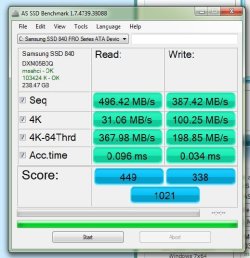
Steve is 100% correct. I was going to type up a post but it seems he's said everything almost word for word that I was going to say. He even posted a benchmark of a regular HDD, which I was going to do as well! Jonny, those scores are fine and indicate no problem with the drive in my opinion. Benchmarks sometimes show us hidden issues with hardware, which is what they are really useful for to be honest. The only thing I will point out is you are using the generic Microsoft SATA controller driver(msahci in the top left corner) and we have found that USUALLY the newer Intel Rapid Storage Technology driver works better. I say usually because sometimes it makes things worse.....most of the time it works great. I would at least look into it.
 

My Computer My Computer

Computer type
PC/Desktop
Computer Manufacturer/Model Number
Custom Built
OS
Windows 7 Professional 64bit SP1
CPU
Intel Core i5-3570K @ 4.5GHz
Motherboard
Asus Sabertooth Z77
Memory
Corsair Vengeance 16GB (4x4) @1866MHz CL 9-9-9-24 1T
Graphics Card(s)
EVGA GTX 750 Ti FTW
Sound Card
Onboard Audio
Monitor(s) Displays
Dell S2309W
Screen Resolution
1920x1080
Hard Drives
Samsung 830 128GB SSD - OS
(4) Seagate 5TB HDD
(1) Seagate 2TB HDD
PSU
Seasonic X750 80+ Gold Full Modular
Case
Antec Eleven Hundred Super Mid Tower
Cooling
Intel Liquid Cooler
Keyboard
Max Nighthawk X8 Mechanical keyboard
Mouse
Mionix Naos 7000
Internet Speed
50 Mbps Down / 10 Mbps Up
Antivirus
Microsoft Security Essentials/Malwarebytes Anti-Malware
Browser
Chrome/Firefox
Other Info
Klipsch ProMedia 2.1's
Asus RT-N66R Wireless Router
Let me show you how bad 'it sucks' Here is a Western Digital 1 TB WD1002FAEX sata III drive. Supposedly one of the faster desktop drives at the time. You tell me which you would rather have, this or yours.

View attachment 334387

I suspect you will say, mine's not too bad at all. The Benchmarks are just for bragging rights. They mean nothing and most of the people who run them (me included) are just trying to show off. Knowledgeable people who are running them know, they have no bearing on real world performance. And a few kb/s make no difference in the real world. The worst SSD is 10 times better than the best mechanical hard drive.


After thinking about it some more maybe i rushed to judgment , i guess mine is just fine after all lol.
 

My Computer My Computer

Computer type
Laptop
Computer Manufacturer/Model Number
Asus laptop U56E
OS
Microsoft Windows 7 Home Premium 64-bit 7601 Multiprocessor Free Service Pack 1
CPU
Intel(R) Core(TM) i5-2430M CPU @ 2.40GHz
Motherboard
ASUSTeK Computer Inc. U56E
Memory
6.00 GB
Graphics Card(s)
Intel(R) HD Graphics 3000
Sound Card
(1) High Definition Audio Device (2) High Definition Audio
Screen Resolution
1366 x 768 x 32 bits (4294967296 colors) @ 60 Hz
Hard Drives
WDC WD6400BPVT-80HXZT3
Steve is 100% correct. I was going to type up a post but it seems he's said everything almost word for word that I was going to say. He even posted a benchmark of a regular HDD, which I was going to do as well! Jonny, those scores are fine and indicate no problem with the drive in my opinion. Benchmarks sometimes show us hidden issues with hardware, which is what they are really useful for to be honest. The only thing I will point out is you are using the generic Microsoft SATA controller driver(msahci in the top left corner) and we have found that USUALLY the newer Intel Rapid Storage Technology driver works better. I say usually because sometimes it makes things worse.....most of the time it works great. I would at least look into it.

Thank you, i appreciate it.
 

My Computer My Computer

Computer type
Laptop
Computer Manufacturer/Model Number
Asus laptop U56E
OS
Microsoft Windows 7 Home Premium 64-bit 7601 Multiprocessor Free Service Pack 1
CPU
Intel(R) Core(TM) i5-2430M CPU @ 2.40GHz
Motherboard
ASUSTeK Computer Inc. U56E
Memory
6.00 GB
Graphics Card(s)
Intel(R) HD Graphics 3000
Sound Card
(1) High Definition Audio Device (2) High Definition Audio
Screen Resolution
1366 x 768 x 32 bits (4294967296 colors) @ 60 Hz
Hard Drives
WDC WD6400BPVT-80HXZT3
Samsung 840 PRO 256Gb

Great test. Here's my Samsung 840PRO 256 score.
 

Attachments

  • SSD Score.jpg
    SSD Score.jpg
    45.8 KB · Views: 30

My Computer My Computer

Computer type
PC/Desktop
Computer Manufacturer/Model Number
Custom Build
OS
Windows 7 64-bit Professional SP1
CPU
Intel Haswell i5-4670k
Motherboard
Asus Z-87 A
Memory
16Gb DDR3 Corsair Vengeance 1600MHz
Graphics Card(s)
Gigabyte GeForce GTX560Ti
Sound Card
Creative Soundblaster Audigy2 zs
Monitor(s) Displays
Dell U2412M
Screen Resolution
1920x1200
Hard Drives
Samsung 840 PRO 256GB
Samsung SpinRite 500Gb
Western Digital Green 1Tb
PSU
Antec TruePower TP650
Case
Antec 900/2
Cooling
Noctua NH-D14
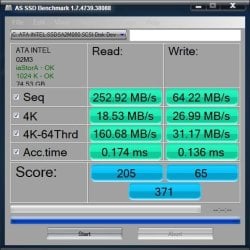
Posting just to make jonnyhillow feel better ;) Intel X25M Gen2 80GB

asssd.jpg

A Guy
 

My Computer My Computer

Computer type
PC/Desktop
OS
Windows 10 Home x64
CPU
INTEL Core i5-750 Quad-Core 3.37GHz
Motherboard
ASUS P7P55D
Memory
HyperX Fury Black Series 8GB (2 x 4GB) 1866Mhz
Graphics Card(s)
EVGA GeForce GTX 750 Superclocked 1GB 128-Bit GDDR5
Monitor(s) Displays
LG 32MA68HY 32" IPS
Screen Resolution
1920 x 1080
Hard Drives
Samsung 840 Evo 120GB, SEAGATE 500GB Barracuda® 7200.12, SATA 3 Gb/s, 7200 RPM, 16MB cache
PSU
ANTEC TruePower New TP-550, 80 PLUS, 550W
Case
ANTEC Three Hundred Illusion
Cooling
COOLER MASTER Hyper 212 Plus, 4 x 120mm 1 x 140mm Noctua's
Internet Speed
85 + Mbps
Antivirus
Avast
Browser
Vivaldi
Funny thing about that Bill, is that you won't notice a nickels worth of difference between that and my Samsung 830! I have an Intel X-25M 120GB and besides higher scores in benchmarks, there is no noticeable difference.
 

My Computer My Computer

Computer type
PC/Desktop
Computer Manufacturer/Model Number
Custom Built
OS
Windows 7 Professional 64bit SP1
CPU
Intel Core i5-3570K @ 4.5GHz
Motherboard
Asus Sabertooth Z77
Memory
Corsair Vengeance 16GB (4x4) @1866MHz CL 9-9-9-24 1T
Graphics Card(s)
EVGA GTX 750 Ti FTW
Sound Card
Onboard Audio
Monitor(s) Displays
Dell S2309W
Screen Resolution
1920x1080
Hard Drives
Samsung 830 128GB SSD - OS
(4) Seagate 5TB HDD
(1) Seagate 2TB HDD
PSU
Seasonic X750 80+ Gold Full Modular
Case
Antec Eleven Hundred Super Mid Tower
Cooling
Intel Liquid Cooler
Keyboard
Max Nighthawk X8 Mechanical keyboard
Mouse
Mionix Naos 7000
Internet Speed
50 Mbps Down / 10 Mbps Up
Antivirus
Microsoft Security Essentials/Malwarebytes Anti-Malware
Browser
Chrome/Firefox
Other Info
Klipsch ProMedia 2.1's
Asus RT-N66R Wireless Router
Posting just to make jonnyhillow feel better ;) Intel X25M Gen2 80GB

View attachment 334437

A Guy


I have to be honest , i would be outraged and ready to kill if i got those scores , thank God some of you had good explanations .

My biggest issue is it really doesn't feel faster than my mechanical drive , i know it is but i wish it was more noticeable.
 

My Computer My Computer

Computer type
Laptop
Computer Manufacturer/Model Number
Asus laptop U56E
OS
Microsoft Windows 7 Home Premium 64-bit 7601 Multiprocessor Free Service Pack 1
CPU
Intel(R) Core(TM) i5-2430M CPU @ 2.40GHz
Motherboard
ASUSTeK Computer Inc. U56E
Memory
6.00 GB
Graphics Card(s)
Intel(R) HD Graphics 3000
Sound Card
(1) High Definition Audio Device (2) High Definition Audio
Screen Resolution
1366 x 768 x 32 bits (4294967296 colors) @ 60 Hz
Hard Drives
WDC WD6400BPVT-80HXZT3
Back
Top