Show us your SSD performance 2

In my opinion, Bill is exactly correct. It will give some terrific benchmark scores, but I did not find any difference in actual usage. I think the reason is that the speed of an SSD is in the 4kb read speed and the access times. Those numbers do not change much, if at all. The rest of the numbers on benchmarks go up tremendously, but 99% of us will never see those numbers. That's my take on it.


I like that take actually , my thoughts on this is , if your not going to see noticeable improvements in everyday usage when compared to other high quality SSD's why bother lol.

You got to admit some folks really love posting those crazy #'s though , it's got to be our ego , more power , it's a guy thing (sorry A guy) not you.
 

My Computer My Computer

Computer type
Laptop
Computer Manufacturer/Model Number
Asus laptop U56E
OS
Microsoft Windows 7 Home Premium 64-bit 7601 Multiprocessor Free Service Pack 1
CPU
Intel(R) Core(TM) i5-2430M CPU @ 2.40GHz
Motherboard
ASUSTeK Computer Inc. U56E
Memory
6.00 GB
Graphics Card(s)
Intel(R) HD Graphics 3000
Sound Card
(1) High Definition Audio Device (2) High Definition Audio
Screen Resolution
1366 x 768 x 32 bits (4294967296 colors) @ 60 Hz
Hard Drives
WDC WD6400BPVT-80HXZT3
Yeah that's right. The SSD performance for the OS stems from the extremely fast access time. The R/W speeds are pretty irrelevant. That's why I always buy the cheapest SSDs. They are just as good as the expensive models. I can care less about benchmarks.

Even running systems from fast flash drives on USB3 is better than running them from a HDD. I use a 128GB stick with 0.7ms access time to run Mint. It beats any HDD installed OS. After all, the average access time of a HDD is 15ms.
 

My Computer My Computer

Computer Manufacturer/Model Number
HP, Dell, Gateway, Toshiba - 4 laptops and 2 desktops
OS
Vista, Windows7, Mint Mate, Zorin, Windows 8
CPU
from 1.6GHz Duo to i7
Monitor(s) Displays
2x HP w2207
Hard Drives
5x HDD, 7x SSD, 12x Externals
Keyboard
with trackball - no mices
Mouse
Trackball mice
Internet Speed
DSL 6000
Thank you Wolfgang. It was a very good read.

Like I have posted many of times.
Install your SSD properly and just use it and enjoy.
Don't worry about read/wright.

I do like this information from the article.

The Corsair, Intel, and Kingston SSDs all issued SMART warnings before their deaths, giving users plenty of time to preserve their data.
 

My Computer My Computer

Computer type
PC/Desktop
Computer Manufacturer/Model Number
Home made Desktop
OS
Windows 10 Pro. 64/ version 1709 Windows 7 Pro/64
CPU
Intel i7-6800K @ 4.3
Motherboard
ASUS X-99 Deluxe II
Memory
Corsair Platinum 16 gig @2400
Graphics Card(s)
EVGA GTX 1070 OC
Monitor(s) Displays
Asus 27" LED LCD/VE278Q
Screen Resolution
1920-1080 or 1280-720 HDMI
Hard Drives
INTEL SSD 730-240 Gb Sata 3.0/
PSU
EVGA Platium 1200W
Case
Phanteks Luxe Tempered Glass 8 fans/ one radiator
Cooling
XSPC/ Water Cooled CPU
Keyboard
Das 4 Professional
Mouse
Logitech M705/MX Anywhere 2-S
Internet Speed
100 mbits
Antivirus
Microsoft Security Essentials/ Malwarebytes Premium 3.0/ SAS
Browser
I.E. 11 default/Firefox/ ISP Time Warner Cable/Spectrum
Other Info
LG BluRay Burner/
Sound system-KLipsch-THX/
Icy Dock ssd Hot Swap bays.
Yeah that's right. The SSD performance for the OS stems from the extremely fast access time. The R/W speeds are pretty irrelevant. That's why I always buy the cheapest SSDs. They are just as good as the expensive models. I can care less about benchmarks.

Even running systems from fast flash drives on USB3 is better than running them from a HDD. I use a 128GB stick with 0.7ms access time to run Mint. It beats any HDD installed OS. After all, the average access time of a HDD is 15ms.


Wow, never even thought about using a flash drive to run the operation system.
 

My Computer My Computer

Computer type
Laptop
Computer Manufacturer/Model Number
Asus laptop U56E
OS
Microsoft Windows 7 Home Premium 64-bit 7601 Multiprocessor Free Service Pack 1
CPU
Intel(R) Core(TM) i5-2430M CPU @ 2.40GHz
Motherboard
ASUSTeK Computer Inc. U56E
Memory
6.00 GB
Graphics Card(s)
Intel(R) HD Graphics 3000
Sound Card
(1) High Definition Audio Device (2) High Definition Audio
Screen Resolution
1366 x 768 x 32 bits (4294967296 colors) @ 60 Hz
Hard Drives
WDC WD6400BPVT-80HXZT3
Wow, never even thought about using a flash drive to run the operation system.
Here I demo running Mint from said flash drive. It is possible to do the same with Windows, see here. It is, however, easier to install Linux, see here. That link includes the demo too.
 

My Computer My Computer

Computer Manufacturer/Model Number
HP, Dell, Gateway, Toshiba - 4 laptops and 2 desktops
OS
Vista, Windows7, Mint Mate, Zorin, Windows 8
CPU
from 1.6GHz Duo to i7
Monitor(s) Displays
2x HP w2207
Hard Drives
5x HDD, 7x SSD, 12x Externals
Keyboard
with trackball - no mices
Mouse
Trackball mice
Internet Speed
DSL 6000
Awesome thank you . Now i have to figure out where to get a Windows 10 iso lol. How much more system resources does Windows 10 use than Windows 8.1 if you know?
 

My Computer My Computer

Computer type
Laptop
Computer Manufacturer/Model Number
Asus laptop U56E
OS
Microsoft Windows 7 Home Premium 64-bit 7601 Multiprocessor Free Service Pack 1
CPU
Intel(R) Core(TM) i5-2430M CPU @ 2.40GHz
Motherboard
ASUSTeK Computer Inc. U56E
Memory
6.00 GB
Graphics Card(s)
Intel(R) HD Graphics 3000
Sound Card
(1) High Definition Audio Device (2) High Definition Audio
Screen Resolution
1366 x 768 x 32 bits (4294967296 colors) @ 60 Hz
Hard Drives
WDC WD6400BPVT-80HXZT3

Attachments

  • 2015-03-14_1435.png
    2015-03-14_1435.png
    2.3 KB · Views: 42

My Computer My Computer

Computer Manufacturer/Model Number
HP, Dell, Gateway, Toshiba - 4 laptops and 2 desktops
OS
Vista, Windows7, Mint Mate, Zorin, Windows 8
CPU
from 1.6GHz Duo to i7
Monitor(s) Displays
2x HP w2207
Hard Drives
5x HDD, 7x SSD, 12x Externals
Keyboard
with trackball - no mices
Mouse
Trackball mice
Internet Speed
DSL 6000
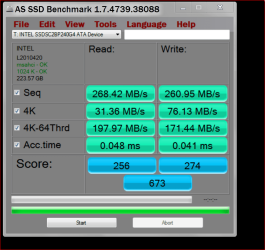
I have tested 2 Intel 730 SSD's and they both came out like this.

One at 659 and the other 673.

One was only formatted and the other had a image backup.

INTEL 730 TEST.PNG
 

My Computer My Computer

Computer type
PC/Desktop
Computer Manufacturer/Model Number
Home made Desktop
OS
Windows 10 Pro. 64/ version 1709 Windows 7 Pro/64
CPU
Intel i7-6800K @ 4.3
Motherboard
ASUS X-99 Deluxe II
Memory
Corsair Platinum 16 gig @2400
Graphics Card(s)
EVGA GTX 1070 OC
Monitor(s) Displays
Asus 27" LED LCD/VE278Q
Screen Resolution
1920-1080 or 1280-720 HDMI
Hard Drives
INTEL SSD 730-240 Gb Sata 3.0/
PSU
EVGA Platium 1200W
Case
Phanteks Luxe Tempered Glass 8 fans/ one radiator
Cooling
XSPC/ Water Cooled CPU
Keyboard
Das 4 Professional
Mouse
Logitech M705/MX Anywhere 2-S
Internet Speed
100 mbits
Antivirus
Microsoft Security Essentials/ Malwarebytes Premium 3.0/ SAS
Browser
I.E. 11 default/Firefox/ ISP Time Warner Cable/Spectrum
Other Info
LG BluRay Burner/
Sound system-KLipsch-THX/
Icy Dock ssd Hot Swap bays.
My new OSZ ARC-100 240 GB SSD:
11009898_885389701521297_2526758033668473690_n.jpg
 

My Computer My Computer

Computer type
PC/Desktop
Computer Manufacturer/Model Number
Custom Build
OS
Windows 10 Home x64
CPU
AMD FX-8320 @ 3.5 GHz
Motherboard
Gigabyte GA-990FXA-UD3 (rev. 4.0)
Memory
4 x 2 GB G Skill Ripjaws DDR3-1600
Graphics Card(s)
EVGA Nvidia GTX 550 Ti 1 GB
Sound Card
Realtek
Monitor(s) Displays
Acer S201HL
Screen Resolution
1600x900
Hard Drives
1 x 240 GB OCZ SSD
1 x 60 GB Intel SSD
1 x 1 TB Samsung HDD
PSU
Silverstone Strider 750w Modular
Case
Antec 300 Illusion
Cooling
Air
Keyboard
Microsoft
Mouse
HP
Antivirus
Microsoft Security Essentials
Browser
Google Chrome
I have tested 2 Intel 730 SSD's and they both came out like this.

One at 659 and the other 673.

One was only formatted and the other had a image backup.

View attachment 352703


Now those #'s i am familiar with , very fast access times . Thanks for posting
 

My Computer My Computer

Computer type
Laptop
Computer Manufacturer/Model Number
Asus laptop U56E
OS
Microsoft Windows 7 Home Premium 64-bit 7601 Multiprocessor Free Service Pack 1
CPU
Intel(R) Core(TM) i5-2430M CPU @ 2.40GHz
Motherboard
ASUSTeK Computer Inc. U56E
Memory
6.00 GB
Graphics Card(s)
Intel(R) HD Graphics 3000
Sound Card
(1) High Definition Audio Device (2) High Definition Audio
Screen Resolution
1366 x 768 x 32 bits (4294967296 colors) @ 60 Hz
Hard Drives
WDC WD6400BPVT-80HXZT3

My Computer My Computer

Computer type
Laptop
Computer Manufacturer/Model Number
Asus laptop U56E
OS
Microsoft Windows 7 Home Premium 64-bit 7601 Multiprocessor Free Service Pack 1
CPU
Intel(R) Core(TM) i5-2430M CPU @ 2.40GHz
Motherboard
ASUSTeK Computer Inc. U56E
Memory
6.00 GB
Graphics Card(s)
Intel(R) HD Graphics 3000
Sound Card
(1) High Definition Audio Device (2) High Definition Audio
Screen Resolution
1366 x 768 x 32 bits (4294967296 colors) @ 60 Hz
Hard Drives
WDC WD6400BPVT-80HXZT3

My Computer My Computer

Computer type
PC/Desktop
Computer Manufacturer/Model Number
Custom Build
OS
Windows 10 Home x64
CPU
AMD FX-8320 @ 3.5 GHz
Motherboard
Gigabyte GA-990FXA-UD3 (rev. 4.0)
Memory
4 x 2 GB G Skill Ripjaws DDR3-1600
Graphics Card(s)
EVGA Nvidia GTX 550 Ti 1 GB
Sound Card
Realtek
Monitor(s) Displays
Acer S201HL
Screen Resolution
1600x900
Hard Drives
1 x 240 GB OCZ SSD
1 x 60 GB Intel SSD
1 x 1 TB Samsung HDD
PSU
Silverstone Strider 750w Modular
Case
Antec 300 Illusion
Cooling
Air
Keyboard
Microsoft
Mouse
HP
Antivirus
Microsoft Security Essentials
Browser
Google Chrome
Question is though , in real World usage with everyday tasks is there a noticeable difference or not that much ?

Now don't go blowing the general belief that in actual use there is not much of a difference now unless it's true lol.

Saying there's a night and day difference will cause me to heave my computer out the window and cause it to have an excruciatingly painful death when hitting the cars or pavement below.
 

My Computer My Computer

Computer type
Laptop
Computer Manufacturer/Model Number
Asus laptop U56E
OS
Microsoft Windows 7 Home Premium 64-bit 7601 Multiprocessor Free Service Pack 1
CPU
Intel(R) Core(TM) i5-2430M CPU @ 2.40GHz
Motherboard
ASUSTeK Computer Inc. U56E
Memory
6.00 GB
Graphics Card(s)
Intel(R) HD Graphics 3000
Sound Card
(1) High Definition Audio Device (2) High Definition Audio
Screen Resolution
1366 x 768 x 32 bits (4294967296 colors) @ 60 Hz
Hard Drives
WDC WD6400BPVT-80HXZT3
My raid array 4x240GB Intel 530 (not a big difference between 3 and 4 drives):
 
Last edited:

My Computer My Computer

Computer type
PC/Desktop
Computer Manufacturer/Model Number
Self Built
OS
Windows 10 Pro 64bit
CPU
i7 4790k
Motherboard
MSI Gaming 5
Memory
Kingston HyperX 32GB
Graphics Card(s)
... (to replace huge NVidia driver fail)
Monitor(s) Displays
30" HP ZR30W; 27" Samsung 275T
Screen Resolution
2560x1600; 1920x1200
Hard Drives
2x240GB Intel 530 SSD Raid-0;
2x1TB Crucial MX500
PSU
Antec Signature SG-850
Case
Lian Li X2000F
Cooling
BeQuiet! Dark Rock 3
Keyboard
G.Skill KM360
Mouse
Logitech G502
Other Info
Logitech Z5500 5.1
Question is though , in real World usage with everyday tasks is there a noticeable difference or not that much ?

Now don't go blowing the general belief that in actual use there is not much of a difference now unless it's true lol.

Saying there's a night and day difference will cause me to heave my computer out the window and cause it to have an excruciatingly painful death when hitting the cars or pavement below.

It seems a tad faster than my old SSD, especially when booting Windows, but it could be also due to it having a fresher install of Windows... lol

However, it's lightyears faster than the HDD that I used to use as my main Windows drive. :D

My raid array 4x240GB Intel 530 (not a big difference between 3 and 4 drives):

4!? $$$. xD

I do good to afford one of these puppies. xD Got the ARC-100 because it was on sale, not much cheaper than regular price, but still, it's cheaper. :p
 

My Computer My Computer

Computer type
PC/Desktop
Computer Manufacturer/Model Number
Custom Build
OS
Windows 10 Home x64
CPU
AMD FX-8320 @ 3.5 GHz
Motherboard
Gigabyte GA-990FXA-UD3 (rev. 4.0)
Memory
4 x 2 GB G Skill Ripjaws DDR3-1600
Graphics Card(s)
EVGA Nvidia GTX 550 Ti 1 GB
Sound Card
Realtek
Monitor(s) Displays
Acer S201HL
Screen Resolution
1600x900
Hard Drives
1 x 240 GB OCZ SSD
1 x 60 GB Intel SSD
1 x 1 TB Samsung HDD
PSU
Silverstone Strider 750w Modular
Case
Antec 300 Illusion
Cooling
Air
Keyboard
Microsoft
Mouse
HP
Antivirus
Microsoft Security Essentials
Browser
Google Chrome
Thanks guys , i also saw the Arc 100 on sale for a very good price awhile back , sounds like you made a good investment .

I agree , 4 separate 240 mb drives ? Dang man , you don't mess around.
 

My Computer My Computer

Computer type
Laptop
Computer Manufacturer/Model Number
Asus laptop U56E
OS
Microsoft Windows 7 Home Premium 64-bit 7601 Multiprocessor Free Service Pack 1
CPU
Intel(R) Core(TM) i5-2430M CPU @ 2.40GHz
Motherboard
ASUSTeK Computer Inc. U56E
Memory
6.00 GB
Graphics Card(s)
Intel(R) HD Graphics 3000
Sound Card
(1) High Definition Audio Device (2) High Definition Audio
Screen Resolution
1366 x 768 x 32 bits (4294967296 colors) @ 60 Hz
Hard Drives
WDC WD6400BPVT-80HXZT3
My raid array 4x240GB Intel 530 (not a big difference between 3 and 4 drives):

Nice nums. But what does that do in real life.
 

My Computer My Computer

Computer Manufacturer/Model Number
HP, Dell, Gateway, Toshiba - 4 laptops and 2 desktops
OS
Vista, Windows7, Mint Mate, Zorin, Windows 8
CPU
from 1.6GHz Duo to i7
Monitor(s) Displays
2x HP w2207
Hard Drives
5x HDD, 7x SSD, 12x Externals
Keyboard
with trackball - no mices
Mouse
Trackball mice
Internet Speed
DSL 6000
I have three computers with single and multiple ssds. The ones in raid are snappier and load stuff faster (games somewhat, encoding/transfers big time.) Raid 0 makes a huge difference with mucking with movies/videos.

Honestly, not a big difference in normal daily use with the number of ssds other than the snappiness, but after using these it is quite a pain to use platter drives in a system! Even my single ssd seems slower at times (mind you its in a dual core system so is part of the issue.) So there is a difference to be felt, especially coming from platter drive systems.

Going from one ssd to multiple is still nice and not bad to implement (in my case,) as I needed the room and slowly bought them over time, and I redo my system once in a while anyways to keep it fresh or when it crashes (I like to muck about at times, sometimes beyond what I can fix!) Three ssds seem to be the sweet point in raid 0 now, as four made only a little difference. I have an older system downstairs with an OC'd i5 750 @ 4-4.2GHz and three Crucial C300 64BG ssds in Raid 0 and 1TB drive and its really nice to use (feels noticeably faster/snappy compared to any system I've used anywhere, even this new one! Friends/family etc that come over all comment on it.) Wait to buy them on sale is what I did even if you only get one or two. I back up my stuff too (usually ;) )
 

My Computer My Computer

Computer type
PC/Desktop
Computer Manufacturer/Model Number
Self Built
OS
Windows 10 Pro 64bit
CPU
i7 4790k
Motherboard
MSI Gaming 5
Memory
Kingston HyperX 32GB
Graphics Card(s)
... (to replace huge NVidia driver fail)
Monitor(s) Displays
30" HP ZR30W; 27" Samsung 275T
Screen Resolution
2560x1600; 1920x1200
Hard Drives
2x240GB Intel 530 SSD Raid-0;
2x1TB Crucial MX500
PSU
Antec Signature SG-850
Case
Lian Li X2000F
Cooling
BeQuiet! Dark Rock 3
Keyboard
G.Skill KM360
Mouse
Logitech G502
Other Info
Logitech Z5500 5.1
Thanks for the experience report. I have a lot of SSDs myself but never raided them. Most are in laptops with a single bay. Some I use externally on USB3 and eSata.
 

My Computer My Computer

Computer Manufacturer/Model Number
HP, Dell, Gateway, Toshiba - 4 laptops and 2 desktops
OS
Vista, Windows7, Mint Mate, Zorin, Windows 8
CPU
from 1.6GHz Duo to i7
Monitor(s) Displays
2x HP w2207
Hard Drives
5x HDD, 7x SSD, 12x Externals
Keyboard
with trackball - no mices
Mouse
Trackball mice
Internet Speed
DSL 6000
I don't know why they haven't exploded in laptop use. They are perfect for them for durability and speed.
 

My Computer My Computer

Computer type
PC/Desktop
Computer Manufacturer/Model Number
Self Built
OS
Windows 10 Pro 64bit
CPU
i7 4790k
Motherboard
MSI Gaming 5
Memory
Kingston HyperX 32GB
Graphics Card(s)
... (to replace huge NVidia driver fail)
Monitor(s) Displays
30" HP ZR30W; 27" Samsung 275T
Screen Resolution
2560x1600; 1920x1200
Hard Drives
2x240GB Intel 530 SSD Raid-0;
2x1TB Crucial MX500
PSU
Antec Signature SG-850
Case
Lian Li X2000F
Cooling
BeQuiet! Dark Rock 3
Keyboard
G.Skill KM360
Mouse
Logitech G502
Other Info
Logitech Z5500 5.1
Back
Top