Show us your SSD performance

Status
Not open for further replies.

My Computer My Computer

Computer type
PC/Desktop
Computer Manufacturer/Model Number
Dell: XPS 420 (2), XPS M1330 (several), XPS 14z, Mini 9, Mini 10v
OS
W8 Pro, W7 Ultimate, XP Pro x64, Vista x64, Ubuntu
CPU
Q6600, Q6700, T7500, T7500, N270, N270
Motherboard
Dell
Memory
8GB, 8GB, 4GB, 4GB, 2GB, 2GB
Graphics Card(s)
ATI, nVidia, nVidia, nVidia, Intel, Intel
Monitor(s) Displays
Dell 2408WFP
Hard Drives
A drawer full. OCZ Vertex's in RAID 0. Vertex 3's, Vertex 4, Samsung 830's, Samsung 840's, Intel 330. Don't use dino drives any more except for servers.
Keyboard
Logitech Wave
Internet Speed
29 Mbps DL / .95 Mbps UL
Other Info
New project(2013)...Another low power server. Zotac H67ITX, i3-2100T, Windows Server 2012 Essentials on Samsung SSD.
Previous project...Low power (38-40 watts using Kill-a-Watt) Windows Home Server. Zotac ION (Atom 330, GeForce9400), 4GB RAM, 2x2TB WD Green, IN WIM miniITX Case. Fits on a shelf in laundry closet, practically silent.
Just got my SSDs hooked up. I never expected results like this :D

Wow! :shock:

What ssd is that? Brand? Model? Size? sata 2? sata 3? Pci?

When? How? Why? :D
 

Attachments

  • ssd.jpg
    ssd.jpg
    129.3 KB · Views: 16

My Computer My Computer

Computer Manufacturer/Model Number
Custom Built by me.
OS
Windows 7 Ultimate 64bit SP1
CPU
Intel Core 2 Quad Q6600
Motherboard
Gigabyte GA-X38-DS4
Memory
2X2GB DDR2 PC6400 800MHZ DUAL CHANNEL
Graphics Card(s)
XFX RADEON HD 6850 1GB GDDR5
Sound Card
2/4/5.1/7.1-channel Realtek High Definition
Monitor(s) Displays
Samsung LE40A656F1 1080p 100Hz LCD HD TV 50,000:1
Screen Resolution
1366x768 in Desktop,1920x1080p in gaming and video
Hard Drives
C:\WD VelociRaptor 150 GB,10,000 RPM
E:\WESTERN DIGITAL WD15EADS 1.5TB CAVIAR GREEN SATA2 F:\WESTERN DIGITAL WD15EADS 1.5TB CAVIAR GREEN SATA2
PSU
THERMALTAKE W0229 TOUGHPOWER XT 750W
Case
A-Case Twin Engine BB
Cooling
3 x thermaltake smart case fan II + 1 arctic cooling fan
Keyboard
Wireless Logitech LX710
Mouse
Logitech Wireless Gaming Mouse G700
Internet Speed
ADSL 12000 plus
Other Info
Mouse Logitech G700,with 13 buttons who needs keyboard in RPG?

D:\Sony high speed sata Dvd Rewriter
Logitech Cordless Rumblepad 2
Those are some very nice numbers, enjoy.
 

My Computer My Computer

Computer type
PC/Desktop
Computer Manufacturer/Model Number
76~2.0
OS
Windows 7 Ult x64 - SP1/ Windows 8 Pro x64
CPU
Intel Core i5-3570K 4.6GHz
Motherboard
Gigabyte GA-Z77X UD3H, f18
Memory
8GB (2X4GB) DDR3 1600 Corsair Vengeance CL8 1.5v
Graphics Card(s)
Sapphire HD 7770 Vapor-X OC 1GB DDR5
Sound Card
Onboard VIA VT2021
Monitor(s) Displays
22" LCD Dell
Screen Resolution
1680x1050
Hard Drives
Samsung 840Pro 128GB SSD,
Seagate Barracuda 500GB SATA2 7200rpm 32MB cache, Seagate Barracuda 1TB SATA2 7200rpm 32MB cache,
PSU
Corsair HX650W
Case
Cooler Master Storm Scout
Cooling
Corsair H80 2x12cm Noctua NF P12 , 2x14cm case fans
Keyboard
Logitech Wave
Mouse
CM Sentinel
Internet Speed
Dismal
Antivirus
Avast
Browser
Opera Next
Other Info
Haswell laptop: HP Envy 17t-j, i7-4700MQ, GeForce 740M 2GB DDR3, 17.3" Full HD 1920x1080, 16GB RAM, Samsung 840 Pro 128GB, 1TB Hitachi 7200 HDD,
Desktop: eSATA ports,
External eSATA Seagate 500GB SATA2 7200rpm,
External WD USB 500GB
Thanks everyone!

Wow! :shock:

What ssd is that? Brand? Model? Size? sata 2? sata 3? Pci?

When? How? Why? :D

Haha Like I said I was hopeing for high 700 Mb/s, never expected it to be this fast.

Its 2 OCZ Vertex 3 120GBs hooked up with some sata III cables directly to my motherboard. Then configured into a RAID 0 array with Intels Matrix Controller which comes with my motherboard. Nothing special about the setup at all.

Not really sure why its so fast but Ill take it :D
 

My Computer My Computer

Computer Manufacturer/Model Number
Custom
OS
W7 Ultimate 64
CPU
Core i5 2500k
Motherboard
ASUS P8Z68 Deluxe LGA 1155 Intel Z68
Memory
G.SKILL 8GB (2 x 4GB) DDR3 @ 1600
Graphics Card(s)
Evga GTX 260 216
Screen Resolution
1920x1080
Hard Drives
2 x 120GB OCZ Vertex 3 in RAID 0
1010 MBps average read
PSU
Corsair 750W
Case
Antec P183
Keyboard
G510
Oh Lordy...

Great stuff, I'm stoked for you!

I have a basic Samsung 470 Series... 64 GB.. on my DJ laptop and music production machine.

It works like a chimp!

Have you notice how Windows 7 is so snappy? I have extensively tweaked the O.S ... no internet and turned off a lot of services.. as it is designed just to run professional music programs.

lol....... it boots from cold in about 7 seconds.

The whole machine has been transformed, all my plugins and soft synths react a lot better and I think it's essential for a laptop to do away with the old spinner type set up as the boot drive and O.S and progs.

I dunno.. its just so... so reactive when I use these very intensive applications... before it was quick... but as I have a lot of VST it just took a while to load them up within the music production software.
 

My Computer My Computer

Computer Manufacturer/Model Number
Asus (tweaked music only laptop)
OS
Windows 7 Home Premuim 64 bit custom build. XP Professional on other studio machines.
CPU
i5 430, Plus Pentuim machines in studio as well.
Motherboard
?
Memory
8 gig ddr 3 on Laptops and 4 gig on XP music machines.
Graphics Card(s)
NVIDIA Genforce GT 540m 1 gig ram on music studio laptop.
Sound Card
Native Instruments Kontrol 1, DJ 8 , DJ 6.
Hard Drives
Samsung 470 Series 64 Gb SSD for boot and O.S and music apps.
Loads of external USB 2.0 drives that contain samples and WAV for music production and playing out.
PSU
N/A
Case
N/A
Cooling
Machine sits on usb coolermaster Notepal (17 inch 3 fans)
Other Info
I have basic Dell machine for web running XP. Other machines are custom builds for music production only. (No web or games)
Some of the benefits of manual OP and Garbage Collection without the benefits of Trim.

PCI E SSD drives cannot take advantage of trim. However, the addition of manual OP and reasonable logged off times (couple of hours a day) to allow built-in garbage collection to work can work wonders. My RevoDrive 3 X2 was installed around the beginning of September. Since then it has been used extensively with enough data written, deleted and replaced to cover the capacity of the drive several times. Logically, it should have moved from the "fresh" state to the "mapped" state to possibly even "hammered" phase during this time, specially lacking trim.

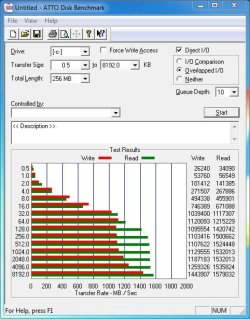
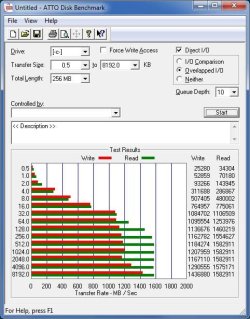
I am posting two of the ATTO runs on this drive. The first one done during the "fresh" state in early September (and posted on this forum) and another one done in mid December. Even taking into consideration, differences between separate runs, the performance of the drive remains unchanged.
 

Attachments

  • Atto9_11_11.JPG
    Atto9_11_11.JPG
    65.2 KB · Views: 13
  • Atto12_15_11.JPG
    Atto12_15_11.JPG
    65.4 KB · Views: 14

My Computer My Computer

Computer Manufacturer/Model Number
Homemade
OS
Win 7 64 bit professional
CPU
CPU: 3930K @ 4.8 MHz Stable as a rock
Motherboard
ASUS Rampage IV Extreme LGA 2011
Memory
CORSAIR DOMINATOR GT 16GB (4 x 4GB) 240-Pin DDR3
Graphics Card(s)
EVGA SuperClocked+ GeForce GTX 680
Monitor(s) Displays
Dell 3007WFP
Screen Resolution
2560 x 1600
Hard Drives
Vector(256gb) x 2
RevoDrive 3 X2 space (240 GB)
Crucial C300 256 GB SSD
PSU
CORSAIR AX1200i 1200W Digital ATX12V v2.31 and EPS 2.92 SLI
Cooling
Water cooling EK Supremacy ELITE
Mouse
ratZ-7
Other Info
WEI-7.8
  • Like
Reactions: JMH
Hmm, the 4K performance even improved. And that is the one that counts.
 

My Computer My Computer

Computer Manufacturer/Model Number
HP, Dell, Gateway, Toshiba - 4 laptops and 2 desktops
OS
Vista, Windows7, Mint Mate, Zorin, Windows 8
CPU
from 1.6GHz Duo to i7
Monitor(s) Displays
2x HP w2207
Hard Drives
5x HDD, 7x SSD, 12x Externals
Keyboard
with trackball - no mices
Mouse
Trackball mice
Internet Speed
DSL 6000
Hmm, the 4K performance even improved. And that is the one that counts.

You have a very perceptive eye, whs
 

My Computer My Computer

Computer Manufacturer/Model Number
Homemade
OS
Win 7 64 bit professional
CPU
CPU: 3930K @ 4.8 MHz Stable as a rock
Motherboard
ASUS Rampage IV Extreme LGA 2011
Memory
CORSAIR DOMINATOR GT 16GB (4 x 4GB) 240-Pin DDR3
Graphics Card(s)
EVGA SuperClocked+ GeForce GTX 680
Monitor(s) Displays
Dell 3007WFP
Screen Resolution
2560 x 1600
Hard Drives
Vector(256gb) x 2
RevoDrive 3 X2 space (240 GB)
Crucial C300 256 GB SSD
PSU
CORSAIR AX1200i 1200W Digital ATX12V v2.31 and EPS 2.92 SLI
Cooling
Water cooling EK Supremacy ELITE
Mouse
ratZ-7
Other Info
WEI-7.8
Excellent set up Snakeyeskm.

The best I remember seeing. :thumbsup:
 

My Computer My Computer

Computer Manufacturer/Model Number
Hopalong/ Godzilla
OS
Windows7 Pro 64bit SP-1; Windows XP Pro 32bit
CPU
Intel Core i7-870 Lynnfield 2.93GHz LGA 1156 95W Quad-Core
Motherboard
ASUS P7P55D-E PRO
Memory
8GB@1400MHz Crucial Ballistix DDR3-1600 4x2GB
Graphics Card(s)
ASUS ENGTX460 DirectCU/2DI/1GD5 1GB 256-bit GDDR5
Sound Card
VIA Onboard
Monitor(s) Displays
Asus VS248H-P 24"; Samsung SyncMaster 941BW 19"ws
Screen Resolution
1920x1080; 1440x900
Hard Drives
Samsung 830 120GB SSD
Intel 320 120GB SSD
Western Digital Caviar Black WD7501AALS 750GB 7200 RPM SATA 3.0Gb/s
Western Digital Caviar Black WD6401AALS 640GB 7200 RPM SATA 3.0Gb/s
PSU
COOLER MASTER Silent Pro RS850-AMBAJ3-US 850W Modular
Case
COOLER MASTER HAF 932 RC-932-KKN5-GP Black
Cooling
Scythe "Mugen-2 Rev.B" (2 ScytheKaze-Jyuni PWM fans)
Keyboard
Logitech K-320
Mouse
Kensington
Antivirus
Avast Inernet Suite
Browser
IE 9 ; Chrome

My Computer My Computer

Computer Manufacturer/Model Number
HP, Dell, Gateway, Toshiba - 4 laptops and 2 desktops
OS
Vista, Windows7, Mint Mate, Zorin, Windows 8
CPU
from 1.6GHz Duo to i7
Monitor(s) Displays
2x HP w2207
Hard Drives
5x HDD, 7x SSD, 12x Externals
Keyboard
with trackball - no mices
Mouse
Trackball mice
Internet Speed
DSL 6000

My Computer My Computer

Computer Manufacturer/Model Number
Custom Built by me.
OS
Windows 7 Ultimate 64bit SP1
CPU
Intel Core 2 Quad Q6600
Motherboard
Gigabyte GA-X38-DS4
Memory
2X2GB DDR2 PC6400 800MHZ DUAL CHANNEL
Graphics Card(s)
XFX RADEON HD 6850 1GB GDDR5
Sound Card
2/4/5.1/7.1-channel Realtek High Definition
Monitor(s) Displays
Samsung LE40A656F1 1080p 100Hz LCD HD TV 50,000:1
Screen Resolution
1366x768 in Desktop,1920x1080p in gaming and video
Hard Drives
C:\WD VelociRaptor 150 GB,10,000 RPM
E:\WESTERN DIGITAL WD15EADS 1.5TB CAVIAR GREEN SATA2 F:\WESTERN DIGITAL WD15EADS 1.5TB CAVIAR GREEN SATA2
PSU
THERMALTAKE W0229 TOUGHPOWER XT 750W
Case
A-Case Twin Engine BB
Cooling
3 x thermaltake smart case fan II + 1 arctic cooling fan
Keyboard
Wireless Logitech LX710
Mouse
Logitech Wireless Gaming Mouse G700
Internet Speed
ADSL 12000 plus
Other Info
Mouse Logitech G700,with 13 buttons who needs keyboard in RPG?

D:\Sony high speed sata Dvd Rewriter
Logitech Cordless Rumblepad 2

My Computer My Computer

Computer Manufacturer/Model Number
Homemade
OS
Win 7 64 bit professional
CPU
CPU: 3930K @ 4.8 MHz Stable as a rock
Motherboard
ASUS Rampage IV Extreme LGA 2011
Memory
CORSAIR DOMINATOR GT 16GB (4 x 4GB) 240-Pin DDR3
Graphics Card(s)
EVGA SuperClocked+ GeForce GTX 680
Monitor(s) Displays
Dell 3007WFP
Screen Resolution
2560 x 1600
Hard Drives
Vector(256gb) x 2
RevoDrive 3 X2 space (240 GB)
Crucial C300 256 GB SSD
PSU
CORSAIR AX1200i 1200W Digital ATX12V v2.31 and EPS 2.92 SLI
Cooling
Water cooling EK Supremacy ELITE
Mouse
ratZ-7
Other Info
WEI-7.8
That is an amazing SSD, Congrats.
 

My Computer My Computer

Computer type
PC/Desktop
Computer Manufacturer/Model Number
76~2.0
OS
Windows 7 Ult x64 - SP1/ Windows 8 Pro x64
CPU
Intel Core i5-3570K 4.6GHz
Motherboard
Gigabyte GA-Z77X UD3H, f18
Memory
8GB (2X4GB) DDR3 1600 Corsair Vengeance CL8 1.5v
Graphics Card(s)
Sapphire HD 7770 Vapor-X OC 1GB DDR5
Sound Card
Onboard VIA VT2021
Monitor(s) Displays
22" LCD Dell
Screen Resolution
1680x1050
Hard Drives
Samsung 840Pro 128GB SSD,
Seagate Barracuda 500GB SATA2 7200rpm 32MB cache, Seagate Barracuda 1TB SATA2 7200rpm 32MB cache,
PSU
Corsair HX650W
Case
Cooler Master Storm Scout
Cooling
Corsair H80 2x12cm Noctua NF P12 , 2x14cm case fans
Keyboard
Logitech Wave
Mouse
CM Sentinel
Internet Speed
Dismal
Antivirus
Avast
Browser
Opera Next
Other Info
Haswell laptop: HP Envy 17t-j, i7-4700MQ, GeForce 740M 2GB DDR3, 17.3" Full HD 1920x1080, 16GB RAM, Samsung 840 Pro 128GB, 1TB Hitachi 7200 HDD,
Desktop: eSATA ports,
External eSATA Seagate 500GB SATA2 7200rpm,
External WD USB 500GB

My Computer My Computer

Computer Manufacturer/Model Number
Custom Built by me.
OS
Windows 7 Ultimate 64bit SP1
CPU
Intel Core 2 Quad Q6600
Motherboard
Gigabyte GA-X38-DS4
Memory
2X2GB DDR2 PC6400 800MHZ DUAL CHANNEL
Graphics Card(s)
XFX RADEON HD 6850 1GB GDDR5
Sound Card
2/4/5.1/7.1-channel Realtek High Definition
Monitor(s) Displays
Samsung LE40A656F1 1080p 100Hz LCD HD TV 50,000:1
Screen Resolution
1366x768 in Desktop,1920x1080p in gaming and video
Hard Drives
C:\WD VelociRaptor 150 GB,10,000 RPM
E:\WESTERN DIGITAL WD15EADS 1.5TB CAVIAR GREEN SATA2 F:\WESTERN DIGITAL WD15EADS 1.5TB CAVIAR GREEN SATA2
PSU
THERMALTAKE W0229 TOUGHPOWER XT 750W
Case
A-Case Twin Engine BB
Cooling
3 x thermaltake smart case fan II + 1 arctic cooling fan
Keyboard
Wireless Logitech LX710
Mouse
Logitech Wireless Gaming Mouse G700
Internet Speed
ADSL 12000 plus
Other Info
Mouse Logitech G700,with 13 buttons who needs keyboard in RPG?

D:\Sony high speed sata Dvd Rewriter
Logitech Cordless Rumblepad 2
Thanks for the feedback guys. There is a new Revodrive3 X2 Max IOPs that coupled with the right system that should have amazing results. Presently difficult to get hold off.

What I wanted to point out in the post, was the benefits off building in extra manual OP when initially installing Windows on SSD drives. I have been using SSD's for a considerable time, Intel, Crucial, OCZ through their several generations and in practically every case, creating approximately 15 to 20% manual OP makes a tremendous difference in the garbage collection (particularly important in raid setups). When necessary it is a simple process within Windows to access this extra OP for traditional storage by expanding the partition. Furthermore, the garbage collection process can be greatly facilitated in heavily used SSD's by logging off the computer in the safe mode. In this mode the reduced CPU and disk activity greatly improves the garbage collection process.
Cheers.
 

My Computer My Computer

Computer Manufacturer/Model Number
Homemade
OS
Win 7 64 bit professional
CPU
CPU: 3930K @ 4.8 MHz Stable as a rock
Motherboard
ASUS Rampage IV Extreme LGA 2011
Memory
CORSAIR DOMINATOR GT 16GB (4 x 4GB) 240-Pin DDR3
Graphics Card(s)
EVGA SuperClocked+ GeForce GTX 680
Monitor(s) Displays
Dell 3007WFP
Screen Resolution
2560 x 1600
Hard Drives
Vector(256gb) x 2
RevoDrive 3 X2 space (240 GB)
Crucial C300 256 GB SSD
PSU
CORSAIR AX1200i 1200W Digital ATX12V v2.31 and EPS 2.92 SLI
Cooling
Water cooling EK Supremacy ELITE
Mouse
ratZ-7
Other Info
WEI-7.8
What I wanted to point out in the post, was the benefits off building in extra manual OP when initially installing Windows on SSD drives.
Good numbers, but what the heck is this OP you keep referring too?
 

My Computer My Computer

Computer type
PC/Desktop
Computer Manufacturer/Model Number
Home Built Desktop By DataTech
OS
Windows 7 Ultimate X64 SP1
CPU
Intel i5-2550K, Differing ~4.4-4.8GHz No built in GPU
Motherboard
ASUS P8Z68-V PRO/GEN3
Memory
16GB G.Skill Sniper 1866MHz @ 2133MHz 2x8GB
Graphics Card(s)
ASUS GTX650TIB-DC2OC-2GD5, (650TI Boost)
Sound Card
Onboard Realtek 5-1
Monitor(s) Displays
Samsung P2570HD
Screen Resolution
1920x1080
Hard Drives
Samsung 840 Pro 256GB SSD for OS, 500GB Seagate Constellation (Enterprise drive) for Data
PSU
Corsair HX650W
Case
Inwin Dragon Rider
Cooling
Hyper 212 EVO w/two Noctua fans, push-pull, @1300 RPM
Keyboard
E-Z Eyes, bright yellow keys with large characters
Mouse
steelseries SENSEI Laser Pro Gaming
Internet Speed
48-51Mbs Mbs down, 11 Mbs up Xfinity Cable
Antivirus
Norton Internet Security 2013
Browser
IE 10, Opera, Pale Moon if needed
Other Info
4 case fans, LG BluRay-RE, ASUS DVD-RW, Mr. Fusion power supply, 1.21 gigawatts.
What I wanted to point out in the post, was the benefits off building in extra manual OP when initially installing Windows on SSD drives.
Good numbers, but what the heck is this OP you keep referring too?
OP- Over provisioning free space.

Never made sense to me because the factory over provisions SSD's out of the box.

What good an extra partitioned non used area would do is beyond me.

It isn't a fixed partitioned area as on a spinner.

I'm not sure if it helps but have never read any proof that it accomplishes anything.

I live next to Missouri which is the "Show me State." Still waiting on a credible explanation in English not jibberish.
 

My Computer My Computer

Computer Manufacturer/Model Number
Hopalong/ Godzilla
OS
Windows7 Pro 64bit SP-1; Windows XP Pro 32bit
CPU
Intel Core i7-870 Lynnfield 2.93GHz LGA 1156 95W Quad-Core
Motherboard
ASUS P7P55D-E PRO
Memory
8GB@1400MHz Crucial Ballistix DDR3-1600 4x2GB
Graphics Card(s)
ASUS ENGTX460 DirectCU/2DI/1GD5 1GB 256-bit GDDR5
Sound Card
VIA Onboard
Monitor(s) Displays
Asus VS248H-P 24"; Samsung SyncMaster 941BW 19"ws
Screen Resolution
1920x1080; 1440x900
Hard Drives
Samsung 830 120GB SSD
Intel 320 120GB SSD
Western Digital Caviar Black WD7501AALS 750GB 7200 RPM SATA 3.0Gb/s
Western Digital Caviar Black WD6401AALS 640GB 7200 RPM SATA 3.0Gb/s
PSU
COOLER MASTER Silent Pro RS850-AMBAJ3-US 850W Modular
Case
COOLER MASTER HAF 932 RC-932-KKN5-GP Black
Cooling
Scythe "Mugen-2 Rev.B" (2 ScytheKaze-Jyuni PWM fans)
Keyboard
Logitech K-320
Mouse
Kensington
Antivirus
Avast Inernet Suite
Browser
IE 9 ; Chrome
As Hopalong X mentioned, OP refers to over provisioning. A little explanation might help.

When you first get your SSD you will notice that the actual capacity shown in Windows is a little less than the stated size of the SSD. The difference (which puzzles some first-time SSD owners) is the part of the SSD drive allocated to OP by the manufacturer. The garbage collection and wear leveling algorithms built into SSD drives used this OP to assist in their processes.(if you need more information on how this OP is used, please post) They obviously try to achieve an optimal OP between efficiency in their algorithms and available capacity.

When the user is installing the OS on these SSD's they have the option to create a partition/partitions that do not fully utilize the available capacity. Any differences between the partition/partitions and the available capacity is referred to as the manual OP. By creating this manual OP, the efficiency of the garbage collection process can improve. Since very few users maximize the use of capacity, at least initially, leaving certain space unused is fairly easy. Recovering the space if and when needed is also easily accomplished by increasing the partition size within Windows. In raid setups, trim is not available to the SSD's and they have to depend on efficient garbage collection to maintain their speed and efficiency. Creating manual OP can greatly facilitate this process. It also helps in drives where trim is available, keeping in mind that trim is simply an instruction to the SSD and it is the garbage collection/wear leveling process that accepts the trim instruction.
 

My Computer My Computer

Computer Manufacturer/Model Number
Homemade
OS
Win 7 64 bit professional
CPU
CPU: 3930K @ 4.8 MHz Stable as a rock
Motherboard
ASUS Rampage IV Extreme LGA 2011
Memory
CORSAIR DOMINATOR GT 16GB (4 x 4GB) 240-Pin DDR3
Graphics Card(s)
EVGA SuperClocked+ GeForce GTX 680
Monitor(s) Displays
Dell 3007WFP
Screen Resolution
2560 x 1600
Hard Drives
Vector(256gb) x 2
RevoDrive 3 X2 space (240 GB)
Crucial C300 256 GB SSD
PSU
CORSAIR AX1200i 1200W Digital ATX12V v2.31 and EPS 2.92 SLI
Cooling
Water cooling EK Supremacy ELITE
Mouse
ratZ-7
Other Info
WEI-7.8
As Hopalong X mentioned, OP refers to over provisioning. A little explanation might help.

When you first get your SSD you will notice that the actual capacity shown in Windows is a little less than the stated size of the SSD. The difference (which puzzles some first-time SSD owners) is the part of the SSD drive allocated to OP by the manufacturer. The garbage collection and wear leveling algorithms built into SSD drives used this OP to assist in their processes.(if you need more information on how this OP is used, please post) They obviously try to achieve an optimal OP between efficiency in their algorithms and available capacity.

When the user is installing the OS on these SSD's they have the option to create a partition/partitions that do not fully utilize the available capacity. Any differences between the partition/partitions and the available capacity is referred to as the manual OP. By creating this manual OP, the efficiency of the garbage collection process can improve. Since very few users maximize the use of capacity, at least initially, leaving certain space unused is fairly easy. Recovering the space if and when needed is also easily accomplished by increasing the partition size within Windows. In raid setups, trim is not available to the SSD's and they have to depend on efficient garbage collection to maintain their speed and efficiency. Creating manual OP can greatly facilitate this process. It also helps in drives where trim is available, keeping in mind that trim is simply an instruction to the SSD and it is the garbage collection/wear leveling process that accepts the trim instruction.
That is the most sensible explanation I have seen of over provisioing.

Speed up clear/clean garbage collection would increase speed overall the more you use the drive.

Intel doesn't use GC and the newer ones have manual TRIM available thru Tool Box.
So I have not run into this problem- yet.

If I get a Crucial m4 now it makes sense of why to over provision! :thumbsup:

Thanks.
Mike
 

My Computer My Computer

Computer Manufacturer/Model Number
Hopalong/ Godzilla
OS
Windows7 Pro 64bit SP-1; Windows XP Pro 32bit
CPU
Intel Core i7-870 Lynnfield 2.93GHz LGA 1156 95W Quad-Core
Motherboard
ASUS P7P55D-E PRO
Memory
8GB@1400MHz Crucial Ballistix DDR3-1600 4x2GB
Graphics Card(s)
ASUS ENGTX460 DirectCU/2DI/1GD5 1GB 256-bit GDDR5
Sound Card
VIA Onboard
Monitor(s) Displays
Asus VS248H-P 24"; Samsung SyncMaster 941BW 19"ws
Screen Resolution
1920x1080; 1440x900
Hard Drives
Samsung 830 120GB SSD
Intel 320 120GB SSD
Western Digital Caviar Black WD7501AALS 750GB 7200 RPM SATA 3.0Gb/s
Western Digital Caviar Black WD6401AALS 640GB 7200 RPM SATA 3.0Gb/s
PSU
COOLER MASTER Silent Pro RS850-AMBAJ3-US 850W Modular
Case
COOLER MASTER HAF 932 RC-932-KKN5-GP Black
Cooling
Scythe "Mugen-2 Rev.B" (2 ScytheKaze-Jyuni PWM fans)
Keyboard
Logitech K-320
Mouse
Kensington
Antivirus
Avast Inernet Suite
Browser
IE 9 ; Chrome
When you first get your SSD you will notice that the actual capacity shown in Windows is a little less than the stated size of the SSD
1. For that reason some manufacturers sell 60GB SSDs which are in reality 64GB SSDs. At least they are honest.

2. Another effect is, of course, between the decimal number on the box and the binary number in the system.
 

My Computer My Computer

Computer Manufacturer/Model Number
HP, Dell, Gateway, Toshiba - 4 laptops and 2 desktops
OS
Vista, Windows7, Mint Mate, Zorin, Windows 8
CPU
from 1.6GHz Duo to i7
Monitor(s) Displays
2x HP w2207
Hard Drives
5x HDD, 7x SSD, 12x Externals
Keyboard
with trackball - no mices
Mouse
Trackball mice
Internet Speed
DSL 6000
Status
Not open for further replies.
Back
Top