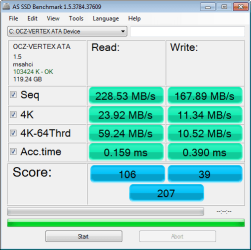
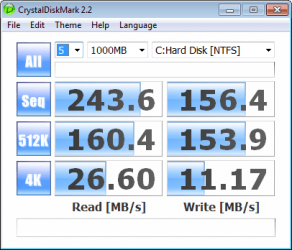
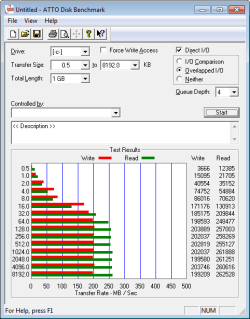
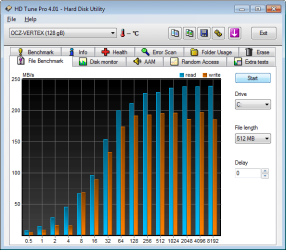
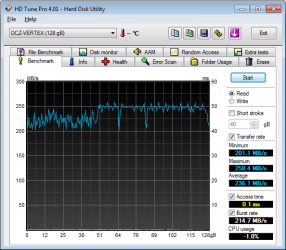
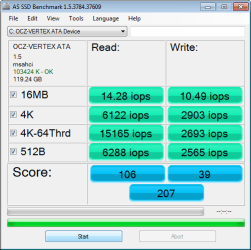
Show us your SSD performance

Status
Not open for further replies.
Hate to bring this up, but you just missed a great deal for the OCZ 120GB Vertex2, $238.

Well that bites :mad:

Oh well.
 

My Computer

Computer type
PC/Desktop
Computer Manufacturer/Model Number
Custom built by me.
OS
Windows 10 Pro
CPU
Intel Core i7-4770K (3.5Ghz)
Motherboard
Gigabyte G1 Sniper 5 (F10 Bios)
Memory
32 gig Corsair Dominator Platinum (4x8Gig)
Graphics Card(s)
Sapphire Tri-X R9 Fury
Sound Card
Soundblaster ZXR
Monitor(s) Displays
NEC PA242W 24" LCD Monitor
Screen Resolution
1920 x 1200
Hard Drives
Primary - Samsung 850 Pro (512gig), Samsung 840 Pro (256gig), 2TB WD Caviar Black.
PSU
EVGA Supernova 1000 G2
Case
Cooler Master HAF X
Cooling
Corsair H100i with Corsair Air Series SP120 Quiet Fans
Keyboard
Logitech Wireless Wave
Mouse
Logitech Performance MX
Internet Speed
High Speed Cable
Antivirus
Norton Security
Browser
IE11
Other Info
Memory Timings - 1866MHz @ 9-9-9-27-1T @ 1.5 volts
sygnus21, you apparently have a laptop since you say that you need at least 120GBs. I generally do not recommend SSDs for laptops because they are still too expensive for storing data. There are some recent laptops with 2 disk bays where it would make sense though.
Generally a 60GB or even a 30 to 40GB SSD is sufficient for the Win7 OS. But then you have to put your data on a spinner.
As for the preparation and maintenance - with Win7, you really do not have to do anything. As long as the BIOS can recognize the SSD, the Win7 installer can deal with it and will make all the required settings. Just make sure you disconnect all other disks that may contain a MBR - else you get into a double boot situation which may give you problems down the road. For booting, change the boot sequence in the BIOS.
If it is a Gen2 SSD, there is no maintenance down the road. The Win7 supported Trim will take care of it. I am not a fan of all those tweaks that float around the net. Just verify that the defrag is turned off (which the Win7 installer usually does), move the user data to a HDD and delete the hibernation file if you do not use hibernation. That's all.
 

My Computer

Computer Manufacturer/Model Number
HP, Dell, Gateway, Toshiba - 4 laptops and 2 desktops
OS
Vista, Windows7, Mint Mate, Zorin, Windows 8
CPU
from 1.6GHz Duo to i7
Monitor(s) Displays
2x HP w2207
Hard Drives
5x HDD, 7x SSD, 12x Externals
Keyboard
with trackball - no mices
Mouse
Trackball mice
Internet Speed
DSL 6000
sygnus21, you apparently have a laptop since you say that you need at least 120GBs.

:( Actually, I don't have a laptop.... yet. This is strictly for my desktop.

As for hard drive space, that's basically stated here... http://www.sevenforums.com/hardware-devices/18229-show-us-your-ssd-performance-61.html#post866002. And my idea situation would be two 120gig SSD drives, one for the OS, the other for games :D

This is why I'm debating on getting an SSD drive in the first place because I have to balance my wants with my finances; and for me, a 120 is the bare minimum.

As for SSD "tweaks" I don't plan on doing any, other than the most basic of basics, if there are any. I'm at a point where tweaks, and beta testing, have passed me by; I'm more of the set it and forget type now.

Thanks.
 

My Computer

Computer type
PC/Desktop
Computer Manufacturer/Model Number
Custom built by me.
OS
Windows 10 Pro
CPU
Intel Core i7-4770K (3.5Ghz)
Motherboard
Gigabyte G1 Sniper 5 (F10 Bios)
Memory
32 gig Corsair Dominator Platinum (4x8Gig)
Graphics Card(s)
Sapphire Tri-X R9 Fury
Sound Card
Soundblaster ZXR
Monitor(s) Displays
NEC PA242W 24" LCD Monitor
Screen Resolution
1920 x 1200
Hard Drives
Primary - Samsung 850 Pro (512gig), Samsung 840 Pro (256gig), 2TB WD Caviar Black.
PSU
EVGA Supernova 1000 G2
Case
Cooler Master HAF X
Cooling
Corsair H100i with Corsair Air Series SP120 Quiet Fans
Keyboard
Logitech Wireless Wave
Mouse
Logitech Performance MX
Internet Speed
High Speed Cable
Antivirus
Norton Security
Browser
IE11
Other Info
Memory Timings - 1866MHz @ 9-9-9-27-1T @ 1.5 volts
I am not a gamer so I do not know the requirements for gaming. I only know that the games seem to need a large amount of space for the files and that can be expensive to cover with the SSDs. The other day they were presenting a 1TB SSD ( World's First 1 TB 2.5" SSD from PureSilicon Is the Dream Drive ) but it was rather expensive.
 

My Computer

Computer Manufacturer/Model Number
HP, Dell, Gateway, Toshiba - 4 laptops and 2 desktops
OS
Vista, Windows7, Mint Mate, Zorin, Windows 8
CPU
from 1.6GHz Duo to i7
Monitor(s) Displays
2x HP w2207
Hard Drives
5x HDD, 7x SSD, 12x Externals
Keyboard
with trackball - no mices
Mouse
Trackball mice
Internet Speed
DSL 6000
Well I've decided to hold off for now. Will rethink at a later time.

Thanks.
 

My Computer

Computer type
PC/Desktop
Computer Manufacturer/Model Number
Custom built by me.
OS
Windows 10 Pro
CPU
Intel Core i7-4770K (3.5Ghz)
Motherboard
Gigabyte G1 Sniper 5 (F10 Bios)
Memory
32 gig Corsair Dominator Platinum (4x8Gig)
Graphics Card(s)
Sapphire Tri-X R9 Fury
Sound Card
Soundblaster ZXR
Monitor(s) Displays
NEC PA242W 24" LCD Monitor
Screen Resolution
1920 x 1200
Hard Drives
Primary - Samsung 850 Pro (512gig), Samsung 840 Pro (256gig), 2TB WD Caviar Black.
PSU
EVGA Supernova 1000 G2
Case
Cooler Master HAF X
Cooling
Corsair H100i with Corsair Air Series SP120 Quiet Fans
Keyboard
Logitech Wireless Wave
Mouse
Logitech Performance MX
Internet Speed
High Speed Cable
Antivirus
Norton Security
Browser
IE11
Other Info
Memory Timings - 1866MHz @ 9-9-9-27-1T @ 1.5 volts
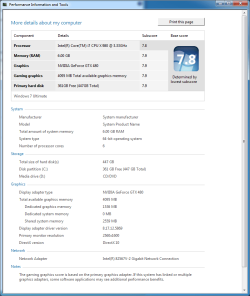
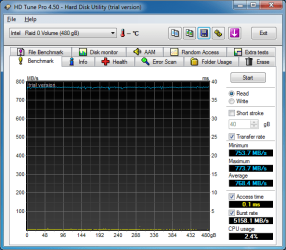
This is with 3x Intel X25M Raid 0 on a Rampage III
 

Attachments

  • wei.png
    wei.png
    83.6 KB · Views: 26
  • 01-August-2010_15-53.png
    01-August-2010_15-53.png
    62.6 KB · Views: 17

My Computer

Computer Manufacturer/Model Number
Custom
OS
Windows 7 Ult
CPU
I7 980X
Motherboard
ASUS Rampage III
Memory
6GB Corsair Dominator DDR3 1600
Graphics Card(s)
GTX480 Tri Sli
Sound Card
Creative X-Fi Titanium
Monitor(s) Displays
30" Dell
Screen Resolution
2560x1600
Hard Drives
Intel X25m G2 160GBx3 Raid 0
PSU
Silverstone 1500
Case
Corsair 800D
Cooling
Liquid
Keyboard
Logitech G19
Mouse
Logitech G9x
Internet Speed
25MB/5MB
Other Info
Speakers: Bose Compantion 5
Water Cooling: 2 Loops 120.3 for Video Cards
140.1 for CPU
Impressive performance (and an impressive system). But what I always ask myself: Does this kind of transfer rate really perform better (for the OS) than e.g. a single SSD with 200MB/sec. Since the system reads only relatively small bits of data, the data transfer rate should not play such a big role (versus the random acces time which I think is the key element).
 

My Computer

Computer Manufacturer/Model Number
HP, Dell, Gateway, Toshiba - 4 laptops and 2 desktops
OS
Vista, Windows7, Mint Mate, Zorin, Windows 8
CPU
from 1.6GHz Duo to i7
Monitor(s) Displays
2x HP w2207
Hard Drives
5x HDD, 7x SSD, 12x Externals
Keyboard
with trackball - no mices
Mouse
Trackball mice
Internet Speed
DSL 6000
Impressive performance (and an impressive system). But what I always ask myself: Does this kind of transfer rate really perform better (for the OS) than e.g. a single SSD with 200MB/sec. Since the system reads only relatively small bits of data, the data transfer rate should not play such a big role (versus the random acces time which I think is the key element).

I feel the same way that you do WHS. For running an operating system where it's just random I/O and small reads and writes...i don't believe the performance is really much improved. It's the low access time....and random I/O times which improve things. The RAID config I'm sure increased that random I/O by a bit...so there would be some gain there.

If you were copying and moving around large video files...then it would really shine. But at 700+MB/s....it would take less than 10 minutes to fill 3 x 160GB drives in a RAID0.
 

My Computer

Computer Manufacturer/Model Number
Self-Built in July 2009
OS
Windows 7 Ultimate x64
CPU
Intel Q9550 2.83Ghz OC'd to 3.40Ghz
Motherboard
Gigabyte GA-EP45-UD3R rev. 1.1, F12 BIOS
Memory
8GB G.Skill PI DDR2-800, 4-4-4-12 timings
Graphics Card(s)
EVGA 1280MB Nvidia GeForce GTX570
Sound Card
Realtek ALC899A 8 channel onboard audio
Monitor(s) Displays
23" Acer x233H
Screen Resolution
1920x1080
Hard Drives
Intel X25-M 80GB Gen 2 SSD
Western Digital 1TB Caviar Black, 32MB cache. WD1001FALS
PSU
Corsair 620HX modular
Case
Antec P182
Cooling
stock
Keyboard
ABS M1 Mechanical
Mouse
Logitech G9 Laser Mouse
Internet Speed
15/2 cable modem
Other Info
Windows and Linux enthusiast. Logitech G35 Headset.
Impressive performance (and an impressive system). But what I always ask myself: Does this kind of transfer rate really perform better (for the OS) than e.g. a single SSD with 200MB/sec. Since the system reads only relatively small bits of data, the data transfer rate should not play such a big role (versus the random acces time which I think is the key element).


Its a bit overkill for sure but I can say that Windows does "feel" faster with the additional drives in raid 0 now if its worth the price is up to the user/buyer
 

My Computer

Computer Manufacturer/Model Number
Custom
OS
Windows 7 Ult
CPU
I7 980X
Motherboard
ASUS Rampage III
Memory
6GB Corsair Dominator DDR3 1600
Graphics Card(s)
GTX480 Tri Sli
Sound Card
Creative X-Fi Titanium
Monitor(s) Displays
30" Dell
Screen Resolution
2560x1600
Hard Drives
Intel X25m G2 160GBx3 Raid 0
PSU
Silverstone 1500
Case
Corsair 800D
Cooling
Liquid
Keyboard
Logitech G19
Mouse
Logitech G9x
Internet Speed
25MB/5MB
Other Info
Speakers: Bose Compantion 5
Water Cooling: 2 Loops 120.3 for Video Cards
140.1 for CPU
Impressive performance (and an impressive system). But what I always ask myself: Does this kind of transfer rate really perform better (for the OS) than e.g. a single SSD with 200MB/sec. Since the system reads only relatively small bits of data, the data transfer rate should not play such a big role (versus the random acces time which I think is the key element).


Its a bit overkill for sure but I can say that Windows does "feel" faster with the additional drives in raid 0 now if its worth the price is up to the user/buyer

RAID0 is Always worth it, if you can afford it...
 

My Computer

Computer Manufacturer/Model Number
Custom Built, RsPC!{Ltd.}
OS
Windows 7 Ultimate x64 & OSX 10.6
CPU
Intel Core 2 Quad Q9550 12MB 2.86 @ 5.09GHz, 1.3Vcore@87
Motherboard
ASUS P5E3 Deluxe w/ Intel X58 Chipset BIOS 0304
Memory
8Gb (4x2Gb) *Serial Sequential* Corsair XMS2 DDR-800 1.8v
Graphics Card(s)
EVGA GTX 470 @865MHz Core, 1730MHz Shader, 1855MHz Mem, >43C
Sound Card
MOTU 192HD+424+3x2408Mk3, D8B, ASUS X-Fi 24, only 96kHz :(
Monitor(s) Displays
Asus VK278Q 27" 2ms HD LED Backlit LCD Monitors
Screen Resolution
2x 1920x1080
Hard Drives
2x OCZ 60GB SSDs RAID0 - OS, (100+ GB Part-Page file)
5x Samsung SATAII 1TB RAID5 - Music,
6x WD RE2 SATAII 1Tb RAID1+0 - Storage,
4x WD Dual 64MB 2TB RAID5 - Backup
3x WD Velociraptor 600GB RAID5 - Audio Production
PSU
2x Corsair 850w, Compaq R3000 UPS Backup
Case
Built Steel/Dynamat/Neopreme Shock Mount 6U Silent Rack Case
Cooling
iXrema+2x12cm Magmas 3x20cm Case Fans 4x14cm Exhaust Fans
Keyboard
Cherry 6316 Mechanical, IBM Model M, Das Keyboard, 10key USB
Mouse
2x Logitec G500... Yes 2 :)
Internet Speed
Fiber, Dual 85Mb/s up 105 Mb/s Down
Other Info
Audio system =
Dynaudio BM6A Near Fields + BM10 Sub for Reference & monitoring
Klipschorns & Servodrive Sub for Music Playback...
Mackie D8B converted into 24ch Automated DAW controller/MIDI interface, MOTU Rig for AD/DA I/O & Professional Recording, ASUS Sound Card for Music Playback (needs upgrade!)

Boot up Time = ~30sec from Dead off Init RAID, then ~9.877-12.454sec for windows, as per B
Its a bit overkill for sure but I can say that Windows does "feel" faster with the additional drives in raid 0 now if its worth the price is up to the user/buyer
Ah, the original benchmark "it feels faster". Glad you are happy with the setup....but I'd love to see with a stopwatch what the real difference is.

RAID0 is Always worth it, if you can afford it...
I couldn't disagree more completely with this statement. RAID0 increases complexity, ability to recover in the event of a mobo or controller failure, loss of all data in the event hat 1 hard drive fails. RAID0 has it's place....but it's not in every machine for every case.
 

My Computer

Computer Manufacturer/Model Number
Self-Built in July 2009
OS
Windows 7 Ultimate x64
CPU
Intel Q9550 2.83Ghz OC'd to 3.40Ghz
Motherboard
Gigabyte GA-EP45-UD3R rev. 1.1, F12 BIOS
Memory
8GB G.Skill PI DDR2-800, 4-4-4-12 timings
Graphics Card(s)
EVGA 1280MB Nvidia GeForce GTX570
Sound Card
Realtek ALC899A 8 channel onboard audio
Monitor(s) Displays
23" Acer x233H
Screen Resolution
1920x1080
Hard Drives
Intel X25-M 80GB Gen 2 SSD
Western Digital 1TB Caviar Black, 32MB cache. WD1001FALS
PSU
Corsair 620HX modular
Case
Antec P182
Cooling
stock
Keyboard
ABS M1 Mechanical
Mouse
Logitech G9 Laser Mouse
Internet Speed
15/2 cable modem
Other Info
Windows and Linux enthusiast. Logitech G35 Headset.
Different subject: Did any of you have the feeling that the BIOS splash screen stays on longer since you installed a SSD? I have 3 SSDs on 3 different systems and in all of them I have the feeling that it lengthened the BIOS phase. On one system, the BIOS phase is longer than the boot time for Win7.
 

My Computer

Computer Manufacturer/Model Number
HP, Dell, Gateway, Toshiba - 4 laptops and 2 desktops
OS
Vista, Windows7, Mint Mate, Zorin, Windows 8
CPU
from 1.6GHz Duo to i7
Monitor(s) Displays
2x HP w2207
Hard Drives
5x HDD, 7x SSD, 12x Externals
Keyboard
with trackball - no mices
Mouse
Trackball mice
Internet Speed
DSL 6000
Mine did not increase any. I had previously timed my settings with my SATA drive and timed again after SATA and that portion of the boot did not change at all. Going from IDE model to AHCI added approx 2 seconds.
 

My Computer

Computer Manufacturer/Model Number
Self-Built in July 2009
OS
Windows 7 Ultimate x64
CPU
Intel Q9550 2.83Ghz OC'd to 3.40Ghz
Motherboard
Gigabyte GA-EP45-UD3R rev. 1.1, F12 BIOS
Memory
8GB G.Skill PI DDR2-800, 4-4-4-12 timings
Graphics Card(s)
EVGA 1280MB Nvidia GeForce GTX570
Sound Card
Realtek ALC899A 8 channel onboard audio
Monitor(s) Displays
23" Acer x233H
Screen Resolution
1920x1080
Hard Drives
Intel X25-M 80GB Gen 2 SSD
Western Digital 1TB Caviar Black, 32MB cache. WD1001FALS
PSU
Corsair 620HX modular
Case
Antec P182
Cooling
stock
Keyboard
ABS M1 Mechanical
Mouse
Logitech G9 Laser Mouse
Internet Speed
15/2 cable modem
Other Info
Windows and Linux enthusiast. Logitech G35 Headset.
I don't own a stop watch but I thought mine booted faster when I first add the SSD.
 

My Computer

Computer Manufacturer/Model Number
* BFK Customs *
OS
W 7 64-bit Ultimate
CPU
Intel Q9550 Yorkfield
Motherboard
ASUS P5Q Pro
Memory
8GB Dominator 8500C5D
Graphics Card(s)
ATI : XFX 5870
Sound Card
Realtek HD Audio 7-1
Monitor(s) Displays
1x 47" LCD HDMI & 3x 26" LCD HDMI
Screen Resolution
1920x1080P & 1920x1200
Hard Drives
1x 80GB Intel X25-M G2 SSD : 1x 500GB & 1x 640GB WD Caviar Black(s)
PSU
Corsair 620HX
Case
Cooler Master RC-690
Cooling
Tuniq Tower 120, 2x 140mm and 3x 120mm case fans
Keyboard
Microsoft 500
Mouse
Razer Diamondback 3G
Internet Speed
14 Mb/s
Other Info
1x Koutech 3Gb/s SATA HDD Hot Swap Rack
I don't own a stop watch but I thought mine booted faster when I first add the SSD.
Yes, the boot of the OS is a lot faster. But the BIOS splash screen lingers longer. At least that is my impression. But I have not really measured it.
 

My Computer

Computer Manufacturer/Model Number
HP, Dell, Gateway, Toshiba - 4 laptops and 2 desktops
OS
Vista, Windows7, Mint Mate, Zorin, Windows 8
CPU
from 1.6GHz Duo to i7
Monitor(s) Displays
2x HP w2207
Hard Drives
5x HDD, 7x SSD, 12x Externals
Keyboard
with trackball - no mices
Mouse
Trackball mice
Internet Speed
DSL 6000
I don't own a stop watch but I thought mine booted faster when I first add the SSD.
Yes, the boot of the OS is a lot faster. But the BIOS splash screen lingers longer. At least that is my impression. But I have not really measured it.


Oh sorry, I did miss-read your statement, my splash screen has always gone by so fast I had to get the camera out so I could finally see/read all the options.
 

My Computer

Computer Manufacturer/Model Number
* BFK Customs *
OS
W 7 64-bit Ultimate
CPU
Intel Q9550 Yorkfield
Motherboard
ASUS P5Q Pro
Memory
8GB Dominator 8500C5D
Graphics Card(s)
ATI : XFX 5870
Sound Card
Realtek HD Audio 7-1
Monitor(s) Displays
1x 47" LCD HDMI & 3x 26" LCD HDMI
Screen Resolution
1920x1080P & 1920x1200
Hard Drives
1x 80GB Intel X25-M G2 SSD : 1x 500GB & 1x 640GB WD Caviar Black(s)
PSU
Corsair 620HX
Case
Cooler Master RC-690
Cooling
Tuniq Tower 120, 2x 140mm and 3x 120mm case fans
Keyboard
Microsoft 500
Mouse
Razer Diamondback 3G
Internet Speed
14 Mb/s
Other Info
1x Koutech 3Gb/s SATA HDD Hot Swap Rack
You are lucky. I could read a full page text off it. But at least I learn what function keys to use for Boot sequence, etc. - LOL.
 

My Computer

Computer Manufacturer/Model Number
HP, Dell, Gateway, Toshiba - 4 laptops and 2 desktops
OS
Vista, Windows7, Mint Mate, Zorin, Windows 8
CPU
from 1.6GHz Duo to i7
Monitor(s) Displays
2x HP w2207
Hard Drives
5x HDD, 7x SSD, 12x Externals
Keyboard
with trackball - no mices
Mouse
Trackball mice
Internet Speed
DSL 6000
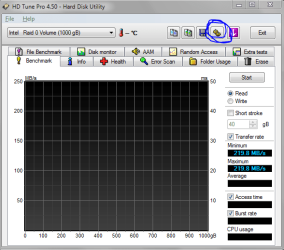
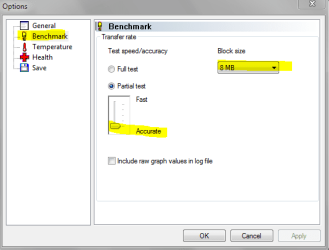
Hey guys I think this is important since the OP dident mention this, remember to bump up the block size in HDtune to see your true max performance of your ssds.
 

Attachments

  • 1.PNG
    1.PNG
    49.8 KB · Views: 9
  • 2.PNG
    2.PNG
    25.9 KB · Views: 10

My Computer

Computer Manufacturer/Model Number
Custom
OS
Windows 7 Ultimate 64bit
CPU
Intel Core i7 920
Motherboard
GA-EX58-UD3R Rev 1 F11 Bios
Memory
8 Gigs DDR3 RAM @ 1600mhz per stic
Graphics Card(s)
GTX 285
Sound Card
Realtek HD Audio
Monitor(s) Displays
Dell 19inch 16:10
Screen Resolution
1440x900
Hard Drives
Western Digital x2 500gig 7200rpm in Raid 0
PSU
OCZ Modular Extreme 700W PSU
Case
Antec 1200
Internet Speed
15mbps down 2 up
Other Info
Coolermaster V8 Cpu Cooler
OK 4 months on and after several re-images put on it this is what I have.


Steve
 

Attachments

  • OCZ SSD 5 04.08.10.png
    OCZ SSD 5 04.08.10.png
    41.4 KB · Views: 0
  • OCZ SSD 4 04.08.10.png
    OCZ SSD 4 04.08.10.png
    47.5 KB · Views: 0
  • OCZ SSD 3 04.08.10.png
    OCZ SSD 3 04.08.10.png
    19.6 KB · Views: 3
  • OCZ SSD 2 04.08.10.png
    OCZ SSD 2 04.08.10.png
    39.7 KB · Views: 2
  • OCZ SSD 1 04.08.10.png
    OCZ SSD 1 04.08.10.png
    43.3 KB · Views: 7
  • OCZ SSD 6 04.08.10.png
    OCZ SSD 6 04.08.10.png
    40.8 KB · Views: 0

My Computer

Computer Manufacturer/Model Number
Over Clockers Ultima Viper 2.80Ghz
OS
Windows 7 Ultimate 64 - OEM Service Pack 1
CPU
Intel Core i7 930 2.80Ghz Bloomfield Socket LGA 1366
Motherboard
Gigabyte GA-X58A-UD3R Intel X58 Socket 1366 DDR3
Memory
Patriot Viper 6GB 3x2GB DDR3 PC3-1200C9 1600Mhz Tri Channel
Graphics Card(s)
Asus ATI Radeon HD 5770 CuCore 1024MB GDDR5 PCI Express
Sound Card
Realtek ALC889 @ Intel 82801JB ICH10 - High Definition Audio
Monitor(s) Displays
Samsung SyncMaster 920N 19"
Screen Resolution
1280*1024
Hard Drives
1 x OCZ Vertex2 Series 120GB 2.5" SATA-II SSD
1 x Seagate Barracuda 7200.12 1TB SATA-II 32MB Cache
1 x Western Digital Caviar Green 2TB SATA-II 64 MB Cache
PSU
Corsair TX 650W ATX SLi
Case
Antec 902 Ultimate Gaming Case Black
Cooling
Prolimatech Megahalems Rev B CPU Cooler Socket 775/1156/1366
Keyboard
Microsoft Comfort Curve Keyboard
Mouse
Microsoft Optical USB
Internet Speed
ADSL24 FTTC 34.2 Mbps Down 7.1Mbps Up
Other Info
OcUK 22x DVDSATA ReWriter Black
Akasa AK-FN058 Apache Black Super Silent 120mm Fan
Printer Epson Stylus Photo R300
Scanner Canon Canoscan 8000F
Its a bit overkill for sure but I can say that Windows does "feel" faster with the additional drives in raid 0 now if its worth the price is up to the user/buyer
Ah, the original benchmark "it feels faster". Glad you are happy with the setup....but I'd love to see with a stopwatch what the real difference is.

RAID0 is Always worth it, if you can afford it...
I couldn't disagree more completely with this statement. RAID0 increases complexity, ability to recover in the event of a mobo or controller failure, loss of all data in the event hat 1 hard drive fails. RAID0 has it's place....but it's not in every machine for every case.


I use Windows home server for backups of my system. In addition my "data" folders are redirected to my server. I have no risk of data loss. Anyone with Tri Sli and raided SSD's should not be using his gaming pc for storing data and running office just my 2 cents
 

My Computer

Computer Manufacturer/Model Number
Custom
OS
Windows 7 Ult
CPU
I7 980X
Motherboard
ASUS Rampage III
Memory
6GB Corsair Dominator DDR3 1600
Graphics Card(s)
GTX480 Tri Sli
Sound Card
Creative X-Fi Titanium
Monitor(s) Displays
30" Dell
Screen Resolution
2560x1600
Hard Drives
Intel X25m G2 160GBx3 Raid 0
PSU
Silverstone 1500
Case
Corsair 800D
Cooling
Liquid
Keyboard
Logitech G19
Mouse
Logitech G9x
Internet Speed
25MB/5MB
Other Info
Speakers: Bose Compantion 5
Water Cooling: 2 Loops 120.3 for Video Cards
140.1 for CPU
Status
Not open for further replies.
Back
Top