Show us your SSD performance

Status
Not open for further replies.
I've been thinking about RAID as well but with all my data on 1TB spinner, the 128GB I have on my SSD is probably gonna last me a very, very long time (I'm only using 31%)
 

My Computer My Computer

Computer Manufacturer/Model Number
tw33k
OS
Windows 7 Ultimate (x64) SP1
CPU
Intel 3770k 4.6GHz
Motherboard
ASUS Maximus V Formula
Memory
8GB (2x 4GB) Crucial Ballistix
Graphics Card(s)
Sapphire 7950 (1060/1600)
Sound Card
On Board Realtek HD Audio
Monitor(s) Displays
27" Acer B273HU (via HDMI)
Screen Resolution
2048 x 1152
Hard Drives
Crucial M4 128GB
2TB WD Black
1TB Samsung F3 SATA
1TB WD Elite External
2TB WD USB 3.0
PSU
Corsair AX750 Gold
Case
Corsair Obsidian 800DW
Cooling
Corsair H100 (2x AP-121/2x UK-3000 push/pull)
Keyboard
Microsoft Wireless 5000
Mouse
Microsoft Wireless 5000
Internet Speed
5mb/s
Other Info
Logitech z-2300 2.1 speakers
Lamptron FC-5 v2
On my 32bit Win7 I have divided my 80GB Intel about half and half. For the system I have about 18GBs of used space and for Data about 15GBs. But my pictures and videos I keep on a 32GB USB stick. That works well for me.
On the 64bit system I use the HDD for data. But there I have only a 60GB OCZ.
 

My Computer My Computer

Computer Manufacturer/Model Number
HP, Dell, Gateway, Toshiba - 4 laptops and 2 desktops
OS
Vista, Windows7, Mint Mate, Zorin, Windows 8
CPU
from 1.6GHz Duo to i7
Monitor(s) Displays
2x HP w2207
Hard Drives
5x HDD, 7x SSD, 12x Externals
Keyboard
with trackball - no mices
Mouse
Trackball mice
Internet Speed
DSL 6000
I had my Patriot Torqx go down on me and Patriot sent me the new Inferno to replace it. I don't have access to my screenshot to the HDTune now so here's my video on the drive and benchmark.

YouTube - Patriot Inferno 120GB SSD - Quick Look
 

My Computer My Computer

Computer Manufacturer/Model Number
Keeps changing - (Custom)
OS
Windows 7 Professional x64
CPU
Intel Core i7 860
Motherboard
Gigabyte GA-P55-UD4P
Memory
4GB DDR3 Mushkin 1600Mhz @ 7-8-7-20
Graphics Card(s)
MSI GTS250 1GB DDR3 Twin Frozr
Sound Card
Onboard realtek
Monitor(s) Displays
Samsung SyncMaster 24" P2450 + Samsung 20" 2033
Screen Resolution
1920 X 1080 and 1600 X 900 (#2 system 1440 X 900)
Hard Drives
Patriot Inferno 120GB SSD + 3 WD Blue 640GB drives
PSU
Corsair 750 HX Modular
Case
Lancool PC-K62
Cooling
Cooler Master TX3 CPU cooler and 4-140mm and 1-120mm case
Keyboard
Gigabyte USB keyboard
Mouse
Microsoft wireless laser mouse 5000
Internet Speed
7 Mb down 1.5 up
Other Info
System #2: AMD Phenom II X6 1055T (Freezer 7 Pro cooler) - Gigabyte 880GMA-UD2H - WD 500GB Black - 9500GT (1GB) 500W OCZ modular PSU - Antec 200 case. System #3 (LapTop) Core 2 Duo T6670 - 320GB 7200RPM HD - 4GB DDR3 RAM.
i pointed it out because a few of us here have been having a friendly debate about which drive performs best "in the real world". it's not that I'm a Crucial fanboy. If/when new drives come out that out perform this one (noticeably outperform that is) then I'll get one no matter who makes it

Did you say real world test? I believe that PCmark Vantage is the best real world test out there. If you care so much about real world tests instead of synthetic bench marks then there are some other choices that might interest you. But I have a feeling that despite this test you would still stick with the Crucial.

FutureMark has developed a good set of hard disk tests for their PCMark Vantage Suite. Windows users can count on Vantage to show them how a drive will perform in normal day to day usage scenarios.

For most users these are the tests that matter since many of the old hat ways to measure performance have become ineffective to measure true Windows performance. ;)

G.Skill Phoenix Pro 120GB High 4K IOPS Solid State Drive Benchmarks - PCMark Vantage Hard Disk Tests :: TweakTown USA Edition
 

My Computer My Computer

Computer type
PC/Desktop
Computer Manufacturer/Model Number
Home built
OS
Windows 7 Ult, Windows 8.1 Pro,
CPU
Q9650-4.275GHz, E8600 4.5GHz, E6750-3.8GHz
Motherboard
Evga 780i FTW
Memory
G.Skill PC2 9600 1200Mhz 5 5 5 15 2T
Graphics Card(s)
GTX480
Sound Card
Asus Xonar D2
Monitor(s) Displays
HannsG
Screen Resolution
1680X1050
Hard Drives
GSkill Phoenix Pro 120GB SSD
PSU
ThermalTake Toughpower 1000Watt modular
Case
ThermalTake XaserV
Cooling
Xigmatek S1283
Keyboard
Logitech G15
Mouse
Logitech G9
Internet Speed
T1
I'm pretty much over benchmarks now. What matters to me is how the drive performs on my machine and I think it's gonna be a long while before I need to upgrade my SSD because everything I need is practically instant with my drive. I don't know how much quicker a drive could get and I don't mean measured by benchmark software.
 

My Computer My Computer

Computer Manufacturer/Model Number
tw33k
OS
Windows 7 Ultimate (x64) SP1
CPU
Intel 3770k 4.6GHz
Motherboard
ASUS Maximus V Formula
Memory
8GB (2x 4GB) Crucial Ballistix
Graphics Card(s)
Sapphire 7950 (1060/1600)
Sound Card
On Board Realtek HD Audio
Monitor(s) Displays
27" Acer B273HU (via HDMI)
Screen Resolution
2048 x 1152
Hard Drives
Crucial M4 128GB
2TB WD Black
1TB Samsung F3 SATA
1TB WD Elite External
2TB WD USB 3.0
PSU
Corsair AX750 Gold
Case
Corsair Obsidian 800DW
Cooling
Corsair H100 (2x AP-121/2x UK-3000 push/pull)
Keyboard
Microsoft Wireless 5000
Mouse
Microsoft Wireless 5000
Internet Speed
5mb/s
Other Info
Logitech z-2300 2.1 speakers
Lamptron FC-5 v2
I'm pretty much over benchmarks now. What matters to me is how the drive performs on my machine and I think it's gonna be a long while before I need to upgrade my SSD because everything I need is practically instant with my drive. I don't know how much quicker a drive could get and I don't mean measured by benchmark software.
Good point. Who needs tests if one is happy.
 

My Computer My Computer

Computer Manufacturer/Model Number
HP, Dell, Gateway, Toshiba - 4 laptops and 2 desktops
OS
Vista, Windows7, Mint Mate, Zorin, Windows 8
CPU
from 1.6GHz Duo to i7
Monitor(s) Displays
2x HP w2207
Hard Drives
5x HDD, 7x SSD, 12x Externals
Keyboard
with trackball - no mices
Mouse
Trackball mice
Internet Speed
DSL 6000
Scroes after running Paragone Alignment tool

Benchmark from ATTO (2).jpgThese my SSD scores after running the Paragone alignment tool , Pick up about 15 points on read and about 12 points on write , Alignment is important , W7 doesn't always do such a great job ??
 
Last edited:

My Computer My Computer

Computer Manufacturer/Model Number
BigBob Built
OS
Windows 7 Pro 64 bit
CPU
Xeon X3380, OC to 3.30
Motherboard
Intel DX48BT2
Memory
DDR3-1333-10600, OC to 1400Mhz
Graphics Card(s)
Two HD5770
Sound Card
IDT
Monitor(s) Displays
Hanns-G 28"
Screen Resolution
1920 x 1200
Hard Drives
Intel SSD 160 GB / WD RE4 1 TB
PSU
SeaSonic Gold 850
Case
Rosewell Windnight
Cooling
Coursair H-70 H2O
Keyboard
Logitech Wave
Mouse
Revalution VX-1
Internet Speed
25MB download 5MB upload
Other Info
Hand built SYS. Built by Me.
I'm pretty much over benchmarks now. What matters to me is how the drive performs on my machine and I think it's gonna be a long while before I need to upgrade my SSD because everything I need is practically instant with my drive. I don't know how much quicker a drive could get and I don't mean measured by benchmark software.


This is very true and the main reason it is true is that the performance boost from rotating to SSD comes almost entirely from the access time which is hundreds or thousands of times faster and it relativelty the same on all SSDs. The pure read/write speeds rarely come into full play during normal use (Meaning that the full read/write speed is virtually never attained in normal use anyway) but the access time is paramount at ALL times that the drive is accessed for reading or writing.
 

My Computer My Computer

Computer Manufacturer/Model Number
Scratch built
OS
Windows 7 x64 Ultimate
CPU
i7 960
Motherboard
Asus P6X58D
Memory
12 Gig Corsair Dominator
Graphics Card(s)
Nvidia 480
Sound Card
Maudio Delta 44 + breakout box
Monitor(s) Displays
Dell UltraSharp U2410 24in and Samsung 21 dual monitors
Screen Resolution
1920x1200 and 1280x1024
Hard Drives
Primary: Intel X-25M G2 160G SSD
Secondary: Segate baracuda 1.0 TB
HDs in AHCI mode.
PSU
Corasair TX850
Case
Cooler Master HAF
Cooling
Corsair H50
Keyboard
Logitech G15 + N52 game pad
Mouse
Logitech MX518
Internet Speed
15kbs down 4.5kbps up
Other Info
WEI 7.6
CPU & RAM 7.6
Graphics 7.9
Hard disk 7.7
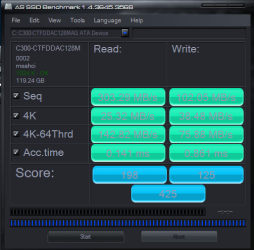
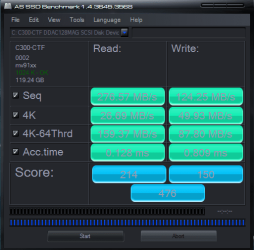
Been a lot of debate regarding the Crucial C300 and Marvell 91xx driver vs msahci so I thought I'd put it to the test. I uninstalled the Marvell driver, rebooted and Windows loaded the msahci files and got me to reboot again. I then ran AS SSD. When it was finished I reinstalled the Marvell driver (the most up to date version: 1001042) and re-ran AS SSD.

Here are the results:

crucial_6_11_2010_msahci.PNG crucial_6_11_2010_mv91xx.PNG

The drive's performance has degraded but it's only noticeable in benchmarks. It "feels" just as fast as it always has.

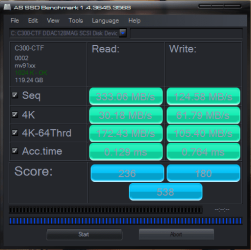
Compare those to this:

crucial_25_08_2010_1.PNG

only a few months ago.
 

My Computer My Computer

Computer Manufacturer/Model Number
tw33k
OS
Windows 7 Ultimate (x64) SP1
CPU
Intel 3770k 4.6GHz
Motherboard
ASUS Maximus V Formula
Memory
8GB (2x 4GB) Crucial Ballistix
Graphics Card(s)
Sapphire 7950 (1060/1600)
Sound Card
On Board Realtek HD Audio
Monitor(s) Displays
27" Acer B273HU (via HDMI)
Screen Resolution
2048 x 1152
Hard Drives
Crucial M4 128GB
2TB WD Black
1TB Samsung F3 SATA
1TB WD Elite External
2TB WD USB 3.0
PSU
Corsair AX750 Gold
Case
Corsair Obsidian 800DW
Cooling
Corsair H100 (2x AP-121/2x UK-3000 push/pull)
Keyboard
Microsoft Wireless 5000
Mouse
Microsoft Wireless 5000
Internet Speed
5mb/s
Other Info
Logitech z-2300 2.1 speakers
Lamptron FC-5 v2
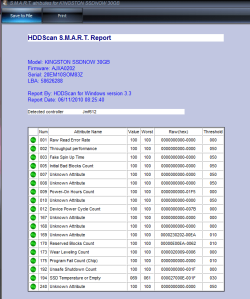
here is my smart readings
 

Attachments

  • ssd.PNG
    ssd.PNG
    20.9 KB · Views: 5

My Computer My Computer

Computer Manufacturer/Model Number
packard bell IXTREME M5722
OS
Operating System : Windows 7 Home Premium Edition 6.01.7600 SP1 (x64)
CPU
Processor : Intel Core 2 Quad Q8300 @ 2500 MHz
Motherboard
Mainboard : Packard Bell (Acer EG43M )
Memory
Physical Memory :8GB Corsair4x 2GB 800MHz C5 DDR2
Graphics Card(s)
Video Card : XFX 6700 AMD
Monitor(s) Displays
Maestro 234DL - BenQ V2220 - BenQ VW2420H
Screen Resolution
Current Display :1920x1080p pixels at 60 Hz in HD LED
Hard Drives
Hard Disks : WDC (1000 GB)
Drive C: (Hard Disk) : 428 GB available on 491 GB
Drive D: (Hard Disk) : 426 GB available on 492 GB
SAMSUNG spinpoint HD103SJ 1000.2 GB
(X 2) KINGSTON SSD NOW V 30GB
PSU
XFX ProSeries 550W PSU
Case
PACKARD BELL IXTREME
Cooling
System Blower Current: 150mA Air Flow16CFM ;Akasa 90mm rear
Keyboard
Gigabyte Aivia K8100
Mouse
TRUST-Wireless Laser Mouse - Carbon edition MI-7770C
Internet Speed
TP-LINK > TL-WN951N / AV500 Gigabit Powerline Adapters
Browser
chrome dev
Other Info
EXTRA COOLING>(FAN CONTROLLER) PC Bay Cooler 3 x 40mm fans; Akasa AK-HD-BL Blue hard drive cooler 2 x 40 mm fan 4500 rpm 29.7 dBA
Bios> American Megatrends Inc.
Version : P01-A1
Date : 08/31/2009
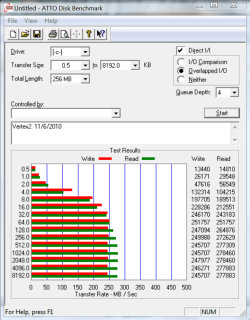
Hello everyone. I have some questions. I installed a Vertex 2 90GB drive last night. I am in AHCI mode, disconnected all other grives before installing, followed the tutorials, moved my user folders over to a spinner. Based on the comments I have heard, I am a little dissappointed. My system does seem a little faster, but not like the comments. I am including (hope i'm doing it right) some benchmarks. My main questions are:
Is this the performance I should expect?
How do I know if trim is enabled in Windows 7 and how do you schedule it?
Like I said before, I moved my user folders over to a spinner. Now I have a library for hte C drive with nothing in it and also have a library under my user nsme with all of thr info in it. Is this normal?
 

Attachments

  • vertex  as ssd.PNG
    vertex as ssd.PNG
    62 KB · Views: 3
  • Vertex2 ATTO.PNG
    Vertex2 ATTO.PNG
    42.8 KB · Views: 6

My Computers My Computers

System One System Two

  • Computer type
    PC/Desktop
    Computer Manufacturer/Model Number
    ALWAYS UNDER CONSTRUCTION
    OS
    Windows 11 Pro
    CPU
    Ryzen 9 5900X
    Motherboard
    Asus X570 Crosshair Viii Hero
    Memory
    32GB G Skill DDR4-3600
    Graphics Card(s)
    EVGA RTX 3080 FTW 3 Ultra
    Sound Card
    On Board/Sennheiser PC37X Headset
    Monitor(s) Displays
    3 X Asus 27"
    Screen Resolution
    2560x1440
    Hard Drives
    2 X 1 TB NVME drives
    PSU
    EVGA 850
    Case
    Phanteks Eclipse P400A
    Cooling
    EVGA 280 AIO
    Keyboard
    Logitech G510s/ Logitech G13
    Mouse
    Logitech G502
    Internet Speed
    24/1
    Antivirus
    ESET/MBAM Pro/SAS Pro
    Browser
    Chrome/ Firefox/ Edge
  • Computer type
    Laptop
    System Manufacturer/Model Number
    Dell 16 Plus
    OS
    Windows 11 Pro
    CPU
    Intel Ultra 9 288V
    Memory
    32 GB LPDDR5X 8533
    Monitor(s) Displays
    16" Mini-LED HDR600 Touch 90 Hz
    Screen Resolution
    2560X1600
    Hard Drives
    1 TB NVME
Your performance numbers are not withing the norm that I experience with a Vertex.

1. Trim you can check with this command: fsutil behavior query DisableDeleteNotify
If Command Prompt returns a 0 (zero), your drive supports TRIM and it is enabled.


2. I suggest you also check the alignment. You use the following commands.

Diskpart
List disk
Select disk n
List partition

Now you should see a result like this.

Partition ### Type Size Offset
------------- ---------------- ------- -------
Partition 1 Primary 59 GB 1024 KB

The offset has to be divisible by 4.
 

My Computer My Computer

Computer Manufacturer/Model Number
HP, Dell, Gateway, Toshiba - 4 laptops and 2 desktops
OS
Vista, Windows7, Mint Mate, Zorin, Windows 8
CPU
from 1.6GHz Duo to i7
Monitor(s) Displays
2x HP w2207
Hard Drives
5x HDD, 7x SSD, 12x Externals
Keyboard
with trackball - no mices
Mouse
Trackball mice
Internet Speed
DSL 6000
You can compare your SSD with other OCZ and the same chipset.

AS SSD Benchmark thread


Your read/write numbers aren't too bad but, the Acc. time is a little off.

Did you update the firmware?

EDIT:
Just noticed in your AS SSD snip, you have 1.22 firmware (new is 1.23) it's not that old.
MS storage driver msachi
64k - ok, that's your offset alignment, green font indicates is ok.
/EDIT


For reference.

Sandforce Firmware update 1.23 (Vertex2, Agility2, Vertex-LE, Vertex2 Pro, Vertex2-EX, Vertex2-E, Agility2-E)

Some good information.
THE BASIC GUIDE & FAQ - ABC for OCZ SSD


As for Trim,

Q. How do I know if TRIM is enabled on my OCZ SSD?
A. In Windows 7, go to start/run/cmd), type the following:
fsutil.exe behaviour query DisableDeleteNotify.
It should respond back with:
DisableDeleteNotify=0 if TRIM support is ready and active.
If it's not.. type fsutil.exe behavior set DisableDeleteNotify 0.

 
Last edited:

My Computer My Computer

Computer type
PC/Desktop
Computer Manufacturer/Model Number
76~2.0
OS
Windows 7 Ult x64 - SP1/ Windows 8 Pro x64
CPU
Intel Core i5-3570K 4.6GHz
Motherboard
Gigabyte GA-Z77X UD3H, f18
Memory
8GB (2X4GB) DDR3 1600 Corsair Vengeance CL8 1.5v
Graphics Card(s)
Sapphire HD 7770 Vapor-X OC 1GB DDR5
Sound Card
Onboard VIA VT2021
Monitor(s) Displays
22" LCD Dell
Screen Resolution
1680x1050
Hard Drives
Samsung 840Pro 128GB SSD,
Seagate Barracuda 500GB SATA2 7200rpm 32MB cache, Seagate Barracuda 1TB SATA2 7200rpm 32MB cache,
PSU
Corsair HX650W
Case
Cooler Master Storm Scout
Cooling
Corsair H80 2x12cm Noctua NF P12 , 2x14cm case fans
Keyboard
Logitech Wave
Mouse
CM Sentinel
Internet Speed
Dismal
Antivirus
Avast
Browser
Opera Next
Other Info
Haswell laptop: HP Envy 17t-j, i7-4700MQ, GeForce 740M 2GB DDR3, 17.3" Full HD 1920x1080, 16GB RAM, Samsung 840 Pro 128GB, 1TB Hitachi 7200 HDD,
Desktop: eSATA ports,
External eSATA Seagate 500GB SATA2 7200rpm,
External WD USB 500GB
Been a lot of debate regarding the Crucial C300 and Marvell 91xx driver vs msahci so I thought I'd put it to the test. I uninstalled the Marvell driver, rebooted and Windows loaded the msahci files and got me to reboot again. I then ran AS SSD. When it was finished I reinstalled the Marvell driver (the most up to date version: 1001042) and re-ran AS SSD.

Here are the results:

View attachment 111463 View attachment 111464

The drive's performance has degraded but it's only noticeable in benchmarks. It "feels" just as fast as it always has.

Compare those to this:

View attachment 111466

only a few months ago.


Your Marvell driver is doing good for you, looks like you're seeing what has been referred to as the 'worn in performance'.

Just did a quick search and found this mentioned, seems it's due to the nand wearing.
Lot's of heated discussion on how/if it can be fixed.

It's great to be on the bleeding edge of hardware ;)
 

My Computer My Computer

Computer type
PC/Desktop
Computer Manufacturer/Model Number
76~2.0
OS
Windows 7 Ult x64 - SP1/ Windows 8 Pro x64
CPU
Intel Core i5-3570K 4.6GHz
Motherboard
Gigabyte GA-Z77X UD3H, f18
Memory
8GB (2X4GB) DDR3 1600 Corsair Vengeance CL8 1.5v
Graphics Card(s)
Sapphire HD 7770 Vapor-X OC 1GB DDR5
Sound Card
Onboard VIA VT2021
Monitor(s) Displays
22" LCD Dell
Screen Resolution
1680x1050
Hard Drives
Samsung 840Pro 128GB SSD,
Seagate Barracuda 500GB SATA2 7200rpm 32MB cache, Seagate Barracuda 1TB SATA2 7200rpm 32MB cache,
PSU
Corsair HX650W
Case
Cooler Master Storm Scout
Cooling
Corsair H80 2x12cm Noctua NF P12 , 2x14cm case fans
Keyboard
Logitech Wave
Mouse
CM Sentinel
Internet Speed
Dismal
Antivirus
Avast
Browser
Opera Next
Other Info
Haswell laptop: HP Envy 17t-j, i7-4700MQ, GeForce 740M 2GB DDR3, 17.3" Full HD 1920x1080, 16GB RAM, Samsung 840 Pro 128GB, 1TB Hitachi 7200 HDD,
Desktop: eSATA ports,
External eSATA Seagate 500GB SATA2 7200rpm,
External WD USB 500GB

My Computer My Computer

Computer Manufacturer/Model Number
tw33k
OS
Windows 7 Ultimate (x64) SP1
CPU
Intel 3770k 4.6GHz
Motherboard
ASUS Maximus V Formula
Memory
8GB (2x 4GB) Crucial Ballistix
Graphics Card(s)
Sapphire 7950 (1060/1600)
Sound Card
On Board Realtek HD Audio
Monitor(s) Displays
27" Acer B273HU (via HDMI)
Screen Resolution
2048 x 1152
Hard Drives
Crucial M4 128GB
2TB WD Black
1TB Samsung F3 SATA
1TB WD Elite External
2TB WD USB 3.0
PSU
Corsair AX750 Gold
Case
Corsair Obsidian 800DW
Cooling
Corsair H100 (2x AP-121/2x UK-3000 push/pull)
Keyboard
Microsoft Wireless 5000
Mouse
Microsoft Wireless 5000
Internet Speed
5mb/s
Other Info
Logitech z-2300 2.1 speakers
Lamptron FC-5 v2
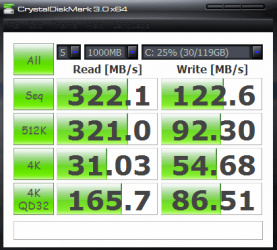
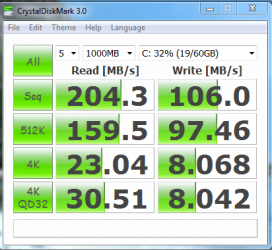
I recently upgraded my DAW, with a fresh install.

i5-650, 4gb ram, win7 32,

Corsair Nova 64gb, rated at 270/130
I'm not using AHCI, but am very pleased with the system response.
And a 6.9 WEI
 

Attachments

  • Corsair Nova AS SSD 110610.PNG
    Corsair Nova AS SSD 110610.PNG
    20.9 KB · Views: 0
  • Corsair Nova CDM3 110610.PNG
    Corsair Nova CDM3 110610.PNG
    19.9 KB · Views: 0

My Computer My Computer

Computer type
PC/Desktop
Computer Manufacturer/Model Number
Homebuilt
OS
windows 7 32
CPU
Intel i7 4770K
Motherboard
Asus Z97-A
Memory
Corsair Vengeance 8gb DDR3 2133(PC3 17000)
Graphics Card(s)
nVidia GTX 660 2gb
Sound Card
Asus Xonar D1
Monitor(s) Displays
Dell Ultrasharp UM2913WM
Screen Resolution
2560x1080 32
Hard Drives
PNY 240gb SSD
Seagate 500gb SSD
PSU
Corsair CXM 600
Case
Fractal Design Define R4
Cooling
Arctic Freezer Xtreme rev 2
Keyboard
Logitech K800 Wireless Illuminated
Mouse
MicroSoft 5000
Internet Speed
Cable
Antivirus
MSE
Browser
IE 11 and Chrome
Other Info
Samsung DVD-RW
Cambridge 4.1 speakers
Hauppauge HVR-950 USB Tuner
Asus Optimized Overclock to 4.4ghz
hi all im just wondering is anyone using there ssd for the page file?
 

My Computer My Computer

Computer Manufacturer/Model Number
packard bell IXTREME M5722
OS
Operating System : Windows 7 Home Premium Edition 6.01.7600 SP1 (x64)
CPU
Processor : Intel Core 2 Quad Q8300 @ 2500 MHz
Motherboard
Mainboard : Packard Bell (Acer EG43M )
Memory
Physical Memory :8GB Corsair4x 2GB 800MHz C5 DDR2
Graphics Card(s)
Video Card : XFX 6700 AMD
Monitor(s) Displays
Maestro 234DL - BenQ V2220 - BenQ VW2420H
Screen Resolution
Current Display :1920x1080p pixels at 60 Hz in HD LED
Hard Drives
Hard Disks : WDC (1000 GB)
Drive C: (Hard Disk) : 428 GB available on 491 GB
Drive D: (Hard Disk) : 426 GB available on 492 GB
SAMSUNG spinpoint HD103SJ 1000.2 GB
(X 2) KINGSTON SSD NOW V 30GB
PSU
XFX ProSeries 550W PSU
Case
PACKARD BELL IXTREME
Cooling
System Blower Current: 150mA Air Flow16CFM ;Akasa 90mm rear
Keyboard
Gigabyte Aivia K8100
Mouse
TRUST-Wireless Laser Mouse - Carbon edition MI-7770C
Internet Speed
TP-LINK > TL-WN951N / AV500 Gigabit Powerline Adapters
Browser
chrome dev
Other Info
EXTRA COOLING>(FAN CONTROLLER) PC Bay Cooler 3 x 40mm fans; Akasa AK-HD-BL Blue hard drive cooler 2 x 40 mm fan 4500 rpm 29.7 dBA
Bios> American Megatrends Inc.
Version : P01-A1
Date : 08/31/2009
I am. I don't agree with moving it to another drive. There have been plenty of discussions on this on this forum.
 

My Computer My Computer

Computer Manufacturer/Model Number
tw33k
OS
Windows 7 Ultimate (x64) SP1
CPU
Intel 3770k 4.6GHz
Motherboard
ASUS Maximus V Formula
Memory
8GB (2x 4GB) Crucial Ballistix
Graphics Card(s)
Sapphire 7950 (1060/1600)
Sound Card
On Board Realtek HD Audio
Monitor(s) Displays
27" Acer B273HU (via HDMI)
Screen Resolution
2048 x 1152
Hard Drives
Crucial M4 128GB
2TB WD Black
1TB Samsung F3 SATA
1TB WD Elite External
2TB WD USB 3.0
PSU
Corsair AX750 Gold
Case
Corsair Obsidian 800DW
Cooling
Corsair H100 (2x AP-121/2x UK-3000 push/pull)
Keyboard
Microsoft Wireless 5000
Mouse
Microsoft Wireless 5000
Internet Speed
5mb/s
Other Info
Logitech z-2300 2.1 speakers
Lamptron FC-5 v2
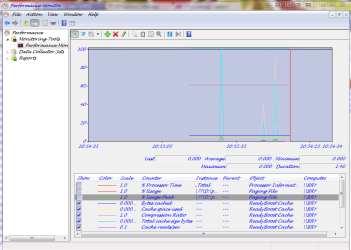
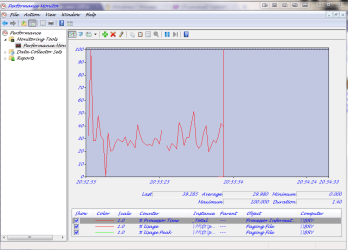
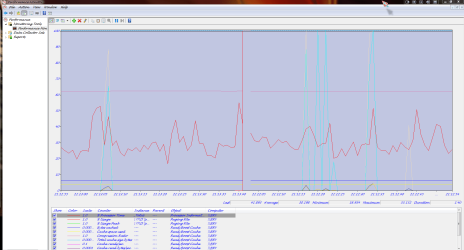
i took my page file off the default hdd c drive and moved it to the ssd and i have readyboost on it to, in the diagnostic program in windows 7 i can see improvement and see the readyboost working fine.
 

Attachments

  • readyboost.PNG
    readyboost.PNG
    37.3 KB · Views: 5
  • page file.PNG
    page file.PNG
    30 KB · Views: 3
  • page and readyboost.PNG
    page and readyboost.PNG
    49.1 KB · Views: 4
Last edited:

My Computer My Computer

Computer Manufacturer/Model Number
packard bell IXTREME M5722
OS
Operating System : Windows 7 Home Premium Edition 6.01.7600 SP1 (x64)
CPU
Processor : Intel Core 2 Quad Q8300 @ 2500 MHz
Motherboard
Mainboard : Packard Bell (Acer EG43M )
Memory
Physical Memory :8GB Corsair4x 2GB 800MHz C5 DDR2
Graphics Card(s)
Video Card : XFX 6700 AMD
Monitor(s) Displays
Maestro 234DL - BenQ V2220 - BenQ VW2420H
Screen Resolution
Current Display :1920x1080p pixels at 60 Hz in HD LED
Hard Drives
Hard Disks : WDC (1000 GB)
Drive C: (Hard Disk) : 428 GB available on 491 GB
Drive D: (Hard Disk) : 426 GB available on 492 GB
SAMSUNG spinpoint HD103SJ 1000.2 GB
(X 2) KINGSTON SSD NOW V 30GB
PSU
XFX ProSeries 550W PSU
Case
PACKARD BELL IXTREME
Cooling
System Blower Current: 150mA Air Flow16CFM ;Akasa 90mm rear
Keyboard
Gigabyte Aivia K8100
Mouse
TRUST-Wireless Laser Mouse - Carbon edition MI-7770C
Internet Speed
TP-LINK > TL-WN951N / AV500 Gigabit Powerline Adapters
Browser
chrome dev
Other Info
EXTRA COOLING>(FAN CONTROLLER) PC Bay Cooler 3 x 40mm fans; Akasa AK-HD-BL Blue hard drive cooler 2 x 40 mm fan 4500 rpm 29.7 dBA
Bios> American Megatrends Inc.
Version : P01-A1
Date : 08/31/2009

My Computer My Computer

Computer Manufacturer/Model Number
tw33k
OS
Windows 7 Ultimate (x64) SP1
CPU
Intel 3770k 4.6GHz
Motherboard
ASUS Maximus V Formula
Memory
8GB (2x 4GB) Crucial Ballistix
Graphics Card(s)
Sapphire 7950 (1060/1600)
Sound Card
On Board Realtek HD Audio
Monitor(s) Displays
27" Acer B273HU (via HDMI)
Screen Resolution
2048 x 1152
Hard Drives
Crucial M4 128GB
2TB WD Black
1TB Samsung F3 SATA
1TB WD Elite External
2TB WD USB 3.0
PSU
Corsair AX750 Gold
Case
Corsair Obsidian 800DW
Cooling
Corsair H100 (2x AP-121/2x UK-3000 push/pull)
Keyboard
Microsoft Wireless 5000
Mouse
Microsoft Wireless 5000
Internet Speed
5mb/s
Other Info
Logitech z-2300 2.1 speakers
Lamptron FC-5 v2
Status
Not open for further replies.
Back
Top