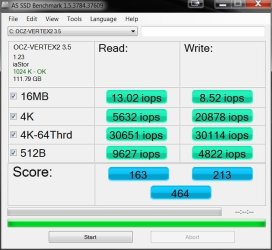
Show us your SSD performance

Status
Not open for further replies.

thanks for link im quite pleased with the ssd performance over hdd i use kubuntu a linux distro on one ssd (i have two of them got for a very good price both new) and have no trouble with it whatsoever runs it very well, my windows 7 is on the hdd that works fine, i plan to build a new machine next year so will just use ssd i think. i no they are expensive but the prices will come down with market demand.
 

My Computer My Computer

Computer Manufacturer/Model Number
packard bell IXTREME M5722
OS
Operating System : Windows 7 Home Premium Edition 6.01.7600 SP1 (x64)
CPU
Processor : Intel Core 2 Quad Q8300 @ 2500 MHz
Motherboard
Mainboard : Packard Bell (Acer EG43M )
Memory
Physical Memory :8GB Corsair4x 2GB 800MHz C5 DDR2
Graphics Card(s)
Video Card : XFX 6700 AMD
Monitor(s) Displays
Maestro 234DL - BenQ V2220 - BenQ VW2420H
Screen Resolution
Current Display :1920x1080p pixels at 60 Hz in HD LED
Hard Drives
Hard Disks : WDC (1000 GB)
Drive C: (Hard Disk) : 428 GB available on 491 GB
Drive D: (Hard Disk) : 426 GB available on 492 GB
SAMSUNG spinpoint HD103SJ 1000.2 GB
(X 2) KINGSTON SSD NOW V 30GB
PSU
XFX ProSeries 550W PSU
Case
PACKARD BELL IXTREME
Cooling
System Blower Current: 150mA Air Flow16CFM ;Akasa 90mm rear
Keyboard
Gigabyte Aivia K8100
Mouse
TRUST-Wireless Laser Mouse - Carbon edition MI-7770C
Internet Speed
TP-LINK > TL-WN951N / AV500 Gigabit Powerline Adapters
Browser
chrome dev
Other Info
EXTRA COOLING>(FAN CONTROLLER) PC Bay Cooler 3 x 40mm fans; Akasa AK-HD-BL Blue hard drive cooler 2 x 40 mm fan 4500 rpm 29.7 dBA
Bios> American Megatrends Inc.
Version : P01-A1
Date : 08/31/2009
hi all im just wondering is anyone using there ssd for the page file?
Sure, what else would you use. But if you have e.g. 4GBs of RAM, there will normally be very little paging activity. You can check that in Resource Monitor > Memory tab > Hard Faults.
But if you have a smaller RAM (2GBs or less), it makes a lot of sense to keep the pagefile on the SSD and to benifit from it's immediate access.
 

My Computer My Computer

Computer Manufacturer/Model Number
HP, Dell, Gateway, Toshiba - 4 laptops and 2 desktops
OS
Vista, Windows7, Mint Mate, Zorin, Windows 8
CPU
from 1.6GHz Duo to i7
Monitor(s) Displays
2x HP w2207
Hard Drives
5x HDD, 7x SSD, 12x Externals
Keyboard
with trackball - no mices
Mouse
Trackball mice
Internet Speed
DSL 6000
Used diskpart clean all then restored an image

crucial_7_11_2010_1.PNG

write speeds still lower tho.
 

My Computer My Computer

Computer Manufacturer/Model Number
tw33k
OS
Windows 7 Ultimate (x64) SP1
CPU
Intel 3770k 4.6GHz
Motherboard
ASUS Maximus V Formula
Memory
8GB (2x 4GB) Crucial Ballistix
Graphics Card(s)
Sapphire 7950 (1060/1600)
Sound Card
On Board Realtek HD Audio
Monitor(s) Displays
27" Acer B273HU (via HDMI)
Screen Resolution
2048 x 1152
Hard Drives
Crucial M4 128GB
2TB WD Black
1TB Samsung F3 SATA
1TB WD Elite External
2TB WD USB 3.0
PSU
Corsair AX750 Gold
Case
Corsair Obsidian 800DW
Cooling
Corsair H100 (2x AP-121/2x UK-3000 push/pull)
Keyboard
Microsoft Wireless 5000
Mouse
Microsoft Wireless 5000
Internet Speed
5mb/s
Other Info
Logitech z-2300 2.1 speakers
Lamptron FC-5 v2
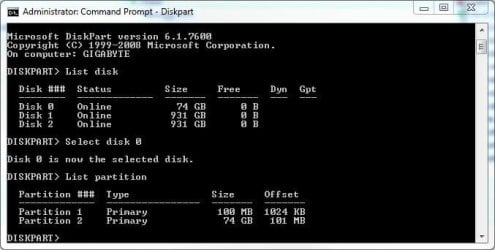
...The offset has to be divisible by 4.
I've got my Recovery Partition on the SSD and it is indeed 1024. The main 74GB partition is coming up as 101MB (or just after the 100MB Recovery Partition). I'm assuming the 1MB difference = 1024KB.

Does this sound right? :)
 

Attachments

  • Diskpart 110610.JPG
    Diskpart 110610.JPG
    36.3 KB · Views: 17

My Computer My Computer

Computer Manufacturer/Model Number
Self
OS
Main - Windows 7 Pro SP1 64-Bit; 2nd - Windows Server 2008 R2
CPU
Main - Core i7 2600K; 2nd - Core i7 920
Motherboard
Main - Asus P8Z68-V Pro/Gen3; 2nd - Gigabyte GA-EX58-UDR3
Memory
Main - 16GB Corsair Vengeance; 2nd - 12GB Corsair Vengeance
Graphics Card(s)
Main - XFX Radeon 6870 1GB; 2nd - XFX Radeon 4870 1GB
Sound Card
Both: Onboard Realtek Azalia
Monitor(s) Displays
Main - Hann 25" + I-INC 25" + Acer 23"; 2nd - Upgrading Soon
Screen Resolution
Main - 1920x1080 (All Three Monitors); 2nd - Upgrading Soon
Hard Drives
Main - (1) Crucial M4 128GB (Boot)
Main - (1) Seagate 2TB 64MB Cache (Data)
Main - (1) Seagate 2TB 64MB Cache (Data Backup)
2nd - (1) Intel X25-M SSD 80GB (Boot)
2nd - (3) Seagate 1TB 32MB Cache (Data Backup)
2nd - (1) Seagate 320GB (Because)
PSU
Main - OCZ 600W Modular; 2nd - OCZ 600W
Case
Main - Thermaltake Element G; 2nd - NZXT something or other
Cooling
Main - Corsair H80; 2nd - Prolimatech Megahalems
Keyboard
Main - Razer Reclusa; 2nd - Old MS Keyboard
Mouse
Main - Logitech MX Revolution; 2nd - Old MS Mouse
Internet Speed
20Mbps Time-Warner Cable
hi all im just wondering is anyone using there ssd for the page file?


I have the page file on my SSD.
Reduced the size to 400MB because of my 8GB RAM.

Everything is working very well.


...The offset has to be divisible by 4.
I've got my Recovery Partition on the SSD and it is indeed 1024. The main 74GB partition is coming up as 101MB (or just after the 100MB Recovery Partition). I'm assuming the 1MB difference = 1024KB.

Does this sound right? :)


I think you're talking about the System Reserved partition.

The Recovery partition is basically the re-installation DVD added in a partition so a DVD won't have to be provided. This also makes it easier to re-install to OEM factory installed state. The Recovery Partition is usually added by OEMs.

The System Reserved partition is usually 100mb, but can be larger, and holds the Windows BCD store that the system boot files are kept in.

In your Disk Part snip, looks like you're talking about the 'Offset' which is the spacing used to align the partitions. This is very important for SSDs.
The 'Offset' 1MB difference = 1024KB, is correct.

Your Disk Part snip looks the same as mine, except for SSD size.
 

My Computer My Computer

Computer type
PC/Desktop
Computer Manufacturer/Model Number
76~2.0
OS
Windows 7 Ult x64 - SP1/ Windows 8 Pro x64
CPU
Intel Core i5-3570K 4.6GHz
Motherboard
Gigabyte GA-Z77X UD3H, f18
Memory
8GB (2X4GB) DDR3 1600 Corsair Vengeance CL8 1.5v
Graphics Card(s)
Sapphire HD 7770 Vapor-X OC 1GB DDR5
Sound Card
Onboard VIA VT2021
Monitor(s) Displays
22" LCD Dell
Screen Resolution
1680x1050
Hard Drives
Samsung 840Pro 128GB SSD,
Seagate Barracuda 500GB SATA2 7200rpm 32MB cache, Seagate Barracuda 1TB SATA2 7200rpm 32MB cache,
PSU
Corsair HX650W
Case
Cooler Master Storm Scout
Cooling
Corsair H80 2x12cm Noctua NF P12 , 2x14cm case fans
Keyboard
Logitech Wave
Mouse
CM Sentinel
Internet Speed
Dismal
Antivirus
Avast
Browser
Opera Next
Other Info
Haswell laptop: HP Envy 17t-j, i7-4700MQ, GeForce 740M 2GB DDR3, 17.3" Full HD 1920x1080, 16GB RAM, Samsung 840 Pro 128GB, 1TB Hitachi 7200 HDD,
Desktop: eSATA ports,
External eSATA Seagate 500GB SATA2 7200rpm,
External WD USB 500GB
...I think you're talking about the System Reserved partition...
You are right. Just a slip of the tongue fingers. :o

Thanks. :)
 

My Computer My Computer

Computer Manufacturer/Model Number
Self
OS
Main - Windows 7 Pro SP1 64-Bit; 2nd - Windows Server 2008 R2
CPU
Main - Core i7 2600K; 2nd - Core i7 920
Motherboard
Main - Asus P8Z68-V Pro/Gen3; 2nd - Gigabyte GA-EX58-UDR3
Memory
Main - 16GB Corsair Vengeance; 2nd - 12GB Corsair Vengeance
Graphics Card(s)
Main - XFX Radeon 6870 1GB; 2nd - XFX Radeon 4870 1GB
Sound Card
Both: Onboard Realtek Azalia
Monitor(s) Displays
Main - Hann 25" + I-INC 25" + Acer 23"; 2nd - Upgrading Soon
Screen Resolution
Main - 1920x1080 (All Three Monitors); 2nd - Upgrading Soon
Hard Drives
Main - (1) Crucial M4 128GB (Boot)
Main - (1) Seagate 2TB 64MB Cache (Data)
Main - (1) Seagate 2TB 64MB Cache (Data Backup)
2nd - (1) Intel X25-M SSD 80GB (Boot)
2nd - (3) Seagate 1TB 32MB Cache (Data Backup)
2nd - (1) Seagate 320GB (Because)
PSU
Main - OCZ 600W Modular; 2nd - OCZ 600W
Case
Main - Thermaltake Element G; 2nd - NZXT something or other
Cooling
Main - Corsair H80; 2nd - Prolimatech Megahalems
Keyboard
Main - Razer Reclusa; 2nd - Old MS Keyboard
Mouse
Main - Logitech MX Revolution; 2nd - Old MS Mouse
Internet Speed
20Mbps Time-Warner Cable
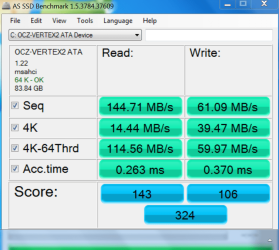
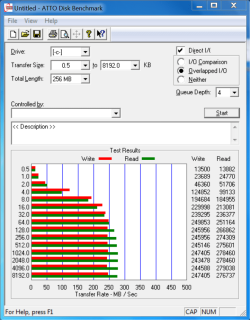
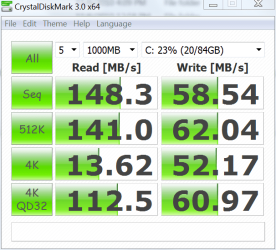
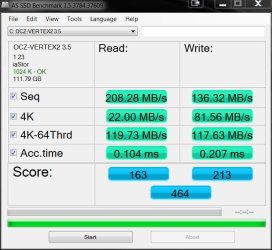
I hope I am posting in the correct forum. I am relatively new to the forum and brand new to ssd's. I posted yesterday and recieved some suggestions which I did most of them. I did not update the latest firmware because the moderator of the OCZ forum said that the new firmware "upsets windows 7" and that he recommended using the new firmware on a second drive only. I installed the new vertex 2 on Friday. All other drives were disconnected. I used Barefoot Kids tutorial (except for the clean all cmd). Based on the suggestions from yesterday, I have confirmed that trim is enabled and that the drive is aligned at 64. here are the several tests I have run:
as ssd test 2.PNGATTO TEST 2.PNGCrystal Diskmark Test.PNG

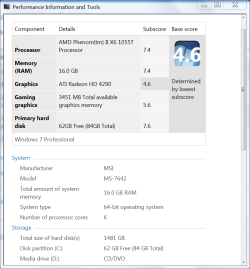
Most of the tests are quite low. However, I know the WEI is not a very reliable tool, however I ran it and got this

WEI.PNG

whish is not so bad. I also tan the smart test from the OCZ tool box and received these results. I don't know what they mean but others here probably do.
SMART TEST.PNG

I am open to any suggestions, but be reminded that I know nothing about SSD's or how to update firmware or if I am supposed to do anythin with trim or if windows does it itself. Any help would be appreciated. Thanks in advance
 

My Computers My Computers

System One System Two

  • Computer type
    PC/Desktop
    Computer Manufacturer/Model Number
    ALWAYS UNDER CONSTRUCTION
    OS
    Windows 11 Pro
    CPU
    Ryzen 9 5900X
    Motherboard
    Asus X570 Crosshair Viii Hero
    Memory
    32GB G Skill DDR4-3600
    Graphics Card(s)
    EVGA RTX 3080 FTW 3 Ultra
    Sound Card
    On Board/Sennheiser PC37X Headset
    Monitor(s) Displays
    3 X Asus 27"
    Screen Resolution
    2560x1440
    Hard Drives
    2 X 1 TB NVME drives
    PSU
    EVGA 850
    Case
    Phanteks Eclipse P400A
    Cooling
    EVGA 280 AIO
    Keyboard
    Logitech G510s/ Logitech G13
    Mouse
    Logitech G502
    Internet Speed
    24/1
    Antivirus
    ESET/MBAM Pro/SAS Pro
    Browser
    Chrome/ Firefox/ Edge
  • Computer type
    Laptop
    System Manufacturer/Model Number
    Dell 16 Plus
    OS
    Windows 11 Pro
    CPU
    Intel Ultra 9 288V
    Memory
    32 GB LPDDR5X 8533
    Monitor(s) Displays
    16" Mini-LED HDR600 Touch 90 Hz
    Screen Resolution
    2560X1600
    Hard Drives
    1 TB NVME
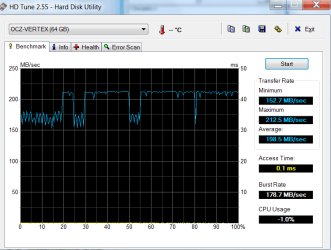
First there are the numbers for my 2 year old Vertex (firmware was updated). The important number (access times) is really good. The performance pattern is a little funny though. I wonder what was running in the background.

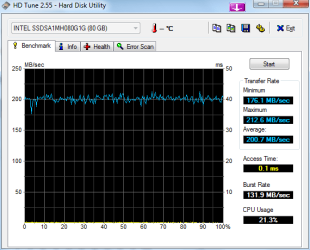
And then my first generation Intel (without Trim). I am happy with that one too.
 

Attachments

  • Vertex Nov. 2010.png
    Vertex Nov. 2010.png
    17.6 KB · Views: 10
  • Intel.png
    Intel.png
    12.9 KB · Views: 7

My Computer My Computer

Computer Manufacturer/Model Number
HP, Dell, Gateway, Toshiba - 4 laptops and 2 desktops
OS
Vista, Windows7, Mint Mate, Zorin, Windows 8
CPU
from 1.6GHz Duo to i7
Monitor(s) Displays
2x HP w2207
Hard Drives
5x HDD, 7x SSD, 12x Externals
Keyboard
with trackball - no mices
Mouse
Trackball mice
Internet Speed
DSL 6000
The pattern on Vertex 2's are like that too with HDTune, so I guess it is normal for these drives. It's not very pretty.
 

My Computer My Computer

Computer type
PC/Desktop
Computer Manufacturer/Model Number
Airbot 2.0
OS
Windows 7 Ultimate x64 SP1
CPU
Core i7 920 (D0) @ 4Ghz, *26c idle *65c full load on air
Motherboard
Asus P6X58D Premium - Sata 6Gb/s - USB 3.0
Memory
12GB DDR3 Corsair Dominator -CMD12GX3M6A1600C8 at 1600MHz
Graphics Card(s)
Zotac Geforce GTX 770
Sound Card
ASUS Xonar D2X
Monitor(s) Displays
1 LG 24" Flatron W2453V-PF 1 Samsung 24" P2450H both 2ms RT
Screen Resolution
1920x1080@60hz
Hard Drives
1 Samsung 250GB 840 Evo SSD
1 OCZ Vertex2 180GB SSD
1 TB Samsung Spinpoint F1 7200RPM 32MB cache
2 500GB WD Caviar Blacks 7200RPM 32MB cache (WD5001AALS)

Pioneer DVD Burner DVR-S18M
PSU
Corsair HX1000W
Case
Cooler Master HAF 932
Cooling
Case Fans *3 230mm, *1 140mm/CPU - *Tuniq Tower 120 Extreme
Keyboard
Logitech Wireless MK700
Mouse
Logitech Wireless MK700
Internet Speed
DL 15 Mbps UL 0.98 Mbps
Antivirus
None
Browser
Firefox Nightly
Other Info
Processor-7.7 *RAM- 7.9 *Graphics-7.9 *Gaming Graphics- 7.9 *SSD- 7.8 W.E.I final score= 7.7
*Phone- LG Nexus 5
The pattern on Vertex 2's are like that too with HDTune, so I guess it is normal for these drives. It's not very pretty.
Yeah, I noticed that too on other posts. I thought it was because of interference from running processes thst access the disc. But I am really only guessing.
 

My Computer My Computer

Computer Manufacturer/Model Number
HP, Dell, Gateway, Toshiba - 4 laptops and 2 desktops
OS
Vista, Windows7, Mint Mate, Zorin, Windows 8
CPU
from 1.6GHz Duo to i7
Monitor(s) Displays
2x HP w2207
Hard Drives
5x HDD, 7x SSD, 12x Externals
Keyboard
with trackball - no mices
Mouse
Trackball mice
Internet Speed
DSL 6000
Don't think it is from any external interfering, but same here - I haven't seen an answer as to why it's like that so it's just speculation. I've done different tests on mine with most everything stopped, still the same, and every shot of someone elses I've seen is almost an identical pattern, or very similar.
 

My Computer My Computer

Computer type
PC/Desktop
Computer Manufacturer/Model Number
Airbot 2.0
OS
Windows 7 Ultimate x64 SP1
CPU
Core i7 920 (D0) @ 4Ghz, *26c idle *65c full load on air
Motherboard
Asus P6X58D Premium - Sata 6Gb/s - USB 3.0
Memory
12GB DDR3 Corsair Dominator -CMD12GX3M6A1600C8 at 1600MHz
Graphics Card(s)
Zotac Geforce GTX 770
Sound Card
ASUS Xonar D2X
Monitor(s) Displays
1 LG 24" Flatron W2453V-PF 1 Samsung 24" P2450H both 2ms RT
Screen Resolution
1920x1080@60hz
Hard Drives
1 Samsung 250GB 840 Evo SSD
1 OCZ Vertex2 180GB SSD
1 TB Samsung Spinpoint F1 7200RPM 32MB cache
2 500GB WD Caviar Blacks 7200RPM 32MB cache (WD5001AALS)

Pioneer DVD Burner DVR-S18M
PSU
Corsair HX1000W
Case
Cooler Master HAF 932
Cooling
Case Fans *3 230mm, *1 140mm/CPU - *Tuniq Tower 120 Extreme
Keyboard
Logitech Wireless MK700
Mouse
Logitech Wireless MK700
Internet Speed
DL 15 Mbps UL 0.98 Mbps
Antivirus
None
Browser
Firefox Nightly
Other Info
Processor-7.7 *RAM- 7.9 *Graphics-7.9 *Gaming Graphics- 7.9 *SSD- 7.8 W.E.I final score= 7.7
*Phone- LG Nexus 5
I hope I am posting in the correct forum. I am relatively new to the forum and brand new to ssd's. I posted yesterday and recieved some suggestions which I did most of them. I did not update the latest firmware because the moderator of the OCZ forum said that the new firmware "upsets windows 7" and that he recommended using the new firmware on a second drive only. I installed the new vertex 2 on Friday. All other drives were disconnected. I used Barefoot Kids tutorial (except for the clean all cmd). Based on the suggestions from yesterday, I have confirmed that trim is enabled and that the drive is aligned at 64. here are the several tests I have run:

Most of the tests are quite low. However, I know the WEI is not a very reliable tool, however I ran it and got this

whish is not so bad. I also tan the smart test from the OCZ tool box and received these results. I don't know what they mean but others here probably do.

I am open to any suggestions, but be reminded that I know nothing about SSD's or how to update firmware or if I am supposed to do anythin with trim or if windows does it itself. Any help would be appreciated. Thanks in advance

Your access times are low.

Check for chipset driver updates, set your Power Options to High Performance.

Is your SSD Write caching enabled?


Have you seen this OCZ forum thread:
OCZ Sandforce (Agility2/Vertex2) expected Benchmarks and General Info

From the second post:

Here is the thing, if you hammer the driver with say enough writes that the drive would under normal use/see in 7 days within a few hrs, the drive will slow down for 7 days, maybe longer. It does this to protect the nand life. So your guys seeing a 50% drop may actually see 30% which is the normal drop, then a further 20% because at some stage they have hammered the drive and then not realised its going to take 5 days or longer for the speed to creep back up. Also remember this write quantity slowdown is further impacted by how you use the drive after you have hammered it.

So take this as an example:

1 you run a few benches and fill the drive with incompressible data,...you do this a few times

2 you run As-SSD a few times and on each run the performance drops lower and lower.

3 you panic thinking the drive is broke

4 you then note its just slowed down quite a bit so continue benching to see if it has started to speed up

5 this benching is actually delaying the drive recovering
6 you note the drive has stayed dog slow....so continue with 4 to 6 AS-SSd runs per day hoping or looking for a drive speed increase

7 the drive stays dog slow

8 you post on the forum that the drive is somehow broken

What you see here is an end user actually inducing the slowdown and not allowing the drive to recover...and its really very easy for this to happen.
SF have told me a drive with incompressible data will bench sequentially a LOT SLOWER than a drive with a mix or more compressible data...so just by using AS-SSD you are actually limiting the drives speed.Also speed is directly linked to what has been written to the drive and what is being written. This seem linked to TRIM speed also where GC reallocates blocks that have had compressible data written to them faster than blocks with incompressible data.


Maybe you should wait a week before trying the AS SSD benchmark again.
 
Last edited:

My Computer My Computer

Computer type
PC/Desktop
Computer Manufacturer/Model Number
76~2.0
OS
Windows 7 Ult x64 - SP1/ Windows 8 Pro x64
CPU
Intel Core i5-3570K 4.6GHz
Motherboard
Gigabyte GA-Z77X UD3H, f18
Memory
8GB (2X4GB) DDR3 1600 Corsair Vengeance CL8 1.5v
Graphics Card(s)
Sapphire HD 7770 Vapor-X OC 1GB DDR5
Sound Card
Onboard VIA VT2021
Monitor(s) Displays
22" LCD Dell
Screen Resolution
1680x1050
Hard Drives
Samsung 840Pro 128GB SSD,
Seagate Barracuda 500GB SATA2 7200rpm 32MB cache, Seagate Barracuda 1TB SATA2 7200rpm 32MB cache,
PSU
Corsair HX650W
Case
Cooler Master Storm Scout
Cooling
Corsair H80 2x12cm Noctua NF P12 , 2x14cm case fans
Keyboard
Logitech Wave
Mouse
CM Sentinel
Internet Speed
Dismal
Antivirus
Avast
Browser
Opera Next
Other Info
Haswell laptop: HP Envy 17t-j, i7-4700MQ, GeForce 740M 2GB DDR3, 17.3" Full HD 1920x1080, 16GB RAM, Samsung 840 Pro 128GB, 1TB Hitachi 7200 HDD,
Desktop: eSATA ports,
External eSATA Seagate 500GB SATA2 7200rpm,
External WD USB 500GB
Good post Dave...thanks
 

My Computer My Computer

Computer Manufacturer/Model Number
tw33k
OS
Windows 7 Ultimate (x64) SP1
CPU
Intel 3770k 4.6GHz
Motherboard
ASUS Maximus V Formula
Memory
8GB (2x 4GB) Crucial Ballistix
Graphics Card(s)
Sapphire 7950 (1060/1600)
Sound Card
On Board Realtek HD Audio
Monitor(s) Displays
27" Acer B273HU (via HDMI)
Screen Resolution
2048 x 1152
Hard Drives
Crucial M4 128GB
2TB WD Black
1TB Samsung F3 SATA
1TB WD Elite External
2TB WD USB 3.0
PSU
Corsair AX750 Gold
Case
Corsair Obsidian 800DW
Cooling
Corsair H100 (2x AP-121/2x UK-3000 push/pull)
Keyboard
Microsoft Wireless 5000
Mouse
Microsoft Wireless 5000
Internet Speed
5mb/s
Other Info
Logitech z-2300 2.1 speakers
Lamptron FC-5 v2
tw33k SSD s Slowing down ?

I read the article . It's old news the new G2 models don't have that problem , In fact with the Intel Tool Box ,You can clean your drive everyday if you want.
 

My Computer My Computer

Computer Manufacturer/Model Number
BigBob Built
OS
Windows 7 Pro 64 bit
CPU
Xeon X3380, OC to 3.30
Motherboard
Intel DX48BT2
Memory
DDR3-1333-10600, OC to 1400Mhz
Graphics Card(s)
Two HD5770
Sound Card
IDT
Monitor(s) Displays
Hanns-G 28"
Screen Resolution
1920 x 1200
Hard Drives
Intel SSD 160 GB / WD RE4 1 TB
PSU
SeaSonic Gold 850
Case
Rosewell Windnight
Cooling
Coursair H-70 H2O
Keyboard
Logitech Wave
Mouse
Revalution VX-1
Internet Speed
25MB download 5MB upload
Other Info
Hand built SYS. Built by Me.

My Computer My Computer

Computer Manufacturer/Model Number
BigBob Built
OS
Windows 7 Pro 64 bit
CPU
Xeon X3380, OC to 3.30
Motherboard
Intel DX48BT2
Memory
DDR3-1333-10600, OC to 1400Mhz
Graphics Card(s)
Two HD5770
Sound Card
IDT
Monitor(s) Displays
Hanns-G 28"
Screen Resolution
1920 x 1200
Hard Drives
Intel SSD 160 GB / WD RE4 1 TB
PSU
SeaSonic Gold 850
Case
Rosewell Windnight
Cooling
Coursair H-70 H2O
Keyboard
Logitech Wave
Mouse
Revalution VX-1
Internet Speed
25MB download 5MB upload
Other Info
Hand built SYS. Built by Me.
Please don't link direct download files.

Link the site that has the download file link.

It will give everyone the chance to see the source.
 

My Computer My Computer

Computer type
PC/Desktop
Computer Manufacturer/Model Number
76~2.0
OS
Windows 7 Ult x64 - SP1/ Windows 8 Pro x64
CPU
Intel Core i5-3570K 4.6GHz
Motherboard
Gigabyte GA-Z77X UD3H, f18
Memory
8GB (2X4GB) DDR3 1600 Corsair Vengeance CL8 1.5v
Graphics Card(s)
Sapphire HD 7770 Vapor-X OC 1GB DDR5
Sound Card
Onboard VIA VT2021
Monitor(s) Displays
22" LCD Dell
Screen Resolution
1680x1050
Hard Drives
Samsung 840Pro 128GB SSD,
Seagate Barracuda 500GB SATA2 7200rpm 32MB cache, Seagate Barracuda 1TB SATA2 7200rpm 32MB cache,
PSU
Corsair HX650W
Case
Cooler Master Storm Scout
Cooling
Corsair H80 2x12cm Noctua NF P12 , 2x14cm case fans
Keyboard
Logitech Wave
Mouse
CM Sentinel
Internet Speed
Dismal
Antivirus
Avast
Browser
Opera Next
Other Info
Haswell laptop: HP Envy 17t-j, i7-4700MQ, GeForce 740M 2GB DDR3, 17.3" Full HD 1920x1080, 16GB RAM, Samsung 840 Pro 128GB, 1TB Hitachi 7200 HDD,
Desktop: eSATA ports,
External eSATA Seagate 500GB SATA2 7200rpm,
External WD USB 500GB
ssdp.jpg


had the drive for about a year and the controller said it has written 3 terabytes so far. no drop in performance since I bought it. not the best but it loads Call Of Duty maps like crazy, I have to wait at least 15 seconds for a game to start and it beats all my buddies raids set ups.
 

My Computer My Computer

Computer Manufacturer/Model Number
Dell D630
OS
Windows 7 Professinal x64
CPU
Intel Core 2 Duo T9300
Motherboard
ICH8 Intel
Memory
8GB DDR2 1066MHZ (4.5GB/s Bandwidth)
Graphics Card(s)
nVidia Quadro NVS 135M
Sound Card
C-Major
Screen Resolution
1400x900
Hard Drives
Seagate Momentus XT Hybrid Drive 500GB
PSU
PA-12 90Watt
Case
Stock
Cooling
Stock (after my mods cools really well)
Other Info
Network Card: NetXtreme 57xx
Here's my score. I do not have AHCI capability on my chipset (ICH7) and I'm trying to get the drive out to take to work to update the firmware...but, still not too shabby.
Thank you to all who've helped me with being green on SSDs, I now find myself trying to figure out why my work PC is so much slower than my home PC...:)


My Computer My Computer

Computer Manufacturer/Model Number
Sytemax
OS
7 Pro 64 Bit
CPU
8300 Quad 2.53Ghz
Motherboard
Asus
Memory
4GB DDR Crucial
Graphics Card(s)
Intel
OCZ Vertex2 120GB:


HD OCZ.JPG HD AS SSD MBs.JPG HD AS SSD iops.JPG


Figures look to be in the ballpark as others.
 

My Computer My Computer

Computer type
PC/Desktop
Computer Manufacturer/Model Number
Systems by SmartEyeball
OS
8 Pro x64
CPU
i7 3770K 4.6GHz
Motherboard
ASUS P8Z77 WS
Memory
16GB G.Skill Trident X 2666mhz
Graphics Card(s)
x2 EVGA 780 Ti Superclocked SLI
Sound Card
SB X-FI Surround 5.1 PRO USB / ATH-AD900 Headphones
Monitor(s) Displays
x3 Dell U2410 / 58" Samsung
Screen Resolution
5760*1200/ 1920*1200
Hard Drives
2x Intel 520 240GB (RAID 0) * 2x WD Caviar Blacks 2TB (RAID 0) * 2TB WD Caviar Black * Sony Optirac DVD
PSU
Silverstone Strider Evolution 1200W
Case
Thermaltake Level 10 GT Snow Edition
Cooling
Noctua NH-D14
Keyboard
Topre Realforce // Ducky Shine MX Black // Filco Ninja TKL
Mouse
Thermaltake Theron (Highly Recommended) + Razer Imperator
Antivirus
MSE
Browser
IE, FF, WaterFox
Other Info
GT Extreme V2 Sim Racing Cockpit + 40" LCD and K/B Mouse stand ▼
Fanatec CSR Elite Wheel + Clubsport V1 Pedals + CSR shifter/7G-H ▼Saitek X52 Pro ▼ TrackIR 5 Pro
Buttkicker v2 Seat Rumbler with Dedicated 5.1 and Sub Woofer attached to frame ▼
=
Bloody Big Grin
smarty, did you test it before with 1.11 firmware? Any improvements with 1.23?
I'm wondering if it's worth my hassle to upgrade to 1.23...thx.
 

My Computer My Computer

Computer Manufacturer/Model Number
Sytemax
OS
7 Pro 64 Bit
CPU
8300 Quad 2.53Ghz
Motherboard
Asus
Memory
4GB DDR Crucial
Graphics Card(s)
Intel
Status
Not open for further replies.
Back
Top