Show us your SSD performance

Status
Not open for further replies.
Hey guys... I noticed there are a lot of these SSD drives available out there, They have such a wide range of pricing. What does a person really choose. Crucial has the 64gig SATA 6Gb/s at a nice price... $134 bucks, Looks very tempting. Someone said we should wait for SLC technology not just MLC.. Whats you're guys take on that?
You can always wait for the next technology step. But I would buy when you want it. Crucial is a decent drive, but the 6Gb/sec you only get when you have the correponding bus - e.g. USB3 at 6Gb/sec. Your normal Sata bus is probably at 3 Gb/sec.
 

My Computer My Computer

Computer Manufacturer/Model Number
HP, Dell, Gateway, Toshiba - 4 laptops and 2 desktops
OS
Vista, Windows7, Mint Mate, Zorin, Windows 8
CPU
from 1.6GHz Duo to i7
Monitor(s) Displays
2x HP w2207
Hard Drives
5x HDD, 7x SSD, 12x Externals
Keyboard
with trackball - no mices
Mouse
Trackball mice
Internet Speed
DSL 6000
...Someone said we should wait for SLC technology not just MLC.. Whats you're guys take on that?
I bought an 80GB Intel X-25M last May and have been quite happy with it. I could buy it, or something comparable, today for a good bit less than the $200 I spent seven months ago. The problem is, there is always something just around the corner. Keep waiting and you'll never get anything. If you have the dough and want one, go for it. In my opinion, excepting the very pricey high-end drives and bargain basement undersized drives, they are all a pretty good deal.

Yeah, If I'd waited I could have gotten something better today for the same money. I also wouldn't have had the pleasure of using this super speedy drive ever since last Spring. :)
 

My Computer My Computer

Computer Manufacturer/Model Number
Self
OS
Main - Windows 7 Pro SP1 64-Bit; 2nd - Windows Server 2008 R2
CPU
Main - Core i7 2600K; 2nd - Core i7 920
Motherboard
Main - Asus P8Z68-V Pro/Gen3; 2nd - Gigabyte GA-EX58-UDR3
Memory
Main - 16GB Corsair Vengeance; 2nd - 12GB Corsair Vengeance
Graphics Card(s)
Main - XFX Radeon 6870 1GB; 2nd - XFX Radeon 4870 1GB
Sound Card
Both: Onboard Realtek Azalia
Monitor(s) Displays
Main - Hann 25" + I-INC 25" + Acer 23"; 2nd - Upgrading Soon
Screen Resolution
Main - 1920x1080 (All Three Monitors); 2nd - Upgrading Soon
Hard Drives
Main - (1) Crucial M4 128GB (Boot)
Main - (1) Seagate 2TB 64MB Cache (Data)
Main - (1) Seagate 2TB 64MB Cache (Data Backup)
2nd - (1) Intel X25-M SSD 80GB (Boot)
2nd - (3) Seagate 1TB 32MB Cache (Data Backup)
2nd - (1) Seagate 320GB (Because)
PSU
Main - OCZ 600W Modular; 2nd - OCZ 600W
Case
Main - Thermaltake Element G; 2nd - NZXT something or other
Cooling
Main - Corsair H80; 2nd - Prolimatech Megahalems
Keyboard
Main - Razer Reclusa; 2nd - Old MS Keyboard
Mouse
Main - Logitech MX Revolution; 2nd - Old MS Mouse
Internet Speed
20Mbps Time-Warner Cable
Hey guys... I noticed there are a lot of these SSD drives available out there, They have such a wide range of pricing. What does a person really choose. Crucial has the 64gig SATA 6Gb/s at a nice price... $134 bucks, Looks very tempting. Someone said we should wait for SLC technology not just MLC.. Whats you're guys take on that?
You can always wait for the next technology step. But I would buy when you want it. Crucial is a decent drive, but the 6Gb/sec you only get when you have the correponding bus - e.g. USB3 at 6Gb/sec. Your normal Sata bus is probably at 3 Gb/sec.

Well this is what I was thinking.. :) And as for the 6Gb/sec should go on my system as my system specs states.
 

My Computer My Computer

Computer type
PC/Desktop
Computer Manufacturer/Model Number
Generic Homebuilt
OS
Windows 7 Home Premium 64bit
CPU
Int i7 950 [3.06] O.C @3.36ghz Quad Core (HT) = 7.6 WEI
Motherboard
ATX LGA1366 DDR3 Asus Rampage III Formula
Memory
DDR3 6GB/Kit PC3-16000 Patriot @ 1733 mhz = 7.9 WEI
Graphics Card(s)
NVIDIA GTS450 1GB PCI-E Zotac = 7.2 WEI
Sound Card
X-Fi 2 Built-in 8-Channel High Definition
Monitor(s) Displays
LG-27"
Screen Resolution
1920 x1200
Hard Drives
Kingston 2.5" 120GB SATA 3.x MLC Int. SSD. = 7.9 WEI, 1TB WD SATA 3.x 64MB Blue.
PSU
600W Coolermaster eXtremePower Plus
Case
Coolermaster Centurion 590
Cooling
Zalman CNPS10X Extreme
Keyboard
Multimedia USB Logitech Wave
Mouse
Team Scorpion (Wired)
Other Info
Windows Experience Index = 7.2 overall
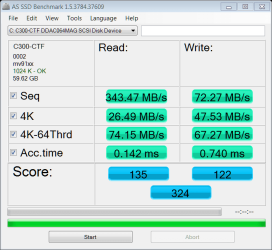
Ok.... here are the stats for my new Crucial C300 2.5" 64GB SATA III MLC Int SSD. These may not be the best scores here, but it brought my WEI score up to 7.2...... My video card is now my lowest score. The SSD went to 7.9. So for now I'm diggin' it. :)
 

Attachments

  • 17-December-2010_01-23.png
    17-December-2010_01-23.png
    32.9 KB · Views: 10
  • as-ssd-bench C300-CTF DDAC064 17.12.2010 1-29-45 AM.png
    as-ssd-bench C300-CTF DDAC064 17.12.2010 1-29-45 AM.png
    16.3 KB · Views: 6

My Computer My Computer

Computer type
PC/Desktop
Computer Manufacturer/Model Number
Generic Homebuilt
OS
Windows 7 Home Premium 64bit
CPU
Int i7 950 [3.06] O.C @3.36ghz Quad Core (HT) = 7.6 WEI
Motherboard
ATX LGA1366 DDR3 Asus Rampage III Formula
Memory
DDR3 6GB/Kit PC3-16000 Patriot @ 1733 mhz = 7.9 WEI
Graphics Card(s)
NVIDIA GTS450 1GB PCI-E Zotac = 7.2 WEI
Sound Card
X-Fi 2 Built-in 8-Channel High Definition
Monitor(s) Displays
LG-27"
Screen Resolution
1920 x1200
Hard Drives
Kingston 2.5" 120GB SATA 3.x MLC Int. SSD. = 7.9 WEI, 1TB WD SATA 3.x 64MB Blue.
PSU
600W Coolermaster eXtremePower Plus
Case
Coolermaster Centurion 590
Cooling
Zalman CNPS10X Extreme
Keyboard
Multimedia USB Logitech Wave
Mouse
Team Scorpion (Wired)
Other Info
Windows Experience Index = 7.2 overall
Beginning,
That's impressive a 7.9 WEI and Benchmark scores. I love my Crucial and I knew you'd love yours. Man snappy just doesn't seem to sum it up but it's close ! Like you I wonder when and if we will see SLC's dropping in price, they must be much more expensive to produce but maybe in time we will see them trickle down !
 

My Computer My Computer

Computer type
PC/Desktop
Computer Manufacturer/Model Number
A blend of brains, brawn and dumb luck.
OS
Windows 7 Ultimate 64
CPU
i7 3770k OC'd 4.6 @ 1.17v, also FX 8120 & i5 miniITX
Motherboard
MSI P67A-GD80 b3
Memory
32 gb G.Skill Sniper DDR3 10-12-12-31 @ 2133
Graphics Card(s)
XFX Radeon 7870 2GB DDR5
Sound Card
Sound Blaster Z Series Card
Monitor(s) Displays
(2) LG LED 23" 1920 x 1080 2ms Monitors via mini d-port
Screen Resolution
1680 X 1050 p
Hard Drives
Samsung 256 gb 830 SSD sata III
(1) 1 tb WD Black
(2) 1 tb Hitachi deskmates/sata II
(2) 1 tb WD green/sata II
(2) 3 tb Seagate Barracuda
(1) 120 gb OCZ Vertex SS
(1) Drobo 5N w/5 Seagate 3tb
PSU
EVGA modular 1000G2 80% gold rating & APC 1200 RS
Case
CoolerMaster Storm Styker
Cooling
7 case fans 140mm & 120mm, NZXT Kraken X60
Keyboard
(2) Logitech Illuminated Keyboards (1) usb (1) wireless
Mouse
Logitech G700 & T-BC21 - nano nx for the laptop
Internet Speed
Basic 120mbps down
Antivirus
Trend Micro Titanium Max Security & Malwarebytes Premium
Browser
Chrome and IE 10
Other Info
5 Noctua case fans + 3 Noctua in p/p on NZXT cooler
Integrated hot swap drive bays for 2.5" Drives
(2) Lite-on dvd/cd/Blu Ray optical 22X
Integrated fan controller and led on/off
HP Officejet Pro 8630 all-n-one
Hot-swappable 3.5" hard drive bay
Netgear Nighthawk router
Asus USB 3 & sata 6 PCIe card
Vantec IDE to sata adptr./Ultra sata adptr
Lenovo L420 i5 lappy with m sata
Drobo 5N advanced NAS
I'm sure by that time I'll need another one :)
 

My Computer My Computer

Computer type
PC/Desktop
Computer Manufacturer/Model Number
Generic Homebuilt
OS
Windows 7 Home Premium 64bit
CPU
Int i7 950 [3.06] O.C @3.36ghz Quad Core (HT) = 7.6 WEI
Motherboard
ATX LGA1366 DDR3 Asus Rampage III Formula
Memory
DDR3 6GB/Kit PC3-16000 Patriot @ 1733 mhz = 7.9 WEI
Graphics Card(s)
NVIDIA GTS450 1GB PCI-E Zotac = 7.2 WEI
Sound Card
X-Fi 2 Built-in 8-Channel High Definition
Monitor(s) Displays
LG-27"
Screen Resolution
1920 x1200
Hard Drives
Kingston 2.5" 120GB SATA 3.x MLC Int. SSD. = 7.9 WEI, 1TB WD SATA 3.x 64MB Blue.
PSU
600W Coolermaster eXtremePower Plus
Case
Coolermaster Centurion 590
Cooling
Zalman CNPS10X Extreme
Keyboard
Multimedia USB Logitech Wave
Mouse
Team Scorpion (Wired)
Other Info
Windows Experience Index = 7.2 overall
finally got around to switching from ide to ahci mode--

attachment.php
 

Attachments

  • as-ssd.jpg
    as-ssd.jpg
    41.6 KB · Views: 117

My Computer My Computer

Computer Manufacturer/Model Number
built by me
OS
Windows 7 Pro 64bit
CPU
i7 970 (stock 3.2Ghz for now)
Motherboard
ASUS P6X58D-E
Memory
G-Skills Ripjaws 12Gb (3X4 GB) 1600 (XMP)
Graphics Card(s)
EVGA GeForce GTX 460SE
Sound Card
HT Omega Claro Plus +
Monitor(s) Displays
I-Inc iH-282HPB 28"
Screen Resolution
1920x1200
Hard Drives
2x Crucial C300 - 64GB (Raid0)
WD Caviar Black 1TB
WD Caviar Black 1TB
External Drives:
WD Caviar Black 1TB
Seagate Barracuda 1TB
Seagate Barracuda 500Gb
PSU
Corsair HX750 Modular
Case
CoolerMaster HAF-X 942
Cooling
Noctua NH-D14
Keyboard
Logitech Illuminated USB Keyboard (Unidriver)
Mouse
Logitech LX8 Cordless Laser
Internet Speed
3mbps
Other Info
Asus DRW 24B1ST
Cyberpower CPS1500AVR
Corsair SP2500 Gaming Audio / Klipsch ProMedia Ultra 5.1 w/Klipsch RB-61 Fronts
3x CoolerMaster MegaFlow 200 Case Fans (snazzy blue!)
Crucial C300 256GB

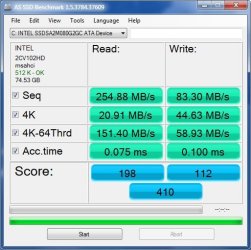
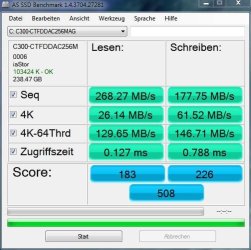
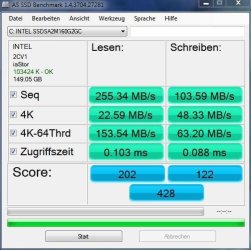
Just installed a Crucial C300 with firmware 6.0. Here are its results compared to an Intel SSD G2 from which I cloned the Crucial SSD. The C300 is Sata 3 capable, but presently connected to sata2.
 

Attachments

  • SSDBenchC300_12_17_2010.JPG
    SSDBenchC300_12_17_2010.JPG
    50.4 KB · Views: 0
  • SSDBench1142010.JPG
    SSDBench1142010.JPG
    48.5 KB · Views: 0
Last edited:

My Computer My Computer

Computer Manufacturer/Model Number
Homemade
OS
Win 7 64 bit professional
CPU
CPU: 3930K @ 4.8 MHz Stable as a rock
Motherboard
ASUS Rampage IV Extreme LGA 2011
Memory
CORSAIR DOMINATOR GT 16GB (4 x 4GB) 240-Pin DDR3
Graphics Card(s)
EVGA SuperClocked+ GeForce GTX 680
Monitor(s) Displays
Dell 3007WFP
Screen Resolution
2560 x 1600
Hard Drives
Vector(256gb) x 2
RevoDrive 3 X2 space (240 GB)
Crucial C300 256 GB SSD
PSU
CORSAIR AX1200i 1200W Digital ATX12V v2.31 and EPS 2.92 SLI
Cooling
Water cooling EK Supremacy ELITE
Mouse
ratZ-7
Other Info
WEI-7.8
Just installed a Crucial C300 with firmware 6.0. Here are its results compared to an Intel SSD G2 from which I cloned the Crucial SSD.
I wonder whether you notice a performance difference one way or another. The Intel is a bit faster in access time and the C300 reads/writes a bit better.
My guess would be that in real life it's a wash - but your experience would be interesting.
 

My Computer My Computer

Computer Manufacturer/Model Number
HP, Dell, Gateway, Toshiba - 4 laptops and 2 desktops
OS
Vista, Windows7, Mint Mate, Zorin, Windows 8
CPU
from 1.6GHz Duo to i7
Monitor(s) Displays
2x HP w2207
Hard Drives
5x HDD, 7x SSD, 12x Externals
Keyboard
with trackball - no mices
Mouse
Trackball mice
Internet Speed
DSL 6000
Will firmware upgrade really make much of a diffidence? Just curious..
 

My Computer My Computer

Computer type
PC/Desktop
Computer Manufacturer/Model Number
Generic Homebuilt
OS
Windows 7 Home Premium 64bit
CPU
Int i7 950 [3.06] O.C @3.36ghz Quad Core (HT) = 7.6 WEI
Motherboard
ATX LGA1366 DDR3 Asus Rampage III Formula
Memory
DDR3 6GB/Kit PC3-16000 Patriot @ 1733 mhz = 7.9 WEI
Graphics Card(s)
NVIDIA GTS450 1GB PCI-E Zotac = 7.2 WEI
Sound Card
X-Fi 2 Built-in 8-Channel High Definition
Monitor(s) Displays
LG-27"
Screen Resolution
1920 x1200
Hard Drives
Kingston 2.5" 120GB SATA 3.x MLC Int. SSD. = 7.9 WEI, 1TB WD SATA 3.x 64MB Blue.
PSU
600W Coolermaster eXtremePower Plus
Case
Coolermaster Centurion 590
Cooling
Zalman CNPS10X Extreme
Keyboard
Multimedia USB Logitech Wave
Mouse
Team Scorpion (Wired)
Other Info
Windows Experience Index = 7.2 overall
Will firmware upgrade really make much of a diffidence? Just curious..
It is like driver update. Sometimes you need to do it to fix a firmware bug or if you want a particular function. E.g my early Vertex had a backlevel firmware that did not support Trim. In order to get that, the firmware had to be updated.
Remember, firmware is just another program (in a slightly different form than we are used to) - same risks and exposures.
 

My Computer My Computer

Computer Manufacturer/Model Number
HP, Dell, Gateway, Toshiba - 4 laptops and 2 desktops
OS
Vista, Windows7, Mint Mate, Zorin, Windows 8
CPU
from 1.6GHz Duo to i7
Monitor(s) Displays
2x HP w2207
Hard Drives
5x HDD, 7x SSD, 12x Externals
Keyboard
with trackball - no mices
Mouse
Trackball mice
Internet Speed
DSL 6000
Just installed a Crucial C300 with firmware 6.0. Here are its results compared to an Intel SSD G2 from which I cloned the Crucial SSD.
I wonder whether you notice a performance difference one way or another. The Intel is a bit faster in access time and the C300 reads/writes a bit better.
My guess would be that in real life it's a wash - but your experience would be interesting.

You are on the mark. Daily use -- no noticeable change. In certain repetitive data intensive programs (Excel using Access databases), about a 5+% speed improvement. Since the specific programs take 4 to 5 hrs to complete, the improvement does help. It did improve in the WEI Hard Drive rating from 7.6 to 7.7 -
 

My Computer My Computer

Computer Manufacturer/Model Number
Homemade
OS
Win 7 64 bit professional
CPU
CPU: 3930K @ 4.8 MHz Stable as a rock
Motherboard
ASUS Rampage IV Extreme LGA 2011
Memory
CORSAIR DOMINATOR GT 16GB (4 x 4GB) 240-Pin DDR3
Graphics Card(s)
EVGA SuperClocked+ GeForce GTX 680
Monitor(s) Displays
Dell 3007WFP
Screen Resolution
2560 x 1600
Hard Drives
Vector(256gb) x 2
RevoDrive 3 X2 space (240 GB)
Crucial C300 256 GB SSD
PSU
CORSAIR AX1200i 1200W Digital ATX12V v2.31 and EPS 2.92 SLI
Cooling
Water cooling EK Supremacy ELITE
Mouse
ratZ-7
Other Info
WEI-7.8
  • Like
Reactions: whs
Just installed a Crucial C300 with firmware 6.0. Here are its results compared to an Intel SSD G2 from which I cloned the Crucial SSD. The C300 is Sata 6 capable, but presently connected to sata3.

There's no such no such thing as SATA 3 or 6. There is SATA Rev 1.0 (1.5 Gb/s), SATA Rev 2.0 (3 Gb/s) or SATA Rev 3.0 (6 Gb/s)
 

My Computer My Computer

Computer Manufacturer/Model Number
tw33k
OS
Windows 7 Ultimate (x64) SP1
CPU
Intel 3770k 4.6GHz
Motherboard
ASUS Maximus V Formula
Memory
8GB (2x 4GB) Crucial Ballistix
Graphics Card(s)
Sapphire 7950 (1060/1600)
Sound Card
On Board Realtek HD Audio
Monitor(s) Displays
27" Acer B273HU (via HDMI)
Screen Resolution
2048 x 1152
Hard Drives
Crucial M4 128GB
2TB WD Black
1TB Samsung F3 SATA
1TB WD Elite External
2TB WD USB 3.0
PSU
Corsair AX750 Gold
Case
Corsair Obsidian 800DW
Cooling
Corsair H100 (2x AP-121/2x UK-3000 push/pull)
Keyboard
Microsoft Wireless 5000
Mouse
Microsoft Wireless 5000
Internet Speed
5mb/s
Other Info
Logitech z-2300 2.1 speakers
Lamptron FC-5 v2
Will firmware upgrade really make much of a diffidence? Just curious..

Did not see any change, but apparently the Trim execution is supposed to be better. There are several C300 users running into stuttering issues with the latest firmware, but I was lucky.
 

My Computer My Computer

Computer Manufacturer/Model Number
Homemade
OS
Win 7 64 bit professional
CPU
CPU: 3930K @ 4.8 MHz Stable as a rock
Motherboard
ASUS Rampage IV Extreme LGA 2011
Memory
CORSAIR DOMINATOR GT 16GB (4 x 4GB) 240-Pin DDR3
Graphics Card(s)
EVGA SuperClocked+ GeForce GTX 680
Monitor(s) Displays
Dell 3007WFP
Screen Resolution
2560 x 1600
Hard Drives
Vector(256gb) x 2
RevoDrive 3 X2 space (240 GB)
Crucial C300 256 GB SSD
PSU
CORSAIR AX1200i 1200W Digital ATX12V v2.31 and EPS 2.92 SLI
Cooling
Water cooling EK Supremacy ELITE
Mouse
ratZ-7
Other Info
WEI-7.8
Just installed a Crucial C300 with firmware 6.0. Here are its results compared to an Intel SSD G2 from which I cloned the Crucial SSD. The C300 is Sata 6 capable, but presently connected to sata3.

There's no such no such thing as SATA 3 or 6. There is SATA Rev 1.0 (1.5 Gb/s), SATA Rev 2.0 (3 Gb/s) or SATA Rev 3.0 (6 Gb/s)

Oops--My bad. I meant sata 2 and 3. Missed that. Thanks
 

My Computer My Computer

Computer Manufacturer/Model Number
Homemade
OS
Win 7 64 bit professional
CPU
CPU: 3930K @ 4.8 MHz Stable as a rock
Motherboard
ASUS Rampage IV Extreme LGA 2011
Memory
CORSAIR DOMINATOR GT 16GB (4 x 4GB) 240-Pin DDR3
Graphics Card(s)
EVGA SuperClocked+ GeForce GTX 680
Monitor(s) Displays
Dell 3007WFP
Screen Resolution
2560 x 1600
Hard Drives
Vector(256gb) x 2
RevoDrive 3 X2 space (240 GB)
Crucial C300 256 GB SSD
PSU
CORSAIR AX1200i 1200W Digital ATX12V v2.31 and EPS 2.92 SLI
Cooling
Water cooling EK Supremacy ELITE
Mouse
ratZ-7
Other Info
WEI-7.8
Just installed a Crucial C300 with firmware 6.0. Here are its results compared to an Intel SSD G2 from which I cloned the Crucial SSD.
I wonder whether you notice a performance difference one way or another. The Intel is a bit faster in access time and the C300 reads/writes a bit better.
My guess would be that in real life it's a wash - but your experience would be interesting.

You are on the mark. Daily use -- no noticeable change. In certain repetitive data intensive programs (Excel using Access databases), about a 5+% speed improvement. Since the specific programs take 4 to 5 hrs to complete, the improvement does help. It did improve in the WEI Hard Drive rating from 7.6 to 7.7 -
Thank you for the answer.
 

My Computer My Computer

Computer Manufacturer/Model Number
HP, Dell, Gateway, Toshiba - 4 laptops and 2 desktops
OS
Vista, Windows7, Mint Mate, Zorin, Windows 8
CPU
from 1.6GHz Duo to i7
Monitor(s) Displays
2x HP w2207
Hard Drives
5x HDD, 7x SSD, 12x Externals
Keyboard
with trackball - no mices
Mouse
Trackball mice
Internet Speed
DSL 6000
Ok.... here are the stats for my new Crucial C300 2.5" 64GB SATA III MLC Int SSD. These may not be the best scores here, but it brought my WEI score up to 7.2...... My video card is now my lowest score. The SSD went to 7.9. So for now I'm diggin' it. :)


Is mv91xx the latest Marvell driver?

Did you update the SSD firmware?

The AS SSD should be a bit higher for the Crucial SSD.

Maybe some of the other members with Crucial/Marvell can tell you what driver they are using.

You can find some Marvell beta drivers, if you're feeling adventurous.


Just installed a Crucial C300 with firmware 6.0. Here are its results compared to an Intel SSD G2 from which I cloned the Crucial SSD.
I wonder whether you notice a performance difference one way or another. The Intel is a bit faster in access time and the C300 reads/writes a bit better.
My guess would be that in real life it's a wash - but your experience would be interesting.

I would be interested in your opinion also, have often wondered what the effect access time has on performance.
It has to have an effect but, how much and is it noticable?

Just saw your reply, thanks for the feed back.
 

My Computer My Computer

Computer type
PC/Desktop
Computer Manufacturer/Model Number
76~2.0
OS
Windows 7 Ult x64 - SP1/ Windows 8 Pro x64
CPU
Intel Core i5-3570K 4.6GHz
Motherboard
Gigabyte GA-Z77X UD3H, f18
Memory
8GB (2X4GB) DDR3 1600 Corsair Vengeance CL8 1.5v
Graphics Card(s)
Sapphire HD 7770 Vapor-X OC 1GB DDR5
Sound Card
Onboard VIA VT2021
Monitor(s) Displays
22" LCD Dell
Screen Resolution
1680x1050
Hard Drives
Samsung 840Pro 128GB SSD,
Seagate Barracuda 500GB SATA2 7200rpm 32MB cache, Seagate Barracuda 1TB SATA2 7200rpm 32MB cache,
PSU
Corsair HX650W
Case
Cooler Master Storm Scout
Cooling
Corsair H80 2x12cm Noctua NF P12 , 2x14cm case fans
Keyboard
Logitech Wave
Mouse
CM Sentinel
Internet Speed
Dismal
Antivirus
Avast
Browser
Opera Next
Other Info
Haswell laptop: HP Envy 17t-j, i7-4700MQ, GeForce 740M 2GB DDR3, 17.3" Full HD 1920x1080, 16GB RAM, Samsung 840 Pro 128GB, 1TB Hitachi 7200 HDD,
Desktop: eSATA ports,
External eSATA Seagate 500GB SATA2 7200rpm,
External WD USB 500GB
Just installed a Crucial C300 with firmware 6.0. Here are its results compared to an Intel SSD G2 from which I cloned the Crucial SSD. The C300 is Sata 6 capable, but presently connected to sata3.

There's no such no such thing as SATA 3 or 6. There is SATA Rev 1.0 (1.5 Gb/s), SATA Rev 2.0 (3 Gb/s) or SATA Rev 3.0 (6 Gb/s)

Seems there is a SATA 6 under Naming Convention.
Seems this is the outfit that names the components.

http://www.sata-io.org/developers/naming_guidelines.asp

SATA-IO Specifications and Naming Conventions

Important: Do not use the incorrect terms 'SATA II' or 'SATA III'
The references embedded within the SATA specifications to 'Gen 3', 'Gen 2', or 'Gen 1' are technical spec naming conventions only and should not be used for marketing and product naming purposes.
 
Last edited:

My Computer My Computer

Computer Manufacturer/Model Number
Hopalong/ Godzilla
OS
Windows7 Pro 64bit SP-1; Windows XP Pro 32bit
CPU
Intel Core i7-870 Lynnfield 2.93GHz LGA 1156 95W Quad-Core
Motherboard
ASUS P7P55D-E PRO
Memory
8GB@1400MHz Crucial Ballistix DDR3-1600 4x2GB
Graphics Card(s)
ASUS ENGTX460 DirectCU/2DI/1GD5 1GB 256-bit GDDR5
Sound Card
VIA Onboard
Monitor(s) Displays
Asus VS248H-P 24"; Samsung SyncMaster 941BW 19"ws
Screen Resolution
1920x1080; 1440x900
Hard Drives
Samsung 830 120GB SSD
Intel 320 120GB SSD
Western Digital Caviar Black WD7501AALS 750GB 7200 RPM SATA 3.0Gb/s
Western Digital Caviar Black WD6401AALS 640GB 7200 RPM SATA 3.0Gb/s
PSU
COOLER MASTER Silent Pro RS850-AMBAJ3-US 850W Modular
Case
COOLER MASTER HAF 932 RC-932-KKN5-GP Black
Cooling
Scythe "Mugen-2 Rev.B" (2 ScytheKaze-Jyuni PWM fans)
Keyboard
Logitech K-320
Mouse
Kensington
Antivirus
Avast Inernet Suite
Browser
IE 9 ; Chrome
Is mv91xx the latest Marvell driver?

Did you update the SSD firmware?

The AS SSD should be a bit higher for the Crucial SSD.

Maybe some of the other members with Crucial/Marvell can tell you what driver they are using.

You can find some Marvell beta drivers, if you're feeling adventurous.

Mv91xx is the marvell driver installed on my system.

I haven't upgraded the firmware yet... I'm a we bit leery.. scared I suppose would be a better word. I'd hate for something to go wrong. :P
 

My Computer My Computer

Computer type
PC/Desktop
Computer Manufacturer/Model Number
Generic Homebuilt
OS
Windows 7 Home Premium 64bit
CPU
Int i7 950 [3.06] O.C @3.36ghz Quad Core (HT) = 7.6 WEI
Motherboard
ATX LGA1366 DDR3 Asus Rampage III Formula
Memory
DDR3 6GB/Kit PC3-16000 Patriot @ 1733 mhz = 7.9 WEI
Graphics Card(s)
NVIDIA GTS450 1GB PCI-E Zotac = 7.2 WEI
Sound Card
X-Fi 2 Built-in 8-Channel High Definition
Monitor(s) Displays
LG-27"
Screen Resolution
1920 x1200
Hard Drives
Kingston 2.5" 120GB SATA 3.x MLC Int. SSD. = 7.9 WEI, 1TB WD SATA 3.x 64MB Blue.
PSU
600W Coolermaster eXtremePower Plus
Case
Coolermaster Centurion 590
Cooling
Zalman CNPS10X Extreme
Keyboard
Multimedia USB Logitech Wave
Mouse
Team Scorpion (Wired)
Other Info
Windows Experience Index = 7.2 overall
ASUS is easy to update.

Just go to their website. Do not use Windows Marvell update or the universal Marvell driver for SATA they are the same.
Asus adds components and tests the drivers for their boards. Marvell has a new one in the past week or so. Pass on it and get the newest at ASUS. It may be older but it works.

Mike
 

My Computer My Computer

Computer Manufacturer/Model Number
Hopalong/ Godzilla
OS
Windows7 Pro 64bit SP-1; Windows XP Pro 32bit
CPU
Intel Core i7-870 Lynnfield 2.93GHz LGA 1156 95W Quad-Core
Motherboard
ASUS P7P55D-E PRO
Memory
8GB@1400MHz Crucial Ballistix DDR3-1600 4x2GB
Graphics Card(s)
ASUS ENGTX460 DirectCU/2DI/1GD5 1GB 256-bit GDDR5
Sound Card
VIA Onboard
Monitor(s) Displays
Asus VS248H-P 24"; Samsung SyncMaster 941BW 19"ws
Screen Resolution
1920x1080; 1440x900
Hard Drives
Samsung 830 120GB SSD
Intel 320 120GB SSD
Western Digital Caviar Black WD7501AALS 750GB 7200 RPM SATA 3.0Gb/s
Western Digital Caviar Black WD6401AALS 640GB 7200 RPM SATA 3.0Gb/s
PSU
COOLER MASTER Silent Pro RS850-AMBAJ3-US 850W Modular
Case
COOLER MASTER HAF 932 RC-932-KKN5-GP Black
Cooling
Scythe "Mugen-2 Rev.B" (2 ScytheKaze-Jyuni PWM fans)
Keyboard
Logitech K-320
Mouse
Kensington
Antivirus
Avast Inernet Suite
Browser
IE 9 ; Chrome
Status
Not open for further replies.
Back
Top