Show us your SSD performance

Status
Not open for further replies.
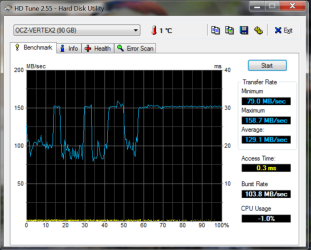
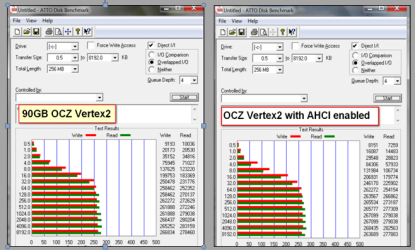
Now I am really puzzled. After I installed the 90GB OCZ Vertex on my new Sony laptop, I ran 2 measurements.

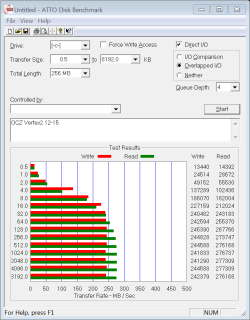
1. The Atto tool which shows results as one would expect
2. the HD Tune which shows miserable results
3, the WEI shows it as 5.9 whereas one would expect something like 7.6

Unfortunately there is no way to change the BIOS to AHCI. Sony made that impossible. There is some tweak for the BIOS I found on the web, but it looked rather risky. So I do not want to venture into that.
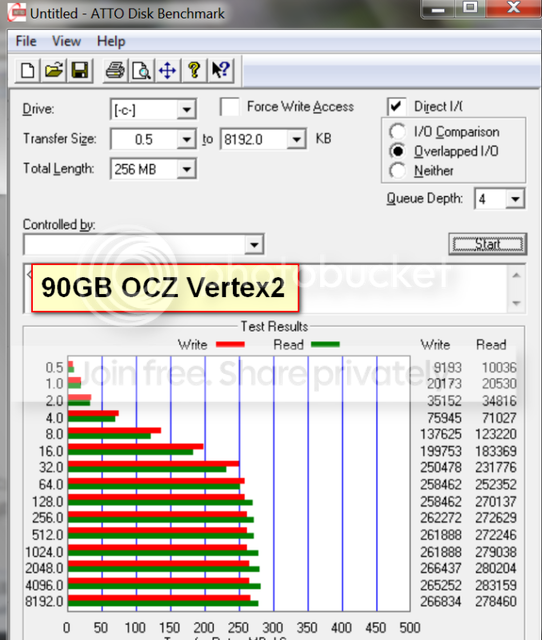

vertex2.png
 

Attachments

  • Vertex Data.png
    Vertex Data.png
    54.9 KB · Views: 14

My Computer My Computer

Computer Manufacturer/Model Number
HP, Dell, Gateway, Toshiba - 4 laptops and 2 desktops
OS
Vista, Windows7, Mint Mate, Zorin, Windows 8
CPU
from 1.6GHz Duo to i7
Monitor(s) Displays
2x HP w2207
Hard Drives
5x HDD, 7x SSD, 12x Externals
Keyboard
with trackball - no mices
Mouse
Trackball mice
Internet Speed
DSL 6000
Besides your OCZ Vertex 2 is their any other drives connected unplug them and run the WEI again. It brought mine from 5.9 to 7.7.
 

My Computer My Computer

Computer Manufacturer/Model Number
HP Pavilion dv6-1030us
OS
Windows 7 Home Premium x64
CPU
Intel Core 2 Duo T6400 (2.0GHz)
Memory
4GB DDR2
Graphics Card(s)
Intel Graphics Media Accelerator 4500MHD w/ 1GB
Sound Card
IDT High Definition CODEC w/ Bose Companion 3 Speaker System
Monitor(s) Displays
Generic PnP Monitor (1366 x 768)
Hard Drives
OCZ Vertex 2 2.5" 120GB SATA II (SSD)
Read: 285MB/s
Write: 275MB/s
Now I am really puzzled. After I installed the 90GB OCZ Vertex on my new Sony laptop, I ran 2 measurements.

1. The Atto tool which shows results as one would expect
2. the HD Tune which shows miserable results

I've seen exactly the same things with my OCZ Vertex 2 60GB (but in my case my WEI was ~7 even though I have two other disks installed).

See here http://www.sevenforums.com/hardware-devices/131915-confused-ide-raid.html
Image in Post #1 (HD Tune) and also in Post #6 (AATO)

I think it may be an issue with HDDTune WHS...but I'm not sure. ATTO seems to be the tool to use.
 

My Computer My Computer

Computer type
PC/Desktop
Computer Manufacturer/Model Number
Golden Mk. I.4
OS
Windows 10 Pro x64 ; Xubuntu x64
CPU
Intel i7 860 @ 2.80 GHz O/C'ed to 4.0GHz
Motherboard
Gigabyte P55A-UD3R Rev.1. Award BIOS F13
Memory
16GB Corsair Vengance DDR3 @ 661 MHz Dual Channel (9-9-9-24)
Graphics Card(s)
EVGA NVidia GTX 560 1024MB
Sound Card
Realtek Integrated
Monitor(s) Displays
Dual Samsung SyncMaster 2494HS
Screen Resolution
1920*1080 and 1920*1080
Hard Drives
1*Samsung 840 EVO 120GB SSD;
1*OCZ Vertex 2 60GB SSD;
2*Samsung F3 SpinPoint 1TB in RAID0;
1*Samsung F1 SpinPoint 1TB;
2*Western Digital 1TB External USB 3.0
1*Western Digital 500GB External USB 3.0
1*Seagate 500GB External USB 2.0
PSU
Thermaltake ToughPower QFan 750W
Case
Thermaltake Element S VK60001W2Z
Cooling
Corsair H60 Water Cooling, 2*230mm and 2*80mm case fans
Keyboard
Logitech G110
Mouse
Logitech MX518
Besides your OCZ Vertex 2 is their any other drives connected unplug them and run the WEI again. It brought mine from 5.9 to 7.7.
Good deal. Thank you. A rerun brought it up to 7.6. In hindsight I think the 5.9 was still from the original HDD from before I took that out and put the SSD in.

But I am still puzzled about the HD Tune results.
 

My Computer My Computer

Computer Manufacturer/Model Number
HP, Dell, Gateway, Toshiba - 4 laptops and 2 desktops
OS
Vista, Windows7, Mint Mate, Zorin, Windows 8
CPU
from 1.6GHz Duo to i7
Monitor(s) Displays
2x HP w2207
Hard Drives
5x HDD, 7x SSD, 12x Externals
Keyboard
with trackball - no mices
Mouse
Trackball mice
Internet Speed
DSL 6000
Now I am really puzzled. After I installed the 90GB OCZ Vertex on my new Sony laptop, I ran 2 measurements.

1. The Atto tool which shows results as one would expect
2. the HD Tune which shows miserable results

I've seen exactly the same things with my OCZ Vertex 2 60GB (but in my case my WEI was ~7 even though I have two other disks installed).

See here http://www.sevenforums.com/hardware-devices/131915-confused-ide-raid.html
Image in Post #1 (HD Tune) and also in Post #6 (AATO)

I think it may be an issue with HDDTune WHS...but I'm not sure. ATTO seems to be the tool to use.

I think you are right. Now that I fixed my WEI ( courtesy of nyyankeefan95), I also think that HD Tune is defunct.
 

My Computer My Computer

Computer Manufacturer/Model Number
HP, Dell, Gateway, Toshiba - 4 laptops and 2 desktops
OS
Vista, Windows7, Mint Mate, Zorin, Windows 8
CPU
from 1.6GHz Duo to i7
Monitor(s) Displays
2x HP w2207
Hard Drives
5x HDD, 7x SSD, 12x Externals
Keyboard
with trackball - no mices
Mouse
Trackball mice
Internet Speed
DSL 6000
Now I am really puzzled. After I installed the 90GB OCZ Vertex on my new Sony laptop, I ran 2 measurements.

1. The Atto tool which shows results as one would expect
2. the HD Tune which shows miserable results

I've seen exactly the same things with my OCZ Vertex 2 60GB (but in my case my WEI was ~7 even though I have two other disks installed).

See here http://www.sevenforums.com/hardware-devices/131915-confused-ide-raid.html
Image in Post #1 (HD Tune) and also in Post #6 (AATO)

I think it may be an issue with HDDTune WHS...but I'm not sure. ATTO seems to be the tool to use.

I think you are right. Now that I fixed my WEI ( courtesy of nyyankeefan95), I also think that HD Tune is defunct.

Yes, well for OCZ SSD's anyway. Did you see that post my mine with the two images? Almost exactly a mirror image of your results.
 

My Computer My Computer

Computer type
PC/Desktop
Computer Manufacturer/Model Number
Golden Mk. I.4
OS
Windows 10 Pro x64 ; Xubuntu x64
CPU
Intel i7 860 @ 2.80 GHz O/C'ed to 4.0GHz
Motherboard
Gigabyte P55A-UD3R Rev.1. Award BIOS F13
Memory
16GB Corsair Vengance DDR3 @ 661 MHz Dual Channel (9-9-9-24)
Graphics Card(s)
EVGA NVidia GTX 560 1024MB
Sound Card
Realtek Integrated
Monitor(s) Displays
Dual Samsung SyncMaster 2494HS
Screen Resolution
1920*1080 and 1920*1080
Hard Drives
1*Samsung 840 EVO 120GB SSD;
1*OCZ Vertex 2 60GB SSD;
2*Samsung F3 SpinPoint 1TB in RAID0;
1*Samsung F1 SpinPoint 1TB;
2*Western Digital 1TB External USB 3.0
1*Western Digital 500GB External USB 3.0
1*Seagate 500GB External USB 2.0
PSU
Thermaltake ToughPower QFan 750W
Case
Thermaltake Element S VK60001W2Z
Cooling
Corsair H60 Water Cooling, 2*230mm and 2*80mm case fans
Keyboard
Logitech G110
Mouse
Logitech MX518
Yeah, now the question is: why does HD Tune show the wrong results.
 

My Computer My Computer

Computer Manufacturer/Model Number
HP, Dell, Gateway, Toshiba - 4 laptops and 2 desktops
OS
Vista, Windows7, Mint Mate, Zorin, Windows 8
CPU
from 1.6GHz Duo to i7
Monitor(s) Displays
2x HP w2207
Hard Drives
5x HDD, 7x SSD, 12x Externals
Keyboard
with trackball - no mices
Mouse
Trackball mice
Internet Speed
DSL 6000
According to the OCZ forums, OCZ technical support will only use the results from ATTO. AS SSD is a test made specifically for SSDs. However, running too many tests will slow your drive down as they write compressed data to the drive in order to do the tests.

Here is a zip folder for an OCZ winsat test. Unzip and run as admin. you'll get completely different readings.
 

Attachments

My Computers My Computers

System One System Two

  • Computer type
    PC/Desktop
    Computer Manufacturer/Model Number
    ALWAYS UNDER CONSTRUCTION
    OS
    Windows 11 Pro
    CPU
    Ryzen 9 5900X
    Motherboard
    Asus X570 Crosshair Viii Hero
    Memory
    32GB G Skill DDR4-3600
    Graphics Card(s)
    EVGA RTX 3080 FTW 3 Ultra
    Sound Card
    On Board/Sennheiser PC37X Headset
    Monitor(s) Displays
    3 X Asus 27"
    Screen Resolution
    2560x1440
    Hard Drives
    2 X 1 TB NVME drives
    PSU
    EVGA 850
    Case
    Phanteks Eclipse P400A
    Cooling
    EVGA 280 AIO
    Keyboard
    Logitech G510s/ Logitech G13
    Mouse
    Logitech G502
    Internet Speed
    24/1
    Antivirus
    ESET/MBAM Pro/SAS Pro
    Browser
    Chrome/ Firefox/ Edge
  • Computer type
    Laptop
    System Manufacturer/Model Number
    Dell 16 Plus
    OS
    Windows 11 Pro
    CPU
    Intel Ultra 9 288V
    Memory
    32 GB LPDDR5X 8533
    Monitor(s) Displays
    16" Mini-LED HDR600 Touch 90 Hz
    Screen Resolution
    2560X1600
    Hard Drives
    1 TB NVME
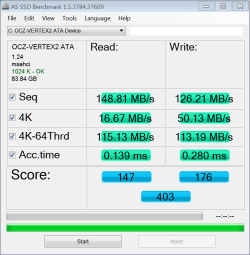
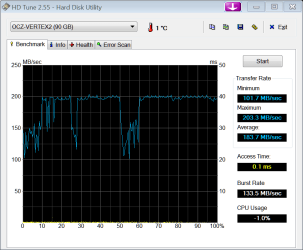
If it is any help, here are the results of my OCZ Vertex2 90GB.
as ssd 12-15.PNG

hd tune 12-15.PNG

ATTO 12-15.PNG
 

My Computers My Computers

System One System Two

  • Computer type
    PC/Desktop
    Computer Manufacturer/Model Number
    ALWAYS UNDER CONSTRUCTION
    OS
    Windows 11 Pro
    CPU
    Ryzen 9 5900X
    Motherboard
    Asus X570 Crosshair Viii Hero
    Memory
    32GB G Skill DDR4-3600
    Graphics Card(s)
    EVGA RTX 3080 FTW 3 Ultra
    Sound Card
    On Board/Sennheiser PC37X Headset
    Monitor(s) Displays
    3 X Asus 27"
    Screen Resolution
    2560x1440
    Hard Drives
    2 X 1 TB NVME drives
    PSU
    EVGA 850
    Case
    Phanteks Eclipse P400A
    Cooling
    EVGA 280 AIO
    Keyboard
    Logitech G510s/ Logitech G13
    Mouse
    Logitech G502
    Internet Speed
    24/1
    Antivirus
    ESET/MBAM Pro/SAS Pro
    Browser
    Chrome/ Firefox/ Edge
  • Computer type
    Laptop
    System Manufacturer/Model Number
    Dell 16 Plus
    OS
    Windows 11 Pro
    CPU
    Intel Ultra 9 288V
    Memory
    32 GB LPDDR5X 8533
    Monitor(s) Displays
    16" Mini-LED HDR600 Touch 90 Hz
    Screen Resolution
    2560X1600
    Hard Drives
    1 TB NVME
Your Atto results are the same as mine. But your HD Tune looks a lot bettter.
 

My Computer My Computer

Computer Manufacturer/Model Number
HP, Dell, Gateway, Toshiba - 4 laptops and 2 desktops
OS
Vista, Windows7, Mint Mate, Zorin, Windows 8
CPU
from 1.6GHz Duo to i7
Monitor(s) Displays
2x HP w2207
Hard Drives
5x HDD, 7x SSD, 12x Externals
Keyboard
with trackball - no mices
Mouse
Trackball mice
Internet Speed
DSL 6000
I think some of it may be becase HDTune is really intended for Spinning drives?
I haven't used it in a long time however, so Im not sure if anything has changed.


I know many people use it for SSDs, but I do recall I reading somewhere it wasn't good to use it as a benchmark for SSDs, rather use ASSSD,CrystalMark, or ATTO.
I can not find that article anywhere now though :(


I did try it a couple times when I first got my SSDs, and I too got really wierd results. Lots of dips, low overall numbers etc.
But my WEI score was usually where it should have been.
 

My Computer My Computer

Computer Manufacturer/Model Number
Custom (Self Build)
OS
Windows 7 Home Premium 64bit
CPU
Intel Core i7 2700k
Motherboard
eVGA P67 SLI
Memory
8GB Mushkin Redline Ridgebacks @1866
Graphics Card(s)
EVGA GTX570 SC
Sound Card
XiFi Titanium HD
Monitor(s) Displays
LG W2453V
Screen Resolution
1920x1080
Hard Drives
Intel 320 80GB -- Intel X25-V 40GB --WD Black 1TB x2 -- WD Blue 640GB
PSU
Seasonic x750
Case
Corsair 600T SE White
Cooling
eVGA Superclocked CPU Cooler
Keyboard
Saitek Cyborg
Antivirus
Kaspersky
Browser
IE
Other Info
LG BD/DVD
I was trying to show in my posts that 3 tests showed different results. I really don't know which one is more accurate. Mine is in ACHI mode. My only suggestion for you is to go in Device manager under IDE ATA/ATAPI controllers, find the port your device is connected to. In properties-Advanced settings tab, see if you can make sure the DMA is checked. If you can it is supposed to help. . The idea is supposed to be to get the box above that check box to read ultra DMA Mode 6. I remember that issue from a previous discussion and it helped a lot for others.
I hope this helped. You have certainly helped me several times.
 

My Computers My Computers

System One System Two

  • Computer type
    PC/Desktop
    Computer Manufacturer/Model Number
    ALWAYS UNDER CONSTRUCTION
    OS
    Windows 11 Pro
    CPU
    Ryzen 9 5900X
    Motherboard
    Asus X570 Crosshair Viii Hero
    Memory
    32GB G Skill DDR4-3600
    Graphics Card(s)
    EVGA RTX 3080 FTW 3 Ultra
    Sound Card
    On Board/Sennheiser PC37X Headset
    Monitor(s) Displays
    3 X Asus 27"
    Screen Resolution
    2560x1440
    Hard Drives
    2 X 1 TB NVME drives
    PSU
    EVGA 850
    Case
    Phanteks Eclipse P400A
    Cooling
    EVGA 280 AIO
    Keyboard
    Logitech G510s/ Logitech G13
    Mouse
    Logitech G502
    Internet Speed
    24/1
    Antivirus
    ESET/MBAM Pro/SAS Pro
    Browser
    Chrome/ Firefox/ Edge
  • Computer type
    Laptop
    System Manufacturer/Model Number
    Dell 16 Plus
    OS
    Windows 11 Pro
    CPU
    Intel Ultra 9 288V
    Memory
    32 GB LPDDR5X 8533
    Monitor(s) Displays
    16" Mini-LED HDR600 Touch 90 Hz
    Screen Resolution
    2560X1600
    Hard Drives
    1 TB NVME
  • Like
Reactions: whs
essenbe, thanks for the detailed help. But mine is already set to 6 port. However, during the investigation I also found out that it is set to Sata AHCI (which I was not sure of before), which is good news. I think I will set the /7 registry to AHCI and see whether that yields an additional improvement.
 

My Computer My Computer

Computer Manufacturer/Model Number
HP, Dell, Gateway, Toshiba - 4 laptops and 2 desktops
OS
Vista, Windows7, Mint Mate, Zorin, Windows 8
CPU
from 1.6GHz Duo to i7
Monitor(s) Displays
2x HP w2207
Hard Drives
5x HDD, 7x SSD, 12x Externals
Keyboard
with trackball - no mices
Mouse
Trackball mice
Internet Speed
DSL 6000
If you want to download As SSD test, I think you can download it here. That link came from the OCZ forums. But, the point is that in the top lef corner it will tell you your alignment and what controller is controlling the drive. You don't have to run the test if you don't want to. Just make sure the SSD is selected in the top dropdown box.
 

My Computers My Computers

System One System Two

  • Computer type
    PC/Desktop
    Computer Manufacturer/Model Number
    ALWAYS UNDER CONSTRUCTION
    OS
    Windows 11 Pro
    CPU
    Ryzen 9 5900X
    Motherboard
    Asus X570 Crosshair Viii Hero
    Memory
    32GB G Skill DDR4-3600
    Graphics Card(s)
    EVGA RTX 3080 FTW 3 Ultra
    Sound Card
    On Board/Sennheiser PC37X Headset
    Monitor(s) Displays
    3 X Asus 27"
    Screen Resolution
    2560x1440
    Hard Drives
    2 X 1 TB NVME drives
    PSU
    EVGA 850
    Case
    Phanteks Eclipse P400A
    Cooling
    EVGA 280 AIO
    Keyboard
    Logitech G510s/ Logitech G13
    Mouse
    Logitech G502
    Internet Speed
    24/1
    Antivirus
    ESET/MBAM Pro/SAS Pro
    Browser
    Chrome/ Firefox/ Edge
  • Computer type
    Laptop
    System Manufacturer/Model Number
    Dell 16 Plus
    OS
    Windows 11 Pro
    CPU
    Intel Ultra 9 288V
    Memory
    32 GB LPDDR5X 8533
    Monitor(s) Displays
    16" Mini-LED HDR600 Touch 90 Hz
    Screen Resolution
    2560X1600
    Hard Drives
    1 TB NVME
I'm no expert here, but I was under the impression that if you were already in AHCI mode that the registry was already set. I thought the only reason you needed to set the registry is if you installed in IDE mode and needed to change it to AHCI.
 

My Computers My Computers

System One System Two

  • Computer type
    PC/Desktop
    Computer Manufacturer/Model Number
    ALWAYS UNDER CONSTRUCTION
    OS
    Windows 11 Pro
    CPU
    Ryzen 9 5900X
    Motherboard
    Asus X570 Crosshair Viii Hero
    Memory
    32GB G Skill DDR4-3600
    Graphics Card(s)
    EVGA RTX 3080 FTW 3 Ultra
    Sound Card
    On Board/Sennheiser PC37X Headset
    Monitor(s) Displays
    3 X Asus 27"
    Screen Resolution
    2560x1440
    Hard Drives
    2 X 1 TB NVME drives
    PSU
    EVGA 850
    Case
    Phanteks Eclipse P400A
    Cooling
    EVGA 280 AIO
    Keyboard
    Logitech G510s/ Logitech G13
    Mouse
    Logitech G502
    Internet Speed
    24/1
    Antivirus
    ESET/MBAM Pro/SAS Pro
    Browser
    Chrome/ Firefox/ Edge
  • Computer type
    Laptop
    System Manufacturer/Model Number
    Dell 16 Plus
    OS
    Windows 11 Pro
    CPU
    Intel Ultra 9 288V
    Memory
    32 GB LPDDR5X 8533
    Monitor(s) Displays
    16" Mini-LED HDR600 Touch 90 Hz
    Screen Resolution
    2560X1600
    Hard Drives
    1 TB NVME
I'm no expert here, but I was under the impression that if you were already in AHCI mode that the registry was already set. I thought the only reason you needed to set the registry is if you installed in IDE mode and needed to change it to AHCI.

Thats correct. If you installed in IDE and wanted to change to AHCI, you need to do two things:

1. Change mode in registry
2. Upon reboot, change mode in BIOS

Please review here Guide * Windows 7 Ultimate Tweaks & Utilities * and see 2nd and 3rd last points in this section:
General Windows 7 Performance Tweaks
Make your Windows 7 Faster
  • Change the Power Plan To Maximum Performance
  • Speed Up the Windows 7 Bootup Time
  • Change the Number of Processors Used at Boot Up
  • How to See What Your Windows 7 Restart Time is
  • Disable the Aero Theme on Windows 7
  • Disable the Unwanted Visual Effects
  • Disable Unwanted Startup Programs
  • Disable the Unwanted Services
  • Services to Disable
  • Disable the User account control (UAC) Feature
  • Turn off Unused Windows 7 Features
  • Disable the Aero Snap features in Windows 7
  • Speed up the Menu Show Delay Time
  • Change the Mouse Hover Time before Pop-up Displays
  • Speed Up the Shut Down Time
  • Change from IDE to AHCI Mode after Installation
  • Change from AHCI to IDE Mode after Installation
  • Enable RAID Mode after Installation
However, if you installed under AHCI mode in BIOS, then a registry change is not neccessary.
 

My Computer My Computer

Computer type
PC/Desktop
Computer Manufacturer/Model Number
Golden Mk. I.4
OS
Windows 10 Pro x64 ; Xubuntu x64
CPU
Intel i7 860 @ 2.80 GHz O/C'ed to 4.0GHz
Motherboard
Gigabyte P55A-UD3R Rev.1. Award BIOS F13
Memory
16GB Corsair Vengance DDR3 @ 661 MHz Dual Channel (9-9-9-24)
Graphics Card(s)
EVGA NVidia GTX 560 1024MB
Sound Card
Realtek Integrated
Monitor(s) Displays
Dual Samsung SyncMaster 2494HS
Screen Resolution
1920*1080 and 1920*1080
Hard Drives
1*Samsung 840 EVO 120GB SSD;
1*OCZ Vertex 2 60GB SSD;
2*Samsung F3 SpinPoint 1TB in RAID0;
1*Samsung F1 SpinPoint 1TB;
2*Western Digital 1TB External USB 3.0
1*Western Digital 500GB External USB 3.0
1*Seagate 500GB External USB 2.0
PSU
Thermaltake ToughPower QFan 750W
Case
Thermaltake Element S VK60001W2Z
Cooling
Corsair H60 Water Cooling, 2*230mm and 2*80mm case fans
Keyboard
Logitech G110
Mouse
Logitech MX518
If you want to download As SSD test, I think you can download it here. That link came from the OCZ forums. But, the point is that in the top lef corner it will tell you your alignment and what controller is controlling the drive. You don't have to run the test if you don't want to. Just make sure the SSD is selected in the top dropdown box.
I had that already, but I hardly ever used it. For checking the alignment I use Diskpart. But thanks anyhow for pointing it out.
 

My Computer My Computer

Computer Manufacturer/Model Number
HP, Dell, Gateway, Toshiba - 4 laptops and 2 desktops
OS
Vista, Windows7, Mint Mate, Zorin, Windows 8
CPU
from 1.6GHz Duo to i7
Monitor(s) Displays
2x HP w2207
Hard Drives
5x HDD, 7x SSD, 12x Externals
Keyboard
with trackball - no mices
Mouse
Trackball mice
Internet Speed
DSL 6000
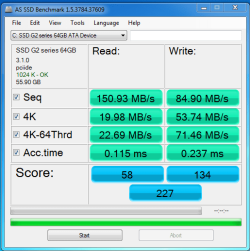
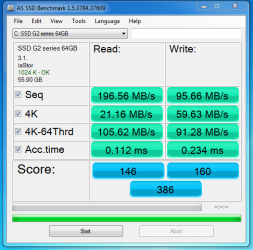
I bought a cheapo $99 SSD as my boot drive for my main computer. It i awesome. Anyone who hasn't tried one, needs to. And $99 for a boot drive this fast, makes it a great value to me.

IDE mode before registry tweak:
Capture1.PNG

AHCI mode after registry tweak:
Capture2.PNG

A noticable difference on the desktop, and a noticable difference on these benchmarks.

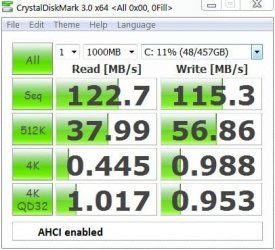
For reference, a members 1TB 7200rpm HDD:
ahci%20speed.JPG
 

My Computer My Computer

OS
Windows 7 Ultimate x64 Steve Ballmer Edition
CPU
Core i7 920 @ 3.6GHz
Motherboard
EVGA X58 SLI Micro
Memory
6Gb Kingston DDR3 1066MHz
Graphics Card(s)
MSI GTX460 1GB Cyclone
Monitor(s) Displays
LG W2361V
Screen Resolution
1920 x 1080p
Hard Drives
64GB Microcenter SSD (Adata S599)
1TB SeaGate Barracuda 7200
PSU
Corsair HX750
Case
Antec 1200
Cooling
Corsair H50
Mouse
Logitech M/X Revolution
Internet Speed
2mb/s
Other Info
SSD Boot drive with MS Office
Since we were wondering about the value of AHCI in terms of SSD performance, I have tried out both. First pic shows measurement with "msahci" registry setting at 3 and the second pic shows the setting at 0. There is essentially very little difference. I only noticed the 4K speeds to be interesting. Here you are hung between a rock and a hard place depending whether you write a lot ( e.g. install programs a lot) or read more.
 

Attachments

  • 2010-12-28_1351.png
    2010-12-28_1351.png
    46.7 KB · Views: 24

My Computer My Computer

Computer Manufacturer/Model Number
HP, Dell, Gateway, Toshiba - 4 laptops and 2 desktops
OS
Vista, Windows7, Mint Mate, Zorin, Windows 8
CPU
from 1.6GHz Duo to i7
Monitor(s) Displays
2x HP w2207
Hard Drives
5x HDD, 7x SSD, 12x Externals
Keyboard
with trackball - no mices
Mouse
Trackball mice
Internet Speed
DSL 6000
How many threads does that test use? AHCI improves threaded performance dramatically and all other performance some but not as noticable.

If that test is not using multiple threads then it may not be reflecing the true difference between IDE and AHCI.

And given that the OS alone may have several hundred threads running (I got over 1k running right now) Having the ability to not be thread locked on all reads and writes is defintely a good thing :)
 

My Computer My Computer

Computer Manufacturer/Model Number
Scratch built
OS
Windows 7 x64 Ultimate
CPU
i7 960
Motherboard
Asus P6X58D
Memory
12 Gig Corsair Dominator
Graphics Card(s)
Nvidia 480
Sound Card
Maudio Delta 44 + breakout box
Monitor(s) Displays
Dell UltraSharp U2410 24in and Samsung 21 dual monitors
Screen Resolution
1920x1200 and 1280x1024
Hard Drives
Primary: Intel X-25M G2 160G SSD
Secondary: Segate baracuda 1.0 TB
HDs in AHCI mode.
PSU
Corasair TX850
Case
Cooler Master HAF
Cooling
Corsair H50
Keyboard
Logitech G15 + N52 game pad
Mouse
Logitech MX518
Internet Speed
15kbs down 4.5kbps up
Other Info
WEI 7.6
CPU & RAM 7.6
Graphics 7.9
Hard disk 7.7
Status
Not open for further replies.
Back
Top