Show us your SSD performance

Status
Not open for further replies.
I currently have the OCZ Agility 2 128g ssd, faily new to the ssd's. I just purchased and installed mine within the last month. I am running windows 7 Premium 64x, how can i tell which version of the firmware i have and if i need to upgrade/flash newer version of firmware?

also, what software or application should i use to benchmark my drive?

Thank you in advance
 

My Computer My Computer

Computer Manufacturer/Model Number
custom
OS
Window 7 Professional 64bit
CPU
AMD Athlon 64 X2 4600+ Windsor 2.4GHz 2 x 512KB L2 Cache Soc
Motherboard
GIGABYTE GA-M61P-S3 AM2 NVIDIA GeForce 6100 / nForce 430 ATX
Memory
8G G.Skill gaming ram ( 2G x 4 chips)
Graphics Card(s)
Zotac NVidia GeForce 9500 GT 1.0G DDR3
Sound Card
on-board from motherboard
Monitor(s) Displays
Acer AL2216W (22" widescreen lcd)
Screen Resolution
1680x1050
Hard Drives
OCZ Agility 2 120G (primary OS and software)
WDC WD4000AAKS (400G HDD)
WDC WD800JB (80G media storage)
WDC MyWorld Book (1.0T external network storage)
Case
PowerSpec
Keyboard
Razer Blackwidow (mechanical gaming keyboard)
Mouse
Razer Mamba (hybrid wired/wireless) Razer Naga (for gaming)
Internet Speed
Comcast broadband with powerboost, 16.83 Mbps/2.86 Mbps

My Computer My Computer

Computer type
PC/Desktop
Computer Manufacturer/Model Number
Custom built by me.
OS
Windows 10 Pro
CPU
Intel Core i7-4770K (3.5Ghz)
Motherboard
Gigabyte G1 Sniper 5 (F10 Bios)
Memory
32 gig Corsair Dominator Platinum (4x8Gig)
Graphics Card(s)
Sapphire Tri-X R9 Fury
Sound Card
Soundblaster ZXR
Monitor(s) Displays
NEC PA242W 24" LCD Monitor
Screen Resolution
1920 x 1200
Hard Drives
Primary - Samsung 850 Pro (512gig), Samsung 840 Pro (256gig), 2TB WD Caviar Black.
PSU
EVGA Supernova 1000 G2
Case
Cooler Master HAF X
Cooling
Corsair H100i with Corsair Air Series SP120 Quiet Fans
Keyboard
Logitech Wireless Wave
Mouse
Logitech Performance MX
Internet Speed
High Speed Cable
Antivirus
Norton Security
Browser
IE11
Other Info
Memory Timings - 1866MHz @ 9-9-9-27-1T @ 1.5 volts
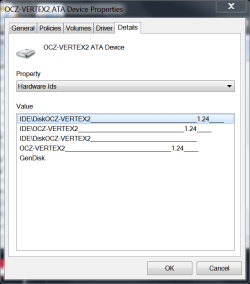
DEVICE MANAGER-DISK DRIVES=YOUR DISK DRIVE-PROPERTIES-DETAILS- FROM DROPDOWN BOX, 2ND ITEM IS HARDWARE ID IT WILL SHOW YOU THE FIRMWARE ON RIGHT SIDE. mINE IS fw 1.24.
VERTEX FW.PNG

ps sorry about the caps.
 

My Computers My Computers

System One System Two

  • Computer type
    PC/Desktop
    Computer Manufacturer/Model Number
    ALWAYS UNDER CONSTRUCTION
    OS
    Windows 11 Pro
    CPU
    Ryzen 9 5900X
    Motherboard
    Asus X570 Crosshair Viii Hero
    Memory
    32GB G Skill DDR4-3600
    Graphics Card(s)
    EVGA RTX 3080 FTW 3 Ultra
    Sound Card
    On Board/Sennheiser PC37X Headset
    Monitor(s) Displays
    3 X Asus 27"
    Screen Resolution
    2560x1440
    Hard Drives
    2 X 1 TB NVME drives
    PSU
    EVGA 850
    Case
    Phanteks Eclipse P400A
    Cooling
    EVGA 280 AIO
    Keyboard
    Logitech G510s/ Logitech G13
    Mouse
    Logitech G502
    Internet Speed
    24/1
    Antivirus
    ESET/MBAM Pro/SAS Pro
    Browser
    Chrome/ Firefox/ Edge
  • Computer type
    Laptop
    System Manufacturer/Model Number
    Dell 16 Plus
    OS
    Windows 11 Pro
    CPU
    Intel Ultra 9 288V
    Memory
    32 GB LPDDR5X 8533
    Monitor(s) Displays
    16" Mini-LED HDR600 Touch 90 Hz
    Screen Resolution
    2560X1600
    Hard Drives
    1 TB NVME
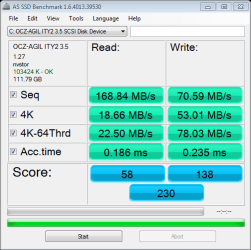
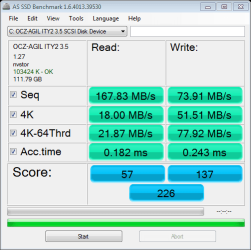
I have determined that my ozc agility 2 is on firmware 1.27. Ran the as ssd benchmark program listed in this post at the top and got what i feel are some real low numbers. When using the pc and gaming it feels failry quick, much quicker than with my previous hdd which i also believe has failed as of last night.

here is the screenshot from as ssd
as-ssd-bench OCZ-AGIL ITY2 3. 2.9.2011 8-12-14 PM.png

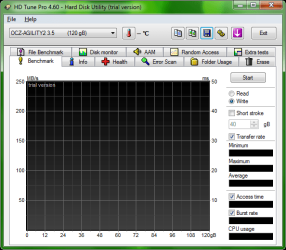
and the screenshot from hd tune (write speed only due to trial version limitation)
IMG.jpeg

i feel i may have something configured incorrectly. I also went into the bios to verify the achi was enabled as i thought it was and i do not have an option to set it.
i am using GIGABYTE GA-M61P-S3 AM2 NVIDIA GeForce 6100 / nForce 430 ATX AMD Motherboard, AMD Athlon 64 X2 4600+ Windsor 2.4GHz 2 x 512KB L2 Cache Socket AM2 65W Dual-Core Processor, 8G G.Skill gaming ram ( 2G x 4 chips) and my bios if i wrote it down correctly is M61P-S3 F5 v6.00P6

anyone have any tips or ideas???
 

Attachments

  • 09-February-2011_20-17.png
    09-February-2011_20-17.png
    20.2 KB · Views: 5
  • 09-February-2011_20-18 2.png
    09-February-2011_20-18 2.png
    18.2 KB · Views: 4

My Computer My Computer

Computer Manufacturer/Model Number
custom
OS
Window 7 Professional 64bit
CPU
AMD Athlon 64 X2 4600+ Windsor 2.4GHz 2 x 512KB L2 Cache Soc
Motherboard
GIGABYTE GA-M61P-S3 AM2 NVIDIA GeForce 6100 / nForce 430 ATX
Memory
8G G.Skill gaming ram ( 2G x 4 chips)
Graphics Card(s)
Zotac NVidia GeForce 9500 GT 1.0G DDR3
Sound Card
on-board from motherboard
Monitor(s) Displays
Acer AL2216W (22" widescreen lcd)
Screen Resolution
1680x1050
Hard Drives
OCZ Agility 2 120G (primary OS and software)
WDC WD4000AAKS (400G HDD)
WDC WD800JB (80G media storage)
WDC MyWorld Book (1.0T external network storage)
Case
PowerSpec
Keyboard
Razer Blackwidow (mechanical gaming keyboard)
Mouse
Razer Mamba (hybrid wired/wireless) Razer Naga (for gaming)
Internet Speed
Comcast broadband with powerboost, 16.83 Mbps/2.86 Mbps
It would be nice if everyone stuck to one set of bench test software :) :) ... I have the Kingston SSDNOW 64gb drive and after setting everything up correctly ACHI ect ,ect I just tested it and for a low cost drive it works well.

ATTO I get 122/225 Not bad for a budget drive at all..
 

My Computer My Computer

Computer Manufacturer/Model Number
MSI
OS
Ultimate 7
CPU
1055T @ 3.7
Motherboard
MSI
Memory
16g Corsair
Graphics Card(s)
HD5770
Sound Card
Onboard
Monitor(s) Displays
FLat 23
Hard Drives
SSD 64g Kingston
500 Gig Western
PSU
850 Thermaltake
I have determined that my ozc agility 2 is on firmware 1.27. Ran the as ssd benchmark program listed in this post at the top and got what i feel are some real low numbers. When using the pc and gaming it feels failry quick, much quicker than with my previous hdd which i also believe has failed as of last night.

here is the screenshot from as ssd
View attachment 137548

and the screenshot from hd tune (write speed only due to trial version limitation)
View attachment 137552

i feel i may have something configured incorrectly. I also went into the bios to verify the achi was enabled as i thought it was and i do not have an option to set it.
i am using GIGABYTE GA-M61P-S3 AM2 NVIDIA GeForce 6100 / nForce 430 ATX AMD Motherboard, AMD Athlon 64 X2 4600+ Windsor 2.4GHz 2 x 512KB L2 Cache Socket AM2 65W Dual-Core Processor, 8G G.Skill gaming ram ( 2G x 4 chips) and my bios if i wrote it down correctly is M61P-S3 F5 v6.00P6

anyone have any tips or ideas???
I noticed that HD Tune does funny things with the OCZ tests. I had a similarly dismal picture from my brand new Vertex 2 - but when I ran Atto, I got great numbers. And the SSD runs great anyhow.I suggest you run Atto and compare. I use HD Tune only for HDDs and sticks from now on.
 

My Computer My Computer

Computer Manufacturer/Model Number
HP, Dell, Gateway, Toshiba - 4 laptops and 2 desktops
OS
Vista, Windows7, Mint Mate, Zorin, Windows 8
CPU
from 1.6GHz Duo to i7
Monitor(s) Displays
2x HP w2207
Hard Drives
5x HDD, 7x SSD, 12x Externals
Keyboard
with trackball - no mices
Mouse
Trackball mice
Internet Speed
DSL 6000
If it helps, here is the link to download your motherboard manual. I am not familar with Gigabyte MBs but in mine I have to enable raid then go to on chip devices, under that sub menu it lists raid mode, if you click that it will enable you to select ahci. This enables the ahci drivers for all sata controllers even if you do not use raid.
 

My Computers My Computers

System One System Two

  • Computer type
    PC/Desktop
    Computer Manufacturer/Model Number
    ALWAYS UNDER CONSTRUCTION
    OS
    Windows 11 Pro
    CPU
    Ryzen 9 5900X
    Motherboard
    Asus X570 Crosshair Viii Hero
    Memory
    32GB G Skill DDR4-3600
    Graphics Card(s)
    EVGA RTX 3080 FTW 3 Ultra
    Sound Card
    On Board/Sennheiser PC37X Headset
    Monitor(s) Displays
    3 X Asus 27"
    Screen Resolution
    2560x1440
    Hard Drives
    2 X 1 TB NVME drives
    PSU
    EVGA 850
    Case
    Phanteks Eclipse P400A
    Cooling
    EVGA 280 AIO
    Keyboard
    Logitech G510s/ Logitech G13
    Mouse
    Logitech G502
    Internet Speed
    24/1
    Antivirus
    ESET/MBAM Pro/SAS Pro
    Browser
    Chrome/ Firefox/ Edge
  • Computer type
    Laptop
    System Manufacturer/Model Number
    Dell 16 Plus
    OS
    Windows 11 Pro
    CPU
    Intel Ultra 9 288V
    Memory
    32 GB LPDDR5X 8533
    Monitor(s) Displays
    16" Mini-LED HDR600 Touch 90 Hz
    Screen Resolution
    2560X1600
    Hard Drives
    1 TB NVME

Attachments

  • benchmark.jpg
    benchmark.jpg
    61.8 KB · Views: 22

My Computer My Computer

Computer Manufacturer/Model Number
Custom Build
OS
Windows 7 Ultimate x64
CPU
AMD Phenom II x6 1100T @ 4.0 GHZ
Motherboard
MSI 890FX-GD65
Memory
4GB Corsair XMS DDR3 1600MHz
Graphics Card(s)
MSI Twin Frozr GTX 560 Ti
Sound Card
Asus Xonar Essense STX
Monitor(s) Displays
23" 1080p LG LCD Flatscreen Panel
Screen Resolution
1920x1080 @ 60Hz
Hard Drives
1 x 120 GB OCZ Agility 2 SSD
1 x 500 GB WD Caviar Black 7200 RPM HDD
1 x 250 GB Maxtor OneTouch external USB Flash HDD
PSU
Corsair TX850W
Case
Antec 900
Cooling
4 case fans, 1xZalman 9500 CPU Heatsink
Keyboard
Logitech G110 Gaming Keyboard
Mouse
Razer Deathadder 3500DPI Infrared Gaming Mouse
Other Info
Sennheiser HD555 Headphones with Zalman Mic
I will check the sub menus in the bios when i get home again and see if i overlooked something. I will also take your tip on trying the ATTO benchmark and will post the results for benchmark and bios options once i get home from work this evening and look at them.

Thank you
 

My Computer My Computer

Computer Manufacturer/Model Number
custom
OS
Window 7 Professional 64bit
CPU
AMD Athlon 64 X2 4600+ Windsor 2.4GHz 2 x 512KB L2 Cache Soc
Motherboard
GIGABYTE GA-M61P-S3 AM2 NVIDIA GeForce 6100 / nForce 430 ATX
Memory
8G G.Skill gaming ram ( 2G x 4 chips)
Graphics Card(s)
Zotac NVidia GeForce 9500 GT 1.0G DDR3
Sound Card
on-board from motherboard
Monitor(s) Displays
Acer AL2216W (22" widescreen lcd)
Screen Resolution
1680x1050
Hard Drives
OCZ Agility 2 120G (primary OS and software)
WDC WD4000AAKS (400G HDD)
WDC WD800JB (80G media storage)
WDC MyWorld Book (1.0T external network storage)
Case
PowerSpec
Keyboard
Razer Blackwidow (mechanical gaming keyboard)
Mouse
Razer Mamba (hybrid wired/wireless) Razer Naga (for gaming)
Internet Speed
Comcast broadband with powerboost, 16.83 Mbps/2.86 Mbps
My Computer My Computer

Computer type
PC/Desktop
Computer Manufacturer/Model Number
76~2.0
OS
Windows 7 Ult x64 - SP1/ Windows 8 Pro x64
CPU
Intel Core i5-3570K 4.6GHz
Motherboard
Gigabyte GA-Z77X UD3H, f18
Memory
8GB (2X4GB) DDR3 1600 Corsair Vengeance CL8 1.5v
Graphics Card(s)
Sapphire HD 7770 Vapor-X OC 1GB DDR5
Sound Card
Onboard VIA VT2021
Monitor(s) Displays
22" LCD Dell
Screen Resolution
1680x1050
Hard Drives
Samsung 840Pro 128GB SSD,
Seagate Barracuda 500GB SATA2 7200rpm 32MB cache, Seagate Barracuda 1TB SATA2 7200rpm 32MB cache,
PSU
Corsair HX650W
Case
Cooler Master Storm Scout
Cooling
Corsair H80 2x12cm Noctua NF P12 , 2x14cm case fans
Keyboard
Logitech Wave
Mouse
CM Sentinel
Internet Speed
Dismal
Antivirus
Avast
Browser
Opera Next
Other Info
Haswell laptop: HP Envy 17t-j, i7-4700MQ, GeForce 740M 2GB DDR3, 17.3" Full HD 1920x1080, 16GB RAM, Samsung 840 Pro 128GB, 1TB Hitachi 7200 HDD,
Desktop: eSATA ports,
External eSATA Seagate 500GB SATA2 7200rpm,
External WD USB 500GB
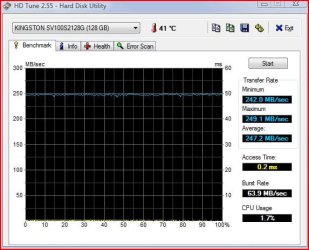
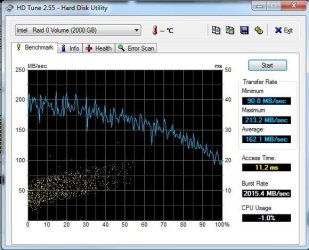
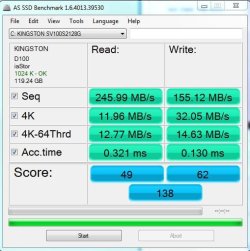
here's my results :- Kingston 128GB SSDNow V100 and my 2xSamsung F1's in raid 0

atto1.PNG

hdtune.ssd.JPG

hdtune1.sammy.f1.s.in.raid0.JPG

asssd bench.JPG


but seems somethings not right low burst speeds and not sure if my ssd is set up right
 

My Computer My Computer

OS
windows 7 x64 ultimate
CPU
intel [email protected]
Motherboard
Asus P5Q Deluxe
Memory
8 Gig OCZ sli Ram@961MHz
Graphics Card(s)
ati xfx 4890 950/1125
Sound Card
xi-fi soundblaster
Monitor(s) Displays
aoc 24" and LG 42"
Hard Drives
128g kingston ssd
2xSamsung 1Tb F1's in Raid 0
PSU
corsair tx850
Case
nzxt
Cooling
zalman
Internet Speed
50Mb
I will check the sub menus in the bios when i get home again and see if i overlooked something. I will also take your tip on trying the ATTO benchmark and will post the results for benchmark and bios options once i get home from work this evening and look at them.

Thank you

When did you buy it?

Might want to check this out: 25nm NAND Transition Causing Problems for OCZ Vertex 2 E SSDs

The motherboard was purchased 10/19/2007 and installed about a week later. I did check the bios version from the manufacturer and was able to find out that there have been 3 updates to the bios since my existing one. One of the updates is even from within the past month. The ssd was purchased and installed in January of this year, about 4-6 weeks ago.
 

My Computer My Computer

Computer Manufacturer/Model Number
custom
OS
Window 7 Professional 64bit
CPU
AMD Athlon 64 X2 4600+ Windsor 2.4GHz 2 x 512KB L2 Cache Soc
Motherboard
GIGABYTE GA-M61P-S3 AM2 NVIDIA GeForce 6100 / nForce 430 ATX
Memory
8G G.Skill gaming ram ( 2G x 4 chips)
Graphics Card(s)
Zotac NVidia GeForce 9500 GT 1.0G DDR3
Sound Card
on-board from motherboard
Monitor(s) Displays
Acer AL2216W (22" widescreen lcd)
Screen Resolution
1680x1050
Hard Drives
OCZ Agility 2 120G (primary OS and software)
WDC WD4000AAKS (400G HDD)
WDC WD800JB (80G media storage)
WDC MyWorld Book (1.0T external network storage)
Case
PowerSpec
Keyboard
Razer Blackwidow (mechanical gaming keyboard)
Mouse
Razer Mamba (hybrid wired/wireless) Razer Naga (for gaming)
Internet Speed
Comcast broadband with powerboost, 16.83 Mbps/2.86 Mbps
It would be nice if everyone stuck to one set of bench test software :) :) ... I have the Kingston SSDNOW 64gb drive and after setting everything up correctly ACHI ect ,ect I just tested it and for a low cost drive it works well.

ATTO I get 122/225 Not bad for a budget drive at all..

I used the 2 that i did because someone posted a reply to my question on what benchmark software everyone was using to test their ssd's. Thanks for the tip though, i will try the ATTO benchmark when i get home this evening.
 

My Computer My Computer

Computer Manufacturer/Model Number
custom
OS
Window 7 Professional 64bit
CPU
AMD Athlon 64 X2 4600+ Windsor 2.4GHz 2 x 512KB L2 Cache Soc
Motherboard
GIGABYTE GA-M61P-S3 AM2 NVIDIA GeForce 6100 / nForce 430 ATX
Memory
8G G.Skill gaming ram ( 2G x 4 chips)
Graphics Card(s)
Zotac NVidia GeForce 9500 GT 1.0G DDR3
Sound Card
on-board from motherboard
Monitor(s) Displays
Acer AL2216W (22" widescreen lcd)
Screen Resolution
1680x1050
Hard Drives
OCZ Agility 2 120G (primary OS and software)
WDC WD4000AAKS (400G HDD)
WDC WD800JB (80G media storage)
WDC MyWorld Book (1.0T external network storage)
Case
PowerSpec
Keyboard
Razer Blackwidow (mechanical gaming keyboard)
Mouse
Razer Mamba (hybrid wired/wireless) Razer Naga (for gaming)
Internet Speed
Comcast broadband with powerboost, 16.83 Mbps/2.86 Mbps
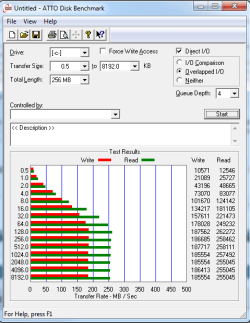
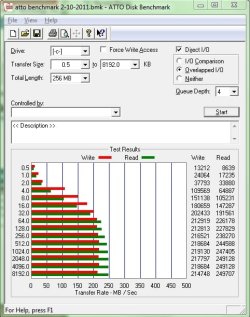
OK, home now and trying new things. First i installed the latest bios from Gigabyte for my mb version F7I released 08/30/2010. Flashed bios and configured before booting into win7. Downloaded and ran the ATTO benchmark and got this (which i believe looks much better than the others
IMG1.jpeg
i also reran the as ssd benchmark to compare and the score seems a little higher this time around so apparently the bios did play a little factor in it. However, i still can not find anything in the bios setting to enable the achi
as-ssd-bench OCZ-AGIL ITY2 3. 2.10.2011 5-52-16 PM.png
 

My Computer My Computer

Computer Manufacturer/Model Number
custom
OS
Window 7 Professional 64bit
CPU
AMD Athlon 64 X2 4600+ Windsor 2.4GHz 2 x 512KB L2 Cache Soc
Motherboard
GIGABYTE GA-M61P-S3 AM2 NVIDIA GeForce 6100 / nForce 430 ATX
Memory
8G G.Skill gaming ram ( 2G x 4 chips)
Graphics Card(s)
Zotac NVidia GeForce 9500 GT 1.0G DDR3
Sound Card
on-board from motherboard
Monitor(s) Displays
Acer AL2216W (22" widescreen lcd)
Screen Resolution
1680x1050
Hard Drives
OCZ Agility 2 120G (primary OS and software)
WDC WD4000AAKS (400G HDD)
WDC WD800JB (80G media storage)
WDC MyWorld Book (1.0T external network storage)
Case
PowerSpec
Keyboard
Razer Blackwidow (mechanical gaming keyboard)
Mouse
Razer Mamba (hybrid wired/wireless) Razer Naga (for gaming)
Internet Speed
Comcast broadband with powerboost, 16.83 Mbps/2.86 Mbps
i would only run ATTO on SSDs. others will help degrade the performance.

22052969.png
 

My Computer My Computer

Computer Manufacturer/Model Number
Self built
OS
Windows 8 Pro x64
CPU
Intel Core i7 2600k @ 4.5GHz
Motherboard
ASRock Z68 Extreme4
Memory
16GB Corsair Vengeance 1600MHz
Graphics Card(s)
Palit GTX670 JetStream @1155MHz
Sound Card
Creative X-Fi Titanium PCI-E
Monitor(s) Displays
Iiyama ProLite E2773HDS
Screen Resolution
1920x1080
Hard Drives
Samsung 840 series 250GB,
Toshiba DT01ACA300 3TB (Data),
Western Digital Caviar Green WD30EZRX-00DC0B0 3TB (Backup)
PSU
Corsair TX850
Case
Silverstone Raven RV03
Cooling
Zalman CNPS9900MAX-B
Keyboard
Logitech G15 V2
Mouse
Logitech G500 + Steelseries QCK mat
Internet Speed
100Mbps/100Mbps unlimited

My Computer My Computer

Computer type
PC/Desktop
Computer Manufacturer/Model Number
Misfits Machine!
OS
Windows 7 Professional
CPU
Intel i7 4790K
Motherboard
ASUS Maximus VII Hero
Memory
32 GB G.SKILL TridentX F3-2400C10D-GTX
Graphics Card(s)
EVGA GeForce GTX 980 Superclocked X2 SLI
Sound Card
Teac UD-501 External USB DAC/Bryston BHA-1 Headphone Amp
Monitor(s) Displays
BenQ BL3200PT
Screen Resolution
2560x1440
Hard Drives
Samsung 850 Pro Series 256GB SSD
Western Digital Red 3TB
PSU
Corsair RM Series Gold 1000W
Case
Corsair Carbide Series Air 540
Cooling
Corsair Hydro Series H110
Keyboard
Corsair Vengeance K70 - Cherry MX Red/Razer Orbweaver Elite
Mouse
Razer DeathAdder Chroma
This is post #1, the thread starter, He is using HD Tune and posted a link to AS SSD.
This thread, since it's beginning has been for all SSDs and all benchmarks as many people have there own preferences.
I'm interested to see what others are getting out of their SSD or SSDs in RAID. It's cool to look through the "Show us your hard drive performance" thread but here's a place for just SSD performance. I have a 128GB Patriot Torqx. (F/W v1881) Please post your benchmarks.:)

Edit: I now have 2 Patriot Torqx drives (Indilinx controlled) and am running v1881 F/W and LOVE them both like my own kids. haha They are great drives but there are better ones out there and even better ones coming out soon. Thanks to whoever made this a "sticky" It's a good thread.

Benchmark Program Links:

There are a lot of forums that prefer one SSD benchmark over others, you can find diverse reasons on any forum for their choice.

Some say there are benchmarks for HDDs and benchmarks for SSD and they aren't very accurate for the device that they weren't designed for.


It would be nice if everyone stuck to one set of bench test software :) :) ... I have the Kingston SSDNOW 64gb drive and after setting everything up correctly ACHI ect ,ect I just tested it and for a low cost drive it works well.

ATTO I get 122/225 Not bad for a budget drive at all..

Some forums have threads for specific SSD benchmarks.
Here is one:
AS SSD Benchmark thread

If you would like to see a specific SSD benchmark thread, you can start one.
It is interesting to see the same benchmark for different SSDs.

I have read that ATTO started as a HDD benchmark, AS SSD was made specifically for SSDs, but that is just my preference and everyone is entitled to theirs.
ATTO uses compressible data for the benchmark which makes the OCZ SF controllers look good because they compress data.
AS SSD uses un-compressible data so will give the SF controllers much lower read/write rates and scores.
Neither of these benchmarks are good indications of normal usage.
One gives you high numbers that you won't see in actual usage, the other gives low numbers that you will exceed in normal usage.


On a slightly different topic, OCZ has published AS SSD benchmarks for their SSDs.

OCZ SSD benchmarks using AS SSD from the OCZ website.
OCZ AS SSD benchmarks posted.PNG

Not quite their published numbers.
Have to give them some credit for posting these benchmark results that are different from their published numbers.

Also have been reading posts from some very disgruntled customers that have received the new Gen3 25nm SSDs with no notification, change in model name or part number.
Evidently the Gen3 speeds are a bit slower than the Gen2 models and the expected life is lower.
Doesn't sound good.
 
Last edited:

My Computer My Computer

Computer type
PC/Desktop
Computer Manufacturer/Model Number
76~2.0
OS
Windows 7 Ult x64 - SP1/ Windows 8 Pro x64
CPU
Intel Core i5-3570K 4.6GHz
Motherboard
Gigabyte GA-Z77X UD3H, f18
Memory
8GB (2X4GB) DDR3 1600 Corsair Vengeance CL8 1.5v
Graphics Card(s)
Sapphire HD 7770 Vapor-X OC 1GB DDR5
Sound Card
Onboard VIA VT2021
Monitor(s) Displays
22" LCD Dell
Screen Resolution
1680x1050
Hard Drives
Samsung 840Pro 128GB SSD,
Seagate Barracuda 500GB SATA2 7200rpm 32MB cache, Seagate Barracuda 1TB SATA2 7200rpm 32MB cache,
PSU
Corsair HX650W
Case
Cooler Master Storm Scout
Cooling
Corsair H80 2x12cm Noctua NF P12 , 2x14cm case fans
Keyboard
Logitech Wave
Mouse
CM Sentinel
Internet Speed
Dismal
Antivirus
Avast
Browser
Opera Next
Other Info
Haswell laptop: HP Envy 17t-j, i7-4700MQ, GeForce 740M 2GB DDR3, 17.3" Full HD 1920x1080, 16GB RAM, Samsung 840 Pro 128GB, 1TB Hitachi 7200 HDD,
Desktop: eSATA ports,
External eSATA Seagate 500GB SATA2 7200rpm,
External WD USB 500GB
Also have been reading posts from some very disgruntled customers that have received the new Gen3 25nm SSDs with no notification, change in model name or part number.
Evidently the Gen3 speeds are a bit slower than the Gen2 models and the expected life is lower.
Doesn't sound good.

Is this from OCZ?

Great post BTW +1 ;)

I posted something about using the correct measuring tool for OCZ drives and that testing too much may degrade the drive - http://www.sevenforums.com/hardware-devices/18229-show-us-your-ssd-performance-100.html#post1166247
 

My Computer My Computer

Computer type
PC/Desktop
Computer Manufacturer/Model Number
Custom built by me.
OS
Windows 10 Pro
CPU
Intel Core i7-4770K (3.5Ghz)
Motherboard
Gigabyte G1 Sniper 5 (F10 Bios)
Memory
32 gig Corsair Dominator Platinum (4x8Gig)
Graphics Card(s)
Sapphire Tri-X R9 Fury
Sound Card
Soundblaster ZXR
Monitor(s) Displays
NEC PA242W 24" LCD Monitor
Screen Resolution
1920 x 1200
Hard Drives
Primary - Samsung 850 Pro (512gig), Samsung 840 Pro (256gig), 2TB WD Caviar Black.
PSU
EVGA Supernova 1000 G2
Case
Cooler Master HAF X
Cooling
Corsair H100i with Corsair Air Series SP120 Quiet Fans
Keyboard
Logitech Wireless Wave
Mouse
Logitech Performance MX
Internet Speed
High Speed Cable
Antivirus
Norton Security
Browser
IE11
Other Info
Memory Timings - 1866MHz @ 9-9-9-27-1T @ 1.5 volts
I only like to add that something is strange when you run the OCZs thru HD Tune. My own OCZs and those of others showed very strange results (low and erratic numbers) that were not confirmed by e.g. Atto.
 

My Computer My Computer

Computer Manufacturer/Model Number
HP, Dell, Gateway, Toshiba - 4 laptops and 2 desktops
OS
Vista, Windows7, Mint Mate, Zorin, Windows 8
CPU
from 1.6GHz Duo to i7
Monitor(s) Displays
2x HP w2207
Hard Drives
5x HDD, 7x SSD, 12x Externals
Keyboard
with trackball - no mices
Mouse
Trackball mice
Internet Speed
DSL 6000
Yes, the above issues are on the OCZ forum.

Drives Shipping With 25nm NAND. Q & A

Vertex 2 60GB (25nm) slow benchmark results and load times?

complaint about 25nm SSD drives


The OCZ staff are saying they use ATTO benchmarks because it gives them good numbers on compressible data, their tests are done on un-used drives.
They admit that customers won't get the same read/write speeds.
The 25nm nand needs more OP so the available space is going to be less, basically that you just have to accept it.

The worst thing is they just started shipping 25nm drives with no indication of the change from 34nm, same models and part numbers. Makes it look like they are trying to hide something.

Doesn't sound good at all.
 

My Computer My Computer

Computer type
PC/Desktop
Computer Manufacturer/Model Number
76~2.0
OS
Windows 7 Ult x64 - SP1/ Windows 8 Pro x64
CPU
Intel Core i5-3570K 4.6GHz
Motherboard
Gigabyte GA-Z77X UD3H, f18
Memory
8GB (2X4GB) DDR3 1600 Corsair Vengeance CL8 1.5v
Graphics Card(s)
Sapphire HD 7770 Vapor-X OC 1GB DDR5
Sound Card
Onboard VIA VT2021
Monitor(s) Displays
22" LCD Dell
Screen Resolution
1680x1050
Hard Drives
Samsung 840Pro 128GB SSD,
Seagate Barracuda 500GB SATA2 7200rpm 32MB cache, Seagate Barracuda 1TB SATA2 7200rpm 32MB cache,
PSU
Corsair HX650W
Case
Cooler Master Storm Scout
Cooling
Corsair H80 2x12cm Noctua NF P12 , 2x14cm case fans
Keyboard
Logitech Wave
Mouse
CM Sentinel
Internet Speed
Dismal
Antivirus
Avast
Browser
Opera Next
Other Info
Haswell laptop: HP Envy 17t-j, i7-4700MQ, GeForce 740M 2GB DDR3, 17.3" Full HD 1920x1080, 16GB RAM, Samsung 840 Pro 128GB, 1TB Hitachi 7200 HDD,
Desktop: eSATA ports,
External eSATA Seagate 500GB SATA2 7200rpm,
External WD USB 500GB
  • Like
Reactions: whs
Status
Not open for further replies.
Back
Top