Show us your SSD performance

Status
Not open for further replies.
1. Each partition should be imaged seperately and restored seperately. I am not sure whether Acronis can "shrink" an image (free Macrium cannot do that), but to be safe, you should shrink the partitions to an equal or smaller size than the receiving partition on the SSD.

2. I would put only the OS and the system reserved 100MB active partition on the SSD. The user data I would leave on the spinners. The D partition which contains some of your program files could go on the SSD too. But I would put the prigram files back onto C before you image and get rid of that extra program file partition - it is not worth the trouble for 5GBs.

3. Format and align the first partitions on the SSD (probably the 100MB active primary partition) with Command Prompt first as shown in the tutorial. The rest of the unallocated space you can then partition with Disk Management (or Partition Wizard if you prefer). If the first partition is properly aligned, the rest will follow the alignment.
 

My Computer My Computer

At a glance

Vista, Windows7, Mint Mate, Zorin, Windows 8from 1.6GHz Duo to i7
Computer Manufacturer/Model Number
HP, Dell, Gateway, Toshiba - 4 laptops and 2 desktops
OS
Vista, Windows7, Mint Mate, Zorin, Windows 8
CPU
from 1.6GHz Duo to i7
Monitor(s) Displays
2x HP w2207
Hard Drives
5x HDD, 7x SSD, 12x Externals
Keyboard
with trackball - no mices
Mouse
Trackball mice
Internet Speed
DSL 6000
1. Each partition should be imaged seperately and restored seperately. I am not sure whether Acronis can "shrink" an image (free Macrium cannot do that), but to be safe, you should shrink the partitions to an equal or smaller size than the receiving partition on the SSD.

2. I would put only the OS and the system reserved 100MB active partition on the SSD. The user data I would leave on the spinners. The D partition which contains some of your program files could go on the SSD too. But I would put the prigram files back onto C before you image and get rid of that extra program file partition - it is not worth the trouble for 5GBs.

3. Format and align the first partitions on the SSD (probably the 100MB active primary partition) with Command Prompt first as shown in the tutorial. The rest of the unallocated space you can then partition with Disk Management (or Partition Wizard if you prefer). If the first partition is properly aligned, the rest will follow the alignment.

I want to thank you but I am going to try it my way first.
Reason is I have this system setup exactly as I want it. OS, programs, everything.
Problem in trying it the way you suggest is I will end up doing a reinstall. And I'm not going through that again.
I do not know of any imaging program that can reimage a drive one partition at a time and have the system boot. Tried that the other day as a test. Once I was done trying to image the C drive & sys reserve with the MBR the system just hung at boot. The only way to restore a OS drive is to do the whole drive at once. Otherwise it does not work.
Acronis TI can & can not shrink a image. It can put part of a image, a secondary/last partition, on the remaining space of a drive after it create the main/first partition and any other partitions, if more then 2, at the same size as what the image was created from. That is if there is enough space left on the drive to hold whatever data is in that last partition.
When I look at my current setup using a partitions program and Disk Management and my current drive seems to be aligned properly.

I will follow your advice about first aligning and formatting the 100MB partition. But once I start the reimaging that partition will get wiped and remade by the image program. That's just the way it is. I don't know of any imaging program that can load a image on a drive without first wiping and recreating the partitions. Yes they can copy files to a already existing partition but that won't do if you actually want the OS to BOOT.
 

My Computer My Computer

At a glance

Windows 7 Pro x64i5 76016GBNvidia GTS450
Computer Manufacturer/Model Number
Built be Me
OS
Windows 7 Pro x64
CPU
i5 760
Motherboard
Asus P7P55D-E Pro
Memory
16GB
Graphics Card(s)
Nvidia GTS450
Sound Card
On board
Monitor(s) Displays
Dell 2007WFP Dell 1800FP
Screen Resolution
1680x1050 1280x1024
Hard Drives
Seagate 250GB & 750GB
WD 1TB
PSU
Antec 750
Case
In Win
Cooling
Cooler Master Hyper 212+
Keyboard
IBM
Mouse
MS
Here is the output from Diskpart on my OS drive

DISKPART> list partition

Partition ### Type Size Offset
------------- ---------------- ------- -------
Partition 1 Primary 100 MB 1024 KB
Partition 2 Primary 82 GB 101 MB
Partition 3 Primary 149 GB 83 GB

I would think that the image created from this disk and then load on the SSD would put everything back the same. Which is the way you say to align the drive in your tutorial.

Right/Wrong?

Does the Offset for the second and third partitions matter?
 

My Computer My Computer

At a glance

Windows 7 Pro x64i5 76016GBNvidia GTS450
Computer Manufacturer/Model Number
Built be Me
OS
Windows 7 Pro x64
CPU
i5 760
Motherboard
Asus P7P55D-E Pro
Memory
16GB
Graphics Card(s)
Nvidia GTS450
Sound Card
On board
Monitor(s) Displays
Dell 2007WFP Dell 1800FP
Screen Resolution
1680x1050 1280x1024
Hard Drives
Seagate 250GB & 750GB
WD 1TB
PSU
Antec 750
Case
In Win
Cooling
Cooler Master Hyper 212+
Keyboard
IBM
Mouse
MS

My Computer My Computer

At a glance

Vista, Windows7, Mint Mate, Zorin, Windows 8from 1.6GHz Duo to i7
Computer Manufacturer/Model Number
HP, Dell, Gateway, Toshiba - 4 laptops and 2 desktops
OS
Vista, Windows7, Mint Mate, Zorin, Windows 8
CPU
from 1.6GHz Duo to i7
Monitor(s) Displays
2x HP w2207
Hard Drives
5x HDD, 7x SSD, 12x Externals
Keyboard
with trackball - no mices
Mouse
Trackball mice
Internet Speed
DSL 6000
1. Is that diskpart is from your spinning disk ?

2. You have to align the SSD first, the imaging program will not do that for you, unless you use this one: Paragon Migrate OS to SSD - System migration to Solid State Drives (SSD) - Overview

3. Partition 2 and 3 are OK in terms of alignment

Yes that is from the spinner.

But if this drives layout, the spinner, is aligned properly now the image I just created should has the same alignment when placed on the SSD.

No?

Maybe I'm missing something. The image I am currently using on my current spinner was made from another drive that I replaced. If the original drive had the 1024KB alignment and that image copied that alignment over to this newer drive why wouldn't it do the same when loading it on the SSD?
I will first boot the system from a Mustang PE disk with TI 2011 and Disk Director and make that 100MB partition. I'll also check that the Mustang PE disk has diskpart on it to check the alignment before and after the imaging.

I'll check out that link. Thanks.

Oh here is the partition alignment after I resized the C partition.

DISKPART> list partition

Partition ### Type Size Offset
------------- ---------------- ------- -------
Partition 1 Primary 100 MB 1024 KB
Partition 2 Primary 60 GB 101 MB
Partition 3 Primary 171 GB 61 GB
 

My Computer My Computer

At a glance

Windows 7 Pro x64i5 76016GBNvidia GTS450
Computer Manufacturer/Model Number
Built be Me
OS
Windows 7 Pro x64
CPU
i5 760
Motherboard
Asus P7P55D-E Pro
Memory
16GB
Graphics Card(s)
Nvidia GTS450
Sound Card
On board
Monitor(s) Displays
Dell 2007WFP Dell 1800FP
Screen Resolution
1680x1050 1280x1024
Hard Drives
Seagate 250GB & 750GB
WD 1TB
PSU
Antec 750
Case
In Win
Cooling
Cooler Master Hyper 212+
Keyboard
IBM
Mouse
MS
@ whs

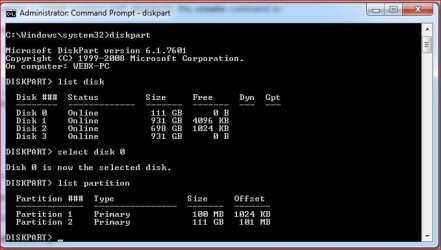
I'm a little confused and actually think his partition is aligned. This is why....

If we look at Diskpart......

It shows the 100MB partition as 1024, it also shows the main partion "C" drive as 101

Diskpart.JPG

Now If we than use Partition Alignment Tool from Paragon to "align" the "C" the program will tell you the drive is already aligned!

Partition Alighnment Tool.JPG

SIW2 asked this question......

I dunno about lucky, whs.

MS deliberately set Vista alignment that way.

Unless you want to shell out for PAT ( works very well, btw ), you could try this:

Image your main partition with macrium/paragon.

Delete the main partition with diskpart from 7 dvd.

Create new main partition with alignment you want - still using Diskpart.

Restore the image you made to that new partition.

See if the alignment is retained - I expect it will be.

Before you do that- you need to ask:

If 1024 is divisible by 4, is 101 x 1024 also divisible by 4 ?

Post: http://www.sevenforums.com/tutorials/113967-ssd-alignment.html#post1087266

I think he might have a point..... at least PAT thinks so.

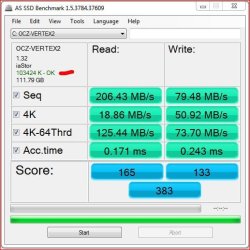
I also note that AS SSD Benchmark tool shows the the partition is OK (Aligned)

AS SSD Bench.JPG

Bottom line is everything showing "C" drive with an offset of 101 is aligned.

What am I missing?

Thanks
 

My Computer My Computer

At a glance

Windows 10 ProIntel Core i7-4770K (3.5Ghz)32 gig Corsair Dominator Platinum (4x8Gig)Sapphire Tri-X R9 Fury
Computer type
PC/Desktop
Computer Manufacturer/Model Number
Custom built by me.
OS
Windows 10 Pro
CPU
Intel Core i7-4770K (3.5Ghz)
Motherboard
Gigabyte G1 Sniper 5 (F10 Bios)
Memory
32 gig Corsair Dominator Platinum (4x8Gig)
Graphics Card(s)
Sapphire Tri-X R9 Fury
Sound Card
Soundblaster ZXR
Monitor(s) Displays
NEC PA242W 24" LCD Monitor
Screen Resolution
1920 x 1200
Hard Drives
Primary - Samsung 850 Pro (512gig), Samsung 840 Pro (256gig), 2TB WD Caviar Black.
PSU
EVGA Supernova 1000 G2
Case
Cooler Master HAF X
Cooling
Corsair H100i with Corsair Air Series SP120 Quiet Fans
Keyboard
Logitech Wireless Wave
Mouse
Logitech Performance MX
Internet Speed
High Speed Cable
Antivirus
Norton Security
Browser
IE11
Other Info
Memory Timings - 1866MHz @ 9-9-9-27-1T @ 1.5 volts
Thank you sygnus21.

I really think people are making this harder then it is.
Most if not all imaging programs are designed to place the image on another drive exactly as it was on the drive it was created from.

If your present drive is properly aligned and the image you create from it is good then when loading that image on ANY other drive it should be placed in the exact same location on disk.

Just checked my Mustang PE disk and it does have Diskpart on it. Did all the checks one more time and everything is aligned as the tutorial stated. 1024KB for the start of the 100MB partition and 101 for the 60GB partition and 61GB for the last partition.

I know for a fact that Acronis TI, since version 9, will create partitions at the exact same place as where they were.

I'm going to do a little test. I have a 160GB drive I'm goning to load this newest image on. With the C partition resized to 60GB and the D partition now at somewhere around 170++.
TI should create the 100MB partition at the front of the drive with the alignment of 1024KB, the C partition of 60GB and then place all the data from the D partition on whatever is left. I'll soon find out.
 

My Computer My Computer

At a glance

Windows 7 Pro x64i5 76016GBNvidia GTS450
Computer Manufacturer/Model Number
Built be Me
OS
Windows 7 Pro x64
CPU
i5 760
Motherboard
Asus P7P55D-E Pro
Memory
16GB
Graphics Card(s)
Nvidia GTS450
Sound Card
On board
Monitor(s) Displays
Dell 2007WFP Dell 1800FP
Screen Resolution
1680x1050 1280x1024
Hard Drives
Seagate 250GB & 750GB
WD 1TB
PSU
Antec 750
Case
In Win
Cooling
Cooler Master Hyper 212+
Keyboard
IBM
Mouse
MS
1. Is that diskpart is from your spinning disk ?

2. You have to align the SSD first, the imaging program will not do that for you, unless you use this one: Paragon Migrate OS to SSD - System migration to Solid State Drives (SSD) - Overview

3. Partition 2 and 3 are OK in terms of alignment

Yes that is from the spinner.

But if this drives layout, the spinner, is aligned properly now the image I just created should has the same alignment when placed on the SSD.

No?

Maybe I'm missing something. The image I am currently using on my current spinner was made from another drive that I replaced. If the original drive had the 1024KB alignment and that image copied that alignment over to this newer drive why wouldn't it do the same when loading it on the SSD?
I will first boot the system from a Mustang PE disk with TI 2011 and Disk Director and make that 100MB partition. I'll also check that the Mustang PE disk has diskpart on it to check the alignment before and after the imaging.

I'll check out that link. Thanks.

Oh here is the partition alignment after I resized the C partition.

DISKPART> list partition

Partition ### Type Size Offset
------------- ---------------- ------- -------
Partition 1 Primary 100 MB 1024 KB
Partition 2 Primary 60 GB 101 MB
Partition 3 Primary 171 GB 61 GB

It does not matter what the spinner layout is - the SSD has to be aligned.
 

My Computer My Computer

At a glance

Vista, Windows7, Mint Mate, Zorin, Windows 8from 1.6GHz Duo to i7
Computer Manufacturer/Model Number
HP, Dell, Gateway, Toshiba - 4 laptops and 2 desktops
OS
Vista, Windows7, Mint Mate, Zorin, Windows 8
CPU
from 1.6GHz Duo to i7
Monitor(s) Displays
2x HP w2207
Hard Drives
5x HDD, 7x SSD, 12x Externals
Keyboard
with trackball - no mices
Mouse
Trackball mice
Internet Speed
DSL 6000
@ Shootist....

Well I know there was a great deal of talk about ATI 2011 being the only backup that truly did alignments, but I suspect that if the image is aligned to begin with, then theoretically it should be aligned when restored. I say theoretically because that's been a big debate about whether ATI of earlier does in fact restore the image aligned. http://kb.acronis.com/content/2699

Anyway I'm no expert and haven't done the experiment to see if this is in fact the case. I suppose I could since I actually have ATI 2010 but....

As for my question to whs, I'm not challenging his knowledge per se as he's helped me understand some things, and has a better grasp on hard drive performance/alignment than I do, I'm just asking for clarification.

Thanks.
 

My Computer My Computer

At a glance

Windows 10 ProIntel Core i7-4770K (3.5Ghz)32 gig Corsair Dominator Platinum (4x8Gig)Sapphire Tri-X R9 Fury
Computer type
PC/Desktop
Computer Manufacturer/Model Number
Custom built by me.
OS
Windows 10 Pro
CPU
Intel Core i7-4770K (3.5Ghz)
Motherboard
Gigabyte G1 Sniper 5 (F10 Bios)
Memory
32 gig Corsair Dominator Platinum (4x8Gig)
Graphics Card(s)
Sapphire Tri-X R9 Fury
Sound Card
Soundblaster ZXR
Monitor(s) Displays
NEC PA242W 24" LCD Monitor
Screen Resolution
1920 x 1200
Hard Drives
Primary - Samsung 850 Pro (512gig), Samsung 840 Pro (256gig), 2TB WD Caviar Black.
PSU
EVGA Supernova 1000 G2
Case
Cooler Master HAF X
Cooling
Corsair H100i with Corsair Air Series SP120 Quiet Fans
Keyboard
Logitech Wireless Wave
Mouse
Logitech Performance MX
Internet Speed
High Speed Cable
Antivirus
Norton Security
Browser
IE11
Other Info
Memory Timings - 1866MHz @ 9-9-9-27-1T @ 1.5 volts
@ whs

I'm a little confused and actually think his partition is aligned. This is why....

If we look at Diskpart......

It shows the 100MB partition as 1024, it also shows the main partion "C" drive as 101

View attachment 148383

Now If we than use Partition Alignment Tool from Paragon to "align" the "C" the program will tell you the drive is already aligned!

View attachment 148384

SIW2 asked this question......

I dunno about lucky, whs.

MS deliberately set Vista alignment that way.

Unless you want to shell out for PAT ( works very well, btw ), you could try this:

Image your main partition with macrium/paragon.

Delete the main partition with diskpart from 7 dvd.

Create new main partition with alignment you want - still using Diskpart.

Restore the image you made to that new partition.

See if the alignment is retained - I expect it will be.

Before you do that- you need to ask:

If 1024 is divisible by 4, is 101 x 1024 also divisible by 4 ?

Post: http://www.sevenforums.com/tutorials/113967-ssd-alignment.html#post1087266

I think he might have a point..... at least PAT thinks so.

I also note that AS SSD Benchmark tool shows the the partition is OK (Aligned)

View attachment 148385

Bottom line is everything showing "C" drive with an offset of 101 is aligned.

What am I missing?

Thanks
Where is the confusion. When the 100MB partition is aligned, the rest follows. You may note that your C is 101 MBs, not KBs. And 101MB is 101.000KB which is divisible by 4KB - 101KB is not.
 
Last edited:

My Computer My Computer

At a glance

Vista, Windows7, Mint Mate, Zorin, Windows 8from 1.6GHz Duo to i7
Computer Manufacturer/Model Number
HP, Dell, Gateway, Toshiba - 4 laptops and 2 desktops
OS
Vista, Windows7, Mint Mate, Zorin, Windows 8
CPU
from 1.6GHz Duo to i7
Monitor(s) Displays
2x HP w2207
Hard Drives
5x HDD, 7x SSD, 12x Externals
Keyboard
with trackball - no mices
Mouse
Trackball mice
Internet Speed
DSL 6000
Thank you sygnus21.

I really think people are making this harder then it is.
Most if not all imaging programs are designed to place the image on another drive exactly as it was on the drive it was created from.

If your present drive is properly aligned and the image you create from it is good then when loading that image on ANY other drive it should be placed in the exact same location on disk.

Just checked my Mustang PE disk and it does have Diskpart on it. Did all the checks one more time and everything is aligned as the tutorial stated. 1024KB for the start of the 100MB partition and 101 for the 60GB partition and 61GB for the last partition.

I know for a fact that Acronis TI, since version 9, will create partitions at the exact same place as where they were.

I'm going to do a little test. I have a 160GB drive I'm goning to load this newest image on. With the C partition resized to 60GB and the D partition now at somewhere around 170++.
TI should create the 100MB partition at the front of the drive with the alignment of 1024KB, the C partition of 60GB and then place all the data from the D partition on whatever is left. I'll soon find out.
Are you doing this test on a new SSD that was never aligned - only that would count. And if the first partition is aligned, the rest follows.
 

My Computer My Computer

At a glance

Vista, Windows7, Mint Mate, Zorin, Windows 8from 1.6GHz Duo to i7
Computer Manufacturer/Model Number
HP, Dell, Gateway, Toshiba - 4 laptops and 2 desktops
OS
Vista, Windows7, Mint Mate, Zorin, Windows 8
CPU
from 1.6GHz Duo to i7
Monitor(s) Displays
2x HP w2207
Hard Drives
5x HDD, 7x SSD, 12x Externals
Keyboard
with trackball - no mices
Mouse
Trackball mice
Internet Speed
DSL 6000
Where is the confusion. When the 100MB partition is aligned, the rest follows. You may note that your C is 101 MBs, not KBs.

I guess I was confused by your statement here....

1024 multiplied with any number is divisible by 4. But what does that tell me? Are you suggesting that the 101 offset of the second partition is OK?

That obviously was in response to this....

Before you do that- you need to ask:

If 1024 is divisible by 4, is 101 x 1024 also divisible by 4 ?

BTW where did I mention KB's?
 

My Computer My Computer

At a glance

Windows 10 ProIntel Core i7-4770K (3.5Ghz)32 gig Corsair Dominator Platinum (4x8Gig)Sapphire Tri-X R9 Fury
Computer type
PC/Desktop
Computer Manufacturer/Model Number
Custom built by me.
OS
Windows 10 Pro
CPU
Intel Core i7-4770K (3.5Ghz)
Motherboard
Gigabyte G1 Sniper 5 (F10 Bios)
Memory
32 gig Corsair Dominator Platinum (4x8Gig)
Graphics Card(s)
Sapphire Tri-X R9 Fury
Sound Card
Soundblaster ZXR
Monitor(s) Displays
NEC PA242W 24" LCD Monitor
Screen Resolution
1920 x 1200
Hard Drives
Primary - Samsung 850 Pro (512gig), Samsung 840 Pro (256gig), 2TB WD Caviar Black.
PSU
EVGA Supernova 1000 G2
Case
Cooler Master HAF X
Cooling
Corsair H100i with Corsair Air Series SP120 Quiet Fans
Keyboard
Logitech Wireless Wave
Mouse
Logitech Performance MX
Internet Speed
High Speed Cable
Antivirus
Norton Security
Browser
IE11
Other Info
Memory Timings - 1866MHz @ 9-9-9-27-1T @ 1.5 volts
It does not matter what the spinner layout is - the SSD has to be aligned.

Ok thanks.
Then tell me this. I just did my little test. Took the image with the resized drive, which is from a 250GB drive, and loaded that on a 160GB drive.
This is what I get from DP for that drive.

DISKPART> list partition

Partition ### Type Size Offset
------------- ---------------- ------- -------
Partition 1 Primary 100 MB 1024 KB
Partition 2 Primary 60 GB 101 MB
Partition 3 Primary 87 GB 61 GB

Everything is still aligned as it was.

What is the big deal with SSDs.
Even if I first align the SSD once I load that image on it it will wipe out that 100MB partition and recreate it. Physically wiping out the alignment I just did. Right?

Well in a few days I will find out.

Thanks again. Will post back with my findings.
 

My Computer My Computer

At a glance

Windows 7 Pro x64i5 76016GBNvidia GTS450
Computer Manufacturer/Model Number
Built be Me
OS
Windows 7 Pro x64
CPU
i5 760
Motherboard
Asus P7P55D-E Pro
Memory
16GB
Graphics Card(s)
Nvidia GTS450
Sound Card
On board
Monitor(s) Displays
Dell 2007WFP Dell 1800FP
Screen Resolution
1680x1050 1280x1024
Hard Drives
Seagate 250GB & 750GB
WD 1TB
PSU
Antec 750
Case
In Win
Cooling
Cooler Master Hyper 212+
Keyboard
IBM
Mouse
MS
Are you doing this test on a new SSD that was never aligned - only that would count. And if the first partition is aligned, the rest follows.

No I don't have it yet. But please tell me what makes SSDs so different then any other spinning drive.

As I posted above if I align the SSD then load that image on it the imaging program will WIPE out whatever partitions are already on the drive and create the new partitions as they were when the image was created.

I really don't see why this is so hard.

I guess I'm really missing something here.

As I said above, I will find out in a few days.

EDIT:
Please explain why when loading a image on a SSD that the imaging program would not PLACE that image in the exact same place on the SSD as it was on the spinner.
 

My Computer My Computer

At a glance

Windows 7 Pro x64i5 76016GBNvidia GTS450
Computer Manufacturer/Model Number
Built be Me
OS
Windows 7 Pro x64
CPU
i5 760
Motherboard
Asus P7P55D-E Pro
Memory
16GB
Graphics Card(s)
Nvidia GTS450
Sound Card
On board
Monitor(s) Displays
Dell 2007WFP Dell 1800FP
Screen Resolution
1680x1050 1280x1024
Hard Drives
Seagate 250GB & 750GB
WD 1TB
PSU
Antec 750
Case
In Win
Cooling
Cooler Master Hyper 212+
Keyboard
IBM
Mouse
MS
It does not matter what the spinner layout is - the SSD has to be aligned.

Ok thanks.
Then tell me this. I just did my little test. Took the image with the resized drive, which is from a 250GB drive, and loaded that on a 160GB drive.
This is what I get from DP for that drive.

DISKPART> list partition

Partition ### Type Size Offset
------------- ---------------- ------- -------
Partition 1 Primary 100 MB 1024 KB
Partition 2 Primary 60 GB 101 MB
Partition 3 Primary 87 GB 61 GB

Everything is still aligned as it was.

What is the big deal with SSDs.
Even if I first align the SSD once I load that image on it it will wipe out that 100MB partition and recreate it. Physically wiping out the alignment I just did. Right?

Well in a few days I will find out.

Thanks again. Will post back with my findings.
Do not go by spinning disks. Fact is that you first have to align a new SSD. Once it is aligned, you are ok.
 

My Computer My Computer

At a glance

Vista, Windows7, Mint Mate, Zorin, Windows 8from 1.6GHz Duo to i7
Computer Manufacturer/Model Number
HP, Dell, Gateway, Toshiba - 4 laptops and 2 desktops
OS
Vista, Windows7, Mint Mate, Zorin, Windows 8
CPU
from 1.6GHz Duo to i7
Monitor(s) Displays
2x HP w2207
Hard Drives
5x HDD, 7x SSD, 12x Externals
Keyboard
with trackball - no mices
Mouse
Trackball mice
Internet Speed
DSL 6000
Are you doing this test on a new SSD that was never aligned - only that would count. And if the first partition is aligned, the rest follows.

No I don't have it yet. But please tell me what makes SSDs so different then any other spinning drive.

As I posted above if I align the SSD then load that image on it the imaging program will WIPE out whatever partitions are already on the drive and create the new partitions as they were when the image was created.

I really don't see why this is so hard.

I guess I'm really missing something here.

As I said above, I will find out in a few days.


EDIT:
Please explain why when loading a image on a SSD that the imaging program would not PLACE that image in the exact same place on the SSD as it was on the spinner.

Yeah, you will find out in a few days. I can only tell you what I experienced with my five SSDs. But maybe yours is different and "auto-aligns".

Please explain why when loading a image on a SSD that the imaging program would not PLACE that image in the exact same place on the SSD as it was on the spinner.

You place them as you like and as you have defined the partitions. The imaging program does nothing automatically. It puts the partition(s) to the place you direct it to.
 

My Computer My Computer

At a glance

Vista, Windows7, Mint Mate, Zorin, Windows 8from 1.6GHz Duo to i7
Computer Manufacturer/Model Number
HP, Dell, Gateway, Toshiba - 4 laptops and 2 desktops
OS
Vista, Windows7, Mint Mate, Zorin, Windows 8
CPU
from 1.6GHz Duo to i7
Monitor(s) Displays
2x HP w2207
Hard Drives
5x HDD, 7x SSD, 12x Externals
Keyboard
with trackball - no mices
Mouse
Trackball mice
Internet Speed
DSL 6000
Yeah, you will find out in a few days. I can only tell you what I experienced with my five SSDs. But maybe yours is different and "auto-aligns".

Please explain why when loading a image on a SSD that the imaging program would not PLACE that image in the exact same place on the SSD as it was on the spinner.

You place them as you like and as you have defined the partitions. The imaging program does nothing automatically. It puts the partition(s) to the place you direct it to.

Found this over at the Acronis forums.

For SSDs, ATI will automatically align a partition when you prepare a new disk, when you restore a single partition (case where you can resize it), and when you restore an entire disk that is aligned.
If you restore an entire disk using an image of a non-aligned disk, the restored disk will not be aligned.

If you clone a disk that is not aligned, the cloned disk will not be aligned.
If you clone a disk that is aligned, the cloned disk will be aligned.

Yet another (hopefully the definitive) SSD Alignment Thread | Knowledge Base

So I'm good to go.
 

My Computer My Computer

At a glance

Windows 7 Pro x64i5 76016GBNvidia GTS450
Computer Manufacturer/Model Number
Built be Me
OS
Windows 7 Pro x64
CPU
i5 760
Motherboard
Asus P7P55D-E Pro
Memory
16GB
Graphics Card(s)
Nvidia GTS450
Sound Card
On board
Monitor(s) Displays
Dell 2007WFP Dell 1800FP
Screen Resolution
1680x1050 1280x1024
Hard Drives
Seagate 250GB & 750GB
WD 1TB
PSU
Antec 750
Case
In Win
Cooling
Cooler Master Hyper 212+
Keyboard
IBM
Mouse
MS
SDD Performance

Windows7 Forum SSD

I run five SDD all in Intel Raid 0, I have three 30GB OCZ Vertex as my main Windows7 system drive witch has run 24/7 for the past 16 months, it also has Ubuntu partition, my main program's run on two 60GB Vertex 2 E Intel Raid 0 on which I also store my RamDrive and VMware disks, I have all the tweaks and updated firmware, I leave prefetch alone as I don’t see any advantage to changing it the performance has stayed the same, I believe it’s because I run Diskeeper in the background and use Perfectdisk to defrag free space if performance as shown in Perfectdisk drops to 97% doesn’t show in real world and its only around once every three months, I don’t have the Windows7 100mb partition on any disks but have 1024mb offset on both SSD raids sets, I use Intel Rapid Storage driver 10.1.0.1008 and have Ghost clones of both disks touch wood not had to use them yet as Windows7 is just super stable, even though I run four raid sets with all first partition’s bootable to Windows7 and independent partitions with Ubuntu, XP64, XenServer, Windows2000 & 2003 server’s even have DOS 5.1 and 6.2 boot partitions.

My data and Backups are spread between two Seagate Barracuda 500GB Intel Raid 0 and two WD Carver Black 1TB Sata-III Marvel Raid 0 which stays in Raid 0 and can be booted to even when I break the Intel Raids in bios settings to update the SDD firmware again touch wood no data loss ever and as long as I don’t format I can flash them with the latest firmware with the OCZ tool from within Windows7/64 running on Marvel Raid array and then reset the bios to Raid and boot to them.

All in all SSD’s are well worth the effort as performance is top’s the 3x Vertex run around 65-70 second reboot with ReStarttime.vbs without Marvel Raid card connected and 80-85 second’s with, the 2x Vertex 2E run 70-75 without Marvel and 85-90 with it installed as the marvel adds around 15-20 seconds to load and check its drivers both SDD Raids score 7.9 in Windows7 performance.

Link showing my Disk Bench marks.
Link To Windows7 Performance.
Link to Restart Timer 3x Vertex Intel Raid 0 With Marvel driver installed can’t find snap without it and don’t have time to unload Marvel will post link when I have time all snaps have 90+ services running and a 3 second pause at system select screen.
Link to Restart Timer 2x Vertex 2e Intel Raid 0 Without Marvel driver installed
Link to Restart Timer 2x Vertex 2e Intel Raid 0 With Marvel driver installed
Link to Prime95 Bench-test
Link to System Temps Intel Burn-Test 64, 21-22 x 201MHz = 4400MHz Max with C1 stepping, Memory is GT 2000 8-8-8 24 but run 24/7 with 6-6-6 16 @800MHz runs 24/7 Hyper/Turbo/Stepping Enabled
 

My Computer My Computer

At a glance

Windows 7 Ultimate x64Intel-920-OC4200MHz Turbo/Typer/Steping enabledCorsair Dominator GT 2000 8-8-8-24 IceT CooledTwo X-Sapphire HD5770-Xfire OC 950MHz-1435MHz
Computer Manufacturer/Model Number
Kinda-7
OS
Windows 7 Ultimate x64
CPU
Intel-920-OC4200MHz Turbo/Typer/Steping enabled
Motherboard
Asus P6T
Memory
Corsair Dominator GT 2000 8-8-8-24 IceT Cooled
Graphics Card(s)
Two X-Sapphire HD5770-Xfire OC 950MHz-1435MHz
Sound Card
Realtec
Monitor(s) Displays
Dell 2407WFP
Screen Resolution
1900x1200
Hard Drives
System 3x30GB Ocz Vertex 60GB Intel Raid0
Programs 2x60GB Ocz Vertex 2e 120GB Intel Raid0
Data 2x500GB Seagate 1TB Intel Raid0
Data 2x1TB WD Carver Black Sata III 2TB Marvel Raid0
RamDrive 4GB with 3GBReadyBoost & 1GB TemporyFiles
PSU
CoolerMaster 900Ultra + 700Ocz Relay Linked = 1600w
Case
CoolerMaster HAF932 Custom
Cooling
Custom Tec\Water\Air
Keyboard
Logitech® G15 + Logitech®Wireless Wave
Mouse
Logetech®MX Performance + G5/MX700
Internet Speed
Virgin 30mb Unlimeted Webstorage
Yeah, you will find out in a few days. I can only tell you what I experienced with my five SSDs. But maybe yours is different and "auto-aligns".

Please explain why when loading a image on a SSD that the imaging program would not PLACE that image in the exact same place on the SSD as it was on the spinner.

You place them as you like and as you have defined the partitions. The imaging program does nothing automatically. It puts the partition(s) to the place you direct it to.

Found this over at the Acronis forums.

For SSDs, ATI will automatically align a partition when you prepare a new disk, when you restore a single partition (case where you can resize it), and when you restore an entire disk that is aligned.
If you restore an entire disk using an image of a non-aligned disk, the restored disk will not be aligned.

If you clone a disk that is not aligned, the cloned disk will not be aligned.
If you clone a disk that is aligned, the cloned disk will be aligned.

Yet another (hopefully the definitive) SSD Alignment Thread | Knowledge Base

So I'm good to go.
This is good to know. I never used Acronis on an SSD - just years ago on spinners.
 

My Computer My Computer

At a glance

Vista, Windows7, Mint Mate, Zorin, Windows 8from 1.6GHz Duo to i7
Computer Manufacturer/Model Number
HP, Dell, Gateway, Toshiba - 4 laptops and 2 desktops
OS
Vista, Windows7, Mint Mate, Zorin, Windows 8
CPU
from 1.6GHz Duo to i7
Monitor(s) Displays
2x HP w2207
Hard Drives
5x HDD, 7x SSD, 12x Externals
Keyboard
with trackball - no mices
Mouse
Trackball mice
Internet Speed
DSL 6000
Found this over at the Acronis forums.

For SSDs, ATI will automatically align a partition when you prepare a new disk, when you restore a single partition (case where you can resize it), and when you restore an entire disk that is aligned.
If you restore an entire disk using an image of a non-aligned disk, the restored disk will not be aligned.

If you clone a disk that is not aligned, the cloned disk will not be aligned.
If you clone a disk that is aligned, the cloned disk will be aligned.

Yet another (hopefully the definitive) SSD Alignment Thread | Knowledge Base

So I'm good to go.
This is good to know. I never used Acronis on an SSD - just years ago on spinners.

Well I would think any UP TO DATE imaging program would handle this the same way.
That is taking a image of the COMPLETE DRIVE, not just individual partitions even if you did all partitions on the drive one by one, and restoring that COMPLETE image.

I think the problems started when people just imaged the system/boot partitions and then tried to restore them to a SSD. Acronis even states in that case the offset will not be correct. Without first aligning the drive.

Actually I can't wait to get this new SSD and most of all see how the imaging goes. I'll know Wednesday night.
 

My Computer My Computer

At a glance

Windows 7 Pro x64i5 76016GBNvidia GTS450
Computer Manufacturer/Model Number
Built be Me
OS
Windows 7 Pro x64
CPU
i5 760
Motherboard
Asus P7P55D-E Pro
Memory
16GB
Graphics Card(s)
Nvidia GTS450
Sound Card
On board
Monitor(s) Displays
Dell 2007WFP Dell 1800FP
Screen Resolution
1680x1050 1280x1024
Hard Drives
Seagate 250GB & 750GB
WD 1TB
PSU
Antec 750
Case
In Win
Cooling
Cooler Master Hyper 212+
Keyboard
IBM
Mouse
MS
Status
Not open for further replies.
Back
Top