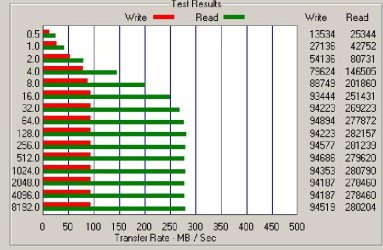
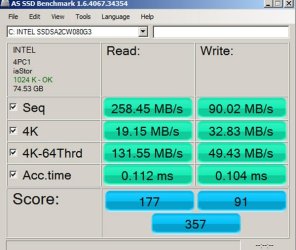
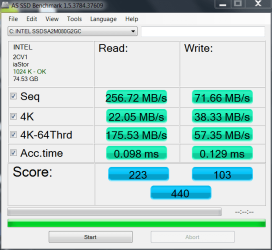
I don't know why and have never tested it. But I have heard several places that benchmarks only approach rated speeds on an empty drive. My guess would simply be that the data slows it down. I've always heard also that filling a SSD will dramatically slow it down. Many of the 'expert' web sites say not to go beyond 80% full. I was reading on Intel forums the other day that if you partition your drive and leave the last partition unallocated, the speed will be faster and that the controller would use the unallocated part to replace worn cells. I haven't ever tried that either and have no intention to. I'm happy with the speed I have now and don't think another .01ms faster would make much difference.
All SSD's come from the factory with unallocated, unaccessible space. Usually 6%-10% to replace RaS as needed.
So that is no problem. It is not included when doing a secure erase so I have read because no info is there. As RaS is needed it would include the replacement sector used into the usable erasable sectors.
The factory sectors from my understanding are on each NAND chip not a true partition as you would think on a HDD.
A mini partition on each NAND chip. 
A NAND cell is 512bytes so you can do the math.

Otherwise an entire NAND chip might be unusable because it is reserved thus decreasing speed.
A 300GB SSD would have two NAND chips unusable.
The speed part I don't know if it would help from making a true partition.
Supposedly it does for running Benchmarks. That is all I have ever read.
----------------------------------------------------------------------------
Essenbe quite reasonable.
80% full makes sense with 6-10% already taken by manufacturer.
That leaves you 10-14% to compress and uncompress files etc and whatever else it needs.
My Intel 320 120GB is 111.79GB usable.
8GB reserved by Intel.
Max my data out 100GB no more than 102GB.
After reading and following along with the xtreme forum testing that makes sense.
On a 60GB that would be about 56GB usable. So around 50-51GB max capacity.
-----------------------------------------------------------------
FYI for anyone-
The firmware is on the controller chip not the NAND set aside.
Someone had that on a different forum but was corrected.
Everything above is what I have been learning about SSD's the last several weeks.
True as best as I know.

No problem if you have different info.
Post it up for all to see or a link or both!
Mike