- Local time
- 8:59 AM
- Messages
- 6,060
Essenbe
Something I ran into when I put mine in. The SSD with the OS was continuously Indexing the old HDD that was the Boot and System HDD.
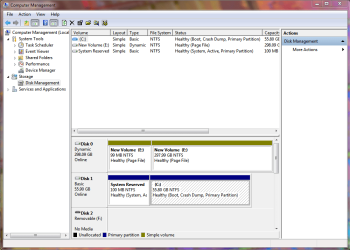
In Disk Management "D" was still showing and marked "Active" and "Primary".
It was no longer marked Boot or System though.
All I had to do was right click and change it as I show in Snip.
Anyway when I got "D" set to just "Primary" it quit indexing.
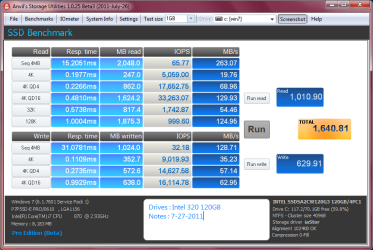
This did slow the SSD down a bit.
Storage is just "Primary" which I know you know but like me did you double check it?
If that isn't the problem I'm not sure what it is.
Mike

That's interesting hopalong, never given a thought to mine but it looks like this.
Is this wrong and if so then is there any way to change it keeping all the data intact on it?
Attachments
My Computer
At a glance
Windows 7 Professional 64 bit
- OS
- Windows 7 Professional 64 bit