
Show us your SSD performance

Status
Not open for further replies.
Yes thats so true but i just had to say it also :-) Do anyone think that if i would by a controllercard with the Marvell chip that i could get better speed on my SSD despite the marvell chip when its in a Pcie x4 slot?
 

My Computer My Computer

Computer Manufacturer/Model Number
Asus P6X58D-E
OS
Windows 7 Ultimate x64 SP1
CPU
Core i7 920 D0 2.67Ghz @ 3.4Ghz
Motherboard
Asus P6X58D-E BIOS 0701
Memory
12Gb Corsair XMS @ 1624Mhz
Graphics Card(s)
ATI Radeon 5870 2GB @ Default
Sound Card
Realtek® ALC889 8-Channel High Definition Audio
Monitor(s) Displays
Samsung 20"
Screen Resolution
Max 1680x1050
Hard Drives
Corsair Force GT 120Gb (555/515Mb)
PSU
Corsair 750W
Case
Noname
Cooling
Scytec Mugen 2 with 2 120mm fans
Keyboard
Logitech...
Mouse
Logitech Mx510
Internet Speed
ComHem 100mbit
I understand that the later Marvel controllers are better, but most of the reasonably priced controllers I have seen are Marvell also.
 

My Computers My Computers

System One System Two

  • Computer type
    PC/Desktop
    Computer Manufacturer/Model Number
    ALWAYS UNDER CONSTRUCTION
    OS
    Windows 11 Pro
    CPU
    Ryzen 9 5900X
    Motherboard
    Asus X570 Crosshair Viii Hero
    Memory
    32GB G Skill DDR4-3600
    Graphics Card(s)
    EVGA RTX 3080 FTW 3 Ultra
    Sound Card
    On Board/Sennheiser PC37X Headset
    Monitor(s) Displays
    3 X Asus 27"
    Screen Resolution
    2560x1440
    Hard Drives
    2 X 1 TB NVME drives
    PSU
    EVGA 850
    Case
    Phanteks Eclipse P400A
    Cooling
    EVGA 280 AIO
    Keyboard
    Logitech G510s/ Logitech G13
    Mouse
    Logitech G502
    Internet Speed
    24/1
    Antivirus
    ESET/MBAM Pro/SAS Pro
    Browser
    Chrome/ Firefox/ Edge
  • Computer type
    Laptop
    System Manufacturer/Model Number
    Dell 16 Plus
    OS
    Windows 11 Pro
    CPU
    Intel Ultra 9 288V
    Memory
    32 GB LPDDR5X 8533
    Monitor(s) Displays
    16" Mini-LED HDR600 Touch 90 Hz
    Screen Resolution
    2560X1600
    Hard Drives
    1 TB NVME
Yes thats so true but i just had to say it also :-) Do anyone think that if i would by a controllercard with the Marvell chip that i could get better speed on my SSD despite the marvell chip when its in a Pcie x4 slot?

Why don't you install Intel RST?
 

My Computer My Computer

Computer Manufacturer/Model Number
tw33k
OS
Windows 7 Ultimate (x64) SP1
CPU
Intel 3770k 4.6GHz
Motherboard
ASUS Maximus V Formula
Memory
8GB (2x 4GB) Crucial Ballistix
Graphics Card(s)
Sapphire 7950 (1060/1600)
Sound Card
On Board Realtek HD Audio
Monitor(s) Displays
27" Acer B273HU (via HDMI)
Screen Resolution
2048 x 1152
Hard Drives
Crucial M4 128GB
2TB WD Black
1TB Samsung F3 SATA
1TB WD Elite External
2TB WD USB 3.0
PSU
Corsair AX750 Gold
Case
Corsair Obsidian 800DW
Cooling
Corsair H100 (2x AP-121/2x UK-3000 push/pull)
Keyboard
Microsoft Wireless 5000
Mouse
Microsoft Wireless 5000
Internet Speed
5mb/s
Other Info
Logitech z-2300 2.1 speakers
Lamptron FC-5 v2
Welcome to Seven Forums HugeRaven. A Guy
 

My Computer My Computer

Computer type
PC/Desktop
OS
Windows 10 Home x64
CPU
INTEL Core i5-750 Quad-Core 3.37GHz
Motherboard
ASUS P7P55D
Memory
HyperX Fury Black Series 8GB (2 x 4GB) 1866Mhz
Graphics Card(s)
EVGA GeForce GTX 750 Superclocked 1GB 128-Bit GDDR5
Monitor(s) Displays
LG 32MA68HY 32" IPS
Screen Resolution
1920 x 1080
Hard Drives
Samsung 840 Evo 120GB, SEAGATE 500GB Barracuda® 7200.12, SATA 3 Gb/s, 7200 RPM, 16MB cache
PSU
ANTEC TruePower New TP-550, 80 PLUS, 550W
Case
ANTEC Three Hundred Illusion
Cooling
COOLER MASTER Hyper 212 Plus, 4 x 120mm 1 x 140mm Noctua's
Internet Speed
85 + Mbps
Antivirus
Avast
Browser
Vivaldi
Thanks "A Guy". "tw33k": Will Intel RST work on the marvell chip? Also i dont have Intel SATA3 it´s only SATA2. Only the Marvell chip has SATA3. Where kan i download Intel RST? Link please :-P
 

My Computer My Computer

Computer Manufacturer/Model Number
Asus P6X58D-E
OS
Windows 7 Ultimate x64 SP1
CPU
Core i7 920 D0 2.67Ghz @ 3.4Ghz
Motherboard
Asus P6X58D-E BIOS 0701
Memory
12Gb Corsair XMS @ 1624Mhz
Graphics Card(s)
ATI Radeon 5870 2GB @ Default
Sound Card
Realtek® ALC889 8-Channel High Definition Audio
Monitor(s) Displays
Samsung 20"
Screen Resolution
Max 1680x1050
Hard Drives
Corsair Force GT 120Gb (555/515Mb)
PSU
Corsair 750W
Case
Noname
Cooling
Scytec Mugen 2 with 2 120mm fans
Keyboard
Logitech...
Mouse
Logitech Mx510
Internet Speed
ComHem 100mbit
I gave you a link. Try it on the Marvell port. You'll be surprised
 

My Computer My Computer

Computer Manufacturer/Model Number
tw33k
OS
Windows 7 Ultimate (x64) SP1
CPU
Intel 3770k 4.6GHz
Motherboard
ASUS Maximus V Formula
Memory
8GB (2x 4GB) Crucial Ballistix
Graphics Card(s)
Sapphire 7950 (1060/1600)
Sound Card
On Board Realtek HD Audio
Monitor(s) Displays
27" Acer B273HU (via HDMI)
Screen Resolution
2048 x 1152
Hard Drives
Crucial M4 128GB
2TB WD Black
1TB Samsung F3 SATA
1TB WD Elite External
2TB WD USB 3.0
PSU
Corsair AX750 Gold
Case
Corsair Obsidian 800DW
Cooling
Corsair H100 (2x AP-121/2x UK-3000 push/pull)
Keyboard
Microsoft Wireless 5000
Mouse
Microsoft Wireless 5000
Internet Speed
5mb/s
Other Info
Logitech z-2300 2.1 speakers
Lamptron FC-5 v2
I gave you a link. Try it on the Marvell port. You'll be surprised

Do i have to uninstall the marvell drivers first? Thanks for the links :-D Edit: Also i only have one SSD Drive, will this INTEL RST drive even then make a difference?
 
Last edited:

My Computer My Computer

Computer Manufacturer/Model Number
Asus P6X58D-E
OS
Windows 7 Ultimate x64 SP1
CPU
Core i7 920 D0 2.67Ghz @ 3.4Ghz
Motherboard
Asus P6X58D-E BIOS 0701
Memory
12Gb Corsair XMS @ 1624Mhz
Graphics Card(s)
ATI Radeon 5870 2GB @ Default
Sound Card
Realtek® ALC889 8-Channel High Definition Audio
Monitor(s) Displays
Samsung 20"
Screen Resolution
Max 1680x1050
Hard Drives
Corsair Force GT 120Gb (555/515Mb)
PSU
Corsair 750W
Case
Noname
Cooling
Scytec Mugen 2 with 2 120mm fans
Keyboard
Logitech...
Mouse
Logitech Mx510
Internet Speed
ComHem 100mbit
I have now read through the info and i´m abit confused about one thing. Do i have to enable Raid on the Marvell SATA3 ports in bios or can i leave it at AHCI as its set to right now before installing the INTEL RST?
 

My Computer My Computer

Computer Manufacturer/Model Number
Asus P6X58D-E
OS
Windows 7 Ultimate x64 SP1
CPU
Core i7 920 D0 2.67Ghz @ 3.4Ghz
Motherboard
Asus P6X58D-E BIOS 0701
Memory
12Gb Corsair XMS @ 1624Mhz
Graphics Card(s)
ATI Radeon 5870 2GB @ Default
Sound Card
Realtek® ALC889 8-Channel High Definition Audio
Monitor(s) Displays
Samsung 20"
Screen Resolution
Max 1680x1050
Hard Drives
Corsair Force GT 120Gb (555/515Mb)
PSU
Corsair 750W
Case
Noname
Cooling
Scytec Mugen 2 with 2 120mm fans
Keyboard
Logitech...
Mouse
Logitech Mx510
Internet Speed
ComHem 100mbit
You can leave the controller at AHCI. IRST is a raid installation, but it also has the intel AHCI driver iaStor. I use the driver but not raid. If you want you can go to services.msc and disable IRST, but still have the iaStor AHCI driver. It really isn't necessary to disable it, but you can if you want.
 

My Computers My Computers

System One System Two

  • Computer type
    PC/Desktop
    Computer Manufacturer/Model Number
    ALWAYS UNDER CONSTRUCTION
    OS
    Windows 11 Pro
    CPU
    Ryzen 9 5900X
    Motherboard
    Asus X570 Crosshair Viii Hero
    Memory
    32GB G Skill DDR4-3600
    Graphics Card(s)
    EVGA RTX 3080 FTW 3 Ultra
    Sound Card
    On Board/Sennheiser PC37X Headset
    Monitor(s) Displays
    3 X Asus 27"
    Screen Resolution
    2560x1440
    Hard Drives
    2 X 1 TB NVME drives
    PSU
    EVGA 850
    Case
    Phanteks Eclipse P400A
    Cooling
    EVGA 280 AIO
    Keyboard
    Logitech G510s/ Logitech G13
    Mouse
    Logitech G502
    Internet Speed
    24/1
    Antivirus
    ESET/MBAM Pro/SAS Pro
    Browser
    Chrome/ Firefox/ Edge
  • Computer type
    Laptop
    System Manufacturer/Model Number
    Dell 16 Plus
    OS
    Windows 11 Pro
    CPU
    Intel Ultra 9 288V
    Memory
    32 GB LPDDR5X 8533
    Monitor(s) Displays
    16" Mini-LED HDR600 Touch 90 Hz
    Screen Resolution
    2560X1600
    Hard Drives
    1 TB NVME
You can leave the controller at AHCI. IRST is a raid installation, but it also has the intel AHCI driver iaStor. I use the driver but not raid. If you want you can go to services.msc and disable IRST, but still have the iaStor AHCI driver. It really isn't necessary to disable it, but you can if you want.

Okey that cleared up som thoughts i had but i still wonder if i have to unistall the marvell drivers or if i can leave them installed before i install IRST?
 

My Computer My Computer

Computer Manufacturer/Model Number
Asus P6X58D-E
OS
Windows 7 Ultimate x64 SP1
CPU
Core i7 920 D0 2.67Ghz @ 3.4Ghz
Motherboard
Asus P6X58D-E BIOS 0701
Memory
12Gb Corsair XMS @ 1624Mhz
Graphics Card(s)
ATI Radeon 5870 2GB @ Default
Sound Card
Realtek® ALC889 8-Channel High Definition Audio
Monitor(s) Displays
Samsung 20"
Screen Resolution
Max 1680x1050
Hard Drives
Corsair Force GT 120Gb (555/515Mb)
PSU
Corsair 750W
Case
Noname
Cooling
Scytec Mugen 2 with 2 120mm fans
Keyboard
Logitech...
Mouse
Logitech Mx510
Internet Speed
ComHem 100mbit
I don't know the correct answer, but I didn't. It seems like the Marvell drivers would have to be installed for the ports to work. After that, you should be able to use whatever ahci driver you want. At least, that's my opinion.
 

My Computers My Computers

System One System Two

  • Computer type
    PC/Desktop
    Computer Manufacturer/Model Number
    ALWAYS UNDER CONSTRUCTION
    OS
    Windows 11 Pro
    CPU
    Ryzen 9 5900X
    Motherboard
    Asus X570 Crosshair Viii Hero
    Memory
    32GB G Skill DDR4-3600
    Graphics Card(s)
    EVGA RTX 3080 FTW 3 Ultra
    Sound Card
    On Board/Sennheiser PC37X Headset
    Monitor(s) Displays
    3 X Asus 27"
    Screen Resolution
    2560x1440
    Hard Drives
    2 X 1 TB NVME drives
    PSU
    EVGA 850
    Case
    Phanteks Eclipse P400A
    Cooling
    EVGA 280 AIO
    Keyboard
    Logitech G510s/ Logitech G13
    Mouse
    Logitech G502
    Internet Speed
    24/1
    Antivirus
    ESET/MBAM Pro/SAS Pro
    Browser
    Chrome/ Firefox/ Edge
  • Computer type
    Laptop
    System Manufacturer/Model Number
    Dell 16 Plus
    OS
    Windows 11 Pro
    CPU
    Intel Ultra 9 288V
    Memory
    32 GB LPDDR5X 8533
    Monitor(s) Displays
    16" Mini-LED HDR600 Touch 90 Hz
    Screen Resolution
    2560X1600
    Hard Drives
    1 TB NVME
I don't know the correct answer, but I didn't. It seems like the Marvell drivers would have to be installed for the ports to work. After that, you should be able to use whatever ahci driver you want. At least, that's my opinion.

Oki, but how if i leave the marvell driver installed does the system know which driver to use after i´ve installed IRST?
 

My Computer My Computer

Computer Manufacturer/Model Number
Asus P6X58D-E
OS
Windows 7 Ultimate x64 SP1
CPU
Core i7 920 D0 2.67Ghz @ 3.4Ghz
Motherboard
Asus P6X58D-E BIOS 0701
Memory
12Gb Corsair XMS @ 1624Mhz
Graphics Card(s)
ATI Radeon 5870 2GB @ Default
Sound Card
Realtek® ALC889 8-Channel High Definition Audio
Monitor(s) Displays
Samsung 20"
Screen Resolution
Max 1680x1050
Hard Drives
Corsair Force GT 120Gb (555/515Mb)
PSU
Corsair 750W
Case
Noname
Cooling
Scytec Mugen 2 with 2 120mm fans
Keyboard
Logitech...
Mouse
Logitech Mx510
Internet Speed
ComHem 100mbit
It seems, that it uses the last driver installed. At least my system works that way. But, you can change drivers threoug device manager, you just need to know where it is. Most drivers are in C/windows/system32/drivers, but I think IRST installs somewhere else.
 

My Computers My Computers

System One System Two

  • Computer type
    PC/Desktop
    Computer Manufacturer/Model Number
    ALWAYS UNDER CONSTRUCTION
    OS
    Windows 11 Pro
    CPU
    Ryzen 9 5900X
    Motherboard
    Asus X570 Crosshair Viii Hero
    Memory
    32GB G Skill DDR4-3600
    Graphics Card(s)
    EVGA RTX 3080 FTW 3 Ultra
    Sound Card
    On Board/Sennheiser PC37X Headset
    Monitor(s) Displays
    3 X Asus 27"
    Screen Resolution
    2560x1440
    Hard Drives
    2 X 1 TB NVME drives
    PSU
    EVGA 850
    Case
    Phanteks Eclipse P400A
    Cooling
    EVGA 280 AIO
    Keyboard
    Logitech G510s/ Logitech G13
    Mouse
    Logitech G502
    Internet Speed
    24/1
    Antivirus
    ESET/MBAM Pro/SAS Pro
    Browser
    Chrome/ Firefox/ Edge
  • Computer type
    Laptop
    System Manufacturer/Model Number
    Dell 16 Plus
    OS
    Windows 11 Pro
    CPU
    Intel Ultra 9 288V
    Memory
    32 GB LPDDR5X 8533
    Monitor(s) Displays
    16" Mini-LED HDR600 Touch 90 Hz
    Screen Resolution
    2560X1600
    Hard Drives
    1 TB NVME
It seems, that it uses the last driver installed. At least my system works that way. But, you can change drivers threoug device manager, you just need to know where it is. Most drivers are in C/windows/system32/drivers, but I think IRST installs somewhere else.


Oki, i´m new to this "change driver i device manager" but then you say that i should first try to just install the IRST driver and see if there is any change in speed, and if the system dont use the IRST i should try changing driver or uninstalling the Marvell driver?
 

My Computer My Computer

Computer Manufacturer/Model Number
Asus P6X58D-E
OS
Windows 7 Ultimate x64 SP1
CPU
Core i7 920 D0 2.67Ghz @ 3.4Ghz
Motherboard
Asus P6X58D-E BIOS 0701
Memory
12Gb Corsair XMS @ 1624Mhz
Graphics Card(s)
ATI Radeon 5870 2GB @ Default
Sound Card
Realtek® ALC889 8-Channel High Definition Audio
Monitor(s) Displays
Samsung 20"
Screen Resolution
Max 1680x1050
Hard Drives
Corsair Force GT 120Gb (555/515Mb)
PSU
Corsair 750W
Case
Noname
Cooling
Scytec Mugen 2 with 2 120mm fans
Keyboard
Logitech...
Mouse
Logitech Mx510
Internet Speed
ComHem 100mbit
No, don't uninstall the marvell. Just leave it alone. If it uses the IRST iaStor driver and you don't like it, just click the 'roll back driver' button in device manager properties. That should change you to where you are now. But, really, you are getting good speed out of youe SSD. You rarely get the advertised speed, no matter how it is set up. Yours seems to be doing quite well as it is.
 

My Computers My Computers

System One System Two

  • Computer type
    PC/Desktop
    Computer Manufacturer/Model Number
    ALWAYS UNDER CONSTRUCTION
    OS
    Windows 11 Pro
    CPU
    Ryzen 9 5900X
    Motherboard
    Asus X570 Crosshair Viii Hero
    Memory
    32GB G Skill DDR4-3600
    Graphics Card(s)
    EVGA RTX 3080 FTW 3 Ultra
    Sound Card
    On Board/Sennheiser PC37X Headset
    Monitor(s) Displays
    3 X Asus 27"
    Screen Resolution
    2560x1440
    Hard Drives
    2 X 1 TB NVME drives
    PSU
    EVGA 850
    Case
    Phanteks Eclipse P400A
    Cooling
    EVGA 280 AIO
    Keyboard
    Logitech G510s/ Logitech G13
    Mouse
    Logitech G502
    Internet Speed
    24/1
    Antivirus
    ESET/MBAM Pro/SAS Pro
    Browser
    Chrome/ Firefox/ Edge
  • Computer type
    Laptop
    System Manufacturer/Model Number
    Dell 16 Plus
    OS
    Windows 11 Pro
    CPU
    Intel Ultra 9 288V
    Memory
    32 GB LPDDR5X 8533
    Monitor(s) Displays
    16" Mini-LED HDR600 Touch 90 Hz
    Screen Resolution
    2560X1600
    Hard Drives
    1 TB NVME
No, don't uninstall the marvell. Just leave it alone. If it uses the IRST iaStor driver and you don't like it, just click the 'roll back driver' button in device manager properties. That should change you to where you are now. But, really, you are getting good speed out of youe SSD. You rarely get the advertised speed, no matter how it is set up. Yours seems to be doing quite well as it is.

OK, then i will try to just install the IRST driver when i get home after work, then test to see if it uses it and if there is any increase in speed(what i´m hoping), othervice i will do driver rollback as you advice me to :-) and go back to the Marvell one´s. Thanks for the kind words about my SSD speed but as i am a "speed nerd" and this is my first SSD i will try to get the most out of it :-P also i like to try to do my best to fix things ;-) especially when it comes to computers. I will let you know how it goes. Many thanks in advance for all the help :-D
 

My Computer My Computer

Computer Manufacturer/Model Number
Asus P6X58D-E
OS
Windows 7 Ultimate x64 SP1
CPU
Core i7 920 D0 2.67Ghz @ 3.4Ghz
Motherboard
Asus P6X58D-E BIOS 0701
Memory
12Gb Corsair XMS @ 1624Mhz
Graphics Card(s)
ATI Radeon 5870 2GB @ Default
Sound Card
Realtek® ALC889 8-Channel High Definition Audio
Monitor(s) Displays
Samsung 20"
Screen Resolution
Max 1680x1050
Hard Drives
Corsair Force GT 120Gb (555/515Mb)
PSU
Corsair 750W
Case
Noname
Cooling
Scytec Mugen 2 with 2 120mm fans
Keyboard
Logitech...
Mouse
Logitech Mx510
Internet Speed
ComHem 100mbit
No problem. I just hope I gave the right advie. But it is just what I did.
 

My Computers My Computers

System One System Two

  • Computer type
    PC/Desktop
    Computer Manufacturer/Model Number
    ALWAYS UNDER CONSTRUCTION
    OS
    Windows 11 Pro
    CPU
    Ryzen 9 5900X
    Motherboard
    Asus X570 Crosshair Viii Hero
    Memory
    32GB G Skill DDR4-3600
    Graphics Card(s)
    EVGA RTX 3080 FTW 3 Ultra
    Sound Card
    On Board/Sennheiser PC37X Headset
    Monitor(s) Displays
    3 X Asus 27"
    Screen Resolution
    2560x1440
    Hard Drives
    2 X 1 TB NVME drives
    PSU
    EVGA 850
    Case
    Phanteks Eclipse P400A
    Cooling
    EVGA 280 AIO
    Keyboard
    Logitech G510s/ Logitech G13
    Mouse
    Logitech G502
    Internet Speed
    24/1
    Antivirus
    ESET/MBAM Pro/SAS Pro
    Browser
    Chrome/ Firefox/ Edge
  • Computer type
    Laptop
    System Manufacturer/Model Number
    Dell 16 Plus
    OS
    Windows 11 Pro
    CPU
    Intel Ultra 9 288V
    Memory
    32 GB LPDDR5X 8533
    Monitor(s) Displays
    16" Mini-LED HDR600 Touch 90 Hz
    Screen Resolution
    2560X1600
    Hard Drives
    1 TB NVME
No problem. I just hope I gave the right advie. But it is just what I did.


If you did it and it worked for you then it should also work for me, at least i´m hoping it will :p

If it doesnt work i´m egeer to try reinstalling OS and then just install IRST after clean system install. But we will see how it goes.
 

My Computer My Computer

Computer Manufacturer/Model Number
Asus P6X58D-E
OS
Windows 7 Ultimate x64 SP1
CPU
Core i7 920 D0 2.67Ghz @ 3.4Ghz
Motherboard
Asus P6X58D-E BIOS 0701
Memory
12Gb Corsair XMS @ 1624Mhz
Graphics Card(s)
ATI Radeon 5870 2GB @ Default
Sound Card
Realtek® ALC889 8-Channel High Definition Audio
Monitor(s) Displays
Samsung 20"
Screen Resolution
Max 1680x1050
Hard Drives
Corsair Force GT 120Gb (555/515Mb)
PSU
Corsair 750W
Case
Noname
Cooling
Scytec Mugen 2 with 2 120mm fans
Keyboard
Logitech...
Mouse
Logitech Mx510
Internet Speed
ComHem 100mbit
No problem. I just hope I gave the right advie. But it is just what I did.

By the way, what is your speed on your SSD? Did it get better with IRST?
 

My Computer My Computer

Computer Manufacturer/Model Number
Asus P6X58D-E
OS
Windows 7 Ultimate x64 SP1
CPU
Core i7 920 D0 2.67Ghz @ 3.4Ghz
Motherboard
Asus P6X58D-E BIOS 0701
Memory
12Gb Corsair XMS @ 1624Mhz
Graphics Card(s)
ATI Radeon 5870 2GB @ Default
Sound Card
Realtek® ALC889 8-Channel High Definition Audio
Monitor(s) Displays
Samsung 20"
Screen Resolution
Max 1680x1050
Hard Drives
Corsair Force GT 120Gb (555/515Mb)
PSU
Corsair 750W
Case
Noname
Cooling
Scytec Mugen 2 with 2 120mm fans
Keyboard
Logitech...
Mouse
Logitech Mx510
Internet Speed
ComHem 100mbit
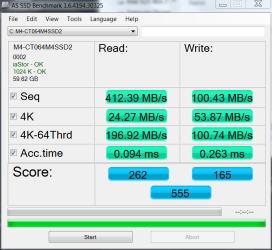
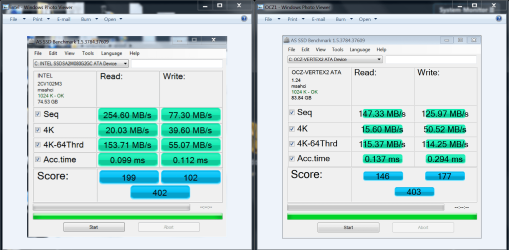
I have 4 SSDs, so not sure which you want. The numbers do come out a little better with iaStor, but can't say that it is noticable. For the sake of discussion, don't get too caught up in ste tests. The more you run, the slower it will get. And, the numbers really have no bearing on real world usage. I have an Intel X25 80GB. I have run AS SSD on it and it was scores as low as 330, have later run the same test and got as high as 440. In actual usage I could tell no difference in how they were performing. I am currently using a 64GB Crucial M4 SSD. Here is the only test I have run on it.
Crucial.PNG

These are the tests I ran on the Intel and the Vertex2
AS SSD both.PNG
 

My Computers My Computers

System One System Two

  • Computer type
    PC/Desktop
    Computer Manufacturer/Model Number
    ALWAYS UNDER CONSTRUCTION
    OS
    Windows 11 Pro
    CPU
    Ryzen 9 5900X
    Motherboard
    Asus X570 Crosshair Viii Hero
    Memory
    32GB G Skill DDR4-3600
    Graphics Card(s)
    EVGA RTX 3080 FTW 3 Ultra
    Sound Card
    On Board/Sennheiser PC37X Headset
    Monitor(s) Displays
    3 X Asus 27"
    Screen Resolution
    2560x1440
    Hard Drives
    2 X 1 TB NVME drives
    PSU
    EVGA 850
    Case
    Phanteks Eclipse P400A
    Cooling
    EVGA 280 AIO
    Keyboard
    Logitech G510s/ Logitech G13
    Mouse
    Logitech G502
    Internet Speed
    24/1
    Antivirus
    ESET/MBAM Pro/SAS Pro
    Browser
    Chrome/ Firefox/ Edge
  • Computer type
    Laptop
    System Manufacturer/Model Number
    Dell 16 Plus
    OS
    Windows 11 Pro
    CPU
    Intel Ultra 9 288V
    Memory
    32 GB LPDDR5X 8533
    Monitor(s) Displays
    16" Mini-LED HDR600 Touch 90 Hz
    Screen Resolution
    2560X1600
    Hard Drives
    1 TB NVME
Status
Not open for further replies.
Back
Top