Show us your SSD performance

Status
Not open for further replies.
I'll repost the specs, prices and model #'s link from my earlier post at the Crucial web site.> SSD upgrades from Crucial.com

3 options. 500 Mb/s. The difference in price is accessories with or without them. It is the same SSD.

1- No accessories
2- Transfer cable and CD/DVD only
3- Mounting hardware only

All three available at Newegg as I posted the third option in my previous post.
 

My Computer

Computer Manufacturer/Model Number
Hopalong/ Godzilla
OS
Windows7 Pro 64bit SP-1; Windows XP Pro 32bit
CPU
Intel Core i7-870 Lynnfield 2.93GHz LGA 1156 95W Quad-Core
Motherboard
ASUS P7P55D-E PRO
Memory
8GB@1400MHz Crucial Ballistix DDR3-1600 4x2GB
Graphics Card(s)
ASUS ENGTX460 DirectCU/2DI/1GD5 1GB 256-bit GDDR5
Sound Card
VIA Onboard
Monitor(s) Displays
Asus VS248H-P 24"; Samsung SyncMaster 941BW 19"ws
Screen Resolution
1920x1080; 1440x900
Hard Drives
Samsung 830 120GB SSD
Intel 320 120GB SSD
Western Digital Caviar Black WD7501AALS 750GB 7200 RPM SATA 3.0Gb/s
Western Digital Caviar Black WD6401AALS 640GB 7200 RPM SATA 3.0Gb/s
PSU
COOLER MASTER Silent Pro RS850-AMBAJ3-US 850W Modular
Case
COOLER MASTER HAF 932 RC-932-KKN5-GP Black
Cooling
Scythe "Mugen-2 Rev.B" (2 ScytheKaze-Jyuni PWM fans)
Keyboard
Logitech K-320
Mouse
Kensington
Antivirus
Avast Inernet Suite
Browser
IE 9 ; Chrome
RAID0 with 2x SSD Benchmark

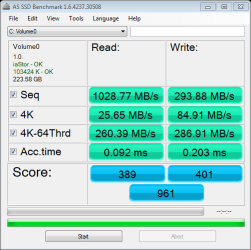
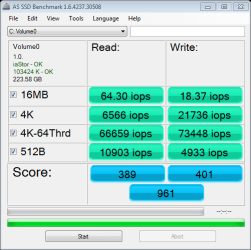
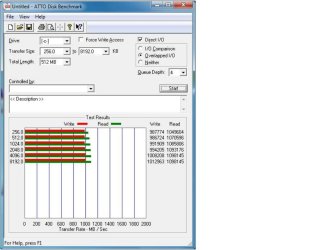
WEI gave primary disk a 7.9. My computer specs are listed in forum profile. The Benchmark results are attached, 961 final score. Don't know if this is good or not, but don't care. I'm never going back to OS on HDD.
 

Attachments

  • as-ssd-bench Volume0 1.22.2012 2-10-09 AM.png
    as-ssd-bench Volume0 1.22.2012 2-10-09 AM.png
    12.8 KB · Views: 10
  • as-ssd-bench Volume0 1.22.2012 2-10-39 AM.png
    as-ssd-bench Volume0 1.22.2012 2-10-39 AM.png
    12.5 KB · Views: 10
  • ATTO.jpg
    ATTO.jpg
    73.9 KB · Views: 28

My Computer

Computer Manufacturer/Model Number
Self-made (7.8 WEI base score)
OS
Windows 7 Professional x64
CPU
Intel Core i7-2700K Sandy Bridge @5.0Ghz ~1.3661-1.5Vcore
Motherboard
ASUS Maximus IV Gene-Z mATX Intel Z68
Memory
G.Skill 2x4GB @ 1866Mhz CL-11 (underclock from XMP)
Graphics Card(s)
recertified PNY Nvidia GTX 470
Sound Card
SupremeFX X-Fi 2
Monitor(s) Displays
Samsung PX2370
Screen Resolution
1920x1080
Hard Drives
RAID0=2x OCZ Vertex III (SATA6Gb/s) 120GB SSDs,
Western Digital Green 2TB HDD
PSU
900W Antec High Current Gamer (Intake from bottom)
Case
Rosewill ARMOR(Fans=2 top, 1 front, 1 MB tray, 1 side panel)
Cooling
Corsair H80 Liquid CPU Cooler (pulling in from the back)
Keyboard
Logitech G15
Mouse
Logitech basic
Internet Speed
1.67 Mbps Up / 9.8 Mbps Down
Other Info
Hauppauge TV tuner w/remote,
ASUS Blu-Ray burner
WEI gave primary disk a 7.9. My computer specs are listed in forum profile. The Benchmark results are attached, 961 final score. Don't know if this is good or not, but don't care. I'm never going back to OS on HDD.

Those numbers are beyond good...incredible :thumbsup:

A Guy
 

My Computer

Computer type
PC/Desktop
OS
Windows 10 Home x64
CPU
INTEL Core i5-750 Quad-Core 3.37GHz
Motherboard
ASUS P7P55D
Memory
HyperX Fury Black Series 8GB (2 x 4GB) 1866Mhz
Graphics Card(s)
EVGA GeForce GTX 750 Superclocked 1GB 128-Bit GDDR5
Monitor(s) Displays
LG 32MA68HY 32" IPS
Screen Resolution
1920 x 1080
Hard Drives
Samsung 840 Evo 120GB, SEAGATE 500GB Barracuda® 7200.12, SATA 3 Gb/s, 7200 RPM, 16MB cache
PSU
ANTEC TruePower New TP-550, 80 PLUS, 550W
Case
ANTEC Three Hundred Illusion
Cooling
COOLER MASTER Hyper 212 Plus, 4 x 120mm 1 x 140mm Noctua's
Internet Speed
85 + Mbps
Antivirus
Avast
Browser
Vivaldi
Very nice scores AwsedreswA, Nice rig ;)
 

My Computer

Computer type
PC/Desktop
Computer Manufacturer/Model Number
76~2.0
OS
Windows 7 Ult x64 - SP1/ Windows 8 Pro x64
CPU
Intel Core i5-3570K 4.6GHz
Motherboard
Gigabyte GA-Z77X UD3H, f18
Memory
8GB (2X4GB) DDR3 1600 Corsair Vengeance CL8 1.5v
Graphics Card(s)
Sapphire HD 7770 Vapor-X OC 1GB DDR5
Sound Card
Onboard VIA VT2021
Monitor(s) Displays
22" LCD Dell
Screen Resolution
1680x1050
Hard Drives
Samsung 840Pro 128GB SSD,
Seagate Barracuda 500GB SATA2 7200rpm 32MB cache, Seagate Barracuda 1TB SATA2 7200rpm 32MB cache,
PSU
Corsair HX650W
Case
Cooler Master Storm Scout
Cooling
Corsair H80 2x12cm Noctua NF P12 , 2x14cm case fans
Keyboard
Logitech Wave
Mouse
CM Sentinel
Internet Speed
Dismal
Antivirus
Avast
Browser
Opera Next
Other Info
Haswell laptop: HP Envy 17t-j, i7-4700MQ, GeForce 740M 2GB DDR3, 17.3" Full HD 1920x1080, 16GB RAM, Samsung 840 Pro 128GB, 1TB Hitachi 7200 HDD,
Desktop: eSATA ports,
External eSATA Seagate 500GB SATA2 7200rpm,
External WD USB 500GB
Those nums are impressive. But what does the setup yield in real life. The access times did not change from a single 2nd generation SSD. So for the OS, I do not really see a big benefit. Or am I wrong.
 

My Computer

Computer Manufacturer/Model Number
HP, Dell, Gateway, Toshiba - 4 laptops and 2 desktops
OS
Vista, Windows7, Mint Mate, Zorin, Windows 8
CPU
from 1.6GHz Duo to i7
Monitor(s) Displays
2x HP w2207
Hard Drives
5x HDD, 7x SSD, 12x Externals
Keyboard
with trackball - no mices
Mouse
Trackball mice
Internet Speed
DSL 6000
Wolfgang with a SSD do you leave Write Caching enabled or not?
 

My Computer

Computer type
PC/Desktop
Computer Manufacturer/Model Number
Home Built Desktop By DataTech
OS
Windows 7 Ultimate X64 SP1
CPU
Intel i5-2550K, Differing ~4.4-4.8GHz No built in GPU
Motherboard
ASUS P8Z68-V PRO/GEN3
Memory
16GB G.Skill Sniper 1866MHz @ 2133MHz 2x8GB
Graphics Card(s)
ASUS GTX650TIB-DC2OC-2GD5, (650TI Boost)
Sound Card
Onboard Realtek 5-1
Monitor(s) Displays
Samsung P2570HD
Screen Resolution
1920x1080
Hard Drives
Samsung 840 Pro 256GB SSD for OS, 500GB Seagate Constellation (Enterprise drive) for Data
PSU
Corsair HX650W
Case
Inwin Dragon Rider
Cooling
Hyper 212 EVO w/two Noctua fans, push-pull, @1300 RPM
Keyboard
E-Z Eyes, bright yellow keys with large characters
Mouse
steelseries SENSEI Laser Pro Gaming
Internet Speed
48-51Mbs Mbs down, 11 Mbs up Xfinity Cable
Antivirus
Norton Internet Security 2013
Browser
IE 10, Opera, Pale Moon if needed
Other Info
4 case fans, LG BluRay-RE, ASUS DVD-RW, Mr. Fusion power supply, 1.21 gigawatts.

My Computer

Computer Manufacturer/Model Number
HP, Dell, Gateway, Toshiba - 4 laptops and 2 desktops
OS
Vista, Windows7, Mint Mate, Zorin, Windows 8
CPU
from 1.6GHz Duo to i7
Monitor(s) Displays
2x HP w2207
Hard Drives
5x HDD, 7x SSD, 12x Externals
Keyboard
with trackball - no mices
Mouse
Trackball mice
Internet Speed
DSL 6000

My Computer

Computer type
PC/Desktop
Computer Manufacturer/Model Number
Home Built Desktop By DataTech
OS
Windows 7 Ultimate X64 SP1
CPU
Intel i5-2550K, Differing ~4.4-4.8GHz No built in GPU
Motherboard
ASUS P8Z68-V PRO/GEN3
Memory
16GB G.Skill Sniper 1866MHz @ 2133MHz 2x8GB
Graphics Card(s)
ASUS GTX650TIB-DC2OC-2GD5, (650TI Boost)
Sound Card
Onboard Realtek 5-1
Monitor(s) Displays
Samsung P2570HD
Screen Resolution
1920x1080
Hard Drives
Samsung 840 Pro 256GB SSD for OS, 500GB Seagate Constellation (Enterprise drive) for Data
PSU
Corsair HX650W
Case
Inwin Dragon Rider
Cooling
Hyper 212 EVO w/two Noctua fans, push-pull, @1300 RPM
Keyboard
E-Z Eyes, bright yellow keys with large characters
Mouse
steelseries SENSEI Laser Pro Gaming
Internet Speed
48-51Mbs Mbs down, 11 Mbs up Xfinity Cable
Antivirus
Norton Internet Security 2013
Browser
IE 10, Opera, Pale Moon if needed
Other Info
4 case fans, LG BluRay-RE, ASUS DVD-RW, Mr. Fusion power supply, 1.21 gigawatts.
If you are talking 'reboot', you have to also consider the time the BIOS takes to get going. On my HP box, the BIOS phase was longer than the time it took to boot Windows. Take a stopwatch and see how much time it takes from 'Starting Windows' to when you have internet connection. That is the timeframe where the SSD plays a role. But during the BIOS phase your SSD is dormant.

There are also a variety of programs which will measure your boot time in a more exact way. I have used Soluto at one time. What is nice about it, it tells you which processes are active during boot and how much time they take. You would be amazed - I had 60 processes only at boot. With Soluto you can also manage certain processes, meaning you can kick them out. This was the result I got at the time on a laptop. The 0.27 min is about 16 sec which I thought was pretty good for a lappy.
 

Attachments

  • 2011-03-02_1937.png
    2011-03-02_1937.png
    16.3 KB · Views: 3

My Computer

Computer Manufacturer/Model Number
HP, Dell, Gateway, Toshiba - 4 laptops and 2 desktops
OS
Vista, Windows7, Mint Mate, Zorin, Windows 8
CPU
from 1.6GHz Duo to i7
Monitor(s) Displays
2x HP w2207
Hard Drives
5x HDD, 7x SSD, 12x Externals
Keyboard
with trackball - no mices
Mouse
Trackball mice
Internet Speed
DSL 6000
Wolfgang I must be really dumb. I downloaded, installed Soluto. All that happens when I click the shortcut to it is a big Soluto icon which says "loading" and then it disappears. I rebooted and the lower left of the desktop "peeled" up and said learning first boot. I can't find anyway to get info from Soluto at all. :o

EDIT: Same on 2nd and 3rd reboot, "Learning first boot".
 

My Computer

Computer type
PC/Desktop
Computer Manufacturer/Model Number
Home Built Desktop By DataTech
OS
Windows 7 Ultimate X64 SP1
CPU
Intel i5-2550K, Differing ~4.4-4.8GHz No built in GPU
Motherboard
ASUS P8Z68-V PRO/GEN3
Memory
16GB G.Skill Sniper 1866MHz @ 2133MHz 2x8GB
Graphics Card(s)
ASUS GTX650TIB-DC2OC-2GD5, (650TI Boost)
Sound Card
Onboard Realtek 5-1
Monitor(s) Displays
Samsung P2570HD
Screen Resolution
1920x1080
Hard Drives
Samsung 840 Pro 256GB SSD for OS, 500GB Seagate Constellation (Enterprise drive) for Data
PSU
Corsair HX650W
Case
Inwin Dragon Rider
Cooling
Hyper 212 EVO w/two Noctua fans, push-pull, @1300 RPM
Keyboard
E-Z Eyes, bright yellow keys with large characters
Mouse
steelseries SENSEI Laser Pro Gaming
Internet Speed
48-51Mbs Mbs down, 11 Mbs up Xfinity Cable
Antivirus
Norton Internet Security 2013
Browser
IE 10, Opera, Pale Moon if needed
Other Info
4 case fans, LG BluRay-RE, ASUS DVD-RW, Mr. Fusion power supply, 1.21 gigawatts.
It takes it a short while to "Learn" your computer.
 

My Computers

System One System Two

  • Computer type
    PC/Desktop
    Computer Manufacturer/Model Number
    ALWAYS UNDER CONSTRUCTION
    OS
    Windows 11 Pro
    CPU
    Ryzen 9 5900X
    Motherboard
    Asus X570 Crosshair Viii Hero
    Memory
    32GB G Skill DDR4-3600
    Graphics Card(s)
    EVGA RTX 3080 FTW 3 Ultra
    Sound Card
    On Board/Sennheiser PC37X Headset
    Monitor(s) Displays
    3 X Asus 27"
    Screen Resolution
    2560x1440
    Hard Drives
    2 X 1 TB NVME drives
    PSU
    EVGA 850
    Case
    Phanteks Eclipse P400A
    Cooling
    EVGA 280 AIO
    Keyboard
    Logitech G510s/ Logitech G13
    Mouse
    Logitech G502
    Internet Speed
    24/1
    Antivirus
    ESET/MBAM Pro/SAS Pro
    Browser
    Chrome/ Firefox/ Edge
  • Computer type
    Laptop
    System Manufacturer/Model Number
    Dell 16 Plus
    OS
    Windows 11 Pro
    CPU
    Intel Ultra 9 288V
    Memory
    32 GB LPDDR5X 8533
    Monitor(s) Displays
    16" Mini-LED HDR600 Touch 90 Hz
    Screen Resolution
    2560X1600
    Hard Drives
    1 TB NVME
Gary, I do not quite remember how that worked. Let me download it and try myself. I am sure it will come back. Will let you know asap.
 

My Computer

Computer Manufacturer/Model Number
HP, Dell, Gateway, Toshiba - 4 laptops and 2 desktops
OS
Vista, Windows7, Mint Mate, Zorin, Windows 8
CPU
from 1.6GHz Duo to i7
Monitor(s) Displays
2x HP w2207
Hard Drives
5x HDD, 7x SSD, 12x Externals
Keyboard
with trackball - no mices
Mouse
Trackball mice
Internet Speed
DSL 6000
Steve is right. It takes a while before it has collected the data. I had to uninstall mine again because it was a bit of a pain. Norton kept blocking it and I did not want to muck around with that.
 

My Computer

Computer Manufacturer/Model Number
HP, Dell, Gateway, Toshiba - 4 laptops and 2 desktops
OS
Vista, Windows7, Mint Mate, Zorin, Windows 8
CPU
from 1.6GHz Duo to i7
Monitor(s) Displays
2x HP w2207
Hard Drives
5x HDD, 7x SSD, 12x Externals
Keyboard
with trackball - no mices
Mouse
Trackball mice
Internet Speed
DSL 6000
Thanks, I uninstalled it too due to it doing nothing. I have Norton too but it made no complaint about Soluto tho.
I would like to get it to work to see what is going on at boot.
 

My Computer

Computer type
PC/Desktop
Computer Manufacturer/Model Number
Home Built Desktop By DataTech
OS
Windows 7 Ultimate X64 SP1
CPU
Intel i5-2550K, Differing ~4.4-4.8GHz No built in GPU
Motherboard
ASUS P8Z68-V PRO/GEN3
Memory
16GB G.Skill Sniper 1866MHz @ 2133MHz 2x8GB
Graphics Card(s)
ASUS GTX650TIB-DC2OC-2GD5, (650TI Boost)
Sound Card
Onboard Realtek 5-1
Monitor(s) Displays
Samsung P2570HD
Screen Resolution
1920x1080
Hard Drives
Samsung 840 Pro 256GB SSD for OS, 500GB Seagate Constellation (Enterprise drive) for Data
PSU
Corsair HX650W
Case
Inwin Dragon Rider
Cooling
Hyper 212 EVO w/two Noctua fans, push-pull, @1300 RPM
Keyboard
E-Z Eyes, bright yellow keys with large characters
Mouse
steelseries SENSEI Laser Pro Gaming
Internet Speed
48-51Mbs Mbs down, 11 Mbs up Xfinity Cable
Antivirus
Norton Internet Security 2013
Browser
IE 10, Opera, Pale Moon if needed
Other Info
4 case fans, LG BluRay-RE, ASUS DVD-RW, Mr. Fusion power supply, 1.21 gigawatts.
Access time most likely remained unchanged from the .2ms, and if anything, boots became longer when compared to a single SSD because there is an extra RAID BIOS screen to get through. My goal in RAID0 was to increase the efficiency with large file reads, i.e. game load screens in SC2 and BF3.

Thanks for response, good to know my numbers are good.
 

My Computer

Computer Manufacturer/Model Number
Self-made (7.8 WEI base score)
OS
Windows 7 Professional x64
CPU
Intel Core i7-2700K Sandy Bridge @5.0Ghz ~1.3661-1.5Vcore
Motherboard
ASUS Maximus IV Gene-Z mATX Intel Z68
Memory
G.Skill 2x4GB @ 1866Mhz CL-11 (underclock from XMP)
Graphics Card(s)
recertified PNY Nvidia GTX 470
Sound Card
SupremeFX X-Fi 2
Monitor(s) Displays
Samsung PX2370
Screen Resolution
1920x1080
Hard Drives
RAID0=2x OCZ Vertex III (SATA6Gb/s) 120GB SSDs,
Western Digital Green 2TB HDD
PSU
900W Antec High Current Gamer (Intake from bottom)
Case
Rosewill ARMOR(Fans=2 top, 1 front, 1 MB tray, 1 side panel)
Cooling
Corsair H80 Liquid CPU Cooler (pulling in from the back)
Keyboard
Logitech G15
Mouse
Logitech basic
Internet Speed
1.67 Mbps Up / 9.8 Mbps Down
Other Info
Hauppauge TV tuner w/remote,
ASUS Blu-Ray burner
Thanks, I uninstalled it too due to it doing nothing. I have Norton too but it made no complaint about Soluto tho.
I would like to get it to work to see what is going on at boot.

Gary, the old version usually takes a few reboots to work. This is the new version, the older version was useful, but if you uninstall it, all the changes you made go with it. So, I tried the old fashioned way. But, while I had it, it was useful and helped.
 

My Computers

System One System Two

  • Computer type
    PC/Desktop
    Computer Manufacturer/Model Number
    ALWAYS UNDER CONSTRUCTION
    OS
    Windows 11 Pro
    CPU
    Ryzen 9 5900X
    Motherboard
    Asus X570 Crosshair Viii Hero
    Memory
    32GB G Skill DDR4-3600
    Graphics Card(s)
    EVGA RTX 3080 FTW 3 Ultra
    Sound Card
    On Board/Sennheiser PC37X Headset
    Monitor(s) Displays
    3 X Asus 27"
    Screen Resolution
    2560x1440
    Hard Drives
    2 X 1 TB NVME drives
    PSU
    EVGA 850
    Case
    Phanteks Eclipse P400A
    Cooling
    EVGA 280 AIO
    Keyboard
    Logitech G510s/ Logitech G13
    Mouse
    Logitech G502
    Internet Speed
    24/1
    Antivirus
    ESET/MBAM Pro/SAS Pro
    Browser
    Chrome/ Firefox/ Edge
  • Computer type
    Laptop
    System Manufacturer/Model Number
    Dell 16 Plus
    OS
    Windows 11 Pro
    CPU
    Intel Ultra 9 288V
    Memory
    32 GB LPDDR5X 8533
    Monitor(s) Displays
    16" Mini-LED HDR600 Touch 90 Hz
    Screen Resolution
    2560X1600
    Hard Drives
    1 TB NVME
I don't know if this is the right place to ask, but if not please let me know where.

I recently bought an Intel 320 SSD (128GB) to place on my mobile system (ASUS G73JH / HM55 Chipset). Once the clean copy of Windows 7 was done, I downloaded and installed the Intel SSD Toolbox.

When I checked the System Tuner panel, the DIPM setting was disabled. After I enabled it, it's status changed to "Feature is optimized". Note that at this time, the Intel RST drivers were not installed.

Later, after I downloaded and installed the latest Intel RST drivers, the DIPM status have changed to "Current storage driver does not support DIPM settings. Consider changing to another storage driver compatible with your system".

I also checked the storage driver details using Device Manager and it's using the "iaStor.sys" file.

Basically, IRST = DIPM disabled; Default Microsoft AHCI drivers = DIPM enabled.

Any thoughts? Does anyone else have/had this issue too?

Thanks in advance.
 

My Computer

OS
Windows 7 Home Premium 64bit

My Computer

OS
Windows 7 Home Premium 64bit

Not really. That guide is intended to enable DIPM when using Microsoft's AHCI default driver.

In my case, I'm trying to enable DIPM feature with Intel RST drivers, since I have no problems with the Microsoft ones.

Thanks, tho.

I was about to say "Huh?" but I see the last post of the page states that it's specific to the MS ACHI driver. Sorry about that.
 

My Computer

OS
XP / Win7 x64 Pro
CPU
Intel Quad-Core Q9450 @ 3.2GHz
Motherboard
Asus P5-E
Memory
2x2GB GSkill DDR2
Graphics Card(s)
NVIDIA GeForce 8600 GTS (EVGA)
Monitor(s) Displays
Dell 2408WFP
Screen Resolution
1920x1200
Status
Not open for further replies.
Back
Top