Show us your SSD performance

Status
Not open for further replies.
Hey guys I just tested mine with ATTO an AS SSD. I got completely different results.

Can anyone give some input? I also see my disk under Defrag (shouldn't it be hidden?)
I have a Corsair Force GT 60, stock FW.
It's not uncommon to see different results among the various benchmark programs. You'll most likely see different results from the SAME benchmark too, even if run back to back. The benchmark programs use-up valuable "wear" so it's not a good idea to be a frequent user of benchmarks on the SSD.

Your SSD will appear in the list of drives in Defrag but the Last Run date should say Never* and the scheduler should not allow a setting for the SSD.

*Note - You can run an Analyze on a SSD and the date of that run will appear but, as already stated, the SSD should not appear in the drive list for the Defrag Scheduler. Also, you can force a Defrag on a SSD but it's probably not a good idea. SSDs operate differently than a HDD and the fragmentation is part of the SSD's wear leveling function. That is, the SSD firmware will try to always use "new" areas to write data before re-using old (deleted) areas. At least that's my understanding. (CYA statement.) ;)
 

My Computer

Computer type
PC/Desktop
Computer Manufacturer/Model Number
Built 2/11/2011
OS
Windows 7 Pro-x64
CPU
i7-2600 3.4GHz - 3.8GHz Turbo
Motherboard
Intel DH67BL-B3
Memory
8Gb - 2x4GB, Muskin 991770 PC3-1333
Graphics Card(s)
Integrated Intel HD 2000
Sound Card
Integrated Intel 10.1 HD, RealTek ALC892
Monitor(s) Displays
Asus LCD VH222H, Haier HL24XSL2a
Screen Resolution
1920x1080, 1920x1080
Hard Drives
Crucial SSD C300-128Gb,
Western Digital WD5002AALX - 500Gb,
Western Digital WD7501AALS - 750Gb
PSU
Seasonic 650W 80+ Gold Modular
Case
Rosewill Defender
Cooling
Stock CPU, Four 120mm case fans, PCH fan added
Keyboard
Logitech EX100 Y-RBH94 Wireless
Mouse
Logitech EX100 M-RCE95 Wireless
Internet Speed
3.0/1.5 Mbs
Antivirus
Microsoft Security Essentials
Browser
Microsoft Internet Explorer 11
Other Info
Antec Veris Premier-Multimedia IR Station,
Cyber Accoustics-3602 Speakers,
AFT XM-5U Card Reader,
Hauppauge TV-HVR-2250,
Sony LX300 USB Turntable
  • Like
Reactions: whs
Hey guys I just tested mine with ATTO an AS SSD. I got completely different results.

Can anyone give some input? I also see my disk under Defrag (shouldnt it be hidden?)
I have a Corsair Force GT 60, stock FW.

As mentioned, different benchmark programs test differently.
AS SSD uses incompressible data, so sandforce drives will have lower numbers than on ATTO.
ATTO uses compressible data, so the sandforce compression feature works on these SSDs and will give higher numbers.

If you want to compare AS SSD scores, look at this: AS SSD Benchmark thread

The only other Corsair Force GT I found there is a 120GB drive, this may have more channels and therefore get a higher score than a 60GB.
The Corsair Force GT 120GB got a 404.

You might consider updating the FW, as sandforce was having some FW issues and they have a new FW out, I think Corsair has it for theirs.

Make sure your SSD is not on the defrag list/schedule.
 

My Computer

Computer type
PC/Desktop
Computer Manufacturer/Model Number
76~2.0
OS
Windows 7 Ult x64 - SP1/ Windows 8 Pro x64
CPU
Intel Core i5-3570K 4.6GHz
Motherboard
Gigabyte GA-Z77X UD3H, f18
Memory
8GB (2X4GB) DDR3 1600 Corsair Vengeance CL8 1.5v
Graphics Card(s)
Sapphire HD 7770 Vapor-X OC 1GB DDR5
Sound Card
Onboard VIA VT2021
Monitor(s) Displays
22" LCD Dell
Screen Resolution
1680x1050
Hard Drives
Samsung 840Pro 128GB SSD,
Seagate Barracuda 500GB SATA2 7200rpm 32MB cache, Seagate Barracuda 1TB SATA2 7200rpm 32MB cache,
PSU
Corsair HX650W
Case
Cooler Master Storm Scout
Cooling
Corsair H80 2x12cm Noctua NF P12 , 2x14cm case fans
Keyboard
Logitech Wave
Mouse
CM Sentinel
Internet Speed
Dismal
Antivirus
Avast
Browser
Opera Next
Other Info
Haswell laptop: HP Envy 17t-j, i7-4700MQ, GeForce 740M 2GB DDR3, 17.3" Full HD 1920x1080, 16GB RAM, Samsung 840 Pro 128GB, 1TB Hitachi 7200 HDD,
Desktop: eSATA ports,
External eSATA Seagate 500GB SATA2 7200rpm,
External WD USB 500GB
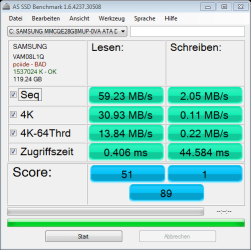
You see the red where it says pciide - BAD in the upper left? This usually means you don't have AHCI enabled. Right now your numbers are very bad I hate to say. Have a look here:

http://www.sevenforums.com/tutorials/61869-ahci-enable-windows-7-vista.html

A Guy

Stu, your score should be in the 300+ range, those access times are very bad.

AHCI mode will help.

What are your system specs?

Let us know if you have any questions.
OK, I finally got back to this, but I have a problem.

I went into my BIOS utility and there is a choice for "something ATA something..." which is currently set to Native-PCI. The other choices are Compatibility, AHCI, and RAID. I assume you think I switch to AHCI. I am all ready to do that except, in the case of a problem, there is no way to switch back to Native-PCI! That is not one of the choices.

Should I be concerned about that? Should I make the switch anyway? What if there's trouble and I have to switch back?

If it still seems I should switch, I'll do it after the Super Bowl and report back. Thanks for helpin'.

Stu, your score should be in the 300+ range, those access times are very bad.

AHCI mode will help.

What are your system specs?

Let us know if you have any questions.

I just updated my system specs - well, the ones I knew how to get an answer for - in my CP. I will have to pick this up tomorrow. I must sleep now.

Nice user name ;)
Mine or Dave's? :D
 

My Computer

Computer type
PC/Desktop
Computer Manufacturer/Model Number
Lenovo/2757CTO Thinkpad W700
OS
Microsoft Windows 7 Professional 64-bit 7601 Multiprocessor Free Service Pack 1
CPU
AMD A6-5350M APU with Radeon(tm) HD Graphics
Motherboard
LENOVO 20B20011US
Memory
16.00 GB
Graphics Card(s)
AMD Radeon HD 8450G
Sound Card
(1) AMD High Definition Audio Device (2) Conexant 20671 Sm
Monitor(s) Displays
??
Screen Resolution
1366 x 768 x 32 bits (4294967296 colors) @ 60 Hz
Hard Drives
HGST HTS 545032A7E380 SATA Disk Device
Mouse
Microsoft Optical Wheel Mouse
Other Info
BIOS: Ver 1.00PARTTBLX
You shouldn't have a problem switching back, if necessary. I have done it for updating firmware temporarially. But, I don't think you will want or need to switch back. AHCI is what every SSD manufacturer I am aware of recomends for best performance.
 

My Computers

System One System Two

  • Computer type
    PC/Desktop
    Computer Manufacturer/Model Number
    ALWAYS UNDER CONSTRUCTION
    OS
    Windows 11 Pro
    CPU
    Ryzen 9 5900X
    Motherboard
    Asus X570 Crosshair Viii Hero
    Memory
    32GB G Skill DDR4-3600
    Graphics Card(s)
    EVGA RTX 3080 FTW 3 Ultra
    Sound Card
    On Board/Sennheiser PC37X Headset
    Monitor(s) Displays
    3 X Asus 27"
    Screen Resolution
    2560x1440
    Hard Drives
    2 X 1 TB NVME drives
    PSU
    EVGA 850
    Case
    Phanteks Eclipse P400A
    Cooling
    EVGA 280 AIO
    Keyboard
    Logitech G510s/ Logitech G13
    Mouse
    Logitech G502
    Internet Speed
    24/1
    Antivirus
    ESET/MBAM Pro/SAS Pro
    Browser
    Chrome/ Firefox/ Edge
  • Computer type
    Laptop
    System Manufacturer/Model Number
    Dell 16 Plus
    OS
    Windows 11 Pro
    CPU
    Intel Ultra 9 288V
    Memory
    32 GB LPDDR5X 8533
    Monitor(s) Displays
    16" Mini-LED HDR600 Touch 90 Hz
    Screen Resolution
    2560X1600
    Hard Drives
    1 TB NVME
You see the red where it says pciide - BAD in the upper left? This usually means you don't have AHCI enabled. Right now your numbers are very bad I hate to say. Have a look here:

http://www.sevenforums.com/tutorials/61869-ahci-enable-windows-7-vista.html

A Guy

You shouldn't have a problem switching back, if necessary. I have done it for updating firmware temporarially. But, I don't think you will want or need to switch back. AHCI is what every SSD manufacturer I am aware of recomends for best performance.

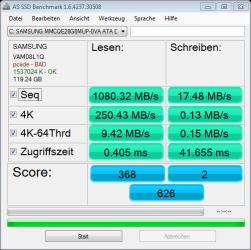
OK. I let it run during the Super Bowl (goyay Giants!) and I got much better results with AHDI on:
as-ssd-bench SAMSUNG MMCQE28G 2.1.2012 12-06-26 AM.pngas-ssd-bench SAMSUNG MMCQE28G 2.5.2012 10-18-05 PM.png
Pretty impressive gain, huh? Thanks for the advice, all. Feel free to explain what some of those numbers mean, anyone.

But notice the pciide-BAD is still there, and still red. Do I have some bad hardware? (Also, notice that some of my readings got a little worse. That ain't right, is it?)
 

My Computer

Computer type
PC/Desktop
Computer Manufacturer/Model Number
Lenovo/2757CTO Thinkpad W700
OS
Microsoft Windows 7 Professional 64-bit 7601 Multiprocessor Free Service Pack 1
CPU
AMD A6-5350M APU with Radeon(tm) HD Graphics
Motherboard
LENOVO 20B20011US
Memory
16.00 GB
Graphics Card(s)
AMD Radeon HD 8450G
Sound Card
(1) AMD High Definition Audio Device (2) Conexant 20671 Sm
Monitor(s) Displays
??
Screen Resolution
1366 x 768 x 32 bits (4294967296 colors) @ 60 Hz
Hard Drives
HGST HTS 545032A7E380 SATA Disk Device
Mouse
Microsoft Optical Wheel Mouse
Other Info
BIOS: Ver 1.00PARTTBLX
The 4K read improved 6 times. The rest is so, so. What is not good is the 41ms access time. That is not normal. There must be a problem with the controller or a BIG problem with Trim. It should be around 0.1ms - but 41ms is 410 times worse. That is a lot worse than a HDD which is between 10 and 15ms.
 

My Computer

Computer Manufacturer/Model Number
HP, Dell, Gateway, Toshiba - 4 laptops and 2 desktops
OS
Vista, Windows7, Mint Mate, Zorin, Windows 8
CPU
from 1.6GHz Duo to i7
Monitor(s) Displays
2x HP w2207
Hard Drives
5x HDD, 7x SSD, 12x Externals
Keyboard
with trackball - no mices
Mouse
Trackball mice
Internet Speed
DSL 6000
You are still in IDE mode. Tell us what you did in following the tutorial. You did the registry edits then rebooted, on startup did you change the sata mode in bios to AHCI? When you booted back into windows, you should have seen windows loading drivers, then rebooted again. Is that what happened?
 

My Computers

System One System Two

  • Computer type
    PC/Desktop
    Computer Manufacturer/Model Number
    ALWAYS UNDER CONSTRUCTION
    OS
    Windows 11 Pro
    CPU
    Ryzen 9 5900X
    Motherboard
    Asus X570 Crosshair Viii Hero
    Memory
    32GB G Skill DDR4-3600
    Graphics Card(s)
    EVGA RTX 3080 FTW 3 Ultra
    Sound Card
    On Board/Sennheiser PC37X Headset
    Monitor(s) Displays
    3 X Asus 27"
    Screen Resolution
    2560x1440
    Hard Drives
    2 X 1 TB NVME drives
    PSU
    EVGA 850
    Case
    Phanteks Eclipse P400A
    Cooling
    EVGA 280 AIO
    Keyboard
    Logitech G510s/ Logitech G13
    Mouse
    Logitech G502
    Internet Speed
    24/1
    Antivirus
    ESET/MBAM Pro/SAS Pro
    Browser
    Chrome/ Firefox/ Edge
  • Computer type
    Laptop
    System Manufacturer/Model Number
    Dell 16 Plus
    OS
    Windows 11 Pro
    CPU
    Intel Ultra 9 288V
    Memory
    32 GB LPDDR5X 8533
    Monitor(s) Displays
    16" Mini-LED HDR600 Touch 90 Hz
    Screen Resolution
    2560X1600
    Hard Drives
    1 TB NVME

My Computer

Computer type
PC/Desktop
OS
Windows 10 Home x64
CPU
INTEL Core i5-750 Quad-Core 3.37GHz
Motherboard
ASUS P7P55D
Memory
HyperX Fury Black Series 8GB (2 x 4GB) 1866Mhz
Graphics Card(s)
EVGA GeForce GTX 750 Superclocked 1GB 128-Bit GDDR5
Monitor(s) Displays
LG 32MA68HY 32" IPS
Screen Resolution
1920 x 1080
Hard Drives
Samsung 840 Evo 120GB, SEAGATE 500GB Barracuda® 7200.12, SATA 3 Gb/s, 7200 RPM, 16MB cache
PSU
ANTEC TruePower New TP-550, 80 PLUS, 550W
Case
ANTEC Three Hundred Illusion
Cooling
COOLER MASTER Hyper 212 Plus, 4 x 120mm 1 x 140mm Noctua's
Internet Speed
85 + Mbps
Antivirus
Avast
Browser
Vivaldi
Isn't it in the IRST package? That is only for IaStor though, otherwise it should be MSAHCI.
 

My Computers

System One System Two

  • Computer type
    PC/Desktop
    Computer Manufacturer/Model Number
    ALWAYS UNDER CONSTRUCTION
    OS
    Windows 11 Pro
    CPU
    Ryzen 9 5900X
    Motherboard
    Asus X570 Crosshair Viii Hero
    Memory
    32GB G Skill DDR4-3600
    Graphics Card(s)
    EVGA RTX 3080 FTW 3 Ultra
    Sound Card
    On Board/Sennheiser PC37X Headset
    Monitor(s) Displays
    3 X Asus 27"
    Screen Resolution
    2560x1440
    Hard Drives
    2 X 1 TB NVME drives
    PSU
    EVGA 850
    Case
    Phanteks Eclipse P400A
    Cooling
    EVGA 280 AIO
    Keyboard
    Logitech G510s/ Logitech G13
    Mouse
    Logitech G502
    Internet Speed
    24/1
    Antivirus
    ESET/MBAM Pro/SAS Pro
    Browser
    Chrome/ Firefox/ Edge
  • Computer type
    Laptop
    System Manufacturer/Model Number
    Dell 16 Plus
    OS
    Windows 11 Pro
    CPU
    Intel Ultra 9 288V
    Memory
    32 GB LPDDR5X 8533
    Monitor(s) Displays
    16" Mini-LED HDR600 Touch 90 Hz
    Screen Resolution
    2560X1600
    Hard Drives
    1 TB NVME

My Computer

Computer type
PC/Desktop
OS
Windows 10 Home x64
CPU
INTEL Core i5-750 Quad-Core 3.37GHz
Motherboard
ASUS P7P55D
Memory
HyperX Fury Black Series 8GB (2 x 4GB) 1866Mhz
Graphics Card(s)
EVGA GeForce GTX 750 Superclocked 1GB 128-Bit GDDR5
Monitor(s) Displays
LG 32MA68HY 32" IPS
Screen Resolution
1920 x 1080
Hard Drives
Samsung 840 Evo 120GB, SEAGATE 500GB Barracuda® 7200.12, SATA 3 Gb/s, 7200 RPM, 16MB cache
PSU
ANTEC TruePower New TP-550, 80 PLUS, 550W
Case
ANTEC Three Hundred Illusion
Cooling
COOLER MASTER Hyper 212 Plus, 4 x 120mm 1 x 140mm Noctua's
Internet Speed
85 + Mbps
Antivirus
Avast
Browser
Vivaldi
There are 2 Intel AHCI sata controllers in there. But, even without them it will run good with the Microsoft sata controller, MSAHCI.
 

My Computers

System One System Two

  • Computer type
    PC/Desktop
    Computer Manufacturer/Model Number
    ALWAYS UNDER CONSTRUCTION
    OS
    Windows 11 Pro
    CPU
    Ryzen 9 5900X
    Motherboard
    Asus X570 Crosshair Viii Hero
    Memory
    32GB G Skill DDR4-3600
    Graphics Card(s)
    EVGA RTX 3080 FTW 3 Ultra
    Sound Card
    On Board/Sennheiser PC37X Headset
    Monitor(s) Displays
    3 X Asus 27"
    Screen Resolution
    2560x1440
    Hard Drives
    2 X 1 TB NVME drives
    PSU
    EVGA 850
    Case
    Phanteks Eclipse P400A
    Cooling
    EVGA 280 AIO
    Keyboard
    Logitech G510s/ Logitech G13
    Mouse
    Logitech G502
    Internet Speed
    24/1
    Antivirus
    ESET/MBAM Pro/SAS Pro
    Browser
    Chrome/ Firefox/ Edge
  • Computer type
    Laptop
    System Manufacturer/Model Number
    Dell 16 Plus
    OS
    Windows 11 Pro
    CPU
    Intel Ultra 9 288V
    Memory
    32 GB LPDDR5X 8533
    Monitor(s) Displays
    16" Mini-LED HDR600 Touch 90 Hz
    Screen Resolution
    2560X1600
    Hard Drives
    1 TB NVME
One was for his model, the other wasn't. Where would he get the MSAHCI?

A Guy
 

My Computer

Computer type
PC/Desktop
OS
Windows 10 Home x64
CPU
INTEL Core i5-750 Quad-Core 3.37GHz
Motherboard
ASUS P7P55D
Memory
HyperX Fury Black Series 8GB (2 x 4GB) 1866Mhz
Graphics Card(s)
EVGA GeForce GTX 750 Superclocked 1GB 128-Bit GDDR5
Monitor(s) Displays
LG 32MA68HY 32" IPS
Screen Resolution
1920 x 1080
Hard Drives
Samsung 840 Evo 120GB, SEAGATE 500GB Barracuda® 7200.12, SATA 3 Gb/s, 7200 RPM, 16MB cache
PSU
ANTEC TruePower New TP-550, 80 PLUS, 550W
Case
ANTEC Three Hundred Illusion
Cooling
COOLER MASTER Hyper 212 Plus, 4 x 120mm 1 x 140mm Noctua's
Internet Speed
85 + Mbps
Antivirus
Avast
Browser
Vivaldi
Windows automatically loads it during the change to AHCI, when you boot after the registry changes and BIOS changes, those are the drivers it downloads.
 

My Computers

System One System Two

  • Computer type
    PC/Desktop
    Computer Manufacturer/Model Number
    ALWAYS UNDER CONSTRUCTION
    OS
    Windows 11 Pro
    CPU
    Ryzen 9 5900X
    Motherboard
    Asus X570 Crosshair Viii Hero
    Memory
    32GB G Skill DDR4-3600
    Graphics Card(s)
    EVGA RTX 3080 FTW 3 Ultra
    Sound Card
    On Board/Sennheiser PC37X Headset
    Monitor(s) Displays
    3 X Asus 27"
    Screen Resolution
    2560x1440
    Hard Drives
    2 X 1 TB NVME drives
    PSU
    EVGA 850
    Case
    Phanteks Eclipse P400A
    Cooling
    EVGA 280 AIO
    Keyboard
    Logitech G510s/ Logitech G13
    Mouse
    Logitech G502
    Internet Speed
    24/1
    Antivirus
    ESET/MBAM Pro/SAS Pro
    Browser
    Chrome/ Firefox/ Edge
  • Computer type
    Laptop
    System Manufacturer/Model Number
    Dell 16 Plus
    OS
    Windows 11 Pro
    CPU
    Intel Ultra 9 288V
    Memory
    32 GB LPDDR5X 8533
    Monitor(s) Displays
    16" Mini-LED HDR600 Touch 90 Hz
    Screen Resolution
    2560X1600
    Hard Drives
    1 TB NVME
The 4K read improved 6 times. The rest is so, so. What is not good is the 41ms access time. That is not normal. There must be a problem with the controller or a BIG problem with Trim. It should be around 0.1ms - but 41ms is 410 times worse. That is a lot worse than a HDD which is between 10 and 15ms.

You are still in IDE mode. Tell us what you did in following the tutorial. You did the registry edits then rebooted, on startup did you change the sata mode in bios to AHCI? When you booted back into windows, you should have seen windows loading drivers, then rebooted again. Is that what happened?

No, that's not what happened.

First, I forgot to change the registry.

So I just went back now and changed the registry setting to 0, then I rebooted into the BIOS. The BIOS change I made last time did not "stick". That is, the SATA controller setting went back to "Native-PCI". I figure that's because I hadn't made the registry change.

So I changed the SATA to "AHCI", pressed "Save & Exit" and restarted Windows. Windows did not load differently and did not force a restart. Just to be sure, I restarted Windows again myself.

Windows restarted and so I started AS SSD Benchmark again. It's running right now. The text pciide - BAD is still there, and it's still red.
 

My Computer

Computer type
PC/Desktop
Computer Manufacturer/Model Number
Lenovo/2757CTO Thinkpad W700
OS
Microsoft Windows 7 Professional 64-bit 7601 Multiprocessor Free Service Pack 1
CPU
AMD A6-5350M APU with Radeon(tm) HD Graphics
Motherboard
LENOVO 20B20011US
Memory
16.00 GB
Graphics Card(s)
AMD Radeon HD 8450G
Sound Card
(1) AMD High Definition Audio Device (2) Conexant 20671 Sm
Monitor(s) Displays
??
Screen Resolution
1366 x 768 x 32 bits (4294967296 colors) @ 60 Hz
Hard Drives
HGST HTS 545032A7E380 SATA Disk Device
Mouse
Microsoft Optical Wheel Mouse
Other Info
BIOS: Ver 1.00PARTTBLX
Go back to the tutorial and do everything in order exactly like the tutorial says. It is really easy and you will be happy with the performance gains. It's just that the tutorial has to be followed step by step.
 

My Computers

System One System Two

  • Computer type
    PC/Desktop
    Computer Manufacturer/Model Number
    ALWAYS UNDER CONSTRUCTION
    OS
    Windows 11 Pro
    CPU
    Ryzen 9 5900X
    Motherboard
    Asus X570 Crosshair Viii Hero
    Memory
    32GB G Skill DDR4-3600
    Graphics Card(s)
    EVGA RTX 3080 FTW 3 Ultra
    Sound Card
    On Board/Sennheiser PC37X Headset
    Monitor(s) Displays
    3 X Asus 27"
    Screen Resolution
    2560x1440
    Hard Drives
    2 X 1 TB NVME drives
    PSU
    EVGA 850
    Case
    Phanteks Eclipse P400A
    Cooling
    EVGA 280 AIO
    Keyboard
    Logitech G510s/ Logitech G13
    Mouse
    Logitech G502
    Internet Speed
    24/1
    Antivirus
    ESET/MBAM Pro/SAS Pro
    Browser
    Chrome/ Firefox/ Edge
  • Computer type
    Laptop
    System Manufacturer/Model Number
    Dell 16 Plus
    OS
    Windows 11 Pro
    CPU
    Intel Ultra 9 288V
    Memory
    32 GB LPDDR5X 8533
    Monitor(s) Displays
    16" Mini-LED HDR600 Touch 90 Hz
    Screen Resolution
    2560X1600
    Hard Drives
    1 TB NVME
Go back to the tutorial and do everything in order exactly like the tutorial says. It is really easy and you will be happy with the performance gains. It's just that the tutorial has to be followed step by step.
I think I did do it right the last time. I set the regedit key to 0; booted to the BIOS and changed the SATA Controller setting to AHCI; started Windows. Right? What am I missing?
 

My Computer

Computer type
PC/Desktop
Computer Manufacturer/Model Number
Lenovo/2757CTO Thinkpad W700
OS
Microsoft Windows 7 Professional 64-bit 7601 Multiprocessor Free Service Pack 1
CPU
AMD A6-5350M APU with Radeon(tm) HD Graphics
Motherboard
LENOVO 20B20011US
Memory
16.00 GB
Graphics Card(s)
AMD Radeon HD 8450G
Sound Card
(1) AMD High Definition Audio Device (2) Conexant 20671 Sm
Monitor(s) Displays
??
Screen Resolution
1366 x 768 x 32 bits (4294967296 colors) @ 60 Hz
Hard Drives
HGST HTS 545032A7E380 SATA Disk Device
Mouse
Microsoft Optical Wheel Mouse
Other Info
BIOS: Ver 1.00PARTTBLX
It's up to you, but why not try it again. I've done it 3 or 4 times and it has worked every time. What you are doing is forcing Windows to load the AHCI drivers. Then when you reboot after loading drivers, you should be in AHCI mode. Maybe I mis-read what you said, but it just looked like it was in the wrong order.
 

My Computers

System One System Two

  • Computer type
    PC/Desktop
    Computer Manufacturer/Model Number
    ALWAYS UNDER CONSTRUCTION
    OS
    Windows 11 Pro
    CPU
    Ryzen 9 5900X
    Motherboard
    Asus X570 Crosshair Viii Hero
    Memory
    32GB G Skill DDR4-3600
    Graphics Card(s)
    EVGA RTX 3080 FTW 3 Ultra
    Sound Card
    On Board/Sennheiser PC37X Headset
    Monitor(s) Displays
    3 X Asus 27"
    Screen Resolution
    2560x1440
    Hard Drives
    2 X 1 TB NVME drives
    PSU
    EVGA 850
    Case
    Phanteks Eclipse P400A
    Cooling
    EVGA 280 AIO
    Keyboard
    Logitech G510s/ Logitech G13
    Mouse
    Logitech G502
    Internet Speed
    24/1
    Antivirus
    ESET/MBAM Pro/SAS Pro
    Browser
    Chrome/ Firefox/ Edge
  • Computer type
    Laptop
    System Manufacturer/Model Number
    Dell 16 Plus
    OS
    Windows 11 Pro
    CPU
    Intel Ultra 9 288V
    Memory
    32 GB LPDDR5X 8533
    Monitor(s) Displays
    16" Mini-LED HDR600 Touch 90 Hz
    Screen Resolution
    2560X1600
    Hard Drives
    1 TB NVME
It's up to you, but why not try it again. I've done it 3 or 4 times and it has worked every time. What you are doing is forcing Windows to load the AHCI drivers. Then when you reboot after loading drivers, you should be in AHCI mode. Maybe I mis-read what you said, but it just looked like it was in the wrong order.
OK. No luck, unfortunately. I set the regedit key to 0, saved and shutdown.

In the BIOS, the AHCI setting did not stick, so I set it again, saved and exited, but went straight into the BIOS. The AHCI setting still didn't stick.

So this time, I set the SATA controller to Compatibility, saved and shut down, and then went straight back into the BIOS. Compatibility mode stuck, so I changed the SATA again to ACHI, saved and shut down.

Then went straight into the BIOS again and saw that AHCI setting was retained. So I shutdown and tried to boot Windows. But Windows would not start.

Windows said there was a problem and it would only boot into Repair Mode. Repair mode ran for about 15 minutes and then said it could not find the problem.

I rebooted into BIOS and went back to Compatbility mode. I could no longer return to the original setting, Native-PCI.

I rebooted and Windows started normally. But when I start AS SSD Benchmark, it still shows pciiide - BAD in red.

I'm looking for more advice at this point. Any ideas what's wrong?

Thanks.
 

My Computer

Computer type
PC/Desktop
Computer Manufacturer/Model Number
Lenovo/2757CTO Thinkpad W700
OS
Microsoft Windows 7 Professional 64-bit 7601 Multiprocessor Free Service Pack 1
CPU
AMD A6-5350M APU with Radeon(tm) HD Graphics
Motherboard
LENOVO 20B20011US
Memory
16.00 GB
Graphics Card(s)
AMD Radeon HD 8450G
Sound Card
(1) AMD High Definition Audio Device (2) Conexant 20671 Sm
Monitor(s) Displays
??
Screen Resolution
1366 x 768 x 32 bits (4294967296 colors) @ 60 Hz
Hard Drives
HGST HTS 545032A7E380 SATA Disk Device
Mouse
Microsoft Optical Wheel Mouse
Other Info
BIOS: Ver 1.00PARTTBLX
One was for his model, the other wasn't. Where would he get the MSAHCI?

A Guy

Windows automatically loads it during the change to AHCI, when you boot after the registry changes and BIOS changes, those are the drivers it downloads.

So what is the consensus? Should I try to upgrade my drivers or not?
 

My Computer

Computer type
PC/Desktop
Computer Manufacturer/Model Number
Lenovo/2757CTO Thinkpad W700
OS
Microsoft Windows 7 Professional 64-bit 7601 Multiprocessor Free Service Pack 1
CPU
AMD A6-5350M APU with Radeon(tm) HD Graphics
Motherboard
LENOVO 20B20011US
Memory
16.00 GB
Graphics Card(s)
AMD Radeon HD 8450G
Sound Card
(1) AMD High Definition Audio Device (2) Conexant 20671 Sm
Monitor(s) Displays
??
Screen Resolution
1366 x 768 x 32 bits (4294967296 colors) @ 60 Hz
Hard Drives
HGST HTS 545032A7E380 SATA Disk Device
Mouse
Microsoft Optical Wheel Mouse
Other Info
BIOS: Ver 1.00PARTTBLX
It is always good to have updated drivers. But, I really don't understand the problem you are having. But, you can use Microsoft's AHCI driver or Intel's AHCI driver.It will work very well either eay. Microsofts drivers are provided by the OS. The registry edits and changing bios is what is supposed to make those drivers load. Microsoft's drivers (MSAHCI) will do well. I ran my SSD with them for about a year and was very happy with it. If I understand the problem correctly, it appears the problem is in your bios. The issue seems to be you setting AHCI in bios and bios not saving the settings. The honest answer is I really don't know. Bios should save whatever settings you change if you save and exit after making them.
 

My Computers

System One System Two

  • Computer type
    PC/Desktop
    Computer Manufacturer/Model Number
    ALWAYS UNDER CONSTRUCTION
    OS
    Windows 11 Pro
    CPU
    Ryzen 9 5900X
    Motherboard
    Asus X570 Crosshair Viii Hero
    Memory
    32GB G Skill DDR4-3600
    Graphics Card(s)
    EVGA RTX 3080 FTW 3 Ultra
    Sound Card
    On Board/Sennheiser PC37X Headset
    Monitor(s) Displays
    3 X Asus 27"
    Screen Resolution
    2560x1440
    Hard Drives
    2 X 1 TB NVME drives
    PSU
    EVGA 850
    Case
    Phanteks Eclipse P400A
    Cooling
    EVGA 280 AIO
    Keyboard
    Logitech G510s/ Logitech G13
    Mouse
    Logitech G502
    Internet Speed
    24/1
    Antivirus
    ESET/MBAM Pro/SAS Pro
    Browser
    Chrome/ Firefox/ Edge
  • Computer type
    Laptop
    System Manufacturer/Model Number
    Dell 16 Plus
    OS
    Windows 11 Pro
    CPU
    Intel Ultra 9 288V
    Memory
    32 GB LPDDR5X 8533
    Monitor(s) Displays
    16" Mini-LED HDR600 Touch 90 Hz
    Screen Resolution
    2560X1600
    Hard Drives
    1 TB NVME
Status
Not open for further replies.
Back
Top