Show us your SSD performance

Status
Not open for further replies.
If you read my post in the link you would have seen that I have updated the firmware (not a noob ;))

1. is the Alignment right?...Yep, it's good
2. its in ahci or ide?...IDE. I have had it set to AHCI but boot time decreased and overall increase in speed was minimal (I posted these results here but can't find them right now)
3. i see you cloned the HDD 2 SSD? some times the alignment dont take. and you need to redo it with Diskpar.

now using the new Intel Driver.


64809d1270306297t-show-us-your-ssd-performance-untitled.jpg


just something maybe to look @.

How to setup Core V1/2, Solid, Apex, Vertex SSD with aligned partitions using USB (if available on the drive) or SATA. Updated to show how to use Vista recovery disk


P.S, you try it with 100MB instead of 1000MB
....thanks for pointing that out ;)
 

Attachments

  • Kingston_SSDNow_X25M.PNG
    Kingston_SSDNow_X25M.PNG
    16.4 KB · Views: 1

My Computer My Computer

Computer Manufacturer/Model Number
tw33k
OS
Windows 7 Ultimate (x64) SP1
CPU
Intel 3770k 4.6GHz
Motherboard
ASUS Maximus V Formula
Memory
8GB (2x 4GB) Crucial Ballistix
Graphics Card(s)
Sapphire 7950 (1060/1600)
Sound Card
On Board Realtek HD Audio
Monitor(s) Displays
27" Acer B273HU (via HDMI)
Screen Resolution
2048 x 1152
Hard Drives
Crucial M4 128GB
2TB WD Black
1TB Samsung F3 SATA
1TB WD Elite External
2TB WD USB 3.0
PSU
Corsair AX750 Gold
Case
Corsair Obsidian 800DW
Cooling
Corsair H100 (2x AP-121/2x UK-3000 push/pull)
Keyboard
Microsoft Wireless 5000
Mouse
Microsoft Wireless 5000
Internet Speed
5mb/s
Other Info
Logitech z-2300 2.1 speakers
Lamptron FC-5 v2
You are also up against an AMD chipset. The following link is from OCZ concerning ssds and AMD, the important info is the AMD chipset having limitations.
This thread concerns a raid, but the info applys to single drives also:

Result Below average benchmark results
 

My Computer My Computer

Computer Manufacturer/Model Number
self built
OS
Windows 7 Professional 64
CPU
i7 860
Motherboard
ASUS P7P55D-E Pro /onboard SATA 6Gb/s USB 3.0
Memory
8GB Corsair CMX4GX3M2A1600C9 DDR3 1600
Graphics Card(s)
(2) Nvidia EVGA GTX 470 SLI
Sound Card
Onboard VIA VT1828S 8 channels
Monitor(s) Displays
ASUS VW266H 25.5" HDMI Widescreen LCD and HP vs19 LCD 19"
Screen Resolution
1920 x 1200 : 1280 X 1024 dual
Hard Drives
Intel X25-M 80GB SSD (boot)
Seagate Barracuda 80GB
Western Digital Caviar Black 500GB
Asus DRW-24B1ST/BLK/B/AS
PSU
COOLER MASTER Silent Pro 1000W
Case
LIAN LI Lancool PC-K62
Cooling
Prolimatech Megahalems with Scythe "ULTRA KAZE" 120
Keyboard
Saitek
Mouse
Microsoft Optical comfort mouse 3000
Internet Speed
Comcast Ultra tier 30/5
interesting read. My access time is excellent and that's what matters most I reckon
 

Attachments

  • Benchmark.JPG
    Benchmark.JPG
    61.8 KB · Views: 26

My Computer My Computer

Computer Manufacturer/Model Number
tw33k
OS
Windows 7 Ultimate (x64) SP1
CPU
Intel 3770k 4.6GHz
Motherboard
ASUS Maximus V Formula
Memory
8GB (2x 4GB) Crucial Ballistix
Graphics Card(s)
Sapphire 7950 (1060/1600)
Sound Card
On Board Realtek HD Audio
Monitor(s) Displays
27" Acer B273HU (via HDMI)
Screen Resolution
2048 x 1152
Hard Drives
Crucial M4 128GB
2TB WD Black
1TB Samsung F3 SATA
1TB WD Elite External
2TB WD USB 3.0
PSU
Corsair AX750 Gold
Case
Corsair Obsidian 800DW
Cooling
Corsair H100 (2x AP-121/2x UK-3000 push/pull)
Keyboard
Microsoft Wireless 5000
Mouse
Microsoft Wireless 5000
Internet Speed
5mb/s
Other Info
Logitech z-2300 2.1 speakers
Lamptron FC-5 v2
Lol yes we are driving ourselves nuts by benching too much! SSD reads blow conventual platter drives out of the water and no matter what chipset we have, we can all enjoy that fact.

Also C1E and C-STATE TECH in the bios, on Intel chipsets are known to skew benchmarks in the 4k range. Disabling those give better results, but that turns off power saving mode on the cpu. Overclocking disables those as default.
 

My Computer My Computer

Computer Manufacturer/Model Number
self built
OS
Windows 7 Professional 64
CPU
i7 860
Motherboard
ASUS P7P55D-E Pro /onboard SATA 6Gb/s USB 3.0
Memory
8GB Corsair CMX4GX3M2A1600C9 DDR3 1600
Graphics Card(s)
(2) Nvidia EVGA GTX 470 SLI
Sound Card
Onboard VIA VT1828S 8 channels
Monitor(s) Displays
ASUS VW266H 25.5" HDMI Widescreen LCD and HP vs19 LCD 19"
Screen Resolution
1920 x 1200 : 1280 X 1024 dual
Hard Drives
Intel X25-M 80GB SSD (boot)
Seagate Barracuda 80GB
Western Digital Caviar Black 500GB
Asus DRW-24B1ST/BLK/B/AS
PSU
COOLER MASTER Silent Pro 1000W
Case
LIAN LI Lancool PC-K62
Cooling
Prolimatech Megahalems with Scythe "ULTRA KAZE" 120
Keyboard
Saitek
Mouse
Microsoft Optical comfort mouse 3000
Internet Speed
Comcast Ultra tier 30/5
My access time is excellent and that's what matters most I reckon
Absolutely correct.
 

My Computer My Computer

Computer Manufacturer/Model Number
HP, Dell, Gateway, Toshiba - 4 laptops and 2 desktops
OS
Vista, Windows7, Mint Mate, Zorin, Windows 8
CPU
from 1.6GHz Duo to i7
Monitor(s) Displays
2x HP w2207
Hard Drives
5x HDD, 7x SSD, 12x Externals
Keyboard
with trackball - no mices
Mouse
Trackball mice
Internet Speed
DSL 6000

My Computer My Computer

Computer Manufacturer/Model Number
tw33k
OS
Windows 7 Ultimate (x64) SP1
CPU
Intel 3770k 4.6GHz
Motherboard
ASUS Maximus V Formula
Memory
8GB (2x 4GB) Crucial Ballistix
Graphics Card(s)
Sapphire 7950 (1060/1600)
Sound Card
On Board Realtek HD Audio
Monitor(s) Displays
27" Acer B273HU (via HDMI)
Screen Resolution
2048 x 1152
Hard Drives
Crucial M4 128GB
2TB WD Black
1TB Samsung F3 SATA
1TB WD Elite External
2TB WD USB 3.0
PSU
Corsair AX750 Gold
Case
Corsair Obsidian 800DW
Cooling
Corsair H100 (2x AP-121/2x UK-3000 push/pull)
Keyboard
Microsoft Wireless 5000
Mouse
Microsoft Wireless 5000
Internet Speed
5mb/s
Other Info
Logitech z-2300 2.1 speakers
Lamptron FC-5 v2
I dont even want to check what my wimpy little convential 2.5" drive does compared to your drives. I could install an SSD directly into my MBP but I think it may take some tinkering. Plus, $200+ for a 60GB drive seems insane atm.
 

My Computer My Computer

Computer Manufacturer/Model Number
Apple Macbook Pro (April 2009)
OS
W7 Ult. x64 | OS X
CPU
Intel Mobile Core 2 Duo 2.93Ghz [T9800 Penryn]
Motherboard
NVIDIA nForce 730i Rev. B1 [Mac-F2268EC8 (U2E1)]
Memory
4096MB Samsung DDR3 Dual Channel [PC3-8500F 1066Mhz]
Graphics Card(s)
NVIDIA GeForce 9600M GT 512MB [G96M Rev. C1]
Sound Card
SB X-Fi Surround 5.1 USB | Onboard Realtek (Disabled)
Monitor(s) Displays
Acer x223wbd 22" | Apple Anti-Glare 17" (Disabled)
Screen Resolution
{Current} 1440x900 {Acer} 1680x1050 {Apple} 1920x1200
Hard Drives
{Internal}
Seagate Momentus 320GB 2.5" 7200RPM [ST9320421AS]

{Externals}
LaCie 320GB USB 2.0 HDD [301284UR]
LaCie 750GB USB 2.0 FW400 eSATA HDD [301314U]
LaCie 1TB USB 2.0 HDD [301304UR]
PSU
Magsafe
Case
Aluminum/Unibody (MBP52)
Cooling
2 x 6000 RPM Fans
Keyboard
Logitech G-15v2 [PN 920-000379]
Mouse
Logitech G-9 [PN 910-000338]
Internet Speed
12Mbps/2.5Mbps w/ 24Mbps Speed Boost [Comcast]
Other Info
Logitech X-540 Speakers [PN 970223-0122]
Sennheiser PC-151 Headset
I dont even want to check what my wimpy little convential 2.5" drive does compared to your drives. I could install an SSD directly into my MBP but I think it may take some tinkering. Plus, $200+ for a 60GB drive seems insane atm.
You can get away with $100 for a 30GB Vertex which is ample for Windows7. It would probably be the best $100 investment you ever made into computers. The difference in performance is just staggering.
 

My Computer My Computer

Computer Manufacturer/Model Number
HP, Dell, Gateway, Toshiba - 4 laptops and 2 desktops
OS
Vista, Windows7, Mint Mate, Zorin, Windows 8
CPU
from 1.6GHz Duo to i7
Monitor(s) Displays
2x HP w2207
Hard Drives
5x HDD, 7x SSD, 12x Externals
Keyboard
with trackball - no mices
Mouse
Trackball mice
Internet Speed
DSL 6000

My Computer My Computer

Computer type
PC/Desktop
Computer Manufacturer/Model Number
benchtec, built to personal specs
OS
Windows10 Pro - 64Bit vs.10547
CPU
i7-965 Extreme Edition (8 Cores) at 3.3GHz (no OC)
Motherboard
BloodRageX58 (Socket1366)
Memory
12G Corsair Dominator DDR3 - tripled
Graphics Card(s)
2xAMD SapphireNITRO R9 380(4G) crossfire
Sound Card
Sonar(SB)X-Fi onboard
Monitor(s) Displays
SyncMaster P2050 20"
Screen Resolution
1600x900 (widescreen)
Hard Drives
480G\OCZSolid3SSD, 64G\OCZVertex3SSD,60G\OCZVertex2SSD, 1TB\spinpointF1SATAHDD
PSU
1200w Power Station Gold
Case
ANTEC 900/2 all blue lights, etc..
Cooling
Noctua SE1366 NH-U12P - a tight fit, but a monster cooler!!
Keyboard
Logitech G19 (wired)
Mouse
Logitech G9 Laser (wired)
Internet Speed
150mb unlimited
Browser
IE11(RP)
Other Info
Xbox One, Nokia735 Windows10 mobile, LG HD/DVD/Blu-Ray r/w, CyberlinkPowerDVD15, LogitechZ5500-SS(5.1), LogitechG35Phones-SS(7.1),MSOffice 2007,CorelDrawX7,Painter2016, Wacom Intuos Pro-SE
I dont even want to check what my wimpy little convential 2.5" drive does compared to your drives. I could install an SSD directly into my MBP but I think it may take some tinkering. Plus, $200+ for a 60GB drive seems insane atm.
While it seems insane, the performance gain is insane as well. I've never really noticed anybody who purchased an SSD say they regretted it. The only regret is often that they waited so long to get the SSD drive.
 

My Computer My Computer

Computer Manufacturer/Model Number
Self-Built in July 2009
OS
Windows 7 Ultimate x64
CPU
Intel Q9550 2.83Ghz OC'd to 3.40Ghz
Motherboard
Gigabyte GA-EP45-UD3R rev. 1.1, F12 BIOS
Memory
8GB G.Skill PI DDR2-800, 4-4-4-12 timings
Graphics Card(s)
EVGA 1280MB Nvidia GeForce GTX570
Sound Card
Realtek ALC899A 8 channel onboard audio
Monitor(s) Displays
23" Acer x233H
Screen Resolution
1920x1080
Hard Drives
Intel X25-M 80GB Gen 2 SSD
Western Digital 1TB Caviar Black, 32MB cache. WD1001FALS
PSU
Corsair 620HX modular
Case
Antec P182
Cooling
stock
Keyboard
ABS M1 Mechanical
Mouse
Logitech G9 Laser Mouse
Internet Speed
15/2 cable modem
Other Info
Windows and Linux enthusiast. Logitech G35 Headset.
I dont even want to check what my wimpy little convential 2.5" drive does compared to your drives. I could install an SSD directly into my MBP but I think it may take some tinkering. Plus, $200+ for a 60GB drive seems insane atm.
You can get away with $100 for a 30GB Vertex which is ample for Windows7. It would probably be the best $100 investment you ever made into computers. The difference in performance is just staggering.

Ahh yes, 30GB may be ok for Windows 7. However, I run dual boot and I also have many games installed. Since I only have the room for one internal drive and my eSATA ExpressCard /34 device doesn't function in Win7 having the games installed on my main drive is the only feasible thing to do. Ever tried playing a video game from a USB External? Not fun!

In other words I'd need atleast ~30GB for the OS X partition, and another 80GB for the Windows 7 partition. I might be able to get away with 120GB if I was picky about how many games I installed. However, as mentioned, I don't have the luxury of a secondary conventional drive.

 

My Computer My Computer

Computer Manufacturer/Model Number
Apple Macbook Pro (April 2009)
OS
W7 Ult. x64 | OS X
CPU
Intel Mobile Core 2 Duo 2.93Ghz [T9800 Penryn]
Motherboard
NVIDIA nForce 730i Rev. B1 [Mac-F2268EC8 (U2E1)]
Memory
4096MB Samsung DDR3 Dual Channel [PC3-8500F 1066Mhz]
Graphics Card(s)
NVIDIA GeForce 9600M GT 512MB [G96M Rev. C1]
Sound Card
SB X-Fi Surround 5.1 USB | Onboard Realtek (Disabled)
Monitor(s) Displays
Acer x223wbd 22" | Apple Anti-Glare 17" (Disabled)
Screen Resolution
{Current} 1440x900 {Acer} 1680x1050 {Apple} 1920x1200
Hard Drives
{Internal}
Seagate Momentus 320GB 2.5" 7200RPM [ST9320421AS]

{Externals}
LaCie 320GB USB 2.0 HDD [301284UR]
LaCie 750GB USB 2.0 FW400 eSATA HDD [301314U]
LaCie 1TB USB 2.0 HDD [301304UR]
PSU
Magsafe
Case
Aluminum/Unibody (MBP52)
Cooling
2 x 6000 RPM Fans
Keyboard
Logitech G-15v2 [PN 920-000379]
Mouse
Logitech G-9 [PN 910-000338]
Internet Speed
12Mbps/2.5Mbps w/ 24Mbps Speed Boost [Comcast]
Other Info
Logitech X-540 Speakers [PN 970223-0122]
Sennheiser PC-151 Headset
I dont even want to check what my wimpy little convential 2.5" drive does compared to your drives. I could install an SSD directly into my MBP but I think it may take some tinkering. Plus, $200+ for a 60GB drive seems insane atm.
You can get away with $100 for a 30GB Vertex which is ample for Windows7. It would probably be the best $100 investment you ever made into computers. The difference in performance is just staggering.

Ahh yes, 30GB may be ok for Windows 7. However, I run dual boot and I also have many games installed. Since I only have the room for one internal drive and my eSATA ExpressCard /34 device doesn't function in Win7 having the games installed on my main drive is the only feasible thing to do. Ever tried playing a video game from a USB External? Not fun!

In other words I'd need atleast ~30GB for the OS X partition, and another 80GB for the Windows 7 partition. I might be able to get away with 120GB if I was picky about how many games I installed. However, as mentioned, I don't have the luxury of a secondary conventional drive.
Yeah, that is a problem if you have only one bay. I have 4 bays in each of my 2 boxes. That makes it easy. But I will also install an 80GB Intel into one of my HP laptops - mainly to fight the heat. The wife uses that system and her requirements are modest. She still has half of her 100GB HDD empty - after 3 years of use.
 

My Computer My Computer

Computer Manufacturer/Model Number
HP, Dell, Gateway, Toshiba - 4 laptops and 2 desktops
OS
Vista, Windows7, Mint Mate, Zorin, Windows 8
CPU
from 1.6GHz Duo to i7
Monitor(s) Displays
2x HP w2207
Hard Drives
5x HDD, 7x SSD, 12x Externals
Keyboard
with trackball - no mices
Mouse
Trackball mice
Internet Speed
DSL 6000
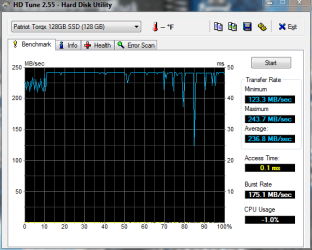
Here's a new Patriot Torqx with 1916 Firmware on it. Best I have seen so far. Very Very good! These Patriot drives are well worth considering. It's my 4th one. This one has new F/W on it (I had to install it. It came with v1881) It also has Windows 7 running on it. I need to do it without next time to avoid the dips.

1916torqx1.PNG
 

My Computer My Computer

Computer Manufacturer/Model Number
Keeps changing - (Custom)
OS
Windows 7 Professional x64
CPU
Intel Core i7 860
Motherboard
Gigabyte GA-P55-UD4P
Memory
4GB DDR3 Mushkin 1600Mhz @ 7-8-7-20
Graphics Card(s)
MSI GTS250 1GB DDR3 Twin Frozr
Sound Card
Onboard realtek
Monitor(s) Displays
Samsung SyncMaster 24" P2450 + Samsung 20" 2033
Screen Resolution
1920 X 1080 and 1600 X 900 (#2 system 1440 X 900)
Hard Drives
Patriot Inferno 120GB SSD + 3 WD Blue 640GB drives
PSU
Corsair 750 HX Modular
Case
Lancool PC-K62
Cooling
Cooler Master TX3 CPU cooler and 4-140mm and 1-120mm case
Keyboard
Gigabyte USB keyboard
Mouse
Microsoft wireless laser mouse 5000
Internet Speed
7 Mb down 1.5 up
Other Info
System #2: AMD Phenom II X6 1055T (Freezer 7 Pro cooler) - Gigabyte 880GMA-UD2H - WD 500GB Black - 9500GT (1GB) 500W OCZ modular PSU - Antec 200 case. System #3 (LapTop) Core 2 Duo T6670 - 320GB 7200RPM HD - 4GB DDR3 RAM.
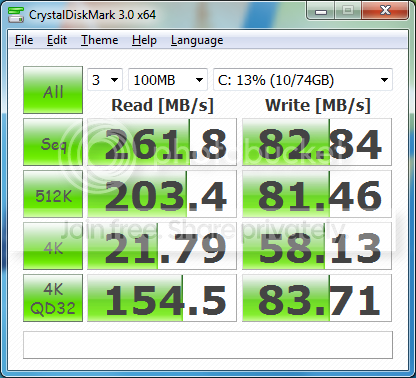
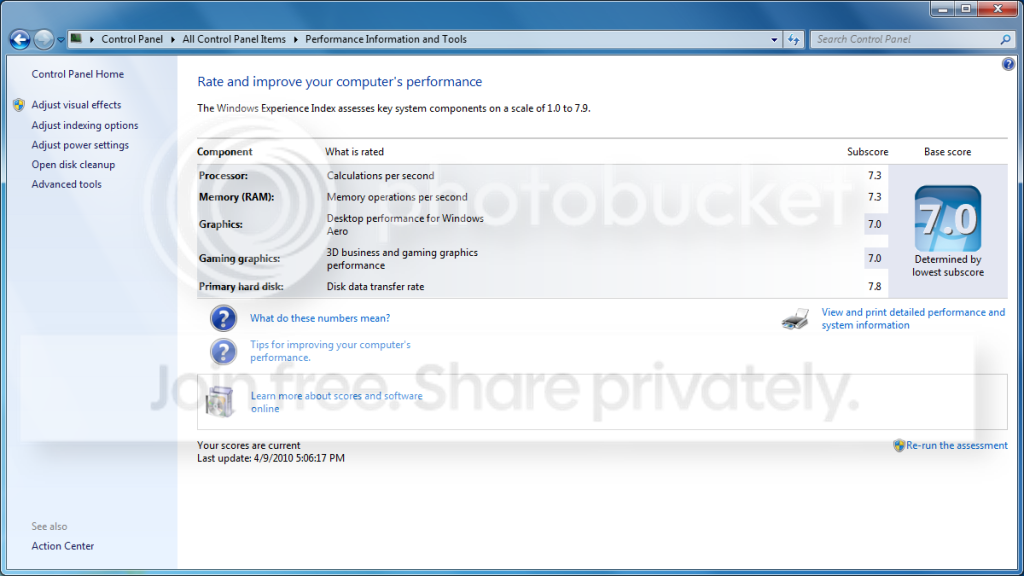
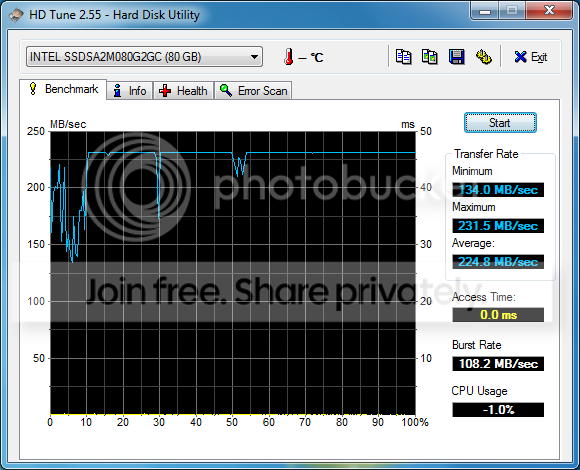
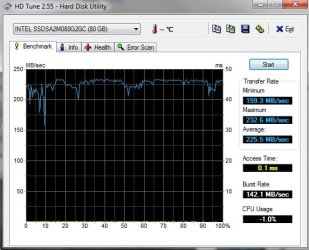
I just took some time today and reloaded Windows 7 onto my Intel X25-M Gen 2 80GB. I also did a mobo firmware update on my GA-EP45-UD3R Rev 1.1 from F9 to F12. This BIOS update eliminated my previous 8 second delay using AHCI mode...and it's now under 2 seconds...which is far more tolerable.

These are all using standard Windows 7 drivers...no 3rd party stuff at all...with no tweaking performed.

Here are some of the results from my benchmarks
CrystalBenchmark_AHCI.png


WEI-Score_after_AHCI_rebuild.png


This was with the OS running...so the dips that I see don't surprise me.
HDTunewithAHCI2.png
 

My Computer My Computer

Computer Manufacturer/Model Number
Self-Built in July 2009
OS
Windows 7 Ultimate x64
CPU
Intel Q9550 2.83Ghz OC'd to 3.40Ghz
Motherboard
Gigabyte GA-EP45-UD3R rev. 1.1, F12 BIOS
Memory
8GB G.Skill PI DDR2-800, 4-4-4-12 timings
Graphics Card(s)
EVGA 1280MB Nvidia GeForce GTX570
Sound Card
Realtek ALC899A 8 channel onboard audio
Monitor(s) Displays
23" Acer x233H
Screen Resolution
1920x1080
Hard Drives
Intel X25-M 80GB Gen 2 SSD
Western Digital 1TB Caviar Black, 32MB cache. WD1001FALS
PSU
Corsair 620HX modular
Case
Antec P182
Cooling
stock
Keyboard
ABS M1 Mechanical
Mouse
Logitech G9 Laser Mouse
Internet Speed
15/2 cable modem
Other Info
Windows and Linux enthusiast. Logitech G35 Headset.
Very nice Pparks1

I really wonder why WEI is showing my SSD as 6.8 (the weak point in my system) I have never been happier and have not had any stuttering or any other problems.

Nice to see your numbers. SSDs rule!
 

My Computer My Computer

Computer Manufacturer/Model Number
Keeps changing - (Custom)
OS
Windows 7 Professional x64
CPU
Intel Core i7 860
Motherboard
Gigabyte GA-P55-UD4P
Memory
4GB DDR3 Mushkin 1600Mhz @ 7-8-7-20
Graphics Card(s)
MSI GTS250 1GB DDR3 Twin Frozr
Sound Card
Onboard realtek
Monitor(s) Displays
Samsung SyncMaster 24" P2450 + Samsung 20" 2033
Screen Resolution
1920 X 1080 and 1600 X 900 (#2 system 1440 X 900)
Hard Drives
Patriot Inferno 120GB SSD + 3 WD Blue 640GB drives
PSU
Corsair 750 HX Modular
Case
Lancool PC-K62
Cooling
Cooler Master TX3 CPU cooler and 4-140mm and 1-120mm case
Keyboard
Gigabyte USB keyboard
Mouse
Microsoft wireless laser mouse 5000
Internet Speed
7 Mb down 1.5 up
Other Info
System #2: AMD Phenom II X6 1055T (Freezer 7 Pro cooler) - Gigabyte 880GMA-UD2H - WD 500GB Black - 9500GT (1GB) 500W OCZ modular PSU - Antec 200 case. System #3 (LapTop) Core 2 Duo T6670 - 320GB 7200RPM HD - 4GB DDR3 RAM.
My link point is my video card...and that's just fine with me. I bought this card originally to be a "hackintosh" and the 9800GTX+ was the highest card I could get and stay most compatible with the "hackintosh" build. After building and getting OSX up, I realized that I really didn't care for it...so it just became my full time Windows 7 machine. It's performance is more than suitable for my gaming needs, so I have not bothered to upgrade it to anything nicer. I would however like to get a card with a quieter cooler at some point in the future though..it's the noisiest part of my computer by far.
 

My Computer My Computer

Computer Manufacturer/Model Number
Self-Built in July 2009
OS
Windows 7 Ultimate x64
CPU
Intel Q9550 2.83Ghz OC'd to 3.40Ghz
Motherboard
Gigabyte GA-EP45-UD3R rev. 1.1, F12 BIOS
Memory
8GB G.Skill PI DDR2-800, 4-4-4-12 timings
Graphics Card(s)
EVGA 1280MB Nvidia GeForce GTX570
Sound Card
Realtek ALC899A 8 channel onboard audio
Monitor(s) Displays
23" Acer x233H
Screen Resolution
1920x1080
Hard Drives
Intel X25-M 80GB Gen 2 SSD
Western Digital 1TB Caviar Black, 32MB cache. WD1001FALS
PSU
Corsair 620HX modular
Case
Antec P182
Cooling
stock
Keyboard
ABS M1 Mechanical
Mouse
Logitech G9 Laser Mouse
Internet Speed
15/2 cable modem
Other Info
Windows and Linux enthusiast. Logitech G35 Headset.
HD TUNE.jpg

is this bad? I can't update the fw, ergo, not beeing able to do maintenance..
 

My Computer My Computer

Computer Manufacturer/Model Number
Took the blue pill and built this one while Trinity was getting me coffee..
OS
Win7 Professional x64
CPU
i7-930
Motherboard
Asus Rampage Extreme 2
Memory
3*Corsair XMS3 DDR3 1600MHz 6GB CL9
Graphics Card(s)
XFX Radeon HD 5870 CrossfireX
Sound Card
SupremeFX X-Fi
Monitor(s) Displays
BENQ 22" FullHD
Screen Resolution
1920*1080
Hard Drives
Corsair SSD Extreme X64 2,5" 64GB || WD VelociRaptor® 300GB
PSU
Corsair HX 1000W PSU
Case
Antec 1200
Cooling
Windtunnel effect
Keyboard
Logitech G15 gen.2
Mouse
Roccat KONE
Internet Speed
12,5mb/3mb
View attachment 66270

is this bad? I can't update the fw, ergo, not beeing able to do maintenance..
Why do you think this is bad - it is actually pretty good. And how come you cannot update the F/W (not that you need to do that).
 

My Computer My Computer

Computer Manufacturer/Model Number
HP, Dell, Gateway, Toshiba - 4 laptops and 2 desktops
OS
Vista, Windows7, Mint Mate, Zorin, Windows 8
CPU
from 1.6GHz Duo to i7
Monitor(s) Displays
2x HP w2207
Hard Drives
5x HDD, 7x SSD, 12x Externals
Keyboard
with trackball - no mices
Mouse
Trackball mice
Internet Speed
DSL 6000

My Computer My Computer

Computer Manufacturer/Model Number
Self-Built in July 2009
OS
Windows 7 Ultimate x64
CPU
Intel Q9550 2.83Ghz OC'd to 3.40Ghz
Motherboard
Gigabyte GA-EP45-UD3R rev. 1.1, F12 BIOS
Memory
8GB G.Skill PI DDR2-800, 4-4-4-12 timings
Graphics Card(s)
EVGA 1280MB Nvidia GeForce GTX570
Sound Card
Realtek ALC899A 8 channel onboard audio
Monitor(s) Displays
23" Acer x233H
Screen Resolution
1920x1080
Hard Drives
Intel X25-M 80GB Gen 2 SSD
Western Digital 1TB Caviar Black, 32MB cache. WD1001FALS
PSU
Corsair 620HX modular
Case
Antec P182
Cooling
stock
Keyboard
ABS M1 Mechanical
Mouse
Logitech G9 Laser Mouse
Internet Speed
15/2 cable modem
Other Info
Windows and Linux enthusiast. Logitech G35 Headset.
Why do you think this is bad - it is actually pretty good. And how come you cannot update the F/W (not that you need to do that).

Thought the finer the line was the more stable the drive was, still in learning mode with my new SSD..
Yeah, Intel sad it was eighter the lack of ACHI mode in BIOS or the fact that I have a nvidia chipset :(
 

My Computer My Computer

Computer Manufacturer/Model Number
Took the blue pill and built this one while Trinity was getting me coffee..
OS
Win7 Professional x64
CPU
i7-930
Motherboard
Asus Rampage Extreme 2
Memory
3*Corsair XMS3 DDR3 1600MHz 6GB CL9
Graphics Card(s)
XFX Radeon HD 5870 CrossfireX
Sound Card
SupremeFX X-Fi
Monitor(s) Displays
BENQ 22" FullHD
Screen Resolution
1920*1080
Hard Drives
Corsair SSD Extreme X64 2,5" 64GB || WD VelociRaptor® 300GB
PSU
Corsair HX 1000W PSU
Case
Antec 1200
Cooling
Windtunnel effect
Keyboard
Logitech G15 gen.2
Mouse
Roccat KONE
Internet Speed
12,5mb/3mb
Status
Not open for further replies.
Back
Top