Show us your SSD performance

Status
Not open for further replies.
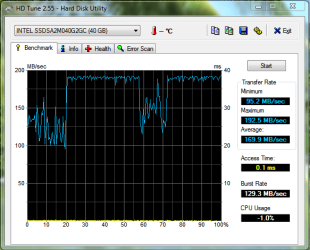
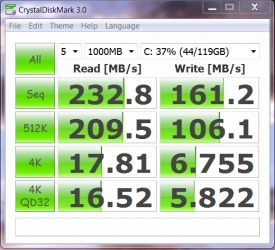
Just installed my Intel X25 V 40GB (only one:().

New firmware, Intel driver, fresh install Win7.
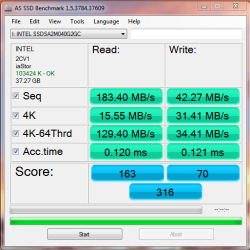
SSD Bench 4 14May10 .PNGSSD Bench HD Tune 1 14May10 .PNG
 
Last edited:

My Computer

Computer type
PC/Desktop
Computer Manufacturer/Model Number
76~2.0
OS
Windows 7 Ult x64 - SP1/ Windows 8 Pro x64
CPU
Intel Core i5-3570K 4.6GHz
Motherboard
Gigabyte GA-Z77X UD3H, f18
Memory
8GB (2X4GB) DDR3 1600 Corsair Vengeance CL8 1.5v
Graphics Card(s)
Sapphire HD 7770 Vapor-X OC 1GB DDR5
Sound Card
Onboard VIA VT2021
Monitor(s) Displays
22" LCD Dell
Screen Resolution
1680x1050
Hard Drives
Samsung 840Pro 128GB SSD,
Seagate Barracuda 500GB SATA2 7200rpm 32MB cache, Seagate Barracuda 1TB SATA2 7200rpm 32MB cache,
PSU
Corsair HX650W
Case
Cooler Master Storm Scout
Cooling
Corsair H80 2x12cm Noctua NF P12 , 2x14cm case fans
Keyboard
Logitech Wave
Mouse
CM Sentinel
Internet Speed
Dismal
Antivirus
Avast
Browser
Opera Next
Other Info
Haswell laptop: HP Envy 17t-j, i7-4700MQ, GeForce 740M 2GB DDR3, 17.3" Full HD 1920x1080, 16GB RAM, Samsung 840 Pro 128GB, 1TB Hitachi 7200 HDD,
Desktop: eSATA ports,
External eSATA Seagate 500GB SATA2 7200rpm,
External WD USB 500GB
Hi Dave76,

Seems to be about on par with the one I have.
But 4k seems slightly low for some reason. Altough probably nothing to worry about, Im wondering if perhaps its due to the Intel Driver.


Have you tried the MS standard drivers?

I only ask, because with mine, I get a little better performance overall with them, oddly. Maybe just my set up likes the generic ones better, I don't know.

I know others claim better performance w/the Intel ones, but it wasnt the case for me.

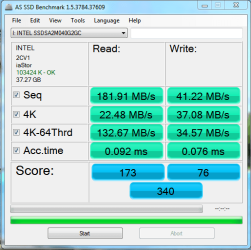
With the Intell Drivers, mine drops in Seq. read (around 165ish)& 4k-64thrd drops as well round 126ish, but the 4K read goes up by about .5 the over all score is a bit lower as well. All else about the same.

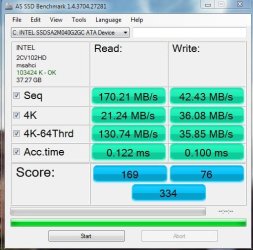
Heres how mine looks after a couple months of use:
 

Attachments

  • intel 25-v.JPG
    intel 25-v.JPG
    49.3 KB · Views: 2

My Computer

Computer Manufacturer/Model Number
Custom (Self Build)
OS
Windows 7 Home Premium 64bit
CPU
Intel Core i7 2700k
Motherboard
eVGA P67 SLI
Memory
8GB Mushkin Redline Ridgebacks @1866
Graphics Card(s)
EVGA GTX570 SC
Sound Card
XiFi Titanium HD
Monitor(s) Displays
LG W2453V
Screen Resolution
1920x1080
Hard Drives
Intel 320 80GB -- Intel X25-V 40GB --WD Black 1TB x2 -- WD Blue 640GB
PSU
Seasonic x750
Case
Corsair 600T SE White
Cooling
eVGA Superclocked CPU Cooler
Keyboard
Saitek Cyborg
Antivirus
Kaspersky
Browser
IE
Other Info
LG BD/DVD
Have not tried the standard MS drivers, most of the reports I have seen say they are getting a little better results from the Intel driver.

I'll try it for comparison, hopefully this week.

Did you notice any affect on your CPU after installing the SSD?

Mine is OC'ed to 3.36 GHz, stepping on, (when running on the HD) usually running at idle 1.44 GHZ going up to 3.36 GHz at the most.
Now with the SSD, at Idle still getting ~1% CPU Usage but, the frequency is between 3.6 to 3.8 GHz. Seems a little odd.

Fixed a couple of driver issues and a printer spooling problem from the old printer driver, thought that might be the cause, but still the same CPU frequency.
 
Last edited:

My Computer

Computer type
PC/Desktop
Computer Manufacturer/Model Number
76~2.0
OS
Windows 7 Ult x64 - SP1/ Windows 8 Pro x64
CPU
Intel Core i5-3570K 4.6GHz
Motherboard
Gigabyte GA-Z77X UD3H, f18
Memory
8GB (2X4GB) DDR3 1600 Corsair Vengeance CL8 1.5v
Graphics Card(s)
Sapphire HD 7770 Vapor-X OC 1GB DDR5
Sound Card
Onboard VIA VT2021
Monitor(s) Displays
22" LCD Dell
Screen Resolution
1680x1050
Hard Drives
Samsung 840Pro 128GB SSD,
Seagate Barracuda 500GB SATA2 7200rpm 32MB cache, Seagate Barracuda 1TB SATA2 7200rpm 32MB cache,
PSU
Corsair HX650W
Case
Cooler Master Storm Scout
Cooling
Corsair H80 2x12cm Noctua NF P12 , 2x14cm case fans
Keyboard
Logitech Wave
Mouse
CM Sentinel
Internet Speed
Dismal
Antivirus
Avast
Browser
Opera Next
Other Info
Haswell laptop: HP Envy 17t-j, i7-4700MQ, GeForce 740M 2GB DDR3, 17.3" Full HD 1920x1080, 16GB RAM, Samsung 840 Pro 128GB, 1TB Hitachi 7200 HDD,
Desktop: eSATA ports,
External eSATA Seagate 500GB SATA2 7200rpm,
External WD USB 500GB
CPU wise I didnt notice anything different, No.

I take it you are in AHCI mode?
 

My Computer

Computer Manufacturer/Model Number
Custom (Self Build)
OS
Windows 7 Home Premium 64bit
CPU
Intel Core i7 2700k
Motherboard
eVGA P67 SLI
Memory
8GB Mushkin Redline Ridgebacks @1866
Graphics Card(s)
EVGA GTX570 SC
Sound Card
XiFi Titanium HD
Monitor(s) Displays
LG W2453V
Screen Resolution
1920x1080
Hard Drives
Intel 320 80GB -- Intel X25-V 40GB --WD Black 1TB x2 -- WD Blue 640GB
PSU
Seasonic x750
Case
Corsair 600T SE White
Cooling
eVGA Superclocked CPU Cooler
Keyboard
Saitek Cyborg
Antivirus
Kaspersky
Browser
IE
Other Info
LG BD/DVD
Yes, AHCI mode.

Guess I'll tweak a little bit and see if I can get the frequency back down to 3.36 GHz again.
 
Last edited:

My Computer

Computer type
PC/Desktop
Computer Manufacturer/Model Number
76~2.0
OS
Windows 7 Ult x64 - SP1/ Windows 8 Pro x64
CPU
Intel Core i5-3570K 4.6GHz
Motherboard
Gigabyte GA-Z77X UD3H, f18
Memory
8GB (2X4GB) DDR3 1600 Corsair Vengeance CL8 1.5v
Graphics Card(s)
Sapphire HD 7770 Vapor-X OC 1GB DDR5
Sound Card
Onboard VIA VT2021
Monitor(s) Displays
22" LCD Dell
Screen Resolution
1680x1050
Hard Drives
Samsung 840Pro 128GB SSD,
Seagate Barracuda 500GB SATA2 7200rpm 32MB cache, Seagate Barracuda 1TB SATA2 7200rpm 32MB cache,
PSU
Corsair HX650W
Case
Cooler Master Storm Scout
Cooling
Corsair H80 2x12cm Noctua NF P12 , 2x14cm case fans
Keyboard
Logitech Wave
Mouse
CM Sentinel
Internet Speed
Dismal
Antivirus
Avast
Browser
Opera Next
Other Info
Haswell laptop: HP Envy 17t-j, i7-4700MQ, GeForce 740M 2GB DDR3, 17.3" Full HD 1920x1080, 16GB RAM, Samsung 840 Pro 128GB, 1TB Hitachi 7200 HDD,
Desktop: eSATA ports,
External eSATA Seagate 500GB SATA2 7200rpm,
External WD USB 500GB
Might by worth trying to reset Bios to Optimized Default and reset all the settings again.

Maybe somethings going on there.

Not sure why you be getting a higher core speed all of the sudden ..
 

My Computer

Computer Manufacturer/Model Number
Custom (Self Build)
OS
Windows 7 Home Premium 64bit
CPU
Intel Core i7 2700k
Motherboard
eVGA P67 SLI
Memory
8GB Mushkin Redline Ridgebacks @1866
Graphics Card(s)
EVGA GTX570 SC
Sound Card
XiFi Titanium HD
Monitor(s) Displays
LG W2453V
Screen Resolution
1920x1080
Hard Drives
Intel 320 80GB -- Intel X25-V 40GB --WD Black 1TB x2 -- WD Blue 640GB
PSU
Seasonic x750
Case
Corsair 600T SE White
Cooling
eVGA Superclocked CPU Cooler
Keyboard
Saitek Cyborg
Antivirus
Kaspersky
Browser
IE
Other Info
LG BD/DVD
Just set the frequency turbo boost to disabled, it allows the frequency to go higher if required.

Guess the SSD required a faster CPU.

It's at 3.2 GHz and steady. See how that goes.

Core 0: 3.2 GHz
Core 1-3: 1.4 GHz
 
Last edited:

My Computer

Computer type
PC/Desktop
Computer Manufacturer/Model Number
76~2.0
OS
Windows 7 Ult x64 - SP1/ Windows 8 Pro x64
CPU
Intel Core i5-3570K 4.6GHz
Motherboard
Gigabyte GA-Z77X UD3H, f18
Memory
8GB (2X4GB) DDR3 1600 Corsair Vengeance CL8 1.5v
Graphics Card(s)
Sapphire HD 7770 Vapor-X OC 1GB DDR5
Sound Card
Onboard VIA VT2021
Monitor(s) Displays
22" LCD Dell
Screen Resolution
1680x1050
Hard Drives
Samsung 840Pro 128GB SSD,
Seagate Barracuda 500GB SATA2 7200rpm 32MB cache, Seagate Barracuda 1TB SATA2 7200rpm 32MB cache,
PSU
Corsair HX650W
Case
Cooler Master Storm Scout
Cooling
Corsair H80 2x12cm Noctua NF P12 , 2x14cm case fans
Keyboard
Logitech Wave
Mouse
CM Sentinel
Internet Speed
Dismal
Antivirus
Avast
Browser
Opera Next
Other Info
Haswell laptop: HP Envy 17t-j, i7-4700MQ, GeForce 740M 2GB DDR3, 17.3" Full HD 1920x1080, 16GB RAM, Samsung 840 Pro 128GB, 1TB Hitachi 7200 HDD,
Desktop: eSATA ports,
External eSATA Seagate 500GB SATA2 7200rpm,
External WD USB 500GB
well i don't think i can get sn SSD now because i have the specs listed below and it seems that the intel SSD's do not work well in nvidia chipsets. and does not support trim function. :cry:. nvidia 720d
 

My Computer

Computer type
PC/Desktop
Computer Manufacturer/Model Number
Custom Build
OS
Windows 8 Pro 64 bit
CPU
Intel Core i7 3770K @ 4.2 GHz
Motherboard
Gigabyte Z77X-D3H
Memory
8GB Corsair XMS3 1333mhz 2x4GB
Graphics Card(s)
Gigabyte Radeon HD 7970 OC WindForce
Sound Card
VIA High Definition Audio
Monitor(s) Displays
Dell S2740L
Screen Resolution
1920x1080
Hard Drives
Samsung 250GB 840 Pro (2.5) (OS+Aps)
Toshiba DT01ACA100 1TB 7200RPM (3.5) (Games)
PSU
Coolmaster Silent ProM 600W
Case
Coolermaster HAF 912 Plus
Cooling
Cooler Master Hyper 612S
Keyboard
Logitech Wireless Keyboard
Mouse
Thermaltake TteSPORTS Theron Gaming Mouse
Internet Speed
50-60Mbs (DL) 12-20Mbs (UL) BT Infinity FTTC
Antivirus
Bitdefender Anti Virus Plus 2015
Browser
Google Chrome
Other Info
Samsung SH-B083L 8x Blu-Ray Reader
It is true that performance is less on nvidia motherboards. But it's STILL far greater than a normal HD. I'm using a gen 1 X-25 on my 720 and it's still a screamer even though the miltithreaded performance is not as good as an intel board and I never had or can have TRIM and it STILL screams so go ahead :D
 

My Computer

Computer Manufacturer/Model Number
Scratch built
OS
Windows 7 x64 Ultimate
CPU
i7 960
Motherboard
Asus P6X58D
Memory
12 Gig Corsair Dominator
Graphics Card(s)
Nvidia 480
Sound Card
Maudio Delta 44 + breakout box
Monitor(s) Displays
Dell UltraSharp U2410 24in and Samsung 21 dual monitors
Screen Resolution
1920x1200 and 1280x1024
Hard Drives
Primary: Intel X-25M G2 160G SSD
Secondary: Segate baracuda 1.0 TB
HDs in AHCI mode.
PSU
Corasair TX850
Case
Cooler Master HAF
Cooling
Corsair H50
Keyboard
Logitech G15 + N52 game pad
Mouse
Logitech MX518
Internet Speed
15kbs down 4.5kbps up
Other Info
WEI 7.6
CPU & RAM 7.6
Graphics 7.9
Hard disk 7.7
hmm im not sure if i want to take the risk, but if i dont install the nvidia chipset drivers, will it be ok? and i read somewhere you can just use the MS ones and TRIM will still work?
Also i dont think i have any chipset driver anyway?
 

Attachments

  • win7.PNG
    win7.PNG
    27.3 KB · Views: 10

My Computer

Computer type
PC/Desktop
Computer Manufacturer/Model Number
Custom Build
OS
Windows 8 Pro 64 bit
CPU
Intel Core i7 3770K @ 4.2 GHz
Motherboard
Gigabyte Z77X-D3H
Memory
8GB Corsair XMS3 1333mhz 2x4GB
Graphics Card(s)
Gigabyte Radeon HD 7970 OC WindForce
Sound Card
VIA High Definition Audio
Monitor(s) Displays
Dell S2740L
Screen Resolution
1920x1080
Hard Drives
Samsung 250GB 840 Pro (2.5) (OS+Aps)
Toshiba DT01ACA100 1TB 7200RPM (3.5) (Games)
PSU
Coolmaster Silent ProM 600W
Case
Coolermaster HAF 912 Plus
Cooling
Cooler Master Hyper 612S
Keyboard
Logitech Wireless Keyboard
Mouse
Thermaltake TteSPORTS Theron Gaming Mouse
Internet Speed
50-60Mbs (DL) 12-20Mbs (UL) BT Infinity FTTC
Antivirus
Bitdefender Anti Virus Plus 2015
Browser
Google Chrome
Other Info
Samsung SH-B083L 8x Blu-Ray Reader
Well I don't want to seem to "sure" about this advice but I have heard that not using the nvidia drivers was better. Though I am using them and it's ok. I DID have to turn off the NCQ option for the sata port with the SSD though (that might be due to the nvidia drivers).

I can't WAIT to upgrade and get the heck off my nvidia board. Not only that but the firewire doesn't work right and apparently NEVER HAS on the nvidia boards ever. They make great GPUs but their MBs are completely off my recommend list forever now.
 

My Computer

Computer Manufacturer/Model Number
Scratch built
OS
Windows 7 x64 Ultimate
CPU
i7 960
Motherboard
Asus P6X58D
Memory
12 Gig Corsair Dominator
Graphics Card(s)
Nvidia 480
Sound Card
Maudio Delta 44 + breakout box
Monitor(s) Displays
Dell UltraSharp U2410 24in and Samsung 21 dual monitors
Screen Resolution
1920x1200 and 1280x1024
Hard Drives
Primary: Intel X-25M G2 160G SSD
Secondary: Segate baracuda 1.0 TB
HDs in AHCI mode.
PSU
Corasair TX850
Case
Cooler Master HAF
Cooling
Corsair H50
Keyboard
Logitech G15 + N52 game pad
Mouse
Logitech MX518
Internet Speed
15kbs down 4.5kbps up
Other Info
WEI 7.6
CPU & RAM 7.6
Graphics 7.9
Hard disk 7.7
C State implemented in the bios usually gives low 4k readings.
 

My Computer

Computer Manufacturer/Model Number
self built
OS
Windows 7 Professional 64
CPU
i7 860
Motherboard
ASUS P7P55D-E Pro /onboard SATA 6Gb/s USB 3.0
Memory
8GB Corsair CMX4GX3M2A1600C9 DDR3 1600
Graphics Card(s)
(2) Nvidia EVGA GTX 470 SLI
Sound Card
Onboard VIA VT1828S 8 channels
Monitor(s) Displays
ASUS VW266H 25.5" HDMI Widescreen LCD and HP vs19 LCD 19"
Screen Resolution
1920 x 1200 : 1280 X 1024 dual
Hard Drives
Intel X25-M 80GB SSD (boot)
Seagate Barracuda 80GB
Western Digital Caviar Black 500GB
Asus DRW-24B1ST/BLK/B/AS
PSU
COOLER MASTER Silent Pro 1000W
Case
LIAN LI Lancool PC-K62
Cooling
Prolimatech Megahalems with Scythe "ULTRA KAZE" 120
Keyboard
Saitek
Mouse
Microsoft Optical comfort mouse 3000
Internet Speed
Comcast Ultra tier 30/5
Kingston V+ 128gb

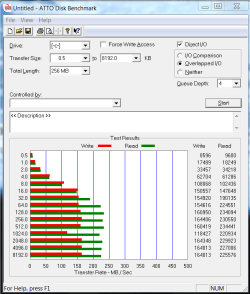
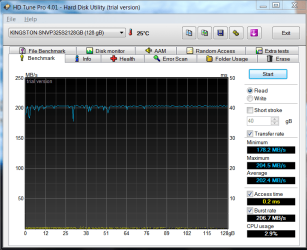
Strange readings between various benchmarks.

any ideas?
 

Attachments

  • ATTO Disk Benchmark 051810 A.PNG
    ATTO Disk Benchmark 051810 A.PNG
    19.8 KB · Views: 9
  • AS SSD Benchmark 051810 B.PNG
    AS SSD Benchmark 051810 B.PNG
    26.7 KB · Views: 2
  • HD Tune Pro 4.01 Benchmark 051810.PNG
    HD Tune Pro 4.01 Benchmark 051810.PNG
    31.8 KB · Views: 11
  • CrystalDiskMark 051810.PNG
    CrystalDiskMark 051810.PNG
    31.4 KB · Views: 2

My Computer

Computer type
PC/Desktop
Computer Manufacturer/Model Number
Homebuilt
OS
windows 7 32
CPU
Intel i7 4770K
Motherboard
Asus Z97-A
Memory
Corsair Vengeance 8gb DDR3 2133(PC3 17000)
Graphics Card(s)
nVidia GTX 660 2gb
Sound Card
Asus Xonar D1
Monitor(s) Displays
Dell Ultrasharp UM2913WM
Screen Resolution
2560x1080 32
Hard Drives
PNY 240gb SSD
Seagate 500gb SSD
PSU
Corsair CXM 600
Case
Fractal Design Define R4
Cooling
Arctic Freezer Xtreme rev 2
Keyboard
Logitech K800 Wireless Illuminated
Mouse
MicroSoft 5000
Internet Speed
Cable
Antivirus
MSE
Browser
IE 11 and Chrome
Other Info
Samsung DVD-RW
Cambridge 4.1 speakers
Hauppauge HVR-950 USB Tuner
Asus Optimized Overclock to 4.4ghz
It is always the case with benchmarks that their numbers are not comparable between various programs.

You can only realisticly compare different machines using the SAME program.

File IO is notoriously tweaky. You can have 5 programmers try to write a file writing function and you will get 5 completely different throughputs. THere are tons of options and different ways of writing data to storage devices. So I'd take the numbers as absolutes with a big grain of salt :D

Just compare the numbers you get with each benchmark to other people's numbers using the same benchmark. Then you are really benchmarking your drive/firmware/driver and motherboard as compared to someone elses and it really means something.
 

My Computer

Computer Manufacturer/Model Number
Scratch built
OS
Windows 7 x64 Ultimate
CPU
i7 960
Motherboard
Asus P6X58D
Memory
12 Gig Corsair Dominator
Graphics Card(s)
Nvidia 480
Sound Card
Maudio Delta 44 + breakout box
Monitor(s) Displays
Dell UltraSharp U2410 24in and Samsung 21 dual monitors
Screen Resolution
1920x1200 and 1280x1024
Hard Drives
Primary: Intel X-25M G2 160G SSD
Secondary: Segate baracuda 1.0 TB
HDs in AHCI mode.
PSU
Corasair TX850
Case
Cooler Master HAF
Cooling
Corsair H50
Keyboard
Logitech G15 + N52 game pad
Mouse
Logitech MX518
Internet Speed
15kbs down 4.5kbps up
Other Info
WEI 7.6
CPU & RAM 7.6
Graphics 7.9
Hard disk 7.7
C State implemented in the bios usually gives low 4k readings.

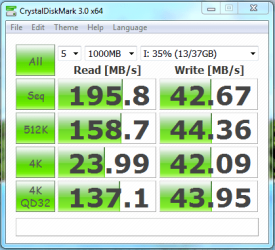
Thanks for the info, seems to have helped :)

These look a little better.


First SSD Bench 3 Enable Write Cache turn off c3-6-7 20May10.PNG SSD Bench CrystalDisk 1 Write cache C3 off 20May10 .PNG
 

My Computer

Computer type
PC/Desktop
Computer Manufacturer/Model Number
76~2.0
OS
Windows 7 Ult x64 - SP1/ Windows 8 Pro x64
CPU
Intel Core i5-3570K 4.6GHz
Motherboard
Gigabyte GA-Z77X UD3H, f18
Memory
8GB (2X4GB) DDR3 1600 Corsair Vengeance CL8 1.5v
Graphics Card(s)
Sapphire HD 7770 Vapor-X OC 1GB DDR5
Sound Card
Onboard VIA VT2021
Monitor(s) Displays
22" LCD Dell
Screen Resolution
1680x1050
Hard Drives
Samsung 840Pro 128GB SSD,
Seagate Barracuda 500GB SATA2 7200rpm 32MB cache, Seagate Barracuda 1TB SATA2 7200rpm 32MB cache,
PSU
Corsair HX650W
Case
Cooler Master Storm Scout
Cooling
Corsair H80 2x12cm Noctua NF P12 , 2x14cm case fans
Keyboard
Logitech Wave
Mouse
CM Sentinel
Internet Speed
Dismal
Antivirus
Avast
Browser
Opera Next
Other Info
Haswell laptop: HP Envy 17t-j, i7-4700MQ, GeForce 740M 2GB DDR3, 17.3" Full HD 1920x1080, 16GB RAM, Samsung 840 Pro 128GB, 1TB Hitachi 7200 HDD,
Desktop: eSATA ports,
External eSATA Seagate 500GB SATA2 7200rpm,
External WD USB 500GB
Brand new out of the box Intel X25-V. Might get a second one in a month or so and run these jewels in RAID0.

Looks good so far
 

Attachments

  • ssd perf.png
    ssd perf.png
    14.5 KB · Views: 12

My Computer

OS
7 Ultimate x64
CPU
Intel i7 930 2.8
Motherboard
Asus P6X58D Premium
Memory
6Gb Corsait DDR3 Triple
Graphics Card(s)
Nvidia GTX8800
Sound Card
Onboard
Monitor(s) Displays
Samsung 24"

My Computer

Computer Manufacturer/Model Number
self built
OS
Windows 7 Professional 64
CPU
i7 860
Motherboard
ASUS P7P55D-E Pro /onboard SATA 6Gb/s USB 3.0
Memory
8GB Corsair CMX4GX3M2A1600C9 DDR3 1600
Graphics Card(s)
(2) Nvidia EVGA GTX 470 SLI
Sound Card
Onboard VIA VT1828S 8 channels
Monitor(s) Displays
ASUS VW266H 25.5" HDMI Widescreen LCD and HP vs19 LCD 19"
Screen Resolution
1920 x 1200 : 1280 X 1024 dual
Hard Drives
Intel X25-M 80GB SSD (boot)
Seagate Barracuda 80GB
Western Digital Caviar Black 500GB
Asus DRW-24B1ST/BLK/B/AS
PSU
COOLER MASTER Silent Pro 1000W
Case
LIAN LI Lancool PC-K62
Cooling
Prolimatech Megahalems with Scythe "ULTRA KAZE" 120
Keyboard
Saitek
Mouse
Microsoft Optical comfort mouse 3000
Internet Speed
Comcast Ultra tier 30/5
Brand new out of the box Intel X25-V. Might get a second one in a month or so and run these jewels in RAID0.

Looks good so far

Congrats on the new SSD.

That's an outstanding score for the X25 V.

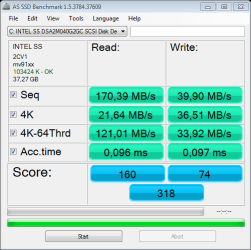
It's rated by Intel at Sequential Read 170 MB/s and Sequential writes 35 MB/s.

Can you share with the rest of us how you got the score of max 265 MB/s? Any special settings enable/disable?

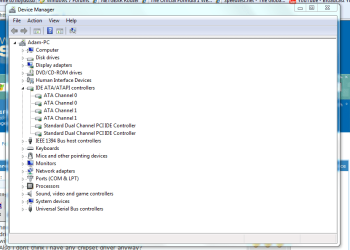
Which drivers are you using? The new Intel or standard MS?

Can you run the AS SSD Benchmark, just click the 'Download' link at the very top, the site is in German but the program is in English.
 
Last edited:

My Computer

Computer type
PC/Desktop
Computer Manufacturer/Model Number
76~2.0
OS
Windows 7 Ult x64 - SP1/ Windows 8 Pro x64
CPU
Intel Core i5-3570K 4.6GHz
Motherboard
Gigabyte GA-Z77X UD3H, f18
Memory
8GB (2X4GB) DDR3 1600 Corsair Vengeance CL8 1.5v
Graphics Card(s)
Sapphire HD 7770 Vapor-X OC 1GB DDR5
Sound Card
Onboard VIA VT2021
Monitor(s) Displays
22" LCD Dell
Screen Resolution
1680x1050
Hard Drives
Samsung 840Pro 128GB SSD,
Seagate Barracuda 500GB SATA2 7200rpm 32MB cache, Seagate Barracuda 1TB SATA2 7200rpm 32MB cache,
PSU
Corsair HX650W
Case
Cooler Master Storm Scout
Cooling
Corsair H80 2x12cm Noctua NF P12 , 2x14cm case fans
Keyboard
Logitech Wave
Mouse
CM Sentinel
Internet Speed
Dismal
Antivirus
Avast
Browser
Opera Next
Other Info
Haswell laptop: HP Envy 17t-j, i7-4700MQ, GeForce 740M 2GB DDR3, 17.3" Full HD 1920x1080, 16GB RAM, Samsung 840 Pro 128GB, 1TB Hitachi 7200 HDD,
Desktop: eSATA ports,
External eSATA Seagate 500GB SATA2 7200rpm,
External WD USB 500GB
There's a nice SSD and CPU Benchmark list and comparison tool on the AnandTech site.

AnandTech SSD Bench - View CPU Bench

Very good for looking up SSD and CPU benchmarks and comparing any two in a side by side list.
 
Last edited:

My Computer

Computer type
PC/Desktop
Computer Manufacturer/Model Number
76~2.0
OS
Windows 7 Ult x64 - SP1/ Windows 8 Pro x64
CPU
Intel Core i5-3570K 4.6GHz
Motherboard
Gigabyte GA-Z77X UD3H, f18
Memory
8GB (2X4GB) DDR3 1600 Corsair Vengeance CL8 1.5v
Graphics Card(s)
Sapphire HD 7770 Vapor-X OC 1GB DDR5
Sound Card
Onboard VIA VT2021
Monitor(s) Displays
22" LCD Dell
Screen Resolution
1680x1050
Hard Drives
Samsung 840Pro 128GB SSD,
Seagate Barracuda 500GB SATA2 7200rpm 32MB cache, Seagate Barracuda 1TB SATA2 7200rpm 32MB cache,
PSU
Corsair HX650W
Case
Cooler Master Storm Scout
Cooling
Corsair H80 2x12cm Noctua NF P12 , 2x14cm case fans
Keyboard
Logitech Wave
Mouse
CM Sentinel
Internet Speed
Dismal
Antivirus
Avast
Browser
Opera Next
Other Info
Haswell laptop: HP Envy 17t-j, i7-4700MQ, GeForce 740M 2GB DDR3, 17.3" Full HD 1920x1080, 16GB RAM, Samsung 840 Pro 128GB, 1TB Hitachi 7200 HDD,
Desktop: eSATA ports,
External eSATA Seagate 500GB SATA2 7200rpm,
External WD USB 500GB

Attachments

  • as-ssd-bench INTEL SS DSA2M04 23.05.2010 11-14-34.png
    as-ssd-bench INTEL SS DSA2M04 23.05.2010 11-14-34.png
    12.9 KB · Views: 6
  • drivers.png
    drivers.png
    32.3 KB · Views: 13

My Computer

OS
7 Ultimate x64
CPU
Intel i7 930 2.8
Motherboard
Asus P6X58D Premium
Memory
6Gb Corsait DDR3 Triple
Graphics Card(s)
Nvidia GTX8800
Sound Card
Onboard
Monitor(s) Displays
Samsung 24"
Status
Not open for further replies.
Back
Top