Show Us Your WEI (2)

Status
Not open for further replies.
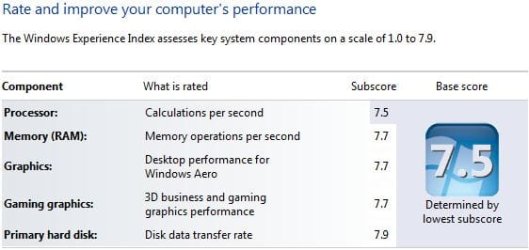
Updated graphics card :)

WEI.PNG
 

My Computer My Computer

Computer Manufacturer/Model Number
tw33k
OS
Windows 7 Ultimate (x64) SP1
CPU
Intel 3770k 4.6GHz
Motherboard
ASUS Maximus V Formula
Memory
8GB (2x 4GB) Crucial Ballistix
Graphics Card(s)
Sapphire 7950 (1060/1600)
Sound Card
On Board Realtek HD Audio
Monitor(s) Displays
27" Acer B273HU (via HDMI)
Screen Resolution
2048 x 1152
Hard Drives
Crucial M4 128GB
2TB WD Black
1TB Samsung F3 SATA
1TB WD Elite External
2TB WD USB 3.0
PSU
Corsair AX750 Gold
Case
Corsair Obsidian 800DW
Cooling
Corsair H100 (2x AP-121/2x UK-3000 push/pull)
Keyboard
Microsoft Wireless 5000
Mouse
Microsoft Wireless 5000
Internet Speed
5mb/s
Other Info
Logitech z-2300 2.1 speakers
Lamptron FC-5 v2
If it's doing what you want then it's a great machine.

The SSD is the best performance upgrade you can do at this time.
You can get a noticeable boost with a mild OC, if you feel it's needed, if not then enjoy the rig it's a very nice one ;)
While my new machine is doing what I needed for, it's been bugging me since I've red your and others' post couple of days ego about OC-ing "mildly". As such, I've done some test and the results are so-so at best that might be due to my lack of knowledge in the area of OC-ing. Anyway...
...
Changing the BIOS to "X.M.P" in the "AI Overcloker Tuner" and running Passmark; CPU-Z shows this:

i5_760_XMP.JPG

The "Bus Speed" increased to about 160MHz and the "QPI Link" 2,892. The CPU maxes out at 2,892; evidently, "X.M.P" disables the Intel Turbo feature.

The overall AS SSD score is actually lower than the non-OC-d scores.
...
As mentioned earlier, my skills for OC-ing the system is rather limited and there's probably more "juice" in the my system than the limited AI OC-ing shows. Regardless how well the system is OC-d, the SSD drive (that is already pretty much at its maximum speed) is still the slowest subsystem in my machine and pretty much maxed out even without OC-ing the system.
...
Thanks to you and others, I've learned more about my system than I've ever wanted to know...;)

Your welcome, once you catch the OC bug you'll be busy learning how everything works.

3 Step Overclocking Guide – Lynnfield

Run Prime95 to test your CPU to full load. Get the 64bit version.


Enabling the RAM XMP shouldn't affect the CPU Turbo settings.
Check your BIOS and see if Turbo is still enabled.
XMP changes your base clock, bus speed, to 160. This will give your RAM 1600 speed if the RAM multiplier is at 10.

With Turbo enabled and the base clock at 160 your CPU should be running at x20 when all 4 cores are running CPU frequency, 160 x 20 = 3200, 3,2GHz.
When your CPU is running 1 or 2 cores it should be 160 x 24 = 3840, 3.84GHz.
Your CPU voltage should not have to be raised.
Keep EIST on and it will idle at 1.44 to 1.5GHz, and jump up when needed.

Overclocking your CPU and RAM won't change the SSD performance, BTW your SSD is getting a 7.9, that is the highest score you can get.

The AS SSD scores will usually change a little from test to test, a 10-20 point change is not unusual.

Have a read of the OC tutorial linked above, google any terms you don't understand. Re-read it a few times, start testing things and have some fun.

You can save your stock and OC'ed BIOS settings from in your BIOS, read in the motherboard manual, and return it to stock at anytime.
 

My Computer My Computer

Computer type
PC/Desktop
Computer Manufacturer/Model Number
76~2.0
OS
Windows 7 Ult x64 - SP1/ Windows 8 Pro x64
CPU
Intel Core i5-3570K 4.6GHz
Motherboard
Gigabyte GA-Z77X UD3H, f18
Memory
8GB (2X4GB) DDR3 1600 Corsair Vengeance CL8 1.5v
Graphics Card(s)
Sapphire HD 7770 Vapor-X OC 1GB DDR5
Sound Card
Onboard VIA VT2021
Monitor(s) Displays
22" LCD Dell
Screen Resolution
1680x1050
Hard Drives
Samsung 840Pro 128GB SSD,
Seagate Barracuda 500GB SATA2 7200rpm 32MB cache, Seagate Barracuda 1TB SATA2 7200rpm 32MB cache,
PSU
Corsair HX650W
Case
Cooler Master Storm Scout
Cooling
Corsair H80 2x12cm Noctua NF P12 , 2x14cm case fans
Keyboard
Logitech Wave
Mouse
CM Sentinel
Internet Speed
Dismal
Antivirus
Avast
Browser
Opera Next
Other Info
Haswell laptop: HP Envy 17t-j, i7-4700MQ, GeForce 740M 2GB DDR3, 17.3" Full HD 1920x1080, 16GB RAM, Samsung 840 Pro 128GB, 1TB Hitachi 7200 HDD,
Desktop: eSATA ports,
External eSATA Seagate 500GB SATA2 7200rpm,
External WD USB 500GB

My Computer My Computer

Computer type
PC/Desktop
Computer Manufacturer/Model Number
76~2.0
OS
Windows 7 Ult x64 - SP1/ Windows 8 Pro x64
CPU
Intel Core i5-3570K 4.6GHz
Motherboard
Gigabyte GA-Z77X UD3H, f18
Memory
8GB (2X4GB) DDR3 1600 Corsair Vengeance CL8 1.5v
Graphics Card(s)
Sapphire HD 7770 Vapor-X OC 1GB DDR5
Sound Card
Onboard VIA VT2021
Monitor(s) Displays
22" LCD Dell
Screen Resolution
1680x1050
Hard Drives
Samsung 840Pro 128GB SSD,
Seagate Barracuda 500GB SATA2 7200rpm 32MB cache, Seagate Barracuda 1TB SATA2 7200rpm 32MB cache,
PSU
Corsair HX650W
Case
Cooler Master Storm Scout
Cooling
Corsair H80 2x12cm Noctua NF P12 , 2x14cm case fans
Keyboard
Logitech Wave
Mouse
CM Sentinel
Internet Speed
Dismal
Antivirus
Avast
Browser
Opera Next
Other Info
Haswell laptop: HP Envy 17t-j, i7-4700MQ, GeForce 740M 2GB DDR3, 17.3" Full HD 1920x1080, 16GB RAM, Samsung 840 Pro 128GB, 1TB Hitachi 7200 HDD,
Desktop: eSATA ports,
External eSATA Seagate 500GB SATA2 7200rpm,
External WD USB 500GB
Updated graphics card :)

Sweet.... Now the CPU is the bottleneck, sigh! You know what comes next right. :D

Nice scores.
 

My Computer My Computer

Computer type
PC/Desktop
Computer Manufacturer/Model Number
Generic Homebuilt
OS
Windows 7 Home Premium 64bit
CPU
Int i7 950 [3.06] O.C @3.36ghz Quad Core (HT) = 7.6 WEI
Motherboard
ATX LGA1366 DDR3 Asus Rampage III Formula
Memory
DDR3 6GB/Kit PC3-16000 Patriot @ 1733 mhz = 7.9 WEI
Graphics Card(s)
NVIDIA GTS450 1GB PCI-E Zotac = 7.2 WEI
Sound Card
X-Fi 2 Built-in 8-Channel High Definition
Monitor(s) Displays
LG-27"
Screen Resolution
1920 x1200
Hard Drives
Kingston 2.5" 120GB SATA 3.x MLC Int. SSD. = 7.9 WEI, 1TB WD SATA 3.x 64MB Blue.
PSU
600W Coolermaster eXtremePower Plus
Case
Coolermaster Centurion 590
Cooling
Zalman CNPS10X Extreme
Keyboard
Multimedia USB Logitech Wave
Mouse
Team Scorpion (Wired)
Other Info
Windows Experience Index = 7.2 overall
I was about to pull the trigger on a new chip, RAM and board but I think I'll wait til "Bulldozer"
 

My Computer My Computer

Computer Manufacturer/Model Number
tw33k
OS
Windows 7 Ultimate (x64) SP1
CPU
Intel 3770k 4.6GHz
Motherboard
ASUS Maximus V Formula
Memory
8GB (2x 4GB) Crucial Ballistix
Graphics Card(s)
Sapphire 7950 (1060/1600)
Sound Card
On Board Realtek HD Audio
Monitor(s) Displays
27" Acer B273HU (via HDMI)
Screen Resolution
2048 x 1152
Hard Drives
Crucial M4 128GB
2TB WD Black
1TB Samsung F3 SATA
1TB WD Elite External
2TB WD USB 3.0
PSU
Corsair AX750 Gold
Case
Corsair Obsidian 800DW
Cooling
Corsair H100 (2x AP-121/2x UK-3000 push/pull)
Keyboard
Microsoft Wireless 5000
Mouse
Microsoft Wireless 5000
Internet Speed
5mb/s
Other Info
Logitech z-2300 2.1 speakers
Lamptron FC-5 v2

My Computer My Computer

Computer type
PC/Desktop
Computer Manufacturer/Model Number
Golden Mk. I.4
OS
Windows 10 Pro x64 ; Xubuntu x64
CPU
Intel i7 860 @ 2.80 GHz O/C'ed to 4.0GHz
Motherboard
Gigabyte P55A-UD3R Rev.1. Award BIOS F13
Memory
16GB Corsair Vengance DDR3 @ 661 MHz Dual Channel (9-9-9-24)
Graphics Card(s)
EVGA NVidia GTX 560 1024MB
Sound Card
Realtek Integrated
Monitor(s) Displays
Dual Samsung SyncMaster 2494HS
Screen Resolution
1920*1080 and 1920*1080
Hard Drives
1*Samsung 840 EVO 120GB SSD;
1*OCZ Vertex 2 60GB SSD;
2*Samsung F3 SpinPoint 1TB in RAID0;
1*Samsung F1 SpinPoint 1TB;
2*Western Digital 1TB External USB 3.0
1*Western Digital 500GB External USB 3.0
1*Seagate 500GB External USB 2.0
PSU
Thermaltake ToughPower QFan 750W
Case
Thermaltake Element S VK60001W2Z
Cooling
Corsair H60 Water Cooling, 2*230mm and 2*80mm case fans
Keyboard
Logitech G110
Mouse
Logitech MX518

My Computer My Computer

Computer Manufacturer/Model Number
Custom Built (by me)
OS
Windows 8 CP x64
CPU
Intel(R) Core(TM) i7 CPU 920 @ 2.97GHz
Motherboard
DX58SO
Memory
Corsair 6GB DDR3 (1333Mhz)
Graphics Card(s)
Nvidia GeForce 9800GT (1GB)
Sound Card
Creative Sound Blaster Audigy Value (24bit internal)
Monitor(s) Displays
22" Samsung SyncMaster B2230 (1920*1080)
Screen Resolution
1920*1080
Hard Drives
Seagate Barracuda 500gb
PSU
i ball 450W
Case
i ball (Work Horse)
Keyboard
Microsoft Wireless Keyboard 700 v2.0
Mouse
Microsoft Wireless Mouse 700 v2.0
Internet Speed
1MB
Your welcome, once you catch the OC bug you'll be busy learning how everything works.

3 Step Overclocking Guide – Lynnfield

Run Prime95 to test your CPU to full load. Get the 64bit version.


Enabling the RAM XMP shouldn't affect the CPU Turbo settings.
Check your BIOS and see if Turbo is still enabled.
XMP changes your base clock, bus speed, to 160. This will give your RAM 1600 speed if the RAM multiplier is at 10.

With Turbo enabled and the base clock at 160 your CPU should be running at x20 when all 4 cores are running CPU frequency, 160 x 20 = 3200, 3,2GHz.
When your CPU is running 1 or 2 cores it should be 160 x 24 = 3840, 3.84GHz.
Your CPU voltage should not have to be raised.
Keep EIST on and it will idle at 1.44 to 1.5GHz, and jump up when needed.
Thanks for the links and I'll read Overclocking Guides sometimes....

In my BIOS, the Turbo mode is not available if the AI is set to anything than default; it just disappears from the available options. Maybe it's because the i5-760 series CPU?

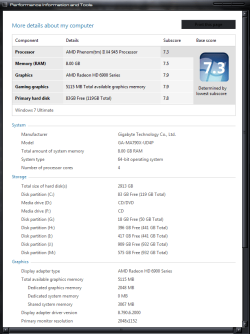
In the meantime I did make some changes in the BIOS; 160.7 x 22 = 3534, 3.53GHz and did not raise the CPU voltage. The lowest multiplier allowed by the BIOS is nine, so the idle speed is around 1.44GHz. The WEI benchmark did run, see below, and the CPU score did go from 7.3 to 7.5. The other scores did not change as you predicted.

The only issue is the increased temperatures. During idle the temperature increased from the no OC mid-thirties to high forties/low fifties in Celsius. Running the Prime95 torture test quickly pushed the temperature to high nineties, as in 98-99 Celsius degree. That's about 30 Celsius higher than the highest I've seen when the system is not OC-d. Yeah, the Real Temp 3.60 was blinking red like crazy during the Prime95 test that had to be stopped...:o

The temperature increase is definitely caused by OC-ing; however, it does not help that the case is shoved in to the cabinet under my desk with no door on it. The temperature drops between 5-8 degree Celsius, if I pull it out in the open even when the system is not OC-ed. No, I didn't pull the system out during OC-ing the system...:huh:

Thanks for the tips and I promise I will read the guide...:shock:

OC_WEI_3.53.JPG
 

Attachments

  • OC_WEI_3.53.JPG
    OC_WEI_3.53.JPG
    29.8 KB · Views: 23

My Computer My Computer

Computer type
PC/Desktop
Computer Manufacturer/Model Number
Custom built at Home
OS
Windows 7 64-bit, Windows 8.1 64-bit, OSX El Capitan, Windows 10 (VMware)
CPU
Intel i5-3350P 3.1 GHz
Motherboard
Gigabyte GA-Z77X-UP5 TH
Memory
16 GBs GSkill Sniper
Graphics Card(s)
Radeon HD 7850
Sound Card
VIA HD Audio
Monitor(s) Displays
Dell U2410 24"
Screen Resolution
1920x1200
Hard Drives
1 x Intel 520 240 GBs
1 x Seagate 1TBs SATA 2.0,
1 x Seagate 1TBs eSATA 2.0
PSU
Thermaltake 850W
Case
Antec P183
Cooling
Noctua NH-D14 Heatsink 2 x 120mm fans, 4 x 120mm case fans
Keyboard
Dell Multimedia keyboard
Mouse
Logitech Trackball
Internet Speed
28.5 Mb/s

Great numbers tw33k :thumbsup:

With Turbo enabled and the base clock at 160 your CPU should be running at x20 when all 4 cores are running CPU frequency, 160 x 20 = 3200, 3,2GHz.
When your CPU is running 1 or 2 cores it should be 160 x 24 = 3840, 3.84GHz.
Your CPU voltage should not have to be raised.
Keep EIST on and it will idle at 1.44 to 1.5GHz, and jump up when needed.

Actually Dave, that's our i5 750, his i5 760 has even higher clocks and turbo boost:

t2.png

So his max boost would be 160 x 26 for 4.16GHz! Mind, just one core will be rare.

A Guy
 

My Computer My Computer

Computer type
PC/Desktop
OS
Windows 10 Home x64
CPU
INTEL Core i5-750 Quad-Core 3.37GHz
Motherboard
ASUS P7P55D
Memory
HyperX Fury Black Series 8GB (2 x 4GB) 1866Mhz
Graphics Card(s)
EVGA GeForce GTX 750 Superclocked 1GB 128-Bit GDDR5
Monitor(s) Displays
LG 32MA68HY 32" IPS
Screen Resolution
1920 x 1080
Hard Drives
Samsung 840 Evo 120GB, SEAGATE 500GB Barracuda® 7200.12, SATA 3 Gb/s, 7200 RPM, 16MB cache
PSU
ANTEC TruePower New TP-550, 80 PLUS, 550W
Case
ANTEC Three Hundred Illusion
Cooling
COOLER MASTER Hyper 212 Plus, 4 x 120mm 1 x 140mm Noctua's
Internet Speed
85 + Mbps
Antivirus
Avast
Browser
Vivaldi
Thanks for the links and I'll read Overclocking Guides sometimes....

In my BIOS, the Turbo mode is not available if the AI is set to anything than default; it just disappears from the available options. Maybe it's because the i5-760 series CPU?

In the meantime I did make some changes in the BIOS; 160.7 x 22 = 3534, 3.53GHz and did not raise the CPU voltage. The lowest multiplier allowed by the BIOS is nine, so the idle speed is around 1.44GHz. The WEI benchmark did run, see below, and the CPU score did go from 7.3 to 7.5. The other scores did not change as you predicted.

The only issue is the increased temperatures. During idle the temperature increased from the no OC mid-thirties to high forties/low fifties in Celsius. Running the Prime95 torture test quickly pushed the temperature to high nineties, as in 98-99 Celsius degree. That's about 30 Celsius higher than the highest I've seen when the system is not OC-d. Yeah, the Real Temp 3.60 was blinking red like crazy during the Prime95 test that had to be stopped...:o

The temperature increase is definitely caused by OC-ing; however, it does not help that the case is shoved in to the cabinet under my desk with no door on it. The temperature drops between 5-8 degree Celsius, if I pull it out in the open even when the system is not OC-ed. No, I didn't pull the system out during OC-ing the system...:huh:

Thanks for the tips and I promise I will read the guide...:shock:

OC_WEI_3.53.JPG

Good start in your OC'ing.

As A Guy mentioned your i5-760 has a little higher turbo mode than our i5-750.

Turbo mode should work with non-default settings, it's an OC'ing feature, check for info in your motherboard manual, BIOS section.

Two key points, high temps are bad and you should think about getting an after market CPU cooler.
The Intel cooler is very limited. You can get a good air cooler for $20-50.

Make sure your case gets proper air ventilation, don't put it in a small closed cabinet.

CPU thermal paste is very important to get applied correctly, read up on it, there are a lot of info on how to do it. Too little doesn't work, too much doesn't work either, just remember you are filling micro holes on the metal finish so it needs to be very thin, almost transparent. Ensure the cooler mounting bolts are tight.

Check your CPU specs here.
Intel® Core™ i5-760 Processor (8M Cache, 2.80 GHz)

The Tcase 72.7°C is for the max temp CPU case, add 5°C for Max core temps.


Your max core temps should be 77.7°C.
If it goes above this temp, shut it down. No need to damage the CPU when OC'ing.
You can keep those settings, reduce the turbo mode setting.


Let us know if you have any questions.
 

My Computer My Computer

Computer type
PC/Desktop
Computer Manufacturer/Model Number
76~2.0
OS
Windows 7 Ult x64 - SP1/ Windows 8 Pro x64
CPU
Intel Core i5-3570K 4.6GHz
Motherboard
Gigabyte GA-Z77X UD3H, f18
Memory
8GB (2X4GB) DDR3 1600 Corsair Vengeance CL8 1.5v
Graphics Card(s)
Sapphire HD 7770 Vapor-X OC 1GB DDR5
Sound Card
Onboard VIA VT2021
Monitor(s) Displays
22" LCD Dell
Screen Resolution
1680x1050
Hard Drives
Samsung 840Pro 128GB SSD,
Seagate Barracuda 500GB SATA2 7200rpm 32MB cache, Seagate Barracuda 1TB SATA2 7200rpm 32MB cache,
PSU
Corsair HX650W
Case
Cooler Master Storm Scout
Cooling
Corsair H80 2x12cm Noctua NF P12 , 2x14cm case fans
Keyboard
Logitech Wave
Mouse
CM Sentinel
Internet Speed
Dismal
Antivirus
Avast
Browser
Opera Next
Other Info
Haswell laptop: HP Envy 17t-j, i7-4700MQ, GeForce 740M 2GB DDR3, 17.3" Full HD 1920x1080, 16GB RAM, Samsung 840 Pro 128GB, 1TB Hitachi 7200 HDD,
Desktop: eSATA ports,
External eSATA Seagate 500GB SATA2 7200rpm,
External WD USB 500GB
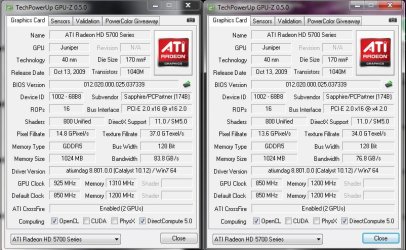
Hi, I just noticed the drop down box on GPUZ for the 2nd Graphics card and noticed I have 1 cat 16x and 1 at 4x. I know that if i overclock the card on the 4x lane that PC becomes unstable. How much am I really being affected by this slower lane?
Screenshots:
GPUZ both cards 16x and 4x Jan 2011.jpg
Any advice appreciated Thanks.

Just found the "Add Reputation" button, sorry to all those who have helped in past who I did not +, Will do so in the future every time.
 
Last edited:

My Computer My Computer

Computer Manufacturer/Model Number
Custom
OS
Windows 7 Ultimate X64
CPU
AMD Phenom II X6 1100T Black Edition @3.6GHz
Motherboard
ASUS AM3+ CROSSHAIR V FORMULA S/L 990FX
Memory
16GB (4 X 4GB) Corsair CMZ8GX3M2A1600C9 1600MHz CL9 DDR3 Ven
Graphics Card(s)
2 X ATI Sapphire HD 5770 1GB DDR5 @850/1200MHz in CrossfireX
Sound Card
Onboard 7.1 HD Audio/Bluetooth Stereo Audio/C-Media USB 5.1
Monitor(s) Displays
LGW2363D 23", HANNspreeXM-S HANNSverona22" & 42"Samsung HDTV
Screen Resolution
2880X900
Hard Drives
Seagate Barracuda LP 1.5TB
SAMSUNG HD154UI 1.5TB
SAMSUNG HD 204UI 2TB
PSU
Evo Labs 900W 80+ 80 plus Dual 12V ATX PC PSU
Case
Cooler Master Mystique 631
Cooling
Corsair H50 With 2X120mm Push/Pull,3X 120mm (FrX1,SideX2).
Keyboard
Accuratus Toughball 2.4GHz
Mouse
Microsoft Laser Mouse 5000/Emprex Cheetah 2000dpi Optical
Internet Speed
5500kbps
Other Info
LG BH10LS30.AUAU10B 10x Internal Blu-Ray BDRW
Corsair H50 Water Cooling With Push/Pull 120mm Fans vent out
Front 120mm Intake
Side Panel 2 X120mm Intake
90mm Extraction fan in top of case.
OCZ - Extreme Thermal Convection
Quiet PC AcoustiPack Lite 2 Ply Sound Deadening both side panels, front, rear, top and bottom.
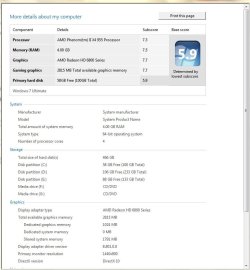
here's mii score:D

the hdd is the culprit :(
is 5.9 the max possible for HDDs, coz i am using seagate sata II drive. only options left are SSDs or Sata III drives............
 

Attachments

  • Capture.JPG
    Capture.JPG
    64.7 KB · Views: 90

My Computer My Computer

Computer Manufacturer/Model Number
mii-darling
OS
Windows 7 Ultimate x64 SP1
CPU
AMD Phenom II X4 955 BE
Motherboard
ASUS M4A87TD EVO
Memory
2X2 GB CORSAIR DDR3 @ 1333MHz
Graphics Card(s)
ASUS EAH 6850
Sound Card
On-Board
Monitor(s) Displays
viewsonic 19"
Screen Resolution
1440x900
Hard Drives
2x250 GB Seagate Baracudas
PSU
Corsair VX 550W
Case
CM Elite 430
Cooling
CM Hyper 212+
Keyboard
Logitech Wireless MK320
Mouse
Logitech Wireless MK320
Internet Speed
dont even ask :(
Good start in your OC'ing.

As A Guy mentioned your i5-760 has a little higher turbo mode than our i5-750.

Turbo mode should work with non-default settings, it's an OC'ing feature, check for info in your motherboard manual, BIOS section.
Yes, I've noticed that the Turbo mode is still on, even if it is not an option in the BIOS.

Two key points, high temps are bad and you should think about getting an after market CPU cooler.
The Intel cooler is very limited. You can get a good air cooler for $20-50.

Make sure your case gets proper air ventilation, don't put it in a small closed cabinet.

CPU thermal paste is very important to get applied correctly, read up on it, there are a lot of info on how to do it. Too little doesn't work, too much doesn't work either, just remember you are filling micro holes on the metal finish so it needs to be very thin, almost transparent. Ensure the cooler mounting bolts are tight.
I have Noctua NH14 CPU cooler with ArticSilver 5 applied, as per instruction at ArticSilver site. You did summarize the process well, better than the site did.

I don't use the cooler that comes with the CPU, it's more of a noise reduction purpose than anything else. The tower also have four case fans; two on the front pulling in air, while the back ones are pushing air out. There's one internal fan for the four hard drive and of course the standard CPU, power supply, and video card fan(s). It's still quite since the fans run at 900-1200 RPM.


Thanks for the specs...

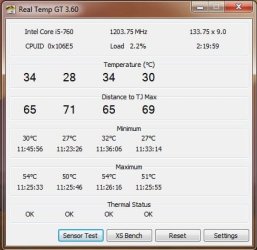
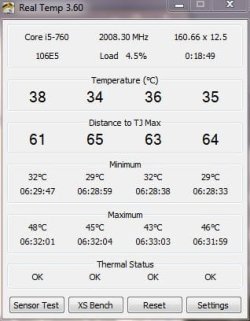
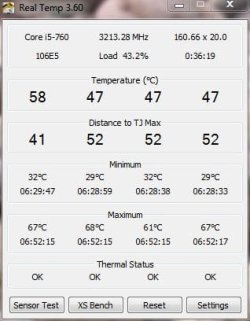
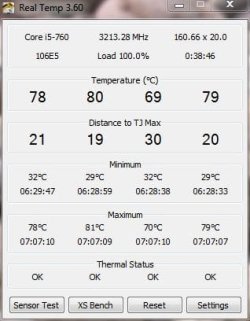
The RealTemp 3.6 indicates TJmax as 99 degree Celsius; evidently, that's an incorrect value then, right?

Here are some of the temperatures, using Real Temp.

Default settings in the BIOS, no OC:

i5 temp.jpg

OC-d to 3.2GHZ, after start up:

i5-760_OC_3.2.JPG

Running Prime95 benchmark:

prime95_bench.JPG

Running Prime95 torture:

Prime95_torture.JPG

I am not sure that the temperature for the torture test is normal. Other than that, the system runs just fined OC-d to 3.2.

The temperature difference from the idle to the torture is about 40; is that a "normal" swing? Once the torture is over, the temperature quickly drops down to the idle values.
 

Attachments

  • i5 temp.jpg
    i5 temp.jpg
    26.9 KB · Views: 11
  • i5-760_OC_3.2.JPG
    i5-760_OC_3.2.JPG
    28.5 KB · Views: 14
  • prime95_bench.JPG
    prime95_bench.JPG
    28.7 KB · Views: 6
  • Prime95_torture.JPG
    Prime95_torture.JPG
    28.8 KB · Views: 10

My Computer My Computer

Computer type
PC/Desktop
Computer Manufacturer/Model Number
Custom built at Home
OS
Windows 7 64-bit, Windows 8.1 64-bit, OSX El Capitan, Windows 10 (VMware)
CPU
Intel i5-3350P 3.1 GHz
Motherboard
Gigabyte GA-Z77X-UP5 TH
Memory
16 GBs GSkill Sniper
Graphics Card(s)
Radeon HD 7850
Sound Card
VIA HD Audio
Monitor(s) Displays
Dell U2410 24"
Screen Resolution
1920x1200
Hard Drives
1 x Intel 520 240 GBs
1 x Seagate 1TBs SATA 2.0,
1 x Seagate 1TBs eSATA 2.0
PSU
Thermaltake 850W
Case
Antec P183
Cooling
Noctua NH-D14 Heatsink 2 x 120mm fans, 4 x 120mm case fans
Keyboard
Dell Multimedia keyboard
Mouse
Logitech Trackball
Internet Speed
28.5 Mb/s
I have a question. Is it possible to have 7,9 score on SATA II bus with single SSD? I've been looking at some pics, but none of them had 7,9; highest score was 7,8 on with Crucial C300.
 

My Computer My Computer

Computer Manufacturer/Model Number
Custom Built
OS
MS Windows 7 Ultimate 64-bit
CPU
Intel Core 2 Quad Q9450 @ 2.66GHz
Motherboard
ASUSTeK Computer INC. P5Q DELUXE (LGA 775)
Memory
8.0GB Dual-Channel DDR2 @ 534MHz (5-5-5-18)
Graphics Card(s)
ATI Radeon HD 4870 512 MB
Sound Card
ATI High Definition Audio Device
Monitor(s) Displays
LG Flatron W2252
Screen Resolution
1680x1050
Hard Drives
500GB Western Digital,
320GB Seagate
PSU
Corsair 650W
Case
Antec Nine Hundred
Cooling
Zalman CNPS9700 LED
Mouse
Razer Copperhead
Internet Speed
2Mbit/384Kbit
Well, the maximum uncoded data transfer rate for SATA II interface is 300MB/s; I sort of doubt WEI score of 7.9 without OC-ing the bus speed.

The SATA interface utilizes 8n/10n encoding that limits the actual data throughput. Here are the theoretical and actual/uncoded throughput rates for the current SATA interfaces:

SATA 1.0:
Theoretical: 1.5Gb/s, or 187MB/s
Uncoded: 1.2Gb/s, or 150MB/s

SATA 2.0:
Theoretical: 3.0Gb/s, or 375MB/s
Uncoded: 2.4Gb/s, or 300MB/s

SATA 3.0:
Theoretical: 6.0Gb/s, or 750MB/s
Uncoded: 4.8Gb/s, or 600MB/s

The encoding is somewhat similar to the network packet encoding...
 

My Computer My Computer

Computer type
PC/Desktop
Computer Manufacturer/Model Number
Custom built at Home
OS
Windows 7 64-bit, Windows 8.1 64-bit, OSX El Capitan, Windows 10 (VMware)
CPU
Intel i5-3350P 3.1 GHz
Motherboard
Gigabyte GA-Z77X-UP5 TH
Memory
16 GBs GSkill Sniper
Graphics Card(s)
Radeon HD 7850
Sound Card
VIA HD Audio
Monitor(s) Displays
Dell U2410 24"
Screen Resolution
1920x1200
Hard Drives
1 x Intel 520 240 GBs
1 x Seagate 1TBs SATA 2.0,
1 x Seagate 1TBs eSATA 2.0
PSU
Thermaltake 850W
Case
Antec P183
Cooling
Noctua NH-D14 Heatsink 2 x 120mm fans, 4 x 120mm case fans
Keyboard
Dell Multimedia keyboard
Mouse
Logitech Trackball
Internet Speed
28.5 Mb/s
My Dell Studio XPS 1645. overclocked GPU.
scorem.jpg
 

My Computer My Computer

Computer Manufacturer/Model Number
Dell D630
OS
Windows 7 Professinal x64
CPU
Intel Core 2 Duo T9300
Motherboard
ICH8 Intel
Memory
8GB DDR2 1066MHZ (4.5GB/s Bandwidth)
Graphics Card(s)
nVidia Quadro NVS 135M
Sound Card
C-Major
Screen Resolution
1400x900
Hard Drives
Seagate Momentus XT Hybrid Drive 500GB
PSU
PA-12 90Watt
Case
Stock
Cooling
Stock (after my mods cools really well)
Other Info
Network Card: NetXtreme 57xx
My Updated score after overclocking graphics card

WEIScore-2.jpg
 

My Computer My Computer

Computer Manufacturer/Model Number
Bailez Custom Desktop PC
OS
Windows 7 Ultimate x64 SP1
CPU
Intel Core i7 2600K @ 4.4 GHz
Motherboard
Asus P8Z68-V PRO
Memory
8GB (2 x 4GB) Mushkin Redline Ridgeback @ 2133MHz CL9
Graphics Card(s)
EVGA GTX 570HD 1.28GB (@Stock)
Sound Card
Realtek® ALC 892 8-Channel High Definition Audio CODEC
Monitor(s) Displays
HP 2311X LED LCD MONITOR, 46" SHARP AQUOS LCD HDTV
Screen Resolution
1920x1080p
Hard Drives
Internal: 2 x Intel 520 Series 180GB RAID 0 (OS & Applications)
Crucial m4 SSD 256GB (Games) ;
WD Caviar Black 640GB (Storage); Seagate Barracuda LP 2TB (Video Library).
External: Seagate 320GB USB 2.0 External Hard Drive (Music)
PSU
Corsair 750HX
Case
CM 690 II Advanced
Cooling
Noctua NH-D14
Keyboard
Logitech Illuminated Keyboard
Mouse
Logitech G700
Internet Speed
Cable - 20 Mbps downstream / 2 Mbps upstream
Other Info
Case Cooling: Intake - 1x140mm fan (front)
Exhaust - 1 x 140mm fan (top) & 1 x 120mm fan (top).
Fan Controller: Zalman ZM-MFC1 6-Channel Fan Controller.

http://valid.canardpc.com/show_oc.php?id=2029207
There are a few flaws with this (like saying my 5870 is DX10, or not recognizing a partition), but here you go:
Hi, It's great to see the 1090T and see the score it gives, I am looking to get one but was wondering if you have overclocked it at all, I have had trouble with stability when overclocking and have all my cores/GPU's at stock. 7.5 is a great score for a stock CPU, I would be very happy with that.

No, it's at the stock 3.2 GHz.
 

My Computer My Computer

Computer Manufacturer/Model Number
Custom
OS
Windows 7 Ultimate SP1 x64
CPU
AMD Phenom II x6 1090T
Motherboard
ASUS Crosshair V Formula
Memory
16GB Mushkin Silverline DDR3-1333
Graphics Card(s)
XFX Radeon HD 7970
Sound Card
Onboard
Monitor(s) Displays
ASUS VK246H
Screen Resolution
24", 1920x1080
Hard Drives
60GB OCZ Vertex 2
3TB Hitachi Deskstar (5400 RPM)
3TB Hitachi Deskstar (7200 RPM)
PSU
Corsair AX1200
Case
NXZT Phantom
Cooling
Cooler Master Hyper 212+ (push-pull, 2x Blade Master 120mm)
Keyboard
Razer Black Widow
Mouse
Razer Abyssus
Internet Speed
10mbit down, 1 mbit up
There are a few flaws with this (like saying my 5870 is DX10, or not recognizing a partition), but here you go:
Hi, It's great to see the 1090T and see the score it gives, I am looking to get one but was wondering if you have overclocked it at all, I have had trouble with stability when overclocking and have all my cores/GPU's at stock. 7.5 is a great score for a stock CPU, I would be very happy with that.

No, it's at the stock 3.2 GHz.
Thank you, nice to know, but since I still haven't raised the cash yet the 1100T is only a few quid more and I think it will be worth saving a little more.
 

My Computer My Computer

Computer Manufacturer/Model Number
Custom
OS
Windows 7 Ultimate X64
CPU
AMD Phenom II X6 1100T Black Edition @3.6GHz
Motherboard
ASUS AM3+ CROSSHAIR V FORMULA S/L 990FX
Memory
16GB (4 X 4GB) Corsair CMZ8GX3M2A1600C9 1600MHz CL9 DDR3 Ven
Graphics Card(s)
2 X ATI Sapphire HD 5770 1GB DDR5 @850/1200MHz in CrossfireX
Sound Card
Onboard 7.1 HD Audio/Bluetooth Stereo Audio/C-Media USB 5.1
Monitor(s) Displays
LGW2363D 23", HANNspreeXM-S HANNSverona22" & 42"Samsung HDTV
Screen Resolution
2880X900
Hard Drives
Seagate Barracuda LP 1.5TB
SAMSUNG HD154UI 1.5TB
SAMSUNG HD 204UI 2TB
PSU
Evo Labs 900W 80+ 80 plus Dual 12V ATX PC PSU
Case
Cooler Master Mystique 631
Cooling
Corsair H50 With 2X120mm Push/Pull,3X 120mm (FrX1,SideX2).
Keyboard
Accuratus Toughball 2.4GHz
Mouse
Microsoft Laser Mouse 5000/Emprex Cheetah 2000dpi Optical
Internet Speed
5500kbps
Other Info
LG BH10LS30.AUAU10B 10x Internal Blu-Ray BDRW
Corsair H50 Water Cooling With Push/Pull 120mm Fans vent out
Front 120mm Intake
Side Panel 2 X120mm Intake
90mm Extraction fan in top of case.
OCZ - Extreme Thermal Convection
Quiet PC AcoustiPack Lite 2 Ply Sound Deadening both side panels, front, rear, top and bottom.
Update WEI with CCC 10.12a drivers, 6970 BIOS @ stock clocks :)

WEI.PNG

My Crucial C300 used to be 7.9 but it's now dropped down a notch :(
 

My Computer My Computer

Computer Manufacturer/Model Number
tw33k
OS
Windows 7 Ultimate (x64) SP1
CPU
Intel 3770k 4.6GHz
Motherboard
ASUS Maximus V Formula
Memory
8GB (2x 4GB) Crucial Ballistix
Graphics Card(s)
Sapphire 7950 (1060/1600)
Sound Card
On Board Realtek HD Audio
Monitor(s) Displays
27" Acer B273HU (via HDMI)
Screen Resolution
2048 x 1152
Hard Drives
Crucial M4 128GB
2TB WD Black
1TB Samsung F3 SATA
1TB WD Elite External
2TB WD USB 3.0
PSU
Corsair AX750 Gold
Case
Corsair Obsidian 800DW
Cooling
Corsair H100 (2x AP-121/2x UK-3000 push/pull)
Keyboard
Microsoft Wireless 5000
Mouse
Microsoft Wireless 5000
Internet Speed
5mb/s
Other Info
Logitech z-2300 2.1 speakers
Lamptron FC-5 v2
Status
Not open for further replies.
Back
Top