Show Us Your WEI [3]

Status
Not open for further replies.
When I got this laptop, it came with 6 GB RAM and the WEI score was 5.7 (1st image)

After I increased the RAM to 8 GB the WEI score become 5.8 (2nd image)

Then I have added a 16 GB SDHC card to the system as Readyboost and the WEI score increased to 5.9. (3rd image)

Now my inherent limitations on the system are the Hard disk (score 5.9) and onboard Intel graphics (score 5.9).

I can increase the HDD's score by going for a SSD, but what to do about the Intel graphics?

Can I do something about it?
Since it's a laptop, I would say there is nothing you can do about the graphics. Almost all laptops do not allow graphics upgrades since the graphics chips (even the ones that are called discrete) are soldered on the motherboard and there are no expansion slots like on a desktop motherboard.
 

My Computer My Computer

At a glance

Win 7 Home Premium 64 bitAMD A8-3500M APU6 GB DDR3-1333HD6620G integrated in APU processor
Computer Manufacturer/Model Number
HP Dv6-6140us Laptop
OS
Win 7 Home Premium 64 bit
CPU
AMD A8-3500M APU
Motherboard
HP
Memory
6 GB DDR3-1333
Graphics Card(s)
HD6620G integrated in APU processor
Sound Card
IDT High Definition
Monitor(s) Displays
15.6 laptop screen, HDMI and VGA ports for external monitor
Screen Resolution
1366X768
Hard Drives
Hitachi 640 GB
Internet Speed
Up to 25mbps from Charter Cable
Other Info
The Optical drive will burn all DVD's and burn Lightscribe labels. It also plays BluRay discs.
Hey guys... I have some kind of... concern with my WEI. I have an OCZ Vertex 2 SSD and, well, its WEI is 6.9. Shouldn't it be 7 and over for a SSD? Do you think it's worth calling OCZ for support?
 

My Computer My Computer

At a glance

Windows 10 Professional 64-bitRyzen 9 5900XG.Skill 3600Mhz CL16 16GB × 4EVGA GeForce RTX 3070 Ti FTW3 Ultra Gaming
Computer type
PC/Desktop
Computer Manufacturer/Model Number
Custom build
OS
Windows 10 Professional 64-bit
CPU
Ryzen 9 5900X
Motherboard
Gigabyte X570 Aorus Master
Memory
G.Skill 3600Mhz CL16 16GB × 4
Graphics Card(s)
EVGA GeForce RTX 3070 Ti FTW3 Ultra Gaming
Sound Card
On-board
Monitor(s) Displays
Dell Alienware AW3418DW
Screen Resolution
3440x1440
Hard Drives
1×Sabrent Rocket 4 Plus 2TB nvme SSD (System, internal)
2x4TB Western Digital Blue (Internal)
1x4TB HDST 7200RPM (Internal)
PSU
Seasonic Focus Plus 850W Platinum
Case
Corsair 680X
Cooling
Stock fans + 3× Corsair QL120, Corsair H100i Platinum
Keyboard
Logitech K350
Mouse
Logitech M510
Internet Speed
120Mbits dl - 20Mbits up
Antivirus
ESET NOD32 Antivirus
Browser
Firefox (latest version)
Other Info
Headphones : Audio-Technica ATH-M50x
Scanner : Canon Canoscan LiDE 220 + Plustek OptiBook 4800
Do you have it ahci mode? And is it properly aligned?
 

My Computers My Computers

  • At a glance

    Windows 11 ProRyzen 9 5900X32GB G Skill DDR4-3600EVGA RTX 3080 FTW 3 Ultra
    Computer type
    PC/Desktop
    Computer Manufacturer/Model Number
    ALWAYS UNDER CONSTRUCTION
    OS
    Windows 11 Pro
    CPU
    Ryzen 9 5900X
    Motherboard
    Asus X570 Crosshair Viii Hero
    Memory
    32GB G Skill DDR4-3600
    Graphics Card(s)
    EVGA RTX 3080 FTW 3 Ultra
    Sound Card
    On Board/Sennheiser PC37X Headset
    Monitor(s) Displays
    3 X Asus 27"
    Screen Resolution
    2560x1440
    Hard Drives
    2 X 1 TB NVME drives
    PSU
    EVGA 850
    Case
    Phanteks Eclipse P400A
    Cooling
    EVGA 280 AIO
    Keyboard
    Logitech G510s/ Logitech G13
    Mouse
    Logitech G502
    Internet Speed
    24/1
    Antivirus
    ESET/MBAM Pro/SAS Pro
    Browser
    Chrome/ Firefox/ Edge
  • At a glance

    Windows 11 ProIntel Ultra 9 288V32 GB LPDDR5X 8533
    Computer type
    Laptop
    System Manufacturer/Model Number
    Dell 16 Plus
    OS
    Windows 11 Pro
    CPU
    Intel Ultra 9 288V
    Memory
    32 GB LPDDR5X 8533
    Monitor(s) Displays
    16" Mini-LED HDR600 Touch 90 Hz
    Screen Resolution
    2560X1600
    Hard Drives
    1 TB NVME
Do you have it ahci mode? And is it properly aligned?

AHCI mode is enabled but when my PC boot up, I only see my 2 HDDs (500GB & 1TB) and my LG BD/DVD/CD drive during the short AHCI detecting sequence. When opened a benchmark software, the SSD is IDE. For some reason. Probably because I plugged it into a SATA 6Gb port...

Don't know about alignment.
 

My Computer My Computer

At a glance

Windows 10 Professional 64-bitRyzen 9 5900XG.Skill 3600Mhz CL16 16GB × 4EVGA GeForce RTX 3070 Ti FTW3 Ultra Gaming
Computer type
PC/Desktop
Computer Manufacturer/Model Number
Custom build
OS
Windows 10 Professional 64-bit
CPU
Ryzen 9 5900X
Motherboard
Gigabyte X570 Aorus Master
Memory
G.Skill 3600Mhz CL16 16GB × 4
Graphics Card(s)
EVGA GeForce RTX 3070 Ti FTW3 Ultra Gaming
Sound Card
On-board
Monitor(s) Displays
Dell Alienware AW3418DW
Screen Resolution
3440x1440
Hard Drives
1×Sabrent Rocket 4 Plus 2TB nvme SSD (System, internal)
2x4TB Western Digital Blue (Internal)
1x4TB HDST 7200RPM (Internal)
PSU
Seasonic Focus Plus 850W Platinum
Case
Corsair 680X
Cooling
Stock fans + 3× Corsair QL120, Corsair H100i Platinum
Keyboard
Logitech K350
Mouse
Logitech M510
Internet Speed
120Mbits dl - 20Mbits up
Antivirus
ESET NOD32 Antivirus
Browser
Firefox (latest version)
Other Info
Headphones : Audio-Technica ATH-M50x
Scanner : Canon Canoscan LiDE 220 + Plustek OptiBook 4800
Go to device manager and expand IDE/ATA/Atapi controllers, you should see an ahci controller listed at the bottom. It should be the intel or msahci. Go to properties - details and go down to the listing for children. You should see your SSD listed there. Also download AS SSD. It is a SSD benchmark program. open it and select your SSD, don't run the test, just show a screen shot of the program. It will tell you the controller and the alignment. That is the easy way. Also, with OCZ drives don't run many benchmark tests, it will slow them down and also start from a cold start and let the computer idle on the login screen for 2 hours a week. It aids in 'garbage collection'- (removing what trim missed).
 

My Computers My Computers

  • At a glance

    Windows 11 ProRyzen 9 5900X32GB G Skill DDR4-3600EVGA RTX 3080 FTW 3 Ultra
    Computer type
    PC/Desktop
    Computer Manufacturer/Model Number
    ALWAYS UNDER CONSTRUCTION
    OS
    Windows 11 Pro
    CPU
    Ryzen 9 5900X
    Motherboard
    Asus X570 Crosshair Viii Hero
    Memory
    32GB G Skill DDR4-3600
    Graphics Card(s)
    EVGA RTX 3080 FTW 3 Ultra
    Sound Card
    On Board/Sennheiser PC37X Headset
    Monitor(s) Displays
    3 X Asus 27"
    Screen Resolution
    2560x1440
    Hard Drives
    2 X 1 TB NVME drives
    PSU
    EVGA 850
    Case
    Phanteks Eclipse P400A
    Cooling
    EVGA 280 AIO
    Keyboard
    Logitech G510s/ Logitech G13
    Mouse
    Logitech G502
    Internet Speed
    24/1
    Antivirus
    ESET/MBAM Pro/SAS Pro
    Browser
    Chrome/ Firefox/ Edge
  • At a glance

    Windows 11 ProIntel Ultra 9 288V32 GB LPDDR5X 8533
    Computer type
    Laptop
    System Manufacturer/Model Number
    Dell 16 Plus
    OS
    Windows 11 Pro
    CPU
    Intel Ultra 9 288V
    Memory
    32 GB LPDDR5X 8533
    Monitor(s) Displays
    16" Mini-LED HDR600 Touch 90 Hz
    Screen Resolution
    2560X1600
    Hard Drives
    1 TB NVME
Like I said, my SSD is not on AHCI but other drives are. Alignment is 1024K and is shown "OK" by AS SSD.
Would it be safe to replug it on another SATA port?
 

My Computer My Computer

At a glance

Windows 10 Professional 64-bitRyzen 9 5900XG.Skill 3600Mhz CL16 16GB × 4EVGA GeForce RTX 3070 Ti FTW3 Ultra Gaming
Computer type
PC/Desktop
Computer Manufacturer/Model Number
Custom build
OS
Windows 10 Professional 64-bit
CPU
Ryzen 9 5900X
Motherboard
Gigabyte X570 Aorus Master
Memory
G.Skill 3600Mhz CL16 16GB × 4
Graphics Card(s)
EVGA GeForce RTX 3070 Ti FTW3 Ultra Gaming
Sound Card
On-board
Monitor(s) Displays
Dell Alienware AW3418DW
Screen Resolution
3440x1440
Hard Drives
1×Sabrent Rocket 4 Plus 2TB nvme SSD (System, internal)
2x4TB Western Digital Blue (Internal)
1x4TB HDST 7200RPM (Internal)
PSU
Seasonic Focus Plus 850W Platinum
Case
Corsair 680X
Cooling
Stock fans + 3× Corsair QL120, Corsair H100i Platinum
Keyboard
Logitech K350
Mouse
Logitech M510
Internet Speed
120Mbits dl - 20Mbits up
Antivirus
ESET NOD32 Antivirus
Browser
Firefox (latest version)
Other Info
Headphones : Audio-Technica ATH-M50x
Scanner : Canon Canoscan LiDE 220 + Plustek OptiBook 4800
Like I said, my SSD is not on AHCI but other drives are. Alignment is 1024K and is shown "OK" by AS SSD.
Would it be safe to replug it on another SATA port?

No, it will not boot. You should have 2 sata controllers in bios and should be able to change them both to ahci, but there is a procedure before doing that, here is the tutorial on changing to ahci. So, I assume AS SD said the controller was pcide or something like that? 1024 is a good alignment. That is the alignment of all my SSDs.
 

My Computers My Computers

  • At a glance

    Windows 11 ProRyzen 9 5900X32GB G Skill DDR4-3600EVGA RTX 3080 FTW 3 Ultra
    Computer type
    PC/Desktop
    Computer Manufacturer/Model Number
    ALWAYS UNDER CONSTRUCTION
    OS
    Windows 11 Pro
    CPU
    Ryzen 9 5900X
    Motherboard
    Asus X570 Crosshair Viii Hero
    Memory
    32GB G Skill DDR4-3600
    Graphics Card(s)
    EVGA RTX 3080 FTW 3 Ultra
    Sound Card
    On Board/Sennheiser PC37X Headset
    Monitor(s) Displays
    3 X Asus 27"
    Screen Resolution
    2560x1440
    Hard Drives
    2 X 1 TB NVME drives
    PSU
    EVGA 850
    Case
    Phanteks Eclipse P400A
    Cooling
    EVGA 280 AIO
    Keyboard
    Logitech G510s/ Logitech G13
    Mouse
    Logitech G502
    Internet Speed
    24/1
    Antivirus
    ESET/MBAM Pro/SAS Pro
    Browser
    Chrome/ Firefox/ Edge
  • At a glance

    Windows 11 ProIntel Ultra 9 288V32 GB LPDDR5X 8533
    Computer type
    Laptop
    System Manufacturer/Model Number
    Dell 16 Plus
    OS
    Windows 11 Pro
    CPU
    Intel Ultra 9 288V
    Memory
    32 GB LPDDR5X 8533
    Monitor(s) Displays
    16" Mini-LED HDR600 Touch 90 Hz
    Screen Resolution
    2560X1600
    Hard Drives
    1 TB NVME
Do you have it ahci mode? And is it properly aligned?

Probably because I plugged it into a SATA 6Gb port...

Don't know about alignment.
Each controller has IDE/ACHI mode.

Read the manual and it should tell you how to put the 6.0GBs controller into AHCI.
Somewhere in the Bios there is a seperate setting for that controller.

On my Asus it isn't listed with the normal HD settings. It is in the add on listing with the USB 3 ports etc. So it could be anywhere.
 

My Computer My Computer

At a glance

Windows7 Pro 64bit SP-1; Windows XP Pro 32bitIntel Core i7-870 Lynnfield 2.93GHz LGA 1156 ...8GB@1400MHz Crucial Ballistix DDR3-1600 4x2GBASUS ENGTX460 DirectCU/2DI/1GD5 1GB 256-bit G...
Computer Manufacturer/Model Number
Hopalong/ Godzilla
OS
Windows7 Pro 64bit SP-1; Windows XP Pro 32bit
CPU
Intel Core i7-870 Lynnfield 2.93GHz LGA 1156 95W Quad-Core
Motherboard
ASUS P7P55D-E PRO
Memory
8GB@1400MHz Crucial Ballistix DDR3-1600 4x2GB
Graphics Card(s)
ASUS ENGTX460 DirectCU/2DI/1GD5 1GB 256-bit GDDR5
Sound Card
VIA Onboard
Monitor(s) Displays
Asus VS248H-P 24"; Samsung SyncMaster 941BW 19"ws
Screen Resolution
1920x1080; 1440x900
Hard Drives
Samsung 830 120GB SSD
Intel 320 120GB SSD
Western Digital Caviar Black WD7501AALS 750GB 7200 RPM SATA 3.0Gb/s
Western Digital Caviar Black WD6401AALS 640GB 7200 RPM SATA 3.0Gb/s
PSU
COOLER MASTER Silent Pro RS850-AMBAJ3-US 850W Modular
Case
COOLER MASTER HAF 932 RC-932-KKN5-GP Black
Cooling
Scythe "Mugen-2 Rev.B" (2 ScytheKaze-Jyuni PWM fans)
Keyboard
Logitech K-320
Mouse
Kensington
Antivirus
Avast Inernet Suite
Browser
IE 9 ; Chrome
Regedit value is already 0 in msahci's start entry. I don't know... I have Intel Rapid Storage driver installed but I haven't installed the driver for "Marvell 91xx Config ATA Device". Should I install that? Also, I'll check my BIOS to see if there isn't two controllers to see if I missed one.

EDIT

I'm going to suspend this problem for the evening. I will backup my data just in case. And if I need it, I will 0 my SSD and install Windows again.
 

My Computer My Computer

At a glance

Windows 10 Professional 64-bitRyzen 9 5900XG.Skill 3600Mhz CL16 16GB × 4EVGA GeForce RTX 3070 Ti FTW3 Ultra Gaming
Computer type
PC/Desktop
Computer Manufacturer/Model Number
Custom build
OS
Windows 10 Professional 64-bit
CPU
Ryzen 9 5900X
Motherboard
Gigabyte X570 Aorus Master
Memory
G.Skill 3600Mhz CL16 16GB × 4
Graphics Card(s)
EVGA GeForce RTX 3070 Ti FTW3 Ultra Gaming
Sound Card
On-board
Monitor(s) Displays
Dell Alienware AW3418DW
Screen Resolution
3440x1440
Hard Drives
1×Sabrent Rocket 4 Plus 2TB nvme SSD (System, internal)
2x4TB Western Digital Blue (Internal)
1x4TB HDST 7200RPM (Internal)
PSU
Seasonic Focus Plus 850W Platinum
Case
Corsair 680X
Cooling
Stock fans + 3× Corsair QL120, Corsair H100i Platinum
Keyboard
Logitech K350
Mouse
Logitech M510
Internet Speed
120Mbits dl - 20Mbits up
Antivirus
ESET NOD32 Antivirus
Browser
Firefox (latest version)
Other Info
Headphones : Audio-Technica ATH-M50x
Scanner : Canon Canoscan LiDE 220 + Plustek OptiBook 4800
Lebon, in every thread I've been involved with, a Gigabyte board is very confusing there are several settings you have to make, and they are not obvious. Panais and I think wishmaster have Gigabyte boards. They may be able to tell you which settings to change. it seems like it is about 3 different settings. All of the boards I have had, it was a simple procedure.
 

My Computers My Computers

  • At a glance

    Windows 11 ProRyzen 9 5900X32GB G Skill DDR4-3600EVGA RTX 3080 FTW 3 Ultra
    Computer type
    PC/Desktop
    Computer Manufacturer/Model Number
    ALWAYS UNDER CONSTRUCTION
    OS
    Windows 11 Pro
    CPU
    Ryzen 9 5900X
    Motherboard
    Asus X570 Crosshair Viii Hero
    Memory
    32GB G Skill DDR4-3600
    Graphics Card(s)
    EVGA RTX 3080 FTW 3 Ultra
    Sound Card
    On Board/Sennheiser PC37X Headset
    Monitor(s) Displays
    3 X Asus 27"
    Screen Resolution
    2560x1440
    Hard Drives
    2 X 1 TB NVME drives
    PSU
    EVGA 850
    Case
    Phanteks Eclipse P400A
    Cooling
    EVGA 280 AIO
    Keyboard
    Logitech G510s/ Logitech G13
    Mouse
    Logitech G502
    Internet Speed
    24/1
    Antivirus
    ESET/MBAM Pro/SAS Pro
    Browser
    Chrome/ Firefox/ Edge
  • At a glance

    Windows 11 ProIntel Ultra 9 288V32 GB LPDDR5X 8533
    Computer type
    Laptop
    System Manufacturer/Model Number
    Dell 16 Plus
    OS
    Windows 11 Pro
    CPU
    Intel Ultra 9 288V
    Memory
    32 GB LPDDR5X 8533
    Monitor(s) Displays
    16" Mini-LED HDR600 Touch 90 Hz
    Screen Resolution
    2560X1600
    Hard Drives
    1 TB NVME

Attachments

  • Gigabyte manual.PNG
    Gigabyte manual.PNG
    57 KB · Views: 3
  • Gigabyte manual2.PNG
    Gigabyte manual2.PNG
    22.5 KB · Views: 4

My Computer My Computer

At a glance

Windows7 Pro 64bit SP-1; Windows XP Pro 32bitIntel Core i7-870 Lynnfield 2.93GHz LGA 1156 ...8GB@1400MHz Crucial Ballistix DDR3-1600 4x2GBASUS ENGTX460 DirectCU/2DI/1GD5 1GB 256-bit G...
Computer Manufacturer/Model Number
Hopalong/ Godzilla
OS
Windows7 Pro 64bit SP-1; Windows XP Pro 32bit
CPU
Intel Core i7-870 Lynnfield 2.93GHz LGA 1156 95W Quad-Core
Motherboard
ASUS P7P55D-E PRO
Memory
8GB@1400MHz Crucial Ballistix DDR3-1600 4x2GB
Graphics Card(s)
ASUS ENGTX460 DirectCU/2DI/1GD5 1GB 256-bit GDDR5
Sound Card
VIA Onboard
Monitor(s) Displays
Asus VS248H-P 24"; Samsung SyncMaster 941BW 19"ws
Screen Resolution
1920x1080; 1440x900
Hard Drives
Samsung 830 120GB SSD
Intel 320 120GB SSD
Western Digital Caviar Black WD7501AALS 750GB 7200 RPM SATA 3.0Gb/s
Western Digital Caviar Black WD6401AALS 640GB 7200 RPM SATA 3.0Gb/s
PSU
COOLER MASTER Silent Pro RS850-AMBAJ3-US 850W Modular
Case
COOLER MASTER HAF 932 RC-932-KKN5-GP Black
Cooling
Scythe "Mugen-2 Rev.B" (2 ScytheKaze-Jyuni PWM fans)
Keyboard
Logitech K-320
Mouse
Kensington
Antivirus
Avast Inernet Suite
Browser
IE 9 ; Chrome
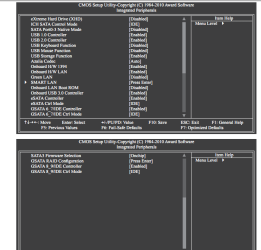
See if any of this looks familiar. It is the bios of a Gigabyte board in AHCI mode.

bios.PNG
 

My Computers My Computers

  • At a glance

    Windows 11 ProRyzen 9 5900X32GB G Skill DDR4-3600EVGA RTX 3080 FTW 3 Ultra
    Computer type
    PC/Desktop
    Computer Manufacturer/Model Number
    ALWAYS UNDER CONSTRUCTION
    OS
    Windows 11 Pro
    CPU
    Ryzen 9 5900X
    Motherboard
    Asus X570 Crosshair Viii Hero
    Memory
    32GB G Skill DDR4-3600
    Graphics Card(s)
    EVGA RTX 3080 FTW 3 Ultra
    Sound Card
    On Board/Sennheiser PC37X Headset
    Monitor(s) Displays
    3 X Asus 27"
    Screen Resolution
    2560x1440
    Hard Drives
    2 X 1 TB NVME drives
    PSU
    EVGA 850
    Case
    Phanteks Eclipse P400A
    Cooling
    EVGA 280 AIO
    Keyboard
    Logitech G510s/ Logitech G13
    Mouse
    Logitech G502
    Internet Speed
    24/1
    Antivirus
    ESET/MBAM Pro/SAS Pro
    Browser
    Chrome/ Firefox/ Edge
  • At a glance

    Windows 11 ProIntel Ultra 9 288V32 GB LPDDR5X 8533
    Computer type
    Laptop
    System Manufacturer/Model Number
    Dell 16 Plus
    OS
    Windows 11 Pro
    CPU
    Intel Ultra 9 288V
    Memory
    32 GB LPDDR5X 8533
    Monitor(s) Displays
    16" Mini-LED HDR600 Touch 90 Hz
    Screen Resolution
    2560X1600
    Hard Drives
    1 TB NVME
thx all, I will set this up later... I need to help my friend now.
 

My Computer My Computer

At a glance

Windows 10 Professional 64-bitRyzen 9 5900XG.Skill 3600Mhz CL16 16GB × 4EVGA GeForce RTX 3070 Ti FTW3 Ultra Gaming
Computer type
PC/Desktop
Computer Manufacturer/Model Number
Custom build
OS
Windows 10 Professional 64-bit
CPU
Ryzen 9 5900X
Motherboard
Gigabyte X570 Aorus Master
Memory
G.Skill 3600Mhz CL16 16GB × 4
Graphics Card(s)
EVGA GeForce RTX 3070 Ti FTW3 Ultra Gaming
Sound Card
On-board
Monitor(s) Displays
Dell Alienware AW3418DW
Screen Resolution
3440x1440
Hard Drives
1×Sabrent Rocket 4 Plus 2TB nvme SSD (System, internal)
2x4TB Western Digital Blue (Internal)
1x4TB HDST 7200RPM (Internal)
PSU
Seasonic Focus Plus 850W Platinum
Case
Corsair 680X
Cooling
Stock fans + 3× Corsair QL120, Corsair H100i Platinum
Keyboard
Logitech K350
Mouse
Logitech M510
Internet Speed
120Mbits dl - 20Mbits up
Antivirus
ESET NOD32 Antivirus
Browser
Firefox (latest version)
Other Info
Headphones : Audio-Technica ATH-M50x
Scanner : Canon Canoscan LiDE 220 + Plustek OptiBook 4800
thx all, I will set this up later... I need to help my friend now.

OK. If you need help, let me know. I will do the best I can.
 

My Computers My Computers

  • At a glance

    Windows 11 ProRyzen 9 5900X32GB G Skill DDR4-3600EVGA RTX 3080 FTW 3 Ultra
    Computer type
    PC/Desktop
    Computer Manufacturer/Model Number
    ALWAYS UNDER CONSTRUCTION
    OS
    Windows 11 Pro
    CPU
    Ryzen 9 5900X
    Motherboard
    Asus X570 Crosshair Viii Hero
    Memory
    32GB G Skill DDR4-3600
    Graphics Card(s)
    EVGA RTX 3080 FTW 3 Ultra
    Sound Card
    On Board/Sennheiser PC37X Headset
    Monitor(s) Displays
    3 X Asus 27"
    Screen Resolution
    2560x1440
    Hard Drives
    2 X 1 TB NVME drives
    PSU
    EVGA 850
    Case
    Phanteks Eclipse P400A
    Cooling
    EVGA 280 AIO
    Keyboard
    Logitech G510s/ Logitech G13
    Mouse
    Logitech G502
    Internet Speed
    24/1
    Antivirus
    ESET/MBAM Pro/SAS Pro
    Browser
    Chrome/ Firefox/ Edge
  • At a glance

    Windows 11 ProIntel Ultra 9 288V32 GB LPDDR5X 8533
    Computer type
    Laptop
    System Manufacturer/Model Number
    Dell 16 Plus
    OS
    Windows 11 Pro
    CPU
    Intel Ultra 9 288V
    Memory
    32 GB LPDDR5X 8533
    Monitor(s) Displays
    16" Mini-LED HDR600 Touch 90 Hz
    Screen Resolution
    2560X1600
    Hard Drives
    1 TB NVME
So, I download and installed the Marvell Drivers. Then, I rebooted and changed the said settings to AHCI but I ended welcomed by a 0xc000000e error at boot. Revert back the BIOS settings, no go. I tried a system restore, no go. After a searching just a bit, I saw that a CHKDSK would work. So, that's what I did : chkdsk c: /f /r in a command prompt. After 5 minutes, it finished and I rebooted. Windows loaded just fine.

I wonder what was the problem... the driver or the BIOS settings?
 

My Computer My Computer

At a glance

Windows 10 Professional 64-bitRyzen 9 5900XG.Skill 3600Mhz CL16 16GB × 4EVGA GeForce RTX 3070 Ti FTW3 Ultra Gaming
Computer type
PC/Desktop
Computer Manufacturer/Model Number
Custom build
OS
Windows 10 Professional 64-bit
CPU
Ryzen 9 5900X
Motherboard
Gigabyte X570 Aorus Master
Memory
G.Skill 3600Mhz CL16 16GB × 4
Graphics Card(s)
EVGA GeForce RTX 3070 Ti FTW3 Ultra Gaming
Sound Card
On-board
Monitor(s) Displays
Dell Alienware AW3418DW
Screen Resolution
3440x1440
Hard Drives
1×Sabrent Rocket 4 Plus 2TB nvme SSD (System, internal)
2x4TB Western Digital Blue (Internal)
1x4TB HDST 7200RPM (Internal)
PSU
Seasonic Focus Plus 850W Platinum
Case
Corsair 680X
Cooling
Stock fans + 3× Corsair QL120, Corsair H100i Platinum
Keyboard
Logitech K350
Mouse
Logitech M510
Internet Speed
120Mbits dl - 20Mbits up
Antivirus
ESET NOD32 Antivirus
Browser
Firefox (latest version)
Other Info
Headphones : Audio-Technica ATH-M50x
Scanner : Canon Canoscan LiDE 220 + Plustek OptiBook 4800
As best as I can figure, it must have been the driver.But, by all rights, the Marvell ports should not have worked without the driver. Checkdisk does not make the OS load ahci drvers. The ahci drivers have to be loaded for it to boot in ahci mode. But, whatever is was, I'm glad you have it working again like it is supposed to be.
 

My Computers My Computers

  • At a glance

    Windows 11 ProRyzen 9 5900X32GB G Skill DDR4-3600EVGA RTX 3080 FTW 3 Ultra
    Computer type
    PC/Desktop
    Computer Manufacturer/Model Number
    ALWAYS UNDER CONSTRUCTION
    OS
    Windows 11 Pro
    CPU
    Ryzen 9 5900X
    Motherboard
    Asus X570 Crosshair Viii Hero
    Memory
    32GB G Skill DDR4-3600
    Graphics Card(s)
    EVGA RTX 3080 FTW 3 Ultra
    Sound Card
    On Board/Sennheiser PC37X Headset
    Monitor(s) Displays
    3 X Asus 27"
    Screen Resolution
    2560x1440
    Hard Drives
    2 X 1 TB NVME drives
    PSU
    EVGA 850
    Case
    Phanteks Eclipse P400A
    Cooling
    EVGA 280 AIO
    Keyboard
    Logitech G510s/ Logitech G13
    Mouse
    Logitech G502
    Internet Speed
    24/1
    Antivirus
    ESET/MBAM Pro/SAS Pro
    Browser
    Chrome/ Firefox/ Edge
  • At a glance

    Windows 11 ProIntel Ultra 9 288V32 GB LPDDR5X 8533
    Computer type
    Laptop
    System Manufacturer/Model Number
    Dell 16 Plus
    OS
    Windows 11 Pro
    CPU
    Intel Ultra 9 288V
    Memory
    32 GB LPDDR5X 8533
    Monitor(s) Displays
    16" Mini-LED HDR600 Touch 90 Hz
    Screen Resolution
    2560X1600
    Hard Drives
    1 TB NVME
Also, go back and read the last part of post #405, It will give you some good tips about Sandforce controllers and how they work best. Make sure defragment is off. and turn off hiber nate and check if trim is working. To do that open an elevated command prompt and type/copy paste powercfg -h off that turns off hibernate and will save you 6GB of space on the SSD. In the same elevated command prompt type/copy paste fsutil behavior query disabledeletenotify it should return DisableDeleteNotify = 0 that means trim is working, if it returns =1 trim is not working. Also go to disk defragmentor and turn it off.
 

My Computers My Computers

  • At a glance

    Windows 11 ProRyzen 9 5900X32GB G Skill DDR4-3600EVGA RTX 3080 FTW 3 Ultra
    Computer type
    PC/Desktop
    Computer Manufacturer/Model Number
    ALWAYS UNDER CONSTRUCTION
    OS
    Windows 11 Pro
    CPU
    Ryzen 9 5900X
    Motherboard
    Asus X570 Crosshair Viii Hero
    Memory
    32GB G Skill DDR4-3600
    Graphics Card(s)
    EVGA RTX 3080 FTW 3 Ultra
    Sound Card
    On Board/Sennheiser PC37X Headset
    Monitor(s) Displays
    3 X Asus 27"
    Screen Resolution
    2560x1440
    Hard Drives
    2 X 1 TB NVME drives
    PSU
    EVGA 850
    Case
    Phanteks Eclipse P400A
    Cooling
    EVGA 280 AIO
    Keyboard
    Logitech G510s/ Logitech G13
    Mouse
    Logitech G502
    Internet Speed
    24/1
    Antivirus
    ESET/MBAM Pro/SAS Pro
    Browser
    Chrome/ Firefox/ Edge
  • At a glance

    Windows 11 ProIntel Ultra 9 288V32 GB LPDDR5X 8533
    Computer type
    Laptop
    System Manufacturer/Model Number
    Dell 16 Plus
    OS
    Windows 11 Pro
    CPU
    Intel Ultra 9 288V
    Memory
    32 GB LPDDR5X 8533
    Monitor(s) Displays
    16" Mini-LED HDR600 Touch 90 Hz
    Screen Resolution
    2560X1600
    Hard Drives
    1 TB NVME
@essenbe

* Yes, I learned about leaving my PC at logon a while ago. So, I might just log off completely and leave it there once in a while.
* Degramentation is OFF. I always checked when I installed Windows the last two times.
* Hibernation is turn off.
* and "fsutil behavior query disabledeletenotify" returned 0.

So, I will probably turn all AHCI on when I will be ready to re-install Windows. That might be the best thing to do and it will avoid errors like I had tonight. Of course, before re-installing Windows, I will zero the drive using the command prompt and disk part. This will hopefully help regaining some lost performance.

Later and thx!
 

My Computer My Computer

At a glance

Windows 10 Professional 64-bitRyzen 9 5900XG.Skill 3600Mhz CL16 16GB × 4EVGA GeForce RTX 3070 Ti FTW3 Ultra Gaming
Computer type
PC/Desktop
Computer Manufacturer/Model Number
Custom build
OS
Windows 10 Professional 64-bit
CPU
Ryzen 9 5900X
Motherboard
Gigabyte X570 Aorus Master
Memory
G.Skill 3600Mhz CL16 16GB × 4
Graphics Card(s)
EVGA GeForce RTX 3070 Ti FTW3 Ultra Gaming
Sound Card
On-board
Monitor(s) Displays
Dell Alienware AW3418DW
Screen Resolution
3440x1440
Hard Drives
1×Sabrent Rocket 4 Plus 2TB nvme SSD (System, internal)
2x4TB Western Digital Blue (Internal)
1x4TB HDST 7200RPM (Internal)
PSU
Seasonic Focus Plus 850W Platinum
Case
Corsair 680X
Cooling
Stock fans + 3× Corsair QL120, Corsair H100i Platinum
Keyboard
Logitech K350
Mouse
Logitech M510
Internet Speed
120Mbits dl - 20Mbits up
Antivirus
ESET NOD32 Antivirus
Browser
Firefox (latest version)
Other Info
Headphones : Audio-Technica ATH-M50x
Scanner : Canon Canoscan LiDE 220 + Plustek OptiBook 4800

My Computers My Computers

  • At a glance

    Windows 11 ProRyzen 9 5900X32GB G Skill DDR4-3600EVGA RTX 3080 FTW 3 Ultra
    Computer type
    PC/Desktop
    Computer Manufacturer/Model Number
    ALWAYS UNDER CONSTRUCTION
    OS
    Windows 11 Pro
    CPU
    Ryzen 9 5900X
    Motherboard
    Asus X570 Crosshair Viii Hero
    Memory
    32GB G Skill DDR4-3600
    Graphics Card(s)
    EVGA RTX 3080 FTW 3 Ultra
    Sound Card
    On Board/Sennheiser PC37X Headset
    Monitor(s) Displays
    3 X Asus 27"
    Screen Resolution
    2560x1440
    Hard Drives
    2 X 1 TB NVME drives
    PSU
    EVGA 850
    Case
    Phanteks Eclipse P400A
    Cooling
    EVGA 280 AIO
    Keyboard
    Logitech G510s/ Logitech G13
    Mouse
    Logitech G502
    Internet Speed
    24/1
    Antivirus
    ESET/MBAM Pro/SAS Pro
    Browser
    Chrome/ Firefox/ Edge
  • At a glance

    Windows 11 ProIntel Ultra 9 288V32 GB LPDDR5X 8533
    Computer type
    Laptop
    System Manufacturer/Model Number
    Dell 16 Plus
    OS
    Windows 11 Pro
    CPU
    Intel Ultra 9 288V
    Memory
    32 GB LPDDR5X 8533
    Monitor(s) Displays
    16" Mini-LED HDR600 Touch 90 Hz
    Screen Resolution
    2560X1600
    Hard Drives
    1 TB NVME
If you want to do a secure erase, here is a tutorial from OCZ.

I tried all their tutorials before and, none of them worked for me. Either it didn't work or said that my SSD was "locked". The only way I found to "zero" my drive was with the command prompt during Windows' install.
 

My Computer My Computer

At a glance

Windows 10 Professional 64-bitRyzen 9 5900XG.Skill 3600Mhz CL16 16GB × 4EVGA GeForce RTX 3070 Ti FTW3 Ultra Gaming
Computer type
PC/Desktop
Computer Manufacturer/Model Number
Custom build
OS
Windows 10 Professional 64-bit
CPU
Ryzen 9 5900X
Motherboard
Gigabyte X570 Aorus Master
Memory
G.Skill 3600Mhz CL16 16GB × 4
Graphics Card(s)
EVGA GeForce RTX 3070 Ti FTW3 Ultra Gaming
Sound Card
On-board
Monitor(s) Displays
Dell Alienware AW3418DW
Screen Resolution
3440x1440
Hard Drives
1×Sabrent Rocket 4 Plus 2TB nvme SSD (System, internal)
2x4TB Western Digital Blue (Internal)
1x4TB HDST 7200RPM (Internal)
PSU
Seasonic Focus Plus 850W Platinum
Case
Corsair 680X
Cooling
Stock fans + 3× Corsair QL120, Corsair H100i Platinum
Keyboard
Logitech K350
Mouse
Logitech M510
Internet Speed
120Mbits dl - 20Mbits up
Antivirus
ESET NOD32 Antivirus
Browser
Firefox (latest version)
Other Info
Headphones : Audio-Technica ATH-M50x
Scanner : Canon Canoscan LiDE 220 + Plustek OptiBook 4800
Status
Not open for further replies.
Back
Top