Show Us Your WEI

Status
Not open for further replies.
WEI on windows 7 baffles me.....

do you OC joe..?? if not that's a stock Q6600 & 800mhz RAM pulling 7.1...:sarc: yet i've seen i7's pulling that & less...& what about DDR3..??, i mean the bandwidth of the lowest DDR3, 1333mhz over 800 is quite significant..??


:)SK

Hey SK!

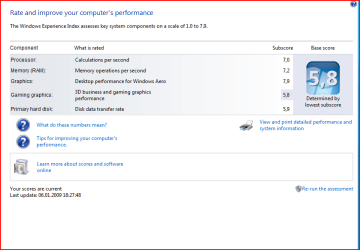
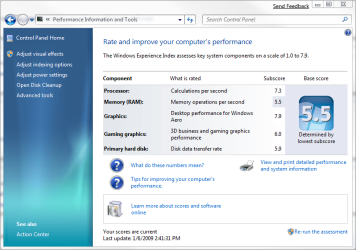
That's a bone stock Q6600, 4GB 800mhz RAM, Nvidia 8800GT, and a SATA 320GB main drive. I did that little performance tweak on the HDD settings. With it "optimized" I topped out at a 3.0. Take the optimization off, and walla a respectable 5.9. I don't put much stock into the WEI. I have a basic system, no OC, and it does a decent job. Most graphic intensive games I have turn out 60fps without a sweat. I know there's better hardware out there, but for the moment, this is what I have to work with.
 
Last edited:

My Computer

Computer Manufacturer/Model Number
Dell XPS 420
OS
Windows 7 RC
CPU
Intel Q6600 Quad Core
Motherboard
Dell Proprietary
Memory
4 GB DDR 800
Graphics Card(s)
Nvidia 8800GT
Sound Card
Integrated - Sigmatel HD Audio
Monitor(s) Displays
Dual Dell 22" Wide Screen
Screen Resolution
3360x1050
Hard Drives
320 GB internal
2.5 TB external
PSU
Big Enough
Case
Dell XPS 420
Cooling
Air
Keyboard
Dell USB
Mouse
Wireless MS mouse
Internet Speed
DSL 3MB Down
Other Info
WEI 5.9 (Windows 7 RC), Not too bad for an off the shelf PC :)
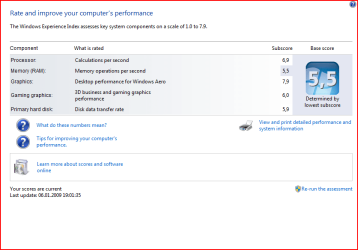
Bwhahahahaha - When I left everything stock I got *horrible results, as you can see back in the thread.

OCing the CPU helped the CPU score, but my RAM is stuck *solidly* at 5.5 - it simply will not for the life of me change, regardless of my settings.

Otherwise, I have some respectable numbers.
 

My Computers

System One System Two

  • Computer type
    PC/Desktop
    Computer Manufacturer/Model Number
    The Beast Model A (homebrew)
    OS
    Windows 11 21H2 Current build
    CPU
    AMD Ryzen 9 3950X
    Motherboard
    MSI MEG X570 GODLIKE
    Memory
    4 * 32 GB - Corsair Vengeance 3600 MHz
    Graphics Card(s)
    EVGA GeForce RTX 3080 Ti XC3 ULTRA GAMING (12G-P5-3955-KR)
    Sound Card
    Realtek® ALC1220 Codec
    Monitor(s) Displays
    2x Eve Spectrum ES07D03 4K Gaming Monitor (Matte) | Eve Spec
    Screen Resolution
    3x 3840 x 2160
    Hard Drives
    3x Samsung 980 Pro NVMe PCIe 4 M.2 2 TB SSD (MZ-V8P2T0B/AM) } 3x Sabrent Rocket NVMe 4.0 1 TB SSD
    PSU
    PC Power & Cooling’s Silencer Series 1050 Watt, 80 Plus Plat
    Case
    Fractal Design Define 7 XL Dark ATX Full Tower Case
    Cooling
    SteelSeries Apex Pro Wired Gaming Keyboard
    Keyboard
    SteelSeries Apex Pro
    Mouse
    Logitech MX Master 3S | MX Master 3 for business
    Internet Speed
    AT&T LightSpeed Gigabit Duplex Ftth
    Antivirus
    Windows Defender + MB 3
    Browser
    Nightly (default) + Firefox (stable),Chrome, Edge
  • Computer type
    PC/Desktop
    System Manufacturer/Model Number
    Dell Latitude E5470
    OS
    ChromeOS Flex Dev Channel (current)
    CPU
    Intel(R) Core(TM) i5-6300U CPU @ 2.40GHz, 2501 Mhz, 2 Core(s), 4 Logical Processor(s)
    Motherboard
    Dell
    Memory
    16 GB
    Graphics Card(s)
    Intel(R) HD Graphics 520
    Sound Card
    Intel(R) HD Graphics 520 + RealTek Audio
    Monitor(s) Displays
    Dell laptop display 15"
    Screen Resolution
    1920 * 1080
    Hard Drives
    Toshiba 128GB M.2 22300 drive
    INTEL Cherryville 520 Series SSDSC2CW180A 180 GB SATA III SSD
    PSU
    Dell
    Case
    Dell
    Cooling
    Dell
    Keyboard
    Dell
    Mouse
    Logitech MX Master 3S (shared w. Sys 1) | Dell TouchPad
    Internet Speed
    AT&T LightSpeed Gigabit Duplex Ftth
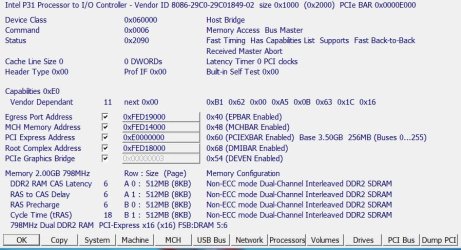
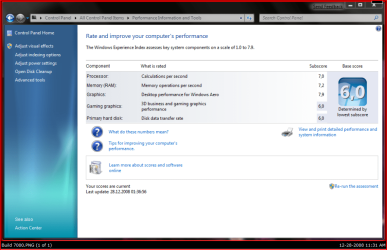
Just increased my Ram speed from 667 to 800 - still get the same WEI score of 5.5.

Could be to do with the timings?

800RAM2008-12-31_200923.jpg

SIW2
 

My Computers

System One System Two

  • Computer type
    PC/Desktop
    OS
    7 X64
    CPU
    i5 8400
    Motherboard
    gigabyte b365m ds3h
    Memory
    2x8gb 3200mhz
    Hard Drives
    various
    PSU
    pure power 11 400w cm
    Case
    Coolermaster
    Cooling
    cryorig m9i
  • Computer type
    PC/Desktop
    OS
    7x64
    CPU
    g5400
    Motherboard
    ga b365m ds3h
    Memory
    8gb ddr4 2400
    PSU
    xfx pro 450w
Perhaps - but I already have the aggressive tmings set - I will try playing with the RAM later today.

If not today, then next year some time :p
 

My Computers

System One System Two

  • Computer type
    PC/Desktop
    Computer Manufacturer/Model Number
    The Beast Model A (homebrew)
    OS
    Windows 11 21H2 Current build
    CPU
    AMD Ryzen 9 3950X
    Motherboard
    MSI MEG X570 GODLIKE
    Memory
    4 * 32 GB - Corsair Vengeance 3600 MHz
    Graphics Card(s)
    EVGA GeForce RTX 3080 Ti XC3 ULTRA GAMING (12G-P5-3955-KR)
    Sound Card
    Realtek® ALC1220 Codec
    Monitor(s) Displays
    2x Eve Spectrum ES07D03 4K Gaming Monitor (Matte) | Eve Spec
    Screen Resolution
    3x 3840 x 2160
    Hard Drives
    3x Samsung 980 Pro NVMe PCIe 4 M.2 2 TB SSD (MZ-V8P2T0B/AM) } 3x Sabrent Rocket NVMe 4.0 1 TB SSD
    PSU
    PC Power & Cooling’s Silencer Series 1050 Watt, 80 Plus Plat
    Case
    Fractal Design Define 7 XL Dark ATX Full Tower Case
    Cooling
    SteelSeries Apex Pro Wired Gaming Keyboard
    Keyboard
    SteelSeries Apex Pro
    Mouse
    Logitech MX Master 3S | MX Master 3 for business
    Internet Speed
    AT&T LightSpeed Gigabit Duplex Ftth
    Antivirus
    Windows Defender + MB 3
    Browser
    Nightly (default) + Firefox (stable),Chrome, Edge
  • Computer type
    PC/Desktop
    System Manufacturer/Model Number
    Dell Latitude E5470
    OS
    ChromeOS Flex Dev Channel (current)
    CPU
    Intel(R) Core(TM) i5-6300U CPU @ 2.40GHz, 2501 Mhz, 2 Core(s), 4 Logical Processor(s)
    Motherboard
    Dell
    Memory
    16 GB
    Graphics Card(s)
    Intel(R) HD Graphics 520
    Sound Card
    Intel(R) HD Graphics 520 + RealTek Audio
    Monitor(s) Displays
    Dell laptop display 15"
    Screen Resolution
    1920 * 1080
    Hard Drives
    Toshiba 128GB M.2 22300 drive
    INTEL Cherryville 520 Series SSDSC2CW180A 180 GB SATA III SSD
    PSU
    Dell
    Case
    Dell
    Cooling
    Dell
    Keyboard
    Dell
    Mouse
    Logitech MX Master 3S (shared w. Sys 1) | Dell TouchPad
    Internet Speed
    AT&T LightSpeed Gigabit Duplex Ftth
hey you guys....

i was shocked that my server pc was able to pull more out than my tablet.....:eek:

hey

skunksmash....

i would too go for the motherboard upgrade but im so tight on money....:cry:
but then again this is not my as much anymore....:p

so ill let it keep going until it dies.....;)

wei.png
 

My Computer

Computer Manufacturer/Model Number
Tx2500z Tablet Pc/Homemade Server
OS
Windows 7 Ult x64(x2), HomePrem x32(x4), Server 08 (+VM), 08 R2 (VM) , SuSe 11.2 (VM), XP 32 (VM)
CPU
Turion X2 ultra (oh well came with laptop)/P4 @3.2 (yes P4)
Motherboard
IDK HP Motherboard / Intel DG965SS
Memory
OCZ Dual Channel 4GB kit/ 1gb Dual Channel
Graphics Card(s)
HD 3200 graphics /GMA x3100 (yay for intergrated!!)
Sound Card
Realtek HD Audio(mic working, well sort of)/Siig IC-70012
Monitor(s) Displays
built-in Hp 12" laptop screen/ Acer 19"
Screen Resolution
1280x800 /1440x900
Cooling
All Air Cooled
Mouse
Logi MX Rev. /MS Wheel Optical 1.1A /Logitech Optical Mouse
Internet Speed
College baby but its still routed through vpn to 1536k...
Other Info
love my wacom pen and pressure sensitivity...
wished it worked in 7, SUSE for that matter though
Can't upload a screenshot at this time, but my Seven WEI is 5.1.

I have T61p with 4GB of Ram, BTW Build 7000 is really stable. No issues at all!
 

My Computer

OS
windows 7
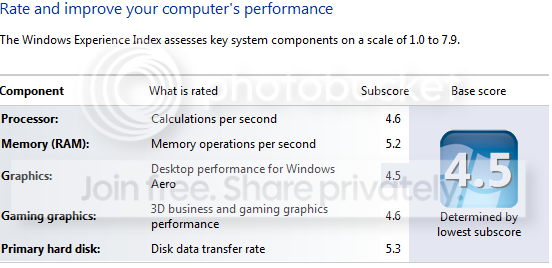
Mine is 2.0 :( let down by rubbish 40GB primary HDD on laptop.
 

My Computer

Computer Manufacturer/Model Number
Advent Roma Laptop
OS
Windows 7 Enterprise SP1 x64 Windows 8 Enterprise RTM x64
CPU
Mobile DualCore Intel Pentium T4400, 2200 MHz (11 x 200)
Motherboard
Advent Roma (Intel Cantiga GL40)
Memory
4028 MB (DDR2-667 DDR2 SDRAM)
Graphics Card(s)
Mobile Intel(R) GMA 4500M
Sound Card
Realtek ALC662 @ Intel 82801IB ICH9 - High Definition Audio
Monitor(s) Displays
Generic PnP Monitor [NoDB]
Screen Resolution
1366x768
Hard Drives
TOSHIBA MK5065GSX ATA Device (500 GB, 5400 RPM, SATA-II)
Mouse
Mikomi 7 Button Laser Mouse w/DPi Switch
Internet Speed
Slow!!
WEI.png

yey :)
 

My Computer

OS
Windows 7 7000; Windows XP Pro SP3
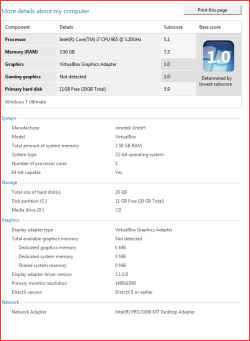
Here is my real WEI score from Windows 7, but this is inside a virtual machine so I never expected it to be good.
 

Attachments

  • Picture 1.png
    Picture 1.png
    57.7 KB · Views: 62

My Computer

Computer Manufacturer/Model Number
Apple MacBook
OS
OS X Leopard, Vista Basic and Windows 7 Ultimate
CPU
2.1GHz Penryn Intel Core 2 Duo
Motherboard
Not sure
Memory
4GB 667MHz DDR2 SDRAM
Graphics Card(s)
Crappy integrated one
Sound Card
Not sure
Monitor(s) Displays
Built in one, it's a laptop
Screen Resolution
1280x800
Hard Drives
120GB HD, 100GB OS X Leopard partition and 20GB Vista Home Basic partition
PSU
Not sure
Cooling
Fans
Keyboard
Apple laptop one with the annoying caps lock button
Mouse
No, it's a trackpad
Internet Speed
8 meg (or so the ISP tells me)
Other Info
I accidentally whacked the side of it against a door this morning.
Runs better than Vista did on this machine :eek:

wei.PNG
 

My Computer

OS
NT4
CPU
Cyrix 233
Motherboard
Jetway
Memory
8 Meg
Graphics Card(s)
Voodoo
Sound Card
SB16
Monitor(s) Displays
14" CRT
Screen Resolution
800x600
Hard Drives
40meg
Keyboard
Yes
Mouse
Yes
Internet Speed
56k
Mine is 3.1 Intel graphics lowers it :(

I didn't know how to add screenshot here :huh:
 

My Computer

Computer Manufacturer/Model Number
IBM
OS
Windows 7 x64
CPU
Intel Core 2 T8100 @ 2.10GHz
Memory
3 GB SO-DIMM DDR2-800
Graphics Card(s)
Nvidia GeForce Go 7300
Sound Card
SteelSeries Siberia 7.1 3D
Screen Resolution
1680x1050
Mouse
Logitech MX
exp_656mDY.png

Airbot, thanks, I know how to use snipping tool :) I couldn't figure how to upload files to here without using some third parity page.
 

My Computer

Computer Manufacturer/Model Number
IBM
OS
Windows 7 x64
CPU
Intel Core 2 T8100 @ 2.10GHz
Memory
3 GB SO-DIMM DDR2-800
Graphics Card(s)
Nvidia GeForce Go 7300
Sound Card
SteelSeries Siberia 7.1 3D
Screen Resolution
1680x1050
Mouse
Logitech MX
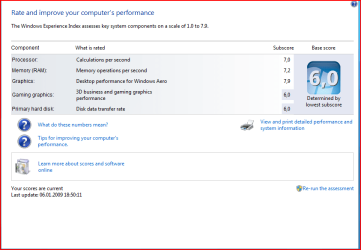
This is what I have learnt so far about the WEI build 7000
4 different shots. The first With 1 Samsung sata3 HDD and the rest with 2 Samsung sata3 HDD's Raid0 I find the results interesting especially for the HDD considering the two different setups. :confused:

If you make changes to your hardware then go to C:\Windows\Performance\WinSAT\DataStore and erase your old results before running the new WEI as a lot of changes do not otherwise show up

Pooch
 

Attachments

  • 4gig RAM, TLB Disabled,   Old Nvidia Driver.PNG
    4gig RAM, TLB Disabled, Old Nvidia Driver.PNG
    20.3 KB · Views: 153
  • 2gig RAM, TLB enabled,  Latest NVidia Drivers.PNG
    2gig RAM, TLB enabled, Latest NVidia Drivers.PNG
    20.8 KB · Views: 209
  • 1 Samsung sata3 TLB Disabled.PNG
    1 Samsung sata3 TLB Disabled.PNG
    88.2 KB · Views: 318
  • 4gig RAM, TLB Disabled,  Latest Nvidia Drivers, HDD Caching enabled 2nd Tick.PNG
    4gig RAM, TLB Disabled, Latest Nvidia Drivers, HDD Caching enabled 2nd Tick.PNG
    20.1 KB · Views: 226
Last edited by a moderator:

My Computer

Computer Manufacturer/Model Number
Something I threw together
OS
Windows 7 Ultimate x64
CPU
Intel Core i7-2600K
Motherboard
Asus P8P67
Memory
16 GB G Skill F3-10666 CL9D-4GBRL
Graphics Card(s)
ATI Radeon HD 6870
Sound Card
ATI Radeon HDMI / Realtek ALC892
Monitor(s) Displays
2 x 22" standard monitors / LG32LC56v TV to watch films
Screen Resolution
1920 x1080
Hard Drives
2 x OCZ Vertex2 111.79GB
3 x Samsung103SJ
1 x Samsung103UJ
1 x WD3200BEVT
1 x Hitachi5K320-160
PSU
Thermaltake Toughpower Cable Management 750W
Case
Antec 300
Cooling
Noctua NH-U12P SE2 and 5 120mm Case fans
Keyboard
Microsoft Comfort Curve Keyboard 2000
Mouse
Hama M3110 / Logitech M305
Internet Speed
16000
Other Info
I have also used Fedora, Suse, Ubuntu Linux
And all other Windows from 95 to date except ME
During Install - it would hang when it was getting set to do the final reboot, and if I forced it (even after waiting 2 hours the first time) W7 gave me an error and asked for me to boot from the DVD and restart my install.

Weird, since Vista never once coughed at my OC - then again, I did have my OC toned down a bit, to 3.21 GHz instead of 3.375, that may also have been a factor....


Yeah, I did that - no change.

But, I figured it out. Thanks to this post http://www.sevenforums.com/general-discussion/1088-7000-leak-14.html#post9814 I found the answer - and I haven't even applied Dave's tweak yet.

Many of us, especially OCers, tend to disable Native Command Queuing in the BIOS - however, I just found out that W7 has it enabled as an option for our SATA controllers. Whether this is from the nVidia drivers or native, I don't know - I suspect native because of the dramatic results I am about to show you:

My original Build 7000 WEI:

View attachment 1900

So, seeing Dave's post made me think - perhaps there is another tweak. Sure enough, take a look at your SATA controllers in Device Manager. See the following window captur and the attached Speed Test:

View attachment 1901View attachment 1902

Now, if you uncheck Command Queuing, initially nothing happens if you run a speed test - because a reboot is required. However, notice the *dramatic* speed changes after removing Command Queuing and the requisite reboot:

View attachment 1903View attachment 1904

I say that the drop in sustained speed is negligible compared to the *massive* increase in the burst speed - and, as I suspected, the WEI is based more on burst than sustained....

And, finally, my new WEI:

View attachment 1905

Again, this is without Dave's tweak - I am going to see if that makes a difference or not - I suspect I'll be back in the 6.9 range with it also performed.

Enjoy, Folks!

Note: On my system, after applying the Command Queuing tweak, I had no effect from applying it to any other port where enabled, so I suspect that WEI only tests a single disk.

Also, I had no effect whatsoever from removing the Write Caching from the drives either - however, the WEI test itself took over twice as long to complete. Therefore, I suspect caching is not taken into account in the WEI.

(Sorry, Dave)

Nope - NCQ is not available through Intel Chipsets IIRC.

check all your other HD related devices, though, there may be something similar....

Also, you may want to check your mobo's BIOS and see if it is on, if it *is* supported by Intel....

And while you're at it, check for an updated BIOS for your board....

That may be it then. Since nVidia is already working so closely with M$ they may have advanced features.

Now, I am curious - I want to know if this is a direct result of my chipset drivers install or if it is built in to W7 based upon the chipset detected when booting....

Anyone out there with nVidia chipsets, preferably nForce 7 (750/780/790) based machines that have not installed the nVidia Chipset drivers? If so, can you confirm if you still have the Command Queuing option available?

I deleted the info in the DataStore folder as mentioned above by Pooch and re-ran my WEI - CPU OC'd to 3.375 GHz, RAM running at 1000MHz 5-5-5-18-2T timing, all voltages trimmed *up* for additional stability...

and it looks like I am going to need to perform my Northbridge / Southbridge heatsink mod - seems eVGA 780s had a bad contact with the chipsets, allowing them to run a lot hotter than they should. Mine don't dun quite as hot, but that is because I have a reversed 60mm x 10 mm fan blowing at full speed (plugged into the Aux port for greater voltage - and yes, it whines pretty loudly) so my chipset doesn't get too hot - but they still get pretty hot, running around 58 degrees at idle.

The skinny - my system with a decent OC still gives me the same WE, though....

Windows 7 Build 7000 WEI post NCQ tweak #2.PNG
 

My Computers

System One System Two

  • Computer type
    PC/Desktop
    Computer Manufacturer/Model Number
    The Beast Model A (homebrew)
    OS
    Windows 11 21H2 Current build
    CPU
    AMD Ryzen 9 3950X
    Motherboard
    MSI MEG X570 GODLIKE
    Memory
    4 * 32 GB - Corsair Vengeance 3600 MHz
    Graphics Card(s)
    EVGA GeForce RTX 3080 Ti XC3 ULTRA GAMING (12G-P5-3955-KR)
    Sound Card
    Realtek® ALC1220 Codec
    Monitor(s) Displays
    2x Eve Spectrum ES07D03 4K Gaming Monitor (Matte) | Eve Spec
    Screen Resolution
    3x 3840 x 2160
    Hard Drives
    3x Samsung 980 Pro NVMe PCIe 4 M.2 2 TB SSD (MZ-V8P2T0B/AM) } 3x Sabrent Rocket NVMe 4.0 1 TB SSD
    PSU
    PC Power & Cooling’s Silencer Series 1050 Watt, 80 Plus Plat
    Case
    Fractal Design Define 7 XL Dark ATX Full Tower Case
    Cooling
    SteelSeries Apex Pro Wired Gaming Keyboard
    Keyboard
    SteelSeries Apex Pro
    Mouse
    Logitech MX Master 3S | MX Master 3 for business
    Internet Speed
    AT&T LightSpeed Gigabit Duplex Ftth
    Antivirus
    Windows Defender + MB 3
    Browser
    Nightly (default) + Firefox (stable),Chrome, Edge
  • Computer type
    PC/Desktop
    System Manufacturer/Model Number
    Dell Latitude E5470
    OS
    ChromeOS Flex Dev Channel (current)
    CPU
    Intel(R) Core(TM) i5-6300U CPU @ 2.40GHz, 2501 Mhz, 2 Core(s), 4 Logical Processor(s)
    Motherboard
    Dell
    Memory
    16 GB
    Graphics Card(s)
    Intel(R) HD Graphics 520
    Sound Card
    Intel(R) HD Graphics 520 + RealTek Audio
    Monitor(s) Displays
    Dell laptop display 15"
    Screen Resolution
    1920 * 1080
    Hard Drives
    Toshiba 128GB M.2 22300 drive
    INTEL Cherryville 520 Series SSDSC2CW180A 180 GB SATA III SSD
    PSU
    Dell
    Case
    Dell
    Cooling
    Dell
    Keyboard
    Dell
    Mouse
    Logitech MX Master 3S (shared w. Sys 1) | Dell TouchPad
    Internet Speed
    AT&T LightSpeed Gigabit Duplex Ftth
LOL, who would have thought that to be so. :confused:
 

My Computer

Computer type
PC/Desktop
Computer Manufacturer/Model Number
Self built custom
OS
64-bit Windows 11 Pro for Workstations
CPU
Intel i7-8700K OC'd to 5 GHz
Motherboard
ASUS ROG Maximus XI Formula Z390
Memory
64 GB (4x16GB) G.SKILL TridentZ RGB DDR4 3600 MHz
Graphics Card(s)
ASUS ROG-STRIX-GTX1080TI-O11G-GAMING
Sound Card
Integrated
Monitor(s) Displays
2 x Samsung Odyssey G7 27"
Screen Resolution
2560x1440
Hard Drives
1TB Samsung 990 PRO M.2,
4TB Samsung 990 PRO PRO M.2,
TerraMaster F8 SSD Plus NAS
PSU
Seasonic Prime Titanium 850W
Case
Thermaltake Core P3
Cooling
Corsair Hydro H115i
Keyboard
Logitech wireless K800
Mouse
Logitech MX Master 4
Internet Speed
2 Gb/s Download and 100 Mb/s Upload
Antivirus
Malwarebyte Anti-Malware Premium
Browser
Google Chrome
Other Info
Logitech Z625 speaker system,
Logitech BRIO 4K Pro webcam,
HP Color LaserJet Pro MFP M477fdn,
APC SMART-UPS RT 1000 XL - SURT1000XLI,
Galaxy S23 Plus phone
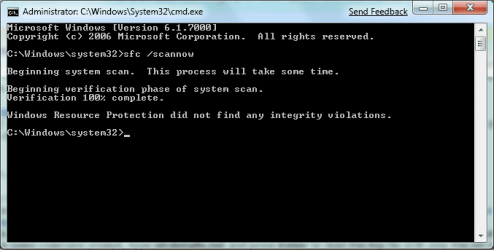
I can't seem to get the assessment to complete, I get the error listed below. Anyone know what is causing this?

There seems to be nothing wrong with drivers in dxdiag or device manager. I would attach my dxdiag but it's too big.
 

Attachments

  • WEI.png
    WEI.png
    9.6 KB · Views: 60

My Computer

Computer Manufacturer/Model Number
Intel WBIBX10J
OS
Linux (Debian, Android)
CPU
Intel Core i7 860
Motherboard
Intel DP55WB
Memory
2x 2GB Kingston DDR3-1333
Graphics Card(s)
AMD Radeon HD 5750
Sound Card
Realtek ALC888
Monitor(s) Displays
2x Dell Inc. E248WFP
Screen Resolution
3840x1200
Hard Drives
Intel X25-V
Samsung HD103SJ
PSU
Corsair CX400
Case
Silverstone GD05
Cooling
Stock
Keyboard
Dell Inc. Bluetooth Wireless
Internet Speed
30 Mbps

My Computer

Computer type
PC/Desktop
Computer Manufacturer/Model Number
Airbot 2.0
OS
Windows 7 Ultimate x64 SP1
CPU
Core i7 920 (D0) @ 4Ghz, *26c idle *65c full load on air
Motherboard
Asus P6X58D Premium - Sata 6Gb/s - USB 3.0
Memory
12GB DDR3 Corsair Dominator -CMD12GX3M6A1600C8 at 1600MHz
Graphics Card(s)
Zotac Geforce GTX 770
Sound Card
ASUS Xonar D2X
Monitor(s) Displays
1 LG 24" Flatron W2453V-PF 1 Samsung 24" P2450H both 2ms RT
Screen Resolution
1920x1080@60hz
Hard Drives
1 Samsung 250GB 840 Evo SSD
1 OCZ Vertex2 180GB SSD
1 TB Samsung Spinpoint F1 7200RPM 32MB cache
2 500GB WD Caviar Blacks 7200RPM 32MB cache (WD5001AALS)

Pioneer DVD Burner DVR-S18M
PSU
Corsair HX1000W
Case
Cooler Master HAF 932
Cooling
Case Fans *3 230mm, *1 140mm/CPU - *Tuniq Tower 120 Extreme
Keyboard
Logitech Wireless MK700
Mouse
Logitech Wireless MK700
Internet Speed
DL 15 Mbps UL 0.98 Mbps
Antivirus
None
Browser
Firefox Nightly
Other Info
Processor-7.7 *RAM- 7.9 *Graphics-7.9 *Gaming Graphics- 7.9 *SSD- 7.8 W.E.I final score= 7.7
*Phone- LG Nexus 5
I tried both of those things and it still didn't work. The WinSAT.exe is stressing my components and the test seems to finish it just pops up that error just before the time it should give me my scores.
 

Attachments

  • SFC.png
    SFC.png
    12.1 KB · Views: 89

My Computer

Computer Manufacturer/Model Number
Intel WBIBX10J
OS
Linux (Debian, Android)
CPU
Intel Core i7 860
Motherboard
Intel DP55WB
Memory
2x 2GB Kingston DDR3-1333
Graphics Card(s)
AMD Radeon HD 5750
Sound Card
Realtek ALC888
Monitor(s) Displays
2x Dell Inc. E248WFP
Screen Resolution
3840x1200
Hard Drives
Intel X25-V
Samsung HD103SJ
PSU
Corsair CX400
Case
Silverstone GD05
Cooling
Stock
Keyboard
Dell Inc. Bluetooth Wireless
Internet Speed
30 Mbps
Status
Not open for further replies.
Back
Top