Show Us Your WEI

Status
Not open for further replies.
Actually the hdd subtest is the only part of wei that IS worth anything imho.
...
SSD is still the biggest "actually feel it" performance boost to your computer, watch newegg for x25-v to dip below 100$ and get one (or 2!).

I really can't complain but the current HDD is pulling my score down and I honestly do not have much faith in Microsoft's assessment of systems.
... I don't take their WEI rating system too seriously either, but like anything in computers, if it gives a number, people want that number to be higher, so it creates competition and boosts hardware sales... It's just another one of the contributing factors to helping computer technology move along.
...:p

... I do agree with you on they play the game to boost sales and people do like the NUMBERS.
For the rest of us, if your computer does what you want and whenever you want it to then be happy. If you wish to race and get the newest toys then do so, what ever makes you happy! I just wish there was some true and blue HDD or SSD that would fill the numbers game.

Agree, it's not a real benchmark.
WEI came out after Vista did, to help people check if Vista could run effectively on their current hardware, which was a major issue at the time.

The WEI was introduced in Windows Vista to provide one means across PCs to measure the relative performance of key hardware components. Like any index or benchmark, it is best used as a relative measure and should not be used to compare one measure to another. Unlike many other measures, the WEI merely measures the relative capability of components. The WEI only runs for a short time and does not measure the interactions of components under a software load, but rather characteristics or your hardware. As such it does not (nor cannot) measure how a system will perform under the your own usage scenarios. Thus the WEI does not measure performance of a system, but merely the relative hardware capabilities when running Windows 7.

More from... Engineering Windows 7

Sorry,

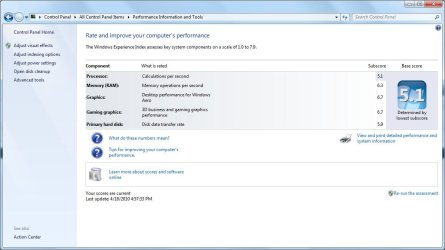
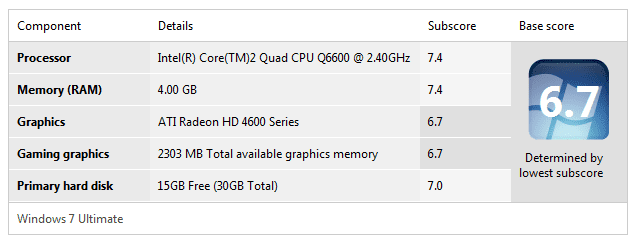
Forgot to post my updated WEI score from the old WEI score for the new system. Same old bottleneck.

View attachment 67756

Nice scores :cool:

There are a lot of us waiting for the SSDs to improve and the prices to drop.
As mentioned above, you can find ~40GB SSDs for sub $100, getting into the possibly acceptable range (for me anyway), should be enough space for a boot drive. You can always load some of your programs on the old spinner.

Let's see what the $/GB is after the 25nm flash comes out later this year.

Have read the X25-V will get you a 7.4 - 7.6, and two in RAID 0 will get you 7.9 :p
That is if your looking at the WEI score.

As mbreslin said, this upgrade is one you can actually feel.

Still waiting for that feeling, hopefully not for long ;)
 
Last edited:

My Computer

Computer type
PC/Desktop
Computer Manufacturer/Model Number
76~2.0
OS
Windows 7 Ult x64 - SP1/ Windows 8 Pro x64
CPU
Intel Core i5-3570K 4.6GHz
Motherboard
Gigabyte GA-Z77X UD3H, f18
Memory
8GB (2X4GB) DDR3 1600 Corsair Vengeance CL8 1.5v
Graphics Card(s)
Sapphire HD 7770 Vapor-X OC 1GB DDR5
Sound Card
Onboard VIA VT2021
Monitor(s) Displays
22" LCD Dell
Screen Resolution
1680x1050
Hard Drives
Samsung 840Pro 128GB SSD,
Seagate Barracuda 500GB SATA2 7200rpm 32MB cache, Seagate Barracuda 1TB SATA2 7200rpm 32MB cache,
PSU
Corsair HX650W
Case
Cooler Master Storm Scout
Cooling
Corsair H80 2x12cm Noctua NF P12 , 2x14cm case fans
Keyboard
Logitech Wave
Mouse
CM Sentinel
Internet Speed
Dismal
Antivirus
Avast
Browser
Opera Next
Other Info
Haswell laptop: HP Envy 17t-j, i7-4700MQ, GeForce 740M 2GB DDR3, 17.3" Full HD 1920x1080, 16GB RAM, Samsung 840 Pro 128GB, 1TB Hitachi 7200 HDD,
Desktop: eSATA ports,
External eSATA Seagate 500GB SATA2 7200rpm,
External WD USB 500GB
Has anyone run the older IDE drives to see what score they get?
 

My Computer

Computer type
PC/Desktop
Computer Manufacturer/Model Number
Self made
OS
windows 7 home premium 64, and Windows 10 64 bit
CPU
I7 940
Motherboard
ASUS P6TX58D Premium- BIOS VERSION 1402
Memory
12 GB Dominator 3 channel 1600
Graphics Card(s)
Radeon R9 Fury Nitro
Sound Card
Z1
Monitor(s) Displays
50 Inch Panasonic TV
Screen Resolution
1920x1080
Hard Drives
Main drive OCZ Revodrive V2 and 8 TB multi drives
PSU
Coolermaster 1000
Case
CoolerMaster 932
Cooling
Coolermaster Dual fan
Keyboard
mx 5500 revolution
Mouse
mx 5500 revolution
Internet Speed
12 mb
Browser
Chrome
Other Info
set up for 3D Blue Ray applications with a surround room of 12 speaker Definitive Technology and multi amps, main is driven by yamaha M-65
Here's mine
 

Attachments

  • WEI77.png
    WEI77.png
    65 KB · Views: 117

My Computer

Computer Manufacturer/Model Number
Homemade
OS
Win 7 64 bit professional
CPU
CPU: 3930K @ 4.8 MHz Stable as a rock
Motherboard
ASUS Rampage IV Extreme LGA 2011
Memory
CORSAIR DOMINATOR GT 16GB (4 x 4GB) 240-Pin DDR3
Graphics Card(s)
EVGA SuperClocked+ GeForce GTX 680
Monitor(s) Displays
Dell 3007WFP
Screen Resolution
2560 x 1600
Hard Drives
Vector(256gb) x 2
RevoDrive 3 X2 space (240 GB)
Crucial C300 256 GB SSD
PSU
CORSAIR AX1200i 1200W Digital ATX12V v2.31 and EPS 2.92 SLI
Cooling
Water cooling EK Supremacy ELITE
Mouse
ratZ-7
Other Info
WEI-7.8
Welcome to Seven Forums Snakeyeskm,

Nice rig and really nice scores. :)
 

My Computer

Computer type
PC/Desktop
Computer Manufacturer/Model Number
76~2.0
OS
Windows 7 Ult x64 - SP1/ Windows 8 Pro x64
CPU
Intel Core i5-3570K 4.6GHz
Motherboard
Gigabyte GA-Z77X UD3H, f18
Memory
8GB (2X4GB) DDR3 1600 Corsair Vengeance CL8 1.5v
Graphics Card(s)
Sapphire HD 7770 Vapor-X OC 1GB DDR5
Sound Card
Onboard VIA VT2021
Monitor(s) Displays
22" LCD Dell
Screen Resolution
1680x1050
Hard Drives
Samsung 840Pro 128GB SSD,
Seagate Barracuda 500GB SATA2 7200rpm 32MB cache, Seagate Barracuda 1TB SATA2 7200rpm 32MB cache,
PSU
Corsair HX650W
Case
Cooler Master Storm Scout
Cooling
Corsair H80 2x12cm Noctua NF P12 , 2x14cm case fans
Keyboard
Logitech Wave
Mouse
CM Sentinel
Internet Speed
Dismal
Antivirus
Avast
Browser
Opera Next
Other Info
Haswell laptop: HP Envy 17t-j, i7-4700MQ, GeForce 740M 2GB DDR3, 17.3" Full HD 1920x1080, 16GB RAM, Samsung 840 Pro 128GB, 1TB Hitachi 7200 HDD,
Desktop: eSATA ports,
External eSATA Seagate 500GB SATA2 7200rpm,
External WD USB 500GB
Thanks for the welcome Dave76. As a newbie to Win 7 I am really learning from this forum.
 

My Computer

Computer Manufacturer/Model Number
Homemade
OS
Win 7 64 bit professional
CPU
CPU: 3930K @ 4.8 MHz Stable as a rock
Motherboard
ASUS Rampage IV Extreme LGA 2011
Memory
CORSAIR DOMINATOR GT 16GB (4 x 4GB) 240-Pin DDR3
Graphics Card(s)
EVGA SuperClocked+ GeForce GTX 680
Monitor(s) Displays
Dell 3007WFP
Screen Resolution
2560 x 1600
Hard Drives
Vector(256gb) x 2
RevoDrive 3 X2 space (240 GB)
Crucial C300 256 GB SSD
PSU
CORSAIR AX1200i 1200W Digital ATX12V v2.31 and EPS 2.92 SLI
Cooling
Water cooling EK Supremacy ELITE
Mouse
ratZ-7
Other Info
WEI-7.8
My Pc is not much powerful though :P. Heres my WEI :-
 

My Computer

Computer Manufacturer/Model Number
ECS Elite group
OS
Windows 7 + Windows Xp Pro + Ubuntu 10.04 + openSUSE 11.2
CPU
Intel C2D 2.0 GHz
Motherboard
ECS
Memory
2.0 GB
Graphics Card(s)
Intel Chipset 945GCT m2
Sound Card
Realtek
Monitor(s) Displays
Samsung LCD
Screen Resolution
1280*1024
Hard Drives
Samsung Sata - 80gb
Samsung Sata - 500gb
Hitachi - 160 gb
External - WD - 500 gb
Keyboard
Logitech
Mouse
Logitech Mx 518
Internet Speed
2mbps broadband
Well here's mine.
 

My Computer

OS
windows 7 64b
CPU
I7 930 2.8ghz
Motherboard
Intel DX585S0
Memory
DDR 3 6GB
Graphics Card(s)
Geforce GTS 250
Monitor(s) Displays
Neovo 17 dx
Screen Resolution
1280x1024
Hard Drives
WD Raptor 2x 300gb mirror
WD black 2x 500gb raid 0
Case
Antec
Cooling
coolermaster
Keyboard
wave corded keyboard
Mouse
logitech mx1000 laser mouse
Internet Speed
5900kB/sec
Hello weebz, welcome to Seven Forums!
 

My Computer

Computer Manufacturer/Model Number
* BFK Customs *
OS
W 7 64-bit Ultimate
CPU
Intel Q9550 Yorkfield
Motherboard
ASUS P5Q Pro
Memory
8GB Dominator 8500C5D
Graphics Card(s)
ATI : XFX 5870
Sound Card
Realtek HD Audio 7-1
Monitor(s) Displays
1x 47" LCD HDMI & 3x 26" LCD HDMI
Screen Resolution
1920x1080P & 1920x1200
Hard Drives
1x 80GB Intel X25-M G2 SSD : 1x 500GB & 1x 640GB WD Caviar Black(s)
PSU
Corsair 620HX
Case
Cooler Master RC-690
Cooling
Tuniq Tower 120, 2x 140mm and 3x 120mm case fans
Keyboard
Microsoft 500
Mouse
Razer Diamondback 3G
Internet Speed
14 Mb/s
Other Info
1x Koutech 3Gb/s SATA HDD Hot Swap Rack
Fresh Install.
 

Attachments

  • WEI.JPG
    WEI.JPG
    72.9 KB · Views: 24

My Computer

Computer type
PC/Desktop
Computer Manufacturer/Model Number
Self Built
OS
Win 10 Pro x64
CPU
Intel I5-2500K @3.3GHz
Motherboard
Asrock P67 Extreme4
Memory
16GB G.Skill Ripjaws X (4x4GB)
Graphics Card(s)
EVGA GeForce 750 Ti SC 2GB
Sound Card
ASUS Xonar DG 5.1 Channels 24-bit 96KHz PCI Interface Sound
Monitor(s) Displays
auria eq2367
Screen Resolution
1920 x 1080
Hard Drives
250GB Samsung 850 EVO SSD
1TB WD Blue
1TB Hitachi
PSU
SeaSonic X 650W 80 Plus Gold
Case
Corsair Obsidian 750D
Cooling
Corsair H60, Three 140mm case fans
Keyboard
Logitech Wireless Keyboard K520
Mouse
Logitech Wireless Mouse M310
Internet Speed
Wave Broadband ~ 100 dn 5 up
Antivirus
Windows Defender, Malwarebytes Premium
Browser
Edge, IE11, Chrome
Other Info
Laptop specs: HP g7-1365dx /
CPU: AMD A6-3420M APU with Radeon(tm) HD Graphics /
RAM: Crucial 8Gb (2x4Gb) /
SSD: Crucial M4-CT128M4SSD2 ATA Device/ FW 000F /
GFX: AMD Radeon HD 6520G /
OS: Windows 10 Pro x64
Latest bump. Same low profile Antec case, mobo, CPU, RAM, etc. I just Arctic Silvered the GPU and VRAM to the stock heatsink and bumped both clocks up by 100MHz. This rig has not been fully rebuilt in years as I love to squeeze every last iota of performance out of mostly sub $100 components and stuff from the previous machine that still works. I'd really love to see a "bang for the buck" comparison here. Who gets the highest scores with the cheapest hardware. That's my bag really. I mean, any schmoe can buy a video card that gets upper 7's or the latest i7 or an Intel SSD and buy their way into the big boys club but that really defeats the purpose if money is no object. Why not just go buy the top of the line Alienware box and post your WEI? My money goes to Joe Six-pack who's got a rig he's been running with for some time that doubles as the family computer too.

Untitled.png
 

My Computer

Computer type
Laptop
Computer Manufacturer/Model Number
Apple
OS
El Capitan / Windows 10
CPU
i7-4980HQ
Memory
16GB
Graphics Card(s)
Iris 5200
I am no fan of MS! LMAO...
Sorry for the late reply; I don't have internet access at home, only at work.. I was saying that very jokingly; I still say the only reason I haven't move over to Linux permanently is because I can't run my games on anything other than Windows and that my program licenses are for the Windows versions..
 

My Computer

Computer type
PC/Desktop
OS
Win 10 x64 Pro x64 / Ubuntu 15.10 x64
CPU
Intel i7-4960X
Motherboard
Asus Rampage IV Black Edition
Memory
4x8GB Corsair Dominator Platinum @2400MHz 10-12-12-31
Graphics Card(s)
2x MSI GTX780Ti 3GB (SLI)
Sound Card
Onboard SupremeFX (Cirrus Logic CS4398)
Monitor(s) Displays
3x LG Cinema 27" IPS LED (27MP65)
Screen Resolution
[1920x1080]x3
Hard Drives
Crucial M500 120GB, Crucial M500 480GB, Toshiba DT01ACA200 2TB
PSU
CoolerMaster V1000
Case
Corsair Obsidian 750D
Cooling
ThermalTake Water 3.0 Extreme, 4xSP120, 3xAF120
Keyboard
Moshi Luna
Mouse
Logitech G700s / Roccat Tyon
Internet Speed
4Mb uncapped ADSL (Afrihost)
Antivirus
MS Security Essentials
Browser
Chrome... Duh. (:
After a couple of upgrades
 

Attachments

  • Capture.JPG
    Capture.JPG
    33.7 KB · Views: 26

My Computer

Computer type
PC/Desktop
Computer Manufacturer/Model Number
Home Built
OS
Windows 7 Ultimate SP1 64- bit
CPU
Intel Core i7-3770K @3.50ghz
Motherboard
EVGA Z77 FTW
Memory
Kingston Technology 16GB (2x 8GB) 2133MHz DDR3 Non-ECC
Graphics Card(s)
EVGA GTX 670 4gb SC
Sound Card
Nil
Monitor(s) Displays
Samsung 22"
Screen Resolution
1920 x 1080 60hz
Hard Drives
OCZ Vertex 4 SSD 128GB
SAMSUNG Spinpoint F3 HD502HJ 500GB 7200 RPM
PSU
Enermax Platinax EPM1000EWT Special OC Edition
Case
Cooler Master HAF Full Tower nVIDIA Edition
Cooling
CoolerMaster Hyper 212 Plus
Keyboard
HP Wireless Keyboard
Mouse
Corsair Vengeance M90
Internet Speed
20 Mb
Other Info
ASUS DRW-24B1ST/BLK/B/AS Black SATA 24X DVD Burner
I would use Microsoft's driver. AMD has some pretty bad AHCI/RAID drivers last I heard
Sorry for being a couple of thread-pages behind, are we talking about this driver shown below and can I just update it like any other regular driver or will I have boot issues when updating in Win7 running?
 

Attachments

  • Capture.JPG
    Capture.JPG
    12.8 KB · Views: 187

My Computer

Computer Manufacturer/Model Number
Custom
OS
Win7 Pro x64
CPU
AMD Phenom II X4 940 BE @3.4Ghz (17x200Mhz)
Motherboard
Foxconn A7DA-S (NB @2200Mz; 1.36V)
Memory
8GB (4x2GB) Kingston HyperX PC2-8500U @ DDR2-800 CL4-4-4-12
Graphics Card(s)
Palit Radeon HD 4870 Sonic, 512MB GDDR5 @790Mhz/1040Mhz
Sound Card
Onboard HD Audio
Monitor(s) Displays
BenQ G2400WT 24'
Screen Resolution
1920x1200
Hard Drives
Hitachi Deskstar 7K1000.B 1000GB, SATA II (HDT721010SLA360)
PSU
Enermax PRO82+ 425W ATX 2.3 (EPR425AWT)
Case
CoolerMaster Elite 335 (RC-335)
Cooling
Scythe Kama Angle + 2x Enermax Twister Everest 120mm

My Computer

Computer Manufacturer/Model Number
* BFK Customs *
OS
W 7 64-bit Ultimate
CPU
Intel Q9550 Yorkfield
Motherboard
ASUS P5Q Pro
Memory
8GB Dominator 8500C5D
Graphics Card(s)
ATI : XFX 5870
Sound Card
Realtek HD Audio 7-1
Monitor(s) Displays
1x 47" LCD HDMI & 3x 26" LCD HDMI
Screen Resolution
1920x1080P & 1920x1200
Hard Drives
1x 80GB Intel X25-M G2 SSD : 1x 500GB & 1x 640GB WD Caviar Black(s)
PSU
Corsair 620HX
Case
Cooler Master RC-690
Cooling
Tuniq Tower 120, 2x 140mm and 3x 120mm case fans
Keyboard
Microsoft 500
Mouse
Razer Diamondback 3G
Internet Speed
14 Mb/s
Other Info
1x Koutech 3Gb/s SATA HDD Hot Swap Rack
Thanks for the Link, I know that procedure but in my case AHCI has been enabled already every since I installed the OS so just wanna know if I can simply roll back to Microsoft drivers without any problems.

But before I do that, can anyone confirm that AMD is still having problems with their AHCI drivers or has there been any improvement in recent times?

And just out of interest: How comes Microsoft has decent drivers available for AMD AHCI chipsets and where do these come from if not from AMD themselves?
 

My Computer

Computer Manufacturer/Model Number
Custom
OS
Win7 Pro x64
CPU
AMD Phenom II X4 940 BE @3.4Ghz (17x200Mhz)
Motherboard
Foxconn A7DA-S (NB @2200Mz; 1.36V)
Memory
8GB (4x2GB) Kingston HyperX PC2-8500U @ DDR2-800 CL4-4-4-12
Graphics Card(s)
Palit Radeon HD 4870 Sonic, 512MB GDDR5 @790Mhz/1040Mhz
Sound Card
Onboard HD Audio
Monitor(s) Displays
BenQ G2400WT 24'
Screen Resolution
1920x1200
Hard Drives
Hitachi Deskstar 7K1000.B 1000GB, SATA II (HDT721010SLA360)
PSU
Enermax PRO82+ 425W ATX 2.3 (EPR425AWT)
Case
CoolerMaster Elite 335 (RC-335)
Cooling
Scythe Kama Angle + 2x Enermax Twister Everest 120mm
Thanks for the Link, I know that procedure but in my case AHCI has been enabled already every since I installed the OS so just wanna know if I can simply roll back to Microsoft drivers without any problems.

But before I do that, can anyone confirm that AMD is still having problems with their AHCI drivers or has there been any improvement in recent times?

And just out of interest: How comes Microsoft has decent drivers available for AMD AHCI chipsets and where do these come from if not from AMD themselves?


Hello again.


This tutorial at the link below may also be a help to you so you can see the old drivers in Device Manager.

http://www.sevenforums.com/tutorials/77614-device-manager-hidden-devices.html?ltr=D
 

My Computer

Computer Manufacturer/Model Number
* BFK Customs *
OS
W 7 64-bit Ultimate
CPU
Intel Q9550 Yorkfield
Motherboard
ASUS P5Q Pro
Memory
8GB Dominator 8500C5D
Graphics Card(s)
ATI : XFX 5870
Sound Card
Realtek HD Audio 7-1
Monitor(s) Displays
1x 47" LCD HDMI & 3x 26" LCD HDMI
Screen Resolution
1920x1080P & 1920x1200
Hard Drives
1x 80GB Intel X25-M G2 SSD : 1x 500GB & 1x 640GB WD Caviar Black(s)
PSU
Corsair 620HX
Case
Cooler Master RC-690
Cooling
Tuniq Tower 120, 2x 140mm and 3x 120mm case fans
Keyboard
Microsoft 500
Mouse
Razer Diamondback 3G
Internet Speed
14 Mb/s
Other Info
1x Koutech 3Gb/s SATA HDD Hot Swap Rack

Attachments

  • weinew.PNG
    weinew.PNG
    9.8 KB · Views: 4

My Computer

Computer Manufacturer/Model Number
Self-built on 31/1/11
OS
Windows 7 Ultimate 64 bit
CPU
Intel i5 2400 @ 3.80 GHz
Motherboard
Ashrock P67 Extreme 4
Memory
Mushkin Silverline 996768 4GB
Graphics Card(s)
MSI GTX 460 760MB Cyclone Overclocked
Sound Card
Integrated
Monitor(s) Displays
Asus VH202T 20" Widescreen
Screen Resolution
1600x900
Hard Drives
SSD: OCZ Vertex 2 60GB
HDD: Hitachi Deskstar 7K1000.C 500GB
PSU
Silverstone Strider 500W
Case
Zalman Z9 Plus
Cooling
Cooler Master Hyper 212 Plus
Keyboard
Logitech Wireless Keyboard MK520
Mouse
Logitech M310
Internet Speed
3 Mbps
Other Info
UEFI: Ashrock P67/
Network Card :TP-Link WN350GD/
WEI: 7.4/
ODD: Lite-On IHAS324
AHHH:eek: :cry: I reset my http://www.sevenforums.com/tutorials/79177-windows-experience-index-reset.html.
When i reran the tests I got a lower score and haven't changed any piece of hardware in my computer.

This is my old one http://www.sevenforums.com/performance-maintenance/342-show-us-your-wei-280.html

Here is my new one.


I no its only a 0.1 change but i liked it beter when it was higher.:(

The WEI means nothing. As long as the PC performs the way you need it to that's what really matters. My notebook is like 2.0 or something low but it runs really well. WEI SHMEI!
 

My Computer

Computer Manufacturer/Model Number
tw33k
OS
Windows 7 Ultimate (x64) SP1
CPU
Intel 3770k 4.6GHz
Motherboard
ASUS Maximus V Formula
Memory
8GB (2x 4GB) Crucial Ballistix
Graphics Card(s)
Sapphire 7950 (1060/1600)
Sound Card
On Board Realtek HD Audio
Monitor(s) Displays
27" Acer B273HU (via HDMI)
Screen Resolution
2048 x 1152
Hard Drives
Crucial M4 128GB
2TB WD Black
1TB Samsung F3 SATA
1TB WD Elite External
2TB WD USB 3.0
PSU
Corsair AX750 Gold
Case
Corsair Obsidian 800DW
Cooling
Corsair H100 (2x AP-121/2x UK-3000 push/pull)
Keyboard
Microsoft Wireless 5000
Mouse
Microsoft Wireless 5000
Internet Speed
5mb/s
Other Info
Logitech z-2300 2.1 speakers
Lamptron FC-5 v2

The WEI means nothing. As long as the PC performs the way you need it to that's what really matters. My notebook is like 2.0 or something low but it runs really well. WEI SHMEI!

Yeah my pc is running beater then ever regardless of the stuffed up wei score but i was just wondering why it got lower.:huh:

But i probably was way overreacting. :D
 
Last edited:

My Computer

Computer Manufacturer/Model Number
Self-built on 31/1/11
OS
Windows 7 Ultimate 64 bit
CPU
Intel i5 2400 @ 3.80 GHz
Motherboard
Ashrock P67 Extreme 4
Memory
Mushkin Silverline 996768 4GB
Graphics Card(s)
MSI GTX 460 760MB Cyclone Overclocked
Sound Card
Integrated
Monitor(s) Displays
Asus VH202T 20" Widescreen
Screen Resolution
1600x900
Hard Drives
SSD: OCZ Vertex 2 60GB
HDD: Hitachi Deskstar 7K1000.C 500GB
PSU
Silverstone Strider 500W
Case
Zalman Z9 Plus
Cooling
Cooler Master Hyper 212 Plus
Keyboard
Logitech Wireless Keyboard MK520
Mouse
Logitech M310
Internet Speed
3 Mbps
Other Info
UEFI: Ashrock P67/
Network Card :TP-Link WN350GD/
WEI: 7.4/
ODD: Lite-On IHAS324
The WEI means nothing. As long as the PC performs the way you need it to that's what really matters. My notebook is like 2.0 or something low but it runs really well. WEI SHMEI!

Yeah my pc is running beater then ever regardless of the stuffed up wei score but i was just wondering why go it lower.:huh:

But i probably was way overreacting. :D
I've never had any benchmark software give me the exact same score every time I ran it on my PC... The WEI score seems to stay the same for the most part because it doesn't give exact values. For example: RAM is calculated in MB/s and can be as high as 30 000 mb/s with extreme OC, and is then assigned a 'score' that goes no higher than 7.9.

So, perhaps whichever component was 0.1 points higher was near the bottom of the range that gave it x.1, and due to minor variations in the tests, it was recorded near the top of the x.0 range, but not enough to give that extra 0.1.

And that got way more technical than I thought it would... :p lol.
 

My Computer

Computer type
PC/Desktop
OS
Win 10 x64 Pro x64 / Ubuntu 15.10 x64
CPU
Intel i7-4960X
Motherboard
Asus Rampage IV Black Edition
Memory
4x8GB Corsair Dominator Platinum @2400MHz 10-12-12-31
Graphics Card(s)
2x MSI GTX780Ti 3GB (SLI)
Sound Card
Onboard SupremeFX (Cirrus Logic CS4398)
Monitor(s) Displays
3x LG Cinema 27" IPS LED (27MP65)
Screen Resolution
[1920x1080]x3
Hard Drives
Crucial M500 120GB, Crucial M500 480GB, Toshiba DT01ACA200 2TB
PSU
CoolerMaster V1000
Case
Corsair Obsidian 750D
Cooling
ThermalTake Water 3.0 Extreme, 4xSP120, 3xAF120
Keyboard
Moshi Luna
Mouse
Logitech G700s / Roccat Tyon
Internet Speed
4Mb uncapped ADSL (Afrihost)
Antivirus
MS Security Essentials
Browser
Chrome... Duh. (:
Status
Not open for further replies.
Back
Top