mbreslin: I had to laugh at something. Not you, but as I was investigating how SMP architecture is implemented today, I found something in Wikipedia that's just too ironic not to share.
Symmetric multiprocessing - Wikipedia, the free encyclopedia
"The
Burroughs B5500 first implemented SMP in 1961.
[1] [2] It was implemented later on other mainframes. Mid-level servers, using between four and eight processors, can be found using the Intel
Xeon MP,
AMD Opteron 800 and 8000 series and the above-mentioned UltraSPARC, SPARC64, MIPS, Itanium, PA-RISC, Alpha and POWER processors. High-end systems, with sixteen or more processors, are also available with all of the above processors."
All of the mainframe experience I've been referring to has been about Burroughs systems, for whom I worked for 16 years, until they merged with Sperry and cut their world-wide workforce from 130,000 employees to 30k. That's when I went from hardware (and system software) into application development.
It's wonna them real small world things.
Here's what I've done. I've removed the swapfile. That freed up 16 gig on the 60 gig SSD. That's pretty significant. I tested the software that I generally use and it all works fine that way. Then I set the graphics mode to "performance" It looks clunky as hell, but I'm gonna try it this way. And I also switched the processor scheduling setting from Programs to Background services. That's the way it's running now.
Nothing's crashed and it seems to be running acceptably well.
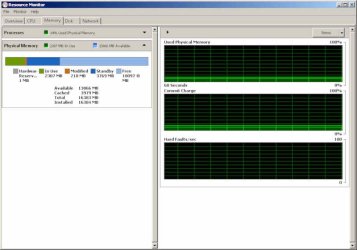
But. (Why is there always a but?) I've kept ResMon open as I've been doing all this stuff (it's displayed on the secondary monitor) and I've never seen more than 3 gig of ram in use. Right now I have 13 applications, 929 threads and 21,500 handles assigned. Still, only 2 gig of ram is in use.
Oh. I happened to read on another forum that many people were finding Explorer to be a major bottleneck and some suggested it might be the source of the memory leak problem that keeps coming up. So I installed Free Commander. I have Xplorer2, but I don't like the fact that it can only have 1 tree view open. Free Commander allows tabbed exploring, side-by-side "panels", each with its own tree. Initial tests seem to be acceptable. I'm gonna have to go shoot a follow-up on the restoration of a Land Speed Racing Streamliner
Ray the Rat's Chevy Asylum so I'll be away for a while, but in the meantime, I'll let this thing percolate and see what it does. Matter of fact, I'm gonna tell it to do a huge thumbnail rebuild in ACDSee and see if it can actually complete it for once. I just fired it off and while it increased the processor load, memory use is still at 2 gig.
As far as your view of two pendula and their swings re: price and performance, I believe you have a very good point. They're often two separate and distinct issues. And I'll admit that I couldn't justify buying the very top of the line CPUs, nor could I go for something like a 1tb SSD. I shudder to think about those prices.
Back on SMP, you're right, although multi-core CPUs may invite more applications to optimize for that. However, there are a coupla things going on here. One is that the architecture of this system is 2 processors, with 4 cores each and two sets of 8 gig of RAM. So some of the commonly-held concepts about SMP working on a common memory stash aren't exactly true here. And there's one other issue to be considered. With a true multi-processor architecture, the OS SHOULD be able to perform load-leveling and assign single-threaded processes to a single core. I believe this is happening, since I can see activity reported on all 8 cores. So while parallel processing of multiple instructions with an SMP-optimized OS and application would be the best solution, load-leveling is probably next best.
And just to bash on my favorite issue, in all the years I've been working with computers that use volatile memory, almost all CPU performance issues have been helped by increasing the amount of available RAM. That's why I left XP. I had a box with 4 gig and XP could only see 2.
Anecdotal evidence seems to indicate that when someone complains that their computer is running slowly, one or more of 4 things is usually going on:
1: Too many applications loading at startup.
2: Insufficient RAM resulting in constant swapfile use. I wish I could remember the term we used for this, but in first generation mini-computers a system could go into gridlock when it kept swapping one segment out for another, then realizing it needed the one it had just swapped out the one it needed to complete the task on the presently loaded segment. I just remembered it. It was called (colorfully enough) "deadly embrace." and would put the system into an infinite loop of swapping memory segments in and out.
3: Malware masquerading as anti-spyware (this is only recent...that is the last few years)
4: Disk fragmentation.
There are several others, but these seem to be the most prevalent that I've seen.
In the first 2 scenarios, increasing RAM will generally be helpful. Certainly not in #3, but it could prevent #4 from occurring as frequently if swapping is minimized.
But I've never seen a dela like what I'm looking at now. I've attached a screen capture showing memory usage. Just weird.
Oh..the thumbnail rebuild that would take forever? It finished in less than 5 minutes. Maybe the setting for task scheduling has helped that.
I'm outta here to go shoot some photos.