Show Us Your WEI

Status
Not open for further replies.

My Computer

Computer Manufacturer/Model Number
* BFK Customs *
OS
W 7 64-bit Ultimate
CPU
Intel Q9550 Yorkfield
Motherboard
ASUS P5Q Pro
Memory
8GB Dominator 8500C5D
Graphics Card(s)
ATI : XFX 5870
Sound Card
Realtek HD Audio 7-1
Monitor(s) Displays
1x 47" LCD HDMI & 3x 26" LCD HDMI
Screen Resolution
1920x1080P & 1920x1200
Hard Drives
1x 80GB Intel X25-M G2 SSD : 1x 500GB & 1x 640GB WD Caviar Black(s)
PSU
Corsair 620HX
Case
Cooler Master RC-690
Cooling
Tuniq Tower 120, 2x 140mm and 3x 120mm case fans
Keyboard
Microsoft 500
Mouse
Razer Diamondback 3G
Internet Speed
14 Mb/s
Other Info
1x Koutech 3Gb/s SATA HDD Hot Swap Rack
Thanx for the welcome :)
What setting needs to be changed in the bios, is it the RAID one (from ide to ahci)?
 

My Computer

OS
Windows 7
CPU
Intel i5 750
Motherboard
MSI P55-GD65
Memory
Kingston 4 GB DDR3-1333
Graphics Card(s)
Club3d HD 5770 OC CrossFire
Sound Card
Onboard 7.1 Realtek ALC889
Monitor(s) Displays
Iiyama ProLite E2407HDS-B1
Screen Resolution
1920x1080
Hard Drives
Intel X25-M G2 Postville 80 GB
Samsung F3 1TB
PSU
Cooler Master RealPower M620
Case
Cooler Master COSMOS 1000
Cooling
Scythe Mugen 2
Keyboard
Logitech G19 Gaming Keyboard
Mouse
Logitech Performance Mouse MX
Other Info
Logitech G27 Racing Wheel
Games: Need for Speed SHIFT | Colin McRae: Dirt 2 | Grand Theft Auto IV | Race Driver GRID
If you have Raid set in the Bios you are all set to go. No need to change to AHCI.
 

My Computer

Computer Manufacturer/Model Number
Homemade
OS
Win 7 64 bit professional
CPU
CPU: 3930K @ 4.8 MHz Stable as a rock
Motherboard
ASUS Rampage IV Extreme LGA 2011
Memory
CORSAIR DOMINATOR GT 16GB (4 x 4GB) 240-Pin DDR3
Graphics Card(s)
EVGA SuperClocked+ GeForce GTX 680
Monitor(s) Displays
Dell 3007WFP
Screen Resolution
2560 x 1600
Hard Drives
Vector(256gb) x 2
RevoDrive 3 X2 space (240 GB)
Crucial C300 256 GB SSD
PSU
CORSAIR AX1200i 1200W Digital ATX12V v2.31 and EPS 2.92 SLI
Cooling
Water cooling EK Supremacy ELITE
Mouse
ratZ-7
Other Info
WEI-7.8
I played with the settings a bit, windows did install drivers but the WEI score stayed the same @7.2, should be a bit more for an X25-M 80GB SSD, guess Snakeyeskm was right ;)

I have another problem I hope you can help me with, not sure where to post it so I'll post it here, delete this and post it in the right section when I get an answer where to post it.
I made a new toolbar to put all my icons in and also to have a functional recycle bin on my taskbar (cleanup the desktop). When I close my computer and boot the next day the toolbar is gone, this does not happen when I reboot.
When I make a new toolbar all the buttons I put inthere the previous day are in the new toolbar so I guess is stored somehow but the toolbar itself doesn't show up on the taskbar automaticaly. Anyone have an idea what's going on?
 

My Computer

OS
Windows 7
CPU
Intel i5 750
Motherboard
MSI P55-GD65
Memory
Kingston 4 GB DDR3-1333
Graphics Card(s)
Club3d HD 5770 OC CrossFire
Sound Card
Onboard 7.1 Realtek ALC889
Monitor(s) Displays
Iiyama ProLite E2407HDS-B1
Screen Resolution
1920x1080
Hard Drives
Intel X25-M G2 Postville 80 GB
Samsung F3 1TB
PSU
Cooler Master RealPower M620
Case
Cooler Master COSMOS 1000
Cooling
Scythe Mugen 2
Keyboard
Logitech G19 Gaming Keyboard
Mouse
Logitech Performance Mouse MX
Other Info
Logitech G27 Racing Wheel
Games: Need for Speed SHIFT | Colin McRae: Dirt 2 | Grand Theft Auto IV | Race Driver GRID
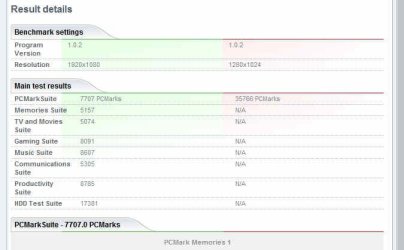
Ok. I ran the Futuremark Vantage benchmark. The numerical score is 7707...whatever that means.

The quick summary image is attached.

When I requested a comparison, the Futuremark site informed me that there was only one other system even remotely like mine and no valid comparison could be made.

mbreslin: I understand your comment about the disk subsystem being the usual suspect for a bottleneck. I addressed that in a previous post, but just to give a quick overview, I can't take the time nor expense at the moment to install a huge RAID 3 or 4 array at this time. It's the beginning of my busy season and that won't end until late October or early November. Maybe by then I'll be frustrated enough to go buy 4 of the 2 tb drives and use Raid striping to emulate multiple paths to disk.

I think one of the reasons that HDDs are a bottleneck is the use of SATA interfaces. I understand that the data transfer rate is greater on SATA 2 than IDE, but what people seem to overlook is that while IDE may only run at a clock rate of 133 mb/sec, there are 16 lines transferring data in parallel, whereas with a SATA 2 interface there's 1 (one) line transferring 300 mb/sec.

This serial/parallel issue goes back to the 70s when some disk pack drives used parallel interfaces (and huge cables) and other drives used serial interfaces...their cables weren't as big. But when put into real world situations, it was found that the allegedly higher clock rate serial transfer drives required 2 channels from the controller, 1 for read, 2 for write to equal the performance of the parallel drives. Then it got ugly when external controllers and I/O exchanges were added to do load shifting to the least used path. It made troubleshooting a nightmare. I came to hate the serial interface drives.

As for Intel vs AMD, to use an analogy in another field I'm familiar with, cameras, there are 2 front runners for digital single-lens reflex cameras: Nikon and Canon. I use Canons. Until a short time ago Canon had the best DSLRs on the market. Now Nikon has introduced the D3 and will be releasing the D4 which will probably put them at the top of the heap. I don't see any impending releases from Canon, but if things follow their usual course of events, they'll release a 1D mk something or a 5D mk 4 and the war will continue to escalate.

I perceive the same thing happening with AMD and Intel. Yeah, the Intel CPUs are the hot ticket right now. But my guess is that the pendulum will swing the other way soon.

However, back in my initial post I wrote that I wasn't trying to build the fastest, newest machine possible. I wanted (and still do) a machine that's more like a 5-ton truck rather than a Porsche. I wanted to be able to run a lot of applications without severe performance degradation. That was the reason for using 2 quad-core chips. If I'd wanted something blindingly fast in a single-threaded setup, I could have taken a different route and cooled it with dry ice just to get the highest overclock rate. But that wouldn't get my photos edited any faster, nor would it help with web site development. In my case, it's not purely speed I'm looking for, it's stamina. I believe I built a box that should have produced that result, but hasn't. That's why I'm here looking for something that I may have overlooked or a suggestion to help me reach that goal.
 

Attachments

  • PCMark 20100503_01.jpg
    PCMark 20100503_01.jpg
    28.5 KB · Views: 40

My Computer

Computer Manufacturer/Model Number
Home Built
OS
Windows 7 Pro 64-bit
CPU
2 x Opteron quad-core
Motherboard
TYAN Thunder N3600B Dual processor mobo
Memory
16 gig buffered
Graphics Card(s)
Radeon 4890 feeding my compnent stereo system. Sounds great
Sound Card
M-Audio Delta Audiophile
Monitor(s) Displays
Acer 24", Acer 21"
Screen Resolution
1980x1050 & 1680x1050
Hard Drives
Internal:

OCZ 60 gig SSD
2 x WD 1tb
1 WD 1.5tb
1 WD 320 GB

External:

3 x WD Mybook 1TB
PSU
Corsair 900w
Case
Coolermaster HAF 932
Cooling
Many fans, liquid cooling on the way but likely in November
Keyboard
Saitek red backlit
Mouse
Logitek USB
Internet Speed
Way too slow for a DSL line
Other Info
This is a build that was in progress but got pressed into service because of the need for large photo editing capability.

More will be revealed after "car season" (race cars, Salt Flats, etc.) is over in October. That's when the serious tweaking will start.

See Build Diary here:
http://www.raytherat.com/dreadnought/Welcome.html
@raytherat: I am very sorry I completely forgot about that benchmark not really taking advantage of SMP systems. That score is horribly low but I'm sure a lot of it has to do with your having a multi-proc system. If I had to guess I would say most of the software you use doesn't fully take advantage of your two processors, I'd bet this causes the majority of your woes.

I'm afraid I'm out of ideas, your system is built I don't know quite what else to say than maybe try and tend towards software that is optimized for smp systems.

Storage interface: Command Queuing and the increase of bandwidth makes sata the clear winner over ide on platter drives. And with ssds access times are so low it is difficult to even reach high queue depth except in synthetic benchmarks so serial/parallel is moot.

Intel vs Amd: I see there being two pendulums, price versus performance, and raw speed. The pvp pendulum sometimes swings to intel but certainly spends the majority of the time for many years now in the amd camp. But as for raw speed intel nearly always has the fastest chip available. I can think of only twice in 10 years when amd had a chip that could beat intels latest in raw performance and the lead wasn't held very long.

I would like to note I hold no allegiances to any of these companies, as they certainly don't care about me, all of them will simply charge the very most they can get me to pay. I recently built this machine and I'd bet it does everything you'd want and more (no dry ice required), though I paid a nearly insane premium for it.

These are all just my opinions of course. In the case of your machine I honestly feel the problem is although SMP has been around for quite some time as it's the minority hardly any software is truly optimized for it. It's been around long enough that there are smp enabled versions of lots of apps but the difference between smp enabled and smp optimized is great.
 

My Computer

OS
w7x64u
CPU
i7 980x @4.5ghz 24/7
Motherboard
gigabyte x58a-ud7
Memory
6gb dominator gt 2000mhz c7
Graphics Card(s)
ati 5970+5870
Sound Card
x-fi
Monitor(s) Displays
dell u2410
Screen Resolution
1920x1200
Hard Drives
8x256gb crucial c300 R0 on lsi 9260
samsung f3 2tb
intel x25-v 40gb
PSU
Enermax Galaxy 1250w
Case
Mountain Mods Ascension
Cooling
dual loop wc
Keyboard
logitech g110
Mouse
ms explorer mouse
Internet Speed
25mbit cable
I played with the settings a bit, windows did install drivers but the WEI score stayed the same @7.2, should be a bit more for an X25-M 80GB SSD, guess Snakeyeskm was right ;)


When I enabled AHCI in this current setup the score for my Intel X25-M G2 went up by 0.3 points.
 

My Computer

Computer Manufacturer/Model Number
* BFK Customs *
OS
W 7 64-bit Ultimate
CPU
Intel Q9550 Yorkfield
Motherboard
ASUS P5Q Pro
Memory
8GB Dominator 8500C5D
Graphics Card(s)
ATI : XFX 5870
Sound Card
Realtek HD Audio 7-1
Monitor(s) Displays
1x 47" LCD HDMI & 3x 26" LCD HDMI
Screen Resolution
1920x1080P & 1920x1200
Hard Drives
1x 80GB Intel X25-M G2 SSD : 1x 500GB & 1x 640GB WD Caviar Black(s)
PSU
Corsair 620HX
Case
Cooler Master RC-690
Cooling
Tuniq Tower 120, 2x 140mm and 3x 120mm case fans
Keyboard
Microsoft 500
Mouse
Razer Diamondback 3G
Internet Speed
14 Mb/s
Other Info
1x Koutech 3Gb/s SATA HDD Hot Swap Rack
mbreslin: I had to laugh at something. Not you, but as I was investigating how SMP architecture is implemented today, I found something in Wikipedia that's just too ironic not to share.
Symmetric multiprocessing - Wikipedia, the free encyclopedia

"The Burroughs B5500 first implemented SMP in 1961.[1] [2] It was implemented later on other mainframes. Mid-level servers, using between four and eight processors, can be found using the Intel Xeon MP, AMD Opteron 800 and 8000 series and the above-mentioned UltraSPARC, SPARC64, MIPS, Itanium, PA-RISC, Alpha and POWER processors. High-end systems, with sixteen or more processors, are also available with all of the above processors."

All of the mainframe experience I've been referring to has been about Burroughs systems, for whom I worked for 16 years, until they merged with Sperry and cut their world-wide workforce from 130,000 employees to 30k. That's when I went from hardware (and system software) into application development.

It's wonna them real small world things.

Here's what I've done. I've removed the swapfile. That freed up 16 gig on the 60 gig SSD. That's pretty significant. I tested the software that I generally use and it all works fine that way. Then I set the graphics mode to "performance" It looks clunky as hell, but I'm gonna try it this way. And I also switched the processor scheduling setting from Programs to Background services. That's the way it's running now.

Nothing's crashed and it seems to be running acceptably well.

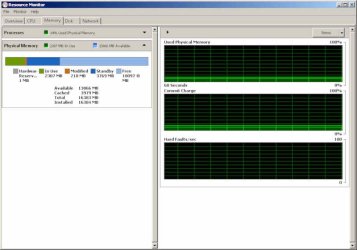
But. (Why is there always a but?) I've kept ResMon open as I've been doing all this stuff (it's displayed on the secondary monitor) and I've never seen more than 3 gig of ram in use. Right now I have 13 applications, 929 threads and 21,500 handles assigned. Still, only 2 gig of ram is in use.

Oh. I happened to read on another forum that many people were finding Explorer to be a major bottleneck and some suggested it might be the source of the memory leak problem that keeps coming up. So I installed Free Commander. I have Xplorer2, but I don't like the fact that it can only have 1 tree view open. Free Commander allows tabbed exploring, side-by-side "panels", each with its own tree. Initial tests seem to be acceptable. I'm gonna have to go shoot a follow-up on the restoration of a Land Speed Racing Streamliner
Ray the Rat's Chevy Asylum so I'll be away for a while, but in the meantime, I'll let this thing percolate and see what it does. Matter of fact, I'm gonna tell it to do a huge thumbnail rebuild in ACDSee and see if it can actually complete it for once. I just fired it off and while it increased the processor load, memory use is still at 2 gig.

As far as your view of two pendula and their swings re: price and performance, I believe you have a very good point. They're often two separate and distinct issues. And I'll admit that I couldn't justify buying the very top of the line CPUs, nor could I go for something like a 1tb SSD. I shudder to think about those prices.

Back on SMP, you're right, although multi-core CPUs may invite more applications to optimize for that. However, there are a coupla things going on here. One is that the architecture of this system is 2 processors, with 4 cores each and two sets of 8 gig of RAM. So some of the commonly-held concepts about SMP working on a common memory stash aren't exactly true here. And there's one other issue to be considered. With a true multi-processor architecture, the OS SHOULD be able to perform load-leveling and assign single-threaded processes to a single core. I believe this is happening, since I can see activity reported on all 8 cores. So while parallel processing of multiple instructions with an SMP-optimized OS and application would be the best solution, load-leveling is probably next best.

And just to bash on my favorite issue, in all the years I've been working with computers that use volatile memory, almost all CPU performance issues have been helped by increasing the amount of available RAM. That's why I left XP. I had a box with 4 gig and XP could only see 2.

Anecdotal evidence seems to indicate that when someone complains that their computer is running slowly, one or more of 4 things is usually going on:

1: Too many applications loading at startup.
2: Insufficient RAM resulting in constant swapfile use. I wish I could remember the term we used for this, but in first generation mini-computers a system could go into gridlock when it kept swapping one segment out for another, then realizing it needed the one it had just swapped out the one it needed to complete the task on the presently loaded segment. I just remembered it. It was called (colorfully enough) "deadly embrace." and would put the system into an infinite loop of swapping memory segments in and out.
3: Malware masquerading as anti-spyware (this is only recent...that is the last few years)
4: Disk fragmentation.

There are several others, but these seem to be the most prevalent that I've seen.

In the first 2 scenarios, increasing RAM will generally be helpful. Certainly not in #3, but it could prevent #4 from occurring as frequently if swapping is minimized.

But I've never seen a dela like what I'm looking at now. I've attached a screen capture showing memory usage. Just weird.

Oh..the thumbnail rebuild that would take forever? It finished in less than 5 minutes. Maybe the setting for task scheduling has helped that.

I'm outta here to go shoot some photos.

 

Attachments

  • ResMon1.jpg
    ResMon1.jpg
    48.4 KB · Views: 19

My Computer

Computer Manufacturer/Model Number
Home Built
OS
Windows 7 Pro 64-bit
CPU
2 x Opteron quad-core
Motherboard
TYAN Thunder N3600B Dual processor mobo
Memory
16 gig buffered
Graphics Card(s)
Radeon 4890 feeding my compnent stereo system. Sounds great
Sound Card
M-Audio Delta Audiophile
Monitor(s) Displays
Acer 24", Acer 21"
Screen Resolution
1980x1050 & 1680x1050
Hard Drives
Internal:

OCZ 60 gig SSD
2 x WD 1tb
1 WD 1.5tb
1 WD 320 GB

External:

3 x WD Mybook 1TB
PSU
Corsair 900w
Case
Coolermaster HAF 932
Cooling
Many fans, liquid cooling on the way but likely in November
Keyboard
Saitek red backlit
Mouse
Logitek USB
Internet Speed
Way too slow for a DSL line
Other Info
This is a build that was in progress but got pressed into service because of the need for large photo editing capability.

More will be revealed after "car season" (race cars, Salt Flats, etc.) is over in October. That's when the serious tweaking will start.

See Build Diary here:
http://www.raytherat.com/dreadnought/Welcome.html
@raytherat: Great points and I'm sorry I couldn't be more helpful. Best of luck.
 

My Computer

OS
w7x64u
CPU
i7 980x @4.5ghz 24/7
Motherboard
gigabyte x58a-ud7
Memory
6gb dominator gt 2000mhz c7
Graphics Card(s)
ati 5970+5870
Sound Card
x-fi
Monitor(s) Displays
dell u2410
Screen Resolution
1920x1200
Hard Drives
8x256gb crucial c300 R0 on lsi 9260
samsung f3 2tb
intel x25-v 40gb
PSU
Enermax Galaxy 1250w
Case
Mountain Mods Ascension
Cooling
dual loop wc
Keyboard
logitech g110
Mouse
ms explorer mouse
Internet Speed
25mbit cable
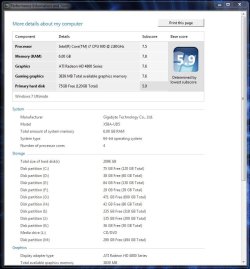
Here's my score on a new i7 build. Grrrrrr....those darn mechanical HD's :eek:

Latest WEI Score.JPG
 

My Computer

Computer type
PC/Desktop
Computer Manufacturer/Model Number
Custom built by me.
OS
Windows 10 Pro
CPU
Intel Core i7-4770K (3.5Ghz)
Motherboard
Gigabyte G1 Sniper 5 (F10 Bios)
Memory
32 gig Corsair Dominator Platinum (4x8Gig)
Graphics Card(s)
Sapphire Tri-X R9 Fury
Sound Card
Soundblaster ZXR
Monitor(s) Displays
NEC PA242W 24" LCD Monitor
Screen Resolution
1920 x 1200
Hard Drives
Primary - Samsung 850 Pro (512gig), Samsung 840 Pro (256gig), 2TB WD Caviar Black.
PSU
EVGA Supernova 1000 G2
Case
Cooler Master HAF X
Cooling
Corsair H100i with Corsair Air Series SP120 Quiet Fans
Keyboard
Logitech Wireless Wave
Mouse
Logitech Performance MX
Internet Speed
High Speed Cable
Antivirus
Norton Security
Browser
IE11
Other Info
Memory Timings - 1866MHz @ 9-9-9-27-1T @ 1.5 volts

My Computer

Computer Manufacturer/Model Number
* BFK Customs *
OS
W 7 64-bit Ultimate
CPU
Intel Q9550 Yorkfield
Motherboard
ASUS P5Q Pro
Memory
8GB Dominator 8500C5D
Graphics Card(s)
ATI : XFX 5870
Sound Card
Realtek HD Audio 7-1
Monitor(s) Displays
1x 47" LCD HDMI & 3x 26" LCD HDMI
Screen Resolution
1920x1080P & 1920x1200
Hard Drives
1x 80GB Intel X25-M G2 SSD : 1x 500GB & 1x 640GB WD Caviar Black(s)
PSU
Corsair 620HX
Case
Cooler Master RC-690
Cooling
Tuniq Tower 120, 2x 140mm and 3x 120mm case fans
Keyboard
Microsoft 500
Mouse
Razer Diamondback 3G
Internet Speed
14 Mb/s
Other Info
1x Koutech 3Gb/s SATA HDD Hot Swap Rack
Yeah, it's the dark stain on an otherwise bright system. I'm good though, don't have (want to spend) the money for an SSD drive yet. Prices Prices Prices :D
 

My Computer

Computer type
PC/Desktop
Computer Manufacturer/Model Number
Custom built by me.
OS
Windows 10 Pro
CPU
Intel Core i7-4770K (3.5Ghz)
Motherboard
Gigabyte G1 Sniper 5 (F10 Bios)
Memory
32 gig Corsair Dominator Platinum (4x8Gig)
Graphics Card(s)
Sapphire Tri-X R9 Fury
Sound Card
Soundblaster ZXR
Monitor(s) Displays
NEC PA242W 24" LCD Monitor
Screen Resolution
1920 x 1200
Hard Drives
Primary - Samsung 850 Pro (512gig), Samsung 840 Pro (256gig), 2TB WD Caviar Black.
PSU
EVGA Supernova 1000 G2
Case
Cooler Master HAF X
Cooling
Corsair H100i with Corsair Air Series SP120 Quiet Fans
Keyboard
Logitech Wireless Wave
Mouse
Logitech Performance MX
Internet Speed
High Speed Cable
Antivirus
Norton Security
Browser
IE11
Other Info
Memory Timings - 1866MHz @ 9-9-9-27-1T @ 1.5 volts
If you keep an eye open you can get an intel x25v for under 100$. (this may be more than you want to spend as well just saying a very good ssd might not be as expensive as you think)

And tightening your ram timings a tiny bit would likely give you 7.9 memory. I doubt you'd care but just in case you do I thought I'd throw it out there.
 

My Computer

OS
w7x64u
CPU
i7 980x @4.5ghz 24/7
Motherboard
gigabyte x58a-ud7
Memory
6gb dominator gt 2000mhz c7
Graphics Card(s)
ati 5970+5870
Sound Card
x-fi
Monitor(s) Displays
dell u2410
Screen Resolution
1920x1200
Hard Drives
8x256gb crucial c300 R0 on lsi 9260
samsung f3 2tb
intel x25-v 40gb
PSU
Enermax Galaxy 1250w
Case
Mountain Mods Ascension
Cooling
dual loop wc
Keyboard
logitech g110
Mouse
ms explorer mouse
Internet Speed
25mbit cable
My problem is is that I like high end items but live on a low end budget :D

I don't have a problem spending a hundred dollars, provided I get what I want ;)
 

My Computer

Computer type
PC/Desktop
Computer Manufacturer/Model Number
Custom built by me.
OS
Windows 10 Pro
CPU
Intel Core i7-4770K (3.5Ghz)
Motherboard
Gigabyte G1 Sniper 5 (F10 Bios)
Memory
32 gig Corsair Dominator Platinum (4x8Gig)
Graphics Card(s)
Sapphire Tri-X R9 Fury
Sound Card
Soundblaster ZXR
Monitor(s) Displays
NEC PA242W 24" LCD Monitor
Screen Resolution
1920 x 1200
Hard Drives
Primary - Samsung 850 Pro (512gig), Samsung 840 Pro (256gig), 2TB WD Caviar Black.
PSU
EVGA Supernova 1000 G2
Case
Cooler Master HAF X
Cooling
Corsair H100i with Corsair Air Series SP120 Quiet Fans
Keyboard
Logitech Wireless Wave
Mouse
Logitech Performance MX
Internet Speed
High Speed Cable
Antivirus
Norton Security
Browser
IE11
Other Info
Memory Timings - 1866MHz @ 9-9-9-27-1T @ 1.5 volts
Well in this case 100$ gets you 7.3 or so, if that's what you want got for it! If 7.9 is what you want get 2!

All joking aside, I'm sure you've read here and elsewhere, ssd is an instant noticeable performance increase. The 'snappyness' factor has to be experienced to truly understand. In my case I spent a lot of time benching my ssd array which most of the time means having windows on a spare drive so I can break/build the array many times to test things like stripe size and controller settings. After awhile I bought an x25v just for this purpose, after going to ssd I can't stand having the os on a spinner anymore, even temporarily for benchmarking. I don't even keep the x25v connected and haven't used it in a few weeks but there is a new firmware update for my crucial drives so I'll be benching again soon.

Edit: I just wanted to add your system is very good even without any ssds, I've said before if you're in the 6's or especially in the 7's your actual w7 experience is going to be great.
 

My Computer

OS
w7x64u
CPU
i7 980x @4.5ghz 24/7
Motherboard
gigabyte x58a-ud7
Memory
6gb dominator gt 2000mhz c7
Graphics Card(s)
ati 5970+5870
Sound Card
x-fi
Monitor(s) Displays
dell u2410
Screen Resolution
1920x1200
Hard Drives
8x256gb crucial c300 R0 on lsi 9260
samsung f3 2tb
intel x25-v 40gb
PSU
Enermax Galaxy 1250w
Case
Mountain Mods Ascension
Cooling
dual loop wc
Keyboard
logitech g110
Mouse
ms explorer mouse
Internet Speed
25mbit cable
Well in this case 100$ gets you 7.3 or so, if that's what you want got for it! If 7.9 is what you want get 2!

All joking aside,

Puff 7.3 :rolleyes: I'm happy with my system as is right now, and I haven’t even done my overclocks! There's a couple of upgrades I'll be making in the next 30 days though - PS, CPU Cooler, "maybe" a video card. After that I "might" I consider spending the money needed for quality 120+GB SSD drive, but that won't be anytime soon. I've got a digital camera to buy; and that puppy is expensive!
 

My Computer

Computer type
PC/Desktop
Computer Manufacturer/Model Number
Custom built by me.
OS
Windows 10 Pro
CPU
Intel Core i7-4770K (3.5Ghz)
Motherboard
Gigabyte G1 Sniper 5 (F10 Bios)
Memory
32 gig Corsair Dominator Platinum (4x8Gig)
Graphics Card(s)
Sapphire Tri-X R9 Fury
Sound Card
Soundblaster ZXR
Monitor(s) Displays
NEC PA242W 24" LCD Monitor
Screen Resolution
1920 x 1200
Hard Drives
Primary - Samsung 850 Pro (512gig), Samsung 840 Pro (256gig), 2TB WD Caviar Black.
PSU
EVGA Supernova 1000 G2
Case
Cooler Master HAF X
Cooling
Corsair H100i with Corsair Air Series SP120 Quiet Fans
Keyboard
Logitech Wireless Wave
Mouse
Logitech Performance MX
Internet Speed
High Speed Cable
Antivirus
Norton Security
Browser
IE11
Other Info
Memory Timings - 1866MHz @ 9-9-9-27-1T @ 1.5 volts
If you keep an eye open you can get an intel x25v for under 100$. (this may be more than you want to spend as well just saying a very good ssd might not be as expensive as you think)

And tightening your ram timings a tiny bit would likely give you 7.9 memory. I doubt you'd care but just in case you do I thought I'd throw it out there.
For an SSD this is one slow disk. Price/performance you're better of to buy a WD raptor.
If you really want an SSD save a bit longer and get a X25-M, one of the best you can get for a decent price ;)
 

My Computer

OS
Windows 7
CPU
Intel i5 750
Motherboard
MSI P55-GD65
Memory
Kingston 4 GB DDR3-1333
Graphics Card(s)
Club3d HD 5770 OC CrossFire
Sound Card
Onboard 7.1 Realtek ALC889
Monitor(s) Displays
Iiyama ProLite E2407HDS-B1
Screen Resolution
1920x1080
Hard Drives
Intel X25-M G2 Postville 80 GB
Samsung F3 1TB
PSU
Cooler Master RealPower M620
Case
Cooler Master COSMOS 1000
Cooling
Scythe Mugen 2
Keyboard
Logitech G19 Gaming Keyboard
Mouse
Logitech Performance Mouse MX
Other Info
Logitech G27 Racing Wheel
Games: Need for Speed SHIFT | Colin McRae: Dirt 2 | Grand Theft Auto IV | Race Driver GRID
Yeah, that was one of my points, I don't want to buy just any SSD drive. If I'm going to get one, I prefer to get a good one. Money well spent.

As to the WEI Score, I know, and see, that my system's pretty fast even without an SSD drive, so I'm happy. Sure, I'd like to have one, but for what I'd want, the cost is a little too steep. The reason why I never got a WD Raptor, though the prices on those are dropping rapidly, but still.

Thanks.
 

My Computer

Computer type
PC/Desktop
Computer Manufacturer/Model Number
Custom built by me.
OS
Windows 10 Pro
CPU
Intel Core i7-4770K (3.5Ghz)
Motherboard
Gigabyte G1 Sniper 5 (F10 Bios)
Memory
32 gig Corsair Dominator Platinum (4x8Gig)
Graphics Card(s)
Sapphire Tri-X R9 Fury
Sound Card
Soundblaster ZXR
Monitor(s) Displays
NEC PA242W 24" LCD Monitor
Screen Resolution
1920 x 1200
Hard Drives
Primary - Samsung 850 Pro (512gig), Samsung 840 Pro (256gig), 2TB WD Caviar Black.
PSU
EVGA Supernova 1000 G2
Case
Cooler Master HAF X
Cooling
Corsair H100i with Corsair Air Series SP120 Quiet Fans
Keyboard
Logitech Wireless Wave
Mouse
Logitech Performance MX
Internet Speed
High Speed Cable
Antivirus
Norton Security
Browser
IE11
Other Info
Memory Timings - 1866MHz @ 9-9-9-27-1T @ 1.5 volts
Just for some reported info on the X25 V, it could be considered faster than any spinner out there.

If you want better performance at a better price then by all means wait a while longer, but the little SSD from Intel isn't that bad.

Intel x25-V 40Gb SSD AS SSD benchmarks and WEI score.

WEI score of 7.6 isn't so bad. Even though WEI isn't a real benchmark, just an indication of how the system works together. :D

The new SandForce controllers are showing some impressive numbers, though they need some longevity stats befor they're confirmed to be #1.

OCZ Vertex 2 50GB, Read 285 MB/s, Write 275 MB/s, for $199.
It's newly released and cheaper than the Vertex (1), and faster.
The patient will see a price drop after a while. ;)
 

My Computer

Computer type
PC/Desktop
Computer Manufacturer/Model Number
76~2.0
OS
Windows 7 Ult x64 - SP1/ Windows 8 Pro x64
CPU
Intel Core i5-3570K 4.6GHz
Motherboard
Gigabyte GA-Z77X UD3H, f18
Memory
8GB (2X4GB) DDR3 1600 Corsair Vengeance CL8 1.5v
Graphics Card(s)
Sapphire HD 7770 Vapor-X OC 1GB DDR5
Sound Card
Onboard VIA VT2021
Monitor(s) Displays
22" LCD Dell
Screen Resolution
1680x1050
Hard Drives
Samsung 840Pro 128GB SSD,
Seagate Barracuda 500GB SATA2 7200rpm 32MB cache, Seagate Barracuda 1TB SATA2 7200rpm 32MB cache,
PSU
Corsair HX650W
Case
Cooler Master Storm Scout
Cooling
Corsair H80 2x12cm Noctua NF P12 , 2x14cm case fans
Keyboard
Logitech Wave
Mouse
CM Sentinel
Internet Speed
Dismal
Antivirus
Avast
Browser
Opera Next
Other Info
Haswell laptop: HP Envy 17t-j, i7-4700MQ, GeForce 740M 2GB DDR3, 17.3" Full HD 1920x1080, 16GB RAM, Samsung 840 Pro 128GB, 1TB Hitachi 7200 HDD,
Desktop: eSATA ports,
External eSATA Seagate 500GB SATA2 7200rpm,
External WD USB 500GB
My problem is I want something that's at least 120+GB. For me a 40-50GB SSD drive just isn't worth it, performance or not.

Even though WEI isn't a real benchmark, just an indication of how the system works together. :D

Completely agree ;) - And also why I'm not rushing out to by a 50GB SSD drive for $200. It'd be nice to have one, but the cost per gig just doesn't justify it for me at this time.

And as you said... "The patient will see a price drop after a while". I'm banking on it ;)
 

My Computer

Computer type
PC/Desktop
Computer Manufacturer/Model Number
Custom built by me.
OS
Windows 10 Pro
CPU
Intel Core i7-4770K (3.5Ghz)
Motherboard
Gigabyte G1 Sniper 5 (F10 Bios)
Memory
32 gig Corsair Dominator Platinum (4x8Gig)
Graphics Card(s)
Sapphire Tri-X R9 Fury
Sound Card
Soundblaster ZXR
Monitor(s) Displays
NEC PA242W 24" LCD Monitor
Screen Resolution
1920 x 1200
Hard Drives
Primary - Samsung 850 Pro (512gig), Samsung 840 Pro (256gig), 2TB WD Caviar Black.
PSU
EVGA Supernova 1000 G2
Case
Cooler Master HAF X
Cooling
Corsair H100i with Corsair Air Series SP120 Quiet Fans
Keyboard
Logitech Wireless Wave
Mouse
Logitech Performance MX
Internet Speed
High Speed Cable
Antivirus
Norton Security
Browser
IE11
Other Info
Memory Timings - 1866MHz @ 9-9-9-27-1T @ 1.5 volts
Status
Not open for further replies.
Back
Top