Showing a connection to the internet but unable to browse

curtis0722

New member
Local time
5:50 PM
Messages
13
Currently I am showing that I am connected to the internet with no issues but when I open a browser or open Skype (anything requiring an internet connection) i am unable to connect. I have been looking all over the forums trying to find a solution. So far I have verified my DNS server is working ok as I can ping both the ip as well as Google in the command prompt with no issues. I have tried multiple browsers (Google Chrome, IE, and Mozilla Firefox) all with no luck. I have tried ipconfig /release and /renew with no luck. It is important to note also that I am typing this up on my laptop using the same direct connection I'm using for my PC with absolutely no issues whatsoever. I have also seen a lot of threads saying that it may be a proxy server but I triple checked in the internet options that no proxy servers were being used. After troubleshooting this for about 5 hours yesterday I decided to format my hard drive and reinstall windows 7. After completely reinstalling windows 7 I am still getting the same indications and after all this I am still unable to connect to the internet. If anyone has any suggestions it would be greatly appreciated.

Thanks in advance.
 

My Computer My Computer

At a glance

Windows 7 Ultimate x64
OS
Windows 7 Ultimate x64
Reinstalling Windows 7 for a second time, no idea what is causing this issue....
 

My Computer My Computer

At a glance

Windows 7 Ultimate x64
OS
Windows 7 Ultimate x64
Is there any error message in Google Chrome, IE or Firefox?
 

My Computer My Computer

At a glance

Windows 7 Professional x64Intel Core i5-3340 CPU @3.10 GHz 3.30GHz4 GB DDR3Intel HD Graphics
Computer type
PC/Desktop
OS
Windows 7 Professional x64
CPU
Intel Core i5-3340 CPU @3.10 GHz 3.30GHz
Motherboard
Gigabyte Technology Co. LTD. H61M-S2PT
Memory
4 GB DDR3
Graphics Card(s)
Intel HD Graphics
Antivirus
ESET Endpoint Antivirus
Currently I am showing that I am connected to the internet with no issues but when I open a browser or open Skype (anything requiring an internet connection) i am unable to connect. I have been looking all over the forums trying to find a solution. So far I have verified my DNS server is working ok as I can ping both the ip as well as Google in the command prompt with no issues. I have tried multiple browsers (Google Chrome, IE, and Mozilla Firefox) all with no luck. I have tried ipconfig /release and /renew with no luck. It is important to note also that I am typing this up on my laptop using the same direct connection I'm using for my PC with absolutely no issues whatsoever. I have also seen a lot of threads saying that it may be a proxy server but I triple checked in the internet options that no proxy servers were being used. After troubleshooting this for about 5 hours yesterday I decided to format my hard drive and reinstall windows 7. After completely reinstalling windows 7 I am still getting the same indications and after all this I am still unable to connect to the internet. If anyone has any suggestions it would be greatly appreciated.

Thanks in advance.

This could be a few different problems.

I would start by resetting winsock and the TCP/ip stack by pasting each command one at a time into an elevated command prompt then hit enter after each one. Reboot after running the commands then check to see if the browsers can connect or not.


Code:
netsh winsock reset catalog
(reset winsock entries)


Code:
netsh int ip reset reset.log hit
(reset TCP/IP stack)

If that isn't working I'd need to see the ipconfig/all from this machine. :)
 

My Computer My Computer

At a glance

Windows 7 Ult, Windows 8.1 Pro,Q9650-4.275GHz, E8600 4.5GHz, E6750-3.8GHzG.Skill PC2 9600 1200Mhz 5 5 5 15 2TGTX480
Computer type
PC/Desktop
Computer Manufacturer/Model Number
Home built
OS
Windows 7 Ult, Windows 8.1 Pro,
CPU
Q9650-4.275GHz, E8600 4.5GHz, E6750-3.8GHz
Motherboard
Evga 780i FTW
Memory
G.Skill PC2 9600 1200Mhz 5 5 5 15 2T
Graphics Card(s)
GTX480
Sound Card
Asus Xonar D2
Monitor(s) Displays
HannsG
Screen Resolution
1680X1050
Hard Drives
GSkill Phoenix Pro 120GB SSD
PSU
ThermalTake Toughpower 1000Watt modular
Case
ThermalTake XaserV
Cooling
Xigmatek S1283
Keyboard
Logitech G15
Mouse
Logitech G9
Internet Speed
T1
@technofrank no errors just says connecting and never connects. Its not only with browsers either, anything that requires internet will not work (Skype, or steam).

@Chev65 i tried both of those commands as administrator with no luck i will post my ipconfig /all shortly
 

My Computer My Computer

At a glance

Windows 7 Ultimate x64
OS
Windows 7 Ultimate x64
Here is my ipconfig /all
 

Attachments

My Computer My Computer

At a glance

Windows 7 Ultimate x64
OS
Windows 7 Ultimate x64
You are showing a valid IP and you should be online with this connection.

Have you tried resetting the router?
 

My Computer My Computer

At a glance

Windows 7 Ult, Windows 8.1 Pro,Q9650-4.275GHz, E8600 4.5GHz, E6750-3.8GHzG.Skill PC2 9600 1200Mhz 5 5 5 15 2TGTX480
Computer type
PC/Desktop
Computer Manufacturer/Model Number
Home built
OS
Windows 7 Ult, Windows 8.1 Pro,
CPU
Q9650-4.275GHz, E8600 4.5GHz, E6750-3.8GHz
Motherboard
Evga 780i FTW
Memory
G.Skill PC2 9600 1200Mhz 5 5 5 15 2T
Graphics Card(s)
GTX480
Sound Card
Asus Xonar D2
Monitor(s) Displays
HannsG
Screen Resolution
1680X1050
Hard Drives
GSkill Phoenix Pro 120GB SSD
PSU
ThermalTake Toughpower 1000Watt modular
Case
ThermalTake XaserV
Cooling
Xigmatek S1283
Keyboard
Logitech G15
Mouse
Logitech G9
Internet Speed
T1
i can't reset the router because It's a shared connection with everyone in my building, so its technically not my router. But the thing is I'm typing this on my laptop using the same ethernet cord (same internet) as my desktop and it is working completely fine.
 

My Computer My Computer

At a glance

Windows 7 Ultimate x64
OS
Windows 7 Ultimate x64
We can try resetting the network stack so as to fix any potential problems with the machine but the connection appears to be working from what I can see here.

Unzip and run the following IP reset .exe file. It will reboot your machine automatically.
 

Attachments

My Computer My Computer

At a glance

Windows 7 Ult, Windows 8.1 Pro,Q9650-4.275GHz, E8600 4.5GHz, E6750-3.8GHzG.Skill PC2 9600 1200Mhz 5 5 5 15 2TGTX480
Computer type
PC/Desktop
Computer Manufacturer/Model Number
Home built
OS
Windows 7 Ult, Windows 8.1 Pro,
CPU
Q9650-4.275GHz, E8600 4.5GHz, E6750-3.8GHz
Motherboard
Evga 780i FTW
Memory
G.Skill PC2 9600 1200Mhz 5 5 5 15 2T
Graphics Card(s)
GTX480
Sound Card
Asus Xonar D2
Monitor(s) Displays
HannsG
Screen Resolution
1680X1050
Hard Drives
GSkill Phoenix Pro 120GB SSD
PSU
ThermalTake Toughpower 1000Watt modular
Case
ThermalTake XaserV
Cooling
Xigmatek S1283
Keyboard
Logitech G15
Mouse
Logitech G9
Internet Speed
T1
Just ran the IPreset file, still same indications. I am going to talk to my landlord to see if I can get the router restarted.
 

My Computer My Computer

At a glance

Windows 7 Ultimate x64
OS
Windows 7 Ultimate x64
Just ran the IPreset file, still same indications. I am going to talk to my landlord to see if I can get the router restarted.

Just out of curiosity, are you able to open a command prompt and input the following and then press enter:

Code:
ping www.google.com

After that can you then input the following and let it complete:

Code:
ping 173.194.34.177


After completion can you upload the results here. It will help to rule out any potential DNS errors.

Josh :)
 

My Computer My Computer

At a glance

Windows 7 Professional x64 SP1 ; Windows Serv...Intel Core i5 2400 @ 3.10GHz8.0GB DDR3 @ 665MHz (2GBx4)AMD Radeon HD 6870
Computer type
PC/Desktop
Computer Manufacturer/Model Number
Custom Built
OS
Windows 7 Professional x64 SP1 ; Windows Server 2012 R2 Standard
CPU
Intel Core i5 2400 @ 3.10GHz
Motherboard
Foxconn H67MP-S/-V/H67MP
Memory
8.0GB DDR3 @ 665MHz (2GBx4)
Graphics Card(s)
AMD Radeon HD 6870
Sound Card
Realtek High Definition Audio
Monitor(s) Displays
AOC 2243W & SMB1930NW
Screen Resolution
1440x900 & 1920x1080
Hard Drives
977GB Seagate ST31000524AS ATA Drive (SATA)
250GB WD iSCSI attached Drive
PSU
750W Gaming PSU
Case
Novatech Night
Cooling
Fan
Keyboard
Dell Standard PS/2 Keyboard
Mouse
R.A.T 07 Gaming Mouse
Internet Speed
Download: 10 Mbps Ping: 30ms Upload: 0.81 Mbps
Browser
Google Chrome
Other Info
Optiarc DVD RW AD-5260S ATA Device
Just ran the IPreset file, still same indications. I am going to talk to my landlord to see if I can get the router restarted.

Just out of curiosity, are you able to open a command prompt and input the following and then press enter:

Code:
ping www.google.com

After that can you then input the following and let it complete:

Code:
ping 173.194.34.177


After completion can you upload the results here. It will help to rule out any potential DNS errors.

Josh :)

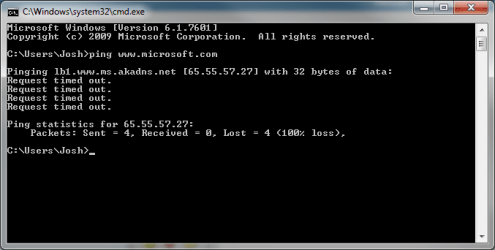
I was able to ping both the ip address as well as Google . one weird thing I have noticed is I am unable to ping www . microsoft . com but any other website will work. Not sure what that means if anything :/ . also my landlord won't be in until tomorrow morning so won't be able to reset router until then.
 

My Computer My Computer

At a glance

Windows 7 Ultimate x64
OS
Windows 7 Ultimate x64
Microsoft blocks pings and is normal ;)

Untitled.png

Are you able to run the following in an elevated command prompt and show the results:

Code:
netstat -a

This will help us see if you are able to form a full TCP session and help us isolate it to an application issue or a potential issue with your NIC.

If you are able to test connectivity on a separate network, maybe a friend or family's then this will further help out troubleshooting.

Josh :)
 

My Computer My Computer

At a glance

Windows 7 Professional x64 SP1 ; Windows Serv...Intel Core i5 2400 @ 3.10GHz8.0GB DDR3 @ 665MHz (2GBx4)AMD Radeon HD 6870
Computer type
PC/Desktop
Computer Manufacturer/Model Number
Custom Built
OS
Windows 7 Professional x64 SP1 ; Windows Server 2012 R2 Standard
CPU
Intel Core i5 2400 @ 3.10GHz
Motherboard
Foxconn H67MP-S/-V/H67MP
Memory
8.0GB DDR3 @ 665MHz (2GBx4)
Graphics Card(s)
AMD Radeon HD 6870
Sound Card
Realtek High Definition Audio
Monitor(s) Displays
AOC 2243W & SMB1930NW
Screen Resolution
1440x900 & 1920x1080
Hard Drives
977GB Seagate ST31000524AS ATA Drive (SATA)
250GB WD iSCSI attached Drive
PSU
750W Gaming PSU
Case
Novatech Night
Cooling
Fan
Keyboard
Dell Standard PS/2 Keyboard
Mouse
R.A.T 07 Gaming Mouse
Internet Speed
Download: 10 Mbps Ping: 30ms Upload: 0.81 Mbps
Browser
Google Chrome
Other Info
Optiarc DVD RW AD-5260S ATA Device
here are the results from the netstat command. Unfortunately I can't test connectivity on another network right now, its pretty late.
 

Attachments

  • netstat.jpg
    netstat.jpg
    129.8 KB · Views: 3

My Computer My Computer

At a glance

Windows 7 Ultimate x64
OS
Windows 7 Ultimate x64
All I see from this is one connection attempting to be made to 88.201.37.201. Further details - 88.201.37.201 IP Address Whois | DomainTools.com

The connection isn't fully established and would align with your symptoms. Until the test on another network we won't be able to fully rule out if it is your machine or the associated router.

For the time being can you test connectivity in safe mode with networking.

To do so please follow this tutorial (OPTION ONE ONLY) - http://www.sevenforums.com/tutorials/69585-safe-mode.html

   Note
Please replace all references of Safe Mode with Safe Mode with Networking.


Josh :)
 

My Computer My Computer

At a glance

Windows 7 Professional x64 SP1 ; Windows Serv...Intel Core i5 2400 @ 3.10GHz8.0GB DDR3 @ 665MHz (2GBx4)AMD Radeon HD 6870
Computer type
PC/Desktop
Computer Manufacturer/Model Number
Custom Built
OS
Windows 7 Professional x64 SP1 ; Windows Server 2012 R2 Standard
CPU
Intel Core i5 2400 @ 3.10GHz
Motherboard
Foxconn H67MP-S/-V/H67MP
Memory
8.0GB DDR3 @ 665MHz (2GBx4)
Graphics Card(s)
AMD Radeon HD 6870
Sound Card
Realtek High Definition Audio
Monitor(s) Displays
AOC 2243W & SMB1930NW
Screen Resolution
1440x900 & 1920x1080
Hard Drives
977GB Seagate ST31000524AS ATA Drive (SATA)
250GB WD iSCSI attached Drive
PSU
750W Gaming PSU
Case
Novatech Night
Cooling
Fan
Keyboard
Dell Standard PS/2 Keyboard
Mouse
R.A.T 07 Gaming Mouse
Internet Speed
Download: 10 Mbps Ping: 30ms Upload: 0.81 Mbps
Browser
Google Chrome
Other Info
Optiarc DVD RW AD-5260S ATA Device
Well im not sure if this is a good thing but I am typing this message from the computer I have been having issues with. Problem is im in safe mode w/networking. Is there anything you want me to do before I restart normal?
 

My Computer My Computer

At a glance

Windows 7 Ultimate x64
OS
Windows 7 Ultimate x64
Well im not sure if this is a good thing but I am typing this message from the computer I have been having issues with. Problem is im in safe mode w/networking. Is there anything you want me to do before I restart normal?

Boot back into normal mode and then go through and follow the steps laid out in this tutorial. The likely cause of this could be malware or a third party application. Please be patient and once you have determined what application is causing the connection failure we can act accordingly.

http://www.sevenforums.com/tutorials/179159-troubleshoot-application-conflicts-performing-clean-startup.html

Chances are you won't need to test on a different network now.

Josh :)
 

My Computer My Computer

At a glance

Windows 7 Professional x64 SP1 ; Windows Serv...Intel Core i5 2400 @ 3.10GHz8.0GB DDR3 @ 665MHz (2GBx4)AMD Radeon HD 6870
Computer type
PC/Desktop
Computer Manufacturer/Model Number
Custom Built
OS
Windows 7 Professional x64 SP1 ; Windows Server 2012 R2 Standard
CPU
Intel Core i5 2400 @ 3.10GHz
Motherboard
Foxconn H67MP-S/-V/H67MP
Memory
8.0GB DDR3 @ 665MHz (2GBx4)
Graphics Card(s)
AMD Radeon HD 6870
Sound Card
Realtek High Definition Audio
Monitor(s) Displays
AOC 2243W & SMB1930NW
Screen Resolution
1440x900 & 1920x1080
Hard Drives
977GB Seagate ST31000524AS ATA Drive (SATA)
250GB WD iSCSI attached Drive
PSU
750W Gaming PSU
Case
Novatech Night
Cooling
Fan
Keyboard
Dell Standard PS/2 Keyboard
Mouse
R.A.T 07 Gaming Mouse
Internet Speed
Download: 10 Mbps Ping: 30ms Upload: 0.81 Mbps
Browser
Google Chrome
Other Info
Optiarc DVD RW AD-5260S ATA Device
Well, i'm now posting this from the computer that originally had issues and I am now able to web browse without being in safe mode. Im not sure what fixed it but it now works! Thanks for all of your help... wish there would have been a more clear fix action but hey im not complaining. Thanks again!!!!!!!!
 

My Computer My Computer

At a glance

Windows 7 Ultimate x64
OS
Windows 7 Ultimate x64
Starting in safe mode doesn't fix anything, it only proves that something that is starting with Windows is preventing the machine from accessing the internet. You had a valid IP so this was always the case.

It didn't fix itself and it's very likely that the IPReset file you ran earlier is what fixed the problem.

Multiple restarts probably had an effect after running the IPReset file and I've seen nothing else here that would explain why the problem just magically fixed itself. Normally you would need to remove the offending software that was blocking the connection but I never got that far.

That IPReset file has fixed more machines than I can count. Feel free to mark as solved.
 
Last edited:

My Computer My Computer

At a glance

Windows 7 Ult, Windows 8.1 Pro,Q9650-4.275GHz, E8600 4.5GHz, E6750-3.8GHzG.Skill PC2 9600 1200Mhz 5 5 5 15 2TGTX480
Computer type
PC/Desktop
Computer Manufacturer/Model Number
Home built
OS
Windows 7 Ult, Windows 8.1 Pro,
CPU
Q9650-4.275GHz, E8600 4.5GHz, E6750-3.8GHz
Motherboard
Evga 780i FTW
Memory
G.Skill PC2 9600 1200Mhz 5 5 5 15 2T
Graphics Card(s)
GTX480
Sound Card
Asus Xonar D2
Monitor(s) Displays
HannsG
Screen Resolution
1680X1050
Hard Drives
GSkill Phoenix Pro 120GB SSD
PSU
ThermalTake Toughpower 1000Watt modular
Case
ThermalTake XaserV
Cooling
Xigmatek S1283
Keyboard
Logitech G15
Mouse
Logitech G9
Internet Speed
T1
I thought the same but couldn't be bothered to post :zip:
 

My Computer My Computer

At a glance

Windows 7 Professional x64 SP1 ; Windows Serv...Intel Core i5 2400 @ 3.10GHz8.0GB DDR3 @ 665MHz (2GBx4)AMD Radeon HD 6870
Computer type
PC/Desktop
Computer Manufacturer/Model Number
Custom Built
OS
Windows 7 Professional x64 SP1 ; Windows Server 2012 R2 Standard
CPU
Intel Core i5 2400 @ 3.10GHz
Motherboard
Foxconn H67MP-S/-V/H67MP
Memory
8.0GB DDR3 @ 665MHz (2GBx4)
Graphics Card(s)
AMD Radeon HD 6870
Sound Card
Realtek High Definition Audio
Monitor(s) Displays
AOC 2243W & SMB1930NW
Screen Resolution
1440x900 & 1920x1080
Hard Drives
977GB Seagate ST31000524AS ATA Drive (SATA)
250GB WD iSCSI attached Drive
PSU
750W Gaming PSU
Case
Novatech Night
Cooling
Fan
Keyboard
Dell Standard PS/2 Keyboard
Mouse
R.A.T 07 Gaming Mouse
Internet Speed
Download: 10 Mbps Ping: 30ms Upload: 0.81 Mbps
Browser
Google Chrome
Other Info
Optiarc DVD RW AD-5260S ATA Device
Back
Top