Shut down or restart computer via Remote Desktop?

AFAIK, the shutdown command requires active directory. For workgroup computers, I suggest using PsTools..
PSTools is an excellent and very useful set of tools.

HOWEVER

Your premise is invalid. The shutdown command does not require active directory. I use it, frequently and successfully.
 
PSTools is an excellent and very useful set of tools.

HOWEVER

Your premise is invalid. The shutdown command does not require active directory. I use it, frequently and successfully.

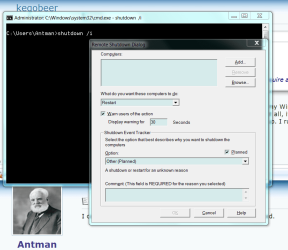
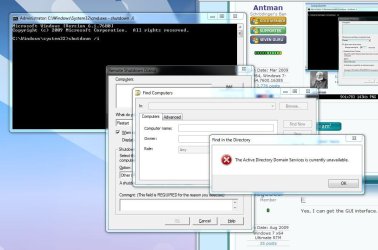
Hmm. I get the same error message if I use shutdown /i on my Win 7 x64 machine. I cannot browse any computers in my workgroup. Using the /m \\computer switch does not work at all, it just spits out the help items. I have a DIR-655 configured for DHCP, and all of my computers belong to the same workgroup. I run cmd as the admin. Do I have to log in remotely to the computer, and then issue the shutdown command remotely?
 

My Computer My Computer

At a glance

Windows 7 Ultimate x64 SP1Core i7-2670QM8GB DDR3 PC3-10600Intel HD Graphics 3000 + GeForce GT 540M
Computer Manufacturer/Model Number
Dell XPS 15 L502x
OS
Windows 7 Ultimate x64 SP1
CPU
Core i7-2670QM
Memory
8GB DDR3 PC3-10600
Graphics Card(s)
Intel HD Graphics 3000 + GeForce GT 540M
Screen Resolution
1920x1080
Hard Drives
1TB 5400RPM Seagate
I need a restatement, a clarification, of the problem at hand. What is the goal, what is the method, what is the result?
 

Attachments

  • Capture.PNG
    Capture.PNG
    42.1 KB · Views: 473
Yes, I can get the GUI interface. When I click on Browse, the error message is displayed.

If the goal is to shut down a computer remotely, and you do not wish to log into that machine remotely, can you use the shutdown command to force a shut down, like you can if you use pstools?
 

Attachments

  • Capture.JPG
    Capture.JPG
    85.6 KB · Views: 437

My Computer My Computer

At a glance

Windows 7 Ultimate x64 SP1Core i7-2670QM8GB DDR3 PC3-10600Intel HD Graphics 3000 + GeForce GT 540M
Computer Manufacturer/Model Number
Dell XPS 15 L502x
OS
Windows 7 Ultimate x64 SP1
CPU
Core i7-2670QM
Memory
8GB DDR3 PC3-10600
Graphics Card(s)
Intel HD Graphics 3000 + GeForce GT 540M
Screen Resolution
1920x1080
Hard Drives
1TB 5400RPM Seagate
Yes, I can get the GUI interface. When I click on Browse, the error message is displayed.

If the goal is to shut down a computer remotely, and you do not wish to log into that machine remotely, can you use the shutdown command to force a shut down, like you can if you use pstools?
I understand. What is your goal? Do you have a list of the workstation names?
 
I have been out playing with the kids today - pardon my lack of focus. I will post a sample shutdown command to terminate MachineX.
 
Yes, I have a list of all workstations. Even when adding them manually, the option to actually shut down a computer is not available. And, as I stated earlier, using the /m switch does not work for any of my computers, Vista or Windows 7.
 

Attachments

  • Capture.JPG
    Capture.JPG
    55.3 KB · Views: 301

My Computer My Computer

At a glance

Windows 7 Ultimate x64 SP1Core i7-2670QM8GB DDR3 PC3-10600Intel HD Graphics 3000 + GeForce GT 540M
Computer Manufacturer/Model Number
Dell XPS 15 L502x
OS
Windows 7 Ultimate x64 SP1
CPU
Core i7-2670QM
Memory
8GB DDR3 PC3-10600
Graphics Card(s)
Intel HD Graphics 3000 + GeForce GT 540M
Screen Resolution
1920x1080
Hard Drives
1TB 5400RPM Seagate
shutdown /s /m \\MachineX
shutdown /s /m \\MachineX /t 060 /f

If these are not working, provide an example of your syntax.

I will not re-read this hijacked thread. Treat all interaction as fresh.
 
I did think of one thing that is true - I am logged in when I use shutdown.
 
shutdown /s /m \\MachineX
shutdown /s /m \\MachineX /t 060 /f

If these are not working, provide an example of your syntax.

I will not re-read this hijacked thread. Treat all interaction as fresh.

Thanks. I realized I neglected to add the /s switch to my command line. Duh.

It also got me thinking about the GUI interface, and something else I neglected to do. After manually adding a workgroup computer, I didn't add any text to the comment box. A single character in the comment box enabled the OK button, and the remote computer shut down perfectly. I also did not need to be logged into the remote computer. The warning comment wasn't displayed, but the timed delay was correct.

Thanks for the assist, Antman.
 

My Computer My Computer

At a glance

Windows 7 Ultimate x64 SP1Core i7-2670QM8GB DDR3 PC3-10600Intel HD Graphics 3000 + GeForce GT 540M
Computer Manufacturer/Model Number
Dell XPS 15 L502x
OS
Windows 7 Ultimate x64 SP1
CPU
Core i7-2670QM
Memory
8GB DDR3 PC3-10600
Graphics Card(s)
Intel HD Graphics 3000 + GeForce GT 540M
Screen Resolution
1920x1080
Hard Drives
1TB 5400RPM Seagate
I am seldom as glad to help with a problem as I am with this one. Something tickled my neck - it had to be something in the syntax. Good recovery.
 
AFAIK, the shutdown command requires active directory. For workgroup computers, I suggest using PsTools. Grab them from Microsoft, then write a batch file to shutdown a computer. That's what I do, and it works great. You use the psshutdown.exe file to remotely shut down any computer on your workgroup, like this:

Code:
psshutdown -k -f -t 00 [URL="file://%5C%5Cnameofpc"]\\nameofpc[/URL]
There are tutorials on the 'net on how to use psshutdown. You can also open a cmd prompt, navigate to the PsTools directory, and type psshutdown ? for a complete list of commands.


I get access denied
 

My Computer My Computer

At a glance

Windows 7 ultimate 64bitIntell e8400Ocz DDR2-1066 mhz 6 gigs worthAsus Engt240
Computer Manufacturer/Model Number
Custome build
OS
Windows 7 ultimate 64bit
CPU
Intell e8400
Motherboard
Evga 780I 132-ck-nf78
Memory
Ocz DDR2-1066 mhz 6 gigs worth
Graphics Card(s)
Asus Engt240
Sound Card
On Board
Monitor(s) Displays
Hp w2007
Screen Resolution
1680X1050 native
Hard Drives
sata st312081
PSU
SP/L 550 watt Dual fan
Case
Cooler Master 690
Cooling
Processor has the Thermaltake V1
Keyboard
dell Keyboard
Mouse
Dell Mouse
I get access denied

Did you try using shutdown /i, with the instructions I posted? If you manually add a workgroup computer instead of browsing for it, you should be able to shut down your remote computer. Or, you can use the command line syntax that Antman posted to do the same thing.

If you get the access denied message, then I'm guessing the authentication on the remote machine is preventing you from accessing it. Are all of your computers running 7 x64?
 

My Computer My Computer

At a glance

Windows 7 Ultimate x64 SP1Core i7-2670QM8GB DDR3 PC3-10600Intel HD Graphics 3000 + GeForce GT 540M
Computer Manufacturer/Model Number
Dell XPS 15 L502x
OS
Windows 7 Ultimate x64 SP1
CPU
Core i7-2670QM
Memory
8GB DDR3 PC3-10600
Graphics Card(s)
Intel HD Graphics 3000 + GeForce GT 540M
Screen Resolution
1920x1080
Hard Drives
1TB 5400RPM Seagate
Its easy press Alt+F4 when you are in remote desktop, there will be option of Shutdown or Restart.
 

My Computer My Computer

At a glance

Windows 7 Professional 64bit
Computer type
PC/Desktop
OS
Windows 7 Professional 64bit
Shutdown or restart computer via Remote Desktop Windows 7

Hey, Guy's

I was looking for it also and i found it. ;)

To shutdown or restart computer via Remote Desktop in windows 7. Click the start button, Then click on Windows Security.. The shutdown options are in the lower right corner.
 

My Computer My Computer

At a glance

Windows 7 Ultimate x64, Windows 7 Ultimate x8...P4 HT, CellD,Cell, P3, P2,AMD K6
Computer type
PC/Desktop
Computer Manufacturer/Model Number
custom build
OS
Windows 7 Ultimate x64, Windows 7 Ultimate x86, Windows XP Pro
CPU
P4 HT, CellD,Cell, P3, P2,AMD K6
Welcome to the Seven Forums, Sittinphat.

Thanks for the additional info.
 

My Computer My Computer

At a glance

W7 Pro SP1 64biti78GBIntel HD Graphics
Computer type
Laptop
Computer Manufacturer/Model Number
Employer provided Dell Latitude
OS
W7 Pro SP1 64bit
CPU
i7
Memory
8GB
Graphics Card(s)
Intel HD Graphics
Hard Drives
crappy SSD
Antivirus
Employer mandated Symantec Endpoint Protection
Browser
Pale Moon 64bit, IE11 64bit & Chrome 64bit
Back
Top