Shut Down -Speed Up

How to Set WaitToKillServiceTimeout to Speed Up Shut Down Time in Windows


   Information
This tutorial will show you how to set the WaitToKillServiceTimeout to how long the system waits for services to stop after notifying the service that the system is shutting down in XP, Vista, Windows 7 and Windows 8.

When the WaitToKillServiceTimeout value of this entry expires, the system notifies the user that the service has not stopped. The user can either force the service task to stop or continue to wait. If the user waits, this WaitToKillServiceTimeout value specifies the interval between repeated user notices that the service has not stopped.

If all services stop before this WaitToKillServiceTimeout value expires, the system shuts down; it does not wait for this value to expire.
   Warning
You should always save and close all programs before shutting down the computer to help prevent any data loss.


   Tip
If your shutdown time is still taking longer then normal, then check these items below.


OPTION ONE

Set WaitToKillServiceTimeout before Shut Down using a REG File Download


1. Do step 2, 3, or 4 below for what you would like to do.

2. To Speed Up Shut Down Time with 2 Second WaitToKillServiceTimeout
A) Click on the Download button below to download the file below, and go to step 5 below.
NOTE: This sets the shutdown "Wait to kill" time to 2 seconds (2000 milliseconds). If you want shutdown to wait for a different amount of seconds, then do the manual method below.
2_Second_Shutdown.reg

Download


3. To Restore the Default WaitToKillServiceTimeout in Windows 7
A) Click on the Download button below to download the file below, and go to step 5 below.
NOTE: The default shutdown "wait to kill" time is 12 seconds (12000 milliseconds) in Windows 7.
Windows-7_Default_Shutdown_Time.reg

Download


4. To Restore the Default WaitToKillServiceTimeout in Windows 8
A) Click on the Download button below to download the file below, and go to step 5 below.
NOTE: The default shutdown "wait to kill" time is 5 seconds (5000 milliseconds) in Windows 7.
Windows-8_Default_Shutdown_Time.reg

Download


5. Save, and save the .reg file to your desktop.

6. Double click on the downloaded .reg file to merge it.

7. If prompted, click on Run, Yes (UAC), Yes, and OK to approve the merge.

8. If you like, you may also wish to change the HungAppTimeout, WaitToKillAppTimeout, and AutoEndTasks values to what you want.

9. When finished, you can delete the downloaded .reg file if you like.


OPTION TWO

Set WaitToKillServiceTimeout before Shut Down in Registry Editor


1. Press the Windows + R keys to open the Run dialog, type regedit, and click/tap on OK.

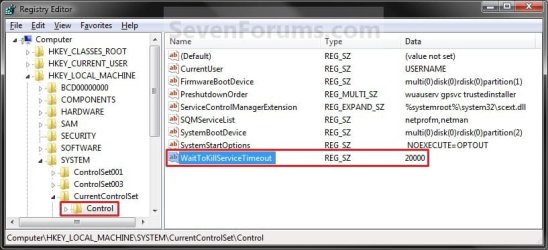
2. In regedit, go to: (See screenshot below)
HKEY_LOCAL_MACHINE\SYSTEM\CurrentControlSet\Control
Regedit.jpg
3. In the right pane, right click on WaitToKillServiceTimeout, and click on Modify. (See screenshot above)

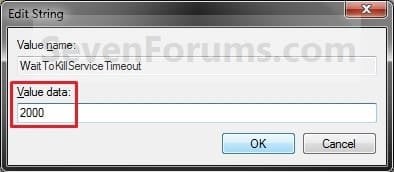
4. Type in a number between 2000-20000 (2-20 seconds), and click on OK. (See screenshot below)
NOTE: The default time is 12000 (Windows 7) or 5000 (Windows 8). I use 2000 (2 seconds) and have not had any problems. Your experience may vary.
Modify.jpg
5. If you like, you may also wish to change the HungAppTimeout, WaitToKillAppTimeout, and AutoEndTasks values to what you want.

6. When finished, you can close Registry Editor if you like.
NOTE: If you have problems with programs from your computer shutting down to quickly, then repeat the above steps and increase the WaitToKillServiceTimeout time (step 5) a bit.
That's it,
Shawn


Attachments

Last edited:
Hello Demonicon,

You most likely have some app that is running in background not wanting to shut down properly. This tutorial will not affect that. You could check in Task Manager (CTRL+Shift+ESC) to see what "Applications" or "Proccess" for a app are listed before shutting down to help narrow down which one may be the cause.

What do you have the wait time set as?

If you like, you could give the tutorial below to use a force shut down shortcut to see if that may help shut down your computer faster until you find the app causing the delay.

Hope this helps,
Shawn
 

My Computer My Computer

At a glance

64-bit Windows 11 Pro for WorkstationsIntel i7-8700K OC'd to 5 GHz64 GB (4x16GB) G.SKILL TridentZ RGB DDR4 3600...ASUS ROG-STRIX-GTX1080TI-O11G-GAMING
Computer type
PC/Desktop
Computer Manufacturer/Model Number
Self built custom
OS
64-bit Windows 11 Pro for Workstations
CPU
Intel i7-8700K OC'd to 5 GHz
Motherboard
ASUS ROG Maximus XI Formula Z390
Memory
64 GB (4x16GB) G.SKILL TridentZ RGB DDR4 3600 MHz
Graphics Card(s)
ASUS ROG-STRIX-GTX1080TI-O11G-GAMING
Sound Card
Integrated
Monitor(s) Displays
2 x Samsung Odyssey G7 27"
Screen Resolution
2560x1440
Hard Drives
1TB Samsung 990 PRO M.2,
4TB Samsung 990 PRO PRO M.2,
TerraMaster F8 SSD Plus NAS
PSU
Seasonic Prime Titanium 850W
Case
Thermaltake Core P3
Cooling
Corsair Hydro H115i
Keyboard
Logitech wireless K800
Mouse
Logitech MX Master 4
Internet Speed
2 Gb/s Download and 100 Mb/s Upload
Antivirus
Malwarebyte Anti-Malware Premium
Browser
Google Chrome
Other Info
Logitech Z625 speaker system,
Logitech BRIO 4K Pro webcam,
HP Color LaserJet Pro MFP M477fdn,
APC SMART-UPS RT 1000 XL - SURT1000XLI,
Galaxy S23 Plus phone
Thanks, I've been looking for ways to maximise my performance on my laptop without purchasing new hardware or software. (:
 

My Computer My Computer

Computer type
Laptop
Hi
I had some problems with shutting down. It takes to long-more than 2min to shutdown. I tried the methods you described above. It really worked but not so great. Then two weeks ago I installed windows 8 consumer preview. Its really takes 10-15 sec to start and shutdown. Is it possible in 7 too.
 

My Computer My Computer

At a glance

windows 7 ultimate 64bit
OS
windows 7 ultimate 64bit
Hello Firetrix,

It sounds like you may have something that is hanging at shut down. Do you have everything closed before shutting down?
 

My Computer My Computer

At a glance

64-bit Windows 11 Pro for WorkstationsIntel i7-8700K OC'd to 5 GHz64 GB (4x16GB) G.SKILL TridentZ RGB DDR4 3600...ASUS ROG-STRIX-GTX1080TI-O11G-GAMING
Computer type
PC/Desktop
Computer Manufacturer/Model Number
Self built custom
OS
64-bit Windows 11 Pro for Workstations
CPU
Intel i7-8700K OC'd to 5 GHz
Motherboard
ASUS ROG Maximus XI Formula Z390
Memory
64 GB (4x16GB) G.SKILL TridentZ RGB DDR4 3600 MHz
Graphics Card(s)
ASUS ROG-STRIX-GTX1080TI-O11G-GAMING
Sound Card
Integrated
Monitor(s) Displays
2 x Samsung Odyssey G7 27"
Screen Resolution
2560x1440
Hard Drives
1TB Samsung 990 PRO M.2,
4TB Samsung 990 PRO PRO M.2,
TerraMaster F8 SSD Plus NAS
PSU
Seasonic Prime Titanium 850W
Case
Thermaltake Core P3
Cooling
Corsair Hydro H115i
Keyboard
Logitech wireless K800
Mouse
Logitech MX Master 4
Internet Speed
2 Gb/s Download and 100 Mb/s Upload
Antivirus
Malwarebyte Anti-Malware Premium
Browser
Google Chrome
Other Info
Logitech Z625 speaker system,
Logitech BRIO 4K Pro webcam,
HP Color LaserJet Pro MFP M477fdn,
APC SMART-UPS RT 1000 XL - SURT1000XLI,
Galaxy S23 Plus phone
Hi brink
yes I had some background processes slow down me. But now I got fixed. What I am trying to ask here is now I have win 8 with shut down time less than 10sec. Is it possible to get that kind of speed in win 7.

And thank you for your post.
 

My Computer My Computer

At a glance

windows 7 ultimate 64bit
OS
windows 7 ultimate 64bit

My Computer My Computer

At a glance

64-bit Windows 11 Pro for WorkstationsIntel i7-8700K OC'd to 5 GHz64 GB (4x16GB) G.SKILL TridentZ RGB DDR4 3600...ASUS ROG-STRIX-GTX1080TI-O11G-GAMING
Computer type
PC/Desktop
Computer Manufacturer/Model Number
Self built custom
OS
64-bit Windows 11 Pro for Workstations
CPU
Intel i7-8700K OC'd to 5 GHz
Motherboard
ASUS ROG Maximus XI Formula Z390
Memory
64 GB (4x16GB) G.SKILL TridentZ RGB DDR4 3600 MHz
Graphics Card(s)
ASUS ROG-STRIX-GTX1080TI-O11G-GAMING
Sound Card
Integrated
Monitor(s) Displays
2 x Samsung Odyssey G7 27"
Screen Resolution
2560x1440
Hard Drives
1TB Samsung 990 PRO M.2,
4TB Samsung 990 PRO PRO M.2,
TerraMaster F8 SSD Plus NAS
PSU
Seasonic Prime Titanium 850W
Case
Thermaltake Core P3
Cooling
Corsair Hydro H115i
Keyboard
Logitech wireless K800
Mouse
Logitech MX Master 4
Internet Speed
2 Gb/s Download and 100 Mb/s Upload
Antivirus
Malwarebyte Anti-Malware Premium
Browser
Google Chrome
Other Info
Logitech Z625 speaker system,
Logitech BRIO 4K Pro webcam,
HP Color LaserJet Pro MFP M477fdn,
APC SMART-UPS RT 1000 XL - SURT1000XLI,
Galaxy S23 Plus phone
now I am using windows 8 consumer preview. And the shut down time is 10 sec.
 

My Computer My Computer

At a glance

windows 7 ultimate 64bit
OS
windows 7 ultimate 64bit
Windows 8 is not fully complete, therefore will have less files than the Windows 7 operating system, maybe that's why Windows 8 seems to shutdown faster.
 

My Computer My Computer

Computer type
Laptop
Excellent, I'm working my way down the optimise (sorry about the UK spelling there) list found here:

http://www.sevenforums.com/tutorials/11728-optimize-windows-7-a.html

and this is a great addition, although I did wonder for a second if I might find a problem, but for now I'm going for maximum efficiency. My philosophy is that if you shut-down too quickly or by mistake, then you learn from it!

Now I'm wondering how you are measuring the re-boot times? Ok... update* I actually went and found a .vbs script from here: http://www.sevenforums.com/tutorials/720-restart-time.html


Going to carry on with the list soon though, but first let's re-boot and then see if my time improves further down the line.
 
Last edited by a moderator:

My Computer My Computer

At a glance

Windows 7 Professional 64bitIntel Core i5-3320M @ 2.60GHz8GBIntel HD Graphics 4000 (integrated)
Computer type
PC/Desktop
Computer Manufacturer/Model Number
Dell
OS
Windows 7 Professional 64bit
CPU
Intel Core i5-3320M @ 2.60GHz
Memory
8GB
Graphics Card(s)
Intel HD Graphics 4000 (integrated)
Sound Card
IDT Audio (integrated)
Monitor(s) Displays
generic dual monitors (various brands)
Screen Resolution
1366 x 768
Hard Drives
500GB built in 5400RPM
various externals (Lacie 4TB, WD 3TB)
PSU
pretty standard.. no sparks or melting
Case
mainly consists of plastic, metal and a few screws
Cooling
there is a fan... somewhere... I can hear it.
Mouse
Microsoft Intellimouse Explorer 3.0
Internet Speed
50 down / 10 up
Antivirus
Avast
Browser
Chrome
Other Info
I have a secondary laptop (replaced due to multiple issues):
- Zoostorm i5, 16GB RAM

I also have desktops:
- AMD Bulldozer, 8GB RAM - keeps turning off - currently unusable
- Acer Core 2 Duo, 2GB RAM - won't boot - currently unusable

I have various other ancient desktops that I don't seem to want to get rid of.
Change Shutdown Time

I have the "wait to kill" set to 5000, per instructions I found, but I still have about a 20 second shutdown time. Is there something else that needs to be set?

Fixed after running the registry utility to set it to two seconds. It shuts down (restart) in 4 seconds. That is acceptable.
 

Attachments

  • registry.JPG
    registry.JPG
    69.9 KB · Views: 154
Last edited:

My Computer My Computer

At a glance

Windows 10 64 bitIntel i7 6700K16GB Corsair DominatorIntel CPU Graphics
Computer type
PC/Desktop
Computer Manufacturer/Model Number
My Own Build
OS
Windows 10 64 bit
CPU
Intel i7 6700K
Motherboard
ASUS ROG Maximus VIII Hero
Memory
16GB Corsair Dominator
Graphics Card(s)
Intel CPU Graphics
Sound Card
RealTek
Monitor(s) Displays
27" Dell S2719dgf
Screen Resolution
2560X1440
Hard Drives
1 TB Samsung 850 EVO SSD for Win 10 Pro
500GB Samsung 850 EVO SSD for Win 10 Insider
2 TB drive for backup
PSU
EVGA Supernova 750G2
Case
BeQuiet Silent Base 600
Cooling
Deepcool Captain 120EX
Keyboard
Microsoft Wireless 2000
Mouse
Microsoft wireless
Internet Speed
100 MB/sec (Cable)
Antivirus
Microsoft Defender and Malwarebytes
Browser
Edge/Firefox
Other Info
Cakewalk (Sonar) by BandLab and Studio One 4.1 Pro recording studio software. MOTU 896Mk3 Hybrid recording interface, Frontier Tranzport wireless control unit, Behringer X-Touch Control Surface.
Five USB connected optical drives for CD Audio production using Nero BurningROM
I have the "wait to kill" set to 5000, per instructions I found, but I still have about a 20 second shutdown time. Is there something else that needs to be set?

According to this tutorial make sure your system is NOT set to clear the pagefile at shutdown. If you open regedit and navigate to:

HKEY_LOCAL_MACHINE\SYSTEM\CurrentControlSet\Control\Session Manager\Memory Management

Change the value of ClearPageFile at Shutdown to a 0 IF the value is 1 (Option Three, Step 6.)

Virtual Memory Paging File - Clear at Shutdown - Vista Forums

If value is already at 0 try doing the Clean Startup to see if anything is interfering with shutdown.
 
Last edited by a moderator:

My Computer My Computer

At a glance

Win 7 Pro 64-bitIntel i5 2.4 Ghz8GB DDR3Intel HD 3000
Computer type
Laptop
Computer Manufacturer/Model Number
Sony Vaio VPCEB47GM Laptop
OS
Win 7 Pro 64-bit
CPU
Intel i5 2.4 Ghz
Memory
8GB DDR3
Graphics Card(s)
Intel HD 3000
Sound Card
IDT High Definition
Monitor(s) Displays
15.6 WGXA Anti-Glare LED
Screen Resolution
1280x800
Hard Drives
640Gb 7200rpm
Antivirus
MSE
Browser
Opera (primary) with IE9 backup
I have the "wait to kill" set to 5000, per instructions I found, but I still have about a 20 second shutdown time. Is there something else that needs to be set?

Hello Jack,

In addition, if you have hibernate enabled, then it could take about that long at shut down to save system memory to the hiberfil.sys file.

Hope this helps, :)
Shawn
 

My Computer My Computer

At a glance

64-bit Windows 11 Pro for WorkstationsIntel i7-8700K OC'd to 5 GHz64 GB (4x16GB) G.SKILL TridentZ RGB DDR4 3600...ASUS ROG-STRIX-GTX1080TI-O11G-GAMING
Computer type
PC/Desktop
Computer Manufacturer/Model Number
Self built custom
OS
64-bit Windows 11 Pro for Workstations
CPU
Intel i7-8700K OC'd to 5 GHz
Motherboard
ASUS ROG Maximus XI Formula Z390
Memory
64 GB (4x16GB) G.SKILL TridentZ RGB DDR4 3600 MHz
Graphics Card(s)
ASUS ROG-STRIX-GTX1080TI-O11G-GAMING
Sound Card
Integrated
Monitor(s) Displays
2 x Samsung Odyssey G7 27"
Screen Resolution
2560x1440
Hard Drives
1TB Samsung 990 PRO M.2,
4TB Samsung 990 PRO PRO M.2,
TerraMaster F8 SSD Plus NAS
PSU
Seasonic Prime Titanium 850W
Case
Thermaltake Core P3
Cooling
Corsair Hydro H115i
Keyboard
Logitech wireless K800
Mouse
Logitech MX Master 4
Internet Speed
2 Gb/s Download and 100 Mb/s Upload
Antivirus
Malwarebyte Anti-Malware Premium
Browser
Google Chrome
Other Info
Logitech Z625 speaker system,
Logitech BRIO 4K Pro webcam,
HP Color LaserJet Pro MFP M477fdn,
APC SMART-UPS RT 1000 XL - SURT1000XLI,
Galaxy S23 Plus phone
I don't have Hibernate enabled (I don't use that).

I just tried it and it now shuts down (restart) in about 4 seconds after applying the utility you listed to change it to 2 seconds (and a restart). I'll take that.

Tnx/Jack
 

My Computer My Computer

At a glance

Windows 10 64 bitIntel i7 6700K16GB Corsair DominatorIntel CPU Graphics
Computer type
PC/Desktop
Computer Manufacturer/Model Number
My Own Build
OS
Windows 10 64 bit
CPU
Intel i7 6700K
Motherboard
ASUS ROG Maximus VIII Hero
Memory
16GB Corsair Dominator
Graphics Card(s)
Intel CPU Graphics
Sound Card
RealTek
Monitor(s) Displays
27" Dell S2719dgf
Screen Resolution
2560X1440
Hard Drives
1 TB Samsung 850 EVO SSD for Win 10 Pro
500GB Samsung 850 EVO SSD for Win 10 Insider
2 TB drive for backup
PSU
EVGA Supernova 750G2
Case
BeQuiet Silent Base 600
Cooling
Deepcool Captain 120EX
Keyboard
Microsoft Wireless 2000
Mouse
Microsoft wireless
Internet Speed
100 MB/sec (Cable)
Antivirus
Microsoft Defender and Malwarebytes
Browser
Edge/Firefox
Other Info
Cakewalk (Sonar) by BandLab and Studio One 4.1 Pro recording studio software. MOTU 896Mk3 Hybrid recording interface, Frontier Tranzport wireless control unit, Behringer X-Touch Control Surface.
Five USB connected optical drives for CD Audio production using Nero BurningROM
Well, if changing this registry key doesn't work for anyone out there, you need to apply this hotfix for it to work: WaitToKillServiceTimeout registry value does not work in Windows 7 or in Windows Server 2008 R2

I have an old system with just 1.25 gigs of RAM. Actually what happens is when I use the system for a lot of time, all the Windows things like services' dlls and exes are paged onto the pagefile and the RAM is emptied for the applications in use. Once these applications are closed, darn Windows does not swap back these services back to the RAM unless and until needed. When the system is then shutdown, these services need to be shutdown as well, but in order to do so, they first need to be swapped back to the RAM from pagefile. This causes shutdown delays.

I first lowered down the value to 2000, but that didn't seem to work because every service was closed before those 2 seconds. The overall shutdown time was around 10-20 seconds which I hated coz I really need super fast shutdowns for some reason. I then lowered down it to 600. Now the shutdown takes around 7 sec which is pretty fine for me. I think there's no need of making these Windows services shutdown down properly coz they don't really have anything to save to the HDD which might result in data loss. Only the handles need to be closed while shutting down, which I suppose, is useless. I never had problems making these pesky services crash. They only make Windows run and provide special functions, so no need to shut them down with too much care, LOL.
 
Last edited:
Thank you for the addition Nilank. :)
 

My Computer My Computer

At a glance

64-bit Windows 11 Pro for WorkstationsIntel i7-8700K OC'd to 5 GHz64 GB (4x16GB) G.SKILL TridentZ RGB DDR4 3600...ASUS ROG-STRIX-GTX1080TI-O11G-GAMING
Computer type
PC/Desktop
Computer Manufacturer/Model Number
Self built custom
OS
64-bit Windows 11 Pro for Workstations
CPU
Intel i7-8700K OC'd to 5 GHz
Motherboard
ASUS ROG Maximus XI Formula Z390
Memory
64 GB (4x16GB) G.SKILL TridentZ RGB DDR4 3600 MHz
Graphics Card(s)
ASUS ROG-STRIX-GTX1080TI-O11G-GAMING
Sound Card
Integrated
Monitor(s) Displays
2 x Samsung Odyssey G7 27"
Screen Resolution
2560x1440
Hard Drives
1TB Samsung 990 PRO M.2,
4TB Samsung 990 PRO PRO M.2,
TerraMaster F8 SSD Plus NAS
PSU
Seasonic Prime Titanium 850W
Case
Thermaltake Core P3
Cooling
Corsair Hydro H115i
Keyboard
Logitech wireless K800
Mouse
Logitech MX Master 4
Internet Speed
2 Gb/s Download and 100 Mb/s Upload
Antivirus
Malwarebyte Anti-Malware Premium
Browser
Google Chrome
Other Info
Logitech Z625 speaker system,
Logitech BRIO 4K Pro webcam,
HP Color LaserJet Pro MFP M477fdn,
APC SMART-UPS RT 1000 XL - SURT1000XLI,
Galaxy S23 Plus phone
As described in my last post, on low memory systems, swapping things back from the pagefile to the RAM in order to close handles to services during shutdown contributes to shut down time.

A solution can be disabling pagefile, but I DON NOT recommend doing so. Instead, setting the min pagefile size to the lowest number (16 MB) and setting the max to a number desired can "force" Windows to use as much as RAM as possible, thus making things stay in the RAM. Windows can automatically increase the pagefile size when required.

Virtual Memory Paging File - Change

Just tested this method. Works pretty well.

Warning: This can lead to fragmentation because the pagefile is resized again and again. To solve this problem, I have made a separate small partition and dedicated it completely to the pagefile. This solves the problem of fragmentation in my case.
 
Last edited by a moderator:
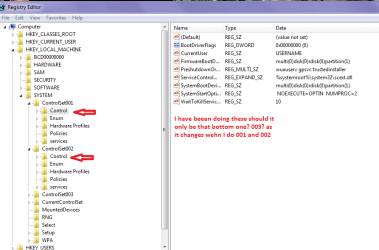
Shawn I might have been doing this wrong - I have been doing the first two control sets so is just that last ref?? for Wait to kill??

Mine as I had told Two cables about:o
 

Attachments

  • REG2.PNG
    REG2.PNG
    22.3 KB · Views: 160

My Computer My Computer

At a glance

Desk1 7 Home Prem / Desk2 10 Pro / Main lap A...Desk1 i5 3750K / Laptop i7 GTX 860M / Desk2 i...Desk1 8GB (1866) / Desk2 16GB (1333) / Laptop...Desk 1& 2NVidia GTX 650 & Laptops on board Intel
Computer type
PC/Desktop
Computer Manufacturer/Model Number
Own build (new) Desk1 / Asus ROG Win 7 / Desk2 1st build
OS
Desk1 7 Home Prem / Desk2 10 Pro / Main lap Asus ROG 10 Pro 2 laptop Toshiba 7 Pro Asus P2520 7 & 10
CPU
Desk1 i5 3750K / Laptop i7 GTX 860M / Desk2 i5 2500
Motherboard
Desk1 Asus P877-V / Desk2 Gigabyte H67 UD3H / Laptop ?
Memory
Desk1 8GB (1866) / Desk2 16GB (1333) / Laptop 8Gb DDR3
Graphics Card(s)
Desk 1& 2NVidia GTX 650 & Laptops on board Intel
Sound Card
Desk 1 & 2 -XONAR DG Realtek High Def audio Laptop
Monitor(s) Displays
Desk 1 Benq HD 2450 / Desk2 Philips 24" / Laptop 17.5"
Screen Resolution
1920x1080 D1 & D2 & Laptop 1
Hard Drives
Desk1 Samsung 120GB 830 SSD
Asus ROG 256GB 850 Pro SSD
Desk2 Samsung 840 256 SSD
Toshiba 120GB EVO
PSU
Desk 1 Corsair HX 1050/ Laptop ? / Desk 2 Corsair HX 650
Case
Desk 1 Cooler HAF XM ? Toshiba laptop / Desk2 Coolermaster
Cooling
Fans on all Desk1 -2 Desk2 - all Coolermasters 5 Laptop ?
Keyboard
Desk 1 MS Sidewinder X6 Desk 2 MS Sidewinder X 4
Mouse
Desk 1&2 - Gigabyte MS 900 gamer - laptop - Logitec wireless
Internet Speed
ADSL2+
Other Info
One other Desktop (tester) and spare Toshba laptop both with SSD's
Running Kaspersky 2016 ISS on all machines config'd identically
Logitec audio stereo systems on each machine (x3)
Canon MG5250MFC
Router/modem TP-Link running WPA2SK
Hello John,

You only need to do the tutorial in the registry location below, and not what's in your screenshot. The ControlSet### keys are just backup versions of your CurrentControlSet key. :)

HKEY_LOCAL_MACHINE\SYSTEM\CurrentControlSet\Control
 

My Computer My Computer

At a glance

64-bit Windows 11 Pro for WorkstationsIntel i7-8700K OC'd to 5 GHz64 GB (4x16GB) G.SKILL TridentZ RGB DDR4 3600...ASUS ROG-STRIX-GTX1080TI-O11G-GAMING
Computer type
PC/Desktop
Computer Manufacturer/Model Number
Self built custom
OS
64-bit Windows 11 Pro for Workstations
CPU
Intel i7-8700K OC'd to 5 GHz
Motherboard
ASUS ROG Maximus XI Formula Z390
Memory
64 GB (4x16GB) G.SKILL TridentZ RGB DDR4 3600 MHz
Graphics Card(s)
ASUS ROG-STRIX-GTX1080TI-O11G-GAMING
Sound Card
Integrated
Monitor(s) Displays
2 x Samsung Odyssey G7 27"
Screen Resolution
2560x1440
Hard Drives
1TB Samsung 990 PRO M.2,
4TB Samsung 990 PRO PRO M.2,
TerraMaster F8 SSD Plus NAS
PSU
Seasonic Prime Titanium 850W
Case
Thermaltake Core P3
Cooling
Corsair Hydro H115i
Keyboard
Logitech wireless K800
Mouse
Logitech MX Master 4
Internet Speed
2 Gb/s Download and 100 Mb/s Upload
Antivirus
Malwarebyte Anti-Malware Premium
Browser
Google Chrome
Other Info
Logitech Z625 speaker system,
Logitech BRIO 4K Pro webcam,
HP Color LaserJet Pro MFP M477fdn,
APC SMART-UPS RT 1000 XL - SURT1000XLI,
Galaxy S23 Plus phone
Thanks Shawn I'll reset the machines:)
 

My Computer My Computer

At a glance

Desk1 7 Home Prem / Desk2 10 Pro / Main lap A...Desk1 i5 3750K / Laptop i7 GTX 860M / Desk2 i...Desk1 8GB (1866) / Desk2 16GB (1333) / Laptop...Desk 1& 2NVidia GTX 650 & Laptops on board Intel
Computer type
PC/Desktop
Computer Manufacturer/Model Number
Own build (new) Desk1 / Asus ROG Win 7 / Desk2 1st build
OS
Desk1 7 Home Prem / Desk2 10 Pro / Main lap Asus ROG 10 Pro 2 laptop Toshiba 7 Pro Asus P2520 7 & 10
CPU
Desk1 i5 3750K / Laptop i7 GTX 860M / Desk2 i5 2500
Motherboard
Desk1 Asus P877-V / Desk2 Gigabyte H67 UD3H / Laptop ?
Memory
Desk1 8GB (1866) / Desk2 16GB (1333) / Laptop 8Gb DDR3
Graphics Card(s)
Desk 1& 2NVidia GTX 650 & Laptops on board Intel
Sound Card
Desk 1 & 2 -XONAR DG Realtek High Def audio Laptop
Monitor(s) Displays
Desk 1 Benq HD 2450 / Desk2 Philips 24" / Laptop 17.5"
Screen Resolution
1920x1080 D1 & D2 & Laptop 1
Hard Drives
Desk1 Samsung 120GB 830 SSD
Asus ROG 256GB 850 Pro SSD
Desk2 Samsung 840 256 SSD
Toshiba 120GB EVO
PSU
Desk 1 Corsair HX 1050/ Laptop ? / Desk 2 Corsair HX 650
Case
Desk 1 Cooler HAF XM ? Toshiba laptop / Desk2 Coolermaster
Cooling
Fans on all Desk1 -2 Desk2 - all Coolermasters 5 Laptop ?
Keyboard
Desk 1 MS Sidewinder X6 Desk 2 MS Sidewinder X 4
Mouse
Desk 1&2 - Gigabyte MS 900 gamer - laptop - Logitec wireless
Internet Speed
ADSL2+
Other Info
One other Desktop (tester) and spare Toshba laptop both with SSD's
Running Kaspersky 2016 ISS on all machines config'd identically
Logitec audio stereo systems on each machine (x3)
Canon MG5250MFC
Router/modem TP-Link running WPA2SK
Back
Top