
Shut Down -Speed Up

How to Set WaitToKillServiceTimeout to Speed Up Shut Down Time in Windows


   Information
This tutorial will show you how to set the WaitToKillServiceTimeout to how long the system waits for services to stop after notifying the service that the system is shutting down in XP, Vista, Windows 7 and Windows 8.

When the WaitToKillServiceTimeout value of this entry expires, the system notifies the user that the service has not stopped. The user can either force the service task to stop or continue to wait. If the user waits, this WaitToKillServiceTimeout value specifies the interval between repeated user notices that the service has not stopped.

If all services stop before this WaitToKillServiceTimeout value expires, the system shuts down; it does not wait for this value to expire.
   Warning
You should always save and close all programs before shutting down the computer to help prevent any data loss.


   Tip
If your shutdown time is still taking longer then normal, then check these items below.


OPTION ONE

Set WaitToKillServiceTimeout before Shut Down using a REG File Download


1. Do step 2, 3, or 4 below for what you would like to do.

2. To Speed Up Shut Down Time with 2 Second WaitToKillServiceTimeout
A) Click on the Download button below to download the file below, and go to step 5 below.
NOTE: This sets the shutdown "Wait to kill" time to 2 seconds (2000 milliseconds). If you want shutdown to wait for a different amount of seconds, then do the manual method below.
2_Second_Shutdown.reg

Download


3. To Restore the Default WaitToKillServiceTimeout in Windows 7
A) Click on the Download button below to download the file below, and go to step 5 below.
NOTE: The default shutdown "wait to kill" time is 12 seconds (12000 milliseconds) in Windows 7.
Windows-7_Default_Shutdown_Time.reg

Download


4. To Restore the Default WaitToKillServiceTimeout in Windows 8
A) Click on the Download button below to download the file below, and go to step 5 below.
NOTE: The default shutdown "wait to kill" time is 5 seconds (5000 milliseconds) in Windows 7.
Windows-8_Default_Shutdown_Time.reg

Download


5. Save, and save the .reg file to your desktop.

6. Double click on the downloaded .reg file to merge it.

7. If prompted, click on Run, Yes (UAC), Yes, and OK to approve the merge.

8. If you like, you may also wish to change the HungAppTimeout, WaitToKillAppTimeout, and AutoEndTasks values to what you want.

9. When finished, you can delete the downloaded .reg file if you like.


OPTION TWO

Set WaitToKillServiceTimeout before Shut Down in Registry Editor


1. Press the Windows + R keys to open the Run dialog, type regedit, and click/tap on OK.

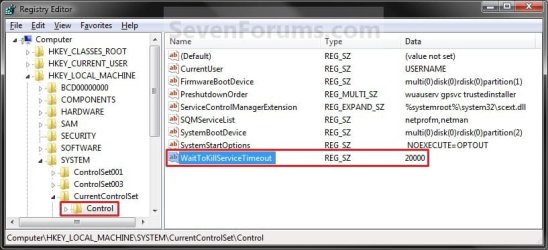
2. In regedit, go to: (See screenshot below)
HKEY_LOCAL_MACHINE\SYSTEM\CurrentControlSet\Control
Regedit.jpg
3. In the right pane, right click on WaitToKillServiceTimeout, and click on Modify. (See screenshot above)

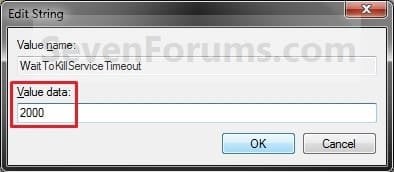
4. Type in a number between 2000-20000 (2-20 seconds), and click on OK. (See screenshot below)
NOTE: The default time is 12000 (Windows 7) or 5000 (Windows 8). I use 2000 (2 seconds) and have not had any problems. Your experience may vary.
Modify.jpg
5. If you like, you may also wish to change the HungAppTimeout, WaitToKillAppTimeout, and AutoEndTasks values to what you want.

6. When finished, you can close Registry Editor if you like.
NOTE: If you have problems with programs from your computer shutting down to quickly, then repeat the above steps and increase the WaitToKillServiceTimeout time (step 5) a bit.
That's it,
Shawn


Attachments

Last edited:
You're most welcome John. :)
 

My Computer

Computer type
PC/Desktop
Computer Manufacturer/Model Number
Self built custom
OS
64-bit Windows 11 Pro for Workstations
CPU
Intel i7-8700K OC'd to 5 GHz
Motherboard
ASUS ROG Maximus XI Formula Z390
Memory
64 GB (4x16GB) G.SKILL TridentZ RGB DDR4 3600 MHz
Graphics Card(s)
ASUS ROG-STRIX-GTX1080TI-O11G-GAMING
Sound Card
Integrated
Monitor(s) Displays
2 x Samsung Odyssey G7 27"
Screen Resolution
2560x1440
Hard Drives
1TB Samsung 990 PRO M.2,
4TB Samsung 990 PRO PRO M.2,
TerraMaster F8 SSD Plus NAS
PSU
Seasonic Prime Titanium 850W
Case
Thermaltake Core P3
Cooling
Corsair Hydro H115i
Keyboard
Logitech wireless K800
Mouse
Logitech MX Master 4
Internet Speed
2 Gb/s Download and 100 Mb/s Upload
Antivirus
Malwarebyte Anti-Malware Premium
Browser
Google Chrome
Other Info
Logitech Z625 speaker system,
Logitech BRIO 4K Pro webcam,
HP Color LaserJet Pro MFP M477fdn,
APC SMART-UPS RT 1000 XL - SURT1000XLI,
Galaxy S23 Plus phone
Thanks for the tutorial. I used option 2 and set to 2000. No problems.
 

My Computer

OS
Microsoft Windows 7 Home Premium 64-bit
THANK YOU!
This has always bugged me: waiting & waiting for the reboot.
The perfect solution!
 

My Computer

Computer type
Laptop
Computer Manufacturer/Model Number
HP G6
OS
Windows 7 Ultimate.
Antivirus
Norton Security
Browser
IE 11/Chrome/Msn Explorer/Firefox

My Computer

Computer type
PC/Desktop
Computer Manufacturer/Model Number
Own build (new) Desk1 / Asus ROG Win 7 / Desk2 1st build
OS
Desk1 7 Home Prem / Desk2 10 Pro / Main lap Asus ROG 10 Pro 2 laptop Toshiba 7 Pro Asus P2520 7 & 10
CPU
Desk1 i5 3750K / Laptop i7 GTX 860M / Desk2 i5 2500
Motherboard
Desk1 Asus P877-V / Desk2 Gigabyte H67 UD3H / Laptop ?
Memory
Desk1 8GB (1866) / Desk2 16GB (1333) / Laptop 8Gb DDR3
Graphics Card(s)
Desk 1& 2NVidia GTX 650 & Laptops on board Intel
Sound Card
Desk 1 & 2 -XONAR DG Realtek High Def audio Laptop
Monitor(s) Displays
Desk 1 Benq HD 2450 / Desk2 Philips 24" / Laptop 17.5"
Screen Resolution
1920x1080 D1 & D2 & Laptop 1
Hard Drives
Desk1 Samsung 120GB 830 SSD
Asus ROG 256GB 850 Pro SSD
Desk2 Samsung 840 256 SSD
Toshiba 120GB EVO
PSU
Desk 1 Corsair HX 1050/ Laptop ? / Desk 2 Corsair HX 650
Case
Desk 1 Cooler HAF XM ? Toshiba laptop / Desk2 Coolermaster
Cooling
Fans on all Desk1 -2 Desk2 - all Coolermasters 5 Laptop ?
Keyboard
Desk 1 MS Sidewinder X6 Desk 2 MS Sidewinder X 4
Mouse
Desk 1&2 - Gigabyte MS 900 gamer - laptop - Logitec wireless
Internet Speed
ADSL2+
Other Info
One other Desktop (tester) and spare Toshba laptop both with SSD's
Running Kaspersky 2016 ISS on all machines config'd identically
Logitec audio stereo systems on each machine (x3)
Canon MG5250MFC
Router/modem TP-Link running WPA2SK

My Computer

Computer type
Laptop
Computer Manufacturer/Model Number
Dell
OS
Windows 7 Ultimate 64bit
CPU
2.2
Memory
8Gb
Graphics Card(s)
NVIDIA
Screen Resolution
1280/762
Mouse
built in pad || iphone || MS wireless
Internet Speed
100MB
Antivirus
Avast
Browser
Chrome, Chrome portable
I imagine that to do something like this
10426-shut-down-speed-up-12000.png


you need to pass some variables.

Some info here, but it's a bit above my level of understanding :(
 

My Computer

Computer type
Laptop
Computer Manufacturer/Model Number
Dell
OS
Windows 7 Ultimate 64bit
CPU
2.2
Memory
8Gb
Graphics Card(s)
NVIDIA
Screen Resolution
1280/762
Mouse
built in pad || iphone || MS wireless
Internet Speed
100MB
Antivirus
Avast
Browser
Chrome, Chrome portable
Jonny mate in the tutorial by Brink http://www.sevenforums.com/tutorials/717-shut-down-speed-up.html just as in Option 2 in the registry but as a precaution do this first just in case you do something wrong
http://www.sevenforums.com/tutorials/4230-registry-backup-restore.html I always do this after a clean install and before tweaking the registry - not that Brinks tutorial will do anything untoward but you just might hit the wrong key or button and if things go awry then you can just merge the registry settings back and start again it is a good safety net.
I have mine set to 5 but you can set it to what you like 20 50 100 etc
Same goes with the menu start up in the Optimise tutorial see point 16 in http://www.sevenforums.com/tutorials/11728-optimize-windows-7-a.html it will speed the start up for you, in fact most of the tweaks will. But do that backup FIRST!!
 

My Computer

Computer type
PC/Desktop
Computer Manufacturer/Model Number
Own build (new) Desk1 / Asus ROG Win 7 / Desk2 1st build
OS
Desk1 7 Home Prem / Desk2 10 Pro / Main lap Asus ROG 10 Pro 2 laptop Toshiba 7 Pro Asus P2520 7 & 10
CPU
Desk1 i5 3750K / Laptop i7 GTX 860M / Desk2 i5 2500
Motherboard
Desk1 Asus P877-V / Desk2 Gigabyte H67 UD3H / Laptop ?
Memory
Desk1 8GB (1866) / Desk2 16GB (1333) / Laptop 8Gb DDR3
Graphics Card(s)
Desk 1& 2NVidia GTX 650 & Laptops on board Intel
Sound Card
Desk 1 & 2 -XONAR DG Realtek High Def audio Laptop
Monitor(s) Displays
Desk 1 Benq HD 2450 / Desk2 Philips 24" / Laptop 17.5"
Screen Resolution
1920x1080 D1 & D2 & Laptop 1
Hard Drives
Desk1 Samsung 120GB 830 SSD
Asus ROG 256GB 850 Pro SSD
Desk2 Samsung 840 256 SSD
Toshiba 120GB EVO
PSU
Desk 1 Corsair HX 1050/ Laptop ? / Desk 2 Corsair HX 650
Case
Desk 1 Cooler HAF XM ? Toshiba laptop / Desk2 Coolermaster
Cooling
Fans on all Desk1 -2 Desk2 - all Coolermasters 5 Laptop ?
Keyboard
Desk 1 MS Sidewinder X6 Desk 2 MS Sidewinder X 4
Mouse
Desk 1&2 - Gigabyte MS 900 gamer - laptop - Logitec wireless
Internet Speed
ADSL2+
Other Info
One other Desktop (tester) and spare Toshba laptop both with SSD's
Running Kaspersky 2016 ISS on all machines config'd identically
Logitec audio stereo systems on each machine (x3)
Canon MG5250MFC
Router/modem TP-Link running WPA2SK
That doesn't answer my question

How do you configure the event viewer's action for an event (103 etc from Microsoft-Windows-Diagnostics-Performance/Operational) to reference the boot / reboot info, like in the image above?
 

My Computer

Computer type
Laptop
Computer Manufacturer/Model Number
Dell
OS
Windows 7 Ultimate 64bit
CPU
2.2
Memory
8Gb
Graphics Card(s)
NVIDIA
Screen Resolution
1280/762
Mouse
built in pad || iphone || MS wireless
Internet Speed
100MB
Antivirus
Avast
Browser
Chrome, Chrome portable

My Computer

Computer type
PC/Desktop
Computer Manufacturer/Model Number
Self built custom
OS
64-bit Windows 11 Pro for Workstations
CPU
Intel i7-8700K OC'd to 5 GHz
Motherboard
ASUS ROG Maximus XI Formula Z390
Memory
64 GB (4x16GB) G.SKILL TridentZ RGB DDR4 3600 MHz
Graphics Card(s)
ASUS ROG-STRIX-GTX1080TI-O11G-GAMING
Sound Card
Integrated
Monitor(s) Displays
2 x Samsung Odyssey G7 27"
Screen Resolution
2560x1440
Hard Drives
1TB Samsung 990 PRO M.2,
4TB Samsung 990 PRO PRO M.2,
TerraMaster F8 SSD Plus NAS
PSU
Seasonic Prime Titanium 850W
Case
Thermaltake Core P3
Cooling
Corsair Hydro H115i
Keyboard
Logitech wireless K800
Mouse
Logitech MX Master 4
Internet Speed
2 Gb/s Download and 100 Mb/s Upload
Antivirus
Malwarebyte Anti-Malware Premium
Browser
Google Chrome
Other Info
Logitech Z625 speaker system,
Logitech BRIO 4K Pro webcam,
HP Color LaserJet Pro MFP M477fdn,
APC SMART-UPS RT 1000 XL - SURT1000XLI,
Galaxy S23 Plus phone
That doesn't answer my question

How do you configure the event viewer's action for an event (103 etc from Microsoft-Windows-Diagnostics-Performance/Operational) to reference the boot / reboot info, like in the image above?
My mistake Jonny I thought you were after how to reduce the shut down and included the menu start time feature to speed things up and why I ref'd Brink's tutorial but seems like you are not into that so I shall leave it at that..

Brink has answered what you need to know. For my own personal use I find that a rather material feature as I just use a timepiece to check mine and like a few other things the restart thing is a curiousity come bragging item.
 

My Computer

Computer type
PC/Desktop
Computer Manufacturer/Model Number
Own build (new) Desk1 / Asus ROG Win 7 / Desk2 1st build
OS
Desk1 7 Home Prem / Desk2 10 Pro / Main lap Asus ROG 10 Pro 2 laptop Toshiba 7 Pro Asus P2520 7 & 10
CPU
Desk1 i5 3750K / Laptop i7 GTX 860M / Desk2 i5 2500
Motherboard
Desk1 Asus P877-V / Desk2 Gigabyte H67 UD3H / Laptop ?
Memory
Desk1 8GB (1866) / Desk2 16GB (1333) / Laptop 8Gb DDR3
Graphics Card(s)
Desk 1& 2NVidia GTX 650 & Laptops on board Intel
Sound Card
Desk 1 & 2 -XONAR DG Realtek High Def audio Laptop
Monitor(s) Displays
Desk 1 Benq HD 2450 / Desk2 Philips 24" / Laptop 17.5"
Screen Resolution
1920x1080 D1 & D2 & Laptop 1
Hard Drives
Desk1 Samsung 120GB 830 SSD
Asus ROG 256GB 850 Pro SSD
Desk2 Samsung 840 256 SSD
Toshiba 120GB EVO
PSU
Desk 1 Corsair HX 1050/ Laptop ? / Desk 2 Corsair HX 650
Case
Desk 1 Cooler HAF XM ? Toshiba laptop / Desk2 Coolermaster
Cooling
Fans on all Desk1 -2 Desk2 - all Coolermasters 5 Laptop ?
Keyboard
Desk 1 MS Sidewinder X6 Desk 2 MS Sidewinder X 4
Mouse
Desk 1&2 - Gigabyte MS 900 gamer - laptop - Logitec wireless
Internet Speed
ADSL2+
Other Info
One other Desktop (tester) and spare Toshba laptop both with SSD's
Running Kaspersky 2016 ISS on all machines config'd identically
Logitec audio stereo systems on each machine (x3)
Canon MG5250MFC
Router/modem TP-Link running WPA2SK
Back
Top