
Shut Down -Speed Up

How to Set WaitToKillServiceTimeout to Speed Up Shut Down Time in Windows


   Information
This tutorial will show you how to set the WaitToKillServiceTimeout to how long the system waits for services to stop after notifying the service that the system is shutting down in XP, Vista, Windows 7 and Windows 8.

When the WaitToKillServiceTimeout value of this entry expires, the system notifies the user that the service has not stopped. The user can either force the service task to stop or continue to wait. If the user waits, this WaitToKillServiceTimeout value specifies the interval between repeated user notices that the service has not stopped.

If all services stop before this WaitToKillServiceTimeout value expires, the system shuts down; it does not wait for this value to expire.
   Warning
You should always save and close all programs before shutting down the computer to help prevent any data loss.


   Tip
If your shutdown time is still taking longer then normal, then check these items below.


OPTION ONE

Set WaitToKillServiceTimeout before Shut Down using a REG File Download


1. Do step 2, 3, or 4 below for what you would like to do.

2. To Speed Up Shut Down Time with 2 Second WaitToKillServiceTimeout
A) Click on the Download button below to download the file below, and go to step 5 below.
NOTE: This sets the shutdown "Wait to kill" time to 2 seconds (2000 milliseconds). If you want shutdown to wait for a different amount of seconds, then do the manual method below.
2_Second_Shutdown.reg

Download


3. To Restore the Default WaitToKillServiceTimeout in Windows 7
A) Click on the Download button below to download the file below, and go to step 5 below.
NOTE: The default shutdown "wait to kill" time is 12 seconds (12000 milliseconds) in Windows 7.
Windows-7_Default_Shutdown_Time.reg

Download


4. To Restore the Default WaitToKillServiceTimeout in Windows 8
A) Click on the Download button below to download the file below, and go to step 5 below.
NOTE: The default shutdown "wait to kill" time is 5 seconds (5000 milliseconds) in Windows 7.
Windows-8_Default_Shutdown_Time.reg

Download


5. Save, and save the .reg file to your desktop.

6. Double click on the downloaded .reg file to merge it.

7. If prompted, click on Run, Yes (UAC), Yes, and OK to approve the merge.

8. If you like, you may also wish to change the HungAppTimeout, WaitToKillAppTimeout, and AutoEndTasks values to what you want.

9. When finished, you can delete the downloaded .reg file if you like.


OPTION TWO

Set WaitToKillServiceTimeout before Shut Down in Registry Editor


1. Press the Windows + R keys to open the Run dialog, type regedit, and click/tap on OK.

2. In regedit, go to: (See screenshot below)
HKEY_LOCAL_MACHINE\SYSTEM\CurrentControlSet\Control
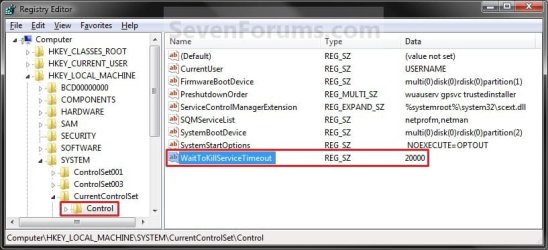
Regedit.jpg
3. In the right pane, right click on WaitToKillServiceTimeout, and click on Modify. (See screenshot above)

4. Type in a number between 2000-20000 (2-20 seconds), and click on OK. (See screenshot below)
NOTE: The default time is 12000 (Windows 7) or 5000 (Windows 8). I use 2000 (2 seconds) and have not had any problems. Your experience may vary.
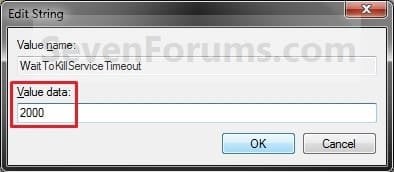
Modify.jpg
5. If you like, you may also wish to change the HungAppTimeout, WaitToKillAppTimeout, and AutoEndTasks values to what you want.

6. When finished, you can close Registry Editor if you like.
NOTE: If you have problems with programs from your computer shutting down to quickly, then repeat the above steps and increase the WaitToKillServiceTimeout time (step 5) a bit.
That's it,
Shawn


Attachments

Last edited:
You're welcome DjProgDG. :)
 

My Computer

Computer type
PC/Desktop
Computer Manufacturer/Model Number
Self built custom
OS
64-bit Windows 11 Pro for Workstations
CPU
Intel i7-8700K OC'd to 5 GHz
Motherboard
ASUS ROG Maximus XI Formula Z390
Memory
64 GB (4x16GB) G.SKILL TridentZ RGB DDR4 3600 MHz
Graphics Card(s)
ASUS ROG-STRIX-GTX1080TI-O11G-GAMING
Sound Card
Integrated
Monitor(s) Displays
2 x Samsung Odyssey G7 27"
Screen Resolution
2560x1440
Hard Drives
1TB Samsung 990 PRO M.2,
4TB Samsung 990 PRO PRO M.2,
TerraMaster F8 SSD Plus NAS
PSU
Seasonic Prime Titanium 850W
Case
Thermaltake Core P3
Cooling
Corsair Hydro H115i
Keyboard
Logitech wireless K800
Mouse
Logitech MX Master 4
Internet Speed
2 Gb/s Download and 100 Mb/s Upload
Antivirus
Malwarebyte Anti-Malware Premium
Browser
Google Chrome
Other Info
Logitech Z625 speaker system,
Logitech BRIO 4K Pro webcam,
HP Color LaserJet Pro MFP M477fdn,
APC SMART-UPS RT 1000 XL - SURT1000XLI,
Galaxy S23 Plus phone
Windows 7 starts up faster, shuts down faster then previous versions by default. The guide here shows you how to take that one more step to lessen the shutdown time even further! Can't beat that now! :D
 

My Computers

System One System Two

  • Computer type
    PC/Desktop
    Computer Manufacturer/Model Number
    Custom builds = 2
    OS
    W7 Ultimate x64/W10 Pro x64/W11 Pro Triple Boot - Main PC W7 Remote PC Micro ATX W7 Pro x64/W11 Pro
    CPU
    AMD Phenom II X4 975 Deneb 3.6ghz - 965 2nd remote pc
    Motherboard
    Gigabyte GA-790XTA-UD4-Gigabyte GA-880GM-D2H remote pc
    Memory
    Kingston Hyper X DDR3 1600 1.5v 16gb - Hyper X Fury 8gb 2nd
    Graphics Card(s)
    MSI HD Radeon 5750 1gb - MSI HD Radeon 6450 on mini tower
    Sound Card
    Creative Labs X-Fi Xtreme Audio P - Realtek onooard 2nd case
    Monitor(s) Displays
    ASUS VW199T-P 19" HP 2082a Main-HP 2082a 20" remote pc
    Screen Resolution
    Asus 1440x900 - HP 1600x900
    Hard Drives
    WD Black 1TB HD per OS W7, W10, and pending W11 presently on 500gb OS Drive - Pending Triple 1TB HDs for Spanned Storage/backup volume
    Single 2TB external USB enclosure, single 1TB System 7 Host/Boot drive, Pending 8TB external HD for system image b
    PSU
    Corsair 750TX - primary / Corsair CX600 - second
    Case
    Antec 900-2 - SSD compatible / NZXT Vulcan mini tower
    Cooling
    Zalman CNPS9900A
    Keyboard
    AZIO L70 Backlit Letters Gaming - ONN Cordless/USB
    Mouse
    MSI DS200 Programmable, Logitech Cordless
    Internet Speed
    30mbps upgrade - primary hard wired - mini tower usb WiFi
    Antivirus
    GFI VIPRE Internet Security 2014 on W7 2016 beta on W10,
    Browser
    Cyberfox, WaterFox 64bit FF variants, FireFox x64, Pale Moon
    Other Info
    Accomdata fan cooled usb 2.0 PIDE/Sata II, III external enclosure.
    Sambient usb/eSata PATA/Sata II, III external enclosure.
  • Computer type
    PC/Desktop
    System Manufacturer/Model Number
    CUSTOM ASSEMBLY
    OS
    W7 Pro x64/W11 Pro
    CPU
    AMD Deneb 3.6ghz - 965
    Motherboard
    Gigabyte GA-880GM-D2H remote pc
    Memory
    Kingston Hyper X Fury 8gb
    Graphics Card(s)
    MSI HD Radeon 6450 DVI Output
    Sound Card
    Realtek onooard Creative or Other separate PENDING
    Monitor(s) Displays
    VIZIO 32" LCD TV Separate LCD Pending
    Screen Resolution
    1600x1080
    Hard Drives
    WD 500GB OS Host/Boot WD Green 1TB Storage/Backup
    PSU
    Corsair 600W - THERMALTAKE 600W spare case
    Case
    NZXT Vulcan mini tower
    Cooling
    Twin 120mm Top Fans - 240mm Side Cover
    Keyboard
    ONN Cordless/USB Logitech Cordless
    Mouse
    ONN USB/Cordless - Logitech Cordless
    Internet Speed
    DSL 5G
    Browser
    MS Edge, FireFox, WaterFox x64, FireFox Nightly
    Other Info
    OS Testing-Remote Access to Main TeamViewer
Thanks, I was always curious if this could be done!
 

My Computer

Computer Manufacturer/Model Number
Custom
OS
Windows 7 Professional; Windows 7 Starter
CPU
Intel Core2 Quad Q9400
Motherboard
Asus P5Q
Memory
4Gb
Graphics Card(s)
ATI Radeon 4870 HD 1Gb
Monitor(s) Displays
BenQ E2200HD
Hard Drives
2x 500Gb SATA2 HDD
1x 1Tb SATA 3.5"
Case
Antec Twelve Hundred
It's more then possible to do it. But you really don't want to lower the time down too much since then you will see a wait for some things to close completely during the shutdown, restart, or simply logging off.
 

My Computers

System One System Two

  • Computer type
    PC/Desktop
    Computer Manufacturer/Model Number
    Custom builds = 2
    OS
    W7 Ultimate x64/W10 Pro x64/W11 Pro Triple Boot - Main PC W7 Remote PC Micro ATX W7 Pro x64/W11 Pro
    CPU
    AMD Phenom II X4 975 Deneb 3.6ghz - 965 2nd remote pc
    Motherboard
    Gigabyte GA-790XTA-UD4-Gigabyte GA-880GM-D2H remote pc
    Memory
    Kingston Hyper X DDR3 1600 1.5v 16gb - Hyper X Fury 8gb 2nd
    Graphics Card(s)
    MSI HD Radeon 5750 1gb - MSI HD Radeon 6450 on mini tower
    Sound Card
    Creative Labs X-Fi Xtreme Audio P - Realtek onooard 2nd case
    Monitor(s) Displays
    ASUS VW199T-P 19" HP 2082a Main-HP 2082a 20" remote pc
    Screen Resolution
    Asus 1440x900 - HP 1600x900
    Hard Drives
    WD Black 1TB HD per OS W7, W10, and pending W11 presently on 500gb OS Drive - Pending Triple 1TB HDs for Spanned Storage/backup volume
    Single 2TB external USB enclosure, single 1TB System 7 Host/Boot drive, Pending 8TB external HD for system image b
    PSU
    Corsair 750TX - primary / Corsair CX600 - second
    Case
    Antec 900-2 - SSD compatible / NZXT Vulcan mini tower
    Cooling
    Zalman CNPS9900A
    Keyboard
    AZIO L70 Backlit Letters Gaming - ONN Cordless/USB
    Mouse
    MSI DS200 Programmable, Logitech Cordless
    Internet Speed
    30mbps upgrade - primary hard wired - mini tower usb WiFi
    Antivirus
    GFI VIPRE Internet Security 2014 on W7 2016 beta on W10,
    Browser
    Cyberfox, WaterFox 64bit FF variants, FireFox x64, Pale Moon
    Other Info
    Accomdata fan cooled usb 2.0 PIDE/Sata II, III external enclosure.
    Sambient usb/eSata PATA/Sata II, III external enclosure.
  • Computer type
    PC/Desktop
    System Manufacturer/Model Number
    CUSTOM ASSEMBLY
    OS
    W7 Pro x64/W11 Pro
    CPU
    AMD Deneb 3.6ghz - 965
    Motherboard
    Gigabyte GA-880GM-D2H remote pc
    Memory
    Kingston Hyper X Fury 8gb
    Graphics Card(s)
    MSI HD Radeon 6450 DVI Output
    Sound Card
    Realtek onooard Creative or Other separate PENDING
    Monitor(s) Displays
    VIZIO 32" LCD TV Separate LCD Pending
    Screen Resolution
    1600x1080
    Hard Drives
    WD 500GB OS Host/Boot WD Green 1TB Storage/Backup
    PSU
    Corsair 600W - THERMALTAKE 600W spare case
    Case
    NZXT Vulcan mini tower
    Cooling
    Twin 120mm Top Fans - 240mm Side Cover
    Keyboard
    ONN Cordless/USB Logitech Cordless
    Mouse
    ONN USB/Cordless - Logitech Cordless
    Internet Speed
    DSL 5G
    Browser
    MS Edge, FireFox, WaterFox x64, FireFox Nightly
    Other Info
    OS Testing-Remote Access to Main TeamViewer
thanks brink..
 

My Computer

Computer Manufacturer/Model Number
acer aspire 5920
OS
windows 7 ultimate x64
CPU
core 2 duo T5550
Motherboard
acer chapala
Memory
4 GB DDR2
Graphics Card(s)
Intel GMA X3100
Hard Drives
500 GB
But what would happen if I change the value to absolute zero 0000??? Will that cause crashes???
 

My Computer

Computer Manufacturer/Model Number
Custom Built
OS
Windows 7 Ultimate 32 Bit, Windows Developer Preview, Linux Mint 9 Gnome 32 Bit
CPU
Intel Pentium Dual CPU E2180@2GHz
Motherboard
Elitegroup 671T-M3
Graphics Card(s)
NVIDIA GeForce 7200 GS
Monitor(s) Displays
AOC TFT1560 15" LCD Monitor
Screen Resolution
1024x768
Keyboard
Logitech USB Keyboard
Hello Vertex,

You can try it if you like to see how well it works for you, but with it that low, it may close to fast and cause a delay while shutting down while Windows 7 is trying to close anything still open. If this happens for you, then you can always change it to a higher number. :)
 

My Computer

Computer type
PC/Desktop
Computer Manufacturer/Model Number
Self built custom
OS
64-bit Windows 11 Pro for Workstations
CPU
Intel i7-8700K OC'd to 5 GHz
Motherboard
ASUS ROG Maximus XI Formula Z390
Memory
64 GB (4x16GB) G.SKILL TridentZ RGB DDR4 3600 MHz
Graphics Card(s)
ASUS ROG-STRIX-GTX1080TI-O11G-GAMING
Sound Card
Integrated
Monitor(s) Displays
2 x Samsung Odyssey G7 27"
Screen Resolution
2560x1440
Hard Drives
1TB Samsung 990 PRO M.2,
4TB Samsung 990 PRO PRO M.2,
TerraMaster F8 SSD Plus NAS
PSU
Seasonic Prime Titanium 850W
Case
Thermaltake Core P3
Cooling
Corsair Hydro H115i
Keyboard
Logitech wireless K800
Mouse
Logitech MX Master 4
Internet Speed
2 Gb/s Download and 100 Mb/s Upload
Antivirus
Malwarebyte Anti-Malware Premium
Browser
Google Chrome
Other Info
Logitech Z625 speaker system,
Logitech BRIO 4K Pro webcam,
HP Color LaserJet Pro MFP M477fdn,
APC SMART-UPS RT 1000 XL - SURT1000XLI,
Galaxy S23 Plus phone
Why would someone want to disable the Wait to Kill time?
 

My Computer

Computer type
PC/Desktop
Computer Manufacturer/Model Number
Custom Desktop PC
OS
Windows 7 / Windows 8.1
CPU
Devils Canyon i7-4790K @ 4.8 GHz ~ 1.33v
Motherboard
Asus Z97 Deluxe
Memory
Corsair Vengeance Pro PC3-19200 DDR3 2400MHz
Graphics Card(s)
EVGA GeForce GTX 980 SuperClocked ACX 2.0
Sound Card
Realtek ALC1150 8 channels
Monitor(s) Displays
BenQ XL2720Z 27"
Screen Resolution
1920 x 1080 @ 144Hz
Hard Drives
SSD1: 512GB Samsung 850 Pro
SSD2: 1TB Samsung 850 EVO
SSD3: 1TB Samsung 850 EVO
HDD: 4TB Western Digital Black
Backup: Western Digital My Book Duo 8TB
PSU
Corsair HX1000i / CyberPower CP1500PFCLCD PFC Sinewave UPS 1
Case
Corsair Graphite 780T
Cooling
Custom single loop liquid; CPU delidded; Aerocool DS Fans
Keyboard
Logitech G710 Cherry MX Blue
Mouse
LogitechG502 Proteus Core
Internet Speed
Download: 119MBs /Upload 39.12MBs via Optimum 101 Ultra
Antivirus
MYOB
Browser
Firefox
Other Info
Cooling: EK-Supremecy MX Waterblock, XSPC AX360 Radiator, Swiftech MCP655 Series 12VDC D5 Pump, EK-RES x3 250 Reservoir, Primochill Ice Intensified Coolant, 11x AerocoolDS fans, Primochill Primoflex Avanced LRT Tubing
Why would someone want to disable the Wait to Kill time?
It makes a certain sense for reboots. But the effect is really minimal - especially on my system where the BIOS phase is longer than the Win7 boot time..
 

My Computer

Computer Manufacturer/Model Number
HP, Dell, Gateway, Toshiba - 4 laptops and 2 desktops
OS
Vista, Windows7, Mint Mate, Zorin, Windows 8
CPU
from 1.6GHz Duo to i7
Monitor(s) Displays
2x HP w2207
Hard Drives
5x HDD, 7x SSD, 12x Externals
Keyboard
with trackball - no mices
Mouse
Trackball mice
Internet Speed
DSL 6000
Is there a way to make the processes kill faster after the log off?
 

My Computer

Computer Manufacturer/Model Number
Toshiba Satellite L505D-S9565
OS
Windows 7 Home Premium x64, Mac OS X 10.6.2 x64
CPU
AMD Athlon X2 Dual-Core 2.1 GHz
Motherboard
Toshiba Built-In with Insyde H20 BIOS 1.40
Memory
4 GB DDR2 800 MHz
Graphics Card(s)
ATI Radeon HD Mobility 3100 Graphics 256MB to 1468 MB Shared
Sound Card
Realtek Mobile ALC272 HD Audio
Monitor(s) Displays
15.6" TFT LCD with TruBrite, Samsung 1080p HDTV
Screen Resolution
1366x768, 1920x1080
Hard Drives
❶:Main: Toshiba 250 GB SATA 5400 RPM
PSU
N/A
Case
N/A
Cooling
Built-in/Open window in winter :P
Keyboard
Built-in
Mouse
Build-in Symantics SmartTouch Pad
Internet Speed
55 MB/sec Down, 9 MB/sec Up
Other Info
❷:Backup: Seagate FreeAgent Desk USB 2.0 5400 RPM
❸:Media: Toshiba 640 GB USB 2.0 5400 RPM Portable Edition

My Computer

Computer Manufacturer/Model Number
HP, Dell, Gateway, Toshiba - 4 laptops and 2 desktops
OS
Vista, Windows7, Mint Mate, Zorin, Windows 8
CPU
from 1.6GHz Duo to i7
Monitor(s) Displays
2x HP w2207
Hard Drives
5x HDD, 7x SSD, 12x Externals
Keyboard
with trackball - no mices
Mouse
Trackball mice
Internet Speed
DSL 6000
I mean besides hardware change. And I dont even think u can change the CPU of a laptop.
 

My Computer

Computer Manufacturer/Model Number
Toshiba Satellite L505D-S9565
OS
Windows 7 Home Premium x64, Mac OS X 10.6.2 x64
CPU
AMD Athlon X2 Dual-Core 2.1 GHz
Motherboard
Toshiba Built-In with Insyde H20 BIOS 1.40
Memory
4 GB DDR2 800 MHz
Graphics Card(s)
ATI Radeon HD Mobility 3100 Graphics 256MB to 1468 MB Shared
Sound Card
Realtek Mobile ALC272 HD Audio
Monitor(s) Displays
15.6" TFT LCD with TruBrite, Samsung 1080p HDTV
Screen Resolution
1366x768, 1920x1080
Hard Drives
❶:Main: Toshiba 250 GB SATA 5400 RPM
PSU
N/A
Case
N/A
Cooling
Built-in/Open window in winter :P
Keyboard
Built-in
Mouse
Build-in Symantics SmartTouch Pad
Internet Speed
55 MB/sec Down, 9 MB/sec Up
Other Info
❷:Backup: Seagate FreeAgent Desk USB 2.0 5400 RPM
❸:Media: Toshiba 640 GB USB 2.0 5400 RPM Portable Edition
Thanks for the shut down/speed up article.

Tom:geek:
 

My Computer

OS
win7 home premium 64
CPU
intel core 2 quad Q6700
Motherboard
asus formula rampage
Memory
8gb corsair dominator ddr21066
Graphics Card(s)
2 radeon msi hd4870/crossfire
Monitor(s) Displays
Samsun ln-t2642h tft lcd tele
Hard Drives
2 wd velo 300bg
PSU
antec 650 trio
Case
cosmos cooler master 1000
Cooling
oem cpu fan + case fans+speedfan4.0
You're most welcome Tom, and welcome to Seven Forums. :)
 

My Computer

Computer type
PC/Desktop
Computer Manufacturer/Model Number
Self built custom
OS
64-bit Windows 11 Pro for Workstations
CPU
Intel i7-8700K OC'd to 5 GHz
Motherboard
ASUS ROG Maximus XI Formula Z390
Memory
64 GB (4x16GB) G.SKILL TridentZ RGB DDR4 3600 MHz
Graphics Card(s)
ASUS ROG-STRIX-GTX1080TI-O11G-GAMING
Sound Card
Integrated
Monitor(s) Displays
2 x Samsung Odyssey G7 27"
Screen Resolution
2560x1440
Hard Drives
1TB Samsung 990 PRO M.2,
4TB Samsung 990 PRO PRO M.2,
TerraMaster F8 SSD Plus NAS
PSU
Seasonic Prime Titanium 850W
Case
Thermaltake Core P3
Cooling
Corsair Hydro H115i
Keyboard
Logitech wireless K800
Mouse
Logitech MX Master 4
Internet Speed
2 Gb/s Download and 100 Mb/s Upload
Antivirus
Malwarebyte Anti-Malware Premium
Browser
Google Chrome
Other Info
Logitech Z625 speaker system,
Logitech BRIO 4K Pro webcam,
HP Color LaserJet Pro MFP M477fdn,
APC SMART-UPS RT 1000 XL - SURT1000XLI,
Galaxy S23 Plus phone
hey.
i seem to have run into a problem out of nowhere.
i already tried this tweak but it didnt resolve my issue.
when i click shutdown it takes like 3 seconds until it shows the "waiting for processes to terminate" or smth like that but it actually doesnt show any process in that list :sarc:
im running miranda, outlook and avast antivir most of the times im clicking shutdown but they havent been an issue. normally it would just go to "shutting down" in like 3 seconds and then its off. but now i get the processes error dialog thing for a minimum of 5 seconds. sometimes i click ok and it goes back to desktop and stays there... and when i click shutdown again nothing happens :devil:
this is really annoying - anyone got a clue?
 

My Computer

OS
win7x64
Hello Saibot,

Be sure to close all nonbackground programs (ex: Miranda & Outlook) first, then see how long it takes to shutdown. The delay you are seeing is Windows 7 trying to force these programs to close.
 

My Computer

Computer type
PC/Desktop
Computer Manufacturer/Model Number
Self built custom
OS
64-bit Windows 11 Pro for Workstations
CPU
Intel i7-8700K OC'd to 5 GHz
Motherboard
ASUS ROG Maximus XI Formula Z390
Memory
64 GB (4x16GB) G.SKILL TridentZ RGB DDR4 3600 MHz
Graphics Card(s)
ASUS ROG-STRIX-GTX1080TI-O11G-GAMING
Sound Card
Integrated
Monitor(s) Displays
2 x Samsung Odyssey G7 27"
Screen Resolution
2560x1440
Hard Drives
1TB Samsung 990 PRO M.2,
4TB Samsung 990 PRO PRO M.2,
TerraMaster F8 SSD Plus NAS
PSU
Seasonic Prime Titanium 850W
Case
Thermaltake Core P3
Cooling
Corsair Hydro H115i
Keyboard
Logitech wireless K800
Mouse
Logitech MX Master 4
Internet Speed
2 Gb/s Download and 100 Mb/s Upload
Antivirus
Malwarebyte Anti-Malware Premium
Browser
Google Chrome
Other Info
Logitech Z625 speaker system,
Logitech BRIO 4K Pro webcam,
HP Color LaserJet Pro MFP M477fdn,
APC SMART-UPS RT 1000 XL - SURT1000XLI,
Galaxy S23 Plus phone
hey ive used this tool, and my shut down time is still over 3.5min, why does it take over 3 min for my computer to shut down?
 

My Computer

OS
Windows 7 Home Premium 64Bit
Back
Top