Shut Down Windows Shortcut

How to Create a "Shut Down Windows" Shortcut in Windows 7

   Information
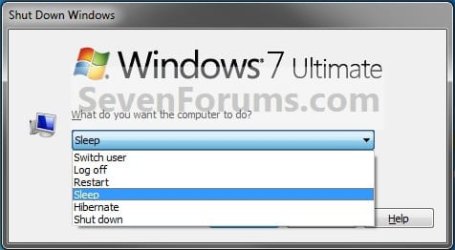
This will show you how to create a Shut Down Windows shortcut to use to select to either Switch user, Log off, Restart, Sleep, Hibernate, or Shutdown in Windows 7.

   Tip
Normally you can press Alt+F4 while the desktop is in focus to also open the Shut Down Windows dialog box.


EXAMPLE: Shut Down Windows
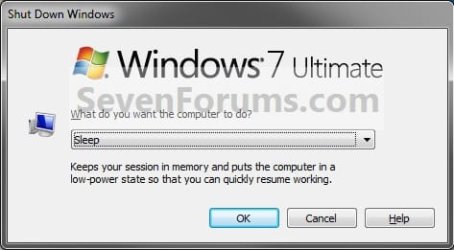
Example1.jpgExample2.jpg


OPTION ONE

To Download the "Shut Down Windows" Shortcut


1. Click on the download button below to download the file below.
Shut_Down_Windows.zip

Download


2. Click on Save and save the .zip file to the Desktop.

3. Right click on the .zip file (on desktop) and click on Open.

4. Select and extract the Shut Down Windows shortcut to the desktop.

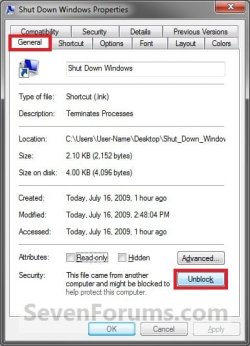
5. Right click on the Shut Down Windows shortcut and click on Properties, General tab, and the Unblock button. (See screenshot below)
NOTE: If the Unblock button is not there, then the shortcut is already unblocked. Continue on to step 8.
Unblock.jpg
6. You can now move the Shut Down Windows shortcut to any location that you want for easy use.

7. You can now delete the downloaded .zip file (on desktop) if you would like to.


OPTION TWO

To Manually Create the "Shut Down Windows" Shortcut


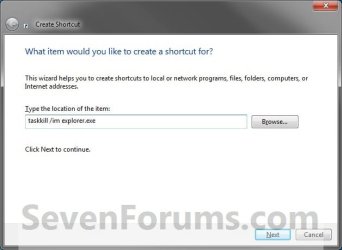
1. Right click on a empty space on your desktop, and click on New and Shortcut.

2. Type taskkill /im explorer.exe for the location, then click on the Next button. (See screenshot below)
Step1.jpg
3. Type Shut Down Windows for the name, then click on the Finish button. (See screenshot below)
Step2.jpg
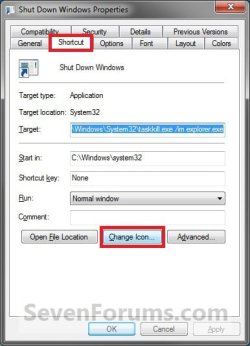
4. Right click on the Shut Down Windows shortcut on the desktop, then click on Properties, Shortcut tab, and on the Change Icon button. (See screenshot below)
NOTE: You can use whatever name you would like for the shortcut though.
Step3.jpg
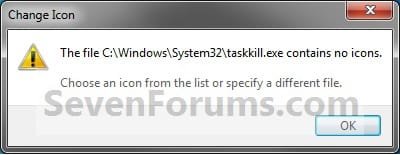
5. Click on OK. (See screenshot below)
Step4.jpg
6. Copy and paste the location in bold below into the Browse line, then press enter. (See screenshot below)
NOTE: If you have a icon of your own that you would prefer to use, then click on the Browse button, navigate to it instead.
C:\Windows\System32\imageres.dll

Step5.jpg
7. Select the icon you want (ex: Computer) and click on OK. (See screenshot above)

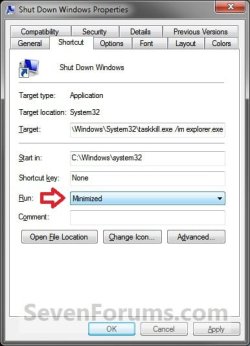
8. To the right in Run, select Minimized from the drop doen menu and click on OK. (See screenshots below)
NOTE: Selecting Minimized will get rid of the quick flash of the command prompt when you use this shortcut.
Step6.jpg Minimize.jpg
9. You can now move the Shut Down Windows shortcut to any location that you want for easy use.
That's it,
Shawn


Attachments

Last edited:
I guess you collaborated the main posts in this thread to make a new tutorial for shutdown. Nice tutorial Shawn. :)
 

My Computer My Computer

Computer Manufacturer/Model Number
Samsung NP530U4B-S02IN
OS
Windows® 8 Pro (64-bit)
CPU
Intel® Core™ i5 Processor 2467M (1.60GHz, 3MB L3 Cache)
Motherboard
Samsung Electronics
Memory
6GB DDR3 System Memory at 1,333MHz (on BD 4GB + 2GB x 1)
Graphics Card(s)
AMD Radeon™ HD7550M 1GB DDR3 (Ext. Graphic)
Sound Card
Realtek High Definition Audio
Monitor(s) Displays
35.56cm (14.0) SuperBright 300nit HD LED Display
Screen Resolution
1366x768
Hard Drives
1TB S-ATA II Hard Drive (5400RPM) with ExpressCache 16GB SSD
Internet Speed
sucks
Antivirus
Microsoft Security Essentials
Browser
Google Chrome (Sync enabled)
LOL, yep. You beat me before I could add it. :)
 

My Computer My Computer

Computer type
PC/Desktop
Computer Manufacturer/Model Number
Self built custom
OS
64-bit Windows 11 Pro for Workstations
CPU
Intel i7-8700K OC'd to 5 GHz
Motherboard
ASUS ROG Maximus XI Formula Z390
Memory
64 GB (4x16GB) G.SKILL TridentZ RGB DDR4 3600 MHz
Graphics Card(s)
ASUS ROG-STRIX-GTX1080TI-O11G-GAMING
Sound Card
Integrated
Monitor(s) Displays
2 x Samsung Odyssey G7 27"
Screen Resolution
2560x1440
Hard Drives
1TB Samsung 990 PRO M.2,
4TB Samsung 990 PRO PRO M.2,
TerraMaster F8 SSD Plus NAS
PSU
Seasonic Prime Titanium 850W
Case
Thermaltake Core P3
Cooling
Corsair Hydro H115i
Keyboard
Logitech wireless K800
Mouse
Logitech MX Master 4
Internet Speed
2 Gb/s Download and 100 Mb/s Upload
Antivirus
Malwarebyte Anti-Malware Premium
Browser
Google Chrome
Other Info
Logitech Z625 speaker system,
Logitech BRIO 4K Pro webcam,
HP Color LaserJet Pro MFP M477fdn,
APC SMART-UPS RT 1000 XL - SURT1000XLI,
Galaxy S23 Plus phone
But it will be really useful for many people. :)
 

My Computer My Computer

Computer Manufacturer/Model Number
Samsung NP530U4B-S02IN
OS
Windows® 8 Pro (64-bit)
CPU
Intel® Core™ i5 Processor 2467M (1.60GHz, 3MB L3 Cache)
Motherboard
Samsung Electronics
Memory
6GB DDR3 System Memory at 1,333MHz (on BD 4GB + 2GB x 1)
Graphics Card(s)
AMD Radeon™ HD7550M 1GB DDR3 (Ext. Graphic)
Sound Card
Realtek High Definition Audio
Monitor(s) Displays
35.56cm (14.0) SuperBright 300nit HD LED Display
Screen Resolution
1366x768
Hard Drives
1TB S-ATA II Hard Drive (5400RPM) with ExpressCache 16GB SSD
Internet Speed
sucks
Antivirus
Microsoft Security Essentials
Browser
Google Chrome (Sync enabled)
Thanks. This is a good one.
 

My Computer My Computer

Computer Manufacturer/Model Number
Acer Aspire 6920
OS
Dual boot - 7 Pro 64 bit/Vista 64 bit
CPU
Intel 2 Duo
Memory
4GB
You're welcome Roadrider, and welcome to Seven Forums. :)
 

My Computer My Computer

Computer type
PC/Desktop
Computer Manufacturer/Model Number
Self built custom
OS
64-bit Windows 11 Pro for Workstations
CPU
Intel i7-8700K OC'd to 5 GHz
Motherboard
ASUS ROG Maximus XI Formula Z390
Memory
64 GB (4x16GB) G.SKILL TridentZ RGB DDR4 3600 MHz
Graphics Card(s)
ASUS ROG-STRIX-GTX1080TI-O11G-GAMING
Sound Card
Integrated
Monitor(s) Displays
2 x Samsung Odyssey G7 27"
Screen Resolution
2560x1440
Hard Drives
1TB Samsung 990 PRO M.2,
4TB Samsung 990 PRO PRO M.2,
TerraMaster F8 SSD Plus NAS
PSU
Seasonic Prime Titanium 850W
Case
Thermaltake Core P3
Cooling
Corsair Hydro H115i
Keyboard
Logitech wireless K800
Mouse
Logitech MX Master 4
Internet Speed
2 Gb/s Download and 100 Mb/s Upload
Antivirus
Malwarebyte Anti-Malware Premium
Browser
Google Chrome
Other Info
Logitech Z625 speaker system,
Logitech BRIO 4K Pro webcam,
HP Color LaserJet Pro MFP M477fdn,
APC SMART-UPS RT 1000 XL - SURT1000XLI,
Galaxy S23 Plus phone
Great, but is there any way to get rid of the cmd window that flashes up before it?
 

My Computer My Computer

Computer Manufacturer/Model Number
Compaq Presario F700
OS
Windows 7 x32
CPU
AMD Turion 64 Mobile TK-53
Motherboard
Quanta 30EA
Memory
DDR2 - 2048 Mbytes
Graphics Card(s)
NVIDIA GeForce 7000M/nForce 610M
Sound Card
?
Monitor(s) Displays
Normal Laptop Screen
Hard Drives
?
PSU
?
Case
?
Cooling
?
Great, but is there any way to get rid of the cmd window that flashes up before it?
The cmd window flashes just for less than a second. So I guess its fine.
 

My Computer My Computer

Computer Manufacturer/Model Number
Samsung NP530U4B-S02IN
OS
Windows® 8 Pro (64-bit)
CPU
Intel® Core™ i5 Processor 2467M (1.60GHz, 3MB L3 Cache)
Motherboard
Samsung Electronics
Memory
6GB DDR3 System Memory at 1,333MHz (on BD 4GB + 2GB x 1)
Graphics Card(s)
AMD Radeon™ HD7550M 1GB DDR3 (Ext. Graphic)
Sound Card
Realtek High Definition Audio
Monitor(s) Displays
35.56cm (14.0) SuperBright 300nit HD LED Display
Screen Resolution
1366x768
Hard Drives
1TB S-ATA II Hard Drive (5400RPM) with ExpressCache 16GB SSD
Internet Speed
sucks
Antivirus
Microsoft Security Essentials
Browser
Google Chrome (Sync enabled)
Great, but is there any way to get rid of the cmd window that flashes up before it?

Hello Jake,

Yes there is. I have updated the tutorial to not have the command prompt flash for a second when using it. Please try the new download, or the new step 8 (manual) to stop it. :)
 

My Computer My Computer

Computer type
PC/Desktop
Computer Manufacturer/Model Number
Self built custom
OS
64-bit Windows 11 Pro for Workstations
CPU
Intel i7-8700K OC'd to 5 GHz
Motherboard
ASUS ROG Maximus XI Formula Z390
Memory
64 GB (4x16GB) G.SKILL TridentZ RGB DDR4 3600 MHz
Graphics Card(s)
ASUS ROG-STRIX-GTX1080TI-O11G-GAMING
Sound Card
Integrated
Monitor(s) Displays
2 x Samsung Odyssey G7 27"
Screen Resolution
2560x1440
Hard Drives
1TB Samsung 990 PRO M.2,
4TB Samsung 990 PRO PRO M.2,
TerraMaster F8 SSD Plus NAS
PSU
Seasonic Prime Titanium 850W
Case
Thermaltake Core P3
Cooling
Corsair Hydro H115i
Keyboard
Logitech wireless K800
Mouse
Logitech MX Master 4
Internet Speed
2 Gb/s Download and 100 Mb/s Upload
Antivirus
Malwarebyte Anti-Malware Premium
Browser
Google Chrome
Other Info
Logitech Z625 speaker system,
Logitech BRIO 4K Pro webcam,
HP Color LaserJet Pro MFP M477fdn,
APC SMART-UPS RT 1000 XL - SURT1000XLI,
Galaxy S23 Plus phone
Yes, it works the manual way, but I don't think the download changed....(for me anyway.

Thanks
 

My Computer My Computer

Computer Manufacturer/Model Number
Compaq Presario F700
OS
Windows 7 x32
CPU
AMD Turion 64 Mobile TK-53
Motherboard
Quanta 30EA
Memory
DDR2 - 2048 Mbytes
Graphics Card(s)
NVIDIA GeForce 7000M/nForce 610M
Sound Card
?
Monitor(s) Displays
Normal Laptop Screen
Hard Drives
?
PSU
?
Case
?
Cooling
?
LOL, I uploaded the same old one again instead of the new version. The download has been updated now. :o
 

My Computer My Computer

Computer type
PC/Desktop
Computer Manufacturer/Model Number
Self built custom
OS
64-bit Windows 11 Pro for Workstations
CPU
Intel i7-8700K OC'd to 5 GHz
Motherboard
ASUS ROG Maximus XI Formula Z390
Memory
64 GB (4x16GB) G.SKILL TridentZ RGB DDR4 3600 MHz
Graphics Card(s)
ASUS ROG-STRIX-GTX1080TI-O11G-GAMING
Sound Card
Integrated
Monitor(s) Displays
2 x Samsung Odyssey G7 27"
Screen Resolution
2560x1440
Hard Drives
1TB Samsung 990 PRO M.2,
4TB Samsung 990 PRO PRO M.2,
TerraMaster F8 SSD Plus NAS
PSU
Seasonic Prime Titanium 850W
Case
Thermaltake Core P3
Cooling
Corsair Hydro H115i
Keyboard
Logitech wireless K800
Mouse
Logitech MX Master 4
Internet Speed
2 Gb/s Download and 100 Mb/s Upload
Antivirus
Malwarebyte Anti-Malware Premium
Browser
Google Chrome
Other Info
Logitech Z625 speaker system,
Logitech BRIO 4K Pro webcam,
HP Color LaserJet Pro MFP M477fdn,
APC SMART-UPS RT 1000 XL - SURT1000XLI,
Galaxy S23 Plus phone
Ok, so I promise this is the last little fault with your script Brink! When you click on help, (not that anyone actually needs it with this) it leads to Fax help. Is there anyway of removing the link or indeed the whole button? Seriously this is my last moan, I swear!;)
 

My Computer My Computer

Computer Manufacturer/Model Number
Compaq Presario F700
OS
Windows 7 x32
CPU
AMD Turion 64 Mobile TK-53
Motherboard
Quanta 30EA
Memory
DDR2 - 2048 Mbytes
Graphics Card(s)
NVIDIA GeForce 7000M/nForce 610M
Sound Card
?
Monitor(s) Displays
Normal Laptop Screen
Hard Drives
?
PSU
?
Case
?
Cooling
?
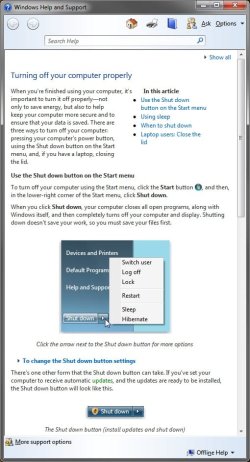
No problem, Jake. However, it's just a shortcut to the default Shut Down Windows (ALT + F4) dialog box in Windows 7, and not a script by me. I'm not sure what you mean though. When I click on the help button, I get the normal Help window below. :confused:

Help.jpg
 
Last edited:

My Computer My Computer

Computer type
PC/Desktop
Computer Manufacturer/Model Number
Self built custom
OS
64-bit Windows 11 Pro for Workstations
CPU
Intel i7-8700K OC'd to 5 GHz
Motherboard
ASUS ROG Maximus XI Formula Z390
Memory
64 GB (4x16GB) G.SKILL TridentZ RGB DDR4 3600 MHz
Graphics Card(s)
ASUS ROG-STRIX-GTX1080TI-O11G-GAMING
Sound Card
Integrated
Monitor(s) Displays
2 x Samsung Odyssey G7 27"
Screen Resolution
2560x1440
Hard Drives
1TB Samsung 990 PRO M.2,
4TB Samsung 990 PRO PRO M.2,
TerraMaster F8 SSD Plus NAS
PSU
Seasonic Prime Titanium 850W
Case
Thermaltake Core P3
Cooling
Corsair Hydro H115i
Keyboard
Logitech wireless K800
Mouse
Logitech MX Master 4
Internet Speed
2 Gb/s Download and 100 Mb/s Upload
Antivirus
Malwarebyte Anti-Malware Premium
Browser
Google Chrome
Other Info
Logitech Z625 speaker system,
Logitech BRIO 4K Pro webcam,
HP Color LaserJet Pro MFP M477fdn,
APC SMART-UPS RT 1000 XL - SURT1000XLI,
Galaxy S23 Plus phone
hmm. odd. Oh well, great tutorial!
 

My Computer My Computer

Computer Manufacturer/Model Number
Compaq Presario F700
OS
Windows 7 x32
CPU
AMD Turion 64 Mobile TK-53
Motherboard
Quanta 30EA
Memory
DDR2 - 2048 Mbytes
Graphics Card(s)
NVIDIA GeForce 7000M/nForce 610M
Sound Card
?
Monitor(s) Displays
Normal Laptop Screen
Hard Drives
?
PSU
?
Case
?
Cooling
?
Brink, would like to reveal a different way:

All the steps remain as described in tutorial except for the step 2,
Type the following in step 2 to achieve the following,

shut down:
option 1: shutdown /s /t 00 /f (change 00 to any value in seconds to delay shutdown)
option 2: shutdown /p

Logoff: shutdown /L

Hibernate : shutdown /h

Restart: shutdown /r /t 00

Abort scheduled Shutdown: shutdown /a (applies only if u have given delay time in the place of 00)

for further options type shutdown /? in cmd prompt :D

And thnx Brink for good and illustrative tutorial!!!
 

My Computer My Computer

OS
Windows 7 RTM X64 Ultimate
CPU
AMD Athlon II X2 240
Motherboard
Biostar 785GE 128M
Memory
Transcend 4GiB @ 800MHz
Monitor(s) Displays
Dell E1909
Screen Resolution
1440x900
Hard Drives
Western Digital 640AAKS
Seagate 160 GiB
PSU
Gigabyte 450W
Case
Antec
Keyboard
Dell
Mouse
Dell
Internet Speed
512 kbps

My Computer My Computer

Computer type
PC/Desktop
Computer Manufacturer/Model Number
Self built custom
OS
64-bit Windows 11 Pro for Workstations
CPU
Intel i7-8700K OC'd to 5 GHz
Motherboard
ASUS ROG Maximus XI Formula Z390
Memory
64 GB (4x16GB) G.SKILL TridentZ RGB DDR4 3600 MHz
Graphics Card(s)
ASUS ROG-STRIX-GTX1080TI-O11G-GAMING
Sound Card
Integrated
Monitor(s) Displays
2 x Samsung Odyssey G7 27"
Screen Resolution
2560x1440
Hard Drives
1TB Samsung 990 PRO M.2,
4TB Samsung 990 PRO PRO M.2,
TerraMaster F8 SSD Plus NAS
PSU
Seasonic Prime Titanium 850W
Case
Thermaltake Core P3
Cooling
Corsair Hydro H115i
Keyboard
Logitech wireless K800
Mouse
Logitech MX Master 4
Internet Speed
2 Gb/s Download and 100 Mb/s Upload
Antivirus
Malwarebyte Anti-Malware Premium
Browser
Google Chrome
Other Info
Logitech Z625 speaker system,
Logitech BRIO 4K Pro webcam,
HP Color LaserJet Pro MFP M477fdn,
APC SMART-UPS RT 1000 XL - SURT1000XLI,
Galaxy S23 Plus phone
Gonna resurect this one.

Is there anyway when clicking the shortcut, windows will immediately shut down - without bringing up the dialog box (where you can pick shutdown, restart, etc) that you have to click okay on?

I am trying to shut down my computer (htpc) from my remote. I've got it programed to call the shortcut, but now I have to bring out the mouse to click okay on the dialog box. :(

Thanks.
 

My Computer My Computer

OS
Vista
Hello Foghat,

You can use the Shut Down shortcut in the link in the post above yours for this instead if you like. :)

Hope this helps,
Shawn
 

My Computer My Computer

Computer type
PC/Desktop
Computer Manufacturer/Model Number
Self built custom
OS
64-bit Windows 11 Pro for Workstations
CPU
Intel i7-8700K OC'd to 5 GHz
Motherboard
ASUS ROG Maximus XI Formula Z390
Memory
64 GB (4x16GB) G.SKILL TridentZ RGB DDR4 3600 MHz
Graphics Card(s)
ASUS ROG-STRIX-GTX1080TI-O11G-GAMING
Sound Card
Integrated
Monitor(s) Displays
2 x Samsung Odyssey G7 27"
Screen Resolution
2560x1440
Hard Drives
1TB Samsung 990 PRO M.2,
4TB Samsung 990 PRO PRO M.2,
TerraMaster F8 SSD Plus NAS
PSU
Seasonic Prime Titanium 850W
Case
Thermaltake Core P3
Cooling
Corsair Hydro H115i
Keyboard
Logitech wireless K800
Mouse
Logitech MX Master 4
Internet Speed
2 Gb/s Download and 100 Mb/s Upload
Antivirus
Malwarebyte Anti-Malware Premium
Browser
Google Chrome
Other Info
Logitech Z625 speaker system,
Logitech BRIO 4K Pro webcam,
HP Color LaserJet Pro MFP M477fdn,
APC SMART-UPS RT 1000 XL - SURT1000XLI,
Galaxy S23 Plus phone
You're most welcome. :)
 

My Computer My Computer

Computer type
PC/Desktop
Computer Manufacturer/Model Number
Self built custom
OS
64-bit Windows 11 Pro for Workstations
CPU
Intel i7-8700K OC'd to 5 GHz
Motherboard
ASUS ROG Maximus XI Formula Z390
Memory
64 GB (4x16GB) G.SKILL TridentZ RGB DDR4 3600 MHz
Graphics Card(s)
ASUS ROG-STRIX-GTX1080TI-O11G-GAMING
Sound Card
Integrated
Monitor(s) Displays
2 x Samsung Odyssey G7 27"
Screen Resolution
2560x1440
Hard Drives
1TB Samsung 990 PRO M.2,
4TB Samsung 990 PRO PRO M.2,
TerraMaster F8 SSD Plus NAS
PSU
Seasonic Prime Titanium 850W
Case
Thermaltake Core P3
Cooling
Corsair Hydro H115i
Keyboard
Logitech wireless K800
Mouse
Logitech MX Master 4
Internet Speed
2 Gb/s Download and 100 Mb/s Upload
Antivirus
Malwarebyte Anti-Malware Premium
Browser
Google Chrome
Other Info
Logitech Z625 speaker system,
Logitech BRIO 4K Pro webcam,
HP Color LaserJet Pro MFP M477fdn,
APC SMART-UPS RT 1000 XL - SURT1000XLI,
Galaxy S23 Plus phone
Back
Top