
Shut Down Without Installing Updates

recycler

New member
Member
Local time
8:29 AM
Messages
81
Hi to the forum

recently I made an inquiry regarding the vast amount of updates i needed after factory restore which was answered for me .my update settings are to check for updates and let me decide.the other night i noticed there were another 14 available.long story......short i googled and discovered Alt +F4 shuts down without updating (i was busy and it was late) but i found on shutting down the updates were installing anyway.does any of you guys know what that's about.
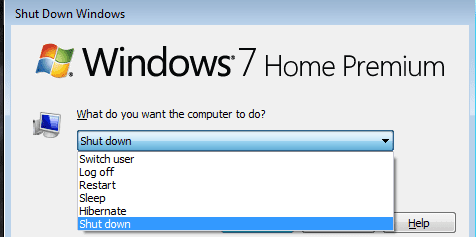
Alt + F4.png

thanks in advance of any help

recycler
 

My Computer

Computer type
Laptop
Computer Manufacturer/Model Number
Samsung S3510
OS
Windows 7 Home Premium 64Bit SP1
CPU
Intel Celeron T3500 @2.10Ghz
Motherboard
Samsung RV410/RV510/S3510/E3510 (U2E1)
Memory
3.00GB Dual ChanelDDR3 @398MHz (6-6-6-15)
Graphics Card(s)
Intel Mobile Intel 4 Series Express Chipset Family
Hard Drives
465GB Western Digital WDC WD 5000BEVT-35 Aorto (SATA)
931 GB Samsung HD 103 SI USB Device (USB (SATA)
Antivirus
McAfee Livesafe
Browser
Google Chrome

My Computer

Computer type
PC/Desktop
Computer Manufacturer/Model Number
Self Built
OS
Win 10 Pro x64
CPU
Intel I5-2500K @3.3GHz
Motherboard
Asrock P67 Extreme4
Memory
16GB G.Skill Ripjaws X (4x4GB)
Graphics Card(s)
EVGA GeForce 750 Ti SC 2GB
Sound Card
ASUS Xonar DG 5.1 Channels 24-bit 96KHz PCI Interface Sound
Monitor(s) Displays
auria eq2367
Screen Resolution
1920 x 1080
Hard Drives
250GB Samsung 850 EVO SSD
1TB WD Blue
1TB Hitachi
PSU
SeaSonic X 650W 80 Plus Gold
Case
Corsair Obsidian 750D
Cooling
Corsair H60, Three 140mm case fans
Keyboard
Logitech Wireless Keyboard K520
Mouse
Logitech Wireless Mouse M310
Internet Speed
Wave Broadband ~ 100 dn 5 up
Antivirus
Windows Defender, Malwarebytes Premium
Browser
Edge, IE11, Chrome
Other Info
Laptop specs: HP g7-1365dx /
CPU: AMD A6-3420M APU with Radeon(tm) HD Graphics /
RAM: Crucial 8Gb (2x4Gb) /
SSD: Crucial M4-CT128M4SSD2 ATA Device/ FW 000F /
GFX: AMD Radeon HD 6520G /
OS: Windows 10 Pro x64
Good find on that tutorial derekimo.
 

My Computer

Computer type
PC/Desktop
Computer Manufacturer/Model Number
Home made Desktop
OS
Windows 10 Pro. 64/ version 1709 Windows 7 Pro/64
CPU
Intel i7-6800K @ 4.3
Motherboard
ASUS X-99 Deluxe II
Memory
Corsair Platinum 16 gig @2400
Graphics Card(s)
EVGA GTX 1070 OC
Monitor(s) Displays
Asus 27" LED LCD/VE278Q
Screen Resolution
1920-1080 or 1280-720 HDMI
Hard Drives
INTEL SSD 730-240 Gb Sata 3.0/
PSU
EVGA Platium 1200W
Case
Phanteks Luxe Tempered Glass 8 fans/ one radiator
Cooling
XSPC/ Water Cooled CPU
Keyboard
Das 4 Professional
Mouse
Logitech M705/MX Anywhere 2-S
Internet Speed
100 mbits
Antivirus
Microsoft Security Essentials/ Malwarebytes Premium 3.0/ SAS
Browser
I.E. 11 default/Firefox/ ISP Time Warner Cable/Spectrum
Other Info
LG BluRay Burner/
Sound system-KLipsch-THX/
Icy Dock ssd Hot Swap bays.

My Computer

Computer type
PC/Desktop
Computer Manufacturer/Model Number
Self Built
OS
Win 10 Pro x64
CPU
Intel I5-2500K @3.3GHz
Motherboard
Asrock P67 Extreme4
Memory
16GB G.Skill Ripjaws X (4x4GB)
Graphics Card(s)
EVGA GeForce 750 Ti SC 2GB
Sound Card
ASUS Xonar DG 5.1 Channels 24-bit 96KHz PCI Interface Sound
Monitor(s) Displays
auria eq2367
Screen Resolution
1920 x 1080
Hard Drives
250GB Samsung 850 EVO SSD
1TB WD Blue
1TB Hitachi
PSU
SeaSonic X 650W 80 Plus Gold
Case
Corsair Obsidian 750D
Cooling
Corsair H60, Three 140mm case fans
Keyboard
Logitech Wireless Keyboard K520
Mouse
Logitech Wireless Mouse M310
Internet Speed
Wave Broadband ~ 100 dn 5 up
Antivirus
Windows Defender, Malwarebytes Premium
Browser
Edge, IE11, Chrome
Other Info
Laptop specs: HP g7-1365dx /
CPU: AMD A6-3420M APU with Radeon(tm) HD Graphics /
RAM: Crucial 8Gb (2x4Gb) /
SSD: Crucial M4-CT128M4SSD2 ATA Device/ FW 000F /
GFX: AMD Radeon HD 6520G /
OS: Windows 10 Pro x64
Hi guys
thank you to all of you who replied to my post.can i just say Laybackbear thank you for your advice but originally when i had auto updating enabled there was no way i could turn off my computer while updates were installing because there simply no tools displayed i had to sit there and take it on the chin until finished.i am quite bemused at this behaviour since i changed my settings to check for downloads and let me choose.the fact that it bypassed the Alt +F4 command is curious .derekimo thank you for that little nugget you supplied and pass on my regards to brink for making it happen.thanks a mil guys for your interest in this it is much appreciated.i will let you know how the next batch behave after downloading your file.

kudos

recycler
 

My Computer

Computer type
Laptop
Computer Manufacturer/Model Number
Samsung S3510
OS
Windows 7 Home Premium 64Bit SP1
CPU
Intel Celeron T3500 @2.10Ghz
Motherboard
Samsung RV410/RV510/S3510/E3510 (U2E1)
Memory
3.00GB Dual ChanelDDR3 @398MHz (6-6-6-15)
Graphics Card(s)
Intel Mobile Intel 4 Series Express Chipset Family
Hard Drives
465GB Western Digital WDC WD 5000BEVT-35 Aorto (SATA)
931 GB Samsung HD 103 SI USB Device (USB (SATA)
Antivirus
McAfee Livesafe
Browser
Google Chrome
Back
Top