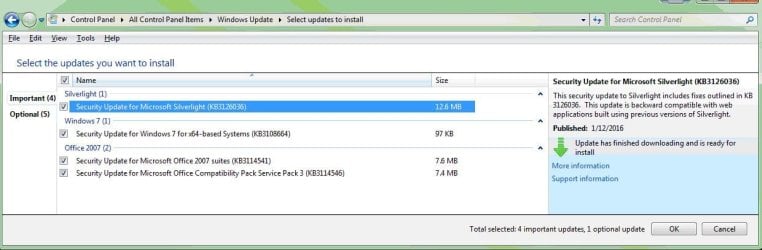
I have Windows 7 Pro x64 set for automatic update. But yesterday, I noticed that no updates had been installed this month, so I checked for updates to make and found about 17 of them, including Win 10. I unchecked that one and proceeded. The computer hung up on installing the 11th update (KB3121461), so after waiting half an hour I clicked Stop Installing. I had error messages and problems running update again and running the programs you list under Windows Update Posting Instructions, but I failed to log them, and they seem to have cleared up.
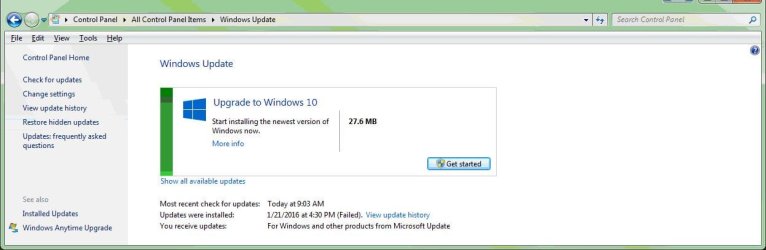
Today, all seemed normal, and an update check showed one important and four optional updates left to do. Win 10 was not listed. When I checked the boxes for these updates and clicked OK, I got a screen whose only clickable button was in the Upgrade to Windows 10 box. I don't want to do that yet--how do I get my other updates to install?
Today, all seemed normal, and an update check showed one important and four optional updates left to do. Win 10 was not listed. When I checked the boxes for these updates and clicked OK, I got a screen whose only clickable button was in the Upgrade to Windows 10 box. I don't want to do that yet--how do I get my other updates to install?
My Computer
At a glance
win7 Pro x64Intel Core 2 QUAD q6700 @ 2.6 GHz8 GB, DDR2nVidia Quadro NVS 290
- Computer type
- PC/Desktop
- Computer Manufacturer/Model Number
- Dell T3400 Workstation
- OS
- win7 Pro x64
- CPU
- Intel Core 2 QUAD q6700 @ 2.6 GHz
- Motherboard
- Dell 0TP412.A02
- Memory
- 8 GB, DDR2
- Graphics Card(s)
- nVidia Quadro NVS 290
- Sound Card
- motherboard
- Monitor(s) Displays
- Samsung T260HD and ViewSonic VA2702w
- Screen Resolution
- 1920*1200, 1920x1080
- Hard Drives
- Seagate hybrid C:, two WD data drives. 5TB total
- PSU
- 375W
- Case
- Stock
- Cooling
- air
- Keyboard
- Dell
- Mouse
- Logitech Performance MX
- Antivirus
- Malwarebytes, Norton 360
- Browser
- IE 11, Seamonkey, Firefox, Opera