ShyBar - an automatic Windows 7 taskbar hider

jykelly

New member
I recently switched to a Windows 7 pc as my main unit and I've become annoyed that even when I set the taskbar to auto-hide it still leaves a line on the bottom of my desktop. So I wrote ShyBar, a taskbar hider that functions automatically without having to click on a button or press a hotkey to show the taskbar when needed.

Please understand that this isn't my day job. I will try to address all your concerns but I may not be able to answer every single post. Rest assured, however, that I will read every comment.


Features:

  • ShyBar is free for personal use however donations via Paypal or Bitcoin will be gratefully accepted and will go towards my sister's medical bills.
  • Tries to detect full-screen applications and will suspend processing so as not to interfere with games or video players.
  • Supports the Classic Shell seashell start button in addition to the regular start button.
  • Works no matter which edge of the desktop the taskbar is docked on.
  • Will only activate if the taskbar is set to auto-hide.
  • Fully automatic. Detects the mouse cursor and will show or hide the taskbar depending on the cursor's proximity to a user-adjustable hotspot and coolspot.
  • ShyBar v1.44+ now includes dual sliders to set the hotspot (area that triggers the appearance of the taskbar) and the coolspot (area which, upon leaving, will trigger concealment of the taskbar). If you prefer the previous single slider version of ShyBar, the download link is in post #12.
  • ShyBar v2.21 adds a configurable delay to allow user control of when the taskbar appears. (This feature is still in BETA.)


Features reported as working by users but not yet personally tested by me:

  • Multi-monitor support
  • Compatible with Display Fusion

Known bugs or issues:

  • If you use Avast! antivirus, the DeepScreen function may make Windows think the installer has stopped working. Just wait for Deepscreen to finish then allow the installer to continue and operation will resume normally.
  • Works with Windows 7.
  • Windows 8 compatibility is in development.
  • User interface not yet tested with high dpi / Retina displays.
  • Does not yet support taskbar notifications. Fix being investigated.
  • If the Classic Shell seashell start button is installed it may flicker a bit if you have a slower computer.
  • The icon is ugly. What can I say? I took a picture of a leaf, plugged it into an icon maker and called it a day.
  • Does not yet support showing the taskbar when the Windows key is pressed. I have an alpha that works however it requires that ShyBar continually check if the Start menu window has been opened. Unless I can resolve the possible performance issues of checking for this window I will not implement this feature.


Download link v2.22: https://app.box.com/s/o41vufkb9ptox36gd83c4qdmxmkepa5p

MD5 5131cad686d0402593252d906842c989
SHA1 7ea68b26f226260fdf582836b6070d749b102cdb

You will also need the 2013 C++ Redistributable: Download Visual C++ Redistributable Packages for Visual Studio 2013 from Official Microsoft Download Center

Version 2.6 BETA - See this post : ShyBar - an automatic Windows 7 taskbar hider - Page 9 - Windows 7 Help Forums
 
Last edited:

My Computer

OS
Windows 7 Home Premium 64 bit
ShyBar updated to version 1.1 to improve compatibility. Download link in first post.
 

My Computer

OS
Windows 7 Home Premium 64 bit
I tested this out in VmWare and it works very nice.

Thank you for the contribution.

Jerry
 

My Computer

Computer type
Laptop
Computer Manufacturer/Model Number
Sager NP9170
OS
Win 7 Pro x64 / Win 10 Pro
CPU
Intel(R) Core(TM) i7-3630QM CPU @ 2.40GHz
Motherboard
CLEVO P170EM
Memory
12 GB
Graphics Card(s)
(1) Intel(R) HD Graphics 4000 (2) NVIDIA GeForce GTX 675M
Sound Card
(1) Realtek High Definition Audio (2) Intel(R) Display Aud
Monitor(s) Displays
17.3
Screen Resolution
1920x1080
Hard Drives
(1) Samsung 860 EVO 500GB(OS) (1) Samsung 860 EVO 500GB(Data)
Keyboard
Backlite
Antivirus
MSE, Malwarebytes Pro
Browser
Firefox
Other Info
DESKTOP: Custom-built.
OS: Win 10 Pro x64.
CASE: Rosewill R5.
CPU: Intel I5 4670K CPU @ 3.40GHz.
CPU COOLER: Cool Master Hyper 212 EVO.
MOTHERBOARD: Asus Z87-A.
MEMORY: Kingston HyperX 2x4 GB.
GPU: Nvidia Geforce 650 TI.
PSU: Corsair TX750.
DRIVES: (1) Samsung 840 120 GB SSD (2) Western Digital blue 500 GB 7200 RPM.
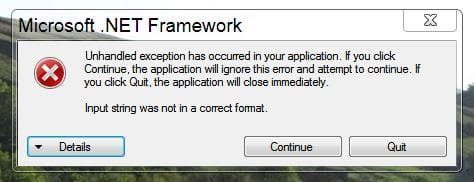
I get an error when I try to run it.

Code:
See the end of this message for details on invoking 
just-in-time (JIT) debugging instead of this dialog box.

************** Exception Text **************
System.FormatException: Input string was not in a correct format.
   at System.Number.StringToNumber(String str, NumberStyles options, NumberBuffer& number, NumberFormatInfo info, Boolean parseDecimal)
   at System.Number.ParseInt32(String s, NumberStyles style, NumberFormatInfo info)
   at Shyness.Dimensions.Prepare()
   at Shyness.ShyBar.Form1_Load(Object sender, EventArgs e)
   at System.Windows.Forms.Form.OnLoad(EventArgs e)
   at System.Windows.Forms.Control.CreateControl(Boolean fIgnoreVisible)
   at System.Windows.Forms.Control.CreateControl()
   at System.Windows.Forms.Control.WmShowWindow(Message& m)
   at System.Windows.Forms.Control.WndProc(Message& m)
   at System.Windows.Forms.Form.WndProc(Message& m)
   at System.Windows.Forms.NativeWindow.Callback(IntPtr hWnd, Int32 msg, IntPtr wparam, IntPtr lparam)


************** Loaded Assemblies **************
mscorlib
    Assembly Version: 4.0.0.0
    Win32 Version: 4.0.30319.18444 built by: FX451RTMGDR
    CodeBase: file:///C:/Windows/Microsoft.NET/Framework64/v4.0.30319/mscorlib.dll
----------------------------------------
ShyBar
    Assembly Version: 1.0.0.0
    Win32 Version: 1.0.0.0
    CodeBase: file:///C:/Program%20Files%20(x86)/ShyBar/ShyBar.exe
----------------------------------------
System.Windows.Forms
    Assembly Version: 4.0.0.0
    Win32 Version: 4.0.30319.18408 built by: FX451RTMGREL
    CodeBase: file:///C:/Windows/Microsoft.Net/assembly/GAC_MSIL/System.Windows.Forms/v4.0_4.0.0.0__b77a5c561934e089/System.Windows.Forms.dll
----------------------------------------
System.Drawing
    Assembly Version: 4.0.0.0
    Win32 Version: 4.0.30319.18408 built by: FX451RTMGREL
    CodeBase: file:///C:/Windows/Microsoft.Net/assembly/GAC_MSIL/System.Drawing/v4.0_4.0.0.0__b03f5f7f11d50a3a/System.Drawing.dll
----------------------------------------
System
    Assembly Version: 4.0.0.0
    Win32 Version: 4.0.30319.18408 built by: FX451RTMGREL
    CodeBase: file:///C:/Windows/Microsoft.Net/assembly/GAC_MSIL/System/v4.0_4.0.0.0__b77a5c561934e089/System.dll
----------------------------------------

************** JIT Debugging **************
To enable just-in-time (JIT) debugging, the .config file for this
application or computer (machine.config) must have the
jitDebugging value set in the system.windows.forms section.
The application must also be compiled with debugging
enabled.

For example:

<configuration>
    <system.windows.forms jitDebugging="true" />
</configuration>

When JIT debugging is enabled, any unhandled exception
will be sent to the JIT debugger registered on the computer
rather than be handled by this dialog box.
 

My Computer

Computer type
PC/Desktop
OS
Windows 7 Ultimate x64
CPU
AMD Phenom(tm) II X4 850
Motherboard
MCP61M-M3
Graphics Card(s)
GeForce GTS 450
Screen Resolution
1366x768
Mouse
X7
Antivirus
Malwarebytes Anti-Malware
Browser
Mozilla Firefox
I get an error when I try to run it.

Hi Sven,

Could you PM me your system specs (OS version, 64 or 32 bit, number of monitors, desktop size)? It's crashing when it tries to get your monitor type/dimensions. You wouldn't happen to be running multiple monitors would you?


Nil
 

My Computer

OS
Windows 7 Home Premium 64 bit
Nice effort, Thanks. I won't use it though because I need my taskbar in plain sight at all times. It provides a lot of info.
 

My Computer

Computer Manufacturer/Model Number
HP, Dell, Gateway, Toshiba - 4 laptops and 2 desktops
OS
Vista, Windows7, Mint Mate, Zorin, Windows 8
CPU
from 1.6GHz Duo to i7
Monitor(s) Displays
2x HP w2207
Hard Drives
5x HDD, 7x SSD, 12x Externals
Keyboard
with trackball - no mices
Mouse
Trackball mice
Internet Speed
DSL 6000
ShyBar updated to version 1.21 to improve compatibility with non-English systems. Thanks to Sven24 for helping with the testing. Download link in first post.
 

My Computer

OS
Windows 7 Home Premium 64 bit
ShyBar updated to version 1.3 to fix an issue where the program could lose track of the mouse in certain situations. Thanks to Sven24 for helping with the testing. Download link in first post.
 

My Computer

OS
Windows 7 Home Premium 64 bit
Fantastic program, definitely something I've been wanting since i first started hiding my taskbar.

Is it possible (if not too much trouble) to add an auto hide delay of say a second or two, or configurable?

This would help especially if one has a taskbar that is a few rows tall or more, the way it is now you either need to set the trigger zone to be on the larger side if one wants to pick something in the higher row(which leads to it showing up when not intended), or else it hides before the mouse can reach it

or if that's not possible maybe a secondary larger definable zone that keeps the taskbar visible until it moves outside this, so that one could keep the trigger area small yet still be able to pick higher items in it without it auto hiding before intended

Thanks again
 

My Computer

Computer type
PC/Desktop
OS
Windows 7 x64
Hmm, okay. I see what you mean. I think I like the idea of adding a second zone better than adding a time delay to hiding the taskbar. Will get on that as soon as I have a few hours free to code/test.

Ooh yeah, and thanks for the enthusiasm!
 

My Computer

OS
Windows 7 Home Premium 64 bit
ShyBar updated to version 1.44, as per ciphray's suggestion it now includes dual sidebars to set the cursor detection hotspot and the taskbar concealing (when it leaves the) coolspot. Download link in first post.

If you want the previous single slider version, I will leave the link here but note that this is now deprecated and will no longer be developed further.

ShyBar 1.3 download link: https://app.box.com/s/gv5iodtxathzov18xats

MD5 4447c8008416d27c9d724256a2acdc45
SHA1 7291707e041b55c900242c910301838644813d3b
 
Last edited:

My Computer

OS
Windows 7 Home Premium 64 bit

you get annoyed by the taskbar line too? Man, and I thought I was the only one! o.o!

I tried it out, and this is defiantly a program worth paying for!

ShyBar gets a 100/100!!!!!:D:D:D:D
 
Last edited:

My Computer

Computer type
Laptop
Computer Manufacturer/Model Number
Compaq ( I want intel :[ )
OS
Windows 7 Home Premium x64
Antivirus
Avast
Browser
Firefox <3
Other Info
if you want a few paid programs for free pm me!
Lol, Welcome to the Tribe of The Invisible Taskbar! Thanks for your support, IamJack! :D
 

My Computer

OS
Windows 7 Home Premium 64 bit

My Computer

Computer type
Laptop
Computer Manufacturer/Model Number
Compaq ( I want intel :[ )
OS
Windows 7 Home Premium x64
Antivirus
Avast
Browser
Firefox <3
Other Info
if you want a few paid programs for free pm me!
ShyBar updated to version 1.45. Fix added for unhandled exception when ZoomPlayer is used to set file associations. Download link in first post.
 

My Computer

OS
Windows 7 Home Premium 64 bit
Greetings Sir;

Great program. I've been using since conception, but I'm getting an error on installation of version 1.4 & 1.45 and have reverted to 1.3.

Any help is appreciated

Error as follows:

Text:

See the end of this message for details on invoking
just-in-time (JIT) debugging instead of this dialog box.

************** Exception Text **************
System.FormatException: Input string was not in a correct format.
at System.Number.StringToNumber(String str, NumberStyles options, NumberBuffer& number, NumberFormatInfo info, Boolean parseDecimal)
at System.Number.ParseInt32(String s, NumberStyles style, NumberFormatInfo info)
at Shyness.ShyBar.StartupCoolSensitivity(String state)
at Shyness.ShyBar.Form1_Load(Object sender, EventArgs e)
at System.Windows.Forms.Form.OnLoad(EventArgs e)
at System.Windows.Forms.Control.CreateControl(Boolean fIgnoreVisible)
at System.Windows.Forms.Control.CreateControl()
at System.Windows.Forms.Control.WmShowWindow(Message& m)
at System.Windows.Forms.Control.WndProc(Message& m)
at System.Windows.Forms.Form.WndProc(Message& m)
at System.Windows.Forms.NativeWindow.Callback(IntPtr hWnd, Int32 msg, IntPtr wparam, IntPtr lparam)


Screen:
 

Attachments

  • Capture.JPG
    Capture.JPG
    28.1 KB · Views: 71
Last edited:

My Computer

Computer type
PC/Desktop
Computer Manufacturer/Model Number
Gateway DX4860
OS
Windows 7 Professional x64
CPU
Intel I5 2320 @ 3.0 HHz
Motherboard
Gateway / Acer
Memory
32 GB DDR3
Graphics Card(s)
Asus Nvidia 440 GT & Zotac Nvidia 610 GT
Sound Card
Realtek HDA
Monitor(s) Displays
(2) Asus VW246H 24" (16:9) & (1) Asus VB198 19" (4:3)
Screen Resolution
5120 Total x 1080
Hard Drives
WD 1.5 TB WD15EARX-22P
PSU
Basiq 650
Case
Gateway Tower
Cooling
(3) Case Fans
Keyboard
1. Saitek Eclipse 2. Focus FK8200
Mouse
Logitech M510
Internet Speed
90 mbps DL / 10 mbps UL (usually 110.5/11.5)
Antivirus
SuperAntiSpyware Pro, MalwareBytes Pro, MSE
Browser
1. Palemoon x64 2. IE 11
Other Info
USB 3.0 Card
ShyBar updated to version 1.46. Fix added for unhandled exception when ShyBar is updated from version 1.3 to a higher version on some systems. Thanks to Sarris for bringing the issue to my attention. Download link in first post.
 

My Computer

OS
Windows 7 Home Premium 64 bit
Back
Top