Solved Side by side browsing in IE11

davpet

New member
Local time
1:01 AM
Messages
39
Hi all.

I read that one of the new features in IE 11 is side by side browsing where you can get two webpages displayed next to each other.

My question is two fold and that is, is this a feature available in Windows 7 as well or specific to Win 8.1 IE11 only.

If it is a feature of Win 7 how would I then access it to make use of it. I sadly cannot find much on the net about how to use this feature at this time.

Many thanks
Dave
 

My Computer

Computer type
Laptop
Computer Manufacturer/Model Number
Toshiba
OS
Windows 7 SP1
CPU
Intel R Core
Memory
2 GB
Graphics Card(s)
ATI Mobility Radeon HD 5470
Monitor(s) Displays
Generic PNP Monitor
Screen Resolution
1366 * 786
Hard Drives
Toshiba MK5065GSXN ATA Device
PSU
Intel Core Duo 5 Processor
Other Info
Laptop Machine
I don't know about IE11 but I've been doing side by side browsing for years, even in XP. I just open two windows of IE and snap them to the sides of the screen (I had an app that gave me AeroSnap in XP).

I can get top and bottom screens using a program called Divvy. I can also have more screens than two.
 
Last edited:

My Computer

Computer type
PC/Desktop
Computer Manufacturer/Model Number
Custom Build
OS
Win 7 Ultimate 64 bit
CPU
Intel i7-3930K
Motherboard
ASUS P9X79 WS
Memory
Kingston HyperX Genesis 32GB Kit (8x4GB Modules) 1600MHz DDR
Graphics Card(s)
MSI R7850 Twin Frozr 2GD5/OC Radeon HD 7850 2GB 256-bit GDDR
Sound Card
Asus Xonar Essence STX
Monitor(s) Displays
3x Asus VG248QE 24", Vizio 32" TV
Screen Resolution
1920 x 1080, ?
Hard Drives
Samsung 128GB 840 Pro SSD (1),
Samsung 4TB 850 EVO SSDs (4)
Samsung 4TB 850 EVO SSDs (16) external backup drives used in 2.5" hot swap bays in the computer.
PSU
Corsair HX750w
Case
Antec Two Hundred v2 (modified)
Cooling
Cooler Master GeminII S524 120mm (fan replaced with a 140mm)
Keyboard
Logitech G510s
Mouse
Logitech M525 (two in use)
Internet Speed
=< 32Mbps down, 8Mbps up
Antivirus
AVAST!, MBAM, SAS, Spybot S&D (all but MBAM free) Glary Util
Browser
IE11
Other Info
LSI 9211-8i HBA card (8 SATA III ports), 2.5" & 3.5" Hot Swap Bays, HooToo HT-CR001 PCI-E to USB 3.0 Internal Hub + 6 Slot Card Reader, and LG Model CH12LS28 BD-ROM Optical Drive. Also, ScanSnap S1500 ADF duplexing scanner, Canon 9000F flat bed scanner, Corsair SP2500 2.1 speakers, Samsung CLP 415nw laser color printer, Cyberpower PP2200SW UPS
As far as I know the Side by Side feature is not an IE11 feature but instead a feature of the Windows 8. Maxthon browsers offer this feature natively, I do not know if any other browsers have it.

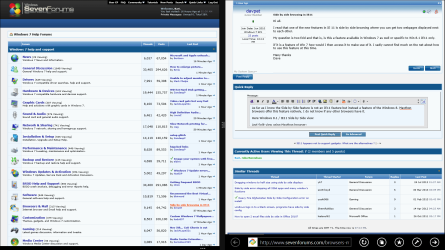
Here Windows 8.1 / IE11 Side by Side view:

W81SplitView.png

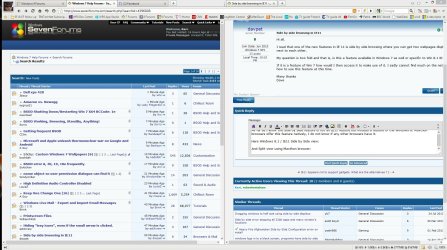
And Split View using Maxthon browser, works on any version of Windows:

2013-11-13_192054.jpg

Kari
 

My Computer

Computer type
Laptop
Computer Manufacturer/Model Number
HP ENVY 17-1150eg
OS
Windows 10 Pro x64 EN-GB
CPU
1.6 GHz Intel Core i7-720QM Processor
Memory
6 GB
Graphics Card(s)
ATI Mobility Radeon HD 5850 Graphics
Sound Card
Beats sound system with integrated subwoofer
Monitor(s) Displays
17" laptop display, 22" LED and 32" Full HD TV through HDMI
Screen Resolution
1600*900 (1), 1920*1080 (2&3)
Hard Drives
Internal: 2 x 500 GB SATA Hard Disk Drive 7200 rpm
External: 2TB for backups, 3TB USB3 network drive for media
Cooling
As Envy runs a bit warm, I have it on a Cooler Master pad
Keyboard
Logitech diNovo Media Desktop Laser (bluetooth)
Mouse
Logitech Performance Mouse MX
Internet Speed
50/10 Mbps VDSL
Antivirus
Windows Defender 4.3.9431.0
Browser
Maxthon 3.5.2., IE11
Hello Davpet,

The way I've always done this is to open two copies of your browser. Say two different websites. Then right click over system tray... where your clock is located in the bottom right corner of the screen. From the menu, choose Windows side by side.

In addition: If you have three or more different websites open, you could select Cascade Windows from this same menu to stack the different websites.

Hope this helps,
John
 
Last edited:

My Computers

System One System Two

  • Computer type
    PC/Desktop
    Computer Manufacturer/Model Number
    HP Pavilion 6751c
    OS
    Win7, Win10, Win11
    Internet Speed
    100 Mbps
    Antivirus
    Norton 360
    Browser
    IE 11
  • Computer type
    PC/Desktop
    System Manufacturer/Model Number
    HP ENVY 750-514 & Dell XPS 8960
    OS
    Win7, Win10, Win11
    Antivirus
    Norton 360
Hi All.

I am aware of the windows side by side and cascade windows from the windows task bar and have used it at times, thank you though for taking the time to ensure that I am aware of such an option.

Below is an excerpt about IE 11 from MS website.

"Multi-Snapping and App-Snapping
One of the biggest issues that plagues the modern era of browser technology is the ability to do multiple things at once. If you’ve got a mass of tabs open and a few programs running, it can be quite the hassle to swap back and forth between objects, especially if you’re on a time crunch or are trying to quickly recall information from the Web. Internet Explorer 11 will offer what’s known as “Snap Mode,” allowing you to snap two browser windows side by side, allowing you to perform tasks on one website or program while looking at another."

It does not appear to be a feature of Win 8 but rather of IE11 what I am not sure about is is this feature supported in Win 7 or not as I cannot seem to find info on how to use this advertised feature.

Any help would be appreciated.

Dave.
 

My Computer

Computer type
Laptop
Computer Manufacturer/Model Number
Toshiba
OS
Windows 7 SP1
CPU
Intel R Core
Memory
2 GB
Graphics Card(s)
ATI Mobility Radeon HD 5470
Monitor(s) Displays
Generic PNP Monitor
Screen Resolution
1366 * 786
Hard Drives
Toshiba MK5065GSXN ATA Device
PSU
Intel Core Duo 5 Processor
Other Info
Laptop Machine
Hi All.

I am aware of the windows side by side and cascade windows from the windows task bar and have used it at times, thank you though for taking the time to ensure that I am aware of such an option.

Below is an excerpt about IE 11 from MS website.

"Multi-Snapping and App-Snapping
One of the biggest issues that plagues the modern era of browser technology is the ability to do multiple things at once. If you’ve got a mass of tabs open and a few programs running, it can be quite the hassle to swap back and forth between objects, especially if you’re on a time crunch or are trying to quickly recall information from the Web. Internet Explorer 11 will offer what’s known as “Snap Mode,” allowing you to snap two browser windows side by side, allowing you to perform tasks on one website or program while looking at another."

It does not appear to be a feature of Win 8 but rather of IE11 what I am not sure about is is this feature supported in Win 7 or not as I cannot seem to find info on how to use this advertised feature.

Any help would be appreciated.

Dave.

I can (and do) do that with IE10 although it's sometimes a little bit tricky. Just grab a tab and snap it to the right side side (you have to snap to the right first). Grab a second tab and snap it to the left side. Occasionally, one of the snapped tabs will go full screen; just grab it again and re-snap it. sometimes you have to snap both windows to the right and then snap the second window to the left or snap the second window to the top, which will make it full screen, then snap it to the left.
 

My Computer

Computer type
PC/Desktop
Computer Manufacturer/Model Number
Custom Build
OS
Win 7 Ultimate 64 bit
CPU
Intel i7-3930K
Motherboard
ASUS P9X79 WS
Memory
Kingston HyperX Genesis 32GB Kit (8x4GB Modules) 1600MHz DDR
Graphics Card(s)
MSI R7850 Twin Frozr 2GD5/OC Radeon HD 7850 2GB 256-bit GDDR
Sound Card
Asus Xonar Essence STX
Monitor(s) Displays
3x Asus VG248QE 24", Vizio 32" TV
Screen Resolution
1920 x 1080, ?
Hard Drives
Samsung 128GB 840 Pro SSD (1),
Samsung 4TB 850 EVO SSDs (4)
Samsung 4TB 850 EVO SSDs (16) external backup drives used in 2.5" hot swap bays in the computer.
PSU
Corsair HX750w
Case
Antec Two Hundred v2 (modified)
Cooling
Cooler Master GeminII S524 120mm (fan replaced with a 140mm)
Keyboard
Logitech G510s
Mouse
Logitech M525 (two in use)
Internet Speed
=< 32Mbps down, 8Mbps up
Antivirus
AVAST!, MBAM, SAS, Spybot S&D (all but MBAM free) Glary Util
Browser
IE11
Other Info
LSI 9211-8i HBA card (8 SATA III ports), 2.5" & 3.5" Hot Swap Bays, HooToo HT-CR001 PCI-E to USB 3.0 Internal Hub + 6 Slot Card Reader, and LG Model CH12LS28 BD-ROM Optical Drive. Also, ScanSnap S1500 ADF duplexing scanner, Canon 9000F flat bed scanner, Corsair SP2500 2.1 speakers, Samsung CLP 415nw laser color printer, Cyberpower PP2200SW UPS

My Computer

Computer type
PC/Desktop
Computer Manufacturer/Model Number
Custom assembled by me :}
OS
Win-7-Pro64bit 7-H-Prem-64bit
CPU
i7-5930K 2nd i9-9940x both water blocked VRM's too
Motherboard
ASUS SABERTOOTH X99 2nd ASUS x299 Apex
Memory
Trident-z 3200C14 2nd Trident-z 3600C16
Graphics Card(s)
EVGA 1080ti ftw3 2nd Titan Xp both water blocked
Sound Card
Built-in Realtek
Monitor(s) Displays
1-AOC G2460PG 24"G-Sync 144Hz/ 2nd 1-ASUS VG248QE 24" 144Hz
Screen Resolution
1920 x 1080 144Hz
Hard Drives
2-Samsung M.2 Evo & Evo Plus
2-Samsung 850 EVO 500GB SSD's/ 3-2.5 W.D. Black 1tb-&3-1tb/3-3.5 WD Black 1tb hdd's
PSU
EVGA SuperNOVA 1000-P2 2nd 1200-P2
Case
2-Corsair Obsidian Series 450D Black ATX Mid Tower
Cooling
Custom water loops
Keyboard
Logitech G710+/ 2nd Logitech G910
Mouse
2-RedDragon M901 Perdition 16400 dpi Gaming mouse = wired
Internet Speed
Comcast Ping 19ms 89.31mbps download speed 6.12mbps upload
Antivirus
Malwarebytes Pro/ Superantispyware Pro
Browser
FireFox & Pale moon
Other Info
2nd ASUS X299 Apex/Intel i9-9940x with Custom water loop/7H-Prem-x64/Corsair 450D case/Ram Trident-z 3600C16 4x8gb / Samsung970Evo plus 500gb SSD/Dual ssd EZ swap evo/PSU EVGA SuperNova 1200w-P2 80+Platinum/GPU Titan Xp /8-ML-140 on push-pull on 2-280GTX rads
Hi All.

I am aware of the windows side by side and cascade windows from the windows task bar and have used it at times, thank you though for taking the time to ensure that I am aware of such an option.

Below is an excerpt about IE 11 from MS website.

"Multi-Snapping and App-Snapping
One of the biggest issues that plagues the modern era of browser technology is the ability to do multiple things at once. If you’ve got a mass of tabs open and a few programs running, it can be quite the hassle to swap back and forth between objects, especially if you’re on a time crunch or are trying to quickly recall information from the Web. Internet Explorer 11 will offer what’s known as “Snap Mode,” allowing you to snap two browser windows side by side, allowing you to perform tasks on one website or program while looking at another."

It does not appear to be a feature of Win 8 but rather of IE11 what I am not sure about is is this feature supported in Win 7 or not as I cannot seem to find info on how to use this advertised feature.

Any help would be appreciated.

Dave.
It is a feature of Windows 8. Or, if you insist, it is a feature in Windows 8 Modern IE11, as well as in all other Windows 8 Modern Apps. You can snap side by side any Windows 8 Modern Apps, in IE11s case you can snap side by side two tabs.
 

My Computer

Computer type
Laptop
Computer Manufacturer/Model Number
HP ENVY 17-1150eg
OS
Windows 10 Pro x64 EN-GB
CPU
1.6 GHz Intel Core i7-720QM Processor
Memory
6 GB
Graphics Card(s)
ATI Mobility Radeon HD 5850 Graphics
Sound Card
Beats sound system with integrated subwoofer
Monitor(s) Displays
17" laptop display, 22" LED and 32" Full HD TV through HDMI
Screen Resolution
1600*900 (1), 1920*1080 (2&3)
Hard Drives
Internal: 2 x 500 GB SATA Hard Disk Drive 7200 rpm
External: 2TB for backups, 3TB USB3 network drive for media
Cooling
As Envy runs a bit warm, I have it on a Cooler Master pad
Keyboard
Logitech diNovo Media Desktop Laser (bluetooth)
Mouse
Logitech Performance Mouse MX
Internet Speed
50/10 Mbps VDSL
Antivirus
Windows Defender 4.3.9431.0
Browser
Maxthon 3.5.2., IE11
Hi all.

Thank you so much for been willing to share so much of your expertise and experience in regard to the question I had. It certainly has assisted me in clarifying a few things. It does appear however that this feature might be better supported within Win 8 which I suppose is understandable.

I have however stumbled across another problem and that is with snapping the window to the right as mentioned by Lady Fitzgerald, this does not appear to be working on my one machine but does on the other. Both are running Win 7 Pro. I shall however start another thread if I cannot resolve this by dong some further searches within the forums. Many thanks once again.

Dave
 

My Computer

Computer type
Laptop
Computer Manufacturer/Model Number
Toshiba
OS
Windows 7 SP1
CPU
Intel R Core
Memory
2 GB
Graphics Card(s)
ATI Mobility Radeon HD 5470
Monitor(s) Displays
Generic PNP Monitor
Screen Resolution
1366 * 786
Hard Drives
Toshiba MK5065GSXN ATA Device
PSU
Intel Core Duo 5 Processor
Other Info
Laptop Machine
Last edited:

My Computer

Computer type
PC/Desktop
Computer Manufacturer/Model Number
Custom assembled by me :}
OS
Win-7-Pro64bit 7-H-Prem-64bit
CPU
i7-5930K 2nd i9-9940x both water blocked VRM's too
Motherboard
ASUS SABERTOOTH X99 2nd ASUS x299 Apex
Memory
Trident-z 3200C14 2nd Trident-z 3600C16
Graphics Card(s)
EVGA 1080ti ftw3 2nd Titan Xp both water blocked
Sound Card
Built-in Realtek
Monitor(s) Displays
1-AOC G2460PG 24"G-Sync 144Hz/ 2nd 1-ASUS VG248QE 24" 144Hz
Screen Resolution
1920 x 1080 144Hz
Hard Drives
2-Samsung M.2 Evo & Evo Plus
2-Samsung 850 EVO 500GB SSD's/ 3-2.5 W.D. Black 1tb-&3-1tb/3-3.5 WD Black 1tb hdd's
PSU
EVGA SuperNOVA 1000-P2 2nd 1200-P2
Case
2-Corsair Obsidian Series 450D Black ATX Mid Tower
Cooling
Custom water loops
Keyboard
Logitech G710+/ 2nd Logitech G910
Mouse
2-RedDragon M901 Perdition 16400 dpi Gaming mouse = wired
Internet Speed
Comcast Ping 19ms 89.31mbps download speed 6.12mbps upload
Antivirus
Malwarebytes Pro/ Superantispyware Pro
Browser
FireFox & Pale moon
Other Info
2nd ASUS X299 Apex/Intel i9-9940x with Custom water loop/7H-Prem-x64/Corsair 450D case/Ram Trident-z 3600C16 4x8gb / Samsung970Evo plus 500gb SSD/Dual ssd EZ swap evo/PSU EVGA SuperNova 1200w-P2 80+Platinum/GPU Titan Xp /8-ML-140 on push-pull on 2-280GTX rads
...I have however stumbled across another problem and that is with snapping the window to the right as mentioned by Lady Fitzgerald, this does not appear to be working on my one machine but does on the other. Both are running Win 7 Pro. I shall however start another thread if I cannot resolve this by dong some further searches within the forums. Many thanks once again.

Dave

Does the machine with the problem have Aero turned off? Many People turn off Aero to reduce system resource load when all that needs to be turned off for that is AeroGlass.
 

My Computer

Computer type
PC/Desktop
Computer Manufacturer/Model Number
Custom Build
OS
Win 7 Ultimate 64 bit
CPU
Intel i7-3930K
Motherboard
ASUS P9X79 WS
Memory
Kingston HyperX Genesis 32GB Kit (8x4GB Modules) 1600MHz DDR
Graphics Card(s)
MSI R7850 Twin Frozr 2GD5/OC Radeon HD 7850 2GB 256-bit GDDR
Sound Card
Asus Xonar Essence STX
Monitor(s) Displays
3x Asus VG248QE 24", Vizio 32" TV
Screen Resolution
1920 x 1080, ?
Hard Drives
Samsung 128GB 840 Pro SSD (1),
Samsung 4TB 850 EVO SSDs (4)
Samsung 4TB 850 EVO SSDs (16) external backup drives used in 2.5" hot swap bays in the computer.
PSU
Corsair HX750w
Case
Antec Two Hundred v2 (modified)
Cooling
Cooler Master GeminII S524 120mm (fan replaced with a 140mm)
Keyboard
Logitech G510s
Mouse
Logitech M525 (two in use)
Internet Speed
=< 32Mbps down, 8Mbps up
Antivirus
AVAST!, MBAM, SAS, Spybot S&D (all but MBAM free) Glary Util
Browser
IE11
Other Info
LSI 9211-8i HBA card (8 SATA III ports), 2.5" & 3.5" Hot Swap Bays, HooToo HT-CR001 PCI-E to USB 3.0 Internal Hub + 6 Slot Card Reader, and LG Model CH12LS28 BD-ROM Optical Drive. Also, ScanSnap S1500 ADF duplexing scanner, Canon 9000F flat bed scanner, Corsair SP2500 2.1 speakers, Samsung CLP 415nw laser color printer, Cyberpower PP2200SW UPS
Hi all.

Many thanks did check the settings. It helps though if you grab the tab in the right place.

This was one of those times when I say "The problem existed between the user and the keyboard" so as to not offend the user.

Many thanks
Dave.
 

My Computer

Computer type
Laptop
Computer Manufacturer/Model Number
Toshiba
OS
Windows 7 SP1
CPU
Intel R Core
Memory
2 GB
Graphics Card(s)
ATI Mobility Radeon HD 5470
Monitor(s) Displays
Generic PNP Monitor
Screen Resolution
1366 * 786
Hard Drives
Toshiba MK5065GSXN ATA Device
PSU
Intel Core Duo 5 Processor
Other Info
Laptop Machine
Back
Top