

- Local time
- 1:31 AM
- Messages
- 12,011
Until today, I had failed at getting “stereo mix” aka “what you hear” recording going in Windows 7 32-bit, even when choosing “show disabled devices” or “show disconnected devices” with a right click in the control panel recording tab. I have an Intel DG965RY motherboard that has a Sigmatel sound chip. Intel is not supplying Win 7 drivers for this board, so my choices were whatever is on the Windows 7 disc or whatever I can locate on the net, which are Vista drivers of one type or another.
I was about to give up and buy a separate sound card, but gave it one more try. Here is what I did. It may or may not work for you:
Uninstall onboard sound drivers in Device Manager. Uninstall any remaining IDT or Sigmatel entries in add/remove programs.
Attempt to install this older Sigmatel driver from Intel: IDT Sigmatel Audio Driver
It may work as is for you, but it didn’t for me. It failed with this error: this system does not support the driver you are trying to install. I got the same result in compatibility mode for Vista sp2 and xp2
Rebooted and accepted installation of default Windows drivers. Control panel now showed a Sigmatel entry, which I am SURE I have never previously had with Win 7.
The playback tab shows 2 sets of speakers; only 1 works.
The recording tab in control panel now showed duplicate entries for microphone, line in, rear mic, and a single entry for stereo mix. I haven’t checked, but I would guess only 1 set of the duplicate pairs will work. The single stereo mix choice works as intended.
The details tab in device mgr shows this as hardware IDs:
HDAUDIO\FUNC_01&VEN_8384&DEV_7618&SUBSYS_80862113&REV_1002
HDAUDIO\FUNC_01&VEN_8384&DEV_7618&SUBSYS_80862113
I can record what I am listening to in Audacity with its Preferences defaults, which are: Interface host: MME; Playback: speakers; Recording device: stereo mix. Make sure the slider next to the master volume control dropdown is set near the midpoint.
I can only guess that the first failed attempt at installing the Vista driver installed the Sigmatel control panel, a set of entries in the sound control panel, and some aspect of “stereo mix” that was later preserved when updated by the default drivers. I do know that the default drivers alone never provided “stereo mix”.
The only apparent downside is the duplicate set of entries (except for stereo mix) in the sound control panel.
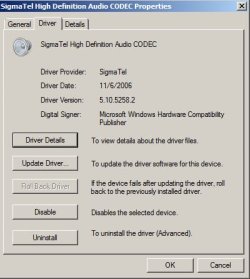
Here is a pic of the driver tab in Device Manager.
I was about to give up and buy a separate sound card, but gave it one more try. Here is what I did. It may or may not work for you:
Uninstall onboard sound drivers in Device Manager. Uninstall any remaining IDT or Sigmatel entries in add/remove programs.
Attempt to install this older Sigmatel driver from Intel: IDT Sigmatel Audio Driver
It may work as is for you, but it didn’t for me. It failed with this error: this system does not support the driver you are trying to install. I got the same result in compatibility mode for Vista sp2 and xp2
Rebooted and accepted installation of default Windows drivers. Control panel now showed a Sigmatel entry, which I am SURE I have never previously had with Win 7.
The playback tab shows 2 sets of speakers; only 1 works.
The recording tab in control panel now showed duplicate entries for microphone, line in, rear mic, and a single entry for stereo mix. I haven’t checked, but I would guess only 1 set of the duplicate pairs will work. The single stereo mix choice works as intended.
The details tab in device mgr shows this as hardware IDs:
HDAUDIO\FUNC_01&VEN_8384&DEV_7618&SUBSYS_80862113&REV_1002
HDAUDIO\FUNC_01&VEN_8384&DEV_7618&SUBSYS_80862113
I can record what I am listening to in Audacity with its Preferences defaults, which are: Interface host: MME; Playback: speakers; Recording device: stereo mix. Make sure the slider next to the master volume control dropdown is set near the midpoint.
I can only guess that the first failed attempt at installing the Vista driver installed the Sigmatel control panel, a set of entries in the sound control panel, and some aspect of “stereo mix” that was later preserved when updated by the default drivers. I do know that the default drivers alone never provided “stereo mix”.
The only apparent downside is the duplicate set of entries (except for stereo mix) in the sound control panel.
Here is a pic of the driver tab in Device Manager.
Attachments
My Computer
At a glance
Windows 7 Home Premium SP1, 64-bitIntel Skylake i5-6600K, not overclocked8 GB HyperX DDR4-2666 (2 x 4 GB)none; graphics are integrated on CPU
- Computer type
- PC/Desktop
- Computer Manufacturer/Model Number
- Ignatz Special; 4 speed manual gearbox; factory air conditioning; one of one
- OS
- Windows 7 Home Premium SP1, 64-bit
- CPU
- Intel Skylake i5-6600K, not overclocked
- Motherboard
- AsRock Z170M Extreme 4, micro ATX
- Memory
- 8 GB HyperX DDR4-2666 (2 x 4 GB)
- Graphics Card(s)
- none; graphics are integrated on CPU
- Sound Card
- onboard: Realtek ALC1150; external: USB Behringer UF0-202
- Monitor(s) Displays
- Dell S2340M 23 inch IPS
- Screen Resolution
- 1600 x 900
- Hard Drives
- System: Crucial MX100 series SSD, 128 GB;
Data: Samsung Spinpoint 103SJ, 1 TB;
Backup: WD Caviar Green WD30EZRX-00D8PB0, 3 TB
- PSU
- Rosewill SilentNight 500 watt fanless, semi-modular
- Case
- Antec Solo II
- Cooling
- Noctua NH-U12S; Noctua F12 intake, Noctua S12A exhaust
- Keyboard
- Microsoft 200 6JH-00001 USB
- Mouse
- Dell or Microsoft optical wired; USB
- Antivirus
- Microsoft Security Essentials and Malwarebytes Premium
- Browser
- Pale Moon
- Other Info
- All fans PWM; speeds at idle: CPU circa 500 rpm; intake circa 600 rpm; exhaust circa 600 rpm; CPU temps 27 idle and 47 C load in a warm room (27 C/81 F) when running Intel Extreme Tuning Utility stress test.


