Solved Simple straightforward hard drive cloning software?

Tomha

New member
Member
VIP
Local time
3:26 PM
Messages
391
Location
Auckland, New Zealand
Does anyone know of a simple program that will allow me to clone a hard drive of about 800gb onto a partition on the same physical drive as the boot drive, while in the OS, without mounting DVDs and all that kinda thing? :)

Thanks
 

My Computer

Computer type
PC/Desktop
Computer Manufacturer/Model Number
Custom Build
OS
Windows 7 Professional 64bit
CPU
Intel i7 3770k 3.5ghz
Motherboard
Asus P8Z77-V Deluxe
Memory
Corsair Vengeance 16gb (4x4gb)
Graphics Card(s)
Gigabyte G1 Gaming GTX970
Sound Card
None
Monitor(s) Displays
3x AOC 12367fh 23"
Screen Resolution
1920x1080
Hard Drives
Western Digital Caviar Black 1TB - 64mb cache
Western Digital Caviar Green 1TB - 32mb cache
Samsung 830 SSD 128Gb Boot Drive
PSU
Corsair AX-860W ATX
Case
Corsair 500R black
Cooling
Corsair 500r Stock cooling (3x120mm, 1x200mm) & Corsair H100
Keyboard
Logitech G110 gaming keyboard
Mouse
Logitech G500s
Other Info
Corsair Hydro 100 CPU Cooler
So you have a pc/laptop with only 1 harddrive (WIN7 is on it)? You want to clone that drive. Correct?

New drive is larger? Nothing on new drive yet? Old and new drive both SATA or both IDE?
 
Last edited:

My Computer

Computer type
Laptop
Computer Manufacturer/Model Number
ACER ASPIRE 5742G
OS
Microsoft Windows 7 Home Premium 64-bits 7601 Multiprocessor Free Service Pack 1
CPU
Intel(R) Core(TM) i3 CPU M 370 @ 2.40GHz
Motherboard
Acer Aspire 5742G
Memory
4,00 GB
Graphics Card(s)
ATI Mobility Radeon HD 5400 Series
Sound Card
(1) AMD High Definition Audio Device (2) Realtek High Defi
Screen Resolution
1366 x 768 x 32 bits (4294967296 colors) @ 60 Hz
Hard Drives
WDC WD5000BEVT-22ZAT0
Please post screenhot of "disk management". With all fields visible of source harddisk (the disk you want to clone). After cloning you want to format old harddisk and use it for other purpose?
 

My Computer

Computer type
Laptop
Computer Manufacturer/Model Number
ACER ASPIRE 5742G
OS
Microsoft Windows 7 Home Premium 64-bits 7601 Multiprocessor Free Service Pack 1
CPU
Intel(R) Core(TM) i3 CPU M 370 @ 2.40GHz
Motherboard
Acer Aspire 5742G
Memory
4,00 GB
Graphics Card(s)
ATI Mobility Radeon HD 5400 Series
Sound Card
(1) AMD High Definition Audio Device (2) Realtek High Defi
Screen Resolution
1366 x 768 x 32 bits (4294967296 colors) @ 60 Hz
Hard Drives
WDC WD5000BEVT-22ZAT0
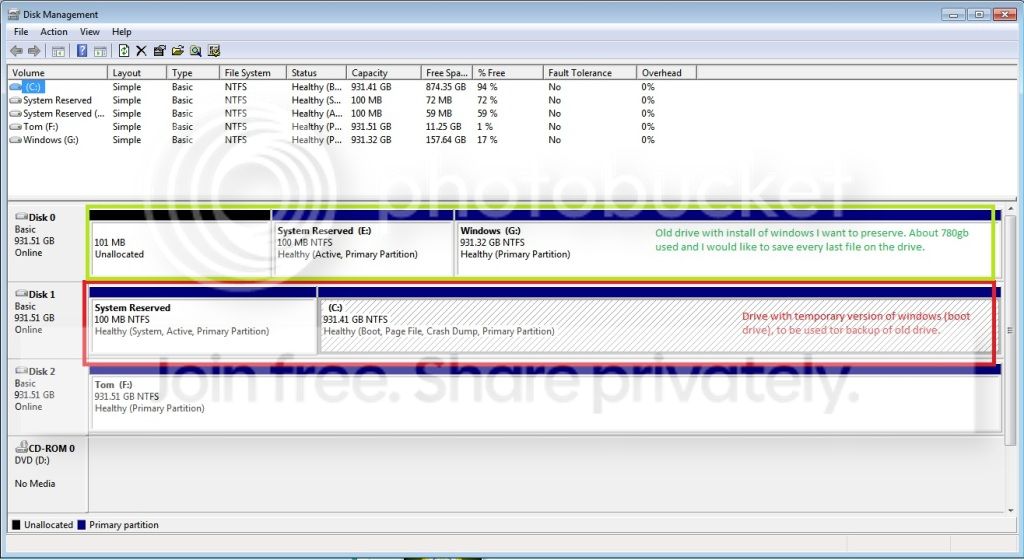
The drives are all internal 1tb drives from Western Digital in my current rig. I have a temporary install of windows on one of the drives with plenty of room left which I want to use for the backup of the old drive, a second drive with about 780gb of data, all of which I want a copy of. The image illustrates:

Drives.jpg


As you can see here:
http://www.sevenforums.com/installa...-sysprep-original-hdd-failed.html#post1987779
I am trying to get the old disk working, but failing that I will reformat and perform a fresh install of windows. That I can handle by myself, I just want to make sure I have a copy of everything on it before I do this.
 

My Computer

Computer type
PC/Desktop
Computer Manufacturer/Model Number
Custom Build
OS
Windows 7 Professional 64bit
CPU
Intel i7 3770k 3.5ghz
Motherboard
Asus P8Z77-V Deluxe
Memory
Corsair Vengeance 16gb (4x4gb)
Graphics Card(s)
Gigabyte G1 Gaming GTX970
Sound Card
None
Monitor(s) Displays
3x AOC 12367fh 23"
Screen Resolution
1920x1080
Hard Drives
Western Digital Caviar Black 1TB - 64mb cache
Western Digital Caviar Green 1TB - 32mb cache
Samsung 830 SSD 128Gb Boot Drive
PSU
Corsair AX-860W ATX
Case
Corsair 500R black
Cooling
Corsair 500r Stock cooling (3x120mm, 1x200mm) & Corsair H100
Keyboard
Logitech G110 gaming keyboard
Mouse
Logitech G500s
Other Info
Corsair Hydro 100 CPU Cooler
you want to clone disk 0 to disk 2? Or do you want to backup E and G to disk 1?
 

My Computer

Computer type
Laptop
Computer Manufacturer/Model Number
ACER ASPIRE 5742G
OS
Microsoft Windows 7 Home Premium 64-bits 7601 Multiprocessor Free Service Pack 1
CPU
Intel(R) Core(TM) i3 CPU M 370 @ 2.40GHz
Motherboard
Acer Aspire 5742G
Memory
4,00 GB
Graphics Card(s)
ATI Mobility Radeon HD 5400 Series
Sound Card
(1) AMD High Definition Audio Device (2) Realtek High Defi
Screen Resolution
1366 x 768 x 32 bits (4294967296 colors) @ 60 Hz
Hard Drives
WDC WD5000BEVT-22ZAT0
Backup E and G to disk 1, sorry if that created confusion, I say clone because I am aware sometimes things that give you "backups" end up giving you giant files you cant use or something, I want an exact copy of all the files, but can't just use copy/paste because windows wont let me do this for many of the files, especially restricted ones such as the user files.
 

My Computer

Computer type
PC/Desktop
Computer Manufacturer/Model Number
Custom Build
OS
Windows 7 Professional 64bit
CPU
Intel i7 3770k 3.5ghz
Motherboard
Asus P8Z77-V Deluxe
Memory
Corsair Vengeance 16gb (4x4gb)
Graphics Card(s)
Gigabyte G1 Gaming GTX970
Sound Card
None
Monitor(s) Displays
3x AOC 12367fh 23"
Screen Resolution
1920x1080
Hard Drives
Western Digital Caviar Black 1TB - 64mb cache
Western Digital Caviar Green 1TB - 32mb cache
Samsung 830 SSD 128Gb Boot Drive
PSU
Corsair AX-860W ATX
Case
Corsair 500R black
Cooling
Corsair 500r Stock cooling (3x120mm, 1x200mm) & Corsair H100
Keyboard
Logitech G110 gaming keyboard
Mouse
Logitech G500s
Other Info
Corsair Hydro 100 CPU Cooler
I think you want to backup E and G to disk 1. Correct? If so:
Post disk management screenshot when done.
How to Move/Resize Partition with partition manager? Partition Wizard Move/Resize Partition Video Help. resize C changing the right partition border NOT the left, otherwise most likely system doesn't boot!
 

My Computer

Computer type
Laptop
Computer Manufacturer/Model Number
ACER ASPIRE 5742G
OS
Microsoft Windows 7 Home Premium 64-bits 7601 Multiprocessor Free Service Pack 1
CPU
Intel(R) Core(TM) i3 CPU M 370 @ 2.40GHz
Motherboard
Acer Aspire 5742G
Memory
4,00 GB
Graphics Card(s)
ATI Mobility Radeon HD 5400 Series
Sound Card
(1) AMD High Definition Audio Device (2) Realtek High Defi
Screen Resolution
1366 x 768 x 32 bits (4294967296 colors) @ 60 Hz
Hard Drives
WDC WD5000BEVT-22ZAT0
Backup E and G to disk 1, sorry if that created confusion, I say clone because I am aware sometimes things that give you "backups" end up giving you giant files you cant use or something, I want an exact copy of all the files, but can't just use copy/paste because windows wont let me do this for many of the files, especially restricted ones such as the user files.
Copy/paste files is not what you want! You want sort of copy/paste partition. All info like file owner/security and registry settings should be saved
 
Last edited:

My Computer

Computer type
Laptop
Computer Manufacturer/Model Number
ACER ASPIRE 5742G
OS
Microsoft Windows 7 Home Premium 64-bits 7601 Multiprocessor Free Service Pack 1
CPU
Intel(R) Core(TM) i3 CPU M 370 @ 2.40GHz
Motherboard
Acer Aspire 5742G
Memory
4,00 GB
Graphics Card(s)
ATI Mobility Radeon HD 5400 Series
Sound Card
(1) AMD High Definition Audio Device (2) Realtek High Defi
Screen Resolution
1366 x 768 x 32 bits (4294967296 colors) @ 60 Hz
Hard Drives
WDC WD5000BEVT-22ZAT0
Well if you just want to break the sysprep process: try this when booting from old drive (new drive disconnected)
  1. When the error: Windows could not finish configuring the system. To attempt to resume configuration, restart the computer. Press SHIFT – F10. Don’t press OK.
  2. Start compmgmt.msc, enable the administrator user, or create an extra user with administrator rights. Or do net user yourusername /active:Yes
  3. Start Regedit
  4. Go to HKLM\System\Setup
  5. Clear the Cmdline value
  6. Reset the MiniSetupInProgress, SetupType and SystemSetupInProgress to 0 / zero
  7. Restart the machine
Post results
 
Last edited:

My Computer

Computer type
Laptop
Computer Manufacturer/Model Number
ACER ASPIRE 5742G
OS
Microsoft Windows 7 Home Premium 64-bits 7601 Multiprocessor Free Service Pack 1
CPU
Intel(R) Core(TM) i3 CPU M 370 @ 2.40GHz
Motherboard
Acer Aspire 5742G
Memory
4,00 GB
Graphics Card(s)
ATI Mobility Radeon HD 5400 Series
Sound Card
(1) AMD High Definition Audio Device (2) Realtek High Defi
Screen Resolution
1366 x 768 x 32 bits (4294967296 colors) @ 60 Hz
Hard Drives
WDC WD5000BEVT-22ZAT0
Im running the defrag now. In regards to your previous post, what did you mean by " You ant"? I can't quite tell what those last 2 sentences are trying to say due to that, I'm sure its just a typo, but none the less.

As for the sysprep process, I'll try that, but come to think of it, I would still like that backup. A fresh install would actually solve quite a few of my problems, at least having a backup allows me to easily do that by myself.
 

My Computer

Computer type
PC/Desktop
Computer Manufacturer/Model Number
Custom Build
OS
Windows 7 Professional 64bit
CPU
Intel i7 3770k 3.5ghz
Motherboard
Asus P8Z77-V Deluxe
Memory
Corsair Vengeance 16gb (4x4gb)
Graphics Card(s)
Gigabyte G1 Gaming GTX970
Sound Card
None
Monitor(s) Displays
3x AOC 12367fh 23"
Screen Resolution
1920x1080
Hard Drives
Western Digital Caviar Black 1TB - 64mb cache
Western Digital Caviar Green 1TB - 32mb cache
Samsung 830 SSD 128Gb Boot Drive
PSU
Corsair AX-860W ATX
Case
Corsair 500R black
Cooling
Corsair 500r Stock cooling (3x120mm, 1x200mm) & Corsair H100
Keyboard
Logitech G110 gaming keyboard
Mouse
Logitech G500s
Other Info
Corsair Hydro 100 CPU Cooler
ant=want
 

My Computer

Computer type
Laptop
Computer Manufacturer/Model Number
ACER ASPIRE 5742G
OS
Microsoft Windows 7 Home Premium 64-bits 7601 Multiprocessor Free Service Pack 1
CPU
Intel(R) Core(TM) i3 CPU M 370 @ 2.40GHz
Motherboard
Acer Aspire 5742G
Memory
4,00 GB
Graphics Card(s)
ATI Mobility Radeon HD 5400 Series
Sound Card
(1) AMD High Definition Audio Device (2) Realtek High Defi
Screen Resolution
1366 x 768 x 32 bits (4294967296 colors) @ 60 Hz
Hard Drives
WDC WD5000BEVT-22ZAT0
Well if you just want to break the sysprep process: try this when booting from old drive (new drive disconnected)
  1. When the error: Windows could not finish configuring the system. To attempt to resume configuration, restart the computer. Press SHIFT – F10. Don’t press OK.
  2. Start compmgmt.msc, enable the administrator user, or create an extra user with administrator rights. Or do net user yourusername /active:Yes
  3. Start Regedit
  4. Go to HKLM\System\Setup
  5. Clear the Cmdline value
  6. Reset the MiniSetupInProgress, SetupType and SystemSetupInProgress to 0 / zero
  7. Restart the machine
Post results
After this you have to install hotfix A Windows 7 or a Windows Server 2008 R2 image deployment process stops when you try to deploy the image on another computer
reboot and try to sysprep again
 
Last edited:

My Computer

Computer type
Laptop
Computer Manufacturer/Model Number
ACER ASPIRE 5742G
OS
Microsoft Windows 7 Home Premium 64-bits 7601 Multiprocessor Free Service Pack 1
CPU
Intel(R) Core(TM) i3 CPU M 370 @ 2.40GHz
Motherboard
Acer Aspire 5742G
Memory
4,00 GB
Graphics Card(s)
ATI Mobility Radeon HD 5400 Series
Sound Card
(1) AMD High Definition Audio Device (2) Realtek High Defi
Screen Resolution
1366 x 768 x 32 bits (4294967296 colors) @ 60 Hz
Hard Drives
WDC WD5000BEVT-22ZAT0
Is there any kind of program or something that allows you to save installed files, cd keys, certain registry changes, etc and allow you to easily restore them after an install? For example I have microsoft office 2010, but my product key came in an email which has since been lost to a stuff up with the server, trying to get this working again would be a huge hassle.
 

My Computer

Computer type
PC/Desktop
Computer Manufacturer/Model Number
Custom Build
OS
Windows 7 Professional 64bit
CPU
Intel i7 3770k 3.5ghz
Motherboard
Asus P8Z77-V Deluxe
Memory
Corsair Vengeance 16gb (4x4gb)
Graphics Card(s)
Gigabyte G1 Gaming GTX970
Sound Card
None
Monitor(s) Displays
3x AOC 12367fh 23"
Screen Resolution
1920x1080
Hard Drives
Western Digital Caviar Black 1TB - 64mb cache
Western Digital Caviar Green 1TB - 32mb cache
Samsung 830 SSD 128Gb Boot Drive
PSU
Corsair AX-860W ATX
Case
Corsair 500R black
Cooling
Corsair 500r Stock cooling (3x120mm, 1x200mm) & Corsair H100
Keyboard
Logitech G110 gaming keyboard
Mouse
Logitech G500s
Other Info
Corsair Hydro 100 CPU Cooler
Is there any kind of program or something that allows you to save installed files, cd keys, certain registry changes, etc and allow you to easily restore them after an install? For example I have microsoft office 2010, but my product key came in an email which has since been lost to a stuff up with the server, trying to get this working again would be a huge hassle.
Windows Easy Transfer - Windows 7 features - Microsoft Windows does it partitially

But better..... make backups using windows backup or "system image"
 

My Computer

Computer type
Laptop
Computer Manufacturer/Model Number
ACER ASPIRE 5742G
OS
Microsoft Windows 7 Home Premium 64-bits 7601 Multiprocessor Free Service Pack 1
CPU
Intel(R) Core(TM) i3 CPU M 370 @ 2.40GHz
Motherboard
Acer Aspire 5742G
Memory
4,00 GB
Graphics Card(s)
ATI Mobility Radeon HD 5400 Series
Sound Card
(1) AMD High Definition Audio Device (2) Realtek High Defi
Screen Resolution
1366 x 768 x 32 bits (4294967296 colors) @ 60 Hz
Hard Drives
WDC WD5000BEVT-22ZAT0
Still defragging? Still shrinking partitions? Or are you trying to cancel sysprep and boot from old drive?
 

My Computer

Computer type
Laptop
Computer Manufacturer/Model Number
ACER ASPIRE 5742G
OS
Microsoft Windows 7 Home Premium 64-bits 7601 Multiprocessor Free Service Pack 1
CPU
Intel(R) Core(TM) i3 CPU M 370 @ 2.40GHz
Motherboard
Acer Aspire 5742G
Memory
4,00 GB
Graphics Card(s)
ATI Mobility Radeon HD 5400 Series
Sound Card
(1) AMD High Definition Audio Device (2) Realtek High Defi
Screen Resolution
1366 x 768 x 32 bits (4294967296 colors) @ 60 Hz
Hard Drives
WDC WD5000BEVT-22ZAT0
How do I use windows backup? I can't find it anywhere.

The defrag process is still going on G (its slow :( ). Almost done though..I assume...part3:3% consolidated?. Once the partitions are all set I'll let you know, I'm gonna try get a backup before I try fix it, then I will fix that, start grabbing my second lot of backups using the tools you have suggested, then I will reformat and start a fresh install.

Thank you soooo much for the help, its incredibly helpful and I appreciate it a lot ;)
 

My Computer

Computer type
PC/Desktop
Computer Manufacturer/Model Number
Custom Build
OS
Windows 7 Professional 64bit
CPU
Intel i7 3770k 3.5ghz
Motherboard
Asus P8Z77-V Deluxe
Memory
Corsair Vengeance 16gb (4x4gb)
Graphics Card(s)
Gigabyte G1 Gaming GTX970
Sound Card
None
Monitor(s) Displays
3x AOC 12367fh 23"
Screen Resolution
1920x1080
Hard Drives
Western Digital Caviar Black 1TB - 64mb cache
Western Digital Caviar Green 1TB - 32mb cache
Samsung 830 SSD 128Gb Boot Drive
PSU
Corsair AX-860W ATX
Case
Corsair 500R black
Cooling
Corsair 500r Stock cooling (3x120mm, 1x200mm) & Corsair H100
Keyboard
Logitech G110 gaming keyboard
Mouse
Logitech G500s
Other Info
Corsair Hydro 100 CPU Cooler
Is there any kind of program or something that allows you to save installed files, cd keys, certain registry changes, etc and allow you to easily restore them after an install? For example I have microsoft office 2010, but my product key came in an email which has since been lost to a stuff up with the server, trying to get this working again would be a huge hassle.
First solve the current problem!
 

My Computer

Computer type
Laptop
Computer Manufacturer/Model Number
ACER ASPIRE 5742G
OS
Microsoft Windows 7 Home Premium 64-bits 7601 Multiprocessor Free Service Pack 1
CPU
Intel(R) Core(TM) i3 CPU M 370 @ 2.40GHz
Motherboard
Acer Aspire 5742G
Memory
4,00 GB
Graphics Card(s)
ATI Mobility Radeon HD 5400 Series
Sound Card
(1) AMD High Definition Audio Device (2) Realtek High Defi
Screen Resolution
1366 x 768 x 32 bits (4294967296 colors) @ 60 Hz
Hard Drives
WDC WD5000BEVT-22ZAT0
Did you install Partition Wizard Home edition? Do it now! Shrink C to about 100GB and G to about 800GB. unallocated space should appear now on the right side (not the left!) of both partitions. Take at look at the free space next to C and the size of partition G. Does G fit in the free space after C? Now press apply. You have to reboot I think.

Post screenshot of disk management after reboot
 
Last edited:

My Computer

Computer type
Laptop
Computer Manufacturer/Model Number
ACER ASPIRE 5742G
OS
Microsoft Windows 7 Home Premium 64-bits 7601 Multiprocessor Free Service Pack 1
CPU
Intel(R) Core(TM) i3 CPU M 370 @ 2.40GHz
Motherboard
Acer Aspire 5742G
Memory
4,00 GB
Graphics Card(s)
ATI Mobility Radeon HD 5400 Series
Sound Card
(1) AMD High Definition Audio Device (2) Realtek High Defi
Screen Resolution
1366 x 768 x 32 bits (4294967296 colors) @ 60 Hz
Hard Drives
WDC WD5000BEVT-22ZAT0
Shrinking G at the moment, just under 800gb
 

My Computer

Computer type
PC/Desktop
Computer Manufacturer/Model Number
Custom Build
OS
Windows 7 Professional 64bit
CPU
Intel i7 3770k 3.5ghz
Motherboard
Asus P8Z77-V Deluxe
Memory
Corsair Vengeance 16gb (4x4gb)
Graphics Card(s)
Gigabyte G1 Gaming GTX970
Sound Card
None
Monitor(s) Displays
3x AOC 12367fh 23"
Screen Resolution
1920x1080
Hard Drives
Western Digital Caviar Black 1TB - 64mb cache
Western Digital Caviar Green 1TB - 32mb cache
Samsung 830 SSD 128Gb Boot Drive
PSU
Corsair AX-860W ATX
Case
Corsair 500R black
Cooling
Corsair 500r Stock cooling (3x120mm, 1x200mm) & Corsair H100
Keyboard
Logitech G110 gaming keyboard
Mouse
Logitech G500s
Other Info
Corsair Hydro 100 CPU Cooler
Shrinking G at the moment, just under 800gb
partition wizard moves files being located at end of partition to another location... so it can shrink.

Shrink (use partition wizard move/resize) C as well. Make it about 100GB. Of course apply changes and reboot
Post screenshot of "disk management" afterwards
 

My Computer

Computer type
Laptop
Computer Manufacturer/Model Number
ACER ASPIRE 5742G
OS
Microsoft Windows 7 Home Premium 64-bits 7601 Multiprocessor Free Service Pack 1
CPU
Intel(R) Core(TM) i3 CPU M 370 @ 2.40GHz
Motherboard
Acer Aspire 5742G
Memory
4,00 GB
Graphics Card(s)
ATI Mobility Radeon HD 5400 Series
Sound Card
(1) AMD High Definition Audio Device (2) Realtek High Defi
Screen Resolution
1366 x 768 x 32 bits (4294967296 colors) @ 60 Hz
Hard Drives
WDC WD5000BEVT-22ZAT0
Back
Top