Simplifying updates for Windows 7 and 8.1

Is there any reason to use this update if a person has a fully (current) updated system ?
To me it seems like it is for clean installs, or systems that are not up to date with Windows Updates.

:ditto:

Unfortunately (or fortunately, depending on how you look at it), I will be doing a clean install in the not too distant future on a new machine.
 

My Computer My Computer

Computer type
PC/Desktop
Computer Manufacturer/Model Number
Custom Build
OS
Win 7 Ultimate 64 bit
CPU
Intel i7-3930K
Motherboard
ASUS P9X79 WS
Memory
Kingston HyperX Genesis 32GB Kit (8x4GB Modules) 1600MHz DDR
Graphics Card(s)
MSI R7850 Twin Frozr 2GD5/OC Radeon HD 7850 2GB 256-bit GDDR
Sound Card
Asus Xonar Essence STX
Monitor(s) Displays
3x Asus VG248QE 24", Vizio 32" TV
Screen Resolution
1920 x 1080, ?
Hard Drives
Samsung 128GB 840 Pro SSD (1),
Samsung 4TB 850 EVO SSDs (4)
Samsung 4TB 850 EVO SSDs (16) external backup drives used in 2.5" hot swap bays in the computer.
PSU
Corsair HX750w
Case
Antec Two Hundred v2 (modified)
Cooling
Cooler Master GeminII S524 120mm (fan replaced with a 140mm)
Keyboard
Logitech G510s
Mouse
Logitech M525 (two in use)
Internet Speed
=< 32Mbps down, 8Mbps up
Antivirus
AVAST!, MBAM, SAS, Spybot S&D (all but MBAM free) Glary Util
Browser
IE11
Other Info
LSI 9211-8i HBA card (8 SATA III ports), 2.5" & 3.5" Hot Swap Bays, HooToo HT-CR001 PCI-E to USB 3.0 Internal Hub + 6 Slot Card Reader, and LG Model CH12LS28 BD-ROM Optical Drive. Also, ScanSnap S1500 ADF duplexing scanner, Canon 9000F flat bed scanner, Corsair SP2500 2.1 speakers, Samsung CLP 415nw laser color printer, Cyberpower PP2200SW UPS

Windows 7 Hotfix repository - Page 1051

sfc-harmless.PNG

abbodi1406 @MDL
worthy.gif
Conclusion = Harmless. Live with it until M$ releases a fix ;) YMMV
 

My Computer My Computer

Computer type
Laptop
Computer Manufacturer/Model Number
MSI PE60 6QE
OS
Win 10 Pro x64, Win 7 Pro x64
CPU
Intel Core i7-6700HQ Skylake
Motherboard
MSI MS-16J5
Memory
16gb Crucial DDR4
Graphics Card(s)
NVIDIA GeForce GTX 960M 2 GB
Screen Resolution
1920 x 1080
Hard Drives
Samsung 850 EVO 250 GB M.2 SSD (MZ-N5E250BW)
HGST 1TB @7200 RPM HTS721010A9E630
Case
Plastic
Keyboard
Got one...
Mouse
Yep, one of those too.
Internet Speed
FIOS 75/75
Antivirus
Defender
Browser
Chrome/FFox/Ex-PLODE-r/(L)Edge
Other Info
Defender, Custom Hosts, uBlock, regular backups w/ Macrium (Free)
Is there any reason to use this update if a person has a fully (current) updated system ?
To me it seems like it is for clean installs, or systems that are not up to date with Windows Updates.
This roll up seems to contain a new version of the Windows Update Client that is not available via Windows Update. See this post: http://www.sevenforums.com/news/396236-simplifying-updates-windows-7-8-1-a-12.html#post3250393

There might be other things in this roll up that you cannot get elsewhere. I wouldn't be surprised if several of the updates are newer versions of the KBs they replace. See this post: http://www.sevenforums.com/news/396236-simplifying-updates-windows-7-8-1-a-11.html#post3250210

If that is true, it would answer the question asked in this post: http://www.sevenforums.com/news/396236-simplifying-updates-windows-7-8-1-a.html#post3249452
 

My Computer My Computer

Computer type
Laptop
Computer Manufacturer/Model Number
Employer provided Dell Latitude
OS
W7 Pro SP1 64bit
CPU
i7
Memory
8GB
Graphics Card(s)
Intel HD Graphics
Hard Drives
crappy SSD
Antivirus
Employer mandated Symantec Endpoint Protection
Browser
Pale Moon 64bit, IE11 64bit & Chrome 64bit
Is there any reason to use this update if a person has a fully (current) updated system ?
To me it seems like it is for clean installs, or systems that are not up to date with Windows Updates.

Look at my post 2 posts above yours. My Win 7 Pro x64 was up-to-date prior to install Convenience Rollup; of course I had several recent backup images to rollback the rollup :p just in case. ;)


Installing Rollup & running subsequent Disk Cleanup/Windows Update Cleanup reduced # of installed updates listed from 227 pre-rollup to 67 post rollup and reclaimed about 2.5-3gb of disk space on my Win 7 Pro x64 (No Office) "Live System".

Works for me. ;)
 

My Computer My Computer

Computer type
Laptop
Computer Manufacturer/Model Number
MSI PE60 6QE
OS
Win 10 Pro x64, Win 7 Pro x64
CPU
Intel Core i7-6700HQ Skylake
Motherboard
MSI MS-16J5
Memory
16gb Crucial DDR4
Graphics Card(s)
NVIDIA GeForce GTX 960M 2 GB
Screen Resolution
1920 x 1080
Hard Drives
Samsung 850 EVO 250 GB M.2 SSD (MZ-N5E250BW)
HGST 1TB @7200 RPM HTS721010A9E630
Case
Plastic
Keyboard
Got one...
Mouse
Yep, one of those too.
Internet Speed
FIOS 75/75
Antivirus
Defender
Browser
Chrome/FFox/Ex-PLODE-r/(L)Edge
Other Info
Defender, Custom Hosts, uBlock, regular backups w/ Macrium (Free)
To expand upon Brds7t7's answer:

1)
KB3125574 does not include Win 10 Telemetry KB's 2952664, 3021917 & 3033583;
KB3125574 does include KB's Win 10 Telemetry KB's3068708, 3075249 & 3080149.

2)
I also recommend installing/ check if already installed : KB3020369 (Svc Stack update, prerequisite), KB2670838 (Platform Update, prereq for IE11) IE11, KB3154070 (IE11 Cum Sec Update)KB3138612 (Latest WU Client) KB3145739 & KB3153199 (Latest Kernel-Mode Drivers) BEFORE you install KB3125574.

HTH

The fact that the rollup contains some telemetry updates is enough for me to reject it. Thank you for clarifying that.

Lady, can those KB telemetry updates can be uninstalled via powershell? It would save a lot of people work when doing a clean install.

Even if you disable all the tasks in task scheduler I don't think the telemetry gets fully disabled.
Since KB2952664 was introduced it installs an appraiser task/file/program whatever you want to call it and compatTel.
I found these were asking for Internet access through comodo on many occasions. I also had a lot more disk thrashing when that update was installed. After removal my disk went back to normal. So, I'm not convinced disabling CEIP and the tasks fully disables it.
 

My Computer My Computer

Computer type
PC/Desktop
Computer Manufacturer/Model Number
Custom Build
OS
Win 7 Ultimate, Win 8.1 Pro, Linux Mint 19 Cinnamon (All 64-Bit)
CPU
Intel i5 4690K
Motherboard
Gigabyte Z97X-UD3H
Memory
Corsair Vengeance LP 32GB DDR3
Graphics Card(s)
MSI GTX 1060 GAMING X 6GB
Sound Card
Onboard
Hard Drives
Samsung 850 EVO 250GB SSD (x2)
Samsung 860 EVO 1TB SSD (x2)
Crucial MX300 525GB SSD
WD Blue 2TB 5400rpm Intellipark Disabled (x2)
PSU
Corsair HX750i
Case
Phanteks Enthoo Pro
Cooling
CM Hyper 212 EVO on CPU, Noctua Redux NF-P14S 1500rpm (x6)
Keyboard
Corsair K70 RGB LUX
Mouse
Corsair Sabre RGB
Antivirus
Avast Free, MalwareBytes, SAS & CryptoPrevent
Browser
Chrome
Other Info
StarTech PEXESAT322I 2 Port PCI-E SATA Card
ASUS PCE-AC56 Dual-band AC1300 Wireless Card
Akasa FC.Six Manual Fan Controller
And a Partridge in a Pear Tree!
Hello PDSNICKLES.

1) ...I would advise switching Windows Update to "Never check" before installing the update or it might hang...It doesn't contain KB3035583

2) ... And you need to install the servicing stack update FIRST or the convenience rollup won't install.

Hope that helps?

To expand upon Brds7t7's answer:

1)
KB3125574 does not include Win 10 Telemetry KB's 2952664, 3021917 & 3033583;
KB3125574 does include KB's Win 10 Telemetry KB's3068708, 3075249 & 3080149.

2)
I also recommend installing/ check if already installed : KB3020369 (Svc Stack update, prerequisite), KB2670838 (Platform Update, prereq for IE11) IE11, KB3154070 (IE11 Cum Sec Update)KB3138612 (Latest WU Client) KB3145739 & KB3153199 (Latest Kernel-Mode Drivers) BEFORE you install KB3125574.

HTH

The fact that the rollup contains some telemetry updates is enough for me to reject it. Thank you for clarifying that.

I still prefer to use a 3rd party update pack on a clean install which I've used for a few years now. I can pick and choose which updates I want to install/avoid. And since I have over 40 recommended updates which I skip, I prefer to use that option.
While this convenience pack is a welcome addition from MS, I still feel there are better options for clean installs.
 

My Computer My Computer

Computer type
PC/Desktop
Computer Manufacturer/Model Number
Custom Build
OS
Win 7 Ultimate, Win 8.1 Pro, Linux Mint 19 Cinnamon (All 64-Bit)
CPU
Intel i5 4690K
Motherboard
Gigabyte Z97X-UD3H
Memory
Corsair Vengeance LP 32GB DDR3
Graphics Card(s)
MSI GTX 1060 GAMING X 6GB
Sound Card
Onboard
Hard Drives
Samsung 850 EVO 250GB SSD (x2)
Samsung 860 EVO 1TB SSD (x2)
Crucial MX300 525GB SSD
WD Blue 2TB 5400rpm Intellipark Disabled (x2)
PSU
Corsair HX750i
Case
Phanteks Enthoo Pro
Cooling
CM Hyper 212 EVO on CPU, Noctua Redux NF-P14S 1500rpm (x6)
Keyboard
Corsair K70 RGB LUX
Mouse
Corsair Sabre RGB
Antivirus
Avast Free, MalwareBytes, SAS & CryptoPrevent
Browser
Chrome
Other Info
StarTech PEXESAT322I 2 Port PCI-E SATA Card
ASUS PCE-AC56 Dual-band AC1300 Wireless Card
Akasa FC.Six Manual Fan Controller
And a Partridge in a Pear Tree!
Hello PDSNICKLES.

1) ...I would advise switching Windows Update to "Never check" before installing the update or it might hang...It doesn't contain KB3035583

2) ... And you need to install the servicing stack update FIRST or the convenience rollup won't install.

Hope that helps?

To expand upon Brds7t7's answer:

1)
KB3125574 does not include Win 10 Telemetry KB's 2952664, 3021917 & 3033583;
KB3125574 does include KB's Win 10 Telemetry KB's3068708, 3075249 & 3080149.

2)
I also recommend installing/ check if already installed : KB3020369 (Svc Stack update, prerequisite), KB2670838 (Platform Update, prereq for IE11) IE11, KB3154070 (IE11 Cum Sec Update)KB3138612 (Latest WU Client) KB3145739 & KB3153199 (Latest Kernel-Mode Drivers) BEFORE you install KB3125574.

HTH
brds and urthbound, thanks for the replies!
What is a "W10 telemetry KB"? Does that mean it is pushing Windows 10 on people and there is a risk you could install it "by accident" as so many have done?
If so, I, like lady, will avoid this "roll up".

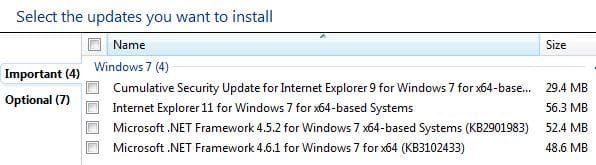
Another question re updates. According to the Update service, I only have FOUR important updates left to go, now that I got it working by some miracle (albeit it super slow):
*I have 2 Net Framework 4.5.2 and 4.6.1
*I have cumulative security for IE9 and I have IE11
Questions:
1) Do I need to download/install both the .net frameworks or can I just hide 4.5.2 and install 4.6.1?
2) Similarly, do I need to do the security updates first on IE9 then also install IE11? OR can I just hide IE9 and skip ahead to IE11?

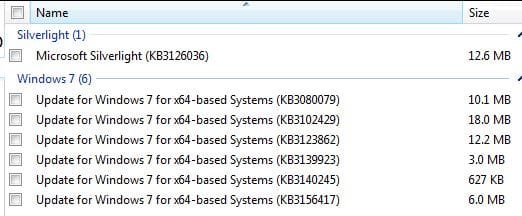
I then have 7 Optional updates left - 6 are Windows 7 Updates for 64bit systems and 1 Silverlight update.
What is your advice on these (attached jpgs of the 2 windows showing the kb#'s)?
Should I download/install all of the above? Or can I skip the earlier versions of Framework and IE?
Your opinions are respected, requested and appreciated!
Thanks!

important updates.JPG

optional updates.JPG
 

My Computer My Computer

OS
7 Home Premium 64bit
Internet Speed
2mbps (Yes, only TWO!!)
Antivirus
Emsisoft pay version
Browser
Firefox and sometimes chrome
If this is against TOS please remove it but I am wondering what you guys think about this script to delete/block all W10 "stuff"?
Is there a down side to it? It seems to leave everything in tact as far as the Updater re other non-W10 telemetry updates.
voat.co/v/technology/comments/853510
But I'm certainly no expert and don't fully understand it! Which is why I'm asking here.
 

My Computer My Computer

OS
7 Home Premium 64bit
Internet Speed
2mbps (Yes, only TWO!!)
Antivirus
Emsisoft pay version
Browser
Firefox and sometimes chrome
Since KB2952664 was introduced it installs an appraiser task/file/program whatever you want to call it and compatTel.

I went to the doctor last week and told him "It hurts when I do this" He told me "Don't do this"

Convenience Rollup doesn't install KB2952664 (or 3021917 or 3035583) Don't install & hide them.
shrug.gif

I really don't see what the problem is, but maybe it's just me?
 

My Computer My Computer

Computer type
Laptop
Computer Manufacturer/Model Number
MSI PE60 6QE
OS
Win 10 Pro x64, Win 7 Pro x64
CPU
Intel Core i7-6700HQ Skylake
Motherboard
MSI MS-16J5
Memory
16gb Crucial DDR4
Graphics Card(s)
NVIDIA GeForce GTX 960M 2 GB
Screen Resolution
1920 x 1080
Hard Drives
Samsung 850 EVO 250 GB M.2 SSD (MZ-N5E250BW)
HGST 1TB @7200 RPM HTS721010A9E630
Case
Plastic
Keyboard
Got one...
Mouse
Yep, one of those too.
Internet Speed
FIOS 75/75
Antivirus
Defender
Browser
Chrome/FFox/Ex-PLODE-r/(L)Edge
Other Info
Defender, Custom Hosts, uBlock, regular backups w/ Macrium (Free)
Nowhere in my reply did I say KB2952664 was installed with the convenience update. :confused: I was replying to the question on telemetry. Perhaps that was misinterpreted as I was quoting three posts.

The reason I don't install KB2952664 is because:

1) I have no intention of "upgrading to Windows 10" as the KB article states.
If I ever decide to upgrade (which isn't looking likely right now) then I'll be happy to provide them telemetry on the upgrade.

2) That update caused me issues.

I'm not fully "Anti-telemetry" if I feel it's necessary. I am, however, "Anti-anything which negatively affects the performance of my system for no good reason". :D That update caused me issues, which were resolved after I removed it, that's all I was saying.

As I said, if I choose to upgrade then MS can collect all the upgrade telemetry they need. Until then, why is it necessary on my system? I don't install anything if I don't feel it is necessary on my system. Why should I?

Anyway, that isn't my reason for not installing the convenience update, I choose to use a 3rd party option as it gives me more control over what I install.
 

My Computer My Computer

Computer type
PC/Desktop
Computer Manufacturer/Model Number
Custom Build
OS
Win 7 Ultimate, Win 8.1 Pro, Linux Mint 19 Cinnamon (All 64-Bit)
CPU
Intel i5 4690K
Motherboard
Gigabyte Z97X-UD3H
Memory
Corsair Vengeance LP 32GB DDR3
Graphics Card(s)
MSI GTX 1060 GAMING X 6GB
Sound Card
Onboard
Hard Drives
Samsung 850 EVO 250GB SSD (x2)
Samsung 860 EVO 1TB SSD (x2)
Crucial MX300 525GB SSD
WD Blue 2TB 5400rpm Intellipark Disabled (x2)
PSU
Corsair HX750i
Case
Phanteks Enthoo Pro
Cooling
CM Hyper 212 EVO on CPU, Noctua Redux NF-P14S 1500rpm (x6)
Keyboard
Corsair K70 RGB LUX
Mouse
Corsair Sabre RGB
Antivirus
Avast Free, MalwareBytes, SAS & CryptoPrevent
Browser
Chrome
Other Info
StarTech PEXESAT322I 2 Port PCI-E SATA Card
ASUS PCE-AC56 Dual-band AC1300 Wireless Card
Akasa FC.Six Manual Fan Controller
And a Partridge in a Pear Tree!
The fact that the rollup contains some telemetry updates is enough for me to reject it. Thank you for clarifying that.

Lady, can those KB telemetry updates can be uninstalled via powershell? It would save a lot of people work when doing a clean install.

Even if you disable all the tasks in task scheduler I don't think the telemetry gets fully disabled.
Since KB2952664 was introduced it installs an appraiser task/file/program whatever you want to call it and compatTel.
I found these were asking for Internet access through comodo on many occasions. I also had a lot more disk thrashing when that update was installed. After removal my disk went back to normal. So, I'm not convinced disabling CEIP and the tasks fully disables it.

Brds7t7
I was asking lady if you go ahead install the rollup which includes the following Telemetry updates KB's3068708, 3075249 & 3080149. Why can't you just uninstall them after the roll-up is installed? If those updates won't uninstall you might be able to force it to uninstall using the Windows 7 powershell. You or anyone else can answer that question.
 

My Computer My Computer

Computer type
PC/Desktop
Computer Manufacturer/Model Number
Dell All in one Inspiron 2020
OS
W10 32 bit, XUbuntu 18.xx 64 bit
CPU
Intel(R) Celeron(R) CPU G1620T @ 2.40GHz, 2400 Mhz
Motherboard
Dell
Memory
4GB
Graphics Card(s)
Intel HD graphics
Sound Card
High Definition Audio Device
Monitor(s) Displays
20 inch Screen
Screen Resolution
W7=1280 x 720 & Linux Mint Xfce=1360 x 768
Hard Drives
500 GB hard drive
Keyboard
Usb
Mouse
Usb
Internet Speed
High-Speed
Antivirus
MSE
Browser
Main Browser Firefox
Other Info
I have done a clean install of Windows 7 using Dell re-installation disk (Dell sent me one). I also use Free Macrium reflect backup and restore.
Lady, can those KB telemetry updates can be uninstalled via powershell? It would save a lot of people work when doing a clean install.

Even if you disable all the tasks in task scheduler I don't think the telemetry gets fully disabled.
Since KB2952664 was introduced it installs an appraiser task/file/program whatever you want to call it and compatTel.
I found these were asking for Internet access through comodo on many occasions. I also had a lot more disk thrashing when that update was installed. After removal my disk went back to normal. So, I'm not convinced disabling CEIP and the tasks fully disables it.

Brds7t7
I was asking lady if you go ahead install the rollup which includes the following Telemetry updates KB's3068708, 3075249 & 3080149. Why can't you just uninstall them after the roll-up is installed? If those updates won't uninstall you might be able to force it to uninstall using the Windows 7 powershell. You or anyone else can answer that question.

Hi Groze,
I'm not sure if it's possible to uninstall via Powershell when the updates are integrated into one rollup update like that, as you can't seem to be able to remove individual updates. I think if you install the updates individually then it's possible. I don't use Powershell often though so could be wrong. I've only really used it in Windows 8.1 to permanently remove metro apps.
 

My Computer My Computer

Computer type
PC/Desktop
Computer Manufacturer/Model Number
Custom Build
OS
Win 7 Ultimate, Win 8.1 Pro, Linux Mint 19 Cinnamon (All 64-Bit)
CPU
Intel i5 4690K
Motherboard
Gigabyte Z97X-UD3H
Memory
Corsair Vengeance LP 32GB DDR3
Graphics Card(s)
MSI GTX 1060 GAMING X 6GB
Sound Card
Onboard
Hard Drives
Samsung 850 EVO 250GB SSD (x2)
Samsung 860 EVO 1TB SSD (x2)
Crucial MX300 525GB SSD
WD Blue 2TB 5400rpm Intellipark Disabled (x2)
PSU
Corsair HX750i
Case
Phanteks Enthoo Pro
Cooling
CM Hyper 212 EVO on CPU, Noctua Redux NF-P14S 1500rpm (x6)
Keyboard
Corsair K70 RGB LUX
Mouse
Corsair Sabre RGB
Antivirus
Avast Free, MalwareBytes, SAS & CryptoPrevent
Browser
Chrome
Other Info
StarTech PEXESAT322I 2 Port PCI-E SATA Card
ASUS PCE-AC56 Dual-band AC1300 Wireless Card
Akasa FC.Six Manual Fan Controller
And a Partridge in a Pear Tree!
Lady, can those KB telemetry updates can be uninstalled via powershell? It would save a lot of people work when doing a clean install.

Even if you disable all the tasks in task scheduler I don't think the telemetry gets fully disabled.
Since KB2952664 was introduced it installs an appraiser task/file/program whatever you want to call it and compatTel.
I found these were asking for Internet access through comodo on many occasions. I also had a lot more disk thrashing when that update was installed. After removal my disk went back to normal. So, I'm not convinced disabling CEIP and the tasks fully disables it.

Brds7t7
I was asking lady if you go ahead install the rollup which includes the following Telemetry updates KB's3068708, 3075249 & 3080149. Why can't you just uninstall them after the roll-up is installed? If those updates won't uninstall you might be able to force it to uninstall using the Windows 7 powershell. You or anyone else can answer that question.
When you install the rollup update, it then shows up in Win Updates History as just 1 single update, no details or anything else. I have no idea if it's possible to remove the 3 telemetry updates somehow, but I'd guess not.

PS - This is on a clean install of Win 7 SP1 with just KB3020369 and the rollup installed. I don't know what happens if you install the rollup on a Win 7 machine which already has various updates historically installed.
 

My Computer My Computer

OS
Windows 7 Ultimate x64
I read those updates. I don't see them as being bad. In fact KB3080149 as a good update. Here is the reason why.

The Diagnostic and Telemetry service collects diagnostics information about functional issues on Windows systems that participate in the Windows Customer Experience Improvement Program (CEIP). CEIP reports don't contain contact information, such as your name, address, or telephone number. This means CEIP won't ask you to participate in surveys or to read junk email, and you won't be contacted in any other way. Windows users can make changes to their Windows CEIP participation in the Windows Customer Experience Improvement Program settings page by opening Control Panel and selecting Action Center > Change Action Center settings > Customer Experience Improvement Program settings.

Included in this update


  • Reduces the network connections on a Windows system that doesn't participate in the Windows Customer Experience Improvement Program (CEIP).
 

My Computer My Computer

Computer type
PC/Desktop
Computer Manufacturer/Model Number
Dell All in one Inspiron 2020
OS
W10 32 bit, XUbuntu 18.xx 64 bit
CPU
Intel(R) Celeron(R) CPU G1620T @ 2.40GHz, 2400 Mhz
Motherboard
Dell
Memory
4GB
Graphics Card(s)
Intel HD graphics
Sound Card
High Definition Audio Device
Monitor(s) Displays
20 inch Screen
Screen Resolution
W7=1280 x 720 & Linux Mint Xfce=1360 x 768
Hard Drives
500 GB hard drive
Keyboard
Usb
Mouse
Usb
Internet Speed
High-Speed
Antivirus
MSE
Browser
Main Browser Firefox
Other Info
I have done a clean install of Windows 7 using Dell re-installation disk (Dell sent me one). I also use Free Macrium reflect backup and restore.
Personally, there aren't many updates I would class as "bad" updates. Many that I've seen reports of causing people issues haven't caused me any problems at all. There are only two that have caused me issues in the past. The first was the one mentioned earlier. The second was this one classed as important: https://support.microsoft.com/en-gb/kb/3064209
That update caused me a BSOD upon install and was eventually pulled from Windows Update last year after numerous reports of issues. I haven't seen it show up again in WU since last year.

Do I feel most of these are bad updates? No. But, do I feel a lot of these need to be installed to have a fully functioning system? Again, No. Along with the other 40 updates I skip. My system runs well without them so I don't see the need to install them all. The main ones I do install are the updates which state they're to fix crashes, BSOD's, Issues caused by previous security updates, etc.

Some people will install all updates and have zero problems. I choose not to Install them if I don't feel they're necessary in the first place. For example, GWX, why would I install a "Get Windows 10" app when I have no intention of installing Windows 10 right now? Just another process running & using up resources.

Everybody has a different opinion on what updates are necessary. Me, personally, if it doesn't feel necessary, I see no need to install it. I have around 40 recommended/Optional updates installed and around 40 skipped. The only ones I don't skip are Security Updates. And I have doubts as to whether some of these are even necessary, if a person uses a lot of common sense online. :D However, with these, I'd rather not take the chance.
 

My Computer My Computer

Computer type
PC/Desktop
Computer Manufacturer/Model Number
Custom Build
OS
Win 7 Ultimate, Win 8.1 Pro, Linux Mint 19 Cinnamon (All 64-Bit)
CPU
Intel i5 4690K
Motherboard
Gigabyte Z97X-UD3H
Memory
Corsair Vengeance LP 32GB DDR3
Graphics Card(s)
MSI GTX 1060 GAMING X 6GB
Sound Card
Onboard
Hard Drives
Samsung 850 EVO 250GB SSD (x2)
Samsung 860 EVO 1TB SSD (x2)
Crucial MX300 525GB SSD
WD Blue 2TB 5400rpm Intellipark Disabled (x2)
PSU
Corsair HX750i
Case
Phanteks Enthoo Pro
Cooling
CM Hyper 212 EVO on CPU, Noctua Redux NF-P14S 1500rpm (x6)
Keyboard
Corsair K70 RGB LUX
Mouse
Corsair Sabre RGB
Antivirus
Avast Free, MalwareBytes, SAS & CryptoPrevent
Browser
Chrome
Other Info
StarTech PEXESAT322I 2 Port PCI-E SATA Card
ASUS PCE-AC56 Dual-band AC1300 Wireless Card
Akasa FC.Six Manual Fan Controller
And a Partridge in a Pear Tree!

My Computer My Computer

Computer type
PC/Desktop
Computer Manufacturer/Model Number
Custom assembled by me :}
OS
Win-7-Pro64bit 7-H-Prem-64bit
CPU
i7-5930K 2nd i9-9940x both water blocked VRM's too
Motherboard
ASUS SABERTOOTH X99 2nd ASUS x299 Apex
Memory
Trident-z 3200C14 2nd Trident-z 3600C16
Graphics Card(s)
EVGA 1080ti ftw3 2nd Titan Xp both water blocked
Sound Card
Built-in Realtek
Monitor(s) Displays
1-AOC G2460PG 24"G-Sync 144Hz/ 2nd 1-ASUS VG248QE 24" 144Hz
Screen Resolution
1920 x 1080 144Hz
Hard Drives
2-Samsung M.2 Evo & Evo Plus
2-Samsung 850 EVO 500GB SSD's/ 3-2.5 W.D. Black 1tb-&3-1tb/3-3.5 WD Black 1tb hdd's
PSU
EVGA SuperNOVA 1000-P2 2nd 1200-P2
Case
2-Corsair Obsidian Series 450D Black ATX Mid Tower
Cooling
Custom water loops
Keyboard
Logitech G710+/ 2nd Logitech G910
Mouse
2-RedDragon M901 Perdition 16400 dpi Gaming mouse = wired
Internet Speed
Comcast Ping 19ms 89.31mbps download speed 6.12mbps upload
Antivirus
Malwarebytes Pro/ Superantispyware Pro
Browser
FireFox & Pale moon
Other Info
2nd ASUS X299 Apex/Intel i9-9940x with Custom water loop/7H-Prem-x64/Corsair 450D case/Ram Trident-z 3600C16 4x8gb / Samsung970Evo plus 500gb SSD/Dual ssd EZ swap evo/PSU EVGA SuperNova 1200w-P2 80+Platinum/GPU Titan Xp /8-ML-140 on push-pull on 2-280GTX rads

My Computer My Computer

Computer type
Laptop
Computer Manufacturer/Model Number
MSI PE60 6QE
OS
Win 10 Pro x64, Win 7 Pro x64
CPU
Intel Core i7-6700HQ Skylake
Motherboard
MSI MS-16J5
Memory
16gb Crucial DDR4
Graphics Card(s)
NVIDIA GeForce GTX 960M 2 GB
Screen Resolution
1920 x 1080
Hard Drives
Samsung 850 EVO 250 GB M.2 SSD (MZ-N5E250BW)
HGST 1TB @7200 RPM HTS721010A9E630
Case
Plastic
Keyboard
Got one...
Mouse
Yep, one of those too.
Internet Speed
FIOS 75/75
Antivirus
Defender
Browser
Chrome/FFox/Ex-PLODE-r/(L)Edge
Other Info
Defender, Custom Hosts, uBlock, regular backups w/ Macrium (Free)
Hi,
Yea my policy is if it's not classified as Important = don't bother ;)
Callender posted a way to use task scheduler to zap any task for ceip which is probably more reliable than letting m$ do it via a update :)
http://www.sevenforums.com/news/389...ndows-7-convenience-rollup-3.html#post3251169

Completely agree mate.

"Included in this update:
Reduces the network connections on a Windows system that doesn't participate in the Windows Customer Experience Improvement Program (CEIP)."

I've always found this to be a contradictory statement anyway. Why would it need to reduce network connections if it's switched off in the first place?? Surely it shouldn't be using any network traffic anyway? :confused:
 

My Computer My Computer

Computer type
PC/Desktop
Computer Manufacturer/Model Number
Custom Build
OS
Win 7 Ultimate, Win 8.1 Pro, Linux Mint 19 Cinnamon (All 64-Bit)
CPU
Intel i5 4690K
Motherboard
Gigabyte Z97X-UD3H
Memory
Corsair Vengeance LP 32GB DDR3
Graphics Card(s)
MSI GTX 1060 GAMING X 6GB
Sound Card
Onboard
Hard Drives
Samsung 850 EVO 250GB SSD (x2)
Samsung 860 EVO 1TB SSD (x2)
Crucial MX300 525GB SSD
WD Blue 2TB 5400rpm Intellipark Disabled (x2)
PSU
Corsair HX750i
Case
Phanteks Enthoo Pro
Cooling
CM Hyper 212 EVO on CPU, Noctua Redux NF-P14S 1500rpm (x6)
Keyboard
Corsair K70 RGB LUX
Mouse
Corsair Sabre RGB
Antivirus
Avast Free, MalwareBytes, SAS & CryptoPrevent
Browser
Chrome
Other Info
StarTech PEXESAT322I 2 Port PCI-E SATA Card
ASUS PCE-AC56 Dual-band AC1300 Wireless Card
Akasa FC.Six Manual Fan Controller
And a Partridge in a Pear Tree!
Hi,
Yea my policy is if it's not classified as Important = don't bother ;)
Callender posted a way to use task scheduler to zap any task for ceip which is probably more reliable than letting m$ do it via a update :)
http://www.sevenforums.com/news/389...ndows-7-convenience-rollup-3.html#post3251169

Completely agree mate.

"Included in this update:
Reduces the network connections on a Windows system that doesn't participate in the Windows Customer Experience Improvement Program (CEIP)."

I've always found this to be a contradictory statement anyway. Why would it need to reduce network connections if it's switched off in the first place?? Surely it shouldn't be using any network traffic anyway? :confused:

My understanding of that if you have CEIP turned on it will use more network connections, if you turn it off it will reduce network connections.
 

My Computer My Computer

Computer type
PC/Desktop
Computer Manufacturer/Model Number
Dell All in one Inspiron 2020
OS
W10 32 bit, XUbuntu 18.xx 64 bit
CPU
Intel(R) Celeron(R) CPU G1620T @ 2.40GHz, 2400 Mhz
Motherboard
Dell
Memory
4GB
Graphics Card(s)
Intel HD graphics
Sound Card
High Definition Audio Device
Monitor(s) Displays
20 inch Screen
Screen Resolution
W7=1280 x 720 & Linux Mint Xfce=1360 x 768
Hard Drives
500 GB hard drive
Keyboard
Usb
Mouse
Usb
Internet Speed
High-Speed
Antivirus
MSE
Browser
Main Browser Firefox
Other Info
I have done a clean install of Windows 7 using Dell re-installation disk (Dell sent me one). I also use Free Macrium reflect backup and restore.
Horror Story

I was remiss in getting my daughter to guard her comp against Win 10 and it tried an install that failed and left her with a non bootable Win 7. I tried several repair methods which all failed. I looked for and found an old image that I had made (she doesn't backup). It was three years old. I loaded this image and started win update to look for the changes. I had to let it set overnight. I had it set to download but let me choose what to install. Next day I had 200+ updates. I installed GWX Panel and started installing. When I was through I had a clean install with no Win 10 trash. There were some of the updates I chose not to install.
 

My Computer My Computer

Computer Manufacturer/Model Number
BGC (Bob's Garage Crew)
OS
win 7 X64 Ultimate SP1
CPU
I3770K
Motherboard
Asus P8Z77-V Deluxe
Memory
G Skill F3-14900CL9-4GBXL x 4
Graphics Card(s)
NVIDIA GeForce GTX670 + Intel 4000
Sound Card
Realtek HD 5.1 (MOB)
Monitor(s) Displays
Asus VW224T (1)
Screen Resolution
1920 x 1080
Hard Drives
SATA Corsair Force GT 2.5" 180GB (System) Sata 3
OCZ Vertex3 120GB
OCZ Vertex 2 120GB 2.5" SATA II
ST31000524AS 1000.2GB
WD15EARS (External)
PSU
CoolerMaster 1000 Watt
Case
CoolerMaster HAF X
Cooling
CPU -- CoolerMaster 520N
Keyboard
MS Wireless 3000 V2
Mouse
MS Wireless 3000 V2
Internet Speed
Cable
Antivirus
Norton Internet Security
Browser
IE9
Other Info
AMI Bios 1805
OC'd 3%
Back
Top