Simply trying to clone a Win7 disk - Need help

mediaman09

New member
Member
VIP
Local time
11:09 AM
Messages
260
Location
Toronto
Hi, first time posting.

In the last few years I've been using Vista, with
-500GB WD main drive
-500GB identical WD backup drive (for automated file backups)
-500GB external drive ( for automated staggered file backups and rotating weekly image archives using Acronis)

Its been working quite well.

Recently, I decided to migrate to Windows 7 Home Premium. It was going very well...until I decided to "improve" my backup strategy by cloning the main drive onto the back up drive. In that way, it would be everything I do now, plus. if the C drive crashed, I'd simply swap it with the clone, and buy a new back drive and I'd be back to normal ( whereas now, for that same sceneario, I'd have to play around with restroing the image archive files)..

Cloning is dead simple - I've done it many time before when installing a second drive.

But the last few days have been a nightmare, and each time I attempt to clone, it messes up my source boot drive, and I need to reinstall Win 7 all over again. See sequence appended below.

Hoping another set of eyes might steer me to a solution.

I'm getting to the point where I should forget about cloning to the backup drive altogether and just use my tried-and-true backup file/image based strategy.


My status quo is this:
  • a working bootable Win 7 C drive ( installed with custom/format option)
  • a working D backup drive, with a quasi-clone copy of the Win7 setup (but unsure if it would boot to Vista or Win 7
  • there are still Vista remnants on the machine ( ie boot loader options show Vista as an option)
  • still cant get an image program to work wihout clobbering my boot sequence
Ideas and next steps...
I am not familiar with Master Boot records, Boot.INI, etc, but I suspect my issue lies there, or perhaps in the default partitions on the drive.. See pic attached of the Startup and Recovery window ( the drop down option there are the ones I see when Win 7 boots up).

Questions:
1) If I format the Backup D drive ( from Windows) - on the assmption that might help - does that affect the list of operating systems I see on boot up ( WIndows Vista, Windows Longhorn)

2) What happens if I delete those drop down entires from Startup and Recovery - does it render the Backup Drive useless or will it still be there? Perhaps deleting those drop down entires PLUS formating the D drive will irradicate Vista, and allow cloing to work??

3) Will the above steps affect my C Drive ??? - famous last words !

4) Are there other diagnostics or tools I can uese to ensure the boot area is proper and fixable?

Thanks
__________________________________________________________

Ref:


Sequence of events to date are as follows:
  1. Backed up user files to an external drive
  2. Started with a bootable C and bootable D drive, both on Vista - both drives are identical WD drives. The drives used to be RAID configured are have not been for some time
  3. I installed Win 7 on the C drive. On this first install , I did the Custom install, - but the one with fresh Windows and Program files but non-formatting so that it keeps user files
  4. Installed the 100 or so Windows updates plus apps
  5. With C and D working I then wanted to Clone C to D
  6. I tried Acronis Ver 11, but did not properly recognize the exisitng drive names and letters
  7. I tried EASEUS - looked good so I ran it, but it trashed the boot up ( showing no Win 7 option on the boot up only Vista.
  8. I had to reisntall Win 7. - On this second install , I again did the Custom install,with fresh Windows and Program file but
    non-formatting so
    that it keeps user files. Again I installed the 100 or so WIndows updates plus app
  9. With C and D working I then wanted to try again Clone C to D
  10. This time I tired Acronis Ver 2009 (free from Western Digitial)
  11. It did not complete the clone , and it screwed up my my boot up. Had to run system repair, and that got me going
  12. With C and D working I then wanted to try again Clone C to D
  13. This time I tried EASEUS again- It took 3 hours to complete !!!! - it compelted the cloining, but again messed up the bootup, This time I saw choices as Vista, Windwows Longhorn, and Win 7 recovered. I chose WIn 7 recovered and got back to normall bootup
  14. Did a cold boot timing test - 2 and half minutes from power on to Google screen.
  15. Given the lng boot time, the lingering rements of Vista, and a full copy of my Win 7 files on the the D drive (recall the cloning
    itself wored), I attempted another Win 7 install
  16. On this THIRD install , I chose the custom/format option- C was indeed formated (user files and other folder not longer there).
  17. C and D now working and I am at the status quo .. still Vista remants.
Startup And Recovery pic : https://lh6.googleusercontent.com/-RryNhh0274A/TmaJCiC1XmI/AAAAAAAAD44/aXpMOM1y_cQ/advanced_system_setting_StartupandRecovery.jpg
 

Attachments

  • advanced_system_setting_StartupandRecovery.jpg
    advanced_system_setting_StartupandRecovery.jpg
    26.2 KB · Views: 3
Last edited:

My Computer My Computer

Computer type
PC/Desktop
Computer Manufacturer/Model Number
DELL XPS 8500 // DELL XPS Studio 9100 // DELL Dim 9200
OS
DELL Win 7 Home Premium 64 Bit
CPU
Intel Core i7-930 (8MB L2, 2.8GHz) // ntel Core 2 Quad Q6600
Motherboard
?? // Dell A02 BIOS // ??
Memory
16GB // 18GB DDR3 SDRAM 1333Mhhz 6 DIMMS (3x2, 3x4) //4 GB
Graphics Card(s)
AMD HD7570 // AMD Radeon HD6750 // ATI Radeon HD5670 1 GB GD
Sound Card
?? // THX TruStudio PC //?
Monitor(s) Displays
Dual Dell 2405 WFP-HC24 //SAmsung 27" // Triple 19" LCD
Screen Resolution
1900 x 1200
Hard Drives
Main :WD Caviar Black 1 TB SATA WD1002FAEX
Backup :WD Caviar Black 1 TB SATA WD1002FAEX
PSU
?? // Ultra 900W // ??
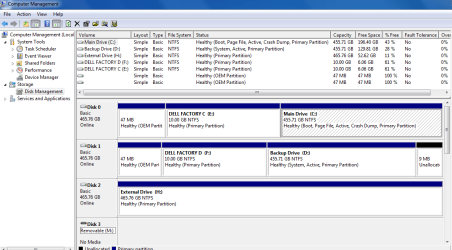
Here is what the disk management layout looks like:
 

Attachments

  • disk_management.PNG
    disk_management.PNG
    31.5 KB · Views: 17

My Computer My Computer

Computer type
PC/Desktop
Computer Manufacturer/Model Number
DELL XPS 8500 // DELL XPS Studio 9100 // DELL Dim 9200
OS
DELL Win 7 Home Premium 64 Bit
CPU
Intel Core i7-930 (8MB L2, 2.8GHz) // ntel Core 2 Quad Q6600
Motherboard
?? // Dell A02 BIOS // ??
Memory
16GB // 18GB DDR3 SDRAM 1333Mhhz 6 DIMMS (3x2, 3x4) //4 GB
Graphics Card(s)
AMD HD7570 // AMD Radeon HD6750 // ATI Radeon HD5670 1 GB GD
Sound Card
?? // THX TruStudio PC //?
Monitor(s) Displays
Dual Dell 2405 WFP-HC24 //SAmsung 27" // Triple 19" LCD
Screen Resolution
1900 x 1200
Hard Drives
Main :WD Caviar Black 1 TB SATA WD1002FAEX
Backup :WD Caviar Black 1 TB SATA WD1002FAEX
PSU
?? // Ultra 900W // ??
You only have Windows 7, correct?

Since you have Acronis, I would not even mess with Cloning TBH, instead I would stick with regular imaging.
Cloning is basically making 2 bootable drives, rather than 1 bootable, and 1 for backup storage. Or moving to a new drive. (but the same can be accomplished just as fast or faster with a full disc image)

In fact, a Full Disc Image will be just as good. As it will image partiton structure, disc signature etc.
I find it to work just as well, and faster.


On the backup drive, I would completely clean it.
Then make a partition for backups, or use it as Acronis Secure Zone. Whichever method you prefer.

Make a Full Disc Image, and this can be your main HD clone.
Then for regular back ups, set up however you desire as a partiton backup... or even a full disk if you choose


Unless you need both drives to be bootable?


To get rid of the boot loader and other options, you may want to try 1 of 2 things.
1) Re-Install Clean.
If you have access to a Win7 disc, you can use your key for a clean installation. This is more work, but well worth it in the long run.
If going this route I would suggest using the cmd prompt and run a clean command on the drive. Then install Windows. Obviously make sure your persoanl DATA is backed up first.

2) Image just the main C partition.
Wipe the drive, and restore the C partition to it.
At this point you'll need to do a repair install possibly 2-3 times.
This will force it to remake the MBR.
The result will be a single partition with just Win7 on it.

Unless of course you need the Dell recovory partition for some reason. But if you've made the recovery DVDs, you shouldnt.


Others may have a better solution and/or advice to offer.
 

My Computer My Computer

Computer Manufacturer/Model Number
Custom (Self Build)
OS
Windows 7 Home Premium 64bit
CPU
Intel Core i7 2700k
Motherboard
eVGA P67 SLI
Memory
8GB Mushkin Redline Ridgebacks @1866
Graphics Card(s)
EVGA GTX570 SC
Sound Card
XiFi Titanium HD
Monitor(s) Displays
LG W2453V
Screen Resolution
1920x1080
Hard Drives
Intel 320 80GB -- Intel X25-V 40GB --WD Black 1TB x2 -- WD Blue 640GB
PSU
Seasonic x750
Case
Corsair 600T SE White
Cooling
eVGA Superclocked CPU Cooler
Keyboard
Saitek Cyborg
Antivirus
Kaspersky
Browser
IE
Other Info
LG BD/DVD
I've had no problems using imaging (Windows or Macrium..) to make a new HDD copy. I don't see a problem with the suggestion above.

But cloning is just a bit copy exercise and should work. However, if you try to boot your system with both the original HDD and the clone in place I'd expect big problems. They both have the same disk signature and Windows will change one basically stuffing things up. So either have the original or the clone connected when booting.
 

My Computer My Computer

Computer type
PC/Desktop
Computer Manufacturer/Model Number
Own build
OS
Windows 7x64 Home Premium SP1
CPU
Intel i7 2600k
Motherboard
ASUS P8Z68 Deluxe
Memory
G.Skill Ripjaws (DDR3-1600) 2x4GB
Graphics Card(s)
Nvidia GeForce GTS 450; Intel HD Graphics 3000(GT2+)
Monitor(s) Displays
Dell Ultrasharp IPS panel U2311H, Samsung SyncMaster P2350
Screen Resolution
1920x1080
Hard Drives
Samsung 850 Pro SSD 256GB, Samsung SSD 840 120GB, Seagates 1TB Barracuda ST31000528AS x2
PSU
Seasonic M12II 520W
Case
Lian Li Lancool PC-K60
Cooling
Case: 1x120mm, 3x140mm CPU: Hyper 212+
Keyboard
Logitech MK520 (wireless)
Mouse
Logitech MK520
Internet Speed
6-7 Mbps
Antivirus
Norton Security Premium, Malwarebytes on 2 (MSE on 3rd PC)
Browser
FireFox
Other Info
Audio: Logitech Z523 2.1
Good stuff, thanks for the input

Yes "Win 7 only" is the end-game.

My follow up comments/questions are these:


1) BACKUP STRATEGY - NO MORE CLONES - The more I think through the cloning option (while fine for one time Cloning of new drives), it is not ideal in terms of an enhanced backup strategy. Some use it that way (claiming their daily clones take only 10 minutes), but as its clobbering my boot sector, I just do not want to go down that road any more. So archive image files it will be, just like I had with Vista (see top of post re my 3 drives).

2) INTENRAL BACKUP DRIVE: I will format (quick format) the D drive, and use as a not bootable back up drive. When I do this, should I be seeing the Vista entry drop off the list I see on boot up?? If its still there after a format, is it okay to delete?

3) OS DROPDOWN LIST: What happens if I first 'delete' the Vista entry from the Startup and Recovery window before I format? Will I still be able to see the D drive? What happens if I delete the 'longhorn' entry?

4) DRIVE C: Ay this stage,, as I am now finished my third install (based on reinstall clean) with everything working, Ithink I'll pass any potions to touch it again. And while those DELL partition may or may not be needed, again they are quite small, I would rather just them as is even if I am still left with real or phantom

5) BOOTABLE DVDS AND FUTURE RESTORE - While I have created image files in the past, I have never had to restore them. I assume it’s as 'simple' as creating an appropriate generic boot/recovery DVD to get to the point where one can run the image software that reads and loads the image archive file. Correct?

6) CHOICE OF IMAGE SOFTWARE - Yes I have Acronis but only the old 2008 version (called Version 11). I don’t know if it even works for Windows 7. As I only need the software to create/restore image files, would Macrium Reflect work reliably for that purpose? Can it be 'task scheduled" to create the image files?


Many thanks
 

My Computer My Computer

Computer type
PC/Desktop
Computer Manufacturer/Model Number
DELL XPS 8500 // DELL XPS Studio 9100 // DELL Dim 9200
OS
DELL Win 7 Home Premium 64 Bit
CPU
Intel Core i7-930 (8MB L2, 2.8GHz) // ntel Core 2 Quad Q6600
Motherboard
?? // Dell A02 BIOS // ??
Memory
16GB // 18GB DDR3 SDRAM 1333Mhhz 6 DIMMS (3x2, 3x4) //4 GB
Graphics Card(s)
AMD HD7570 // AMD Radeon HD6750 // ATI Radeon HD5670 1 GB GD
Sound Card
?? // THX TruStudio PC //?
Monitor(s) Displays
Dual Dell 2405 WFP-HC24 //SAmsung 27" // Triple 19" LCD
Screen Resolution
1900 x 1200
Hard Drives
Main :WD Caviar Black 1 TB SATA WD1002FAEX
Backup :WD Caviar Black 1 TB SATA WD1002FAEX
PSU
?? // Ultra 900W // ??
Seagate DiscWizard app looks to be a cut down Acronis v11 - that works fine

Macrium should work fine too.

Easeus Todo is another excellent imaging app.

There are several to choose from.
 

My Computers My Computers

System One System Two

  • Computer type
    PC/Desktop
    OS
    7 X64
    CPU
    i5 8400
    Motherboard
    gigabyte b365m ds3h
    Memory
    2x8gb 3200mhz
    Hard Drives
    various
    PSU
    pure power 11 400w cm
    Case
    Coolermaster
    Cooling
    cryorig m9i
  • Computer type
    PC/Desktop
    OS
    7x64
    CPU
    g5400
    Motherboard
    ga b365m ds3h
    Memory
    8gb ddr4 2400
    PSU
    xfx pro 450w
For prodcuts like:
-EaseTodo
-Acronis True Image V11 (2008) and
-Acronis True Image WD 2009 Version

....these all clobbered me when doing cloning, but each might be absolutely fine with respect to creating image files. As might Acronis True Image 2012.

I will likely rule out those that :
- cannot be scheduled automatically (as I want these to be done unattneded
- cannot exclude files (as I want to exclude user files to keep the files soze down ; my user files are backed up independantly
- are too pricey
- dont work for WD drives ( eg some Maxtor prodcut only work on Maxtor drives)

.... and then choose from the balance.

I guess that answers question #6 !
 

My Computer My Computer

Computer type
PC/Desktop
Computer Manufacturer/Model Number
DELL XPS 8500 // DELL XPS Studio 9100 // DELL Dim 9200
OS
DELL Win 7 Home Premium 64 Bit
CPU
Intel Core i7-930 (8MB L2, 2.8GHz) // ntel Core 2 Quad Q6600
Motherboard
?? // Dell A02 BIOS // ??
Memory
16GB // 18GB DDR3 SDRAM 1333Mhhz 6 DIMMS (3x2, 3x4) //4 GB
Graphics Card(s)
AMD HD7570 // AMD Radeon HD6750 // ATI Radeon HD5670 1 GB GD
Sound Card
?? // THX TruStudio PC //?
Monitor(s) Displays
Dual Dell 2405 WFP-HC24 //SAmsung 27" // Triple 19" LCD
Screen Resolution
1900 x 1200
Hard Drives
Main :WD Caviar Black 1 TB SATA WD1002FAEX
Backup :WD Caviar Black 1 TB SATA WD1002FAEX
PSU
?? // Ultra 900W // ??
With all the words it's difficult to know what you you really wanted.

To make a complete standby disk, imaging or cloning is ok - I use imaging.
Obviously cloning is no substitute for keeping routine partition images.

Imaging software - pick your favorite.
* Windows own imaging - I use it all the time. It has never let me down. Made 2 new HDDs from it and 20+ full system restores. Some report problems, many don't.
* Macrium - fine reliable product. Made a couple of system restores from it.
* Easeus Todo V3 - looks ok but new and not fully proven yet by a large number of users.
* Acronis - free version ties you to Seagate or WD.
* Paragon - some like it, I don't.

I believe manual imaging is preferable to scheduled imaging. It only takes a bit of discipline to image when you feel necessary.
 

My Computer My Computer

Computer type
PC/Desktop
Computer Manufacturer/Model Number
Own build
OS
Windows 7x64 Home Premium SP1
CPU
Intel i7 2600k
Motherboard
ASUS P8Z68 Deluxe
Memory
G.Skill Ripjaws (DDR3-1600) 2x4GB
Graphics Card(s)
Nvidia GeForce GTS 450; Intel HD Graphics 3000(GT2+)
Monitor(s) Displays
Dell Ultrasharp IPS panel U2311H, Samsung SyncMaster P2350
Screen Resolution
1920x1080
Hard Drives
Samsung 850 Pro SSD 256GB, Samsung SSD 840 120GB, Seagates 1TB Barracuda ST31000528AS x2
PSU
Seasonic M12II 520W
Case
Lian Li Lancool PC-K60
Cooling
Case: 1x120mm, 3x140mm CPU: Hyper 212+
Keyboard
Logitech MK520 (wireless)
Mouse
Logitech MK520
Internet Speed
6-7 Mbps
Antivirus
Norton Security Premium, Malwarebytes on 2 (MSE on 3rd PC)
Browser
FireFox
Other Info
Audio: Logitech Z523 2.1
Got a bigger issue now - I cannot even format the backup drive!

Is that because there are "System files" on that drive ?? See pic below.

Are the Win 7 system Files the bootable C drive relies on ....or just remants of my old Vista drive?

How do I fix this?

Do I follow these instructions??

http://www.sevenforums.com/tutorials/52129-disk-clean-clean-all-diskpart-command.html


It boggles me how could have possible messed up a Win 7 install even with a clean/format option.. I've reinstalled windows 7 3 times already. Cant believe I may need to need to do it again!
 

Attachments

  • 174138d1315355807-simply-trying-clone-win7-disk-need-help-disk_management.png
    174138d1315355807-simply-trying-clone-win7-disk-need-help-disk_management.png
    31.5 KB · Views: 12

My Computer My Computer

Computer type
PC/Desktop
Computer Manufacturer/Model Number
DELL XPS 8500 // DELL XPS Studio 9100 // DELL Dim 9200
OS
DELL Win 7 Home Premium 64 Bit
CPU
Intel Core i7-930 (8MB L2, 2.8GHz) // ntel Core 2 Quad Q6600
Motherboard
?? // Dell A02 BIOS // ??
Memory
16GB // 18GB DDR3 SDRAM 1333Mhhz 6 DIMMS (3x2, 3x4) //4 GB
Graphics Card(s)
AMD HD7570 // AMD Radeon HD6750 // ATI Radeon HD5670 1 GB GD
Sound Card
?? // THX TruStudio PC //?
Monitor(s) Displays
Dual Dell 2405 WFP-HC24 //SAmsung 27" // Triple 19" LCD
Screen Resolution
1900 x 1200
Hard Drives
Main :WD Caviar Black 1 TB SATA WD1002FAEX
Backup :WD Caviar Black 1 TB SATA WD1002FAEX
PSU
?? // Ultra 900W // ??
It looks like your boot manager and [Boot] containing the BCD (ie. your boot files) are on partition D:.
Things are in a mess as far as I can see. You had a Dell Vista PC, upgraded to Windows 7 as I understand it. Then you cloned disk 1. Booted with disk 0 and 1 connected.

If you have upgrade disks and the previous legal Vista OEM license. I'd be looking at a total clean install.
Others may care to comment.
 

My Computer My Computer

Computer type
PC/Desktop
Computer Manufacturer/Model Number
Own build
OS
Windows 7x64 Home Premium SP1
CPU
Intel i7 2600k
Motherboard
ASUS P8Z68 Deluxe
Memory
G.Skill Ripjaws (DDR3-1600) 2x4GB
Graphics Card(s)
Nvidia GeForce GTS 450; Intel HD Graphics 3000(GT2+)
Monitor(s) Displays
Dell Ultrasharp IPS panel U2311H, Samsung SyncMaster P2350
Screen Resolution
1920x1080
Hard Drives
Samsung 850 Pro SSD 256GB, Samsung SSD 840 120GB, Seagates 1TB Barracuda ST31000528AS x2
PSU
Seasonic M12II 520W
Case
Lian Li Lancool PC-K60
Cooling
Case: 1x120mm, 3x140mm CPU: Hyper 212+
Keyboard
Logitech MK520 (wireless)
Mouse
Logitech MK520
Internet Speed
6-7 Mbps
Antivirus
Norton Security Premium, Malwarebytes on 2 (MSE on 3rd PC)
Browser
FireFox
Other Info
Audio: Logitech Z523 2.1
It looks like your boot manager and [Boot] containing the BCD (ie. your boot files) are on partition D:.
Things are in a mess as far as I can see. You had a Dell Vista PC, upgraded to Windows 7 as I understand it. Then you cloned disk 1. Booted with disk 0 and 1 connected.

If you have upgrade disks and the previous legal Vista OEM license. I'd be looking at a total clean install.
Others may care to comment.


Mess - yes. In a nutshell . I had a Dell Vista PC (two bootable drives), did a cllean install (custom/format) and yes, never physically disconnected anything,.

Goinf forward, if I am able to totally wipe C ad D clean (somehow), and attempt to reinstall, will the Win 7 upgrade DVD still work or will it complain it cant find a Vista licence ?. Even if its smart enough to prompt me to put in a Vista CD, will it accept the Dell OEM Vista CD as a valid licence to upgrade from???
 

My Computer My Computer

Computer type
PC/Desktop
Computer Manufacturer/Model Number
DELL XPS 8500 // DELL XPS Studio 9100 // DELL Dim 9200
OS
DELL Win 7 Home Premium 64 Bit
CPU
Intel Core i7-930 (8MB L2, 2.8GHz) // ntel Core 2 Quad Q6600
Motherboard
?? // Dell A02 BIOS // ??
Memory
16GB // 18GB DDR3 SDRAM 1333Mhhz 6 DIMMS (3x2, 3x4) //4 GB
Graphics Card(s)
AMD HD7570 // AMD Radeon HD6750 // ATI Radeon HD5670 1 GB GD
Sound Card
?? // THX TruStudio PC //?
Monitor(s) Displays
Dual Dell 2405 WFP-HC24 //SAmsung 27" // Triple 19" LCD
Screen Resolution
1900 x 1200
Hard Drives
Main :WD Caviar Black 1 TB SATA WD1002FAEX
Backup :WD Caviar Black 1 TB SATA WD1002FAEX
PSU
?? // Ultra 900W // ??
Re "I'd be looking at a total clean install.", per this link, it would seem I will NOT be able to resinsall Win 7 on clean disks !!!

So how do I move forward in my case given a Win 7 upgrade DVD and a previous legal Vista OEM license., and a messed up boot situation?
 

My Computer My Computer

Computer type
PC/Desktop
Computer Manufacturer/Model Number
DELL XPS 8500 // DELL XPS Studio 9100 // DELL Dim 9200
OS
DELL Win 7 Home Premium 64 Bit
CPU
Intel Core i7-930 (8MB L2, 2.8GHz) // ntel Core 2 Quad Q6600
Motherboard
?? // Dell A02 BIOS // ??
Memory
16GB // 18GB DDR3 SDRAM 1333Mhhz 6 DIMMS (3x2, 3x4) //4 GB
Graphics Card(s)
AMD HD7570 // AMD Radeon HD6750 // ATI Radeon HD5670 1 GB GD
Sound Card
?? // THX TruStudio PC //?
Monitor(s) Displays
Dual Dell 2405 WFP-HC24 //SAmsung 27" // Triple 19" LCD
Screen Resolution
1900 x 1200
Hard Drives
Main :WD Caviar Black 1 TB SATA WD1002FAEX
Backup :WD Caviar Black 1 TB SATA WD1002FAEX
PSU
?? // Ultra 900W // ??

My Computer My Computer

Computer type
PC/Desktop
Computer Manufacturer/Model Number
DELL XPS 8500 // DELL XPS Studio 9100 // DELL Dim 9200
OS
DELL Win 7 Home Premium 64 Bit
CPU
Intel Core i7-930 (8MB L2, 2.8GHz) // ntel Core 2 Quad Q6600
Motherboard
?? // Dell A02 BIOS // ??
Memory
16GB // 18GB DDR3 SDRAM 1333Mhhz 6 DIMMS (3x2, 3x4) //4 GB
Graphics Card(s)
AMD HD7570 // AMD Radeon HD6750 // ATI Radeon HD5670 1 GB GD
Sound Card
?? // THX TruStudio PC //?
Monitor(s) Displays
Dual Dell 2405 WFP-HC24 //SAmsung 27" // Triple 19" LCD
Screen Resolution
1900 x 1200
Hard Drives
Main :WD Caviar Black 1 TB SATA WD1002FAEX
Backup :WD Caviar Black 1 TB SATA WD1002FAEX
PSU
?? // Ultra 900W // ??

My Computer My Computer

Computer type
PC/Desktop
Computer Manufacturer/Model Number
Own build
OS
Windows 7x64 Home Premium SP1
CPU
Intel i7 2600k
Motherboard
ASUS P8Z68 Deluxe
Memory
G.Skill Ripjaws (DDR3-1600) 2x4GB
Graphics Card(s)
Nvidia GeForce GTS 450; Intel HD Graphics 3000(GT2+)
Monitor(s) Displays
Dell Ultrasharp IPS panel U2311H, Samsung SyncMaster P2350
Screen Resolution
1920x1080
Hard Drives
Samsung 850 Pro SSD 256GB, Samsung SSD 840 120GB, Seagates 1TB Barracuda ST31000528AS x2
PSU
Seasonic M12II 520W
Case
Lian Li Lancool PC-K60
Cooling
Case: 1x120mm, 3x140mm CPU: Hyper 212+
Keyboard
Logitech MK520 (wireless)
Mouse
Logitech MK520
Internet Speed
6-7 Mbps
Antivirus
Norton Security Premium, Malwarebytes on 2 (MSE on 3rd PC)
Browser
FireFox
Other Info
Audio: Logitech Z523 2.1
To eradicate my messed up boot setup and inability to work with the backup drive, I am currently executing this plan of attack:

  1. - boot with a emergency disc
  2. - wipe the d drive
  3. - reboot into my bios setup
  4. - turn-off the backup drive (I figured in win 7 can see it,won't put boot files there
  5. - reinstall win 7 with no activation or updates
  6. - confirm clean boot prompts and location of system partition
  7. - activate:p
  8. - reboot and enable the second drive in bios
  9. - format the d drive and make it an active partition
  10. - make an base image of the c drive (store on backup drive)
  11. - update service packs
  12. - bring back user files
  13. - reload apps
  14. - take a another image and refresh occasionally
  15. - resume normal backup

So far so good. At step 6.
 

My Computer My Computer

Computer type
PC/Desktop
Computer Manufacturer/Model Number
DELL XPS 8500 // DELL XPS Studio 9100 // DELL Dim 9200
OS
DELL Win 7 Home Premium 64 Bit
CPU
Intel Core i7-930 (8MB L2, 2.8GHz) // ntel Core 2 Quad Q6600
Motherboard
?? // Dell A02 BIOS // ??
Memory
16GB // 18GB DDR3 SDRAM 1333Mhhz 6 DIMMS (3x2, 3x4) //4 GB
Graphics Card(s)
AMD HD7570 // AMD Radeon HD6750 // ATI Radeon HD5670 1 GB GD
Sound Card
?? // THX TruStudio PC //?
Monitor(s) Displays
Dual Dell 2405 WFP-HC24 //SAmsung 27" // Triple 19" LCD
Screen Resolution
1900 x 1200
Hard Drives
Main :WD Caviar Black 1 TB SATA WD1002FAEX
Backup :WD Caviar Black 1 TB SATA WD1002FAEX
PSU
?? // Ultra 900W // ??
Are you asking for comment? I'll assume yes.

I would have gotten rid of the Dell remnants (partition structure etc) on disk 0 and ended with a nice clean install.

By "d drive" do you mean the full second disk marked disk 1 in your screenshot?
Why would you want to make this "backup" disk active? It shouldn't be.

With your update disks you can always go back and reconfigure later if you want.
 

My Computer My Computer

Computer type
PC/Desktop
Computer Manufacturer/Model Number
Own build
OS
Windows 7x64 Home Premium SP1
CPU
Intel i7 2600k
Motherboard
ASUS P8Z68 Deluxe
Memory
G.Skill Ripjaws (DDR3-1600) 2x4GB
Graphics Card(s)
Nvidia GeForce GTS 450; Intel HD Graphics 3000(GT2+)
Monitor(s) Displays
Dell Ultrasharp IPS panel U2311H, Samsung SyncMaster P2350
Screen Resolution
1920x1080
Hard Drives
Samsung 850 Pro SSD 256GB, Samsung SSD 840 120GB, Seagates 1TB Barracuda ST31000528AS x2
PSU
Seasonic M12II 520W
Case
Lian Li Lancool PC-K60
Cooling
Case: 1x120mm, 3x140mm CPU: Hyper 212+
Keyboard
Logitech MK520 (wireless)
Mouse
Logitech MK520
Internet Speed
6-7 Mbps
Antivirus
Norton Security Premium, Malwarebytes on 2 (MSE on 3rd PC)
Browser
FireFox
Other Info
Audio: Logitech Z523 2.1
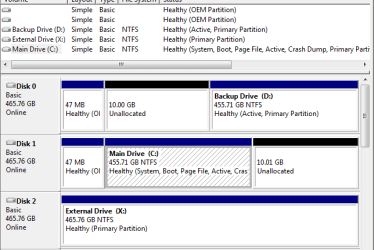
I believe I am now back in control, and my problem solved.

  • I can now boot properly:D
  • I see only a single entry in the Boot list , ie WIndows 7:D
  • My boot and system files are now on the boot drive and are not split across two drives.:D
  • I can clone and I can image:D
  • I can boot with both drives connected, or either drive connected ( I made both drives bootable):D
The key (for me)was disabling the backup drive in the BIOS first ; then upgrading to Win 7.

Yes, I did blow way that DELL parition as well. I also tried shrinking / expandin g /merging the resultant free 10GB ion to get that unalllocated 10GB into the larger partition, but did not want to push that one too far !

My disk map is attached.

Thank youto everyone here for offering great advive and being patient with my very long nightmare install. Amazingly I did not lose any files through it all.
 

Attachments

  • Both-MAP.PNG
    Both-MAP.PNG
    14.3 KB · Views: 6

My Computer My Computer

Computer type
PC/Desktop
Computer Manufacturer/Model Number
DELL XPS 8500 // DELL XPS Studio 9100 // DELL Dim 9200
OS
DELL Win 7 Home Premium 64 Bit
CPU
Intel Core i7-930 (8MB L2, 2.8GHz) // ntel Core 2 Quad Q6600
Motherboard
?? // Dell A02 BIOS // ??
Memory
16GB // 18GB DDR3 SDRAM 1333Mhhz 6 DIMMS (3x2, 3x4) //4 GB
Graphics Card(s)
AMD HD7570 // AMD Radeon HD6750 // ATI Radeon HD5670 1 GB GD
Sound Card
?? // THX TruStudio PC //?
Monitor(s) Displays
Dual Dell 2405 WFP-HC24 //SAmsung 27" // Triple 19" LCD
Screen Resolution
1900 x 1200
Hard Drives
Main :WD Caviar Black 1 TB SATA WD1002FAEX
Backup :WD Caviar Black 1 TB SATA WD1002FAEX
PSU
?? // Ultra 900W // ??
Well then for the curious why have you made D: active?
I can only see it as inviting trouble if you need to do a system repair at a later stage.
 

My Computer My Computer

Computer type
PC/Desktop
Computer Manufacturer/Model Number
Own build
OS
Windows 7x64 Home Premium SP1
CPU
Intel i7 2600k
Motherboard
ASUS P8Z68 Deluxe
Memory
G.Skill Ripjaws (DDR3-1600) 2x4GB
Graphics Card(s)
Nvidia GeForce GTS 450; Intel HD Graphics 3000(GT2+)
Monitor(s) Displays
Dell Ultrasharp IPS panel U2311H, Samsung SyncMaster P2350
Screen Resolution
1920x1080
Hard Drives
Samsung 850 Pro SSD 256GB, Samsung SSD 840 120GB, Seagates 1TB Barracuda ST31000528AS x2
PSU
Seasonic M12II 520W
Case
Lian Li Lancool PC-K60
Cooling
Case: 1x120mm, 3x140mm CPU: Hyper 212+
Keyboard
Logitech MK520 (wireless)
Mouse
Logitech MK520
Internet Speed
6-7 Mbps
Antivirus
Norton Security Premium, Malwarebytes on 2 (MSE on 3rd PC)
Browser
FireFox
Other Info
Audio: Logitech Z523 2.1
Its not that I explicitly chosse to make it active, but that's how it ended up. You correct, I dont neceessarily need it bootable - its jsut for data storage.

But recall, I was dealing with an absloute mess with the system/boot files spread over two drives. not being able to perform images, having Vista remnants everywhere it, 3 minute cold boot up times, etc, etc

Whereas now, its the cleanest its ever been, all my normal functions have returned, only one OS entry for appears on boot up, no Vista remnants appear anywhere, only one drive has the System/Boot, and I can boot from either drive if one is unavailable.

To me, naively perhaps, these were good things, and I thought I did real good!

To me, if one of the drives messed up to the point its in need a system repair, then I would either
- protect the good drive by disconnnting it while I ran a system repair on the bad one, or
- run an energ disk and load an image
- boot from the good drive and physically replace the bad one.

If I am inviting trouble , I am not knowlwdgable enough to recognize it.

I do not know how ( yet) to make a drive "un-active". How does one do it? If it involves another re-intrall, I am too drained !!

I know many users of the Dell forum have preceisely this setup. My other Win 7 machine ( hihc came with WIn 7) is the same ; I simple added a drive, and cloned from C drive to it. That machine as well only has System/Boot on one disk. and both C and D are Active.

I guess I am missing part of the picture, not seeinh the negatives but at least I am in better shape from the mess I started from!
 
Last edited:

My Computer My Computer

Computer type
PC/Desktop
Computer Manufacturer/Model Number
DELL XPS 8500 // DELL XPS Studio 9100 // DELL Dim 9200
OS
DELL Win 7 Home Premium 64 Bit
CPU
Intel Core i7-930 (8MB L2, 2.8GHz) // ntel Core 2 Quad Q6600
Motherboard
?? // Dell A02 BIOS // ??
Memory
16GB // 18GB DDR3 SDRAM 1333Mhhz 6 DIMMS (3x2, 3x4) //4 GB
Graphics Card(s)
AMD HD7570 // AMD Radeon HD6750 // ATI Radeon HD5670 1 GB GD
Sound Card
?? // THX TruStudio PC //?
Monitor(s) Displays
Dual Dell 2405 WFP-HC24 //SAmsung 27" // Triple 19" LCD
Screen Resolution
1900 x 1200
Hard Drives
Main :WD Caviar Black 1 TB SATA WD1002FAEX
Backup :WD Caviar Black 1 TB SATA WD1002FAEX
PSU
?? // Ultra 900W // ??
I would just go with a clean istallation of 7 as in the tutorial mjf linked. No upgrade. As long as that a legit upgrade key, you will be fine. You already have Vista.


What I would do is this...

1) backup any personal DATA you do not want to loose. This will delete everything on BOTH drives.

2)Boot from your Win7 DVD

3)At the first screen, open the commad prompt and type:
diskpart
4)When it loads, type: list disk
this will show you the number of the disk. It should be Disk 0 and 1.
Next type:
select disk 0
clean
selects disk 1
clean

This will delete both drives, partiton structure etc leaving both with unallocated space.

Now, exit diskpart and the Win7 installation, shutdown your PC.


Disconnect 1 of the drives for now. This is mainly to ensure theres little chance of any no or accidents during the installation. Windows can only go in one place.
Leave only the 1 HD connected you want Windows on.

Boot up from the Win7 DVD and do a clean install Windows 7, via the tutorial mfj linked.

Once Windows is up and running, and all is OK, shutdown and re-connect your other drive.
Boot into Windows and go to DiskManagement.
Now you can set up the secondary drive, format and partion it however you see fit.
 

My Computer My Computer

Computer Manufacturer/Model Number
Custom (Self Build)
OS
Windows 7 Home Premium 64bit
CPU
Intel Core i7 2700k
Motherboard
eVGA P67 SLI
Memory
8GB Mushkin Redline Ridgebacks @1866
Graphics Card(s)
EVGA GTX570 SC
Sound Card
XiFi Titanium HD
Monitor(s) Displays
LG W2453V
Screen Resolution
1920x1080
Hard Drives
Intel 320 80GB -- Intel X25-V 40GB --WD Black 1TB x2 -- WD Blue 640GB
PSU
Seasonic x750
Case
Corsair 600T SE White
Cooling
eVGA Superclocked CPU Cooler
Keyboard
Saitek Cyborg
Antivirus
Kaspersky
Browser
IE
Other Info
LG BD/DVD
Back
Top