Everyone that isn’t a first trip sailor on this site knows that SIW2 is a high skill geek.
He builds and shares his wonderful tools with us. The main problem is that, as he builds for himself, it lacks the information on how to use.
I am learning about his wonderful and powerful 17514x64-v6 tool.
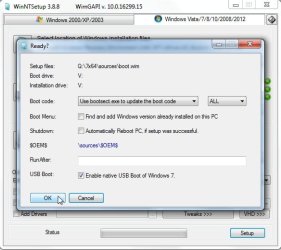
Every time I boot it there are a lot of missing drivers, so I run the driver scan and updater but there were some drivers that couldn't be found. With the 7UPDATERv6 I added some drivers on Boot.wim for Intel64 (AHCI, Chipset, IO, MEI, MVMe), Lan and Samsung MVMe) (I had to "create" a /sources\install.wim as 7UPDATERv6 was asking for.) After Boot.wim update, I aborted (ctrl+c).
Now I boot the 17514x64-v6 and I search for updates on Device manager and it loads the drivers.
So, after a while I have the tool with almost all drivers.
I noticed that there is one \sources and another \sources17514 with almost same files on it,. Why?
From this point I would like to do the reverse, that is, save the ramdisk drive X: to boot.wim.
I saw it has SIW2 Dism10 and it has a Capture function.
Can I use SIW2 Dism10 to create a boot.wim from drive X:? Do you have any instructions on how to use Dism10?
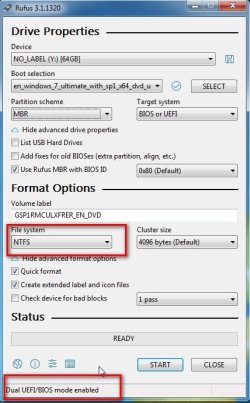
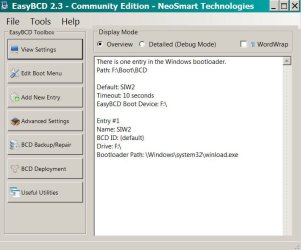
I tried to extract boot.wim to the USB flash disk (NTFS) and boot directly to the \windows\system32\boot\winload.exe. I've created an option on the bcd file for it.
It gave me a BSOD.
Why it can boot the \sources\boot.wim drive and can't boot the F: drive?
He builds and shares his wonderful tools with us. The main problem is that, as he builds for himself, it lacks the information on how to use.
I am learning about his wonderful and powerful 17514x64-v6 tool.
Every time I boot it there are a lot of missing drivers, so I run the driver scan and updater but there were some drivers that couldn't be found. With the 7UPDATERv6 I added some drivers on Boot.wim for Intel64 (AHCI, Chipset, IO, MEI, MVMe), Lan and Samsung MVMe) (I had to "create" a /sources\install.wim as 7UPDATERv6 was asking for.) After Boot.wim update, I aborted (ctrl+c).
Now I boot the 17514x64-v6 and I search for updates on Device manager and it loads the drivers.
So, after a while I have the tool with almost all drivers.
I noticed that there is one \sources and another \sources17514 with almost same files on it,. Why?
From this point I would like to do the reverse, that is, save the ramdisk drive X: to boot.wim.
I saw it has SIW2 Dism10 and it has a Capture function.
Can I use SIW2 Dism10 to create a boot.wim from drive X:? Do you have any instructions on how to use Dism10?
I tried to extract boot.wim to the USB flash disk (NTFS) and boot directly to the \windows\system32\boot\winload.exe. I've created an option on the bcd file for it.
It gave me a BSOD.
Why it can boot the \sources\boot.wim drive and can't boot the F: drive?
Attachments

Last edited:
My Computers
System One System Two
-
- Computer type
- PC/Desktop
- Computer Manufacturer/Model Number
- custom build
- OS
- Windows 7 HP 64
- CPU
- i5 6600K - 800MHz to 4200MHz
- Motherboard
- GA-Z170-HD3P
- Memory
- 4+4G GSkill DDR4 3000
- Graphics Card(s)
- IG - Intel 530
- Monitor(s) Displays
- Samsung 226BW
- Screen Resolution
- 1680x1050
- Hard Drives
- (1) -1 SM951 – 128GB M.2 AHCI PCIe SSD drive for Windows 7 and Lubuntu
(2) -1 WD SATA 3 - 1T for Data
(3) -1 WD SATA 3 - 1T for backup
- PSU
- Thermaltake 450W TR2 gold
- Keyboard
- Old and good Chicony mechanical keyboard
- Mouse
- Logitech mX performance - 9 buttons (had to disable some)
- Internet Speed
- 500Mb/s
- Browser
- Firefox 64
- Other Info
- TinyWall firewall
-
- Computer type
- Laptop
- System Manufacturer/Model Number
- Asus Q550LF
- OS
- Windows 7 Pro
- CPU
- i7-4500U 800MHz to 3.0GHz
- Motherboard
- Asus Q550LF
- Memory
- (4+4)G DDR3 1600
- Graphics Card(s)
- IG intel 4400 + NVIDIA GeForce GT 745M
- Sound Card
- Realtek
- Monitor(s) Displays
- LG Display LP156WF4-SPH1
- Screen Resolution
- 1920 x 1080
- Hard Drives
- BX500 120G SSD for Windows and programs +
1T HDD for data
- Internet Speed
- 500 Mb/s
- Browser
- Firefox
- Other Info
- TinyWall firewall


![20180819_143408[1].jpg](/data/attachments/222/222418-12a27e1ac0cba10c04126c4c294f2ec0.jpg?hash=p_nFiT3_K6)