SkyStar 2 PCI

I also tried everything installing 4.3.3 and 4.5.0 NON-BDA drivers on WIn 7 64bit - definately a no go. I didn´t check 32bit, but on 64bit its a no go. When u install the driver, u see the progress bar and then suddenly get a bsod (blue screen of death). If any1 has a solution, please post it as its highly desired.
 

My Computer

OS
XP, Windows 7
well i have that problem & i resolved With Clean Instalation Win7 7077 64 Bit

but remember you must use only BDA Driver.. and move all that files .. on other place .. create folder then ... move in your .. local C : Disk.. & Device manager - browse ...Try ..

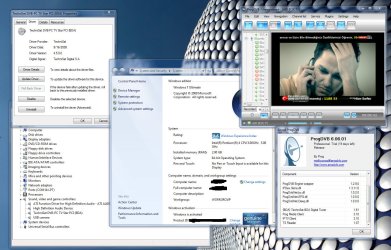
http://i43.tinypic.com/13ztwee.jpg

I only tested on ProgDvb .. on other i dont'know ?
 

My Computer

OS
windows 7
please help me with procedures. I'm new to win 7. Icant get ss2 to work on 32bit.
error message'' HARDWARE AND DEVICE DRIVER MUST BE INSTALLED
BEFORE APPLICATION SOFTWARE" No way to install this.
I used latest 4.5.0 driver. Even i tried the 4.3.3 then I get ss2 yellow triangle in device manger. Technisat said that no driver support will be available until MS release a full version. BTW how to install only BDA. Please help.
 

My Computer

Computer Manufacturer/Model Number
1.Custom PC 2.Acer laptop
OS
1.Windows7 32bit 2. Win7 64 bit
CPU
INTEL Core 2 Quad Q6600 2.4Ghz
Motherboard
GIGABYTE GA-EP45-DS3R
Memory
RAM=2X2GB DDR2 667MHz kingston
Graphics Card(s)
GIGABYTE Nvidia GEFORCE 9500GT 512MB (Twin DVI)
Sound Card
Realtek on Board + M-Audio delta 1010
Monitor(s) Displays
ViewSonic VA2226w
Screen Resolution
1680x1050
Hard Drives
Hitachi 160 GB
Seagate 500 GB
Keyboard
Logitech
Mouse
Logitech
Internet Speed
2048 MB
Other Info
Technisat Skystar 2 DVB PCI driver 4.5.1
well i have that problem & i resolved With Clean Instalation Win7 7077 64 Bit

but remember you must use only BDA Driver.. and move all that files .. on other place .. create folder then ... move in your .. local C : Disk.. & Device manager - browse ...Try ..

http://i43.tinypic.com/13ztwee.jpg

I only tested on ProgDvb .. on other i dont'know ?


I did that several times. This just doesn´t work on X64. Did this work for you on X64?
 

My Computer

OS
XP, Windows 7
And i try and i try . I can get no satisfaction
 

My Computer

Computer Manufacturer/Model Number
1.Custom PC 2.Acer laptop
OS
1.Windows7 32bit 2. Win7 64 bit
CPU
INTEL Core 2 Quad Q6600 2.4Ghz
Motherboard
GIGABYTE GA-EP45-DS3R
Memory
RAM=2X2GB DDR2 667MHz kingston
Graphics Card(s)
GIGABYTE Nvidia GEFORCE 9500GT 512MB (Twin DVI)
Sound Card
Realtek on Board + M-Audio delta 1010
Monitor(s) Displays
ViewSonic VA2226w
Screen Resolution
1680x1050
Hard Drives
Hitachi 160 GB
Seagate 500 GB
Keyboard
Logitech
Mouse
Logitech
Internet Speed
2048 MB
Other Info
Technisat Skystar 2 DVB PCI driver 4.5.1
I got the satisfaction. My SS2 is now recognised as network adapters. It was always shown as other devices ( audio ). I tried all drivers but in vain. At last I updated the ? Nretwork controller icon in Device manager with my old Technisat CD (Ver 4.4.0) et Voila now it appears in network adapters as Technisat DVB PC TV Star PCI#2. I ran DVBDream and it makes me happy. I configured four satellites on Diseqc and all channels and levels came as on Win XP. Thank you all. My onboard audio was realtek. MOBO is Gigabyte EP45.
 

My Computer

Computer Manufacturer/Model Number
1.Custom PC 2.Acer laptop
OS
1.Windows7 32bit 2. Win7 64 bit
CPU
INTEL Core 2 Quad Q6600 2.4Ghz
Motherboard
GIGABYTE GA-EP45-DS3R
Memory
RAM=2X2GB DDR2 667MHz kingston
Graphics Card(s)
GIGABYTE Nvidia GEFORCE 9500GT 512MB (Twin DVI)
Sound Card
Realtek on Board + M-Audio delta 1010
Monitor(s) Displays
ViewSonic VA2226w
Screen Resolution
1680x1050
Hard Drives
Hitachi 160 GB
Seagate 500 GB
Keyboard
Logitech
Mouse
Logitech
Internet Speed
2048 MB
Other Info
Technisat Skystar 2 DVB PCI driver 4.5.1
i'm hapy you yr fixed your problem patmos :)..

soory for late response .. i m , being busy ..


But here Some New News!

users who use Progdvb temporary new ver..6.06.1 with major update - [High definition monitor or TV with HD resolution] let be careful ..

for some reason.. tools like system mechanic & registry mechanic .. have mess up registry of progdvb .. and after next run ... You will get message 'BDA cant be find" Error Error!!

After you run yr favorite tool .. use manual function .. and watch what be deleted ;) .. Friendly Advice ..

IngoPan

Yes my bro i still work on windows 7 64 bit .. with fully satisfaction of Mine Skystar 2 .. Video & sound is perfectly..

i have send you private mine BDA Drivers ... That i installed on mine pc./

Here Mine Details :
 

Attachments

  • 23lxnv5.jpg
    23lxnv5.jpg
    215.1 KB · Views: 2,559

My Computer

OS
windows 7
My problem is, i´d like to receive a data channel with it. So i need the card to be configured as a network device, so BDA imho is a no go.

Any clue?
 

My Computer

OS
XP, Windows 7
that i not yet resolved .. im on alternative network for time being..

and guys from technisat is not very helpful :( .

he saying that want to wait finale relase of win7.. if you ask me .. that people are too lazy .. manyy other smaller .. company already have full support for upcoming finale release win7..

must research and if i fix that problem .. i will post tutorial & everything what need here ;)
 

My Computer

OS
windows 7
that i not yet resolved .. im on alternative network for time being..

and guys from technisat is not very helpful :( .

he saying that want to wait finale relase of win7.. if you ask me .. that people are too lazy .. manyy other smaller .. company already have full support for upcoming finale release win7..

must research and if i fix that problem .. i will post tutorial & everything what need here ;)

Would be nice, thanks.
As the driver sute is out, maybe lets code our own drivers ;))
 

My Computer

OS
XP, Windows 7
I went this way in order to install Skystar 2 (NON BDA!) drivers under W64:


- Disable the card (! important otherwise u will
experience a bluescreen/crash)

-Install the 4.3.3 Beta drivers from here:
...::: DVB SkyStar - Digital Future :::... manually via the device manager.

-Reboot

-Install the latest drivers (4.5.5) from Skystar 2 page.

Thats it. The card now works as it used to do under Windows 7 64Bit.


I hope i could help you guys a little bit.
 

My Computer

OS
XP, Windows 7
I have installed
Technisat Drivers 4.4.3 (no BDA)
(...::: DVB SkyStar - Digital Future :::...).
It s working.

My windows7 (64 bit) build 7127
have demonstrated a lot of problems with installing and uninstaling different drivers .
After a system restore, device maneger was showing - network adapter and no something like : technisat dvb - pc tv star pci ( from previous driver installations).
Then i have updated with Technisat Drivers 4.4.3 , (system restart) and installed the software (restart).
Prog dvb 6 was not working and I used Prog dvb version 5 (5.16.2 pro) (normal install) . It s okay.

Good luck
:)

Intel Pentium 4 E5200 C2 2.5 GHz/ 1024 MB/ Ati Radeon 512 MB 3650 / Gigabyte EP45 - UD3 / skystar 2
 
Last edited:

My Computer

OS
windows 7
Does it require Microsoft .NET Framework Version 2.0 on windows7?
 

My Computer

Computer Manufacturer/Model Number
1.Custom PC 2.Acer laptop
OS
1.Windows7 32bit 2. Win7 64 bit
CPU
INTEL Core 2 Quad Q6600 2.4Ghz
Motherboard
GIGABYTE GA-EP45-DS3R
Memory
RAM=2X2GB DDR2 667MHz kingston
Graphics Card(s)
GIGABYTE Nvidia GEFORCE 9500GT 512MB (Twin DVI)
Sound Card
Realtek on Board + M-Audio delta 1010
Monitor(s) Displays
ViewSonic VA2226w
Screen Resolution
1680x1050
Hard Drives
Hitachi 160 GB
Seagate 500 GB
Keyboard
Logitech
Mouse
Logitech
Internet Speed
2048 MB
Other Info
Technisat Skystar 2 DVB PCI driver 4.5.1
Yes, it requires but this windows like some others is based on Microsoft framework technology, so there is no need to install it.
 

My Computer

OS
windows 7
I have installed
Technisat Drivers 4.4.3 (no BDA)
(...::: DVB SkyStar - Digital Future :::...).
It s working.

My windows7 (64 bit) build 7127
have demonstrated a lot of problems with installing and uninstaling different drivers .
After a system restore, device maneger was showing - network adapter and no something like : technisat dvb - pc tv star pci ( from previous driver installations).
Then i have updated with Technisat Drivers 4.4.3 , (system restart) and installed the software (restart).
Prog dvb 6 was not working and I used Prog dvb version 5 (5.16.2 pro) (normal install) . It s okay.

Good luck
:)

Intel Pentium 4 E5200 C2 2.5 GHz/ 1024 MB/ Ati Radeon 512 MB 3650 / Gigabyte EP45 - UD3 / skystar 2

It only will show as technisat dvb - pc tv star pci if you install the BDA driver otherwise its seen as a nic which is no problem if that works fine for you :)
 

My Computer

Computer Manufacturer/Model Number
HP 6720s
OS
Microsoft Windows 7 Ultimate
CPU
Mobile Intel Celeron M 530, 1733 MHz (13 x 133)
Motherboard
Intel Crestline GLE960/GME965
Memory
2038 MB (DDR2-667 DDR2 SDRAM)
Graphics Card(s)
Intel GMA X3100
Sound Card
Analog Devices AD1981HD @ Intel 82801HBM ICH8M
Monitor(s) Displays
AU Optronics B154EW02 V7 [15.4" LCD]
Screen Resolution
1280 x 800
Hard Drives
TOSHIBA MK1246GSX ATA Device (120 GB, 5400 RPM, SATA-II)
Maxtor 3200 USB Device (372 GB, USB)
Actually, if BDA drivers are in use it will show - Technisat DVB - PC TV Star PCI as a saund video and game controller.
It doesn’t matter.
But BDA are not recommended because of unrecognized Skystar2 device as a network adapter and loss of some specific options.
 

My Computer

OS
windows 7
Yea diseqc only lnb 1 will work but i tought it was solved in last builds.

My airstar2 works with bda 4.50A in w7 if you only have 1 lnb its nice to install the bda driver course mediacenter will see the ss2/airstar2.
 

My Computer

Computer Manufacturer/Model Number
HP 6720s
OS
Microsoft Windows 7 Ultimate
CPU
Mobile Intel Celeron M 530, 1733 MHz (13 x 133)
Motherboard
Intel Crestline GLE960/GME965
Memory
2038 MB (DDR2-667 DDR2 SDRAM)
Graphics Card(s)
Intel GMA X3100
Sound Card
Analog Devices AD1981HD @ Intel 82801HBM ICH8M
Monitor(s) Displays
AU Optronics B154EW02 V7 [15.4" LCD]
Screen Resolution
1280 x 800
Hard Drives
TOSHIBA MK1246GSX ATA Device (120 GB, 5400 RPM, SATA-II)
Maxtor 3200 USB Device (372 GB, USB)
Ok I found yesterday a solution, since in my case using the BDA driver inside win 7 RC 64 would not work cause the SkyStar card was recognized as a sound card and not as network card, therefore the Sat app wouldn't lock the signal at all. In my 32 version I made it work by going back to 4.3.3 version of the driver, aceppting it despite of the "non digitaly signed" drivers warning and upgrading it from withing the device manager to the last one 4.5.0.But in the 64 version the 4.3.3 would not load the driver as in the 32 version. So I went to this page :: DVBSkyStar.com - Support for PC SAT Cards // SkyStar2, HDTV, DVB Software and from there I downloaded the 4.3.2 version, the first one including a 64 version for WinXp 64 , went home repeated the process , received the "non digitally signed" warnig, accepted it anyway , the card was recognized but still would not load , went to the device manager told it to upgrade the driver version by showing it the path until the 4.5.0 version and oilá the card was finally recognized as a network pci card as it should be and started to lock channels and signal and was working marbelous.Hope this explanation will help a lot of guys having the same issue.
 

My Computer

OS
win 7 x64
Back
Top