Sleep feature stopped to work

yankleber

IT Dinosaur
Member
VIP
Local time
5:20 AM
Messages
212
Location
Home
Since a few weeks ago the sleep feature of my Seven just stopped to work.

Now whenever I try to put it to sleep, it performs all the process and turns off the computer but then after around 1 second it awakes again and stops at the login screen.

Any idea?
 

My Computer

Computer type
PC/Desktop
Computer Manufacturer/Model Number
Custom
OS
Windows 7 Professional 64bit
CPU
Intel i5-3330
Motherboard
GigaByte B75M-D3H
Memory
8GB
Graphics Card(s)
Onboard
Sound Card
Behringer UCA222
Monitor(s) Displays
Samsung 22.5"
Screen Resolution
1920x1080
Hard Drives
SSD Kingston 120GB
HDD Samsung 320GB
Internet Speed
1M
Antivirus
ZoneAlarm FW + AV Free
Browser
Chrome
Hi yankleber,

Is your mouse wake disabled?
I had issue with the mouse continually waking my computer from sleep before I disabled that feature.
The infrared tracking of the mouse continually checking for movement causing my issue.
Annoying? Yes, very!
It also kept waking the computer when in sleep mode.

Snick
 

My Computer

Computer type
PC/Desktop
Computer Manufacturer/Model Number
HP Desktop & Compaq Laptop
OS
Win 10 x64, Linux Lite, Win 7 x64, BlackArch, & Kali
Hard Drives
Samsung 850 Pro 256Gb,
Hitachi HDD 1Tb,
Crucial MX SSD 250Gb
Segate 3Tb USB 3.0 Ext. Backup HDD
Internet Speed
150Mbps dn, 20Mbps up
Antivirus
Avast Free, Malwarebytes Anti-Exploit & Anti-Ransomware
Browser
Firefox, Chrome, Opera, & VPN

My Computer

Computer type
PC/Desktop
Computer Manufacturer/Model Number
Custom
OS
Windows 7 Professional 64bit
CPU
Intel i5-3330
Motherboard
GigaByte B75M-D3H
Memory
8GB
Graphics Card(s)
Onboard
Sound Card
Behringer UCA222
Monitor(s) Displays
Samsung 22.5"
Screen Resolution
1920x1080
Hard Drives
SSD Kingston 120GB
HDD Samsung 320GB
Internet Speed
1M
Antivirus
ZoneAlarm FW + AV Free
Browser
Chrome
Here you go!

Stop Mouse from Waking PC

  1. To start, go to Control Panel and click on Mouse. ...
  2. In the second Properties window for your mouse, click on the Change Settings button on the General tab.
  3. Finally, click the Power Management tab and uncheck the Allow This Device to Wake the Computer box.
 

My Computer

Computer type
PC/Desktop
Computer Manufacturer/Model Number
HP Desktop & Compaq Laptop
OS
Win 10 x64, Linux Lite, Win 7 x64, BlackArch, & Kali
Hard Drives
Samsung 850 Pro 256Gb,
Hitachi HDD 1Tb,
Crucial MX SSD 250Gb
Segate 3Tb USB 3.0 Ext. Backup HDD
Internet Speed
150Mbps dn, 20Mbps up
Antivirus
Avast Free, Malwarebytes Anti-Exploit & Anti-Ransomware
Browser
Firefox, Chrome, Opera, & VPN
Here you go!

Stop Mouse from Waking PC

  1. To start, go to Control Panel and click on Mouse. ...
  2. In the second Properties window for your mouse, click on the Change Settings button on the General tab.
  3. Finally, click the Power Management tab and uncheck the Allow This Device to Wake the Computer box.

Hey Snick, thank you for the directions!

Unfortunately it didn't work for me. I did exactly as you said (and yes, the checkbox was checked) but even unchecking it my computer still seems to be suffering of insomnia!

:huh:
 

My Computer

Computer type
PC/Desktop
Computer Manufacturer/Model Number
Custom
OS
Windows 7 Professional 64bit
CPU
Intel i5-3330
Motherboard
GigaByte B75M-D3H
Memory
8GB
Graphics Card(s)
Onboard
Sound Card
Behringer UCA222
Monitor(s) Displays
Samsung 22.5"
Screen Resolution
1920x1080
Hard Drives
SSD Kingston 120GB
HDD Samsung 320GB
Internet Speed
1M
Antivirus
ZoneAlarm FW + AV Free
Browser
Chrome
yankleber
OK
Here's additional instructions from Gizmo's Freeware Site
How to Fix a Computer that Keeps Waking Up
You can also find what is waking your computer from Command Prompt (CMD)
open Administrative CMD
Click Start Orb lower left corner of screen
Type CMD
right click on it, choose run as administrator
type
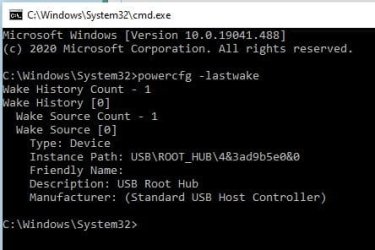
powercfg -lastwake
This is from my desktop computer.

Capture.JPG
 

My Computer

Computer type
PC/Desktop
Computer Manufacturer/Model Number
HP Desktop & Compaq Laptop
OS
Win 10 x64, Linux Lite, Win 7 x64, BlackArch, & Kali
Hard Drives
Samsung 850 Pro 256Gb,
Hitachi HDD 1Tb,
Crucial MX SSD 250Gb
Segate 3Tb USB 3.0 Ext. Backup HDD
Internet Speed
150Mbps dn, 20Mbps up
Antivirus
Avast Free, Malwarebytes Anti-Exploit & Anti-Ransomware
Browser
Firefox, Chrome, Opera, & VPN

My Computer

Computer type
PC/Desktop
Computer Manufacturer/Model Number
Custom
OS
Windows 7 Professional 64bit
CPU
Intel i5-3330
Motherboard
GigaByte B75M-D3H
Memory
8GB
Graphics Card(s)
Onboard
Sound Card
Behringer UCA222
Monitor(s) Displays
Samsung 22.5"
Screen Resolution
1920x1080
Hard Drives
SSD Kingston 120GB
HDD Samsung 320GB
Internet Speed
1M
Antivirus
ZoneAlarm FW + AV Free
Browser
Chrome
Wake Source Count 0 means Windows itself didn't get the wake signal via the power management (ACPI) API

Do you have any Scheduled Tasks set?
 

My Computer

Computer type
PC/Desktop
Computer Manufacturer/Model Number
HP Desktop & Compaq Laptop
OS
Win 10 x64, Linux Lite, Win 7 x64, BlackArch, & Kali
Hard Drives
Samsung 850 Pro 256Gb,
Hitachi HDD 1Tb,
Crucial MX SSD 250Gb
Segate 3Tb USB 3.0 Ext. Backup HDD
Internet Speed
150Mbps dn, 20Mbps up
Antivirus
Avast Free, Malwarebytes Anti-Exploit & Anti-Ransomware
Browser
Firefox, Chrome, Opera, & VPN
Wake Source Count 0 means Windows itself didn't get the wake signal via the power management (ACPI) API

Do you have any Scheduled Tasks set?

I don't... The only thing I know is that I used to use the sleep feature daily (sometimes it took over a week until I reboot my computer) but suddenly it stopped to work without any apparent reason...
 

My Computer

Computer type
PC/Desktop
Computer Manufacturer/Model Number
Custom
OS
Windows 7 Professional 64bit
CPU
Intel i5-3330
Motherboard
GigaByte B75M-D3H
Memory
8GB
Graphics Card(s)
Onboard
Sound Card
Behringer UCA222
Monitor(s) Displays
Samsung 22.5"
Screen Resolution
1920x1080
Hard Drives
SSD Kingston 120GB
HDD Samsung 320GB
Internet Speed
1M
Antivirus
ZoneAlarm FW + AV Free
Browser
Chrome
Back
Top