Sleep Hibernate ... all gone

Matthew Enderle

New member
Local time
11:09 PM
Messages
3
Location
In a basement beside a rat
My dad wanted to remove Vista from his Dell Vostro 1700. And obviously i put seven on. Until recently the Sleep and Hibernate options are Gone!!! No where to be found. Avg didn't find any viruses at all... but malware bytes found three the INSTANT i pluged in my SD Card.

I surprisingly made an image of the Laptop, do i have to reapply it?

My dad does not like it when he shuts the screen, then it shutdowns FORCING ALL APPS TO EXIT OR CLOSE!:mad::cry:
 

My Computer

Computer Manufacturer/Model Number
CUSTOM BUILT
OS
Windows 7
CPU
dual core @ 2.56 mHz each
Motherboard
Intel D915PGN
Memory
4 GB
Graphics Card(s)
1 GB
Sound Card
None
Monitor(s) Displays
yea yea yea... a CRT Monitor
Screen Resolution
1400 x 1050
Hard Drives
Seagate 80 GB - crashing
Seagate 500 GB - crashed... and returning.
PSU
600W
Case
Nutin special
Cooling
Nutin special
Keyboard
Dell standered... from old computer..
Mouse
Dell standered... from old computer..
Internet Speed
T1
Other Info
I HATE IT... MY DESKTOP!
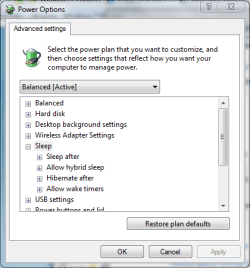
You could try looking at the advanced power settings. Click on the battery icon on the task bar & select more power options, then select Change plan settings next to the currently active power plan.

There is options for sleep & hibernate, you could look to see if they've been disabled. Other than that i'll keep looking for other possible causes/solutions.

http://www.sevenforums.com/tutorials/778-power-plan-settings-change.html

Capture.PNG
 
Last edited by a moderator:

My Computer

Computer Manufacturer/Model Number
Compaq Desktop
OS
Windows 7 Ultimate x64
CPU
AMD Sempron Dual Core
Memory
3GB
Graphics Card(s)
NVIDIA GeForce 6150SE nForce 430
Screen Resolution
1024x768
Hard Drives
150GB Sata
probably not working on laptops....if i put it into sleep by closing the lid, it crashes when i open the lid, with a nice BSOD
 

My Computer

OS
vista
Weird, both Sleep & Hibernate work fine for me on my laptop :confused:
 

My Computer

Computer Manufacturer/Model Number
Compaq Desktop
OS
Windows 7 Ultimate x64
CPU
AMD Sempron Dual Core
Memory
3GB
Graphics Card(s)
NVIDIA GeForce 6150SE nForce 430
Screen Resolution
1024x768
Hard Drives
150GB Sata
same here
on mine that is
 

My Computer

Computer Manufacturer/Model Number
CUSTOM BUILT
OS
Windows 7
CPU
dual core @ 2.56 mHz each
Motherboard
Intel D915PGN
Memory
4 GB
Graphics Card(s)
1 GB
Sound Card
None
Monitor(s) Displays
yea yea yea... a CRT Monitor
Screen Resolution
1400 x 1050
Hard Drives
Seagate 80 GB - crashing
Seagate 500 GB - crashed... and returning.
PSU
600W
Case
Nutin special
Cooling
Nutin special
Keyboard
Dell standered... from old computer..
Mouse
Dell standered... from old computer..
Internet Speed
T1
Other Info
I HATE IT... MY DESKTOP!
You could try looking at the advanced power settings. Click on the battery icon on the task bar & select more power options, then select Change plan settings next to the currently active power plan.

There is options for sleep & hibernate, you could look to see if they've been disabled. Other than that i'll keep looking for other possible causes/solutions.

http://www.sevenforums.com/tutorials/778-power-plan-settings-change.html

View attachment 8234

Thanks i shall try that!
 

My Computer

Computer Manufacturer/Model Number
CUSTOM BUILT
OS
Windows 7
CPU
dual core @ 2.56 mHz each
Motherboard
Intel D915PGN
Memory
4 GB
Graphics Card(s)
1 GB
Sound Card
None
Monitor(s) Displays
yea yea yea... a CRT Monitor
Screen Resolution
1400 x 1050
Hard Drives
Seagate 80 GB - crashing
Seagate 500 GB - crashed... and returning.
PSU
600W
Case
Nutin special
Cooling
Nutin special
Keyboard
Dell standered... from old computer..
Mouse
Dell standered... from old computer..
Internet Speed
T1
Other Info
I HATE IT... MY DESKTOP!
Mathew,

Which version/build of windows are you using and what happened just before you had the problems.
Also did you get rid of the virus/s found? :)
 
Last edited:

My Computer

Computer Manufacturer/Model Number
Dilithium Computers/Engineering (Myself) Star date 42.739285.5432.9
OS
Win7 Ultimate x64 on Desktop / Win7 Ultimate x86 on laptop / Win7 x86 Starter on Netbook
CPU
AMD Phenom 965 X4 3.4Ghz cpu Black Edition
Motherboard
Gigabyte 790XT
Memory
12 Gb DDR3
Graphics Card(s)
Nvidea Gforce GTX 470
Sound Card
Onboard Realtek hi-fi
Monitor(s) Displays
Lg 3D led 23"
Screen Resolution
1920x1080
Hard Drives
Loads maxstore sata 1 & 2/ loads of partitions + 1Tb Hitachi sata 2. 256Gb Crucial ssd.
PSU
OCZ 700W GameXstream
Case
Artec 10000
Cooling
On board + many case fans
Keyboard
Logitech wireless K350
Mouse
Inferno gaming mouse
Internet Speed
Talk talk. 10Mb
Other Info
My PC was hand built with matchsticks. xbox 360 controller. Printers,fax.........
wierd but is anyone password on wakeup??

maybe i should take off the pass, even though i dont have a pass on logon
 

My Computer

OS
vista
ollie,

If you look at post #2 and select the top setting in the pic. You can choose whether or not Windows asks for a password when waking up.
 

My Computer

Computer Manufacturer/Model Number
Compaq Desktop
OS
Windows 7 Ultimate x64
CPU
AMD Sempron Dual Core
Memory
3GB
Graphics Card(s)
NVIDIA GeForce 6150SE nForce 430
Screen Resolution
1024x768
Hard Drives
150GB Sata
Matthew,

Try this command

powercfg -h on

I used it (with "off" instead of "on") to disable hibernating file as I couldn't find a way to get rid of it using the GUI. This should let you see the hibernate options again.

Hope it helps.
 

My Computer

OS
Win7 x64 7232 // XP x86 SP3
CPU
E8400 @ 3.825GHz
Motherboard
EVGA 750i FTW
Memory
4GB G.Skill DDR2 1000MHz
Graphics Card(s)
MSI 8800GTS (G92) in SLI
Sound Card
HT|OMEGA Claro Plus+
Monitor(s) Displays
Dell S2209W
Screen Resolution
1920x1080
Hard Drives
WD Caviar Black 1TB //
Hitachi 7k1000.B 1TB //
WD SE16 640GB
PSU
Corsair 750TX
Case
ABS Monolith
Has it given you BSOD before?
 

My Computer

Computer Manufacturer/Model Number
Compaq Desktop
OS
Windows 7 Ultimate x64
CPU
AMD Sempron Dual Core
Memory
3GB
Graphics Card(s)
NVIDIA GeForce 6150SE nForce 430
Screen Resolution
1024x768
Hard Drives
150GB Sata
Mathew,

Which version/build of windows are you using and what happened just before you had the problems.
Also did you get rid of the virus/s found? :)

See above?
 

My Computer

Computer Manufacturer/Model Number
Dilithium Computers/Engineering (Myself) Star date 42.739285.5432.9
OS
Win7 Ultimate x64 on Desktop / Win7 Ultimate x86 on laptop / Win7 x86 Starter on Netbook
CPU
AMD Phenom 965 X4 3.4Ghz cpu Black Edition
Motherboard
Gigabyte 790XT
Memory
12 Gb DDR3
Graphics Card(s)
Nvidea Gforce GTX 470
Sound Card
Onboard Realtek hi-fi
Monitor(s) Displays
Lg 3D led 23"
Screen Resolution
1920x1080
Hard Drives
Loads maxstore sata 1 & 2/ loads of partitions + 1Tb Hitachi sata 2. 256Gb Crucial ssd.
PSU
OCZ 700W GameXstream
Case
Artec 10000
Cooling
On board + many case fans
Keyboard
Logitech wireless K350
Mouse
Inferno gaming mouse
Internet Speed
Talk talk. 10Mb
Other Info
My PC was hand built with matchsticks. xbox 360 controller. Printers,fax.........
Back
Top