Sleep mode problem

Graemzy

HarderEdge
Member
VIP
Local time
11:28 AM
Messages
229
Location
An Mhí
Hey, im new on ere but just wondering can anyone help me? Been havin a weird problem with me machine the last few nights, when i leave it to go to sleep after watchin a film or something only the monitor will go to sleep. the computer is still running and there is no signal goin to the monitor. nothing will wake it up and i have to hold power to it shuts down. i have checked power managment already and changed them even tho they were both set to 5 mins just to make a fresh apply if ya know what i mean, any ideas? :D
 

My Computer

Computer Manufacturer/Model Number
Acer Aspire x33000
OS
Windows 7 Home Premium 64bit
CPU
AMD Athlon x2
Motherboard
Acer wmcp78m
Memory
3g Ram and 10g Virtual
Graphics Card(s)
Nivida Gforce 9
Screen Resolution
1920 x 1080
bump

also, it will go to sleep and wake up no problem if i press the sleep button.

any ideas?
 

My Computer

Computer Manufacturer/Model Number
Acer Aspire x33000
OS
Windows 7 Home Premium 64bit
CPU
AMD Athlon x2
Motherboard
Acer wmcp78m
Memory
3g Ram and 10g Virtual
Graphics Card(s)
Nivida Gforce 9
Screen Resolution
1920 x 1080
Hi! Graemzy, welcome to 7F :)

It would help if you filled out your system specs so everyone will know what we are dealing with.

Please go here, and read the rules, and then go to post #4 by Zidane24 to learn how to fill out your SystemSpecs.
 

My Computer

Computer type
PC/Desktop
Computer Manufacturer/Model Number
Gateway DX4831-01e (Mid-Tower Desktop)
OS
Originally Win 7 Hm Prem x64 Ver 6.1.7600 Build 7601-SP1 | Upgraded to Windows 10 December 14, 2019
CPU
Intel i3 530 2.93GHz, 2933MHz 2 Cores 4 Logical Processors
Motherboard
Gateway H57M01 133 megahertz
Memory
6GB of 1,333MHz DDR3 SDRAM
Graphics Card(s)
32MB Intel Graphics Media Accelerator HD IGChip
Sound Card
Realtek High Definition Audio
Monitor(s) Displays
Gateway HX2000 20inch TFT active matrix TN
Screen Resolution
1600 x 900 x 59 hertz
Hard Drives
WDC WD10EADS-00M2B0 [HDD] (1000.20 GB) -- drive 0,
HL-DT-ST DVDRAM GH41N [CD-ROM dr]
Four card readers, and Four USB 2.0
PSU
300watts.
Case
Mid-Tower Desktop
Cooling
Stock from Gateway
Keyboard
Natural Ergonomic Keyboard 4000, see Other Info
Mouse
Orig. Gateway wore out now using Insignia USB wired optical
Internet Speed
Vz FIOS 10ms png 57.64Mbps down 65.53Mbps up Speedtest.org
Antivirus
Zamana Anti-logger with Anti-malware, MSE, Windows Firewall,
Browser
IE11.0.9600.19399-Upd ver11.0.135, Firefox 68.0.1 x64
Other Info
System Specs by Belarc.

BIOS: American Megatrends Inc. P01-A0 11/17/2009

Replaced the MS 'Natural' Standard PS/2 Enhanced 101-102 Keyboard with a new Natural Ergonomic Keyboard 4000 on August 1st 2014.

Canon Pixma MG3222 Printer.

Updated to IE11 on 12102015 | Fios Quantum Router g1100

Additional AV: SpywareBlaster, manual Mbam, SAS
Hi! Graemzy, welcome to 7F :)

It would help if you filled out your system specs so everyone will know what we are dealing with.

Please go here, and read the rules, and then go to post #4 by Zidane24 to learn how to fill out your SystemSpecs.

Nice one thanks! Ill do it when i get home!:D
 

My Computer

Computer Manufacturer/Model Number
Acer Aspire x33000
OS
Windows 7 Home Premium 64bit
CPU
AMD Athlon x2
Motherboard
Acer wmcp78m
Memory
3g Ram and 10g Virtual
Graphics Card(s)
Nivida Gforce 9
Screen Resolution
1920 x 1080
Hi! Graemzy, welcome to 7F :)

It would help if you filled out your system specs so everyone will know what we are dealing with.

Please go here, and read the rules, and then go to post #4 by Zidane24 to learn how to fill out your SystemSpecs.

Nice one thanks! Ill do it when i get home!:D
Happens to the best of us, apologies for omitting that link :o
http://www.sevenforums.com/general-discussion/8-forum-rules-info-please-read.html

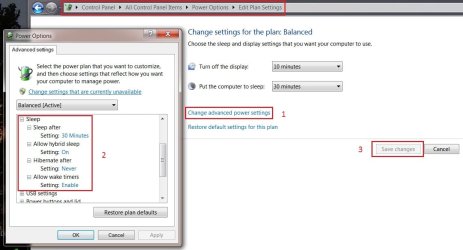
In general terms, Windows still, to this day has problems with some PC configurations, and hibernation.

Go back into Power Management and check to see if yours is checked to go on.
Control Panel\All Control Panel Items\Power Options, then in the left pane click on "Change when the Computer sleeps"

Then like in the pix below click at #1, and the box to the left will open.
Scroll down to sleep, and click on the + to open sleep. It shows in #2 how I have my settings. to change any settings click on the blue words and a change box will open to allow you to make adjustments.

When done go to #3 to save Changes then OK your way out.
 

Attachments

  • SleepSettings.JPG
    SleepSettings.JPG
    75.1 KB · Views: 221

My Computer

Computer type
PC/Desktop
Computer Manufacturer/Model Number
Gateway DX4831-01e (Mid-Tower Desktop)
OS
Originally Win 7 Hm Prem x64 Ver 6.1.7600 Build 7601-SP1 | Upgraded to Windows 10 December 14, 2019
CPU
Intel i3 530 2.93GHz, 2933MHz 2 Cores 4 Logical Processors
Motherboard
Gateway H57M01 133 megahertz
Memory
6GB of 1,333MHz DDR3 SDRAM
Graphics Card(s)
32MB Intel Graphics Media Accelerator HD IGChip
Sound Card
Realtek High Definition Audio
Monitor(s) Displays
Gateway HX2000 20inch TFT active matrix TN
Screen Resolution
1600 x 900 x 59 hertz
Hard Drives
WDC WD10EADS-00M2B0 [HDD] (1000.20 GB) -- drive 0,
HL-DT-ST DVDRAM GH41N [CD-ROM dr]
Four card readers, and Four USB 2.0
PSU
300watts.
Case
Mid-Tower Desktop
Cooling
Stock from Gateway
Keyboard
Natural Ergonomic Keyboard 4000, see Other Info
Mouse
Orig. Gateway wore out now using Insignia USB wired optical
Internet Speed
Vz FIOS 10ms png 57.64Mbps down 65.53Mbps up Speedtest.org
Antivirus
Zamana Anti-logger with Anti-malware, MSE, Windows Firewall,
Browser
IE11.0.9600.19399-Upd ver11.0.135, Firefox 68.0.1 x64
Other Info
System Specs by Belarc.

BIOS: American Megatrends Inc. P01-A0 11/17/2009

Replaced the MS 'Natural' Standard PS/2 Enhanced 101-102 Keyboard with a new Natural Ergonomic Keyboard 4000 on August 1st 2014.

Canon Pixma MG3222 Printer.

Updated to IE11 on 12102015 | Fios Quantum Router g1100

Additional AV: SpywareBlaster, manual Mbam, SAS
nothing will wake it up
  • Open the Control Panel.

  • Click on the Device Manager icon.

  • Click on Continue in the UAC prompt.

  • Open the device's list that you want to change. Check the ones I have boxed.

  • Right click on the device name and click on Properties.

  • Click on the Power Management tab.

  • Check Allow this device to wake the computer.

  • For the Network Adapters there may be three settings I have all three checked.
 

Attachments

  • WakeCheck.JPG
    WakeCheck.JPG
    59.5 KB · Views: 132

My Computer

Computer type
PC/Desktop
Computer Manufacturer/Model Number
Gateway DX4831-01e (Mid-Tower Desktop)
OS
Originally Win 7 Hm Prem x64 Ver 6.1.7600 Build 7601-SP1 | Upgraded to Windows 10 December 14, 2019
CPU
Intel i3 530 2.93GHz, 2933MHz 2 Cores 4 Logical Processors
Motherboard
Gateway H57M01 133 megahertz
Memory
6GB of 1,333MHz DDR3 SDRAM
Graphics Card(s)
32MB Intel Graphics Media Accelerator HD IGChip
Sound Card
Realtek High Definition Audio
Monitor(s) Displays
Gateway HX2000 20inch TFT active matrix TN
Screen Resolution
1600 x 900 x 59 hertz
Hard Drives
WDC WD10EADS-00M2B0 [HDD] (1000.20 GB) -- drive 0,
HL-DT-ST DVDRAM GH41N [CD-ROM dr]
Four card readers, and Four USB 2.0
PSU
300watts.
Case
Mid-Tower Desktop
Cooling
Stock from Gateway
Keyboard
Natural Ergonomic Keyboard 4000, see Other Info
Mouse
Orig. Gateway wore out now using Insignia USB wired optical
Internet Speed
Vz FIOS 10ms png 57.64Mbps down 65.53Mbps up Speedtest.org
Antivirus
Zamana Anti-logger with Anti-malware, MSE, Windows Firewall,
Browser
IE11.0.9600.19399-Upd ver11.0.135, Firefox 68.0.1 x64
Other Info
System Specs by Belarc.

BIOS: American Megatrends Inc. P01-A0 11/17/2009

Replaced the MS 'Natural' Standard PS/2 Enhanced 101-102 Keyboard with a new Natural Ergonomic Keyboard 4000 on August 1st 2014.

Canon Pixma MG3222 Printer.

Updated to IE11 on 12102015 | Fios Quantum Router g1100

Additional AV: SpywareBlaster, manual Mbam, SAS
Thanks, ill try the advanced power managment. not at my on machine at the mo. i have changed the power managment a few times. what is the difference between sleep mode and hibernation??

as for the device manager, ill try that again too because i cant rember if i turned the network adaptor on or off. i know i had the keyboard turned off before because it kept waking up the computer as soon as it tired to sleep. I have it turned on now but it still wont wake the comp. either will the mouse!

ps - i have filled in some of my specs, all i can rember about the motherboard is i think its an acer. ill fill in full when i get home.

thanks again! :D
 

My Computer

Computer Manufacturer/Model Number
Acer Aspire x33000
OS
Windows 7 Home Premium 64bit
CPU
AMD Athlon x2
Motherboard
Acer wmcp78m
Memory
3g Ram and 10g Virtual
Graphics Card(s)
Nivida Gforce 9
Screen Resolution
1920 x 1080
Sleep is easier to say than "Standby", and Hibernate should be called "Deep, Deep Sleep".

Like sleep, hibernation is a power-saving state. But while sleep typically saves your settings in memory and draws a small amount of power, hibernation saves your open documents and programs to your hard disk and then turns off your computer. Of all the power-saving states in Windows, hibernation uses the least amount of power.
More:http://windows.microsoft.com/en-US/windows-vista/Turn-off-a-computer-frequently-asked-qu

As for your System Specs you can follow post #4 by Zidane24, and type in msinfo32.exe or you can use either of these free programs Belarc Advisor - Free Personal PC Audit or Speccy - System Information - Free Download they will offer much more information.

I have been thinking about how you stated your problem, and I'm beginning to think you might have a memory or video card problem.

Try this for the Memtest:
http://www.sevenforums.com/tutorials/105647-ram-test-memtest86.html

For the Video card:
http://www.sevenforums.com/tutorials/100356-video-card-stress-test-furmark.html
 

My Computer

Computer type
PC/Desktop
Computer Manufacturer/Model Number
Gateway DX4831-01e (Mid-Tower Desktop)
OS
Originally Win 7 Hm Prem x64 Ver 6.1.7600 Build 7601-SP1 | Upgraded to Windows 10 December 14, 2019
CPU
Intel i3 530 2.93GHz, 2933MHz 2 Cores 4 Logical Processors
Motherboard
Gateway H57M01 133 megahertz
Memory
6GB of 1,333MHz DDR3 SDRAM
Graphics Card(s)
32MB Intel Graphics Media Accelerator HD IGChip
Sound Card
Realtek High Definition Audio
Monitor(s) Displays
Gateway HX2000 20inch TFT active matrix TN
Screen Resolution
1600 x 900 x 59 hertz
Hard Drives
WDC WD10EADS-00M2B0 [HDD] (1000.20 GB) -- drive 0,
HL-DT-ST DVDRAM GH41N [CD-ROM dr]
Four card readers, and Four USB 2.0
PSU
300watts.
Case
Mid-Tower Desktop
Cooling
Stock from Gateway
Keyboard
Natural Ergonomic Keyboard 4000, see Other Info
Mouse
Orig. Gateway wore out now using Insignia USB wired optical
Internet Speed
Vz FIOS 10ms png 57.64Mbps down 65.53Mbps up Speedtest.org
Antivirus
Zamana Anti-logger with Anti-malware, MSE, Windows Firewall,
Browser
IE11.0.9600.19399-Upd ver11.0.135, Firefox 68.0.1 x64
Other Info
System Specs by Belarc.

BIOS: American Megatrends Inc. P01-A0 11/17/2009

Replaced the MS 'Natural' Standard PS/2 Enhanced 101-102 Keyboard with a new Natural Ergonomic Keyboard 4000 on August 1st 2014.

Canon Pixma MG3222 Printer.

Updated to IE11 on 12102015 | Fios Quantum Router g1100

Additional AV: SpywareBlaster, manual Mbam, SAS
Something else, do you hear more the one beep when you start, re-start your machine?

Best I can tell you may have a Phoenix Bios in your Acer, Acer doesn't tell you much at their site:
Acer Support - Drivers & Support Documents

Go here to interpret the beep start-up codes (POST):
PC Hell: BIOS Error Beep Codes
When you get there click on Phoenix at the top, and it'll take you right to the Phoenix codes.
 

My Computer

Computer type
PC/Desktop
Computer Manufacturer/Model Number
Gateway DX4831-01e (Mid-Tower Desktop)
OS
Originally Win 7 Hm Prem x64 Ver 6.1.7600 Build 7601-SP1 | Upgraded to Windows 10 December 14, 2019
CPU
Intel i3 530 2.93GHz, 2933MHz 2 Cores 4 Logical Processors
Motherboard
Gateway H57M01 133 megahertz
Memory
6GB of 1,333MHz DDR3 SDRAM
Graphics Card(s)
32MB Intel Graphics Media Accelerator HD IGChip
Sound Card
Realtek High Definition Audio
Monitor(s) Displays
Gateway HX2000 20inch TFT active matrix TN
Screen Resolution
1600 x 900 x 59 hertz
Hard Drives
WDC WD10EADS-00M2B0 [HDD] (1000.20 GB) -- drive 0,
HL-DT-ST DVDRAM GH41N [CD-ROM dr]
Four card readers, and Four USB 2.0
PSU
300watts.
Case
Mid-Tower Desktop
Cooling
Stock from Gateway
Keyboard
Natural Ergonomic Keyboard 4000, see Other Info
Mouse
Orig. Gateway wore out now using Insignia USB wired optical
Internet Speed
Vz FIOS 10ms png 57.64Mbps down 65.53Mbps up Speedtest.org
Antivirus
Zamana Anti-logger with Anti-malware, MSE, Windows Firewall,
Browser
IE11.0.9600.19399-Upd ver11.0.135, Firefox 68.0.1 x64
Other Info
System Specs by Belarc.

BIOS: American Megatrends Inc. P01-A0 11/17/2009

Replaced the MS 'Natural' Standard PS/2 Enhanced 101-102 Keyboard with a new Natural Ergonomic Keyboard 4000 on August 1st 2014.

Canon Pixma MG3222 Printer.

Updated to IE11 on 12102015 | Fios Quantum Router g1100

Additional AV: SpywareBlaster, manual Mbam, SAS
no i just have the one normal beep to say everything is ok with the machine!

my bios is AMI version PO1 - A3

My mainboard is Acer and model number is WMCP78M

maybe it could be a memory problem. i have set the paging file to give me between 10g and 11g extra? running 64 bit tho so this shouldn't be a problem. i have loads of extra space on the hard drive!

thanks for all your help! :D
 

My Computer

Computer Manufacturer/Model Number
Acer Aspire x33000
OS
Windows 7 Home Premium 64bit
CPU
AMD Athlon x2
Motherboard
Acer wmcp78m
Memory
3g Ram and 10g Virtual
Graphics Card(s)
Nivida Gforce 9
Screen Resolution
1920 x 1080
no i just have the one normal beep to say everything is ok with the machine!

my bios is AMI version PO1 - A3

My mainboard is Acer and model number is WMCP78M

maybe it could be a memory problem. i have set the paging file to give me between 10g and 11g extra? running 64 bit tho so this shouldn't be a problem. i have loads of extra space on the hard drive!

thanks for all your help! :D
Your quite welcome.

Good to hear your machine is POSTting okay.

About that memory.....
10 to 11g is a mite high, according to this: Change the size of virtual memory Your min should be 3.03g, and your max 9g. Why don't you let windows handle it on auto for a while to see if it makes a difference? Do you game?

If it was me I'd be tempted to pull a side cover to clean out the cobwebs, and also pull the memory sticks, check the contacts for dirt, then re-seat them.
Remember how they go back in, and also remember 'bout the static, and grounding yourself before you go in!
Most slots today have those clips on the ends that you have to push back, remember to put them back if you get in there.

More on memory see links at bottom of post #2 here:
http://www.sevenforums.com/performance-maintenance/9185-virtual-memory-managment.html

EDIT:

I have seen X64 run on 1g, 2 was better 3 okay, 4, and 5 better still, 6 on up cozy......I have 6 ;)
 

My Computer

Computer type
PC/Desktop
Computer Manufacturer/Model Number
Gateway DX4831-01e (Mid-Tower Desktop)
OS
Originally Win 7 Hm Prem x64 Ver 6.1.7600 Build 7601-SP1 | Upgraded to Windows 10 December 14, 2019
CPU
Intel i3 530 2.93GHz, 2933MHz 2 Cores 4 Logical Processors
Motherboard
Gateway H57M01 133 megahertz
Memory
6GB of 1,333MHz DDR3 SDRAM
Graphics Card(s)
32MB Intel Graphics Media Accelerator HD IGChip
Sound Card
Realtek High Definition Audio
Monitor(s) Displays
Gateway HX2000 20inch TFT active matrix TN
Screen Resolution
1600 x 900 x 59 hertz
Hard Drives
WDC WD10EADS-00M2B0 [HDD] (1000.20 GB) -- drive 0,
HL-DT-ST DVDRAM GH41N [CD-ROM dr]
Four card readers, and Four USB 2.0
PSU
300watts.
Case
Mid-Tower Desktop
Cooling
Stock from Gateway
Keyboard
Natural Ergonomic Keyboard 4000, see Other Info
Mouse
Orig. Gateway wore out now using Insignia USB wired optical
Internet Speed
Vz FIOS 10ms png 57.64Mbps down 65.53Mbps up Speedtest.org
Antivirus
Zamana Anti-logger with Anti-malware, MSE, Windows Firewall,
Browser
IE11.0.9600.19399-Upd ver11.0.135, Firefox 68.0.1 x64
Other Info
System Specs by Belarc.

BIOS: American Megatrends Inc. P01-A0 11/17/2009

Replaced the MS 'Natural' Standard PS/2 Enhanced 101-102 Keyboard with a new Natural Ergonomic Keyboard 4000 on August 1st 2014.

Canon Pixma MG3222 Printer.

Updated to IE11 on 12102015 | Fios Quantum Router g1100

Additional AV: SpywareBlaster, manual Mbam, SAS
yea as far as i know ya can go as much as ya want with 64bit as long as ya have it.

think its just 32bit xp and vista that are limited to 4g.

dont game on it no but i do a bit on photoshop so its handy to have the extra memory ya know! as for the cleaning of it its well over due. will prob tackel it this weekend at some stage!

sleep mode problem - i have just stoped the comp from goin to sleep at all, i just let the monitor go to sleep. :D
 

My Computer

Computer Manufacturer/Model Number
Acer Aspire x33000
OS
Windows 7 Home Premium 64bit
CPU
AMD Athlon x2
Motherboard
Acer wmcp78m
Memory
3g Ram and 10g Virtual
Graphics Card(s)
Nivida Gforce 9
Screen Resolution
1920 x 1080
yea as far as i know ya can go as much as ya want with 64bit as long as ya have it.
Last I heard a user can have up to 32GB!......depends on the MB.

think its just 32bit xp and vista that are limited to 4g.
Well.......32xp will handle up to 3, and Vis up to 4......talkin' x32

dont game on it no but i do a bit on photoshop so its handy to have the extra memory ya know! as for the cleaning of it its well over due. will prob tackel it this weekend at some stage!
What will your roomy think of ya havin' a dustcap on?....Tell 'em to go to blazes' This is what ya say.........
Ya want this to work right, then plug this in................! And get the SuckBucket ta workin'.

sleep mode problem - i have just stoped the comp from goin to sleep at all, i just let the monitor go to sleep. :D
For now, that is all you can do.
 

My Computer

Computer type
PC/Desktop
Computer Manufacturer/Model Number
Gateway DX4831-01e (Mid-Tower Desktop)
OS
Originally Win 7 Hm Prem x64 Ver 6.1.7600 Build 7601-SP1 | Upgraded to Windows 10 December 14, 2019
CPU
Intel i3 530 2.93GHz, 2933MHz 2 Cores 4 Logical Processors
Motherboard
Gateway H57M01 133 megahertz
Memory
6GB of 1,333MHz DDR3 SDRAM
Graphics Card(s)
32MB Intel Graphics Media Accelerator HD IGChip
Sound Card
Realtek High Definition Audio
Monitor(s) Displays
Gateway HX2000 20inch TFT active matrix TN
Screen Resolution
1600 x 900 x 59 hertz
Hard Drives
WDC WD10EADS-00M2B0 [HDD] (1000.20 GB) -- drive 0,
HL-DT-ST DVDRAM GH41N [CD-ROM dr]
Four card readers, and Four USB 2.0
PSU
300watts.
Case
Mid-Tower Desktop
Cooling
Stock from Gateway
Keyboard
Natural Ergonomic Keyboard 4000, see Other Info
Mouse
Orig. Gateway wore out now using Insignia USB wired optical
Internet Speed
Vz FIOS 10ms png 57.64Mbps down 65.53Mbps up Speedtest.org
Antivirus
Zamana Anti-logger with Anti-malware, MSE, Windows Firewall,
Browser
IE11.0.9600.19399-Upd ver11.0.135, Firefox 68.0.1 x64
Other Info
System Specs by Belarc.

BIOS: American Megatrends Inc. P01-A0 11/17/2009

Replaced the MS 'Natural' Standard PS/2 Enhanced 101-102 Keyboard with a new Natural Ergonomic Keyboard 4000 on August 1st 2014.

Canon Pixma MG3222 Printer.

Updated to IE11 on 12102015 | Fios Quantum Router g1100

Additional AV: SpywareBlaster, manual Mbam, SAS
What will your roomy think of ya havin' a dustcap on?....Tell 'em to go to blazes' This is what ya say.........
Ya want this to work right, then plug this in................! And get the SuckBucket ta workin'.

im not entirely sure what ya mean by that but im with ya on the rest of it! lol thanks! :D

its not the end of the world anyway, i rather it stayed awake with no problems rather than let it go asleep and risk doin damage! :eek:
 

My Computer

Computer Manufacturer/Model Number
Acer Aspire x33000
OS
Windows 7 Home Premium 64bit
CPU
AMD Athlon x2
Motherboard
Acer wmcp78m
Memory
3g Ram and 10g Virtual
Graphics Card(s)
Nivida Gforce 9
Screen Resolution
1920 x 1080
Then while everyone asleep, clean 'er out, an see what that'll do.

Just remember to discharge any static............or else it'll be BOOM!
 

My Computer

Computer type
PC/Desktop
Computer Manufacturer/Model Number
Gateway DX4831-01e (Mid-Tower Desktop)
OS
Originally Win 7 Hm Prem x64 Ver 6.1.7600 Build 7601-SP1 | Upgraded to Windows 10 December 14, 2019
CPU
Intel i3 530 2.93GHz, 2933MHz 2 Cores 4 Logical Processors
Motherboard
Gateway H57M01 133 megahertz
Memory
6GB of 1,333MHz DDR3 SDRAM
Graphics Card(s)
32MB Intel Graphics Media Accelerator HD IGChip
Sound Card
Realtek High Definition Audio
Monitor(s) Displays
Gateway HX2000 20inch TFT active matrix TN
Screen Resolution
1600 x 900 x 59 hertz
Hard Drives
WDC WD10EADS-00M2B0 [HDD] (1000.20 GB) -- drive 0,
HL-DT-ST DVDRAM GH41N [CD-ROM dr]
Four card readers, and Four USB 2.0
PSU
300watts.
Case
Mid-Tower Desktop
Cooling
Stock from Gateway
Keyboard
Natural Ergonomic Keyboard 4000, see Other Info
Mouse
Orig. Gateway wore out now using Insignia USB wired optical
Internet Speed
Vz FIOS 10ms png 57.64Mbps down 65.53Mbps up Speedtest.org
Antivirus
Zamana Anti-logger with Anti-malware, MSE, Windows Firewall,
Browser
IE11.0.9600.19399-Upd ver11.0.135, Firefox 68.0.1 x64
Other Info
System Specs by Belarc.

BIOS: American Megatrends Inc. P01-A0 11/17/2009

Replaced the MS 'Natural' Standard PS/2 Enhanced 101-102 Keyboard with a new Natural Ergonomic Keyboard 4000 on August 1st 2014.

Canon Pixma MG3222 Printer.

Updated to IE11 on 12102015 | Fios Quantum Router g1100

Additional AV: SpywareBlaster, manual Mbam, SAS
ill just wait till i get an anti static arm band! need to start building a kit anyway. :D
 

My Computer

Computer Manufacturer/Model Number
Acer Aspire x33000
OS
Windows 7 Home Premium 64bit
CPU
AMD Athlon x2
Motherboard
Acer wmcp78m
Memory
3g Ram and 10g Virtual
Graphics Card(s)
Nivida Gforce 9
Screen Resolution
1920 x 1080
Back
Top