
I just upgraded my computer to a new mobo and CPU and for some reason sleep mode won't work. I can put the computer in sleep mode but it won't wake up. Everything turns on (Fans, hard drive, PSU) but no picture on the monitor. Also no BSOD error.
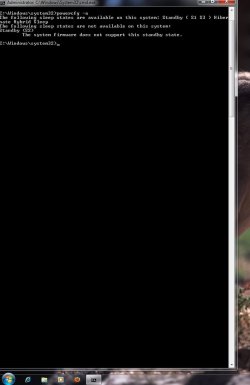
After typing in CMD and running as Admin then typing powercfg -a the results were this: The system firmware does not support this standby state.
Has anyone have a clue how to fix this cause everything is all up to date with a clean install of Windows 7 64 bit. Or does it mean Windows 7 don't like the new CPU? I don't have to use sleep mode but I rather use it if I can.
See picture below.
Besides this small problem the computer works great very fast.
System spec's
Windows 7 home premium 64 bit Retail
8GB Kingston HyperX Genesis KHX1600C9D3K2/8GX 1600MHz Gaming memory
Sapphire Radeon HD 5770 XFX HD-577A-ZNFC(Juniper XT) 1GB 128-bit GDDR5 PCI Express 2.1 x16 video card
ASUS M5A97 AM3+ AMD 970 SATA 6Gb/s USB 3.0 ATX AMD Motherboard with UEFI BIOS
AMD FX-6100 Zambezi 3.3GHz Socket AM3+ 95W Six-Core Desktop Processor FD6100WMGUSBX OC'ed to 4.41GHz
Western Digital wd20ears Caviar Green 2tb sata2 (Backup)
Kingston SSDNOW V+ 200 SVP200S3 120GB SATA 3 SSD drive(Main boot drive)
Cooler Master Elite 310 Case
Cooler Master V6 with dual 120mm LED fans
LG Flatron E2241 Super Full HD LED 22 inch monitor
Cooler Master Silent Pro M 700W power supply
LG CH10LS20 Blu-ray reader/ DVD burner
After typing in CMD and running as Admin then typing powercfg -a the results were this: The system firmware does not support this standby state.
Has anyone have a clue how to fix this cause everything is all up to date with a clean install of Windows 7 64 bit. Or does it mean Windows 7 don't like the new CPU? I don't have to use sleep mode but I rather use it if I can.
See picture below.
Besides this small problem the computer works great very fast.
System spec's
Windows 7 home premium 64 bit Retail
8GB Kingston HyperX Genesis KHX1600C9D3K2/8GX 1600MHz Gaming memory
Sapphire Radeon HD 5770 XFX HD-577A-ZNFC(Juniper XT) 1GB 128-bit GDDR5 PCI Express 2.1 x16 video card
ASUS M5A97 AM3+ AMD 970 SATA 6Gb/s USB 3.0 ATX AMD Motherboard with UEFI BIOS
AMD FX-6100 Zambezi 3.3GHz Socket AM3+ 95W Six-Core Desktop Processor FD6100WMGUSBX OC'ed to 4.41GHz
Western Digital wd20ears Caviar Green 2tb sata2 (Backup)
Kingston SSDNOW V+ 200 SVP200S3 120GB SATA 3 SSD drive(Main boot drive)
Cooler Master Elite 310 Case
Cooler Master V6 with dual 120mm LED fans
LG Flatron E2241 Super Full HD LED 22 inch monitor
Cooler Master Silent Pro M 700W power supply
LG CH10LS20 Blu-ray reader/ DVD burner
Attachments
Last edited:
My Computer
- Computer Manufacturer/Model Number
- Custom built
- OS
- Windows 7 Home Premium x64 SP1 retail
- CPU
- Intel i7 3770
- Motherboard
- ASUS P8Z77-V LX
- Memory
- 8GB Kingston HyperX Genesis KHX1600C9D3K2/8GX 1600MHz
- Graphics Card(s)
- ASUS ENGTX560 DCII OC/2DI/1GD5 GeForce GTX 560
- Sound Card
- 5.1 channel
- Monitor(s) Displays
- ASUS VE247H Black 23.6"
- Screen Resolution
- 1920 x 1080
- Hard Drives
- Western Digital Caviar Green WD30EZRX 3TB
Kingston SSDNOW V+ 200 SVP200S3 120GB SATA 3 SSD
- PSU
- Cooler Master Silent Pro M 700W power supply
- Case
- Enermax
- Cooling
- 4 120mm fans, Cooler Master V6 GTdual 120mm fans
- Keyboard
- steelseries Merc Stealth Black
- Mouse
- Razer Lachesis
- Internet Speed
- 20MB per second
- Other Info
- LG CH10LS20 Blu-ray reader/ DVD burner
Altec Lansing vs3151 5.1 channel


