Slipstream essential drivers into win7 iso

billybellfoot

New member
Local time
2:53 AM
Messages
21
Hi i am trying to install win 7 via usb .iso on a dual boot to road test it with view to migration currently vista user but cant complete the installation it gets to win splash screen and signal to monitor drops out (hdmi) as it doesnt have the necessary driver for the display, so cannot finish the install is there any way to slipstream a driver i have that currently works on that pc with vista into the win7 install .iso so as it will be present when required during install. Any help advice greatly appreciated
 

My Computer My Computer

Computer type
PC/Desktop
Computer Manufacturer/Model Number
acer
OS
Win7 pro 32
CPU
Intel atom 230 @1.6
Motherboard
Mcp7a
Memory
4 GB
Graphics Card(s)
Nvidia Ion
Hard Drives
Integral ssd
Yes.

You would need to install it into boot.wim image 2.

If you post the driver here in a .zip file. I ,may be able to automate it for you.
 

My Computers My Computers

System One System Two

  • Computer type
    PC/Desktop
    OS
    7 X64
    CPU
    i5 8400
    Motherboard
    gigabyte b365m ds3h
    Memory
    2x8gb 3200mhz
    Hard Drives
    various
    PSU
    pure power 11 400w cm
    Case
    Coolermaster
    Cooling
    cryorig m9i
  • Computer type
    PC/Desktop
    OS
    7x64
    CPU
    g5400
    Motherboard
    ga b365m ds3h
    Memory
    8gb ddr4 2400
    PSU
    xfx pro 450w
hi thanks for the support not sure how to post the zip here so prob as easy to give DL location for win 7 drivers acer site (32b version) Product support

thanks again for support much appreciated
 

My Computer My Computer

Computer type
PC/Desktop
Computer Manufacturer/Model Number
acer
OS
Win7 pro 32
CPU
Intel atom 230 @1.6
Motherboard
Mcp7a
Memory
4 GB
Graphics Card(s)
Nvidia Ion
Hard Drives
Integral ssd
1.Copy boot.wim and install.wim from the "sources" folder of the usb onto your hard drive.

2. Mount boot.wim image 2 into an empty folder ( you can just create a folder on your C drive and call it "mount" ).

3. Add the drivers.

4. Save the image ( Direct Save)

5. Unmount the image.

6. Mount the relevant image from install.wim.

7. Add the drivers.

8. Save the image ( Direct Save).

9. Unmount the image.

10. Then copy boot.wim and install.wim back into the sources folder of the usb.

You can use this to mount, add drivers/updates, Save and unmount:

Download
 

My Computers My Computers

System One System Two

  • Computer type
    PC/Desktop
    OS
    7 X64
    CPU
    i5 8400
    Motherboard
    gigabyte b365m ds3h
    Memory
    2x8gb 3200mhz
    Hard Drives
    various
    PSU
    pure power 11 400w cm
    Case
    Coolermaster
    Cooling
    cryorig m9i
  • Computer type
    PC/Desktop
    OS
    7x64
    CPU
    g5400
    Motherboard
    ga b365m ds3h
    Memory
    8gb ddr4 2400
    PSU
    xfx pro 450w
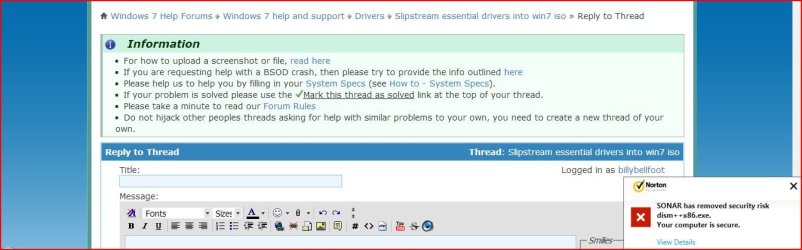
hi just attempted to proceed with this but then this happened


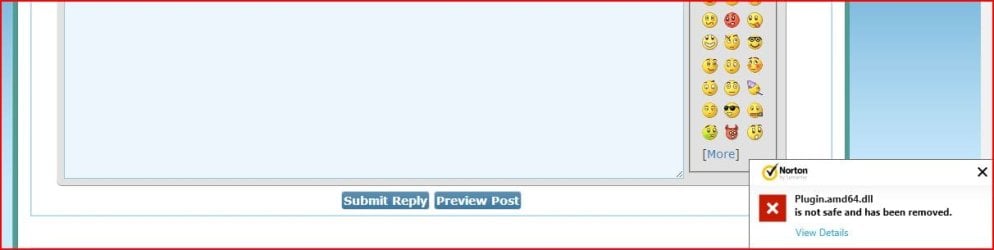
and as i was writing this also
 

Attachments

  • Capture.JPG
    Capture.JPG
    77.5 KB · Views: 4
  • Capture2.JPG
    Capture2.JPG
    32.9 KB · Views: 2
Last edited:

My Computer My Computer

Computer type
PC/Desktop
Computer Manufacturer/Model Number
acer
OS
Win7 pro 32
CPU
Intel atom 230 @1.6
Motherboard
Mcp7a
Memory
4 GB
Graphics Card(s)
Nvidia Ion
Hard Drives
Integral ssd
Then turn off Norton. If you can be bothered, you can tell Norton it is an FP.

Otherwise, use a different A/V. Microsoft Security Essentials is fine.

MSE
 

My Computers My Computers

System One System Two

  • Computer type
    PC/Desktop
    OS
    7 X64
    CPU
    i5 8400
    Motherboard
    gigabyte b365m ds3h
    Memory
    2x8gb 3200mhz
    Hard Drives
    various
    PSU
    pure power 11 400w cm
    Case
    Coolermaster
    Cooling
    cryorig m9i
  • Computer type
    PC/Desktop
    OS
    7x64
    CPU
    g5400
    Motherboard
    ga b365m ds3h
    Memory
    8gb ddr4 2400
    PSU
    xfx pro 450w
hi just attempted to proceed with this but then this happened


and as i was writing this also

Hi,

Sorry for the delay. You can report FP here Norton.com/fp we'll analyze the file and make changes to the whitelist definition if necessary. Please let us know if you need more help.

Thanks!
Praveen
Norton Support.
 

My Computer My Computer

Computer type
PC/Desktop
OS
Windows 7 Ultimate x64
Back
Top