Slow Boot, CPU High Usage, Tried Nearly Everything

cornishidiot

New member
Local time
8:18 AM
Messages
10
Slow Boot, High CPU Usage, WEP key N/C, System Clock x 300, The Lot.

Hi,

Sorry if I have not posted this in the correct forum, I wasn't sure where to post...

Specs -

Windows 7 Ultimate x64 Build 7600
AMD Phenom II X4 965
Crucial 4GB DDR3 1333mhz
Asus M4A785TD-V EVO
Samsung HD103SJ Spinpoint F3 1TB x 2
Western Digital 80GB Internal
Zalman CNPS9500A
Arctic Silver 5
Edimax Wireless-N150 USB
Logitech Revolution MX
Samsung SH-S223 DVD-RW
Coolermaster Silent Pro 700W Modular PSU
CM Storm Scout

(Detailed spec as I'm about to explain the drivers etc)


Basically,
Since I build my computer approx. 8 months ago, upon first installation everything was fine and working great, no problems whatsoever.

But as time expends so does operating systems (naturally).

The first problem that I experienced probably a couple months back, 3 maybe, was an issue with my MOBO, where the system clock was running at about 300x normal speed (this makes things considerably difficult)

And then up arose the CPU maxing out constantly problem, resulting in regular reboots to reset the usage to something not so worrying.

I also tried formats with no success.

So I have recently RMA'd my MOBO (1-2 months) and gained a swap, as I had read that this was the only apparant fix to the problem, Ebuyer seemed to lightly agree.
So far I have not encountered the problem since (fingers crossed).

At the same point of returning my MOBO I took the opportunity of changing my HSF from the stock AMD one to the Zalman I have listed, also with the purchase of Artic Silver. As I had read that high CPU usage can be caused with relations to the thermal compound that is sometimes used in stock HSF's, also the fact that the stock HSF was noisy as hell.

Upon delivery, install fan + compound, boot, no problems. Apart from being mega slow, as usual. And also the whole CPU maxed out thingy too.

Format. Fresh Install.

Working lush, able to log on and off within 10 seconds, boot time excellent, winamp not spinning out, shutdown marvellous. However this did not last long, the same evening after installing all the essentials (vlc, chome, utorrent etc, MS security essentials etc) boot time has reduced to something diabolical. Again.

Loads of googling,

Format. Fresh Install.

Exact same thing.

Format. Fresh Install.

Only installing bare minimum, turning off certain windows features, services and stuff. Same thing. Slow Boot. High CPU.

(For the record my memory has always been fine and not experienced any high usage, I think the highest I've ever seen it was 2.73GB, and that was months ago with loads installed and running. Which is weird because most high CPU threads I have researched have reported the memory causing issues too)

I have read that some certain drivers, espeshly ones regarding USB devices can cause slow boots if they are missing or need updating, so I have format again and installed my Ralink adapter manually (with and without the disc) then my mouse. Run driver disc from mobo. Slight improvement on boot time but no useful effect on CPU usage.

Note - the CPU problem is not constant, I have to keep regularly checking task manager to see when it has rocketed.

I had noticed a change in my startup and login time when I switched from using one of my Samsung's 1TB for Windows OS to my Western Digital 80GB, obviously as the HDD is older and probably has a slower RPM this will be noticeable. But, not as noticeable as the boot time recently, it is jokes.

I will mention when un-installing MOBO for the RMA the compound on the HSF refused to release my CPU nicely and resulted in the whole lot coming out at once in a very concerning manner, thus leaving me with slightly bent pins on the CPU, nothing intensely wonky, only a few which were extremely carefully rectified after much more googling and also with the use of a blunt vegetable knife + much patience.
Hardly noticeable now.

One further problem I managed to land myself with since the fresh mobo was an issue with Windows 7 not connecting to WEP wireless keys, which is really really weird because is was fine before... after much messing around and hassle, I was able to somehow transfer the same problem onto my mother's laptop too, great stuff huh?
In the end I reset the router to factory settings and spent an hour on the blower to ISP and I have now got that one solved, seemed to be a thing with the router more than windows, still really weird though. NOTE - ANYONE GOOGLING THIS THREAD WITH WINDOWS 7 (7600) WEP KEY PROBLEMS TRY ROUTER RESTORE. It's the last option I had and it worked. (Netgear DG834G v3).

So yeah, in summary I am still with a 'slower' boot time and high CPU usage after trying pretty much everything months of googing has to offer.

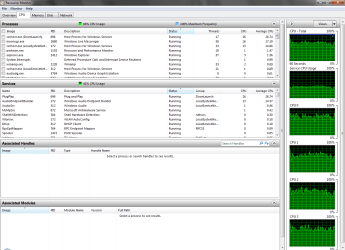
When checking task manager to see what is causing the high CPU threads there is nothing listed. Everything seems normal.

The one last option I have is to somehow RMA my CPU which I'm desperately trying to avoid as Ebuyer probably seriously don't like me much at the moment. (I'm currently proceeding legal claims with them for my Laptop which has been on-going for over 8 months)

This is all really really annoying and frustrating, I built my comp to what I had hoped to be something along the lines of inferior and uber cool, (with respect to that being eight months ago) but I literally can't do bugger all with it.

I think I might be cursed and/or I'm going to cry.


Please if anyone has anymore ideas do post, I am literally about to freak.


Regards


Kraig
 

My Computer

OS
Windows 7 Ultimate x64 Bit Build 7600
CPU
AMD Phenom II X4 965 3.4GHZ
Motherboard
Asus M4A785TD-V EVO
Memory
Crucial 4GB DDR3 1333mhz
Graphics Card(s)
ATI Radeon HD 5400
Sound Card
Asus HD Audio Deck
Monitor(s) Displays
My Far-Too-Small TV
Screen Resolution
1280 x 1024
Hard Drives
2 x Samsung Spinpoint 1TB,
1 x Seagate Barracuda 80 GB,
2 x Iomega Prestige Portable 320GB,
1 x Hitachi Deskstar 120GB,
1 x Seagate 20GB
PSU
Coolermaster Silent Pro 700W Modular PSU
Case
CM Storm Scout
Cooling
Zalman CNPS9500A
Keyboard
Dell SK-8135 Multimedia
Mouse
Logitech Revolution MX
Internet Speed
Jokes
Other Info
Arctic Silver 5,
Edimax Wireless-N150 USB,
Samsung SH-S223 DVD-RW
Hi,

Sorry if I have not posted this in the correct forum, I wasn't sure where to post...

Specs -

Windows 7 Ultimate x64 Build 7600
AMD Phenom II X4 965
Crucial 4GB DDR3 1333mhz
Asus M4A785TD-V EVO
Samsung HD103SJ Spinpoint F3 1TB x 2
Western Digital 80GB Internal
Zalman CNPS9500A
Arctic Silver 5
Edimax Wireless-N150 USB
Logitech Revolution MX
Samsung SH-S223 DVD-RW
Coolermaster Silent Pro 700W Modular PSU
CM Storm Scout

(Detailed spec as I'm about to explain the drivers etc)


Basically,
Since I build my computer approx. 8 months ago, upon first installation everything was fine and working great, no problems whatsoever.

But as time expends so does operating systems (naturally).

The first problem that I experienced probably a couple months back, 3 maybe, was an issue with my MOBO, where the system clock was running at about 300x normal speed (this makes things considerably difficult)

And then up arose the CPU maxing out constantly problem, resulting in regular reboots to reset the usage to something not so worrying.

I also tried formats with no success.

So I have recently RMA'd my MOBO (1-2 months) and gained a swap, as I had read that this was the only apparant fix to the problem, Ebuyer seemed to lightly agree.
So far I have not encountered the problem since (fingers crossed).

At the same point of returning my MOBO I took the opportunity of changing my HSF from the stock AMD one to the Zalman I have listed, also with the purchase of Artic Silver. As I had read that high CPU usage can be caused with relations to the thermal compound that is sometimes used in stock HSF's, also the fact that the stock HSF was noisy as hell.

Upon delivery, install fan + compound, boot, no problems. Apart from being mega slow, as usual. And also the whole CPU maxed out thingy too.

Format. Fresh Install.

Working lush, able to log on and off within 10 seconds, boot time excellent, winamp not spinning out, shutdown marvellous. However this did not last long, the same evening after installing all the essentials (vlc, chome, utorrent etc, MS security essentials etc) boot time has reduced to something diabolical. Again.

Loads of googling,

Format. Fresh Install.

Exact same thing.

Format. Fresh Install.

Only installing bare minimum, turning off certain windows features, services and stuff. Same thing. Slow Boot. High CPU.

(For the record my memory has always been fine and not experienced any high usage, which is weird because most high CPU threads I have researched have reported the memory causing issues too)

I have read that some certain drivers, espeshly ones regarding USB devices can cause slow boots if they are missing or need updating, so I have format again and installed my Ralink adapter manually (with and without the disc) then my mouse. Run driver disc from mobo. Slight improvement on boot time but no useful effect on CPU usage.

Note - the CPU problem is not constant, I have to keep regularly checking task manager to see when it has rocketed.

I had noticed a change in my startup and login time when I switched from using one of my Samsung's 1TB for Windows OS to my Western Digital 80GB, obviously as the HDD is older and probably has a slower RPM this will be noticeable. But, not as noticeable as the boot time recently, it is jokes.

I will mention when un-installing MOBO for the RMA the compound on the HSF refused to release my CPU nicely and resulted in the whole lot coming out at once in a very concerning manner, thus leaving me with slightly bent pins on the CPU, nothing intensely wonky, only a few which were extremely carefully rectified after much more googling and also with the use of a blunt vegetable knife + much patience.
Hardly noticeable now.

One further problem I managed to land myself with since the fresh mobo was an issue with Windows 7 not connecting to WEP wireless keys, which is really really weird because is was fine before... after much messing around and hassle, I was able to somehow transfer the same problem onto my mother's laptop too, great stuff huh?
In the end I reset the router to factory settings and spent an hour on the blower to ISP and I have now got that one solved, seemed to be a thing with the router more than windows, still really weird though. NOTE - ANYONE GOOGLING THIS THREAD WITH WINDOWS 7 (7600) WEP KEY PROBLEMS TRY ROUTER RESTORE. It's the last option I had and it worked. (Netgear DG834G v3).

So yeah, in summary I am still with a 'slower' boot time and high CPU usage after trying pretty much everything months of googing has to offer.

When checking task manager to see what is causing the high CPU threads there is nothing listed. Everything seems normal.

The one last option I have is to somehow RMA my CPU which I'm desperately trying to avoid as Ebuyer probably seriously don't like me much at the moment. (I'm currently proceeding legal claims with them for my Laptop which has been on-going for over 8 months)

Please if anyone has anymore ideas do post, I am literally about to freak.


Regards


Kraig


Kraig

Hi and welcome

we need more info.

1-event viewer- look for critical errors
There are several ways to find what the problem is. The best is to go into event viewer (type eventvwr in search). Go to the windows log>application tab.

You want to look for critical errors (they have red in the left column ).

When you find them you want to look for critical errors that say app hang, app crash, or anything that relates to the problem.

When you find them please note the event ID, and the source codes and tell us what they are.

2- Device manager
Please go to start>search>type device manager.
Are there any "unknown devices" with yellow triangles on them?
Is you driver there , listed, and working?

If your driver is missing, or there is a yellow triangle on it, you will need to update it.


3-System file check

http://www.sevenforums.com/tutorials/1538-sfc-scannow-command-system-file-checker.html?ltr=S


Let us know if you need help


Ken J
 

My Computer

Computer Manufacturer/Model Number
HP Pavillion dv-7 1005 Tx
OS
Win 8 Release candidate 8400
CPU
[email protected]
Memory
4 gigs
Graphics Card(s)
Nvidia 9600M
Sound Card
HD built-in
Monitor(s) Displays
17" Wxga
Screen Resolution
1440x900
Cooling
none
Internet Speed
45Mb down 5Mb up
Ken has excellent recommendations. Do that first.

Also, check your bios to see if it's see for fast boot.

And please check your mobo again. You have it listed as Asus M4a78gTD - EVO. I can't reference it. If it's different, please list here and update specs.
 

My Computer

Computer Manufacturer/Model Number
Dell and Custom
OS
Systems 1 and 2: Windows 7 Enterprise x64, Win 8 Developer
CPU
System 1: i7 [email protected], System 2: AMD FX-4100 Zambezi 3.6G
Motherboard
System 1:Dell 06NWYK System 2: ASUS M5A97 AM3+
Memory
System 1: 8GB System 2: 8GB
Graphics Card(s)
System 1: ATI FirePro V4800 System 2: Radeon HD 6850
Sound Card
System 1: onboard System 2: onboard
Monitor(s) Displays
System1: Viewsonic HDMI 24"
Screen Resolution
System 1: 1920x1080 System 2: 1920x1080
Hard Drives
System 1: Mirrored .5B drives System 2: Seagate Barracuda ST1000DM003 1TB 7200 RPM 64MB Cache SATA 6.0Gb/s
Case
System 1: Dell System 2: Cooler Master
Internet Speed
10 MBPS
Hi,

Sorry if I have not posted this in the correct forum, I wasn't sure where to post...

Specs -

Windows 7 Ultimate x64 Build 7600
AMD Phenom II X4 965
Crucial 4GB DDR3 1333mhz
Asus M4A785TD-V EVO
Samsung HD103SJ Spinpoint F3 1TB x 2
Western Digital 80GB Internal
Zalman CNPS9500A
Arctic Silver 5
Edimax Wireless-N150 USB
Logitech Revolution MX
Samsung SH-S223 DVD-RW
Coolermaster Silent Pro 700W Modular PSU
CM Storm Scout

(Detailed spec as I'm about to explain the drivers etc)


Basically,
Since I build my computer approx. 8 months ago, upon first installation everything was fine and working great, no problems whatsoever.

But as time expends so does operating systems (naturally).

The first problem that I experienced probably a couple months back, 3 maybe, was an issue with my MOBO, where the system clock was running at about 300x normal speed (this makes things considerably difficult)

And then up arose the CPU maxing out constantly problem, resulting in regular reboots to reset the usage to something not so worrying.

I also tried formats with no success.

So I have recently RMA'd my MOBO (1-2 months) and gained a swap, as I had read that this was the only apparant fix to the problem, Ebuyer seemed to lightly agree.
So far I have not encountered the problem since (fingers crossed).

At the same point of returning my MOBO I took the opportunity of changing my HSF from the stock AMD one to the Zalman I have listed, also with the purchase of Artic Silver. As I had read that high CPU usage can be caused with relations to the thermal compound that is sometimes used in stock HSF's, also the fact that the stock HSF was noisy as hell.

Upon delivery, install fan + compound, boot, no problems. Apart from being mega slow, as usual. And also the whole CPU maxed out thingy too.

Format. Fresh Install.

Working lush, able to log on and off within 10 seconds, boot time excellent, winamp not spinning out, shutdown marvellous. However this did not last long, the same evening after installing all the essentials (vlc, chome, utorrent etc, MS security essentials etc) boot time has reduced to something diabolical. Again.

Loads of googling,

Format. Fresh Install.

Exact same thing.

Format. Fresh Install.

Only installing bare minimum, turning off certain windows features, services and stuff. Same thing. Slow Boot. High CPU.

(For the record my memory has always been fine and not experienced any high usage, which is weird because most high CPU threads I have researched have reported the memory causing issues too)

I have read that some certain drivers, espeshly ones regarding USB devices can cause slow boots if they are missing or need updating, so I have format again and installed my Ralink adapter manually (with and without the disc) then my mouse. Run driver disc from mobo. Slight improvement on boot time but no useful effect on CPU usage.

Note - the CPU problem is not constant, I have to keep regularly checking task manager to see when it has rocketed.

I had noticed a change in my startup and login time when I switched from using one of my Samsung's 1TB for Windows OS to my Western Digital 80GB, obviously as the HDD is older and probably has a slower RPM this will be noticeable. But, not as noticeable as the boot time recently, it is jokes.

I will mention when un-installing MOBO for the RMA the compound on the HSF refused to release my CPU nicely and resulted in the whole lot coming out at once in a very concerning manner, thus leaving me with slightly bent pins on the CPU, nothing intensely wonky, only a few which were extremely carefully rectified after much more googling and also with the use of a blunt vegetable knife + much patience.
Hardly noticeable now.

One further problem I managed to land myself with since the fresh mobo was an issue with Windows 7 not connecting to WEP wireless keys, which is really really weird because is was fine before... after much messing around and hassle, I was able to somehow transfer the same problem onto my mother's laptop too, great stuff huh?
In the end I reset the router to factory settings and spent an hour on the blower to ISP and I have now got that one solved, seemed to be a thing with the router more than windows, still really weird though. NOTE - ANYONE GOOGLING THIS THREAD WITH WINDOWS 7 (7600) WEP KEY PROBLEMS TRY ROUTER RESTORE. It's the last option I had and it worked. (Netgear DG834G v3).

So yeah, in summary I am still with a 'slower' boot time and high CPU usage after trying pretty much everything months of googing has to offer.

When checking task manager to see what is causing the high CPU threads there is nothing listed. Everything seems normal.

The one last option I have is to somehow RMA my CPU which I'm desperately trying to avoid as Ebuyer probably seriously don't like me much at the moment. (I'm currently proceeding legal claims with them for my Laptop which has been on-going for over 8 months)

Please if anyone has anymore ideas do post, I am literally about to freak.


Regards


Kraig


Kraig

Hi and welcome

we need more info.

1-event viewer- look for critical errors
There are several ways to find what the problem is. The best is to go into event viewer (type eventvwr in search). Go to the windows log>application tab.

You want to look for critical errors (they have red in the left column ).

When you find them you want to look for critical errors that say app hang, app crash, or anything that relates to the problem.

When you find them please note the event ID, and the source codes and tell us what they are.

2- Device manager
Please go to start>search>type device manager.
Are there any "unknown devices" with yellow triangles on them?
Is you driver there , listed, and working?

If your driver is missing, or there is a yellow triangle on it, you will need to update it.


3-System file check

http://www.sevenforums.com/tutorials/1538-sfc-scannow-command-system-file-checker.html?ltr=S


Let us know if you need help


Ken J


Hi Zigzag,


Many thanks for the reply,


I have checked event viewer and recorded the following critical errors:-

Windows live messenger, Event ID 7, Category - none
ATIeRecord, event ID 16388, Category - EEU
SideBySide, Event ID 33, Category - None x 8
Restart Manager, Event ID 10006, Category - None


When checking Device Manager, all devices and drivers are accounted for excluding what's called -

Teredo Tunneling Pseudo-Interface

When I select it it informs me that the device is unable to start.
When I try to automatically update driver it informs me that the lastest driver is already installed.
When I try to disable it, it crashes - end process,
Start Device Manager again to enable it but it only crashes again, end process etc.
Now I have checked back and it has no triangle but says there is no driver installed.
So I play around with it again and its gone back to square one with the triangle.
Etc etc etc...

^ I have done the above cycle for the driver thrice now, strange.


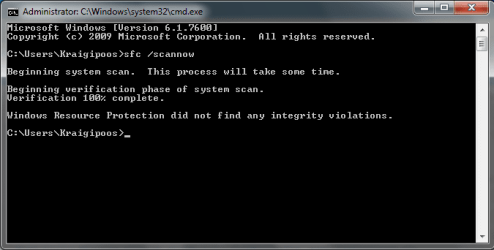
I successfully ran the System File check CMD and it reported no integrity violations. (which is good I guess?)

I have attached a screen print of the SFC results.


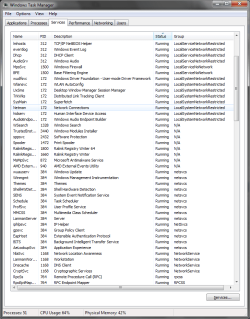
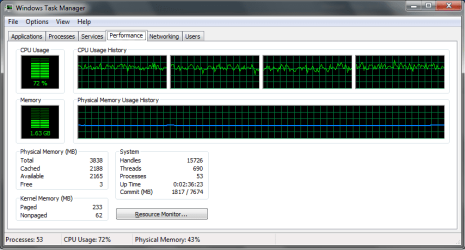
NOTE - I have attached some screen shots of my task manager also if it might be of any aid.


Lemur, also thankyou for the reply.

My MOBO is the

Asus M4A785TD-V EVO.

It's possible you may of made a typo somewhere.


Another Note - I have made various basic tweaks to my system to optimize preformance as obviously these things can help.
I have used some of the features from the 'TweakNow WinSecret 2010' application, namely on the /Win secret/Windows Core Tab.
There are some useful features which unlock core potential in systems.

However if specified I can revert to default by a click of a button.

Just my best trying to make everything that I have played about with clear as specification can save much time on forums. :)


Regards


Kraig
 

Attachments

  • results.png
    results.png
    10.7 KB · Views: 23
  • CPU usage.png
    CPU usage.png
    17.7 KB · Views: 28
  • processes.png
    processes.png
    22.2 KB · Views: 20
  • resources.png
    resources.png
    43.9 KB · Views: 20
  • services.png
    services.png
    34.2 KB · Views: 18

My Computer

OS
Windows 7 Ultimate x64 Bit Build 7600
CPU
AMD Phenom II X4 965 3.4GHZ
Motherboard
Asus M4A785TD-V EVO
Memory
Crucial 4GB DDR3 1333mhz
Graphics Card(s)
ATI Radeon HD 5400
Sound Card
Asus HD Audio Deck
Monitor(s) Displays
My Far-Too-Small TV
Screen Resolution
1280 x 1024
Hard Drives
2 x Samsung Spinpoint 1TB,
1 x Seagate Barracuda 80 GB,
2 x Iomega Prestige Portable 320GB,
1 x Hitachi Deskstar 120GB,
1 x Seagate 20GB
PSU
Coolermaster Silent Pro 700W Modular PSU
Case
CM Storm Scout
Cooling
Zalman CNPS9500A
Keyboard
Dell SK-8135 Multimedia
Mouse
Logitech Revolution MX
Internet Speed
Jokes
Other Info
Arctic Silver 5,
Edimax Wireless-N150 USB,
Samsung SH-S223 DVD-RW
Thanks for the update on your mobo. It does say Asus M4a78gTD - EVO on your System Specs, and that's a cut and paste.

Do you have bios version 2105? If not, let's flash the bios.

ASUSTeK Computer Inc.-Support-
 

My Computer

Computer Manufacturer/Model Number
Dell and Custom
OS
Systems 1 and 2: Windows 7 Enterprise x64, Win 8 Developer
CPU
System 1: i7 [email protected], System 2: AMD FX-4100 Zambezi 3.6G
Motherboard
System 1:Dell 06NWYK System 2: ASUS M5A97 AM3+
Memory
System 1: 8GB System 2: 8GB
Graphics Card(s)
System 1: ATI FirePro V4800 System 2: Radeon HD 6850
Sound Card
System 1: onboard System 2: onboard
Monitor(s) Displays
System1: Viewsonic HDMI 24"
Screen Resolution
System 1: 1920x1080 System 2: 1920x1080
Hard Drives
System 1: Mirrored .5B drives System 2: Seagate Barracuda ST1000DM003 1TB 7200 RPM 64MB Cache SATA 6.0Gb/s
Case
System 1: Dell System 2: Cooler Master
Internet Speed
10 MBPS

My Computer

Computer Manufacturer/Model Number
Dell and Custom
OS
Systems 1 and 2: Windows 7 Enterprise x64, Win 8 Developer
CPU
System 1: i7 [email protected], System 2: AMD FX-4100 Zambezi 3.6G
Motherboard
System 1:Dell 06NWYK System 2: ASUS M5A97 AM3+
Memory
System 1: 8GB System 2: 8GB
Graphics Card(s)
System 1: ATI FirePro V4800 System 2: Radeon HD 6850
Sound Card
System 1: onboard System 2: onboard
Monitor(s) Displays
System1: Viewsonic HDMI 24"
Screen Resolution
System 1: 1920x1080 System 2: 1920x1080
Hard Drives
System 1: Mirrored .5B drives System 2: Seagate Barracuda ST1000DM003 1TB 7200 RPM 64MB Cache SATA 6.0Gb/s
Case
System 1: Dell System 2: Cooler Master
Internet Speed
10 MBPS
regarding your slow boot time. are any of your hard drives external? i have a 1TB USB external and if i dont disconnect it before rebooting, my computer takes about 10 minutes to start. without it, i'm at the desktop in less than 30 seconds.
 

My Computer

Computer Manufacturer/Model Number
Alienware AREA-51 M17x
OS
windows 7 ultimate 64bit
CPU
Intel Core2 Extreme x9000 2.8GHZ
Motherboard
Asus P965 Intel chipset
Memory
4Gig
Graphics Card(s)
2 NVidia GeForce 8800M GTX (SLi)
Sound Card
onboard
Monitor(s) Displays
17in. built-in, 47in JVC LCD
Screen Resolution
1080p
Hard Drives
2 250Gig Hitachi (RAID 0) @ 7200RPM
Case
17in. laptop
Mouse
touchpad, Logitech Anywhere Mouse cordless laser
Internet Speed
cable
regarding your slow boot time. are any of your hard drives external? i have a 1TB USB external and if i dont disconnect it before rebooting, my computer takes about 10 minutes to start. without it, i'm at the desktop in less than 30 seconds.

Wow, that's unreal.

Some thoughts...

Are you indexing that drive?
Is USB selected in boot order?
 

My Computer

Computer Manufacturer/Model Number
Dell and Custom
OS
Systems 1 and 2: Windows 7 Enterprise x64, Win 8 Developer
CPU
System 1: i7 [email protected], System 2: AMD FX-4100 Zambezi 3.6G
Motherboard
System 1:Dell 06NWYK System 2: ASUS M5A97 AM3+
Memory
System 1: 8GB System 2: 8GB
Graphics Card(s)
System 1: ATI FirePro V4800 System 2: Radeon HD 6850
Sound Card
System 1: onboard System 2: onboard
Monitor(s) Displays
System1: Viewsonic HDMI 24"
Screen Resolution
System 1: 1920x1080 System 2: 1920x1080
Hard Drives
System 1: Mirrored .5B drives System 2: Seagate Barracuda ST1000DM003 1TB 7200 RPM 64MB Cache SATA 6.0Gb/s
Case
System 1: Dell System 2: Cooler Master
Internet Speed
10 MBPS
regarding your slow boot time. are any of your hard drives external? i have a 1TB USB external and if i dont disconnect it before rebooting, my computer takes about 10 minutes to start. without it, i'm at the desktop in less than 30 seconds.

Wow, that's unreal.

Some thoughts...

Are you indexing that drive?
Is USB selected in boot order?


i'm not sure what's going on with it. after my last win7 re-install it booted fine, so it must be related to either an updated driver or a windows update. USB is last in the boot order, and all i use that drive for is movies, mp3's, documents, and copies of drivers and programs (so i dont have to keep downloading them).
if i had paid more attention, i probably could have pinpointed when it started, but i had assumed the reformat had solved my problem.
 

My Computer

Computer Manufacturer/Model Number
Alienware AREA-51 M17x
OS
windows 7 ultimate 64bit
CPU
Intel Core2 Extreme x9000 2.8GHZ
Motherboard
Asus P965 Intel chipset
Memory
4Gig
Graphics Card(s)
2 NVidia GeForce 8800M GTX (SLi)
Sound Card
onboard
Monitor(s) Displays
17in. built-in, 47in JVC LCD
Screen Resolution
1080p
Hard Drives
2 250Gig Hitachi (RAID 0) @ 7200RPM
Case
17in. laptop
Mouse
touchpad, Logitech Anywhere Mouse cordless laser
Internet Speed
cable
Thanks for the update on your mobo. It does say Asus M4a78gTD - EVO on your System Specs, and that's a cut and paste.

Do you have bios version 2105? If not, let's flash the bios.

ASUSTeK Computer Inc.-Support-

Hi Lemur,

My apologies on the MOBO, you was right I had mistyped it. I believe that was my drunken attempt at filling in those criteria the other night after coming home.

I have checked the Edimax Windows 7 software/driver on the site and it only gives me the option of uninstalling the software that I have installed at the moment, so I'm assuming that's all up to date.

However, I referenced my BIOS version and I am currently running v.2103, so as you rightly suggested a flash is in order. I've not flashed this MOBO before.. My last attempt as a BIOS update went amazingly wrong.
I believe there is an automated Asus flash ultility that can be used for this process? It should be on the driver disc, should I go ahead and check it out?

Kword88, Thankyou for the reply.

None of my HDD's are external, I have two portable ones which are used on occasion where it usually involves getting roped into sorting someone's computer out for them against free will.

I had read somewhere that some windows settings freak out when certain USB devices are attached causing massive system lag on boot up. Which = Fail basically.


Regards


Kraig
 

My Computer

OS
Windows 7 Ultimate x64 Bit Build 7600
CPU
AMD Phenom II X4 965 3.4GHZ
Motherboard
Asus M4A785TD-V EVO
Memory
Crucial 4GB DDR3 1333mhz
Graphics Card(s)
ATI Radeon HD 5400
Sound Card
Asus HD Audio Deck
Monitor(s) Displays
My Far-Too-Small TV
Screen Resolution
1280 x 1024
Hard Drives
2 x Samsung Spinpoint 1TB,
1 x Seagate Barracuda 80 GB,
2 x Iomega Prestige Portable 320GB,
1 x Hitachi Deskstar 120GB,
1 x Seagate 20GB
PSU
Coolermaster Silent Pro 700W Modular PSU
Case
CM Storm Scout
Cooling
Zalman CNPS9500A
Keyboard
Dell SK-8135 Multimedia
Mouse
Logitech Revolution MX
Internet Speed
Jokes
Other Info
Arctic Silver 5,
Edimax Wireless-N150 USB,
Samsung SH-S223 DVD-RW
Hi,

Update -

I have updated BIOS to v2105 earlier, but haven't been on computer much to monitor stats. However whilst I'm looking at it now there doesn't seem to be much change, its still receptively high and low all the time, prehaps a bit shakier than before with the ups and downs.

Now about to install and boot scan using Comodo and Avast, I'll post an update.


Kraig
 

My Computer

OS
Windows 7 Ultimate x64 Bit Build 7600
CPU
AMD Phenom II X4 965 3.4GHZ
Motherboard
Asus M4A785TD-V EVO
Memory
Crucial 4GB DDR3 1333mhz
Graphics Card(s)
ATI Radeon HD 5400
Sound Card
Asus HD Audio Deck
Monitor(s) Displays
My Far-Too-Small TV
Screen Resolution
1280 x 1024
Hard Drives
2 x Samsung Spinpoint 1TB,
1 x Seagate Barracuda 80 GB,
2 x Iomega Prestige Portable 320GB,
1 x Hitachi Deskstar 120GB,
1 x Seagate 20GB
PSU
Coolermaster Silent Pro 700W Modular PSU
Case
CM Storm Scout
Cooling
Zalman CNPS9500A
Keyboard
Dell SK-8135 Multimedia
Mouse
Logitech Revolution MX
Internet Speed
Jokes
Other Info
Arctic Silver 5,
Edimax Wireless-N150 USB,
Samsung SH-S223 DVD-RW
One of your problems may be that AM3 memory controllers don't work very well with DDR3 1333 and will downclock it to 1066 if you have more than 2 DIMMs installed. On most motherboards it is necessary to either switch to 1066 or 1600.
 
Simplify your life and your computer.

Remove all of that 3rd party "speedup", "cleanup", "fixup" software.

That stuff causes many more problems than it solves.

Win 7 is an excellent operating system.

You keep that system clean of all that 3rd party junk and any problems you have we will be able to fix easily.

3rd party software complicates problems immensely.

Now here is going to come a real shocker for you.

Remove completely comodo and avast. Install Microsoft Security Essentials and use the Windows Firewall.

This is the security protection that most of us here use.

Your computer will run faster and with less problems.

After doing than, then download and run Malwarebytes.

Oh yes, it goes without saying uninstall all of those handy-dandy programs you installed.

After all of this is if you still have problems, then, most certainly, let us know.
MSE - Microsoft Security Essentials
Malwarebytes
 

My Computer

Computer Manufacturer/Model Number
Toshiba Satellite S875D-S7239 laptop
OS
MS Windows 7 Ultimate SP1 64-bit
CPU
AMD A10-4600M
Motherboard
AMD Pumori (Socket FT1)
Memory
6.00 GB Dual-Channel DDR3 @ 798MHz (11-11-12-28)
Graphics Card(s)
AMD Radeon HD 7660G
Sound Card
High Definition Audio Device
Monitor(s) Displays
Generic PnP Monitor (1600x900@60Hz)
Screen Resolution
1600x900@60Hz
Hard Drives
SSD 119GB Corsair CSSD-V128GB2 ATA Device
Keyboard
Standard PS/2 Keyboard
Mouse
HP Wireless Optical Mobile Mouse Model FHA-3410
Internet Speed
What the local pub, local coffee shop offers.
Other Info
Optical Drive:MATSHITA BD-CMB UJ160B ATA Device


Also have an Asus ha1002xp netbook with Win 7 Ultimate installed.
madtownidiot -

That's an interesting concept to know, I was not aware of this. When I built the comp months back I didn't find any reference to this problem anywhere, is this something that has been cropping up more recently?

Also, in oppose to switching my entire RAM sticks and buying more, is there a chance I could oc/dc as a fix? Am now about to start googling.

Karl -

Are you referring to the Winsecret application that I mentioned earlier in thread? It is a portable administrative program, and has many useful features. I have had this problem with and without the use of that application.
The problem has been apparent when I have freshly format with zero applications installed... :confused:

I have noticed that Security Essentials has not picked up certain files that other AV's will, therefore I have not solely depended on it, it seems to lack the thorough-ness that other programs enforce. Same applies with Windows Firewall, they both seem kind of 'slack' so to speak,

Either way, I have done as you said and un-installed/installed as you suggested, but my CPU is still running riot :(

Also another update -

I had not been able to solve the WEP key problem I mentioned before. But I have now manually gone through the house and sorted everyones computers out to WPA, which works, also with the new PS3 software update my PS3 agress to connect to WPA once again, which is awesome, so an alternative fix in a way. Sucess.
 

My Computer

OS
Windows 7 Ultimate x64 Bit Build 7600
CPU
AMD Phenom II X4 965 3.4GHZ
Motherboard
Asus M4A785TD-V EVO
Memory
Crucial 4GB DDR3 1333mhz
Graphics Card(s)
ATI Radeon HD 5400
Sound Card
Asus HD Audio Deck
Monitor(s) Displays
My Far-Too-Small TV
Screen Resolution
1280 x 1024
Hard Drives
2 x Samsung Spinpoint 1TB,
1 x Seagate Barracuda 80 GB,
2 x Iomega Prestige Portable 320GB,
1 x Hitachi Deskstar 120GB,
1 x Seagate 20GB
PSU
Coolermaster Silent Pro 700W Modular PSU
Case
CM Storm Scout
Cooling
Zalman CNPS9500A
Keyboard
Dell SK-8135 Multimedia
Mouse
Logitech Revolution MX
Internet Speed
Jokes
Other Info
Arctic Silver 5,
Edimax Wireless-N150 USB,
Samsung SH-S223 DVD-RW
Another update -

The WPA fix didn't work. My comp now refuses to connect any form of key. Tryed loads of drivers, running out of ideas now
 

My Computer

OS
Windows 7 Ultimate x64 Bit Build 7600
CPU
AMD Phenom II X4 965 3.4GHZ
Motherboard
Asus M4A785TD-V EVO
Memory
Crucial 4GB DDR3 1333mhz
Graphics Card(s)
ATI Radeon HD 5400
Sound Card
Asus HD Audio Deck
Monitor(s) Displays
My Far-Too-Small TV
Screen Resolution
1280 x 1024
Hard Drives
2 x Samsung Spinpoint 1TB,
1 x Seagate Barracuda 80 GB,
2 x Iomega Prestige Portable 320GB,
1 x Hitachi Deskstar 120GB,
1 x Seagate 20GB
PSU
Coolermaster Silent Pro 700W Modular PSU
Case
CM Storm Scout
Cooling
Zalman CNPS9500A
Keyboard
Dell SK-8135 Multimedia
Mouse
Logitech Revolution MX
Internet Speed
Jokes
Other Info
Arctic Silver 5,
Edimax Wireless-N150 USB,
Samsung SH-S223 DVD-RW
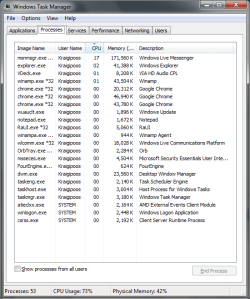
Try a screenshot with Process Explorer from Microsoft.
 

My Computer

Computer type
PC/Desktop
OS
Microsoft Windows 10 Professional / Windows 7 Professional
CPU
Intel i5-3570
Motherboard
Lenovo Mahobay
Memory
16GB DDR3
Graphics Card(s)
AMD Radeon HD 7850 2GB
Sound Card
(1) Realtek HD Audio (2) AMD HD Audio
Monitor(s) Displays
LG LS192WS
Screen Resolution
1440 x 900 @ 32bit color
Hard Drives
(1) SUV300S37A/120G (2) ST3500413AS SATA Disk Device AHCI mode enabled.
PSU
Corsair HX620
Case
Thermaltake V4 Black Edition
Cooling
Cooler Master Hyper 212 + Artic Silver 5 on CPU/GPU
Keyboard
Dell SK-8115
Mouse
Razer Copperhead with MAPED mat (awesome!)
Internet Speed
100 Mbps up/down
Browser
Chrome
Back
Top