Slow game performance

My Computer

Computer type
PC/Desktop
Computer Manufacturer/Model Number
Custom
OS
Win 10 Home Premium 64 Bit
CPU
I7 5930K @ 4.5
Motherboard
Asus X99 s
Memory
16GB Kingston Hyper X Fury DDR4
Graphics Card(s)
EVGA 980ti SC + ACX 2.0
Sound Card
Onboard
Monitor(s) Displays
ROG Swift PG278Q
Screen Resolution
2560x1440
Hard Drives
Kingston Hyper X 250gb SSD
Samsung 2TB mechanical
PSU
Corsair RM 850
Case
NZXT H440 Red
Cooling
Corsair H100i GTX
Keyboard
Razer Reclusa
Mouse
Logitech G5 Gamer
Internet Speed
34mb
Antivirus
Eset Smart Security
Browser
Firefox
go here MSI Afterburner download the benchmark tool (msi kombustor) run it in fullscreen mode (it will show up your gpu usage top right)

if its still at zero use MSI after burner to up your core clock by 5mhz (its a tiny oc it will be fine) then run Kombuster again

ive been told by another user of your gpu that you can get the tool monitoring usage but only with a small oc , its not a fix for your issue but its somewhere i want to start :)

EDIT scrap the OC bit just heard from Unwinder (the guy who developed the afterburner tool) that gpu usage is only supported for 2 series and ubove cards , thats why yours is reading 0 , even if you did get it working it would be wrong

brb ........................
 

My Computer

Computer type
PC/Desktop
Computer Manufacturer/Model Number
Custom
OS
Win 10 Home Premium 64 Bit
CPU
I7 5930K @ 4.5
Motherboard
Asus X99 s
Memory
16GB Kingston Hyper X Fury DDR4
Graphics Card(s)
EVGA 980ti SC + ACX 2.0
Sound Card
Onboard
Monitor(s) Displays
ROG Swift PG278Q
Screen Resolution
2560x1440
Hard Drives
Kingston Hyper X 250gb SSD
Samsung 2TB mechanical
PSU
Corsair RM 850
Case
NZXT H440 Red
Cooling
Corsair H100i GTX
Keyboard
Razer Reclusa
Mouse
Logitech G5 Gamer
Internet Speed
34mb
Antivirus
Eset Smart Security
Browser
Firefox
this is the link i gave Download details: DirectX End-User Runtime

i just checked it and its deffo the web update tool , just download it and run it , it should search for DX updates and install em


That's a no go, i'm getting the same message as before "DirectX setup has determined that a newer or equivalent version of DirectX has been installed already. No installation is necessary."
 

My Computer

Computer Manufacturer/Model Number
Self-Build
OS
Windows 7 Home Premium x64, Ubuntu Linux
CPU
Intel [email protected]
Motherboard
ASUS P5N-D nForce 750i SLI
Memory
8GB Patroit Gamer Series PC6400 DDR2
Graphics Card(s)
PNY GTX 470
Sound Card
Realtek HD Audio
Monitor(s) Displays
Acer X233H
Screen Resolution
1920x1080
Hard Drives
Western Digital 1TB
Western Digital 2TB
Corsair Neutron 120GB SSD
PSU
900 watt, efficient to 750 watts
Case
NZXT M59
Cooling
Ultra Chilltec Silver CPU Cooler, 120mm fan x2, 140mm fan x2
Keyboard
Razer Marauder (Starcraft 2)
Mouse
Razer Spectre (Starcraft 2)
Internet Speed
Cable (2-5Mb/s)
go here MSI Afterburner download the benchmark tool (msi kombustor) run it in fullscreen mode (it will show up your gpu usage top right)

if its still at zero use MSI after burner to up your core clock by 5mhz (its a tiny oc it will be fine) then run Kombuster again

ive been told by another user of your gpu that you can get the tool monitoring usage but only with a small oc , its not a fix for your issue but its somewhere i want to start :)

EDIT scrap the OC bit just heard from Unwinder (the guy who developed the afterburner tool) that gpu usage is only supported for 2 series and ubove cards , thats why yours is reading 0 , even if you did get it working it would be wrong

brb ........................

So forget about Kombuster too?
 

My Computer

Computer Manufacturer/Model Number
Self-Build
OS
Windows 7 Home Premium x64, Ubuntu Linux
CPU
Intel [email protected]
Motherboard
ASUS P5N-D nForce 750i SLI
Memory
8GB Patroit Gamer Series PC6400 DDR2
Graphics Card(s)
PNY GTX 470
Sound Card
Realtek HD Audio
Monitor(s) Displays
Acer X233H
Screen Resolution
1920x1080
Hard Drives
Western Digital 1TB
Western Digital 2TB
Corsair Neutron 120GB SSD
PSU
900 watt, efficient to 750 watts
Case
NZXT M59
Cooling
Ultra Chilltec Silver CPU Cooler, 120mm fan x2, 140mm fan x2
Keyboard
Razer Marauder (Starcraft 2)
Mouse
Razer Spectre (Starcraft 2)
Internet Speed
Cable (2-5Mb/s)
no mate give kombuster a go its just a benchmark tool :)

its odd how the dx update tool is working , can you run DXdiag and see what comes up

hit start all programs/acessories then open the run command

in the box type dxdiag and hit return (jut incase your not sure how to do it :P )

look under the directx files tab make sure you have some recent dated files in there then under the display tab select the test direct draw and test direct 3d tabs , do the same for sound
 

My Computer

Computer type
PC/Desktop
Computer Manufacturer/Model Number
Custom
OS
Win 10 Home Premium 64 Bit
CPU
I7 5930K @ 4.5
Motherboard
Asus X99 s
Memory
16GB Kingston Hyper X Fury DDR4
Graphics Card(s)
EVGA 980ti SC + ACX 2.0
Sound Card
Onboard
Monitor(s) Displays
ROG Swift PG278Q
Screen Resolution
2560x1440
Hard Drives
Kingston Hyper X 250gb SSD
Samsung 2TB mechanical
PSU
Corsair RM 850
Case
NZXT H440 Red
Cooling
Corsair H100i GTX
Keyboard
Razer Reclusa
Mouse
Logitech G5 Gamer
Internet Speed
34mb
Antivirus
Eset Smart Security
Browser
Firefox
no mate give kombuster a go its just a benchmark tool :)

its odd how the dx update tool is working , can you run DXdiag and see what comes up

hit start all programs/acessories then open the run command

in the box type dxdiag and hit return (jut incase your not sure how to do it :P )

look under the directx files tab make sure you have some recent dated files in there then under the display tab select the test direct draw and test direct 3d tabs , do the same for sound

Ok i have dxdiag up but i'm not seeing a "directx files" tab. the tabs i have are System, Display, Sound 1, Sound 2, Sound 3, and input.

when i look in the display tab, in the middle of the window there is a category called DirectX Features. the features are DirectDraw Acceleration, Direct3D Acceleration, and AGP Texture Acceleration. all three of the DX features are Enabled. Also, under the system tab, the processor says "Intel(R) Pentium(R) 4 CPU 3.40GHz (2 CPUs), ~ 3.4GHz. it says 2 CPUs but i only have a single core. this shows up in the task manager too, 2 graphs for CPU usage. Why does it say 2 CPUs if i only have a single core?

i'll give Kombuster a try when i get a chance, it's my Mom's birthday in a few days and i have to go find something for her, so i probably won't be on here as much.

buy the way, was it ever decided that a BIOS update would help?
 

My Computer

Computer Manufacturer/Model Number
Self-Build
OS
Windows 7 Home Premium x64, Ubuntu Linux
CPU
Intel [email protected]
Motherboard
ASUS P5N-D nForce 750i SLI
Memory
8GB Patroit Gamer Series PC6400 DDR2
Graphics Card(s)
PNY GTX 470
Sound Card
Realtek HD Audio
Monitor(s) Displays
Acer X233H
Screen Resolution
1920x1080
Hard Drives
Western Digital 1TB
Western Digital 2TB
Corsair Neutron 120GB SSD
PSU
900 watt, efficient to 750 watts
Case
NZXT M59
Cooling
Ultra Chilltec Silver CPU Cooler, 120mm fan x2, 140mm fan x2
Keyboard
Razer Marauder (Starcraft 2)
Mouse
Razer Spectre (Starcraft 2)
Internet Speed
Cable (2-5Mb/s)
no mate give kombuster a go its just a benchmark tool :)

its odd how the dx update tool is working , can you run DXdiag and see what comes up

hit start all programs/acessories then open the run command

in the box type dxdiag and hit return (jut incase your not sure how to do it :P )

look under the directx files tab make sure you have some recent dated files in there then under the display tab select the test direct draw and test direct 3d tabs , do the same for sound

Ok i have dxdiag up but i'm not seeing a "directx files" tab. the tabs i have are System, Display, Sound 1, Sound 2, Sound 3, and input.

when i look in the display tab, in the middle of the window there is a category called DirectX Features. the features are DirectDraw Acceleration, Direct3D Acceleration, and AGP Texture Acceleration. all three of the DX features are Enabled. Also, under the system tab, the processor says "Intel(R) Pentium(R) 4 CPU 3.40GHz (2 CPUs), ~ 3.4GHz. it says 2 CPUs but i only have a single core. this shows up in the task manager too, 2 graphs for CPU usage. Why does it say 2 CPUs if i only have a single core?

i'll give Kombuster a try when i get a chance, it's my Mom's birthday in a few days and i have to go find something for her, so i probably won't be on here as much.

buy the way, was it ever decided that a BIOS update would help?

sorry mate i was on the wifes laptop when i looked at DX diag too check settings .......... its windows XP ha ha , back on the pc now with 7 and your right..im a muppet :P

well im thinking a bios update certainly wont hurt anything so give it a go , i have heard of some bios's being incompatible with win 7 , im fast running outta ideas , your gpu seems fine , your cpu is ok (ish although i think your os thinks you have a dual core because it simply refuses to beleive anyone still runs anything on a single core cpu ;) ;) ((you really need to get that sorted out :P )) ) As everything runs better on XP it has to be a bios or an OS issue , your hardware is obviously ok (it could be a cpu issue of course with it being a little prehistoric and win 7 needing at least a dual core , looking at some benchmarks XP does get up to 10fps more ingame than Vista or 7 on older hardware)

did you do a full format before installing 7?
 

My Computer

Computer type
PC/Desktop
Computer Manufacturer/Model Number
Custom
OS
Win 10 Home Premium 64 Bit
CPU
I7 5930K @ 4.5
Motherboard
Asus X99 s
Memory
16GB Kingston Hyper X Fury DDR4
Graphics Card(s)
EVGA 980ti SC + ACX 2.0
Sound Card
Onboard
Monitor(s) Displays
ROG Swift PG278Q
Screen Resolution
2560x1440
Hard Drives
Kingston Hyper X 250gb SSD
Samsung 2TB mechanical
PSU
Corsair RM 850
Case
NZXT H440 Red
Cooling
Corsair H100i GTX
Keyboard
Razer Reclusa
Mouse
Logitech G5 Gamer
Internet Speed
34mb
Antivirus
Eset Smart Security
Browser
Firefox
no mate give kombuster a go its just a benchmark tool :)

its odd how the dx update tool is working , can you run DXdiag and see what comes up

hit start all programs/acessories then open the run command

in the box type dxdiag and hit return (jut incase your not sure how to do it :P )

look under the directx files tab make sure you have some recent dated files in there then under the display tab select the test direct draw and test direct 3d tabs , do the same for sound

Ok i have dxdiag up but i'm not seeing a "directx files" tab. the tabs i have are System, Display, Sound 1, Sound 2, Sound 3, and input.

when i look in the display tab, in the middle of the window there is a category called DirectX Features. the features are DirectDraw Acceleration, Direct3D Acceleration, and AGP Texture Acceleration. all three of the DX features are Enabled. Also, under the system tab, the processor says "Intel(R) Pentium(R) 4 CPU 3.40GHz (2 CPUs), ~ 3.4GHz. it says 2 CPUs but i only have a single core. this shows up in the task manager too, 2 graphs for CPU usage. Why does it say 2 CPUs if i only have a single core?

i'll give Kombuster a try when i get a chance, it's my Mom's birthday in a few days and i have to go find something for her, so i probably won't be on here as much.

buy the way, was it ever decided that a BIOS update would help?

sorry mate i was on the wifes laptop when i looked at DX diag too check settings .......... its windows XP ha ha , back on the pc now with 7 and your right..im a muppet :P

well im thinking a bios update certainly wont hurt anything so give it a go , i have heard of some bios's being incompatible with win 7 , im fast running outta ideas , your gpu seems fine , your cpu is ok (ish although i think your os thinks you have a dual core because it simply refuses to beleive anyone still runs anything on a single core cpu ;) ;) ((you really need to get that sorted out :P )) ) As everything runs better on XP it has to be a bios or an OS issue , your hardware is obviously ok

did you do a full format before installing 7?


HAHAHAHA, yeah i'm going to get a quad care soon, just need my dad to let me use the credit card so that i can make the order.

I did not format the hard drive before i installed 7. i was reading the instructions on Microsoft's website and it said that you don't have to format the hard drive, just pop the disc in and select custom install if you are currently running XP.

Now i'm not that dumb when it comes to computers, it's just the BIOS and this problem that seem to have me beat.:D so how would i update the Bios?
 

My Computer

Computer Manufacturer/Model Number
Self-Build
OS
Windows 7 Home Premium x64, Ubuntu Linux
CPU
Intel [email protected]
Motherboard
ASUS P5N-D nForce 750i SLI
Memory
8GB Patroit Gamer Series PC6400 DDR2
Graphics Card(s)
PNY GTX 470
Sound Card
Realtek HD Audio
Monitor(s) Displays
Acer X233H
Screen Resolution
1920x1080
Hard Drives
Western Digital 1TB
Western Digital 2TB
Corsair Neutron 120GB SSD
PSU
900 watt, efficient to 750 watts
Case
NZXT M59
Cooling
Ultra Chilltec Silver CPU Cooler, 120mm fan x2, 140mm fan x2
Keyboard
Razer Marauder (Starcraft 2)
Mouse
Razer Spectre (Starcraft 2)
Internet Speed
Cable (2-5Mb/s)
Ok i have dxdiag up but i'm not seeing a "directx files" tab. the tabs i have are System, Display, Sound 1, Sound 2, Sound 3, and input.

when i look in the display tab, in the middle of the window there is a category called DirectX Features. the features are DirectDraw Acceleration, Direct3D Acceleration, and AGP Texture Acceleration. all three of the DX features are Enabled. Also, under the system tab, the processor says "Intel(R) Pentium(R) 4 CPU 3.40GHz (2 CPUs), ~ 3.4GHz. it says 2 CPUs but i only have a single core. this shows up in the task manager too, 2 graphs for CPU usage. Why does it say 2 CPUs if i only have a single core?

i'll give Kombuster a try when i get a chance, it's my Mom's birthday in a few days and i have to go find something for her, so i probably won't be on here as much.

buy the way, was it ever decided that a BIOS update would help?

sorry mate i was on the wifes laptop when i looked at DX diag too check settings .......... its windows XP ha ha , back on the pc now with 7 and your right..im a muppet :P

well im thinking a bios update certainly wont hurt anything so give it a go , i have heard of some bios's being incompatible with win 7 , im fast running outta ideas , your gpu seems fine , your cpu is ok (ish although i think your os thinks you have a dual core because it simply refuses to beleive anyone still runs anything on a single core cpu ;) ;) ((you really need to get that sorted out :P )) ) As everything runs better on XP it has to be a bios or an OS issue , your hardware is obviously ok

did you do a full format before installing 7?


HAHAHAHA, yeah i'm going to get a quad care soon, just need my dad to let me use the credit card so that i can make the order.

I did not format the hard drive before i installed 7. i was reading the instructions on Microsoft's website and it said that you don't have to format the hard drive, just pop the disc in and select custom install if you are currently running XP.

Now i'm not that dumb when it comes to computers, it's just the BIOS and this problem that seem to have me beat.:D so how would i update the Bios?

Update Bios , fully format your drive , install win 7 :D Honestly mate you really need to fully format your machine , especially if your a gamer , dont listen to microsoft what the hell do they know anyway?? ;)

try the bios thing it wont hurt............unless you get a bad flash and end up with a fried bios chip ;)
 

My Computer

Computer type
PC/Desktop
Computer Manufacturer/Model Number
Custom
OS
Win 10 Home Premium 64 Bit
CPU
I7 5930K @ 4.5
Motherboard
Asus X99 s
Memory
16GB Kingston Hyper X Fury DDR4
Graphics Card(s)
EVGA 980ti SC + ACX 2.0
Sound Card
Onboard
Monitor(s) Displays
ROG Swift PG278Q
Screen Resolution
2560x1440
Hard Drives
Kingston Hyper X 250gb SSD
Samsung 2TB mechanical
PSU
Corsair RM 850
Case
NZXT H440 Red
Cooling
Corsair H100i GTX
Keyboard
Razer Reclusa
Mouse
Logitech G5 Gamer
Internet Speed
34mb
Antivirus
Eset Smart Security
Browser
Firefox
Just ran Kombuster. all i had up was FireFox, and kombuster, and the GPU usage says 99%.

as for formating, that's something else i've never done. i take it that i would just right-click on the C drive and click Format? i don't even know what formating does, does it wipe the whole drive to a factory clean?

If i'm going to reinstall windows then i think i'll wait until i get the quad care so that i can install 64-bit. or should i stay with 32?
 

Attachments

  • Kombuster.png
    Kombuster.png
    858 KB · Views: 2

My Computer

Computer Manufacturer/Model Number
Self-Build
OS
Windows 7 Home Premium x64, Ubuntu Linux
CPU
Intel [email protected]
Motherboard
ASUS P5N-D nForce 750i SLI
Memory
8GB Patroit Gamer Series PC6400 DDR2
Graphics Card(s)
PNY GTX 470
Sound Card
Realtek HD Audio
Monitor(s) Displays
Acer X233H
Screen Resolution
1920x1080
Hard Drives
Western Digital 1TB
Western Digital 2TB
Corsair Neutron 120GB SSD
PSU
900 watt, efficient to 750 watts
Case
NZXT M59
Cooling
Ultra Chilltec Silver CPU Cooler, 120mm fan x2, 140mm fan x2
Keyboard
Razer Marauder (Starcraft 2)
Mouse
Razer Spectre (Starcraft 2)
Internet Speed
Cable (2-5Mb/s)
Im looking at kombuster and it says my graphics card is an ATI Radeon 5670.?????

when i clicked on the benchmark button in your link it didn't really download or install. it just opened a new window that looked like the picture in my last post. is it supposed to do that, i don't think it is but i've seen some weird programs that do?
 

My Computer

Computer Manufacturer/Model Number
Self-Build
OS
Windows 7 Home Premium x64, Ubuntu Linux
CPU
Intel [email protected]
Motherboard
ASUS P5N-D nForce 750i SLI
Memory
8GB Patroit Gamer Series PC6400 DDR2
Graphics Card(s)
PNY GTX 470
Sound Card
Realtek HD Audio
Monitor(s) Displays
Acer X233H
Screen Resolution
1920x1080
Hard Drives
Western Digital 1TB
Western Digital 2TB
Corsair Neutron 120GB SSD
PSU
900 watt, efficient to 750 watts
Case
NZXT M59
Cooling
Ultra Chilltec Silver CPU Cooler, 120mm fan x2, 140mm fan x2
Keyboard
Razer Marauder (Starcraft 2)
Mouse
Razer Spectre (Starcraft 2)
Internet Speed
Cable (2-5Mb/s)
Im looking at kombuster and it says my graphics card is an ATI Radeon 5670.?????

when i clicked on the benchmark button in your link it didn't really download or install. it just opened a new window that looked like the picture in my last post. is it supposed to do that, i don't think it is but i've seen some weird programs that do?

good grief ATI!!

get this GPU-Z Video card GPU Information Utility run it and post up a pic of the main window
 

My Computer

Computer type
PC/Desktop
Computer Manufacturer/Model Number
Custom
OS
Win 10 Home Premium 64 Bit
CPU
I7 5930K @ 4.5
Motherboard
Asus X99 s
Memory
16GB Kingston Hyper X Fury DDR4
Graphics Card(s)
EVGA 980ti SC + ACX 2.0
Sound Card
Onboard
Monitor(s) Displays
ROG Swift PG278Q
Screen Resolution
2560x1440
Hard Drives
Kingston Hyper X 250gb SSD
Samsung 2TB mechanical
PSU
Corsair RM 850
Case
NZXT H440 Red
Cooling
Corsair H100i GTX
Keyboard
Razer Reclusa
Mouse
Logitech G5 Gamer
Internet Speed
34mb
Antivirus
Eset Smart Security
Browser
Firefox
Here a pic of GPU-Z
 

Attachments

  • GPUZ.png
    GPUZ.png
    1.1 MB · Views: 20

My Computer

Computer Manufacturer/Model Number
Self-Build
OS
Windows 7 Home Premium x64, Ubuntu Linux
CPU
Intel [email protected]
Motherboard
ASUS P5N-D nForce 750i SLI
Memory
8GB Patroit Gamer Series PC6400 DDR2
Graphics Card(s)
PNY GTX 470
Sound Card
Realtek HD Audio
Monitor(s) Displays
Acer X233H
Screen Resolution
1920x1080
Hard Drives
Western Digital 1TB
Western Digital 2TB
Corsair Neutron 120GB SSD
PSU
900 watt, efficient to 750 watts
Case
NZXT M59
Cooling
Ultra Chilltec Silver CPU Cooler, 120mm fan x2, 140mm fan x2
Keyboard
Razer Marauder (Starcraft 2)
Mouse
Razer Spectre (Starcraft 2)
Internet Speed
Cable (2-5Mb/s)
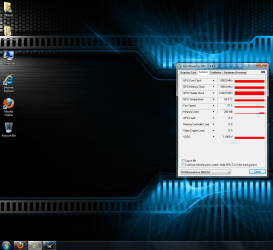
Here's a pic of GPU-Z's sensors tab while i was running Call of Duty. the GPU load says 0%. does GPU-Z have the same problem as Afterburn does with reading the usage of my card?
 

Attachments

  • GPU-Z Game Test.png
    GPU-Z Game Test.png
    1.1 MB · Views: 12

My Computer

Computer Manufacturer/Model Number
Self-Build
OS
Windows 7 Home Premium x64, Ubuntu Linux
CPU
Intel [email protected]
Motherboard
ASUS P5N-D nForce 750i SLI
Memory
8GB Patroit Gamer Series PC6400 DDR2
Graphics Card(s)
PNY GTX 470
Sound Card
Realtek HD Audio
Monitor(s) Displays
Acer X233H
Screen Resolution
1920x1080
Hard Drives
Western Digital 1TB
Western Digital 2TB
Corsair Neutron 120GB SSD
PSU
900 watt, efficient to 750 watts
Case
NZXT M59
Cooling
Ultra Chilltec Silver CPU Cooler, 120mm fan x2, 140mm fan x2
Keyboard
Razer Marauder (Starcraft 2)
Mouse
Razer Spectre (Starcraft 2)
Internet Speed
Cable (2-5Mb/s)
so you definately dont have onboard graphics on your motherboard? (im too lazy too look which one you have ;) ) and you have been into bios and selected PCIe as your main graphics adapter?

so you must have some rogue ATI drivers on there or something!!?? Does anything show up im add/remove programs? (programs and features) for ATI?

oh and below on gpuz where it says NVidia gforce 9600GT , click the drop down list......anything there?
 

My Computer

Computer type
PC/Desktop
Computer Manufacturer/Model Number
Custom
OS
Win 10 Home Premium 64 Bit
CPU
I7 5930K @ 4.5
Motherboard
Asus X99 s
Memory
16GB Kingston Hyper X Fury DDR4
Graphics Card(s)
EVGA 980ti SC + ACX 2.0
Sound Card
Onboard
Monitor(s) Displays
ROG Swift PG278Q
Screen Resolution
2560x1440
Hard Drives
Kingston Hyper X 250gb SSD
Samsung 2TB mechanical
PSU
Corsair RM 850
Case
NZXT H440 Red
Cooling
Corsair H100i GTX
Keyboard
Razer Reclusa
Mouse
Logitech G5 Gamer
Internet Speed
34mb
Antivirus
Eset Smart Security
Browser
Firefox
so you definately dont have onboard graphics on your motherboard? (im too lazy too look which one you have ;) ) and you have been into bios and selected PCIe as your main graphics adapter?

so you must have some rogue ATI drivers on there or something!!?? Does anything show up im add/remove programs? (programs and features) for ATI?

oh and below on gpuz where it says NVidia gforce 9600GT , click the drop down list......anything there?

there is no onboard graphics, and the primary graphics adapter is PCIe.
Nothing shows up in add/remove programs for ATI, however, as i believe i mentioned in a previous post, DriverSweeper found and ATI catalyst driver. I didn't delete it although i probably should have.

There is nothing else in the drop down list.

Edit - ATI Display, not ATI Catalyst
 

My Computer

Computer Manufacturer/Model Number
Self-Build
OS
Windows 7 Home Premium x64, Ubuntu Linux
CPU
Intel [email protected]
Motherboard
ASUS P5N-D nForce 750i SLI
Memory
8GB Patroit Gamer Series PC6400 DDR2
Graphics Card(s)
PNY GTX 470
Sound Card
Realtek HD Audio
Monitor(s) Displays
Acer X233H
Screen Resolution
1920x1080
Hard Drives
Western Digital 1TB
Western Digital 2TB
Corsair Neutron 120GB SSD
PSU
900 watt, efficient to 750 watts
Case
NZXT M59
Cooling
Ultra Chilltec Silver CPU Cooler, 120mm fan x2, 140mm fan x2
Keyboard
Razer Marauder (Starcraft 2)
Mouse
Razer Spectre (Starcraft 2)
Internet Speed
Cable (2-5Mb/s)
so you definately dont have onboard graphics on your motherboard? (im too lazy too look which one you have ;) ) and you have been into bios and selected PCIe as your main graphics adapter?

so you must have some rogue ATI drivers on there or something!!?? Does anything show up im add/remove programs? (programs and features) for ATI?

oh and below on gpuz where it says NVidia gforce 9600GT , click the drop down list......anything there?

there is no onboard graphics, and the primary graphics adapter is PCIe.
Nothing shows up in add/remove programs for ATI, however, as i believe i mentioned in a previous post, DriverSweeper found and ATI catalyst driver. I didn't delete it although i probably should have.

There is nothing else in the drop down list.

Edit - ATI Display, not ATI Catalyst

i dont think driver sweeper found ATI as such its just listed in its default cleaning profile , i wonder why kombuster shows ATI?? Ill have to go away and ask elsewhere
 

My Computer

Computer type
PC/Desktop
Computer Manufacturer/Model Number
Custom
OS
Win 10 Home Premium 64 Bit
CPU
I7 5930K @ 4.5
Motherboard
Asus X99 s
Memory
16GB Kingston Hyper X Fury DDR4
Graphics Card(s)
EVGA 980ti SC + ACX 2.0
Sound Card
Onboard
Monitor(s) Displays
ROG Swift PG278Q
Screen Resolution
2560x1440
Hard Drives
Kingston Hyper X 250gb SSD
Samsung 2TB mechanical
PSU
Corsair RM 850
Case
NZXT H440 Red
Cooling
Corsair H100i GTX
Keyboard
Razer Reclusa
Mouse
Logitech G5 Gamer
Internet Speed
34mb
Antivirus
Eset Smart Security
Browser
Firefox
I've got to run. have to go birthday shop for my Mom:party:, i'll be back later.
 

My Computer

Computer Manufacturer/Model Number
Self-Build
OS
Windows 7 Home Premium x64, Ubuntu Linux
CPU
Intel [email protected]
Motherboard
ASUS P5N-D nForce 750i SLI
Memory
8GB Patroit Gamer Series PC6400 DDR2
Graphics Card(s)
PNY GTX 470
Sound Card
Realtek HD Audio
Monitor(s) Displays
Acer X233H
Screen Resolution
1920x1080
Hard Drives
Western Digital 1TB
Western Digital 2TB
Corsair Neutron 120GB SSD
PSU
900 watt, efficient to 750 watts
Case
NZXT M59
Cooling
Ultra Chilltec Silver CPU Cooler, 120mm fan x2, 140mm fan x2
Keyboard
Razer Marauder (Starcraft 2)
Mouse
Razer Spectre (Starcraft 2)
Internet Speed
Cable (2-5Mb/s)
Honestly man I think its your ancient P4. I remember the first time I tried W7 it was on a P4 box and the game performance definitely suffered. You need to upgrade for sure.
 

My Computer

Computer type
PC/Desktop
Computer Manufacturer/Model Number
Home Built
OS
Win7 Ultimate x64
CPU
Intel I5 4690k
Motherboard
MSI Z97 Gaming 5
Memory
16gb Corsair DDR3 @1600mhz
Graphics Card(s)
GTX 970
Sound Card
Realtek HD 5.1
Monitor(s) Displays
Acer 23" LCD
Screen Resolution
1920x1080
Hard Drives
Samsung Evo III SSD
WD 1TB Black
PSU
EVGA Supernove 650w
Case
Diabolik
Cooling
Cooler Master
Keyboard
Logitech
Mouse
Logitech
Internet Speed
Fiber
Other Info
Logitech X-540 5.1 Surround Sound/
Logitech Rumblepad2/
Thrustmaster RGT FFB Wheel
Ok, i'm back.

About reinstalling 7, i have the upgrade version of Home Premium. will i be able to install 7 after i format the drive or to i need to go out and buy the full OS version?
 

My Computer

Computer Manufacturer/Model Number
Self-Build
OS
Windows 7 Home Premium x64, Ubuntu Linux
CPU
Intel [email protected]
Motherboard
ASUS P5N-D nForce 750i SLI
Memory
8GB Patroit Gamer Series PC6400 DDR2
Graphics Card(s)
PNY GTX 470
Sound Card
Realtek HD Audio
Monitor(s) Displays
Acer X233H
Screen Resolution
1920x1080
Hard Drives
Western Digital 1TB
Western Digital 2TB
Corsair Neutron 120GB SSD
PSU
900 watt, efficient to 750 watts
Case
NZXT M59
Cooling
Ultra Chilltec Silver CPU Cooler, 120mm fan x2, 140mm fan x2
Keyboard
Razer Marauder (Starcraft 2)
Mouse
Razer Spectre (Starcraft 2)
Internet Speed
Cable (2-5Mb/s)
Back
Top