slow laptop

theski232

New member
Member
VIP
Local time
12:03 PM
Messages
399
Location
Massachussetts
my laptop is less than a year old and in the past few weeks it has become really slow. i am not sure what the problem is but i would be grateful if someone could help me :confused:
 

My Computer

Computer Manufacturer/Model Number
Dell Studio 1749
OS
Windows 7 Home Premium 64 Bit
CPU
Intel i5 2.40GHz
Internet Speed
university ethernet sucks
Download and run a FULL scan with Malwarebytes and post the result. We'll go from there.
 

My Computer

Computer Manufacturer/Model Number
Custom
OS
Windows 7 ultimate X64
CPU
Core i7 870 Lynnfield
Motherboard
MSI P55-GD55
Memory
4GB Corsair XMS 3 1600Mhz
Graphics Card(s)
GeForce 8800 GTS (for the time being)
Sound Card
Onboard 7.1 digital
Monitor(s) Displays
Dell 19"
Screen Resolution
1280x1024
Hard Drives
Barracuda 750Gb
PSU
Corsair TX 650w
Case
Thermaltake Armour Extreme Edition
Cooling
Corsair H50
Keyboard
Dell XPS slim
Mouse
Dell XPS mouse (only good product)
Internet Speed
100 Mbps +/-
my laptop is less than a year old and in the past few weeks it has become really slow. i am not sure what the problem is but i would be grateful if someone could help me :confused:
Windows slows down because it gets dirty over time and so because it install many soft and update. To resolve this problem you can defragment the hard drive, verify is you are not a malware or virus, used msconfig in ms dos command if you don't want that all software are launched in early.
 

My Computer

OS
Windows 7 pro 64 bit
Memory
2 Go
Graphics Card(s)
Nvidia
Mouse
Microsoft optical mouse
the scan is still running and so far nothing is infected (out of 80,000+ objects/files), i will post the complete results when finished scanning
 

My Computer

Computer Manufacturer/Model Number
Dell Studio 1749
OS
Windows 7 Home Premium 64 Bit
CPU
Intel i5 2.40GHz
Internet Speed
university ethernet sucks
my laptop is less than a year old and in the past few weeks it has become really slow. i am not sure what the problem is but i would be grateful if someone could help me :confused:
Windows slows down because it gets dirty over time and so because it install many soft and update. To resolve this problem you can defragment the hard drive, verify is you are not a malware or virus, used msconfig in ms dos command if you don't want that all software are launched in early.
i already checked the hard drive and it said that is was 0% fragmented
 

My Computer

Computer Manufacturer/Model Number
Dell Studio 1749
OS
Windows 7 Home Premium 64 Bit
CPU
Intel i5 2.40GHz
Internet Speed
university ethernet sucks
Could you describe what "slow" is, specifically? Is it slow to boot, slow to run certain apps, etc?
 

My Computer

Computer type
PC/Desktop
Computer Manufacturer/Model Number
Custom
OS
Windows 10 Pro x64
CPU
Intel Core i7 4790K @ 4.5GHz
Motherboard
Asus Maximus Hero VII
Memory
32GB DDR3
Graphics Card(s)
Nvidia GeForce GTX970
Sound Card
Realtek HD Audio
Screen Resolution
1920x1200
Hard Drives
1x Samsung 250GB SSD
4x WD RE 2TB (RAIDZ)
PSU
Corsair AX760i
Case
Fractal Design Define R4
Cooling
Noctua NH-D15
gestion W7.jpg
 

My Computer

OS
Windows 7 pro 64 bit
Memory
2 Go
Graphics Card(s)
Nvidia
Mouse
Microsoft optical mouse
Could you describe what "slow" is, specifically? Is it slow to boot, slow to run certain apps, etc?
it is slow on start up, some times i have to hold down the power button to shut the computer down then restart b/c it doesnt boot properly, or it will boot properly but will be very slow opening applications after booting up, or the screen will be blank with only a mouse for a few minutes
 

My Computer

Computer Manufacturer/Model Number
Dell Studio 1749
OS
Windows 7 Home Premium 64 Bit
CPU
Intel i5 2.40GHz
Internet Speed
university ethernet sucks
Does it ever work "properly" at all, or does it always exhibit some slowness? Also, is slow booting or shutting down the most common issue?
 

My Computer

Computer type
PC/Desktop
Computer Manufacturer/Model Number
Custom
OS
Windows 10 Pro x64
CPU
Intel Core i7 4790K @ 4.5GHz
Motherboard
Asus Maximus Hero VII
Memory
32GB DDR3
Graphics Card(s)
Nvidia GeForce GTX970
Sound Card
Realtek HD Audio
Screen Resolution
1920x1200
Hard Drives
1x Samsung 250GB SSD
4x WD RE 2TB (RAIDZ)
PSU
Corsair AX760i
Case
Fractal Design Define R4
Cooling
Noctua NH-D15
  • Like
Reactions: JMH
I'd recommend doing a Disk Cleanup and installing and running CCleaner (don't run the registry cleaner, and carefully look through its settings to make sure it doesn't mess anything up more). Also go into Run and type msconfig, go to startup tab, disable anything you know you don't need....my advice, if you don't know what it is, don't disable it ;).

Is your system fully updated? What antivirus are you using? How much RAM does your system have? I see you're using 64-bit OS, IMHO you should have more than 2GB to get the best performance.

What also might be a good article to look at is the Optimize Windows 7 guide.
 

My Computer

Computer Manufacturer/Model Number
self built
OS
Windows 8 Pro x64; Win 7 Home Premium x64 SP1 on VirtualBox
CPU
Intel Core i3-2120 @ 3.3GHz
Motherboard
ASUS P8Z68-M Pro
Memory
8GB DDR3
Graphics Card(s)
ZOTAC GeForce GTX 560 Ti
Sound Card
Realteck HD Audio
Monitor(s) Displays
ASUS VS228 21.5" 1080p
Screen Resolution
1920x1080
Hard Drives
120GB SanDisk SSD;
500GB 7200RPM HDD
PSU
500W 80PLUS Bronze Certified
Case
Antec Three Hundred Illusion
Keyboard
Microsoft Comfort Curve Keyboard 2000 v1.0
Mouse
Microsoft Wireless Mobile Mouse 3000
Internet Speed
26/22Mbps Verizon FiOS
Other Info
very first PC build
  • Like
Reactions: JMH
Is your system fully updated? What antivirus are you using? How much RAM does your system have? I see you're using 64-bit OS, IMHO you should have more than 2GB to get the best performance.
yes fully updated, McAfee security center, and 4 GB ram
 

My Computer

Computer Manufacturer/Model Number
Dell Studio 1749
OS
Windows 7 Home Premium 64 Bit
CPU
Intel i5 2.40GHz
Internet Speed
university ethernet sucks
Does it ever work "properly" at all, or does it always exhibit some slowness? Also, is slow booting or shutting down the most common issue?
yes it does work properly some times about 50/50 on working properly and not
 

My Computer

Computer Manufacturer/Model Number
Dell Studio 1749
OS
Windows 7 Home Premium 64 Bit
CPU
Intel i5 2.40GHz
Internet Speed
university ethernet sucks
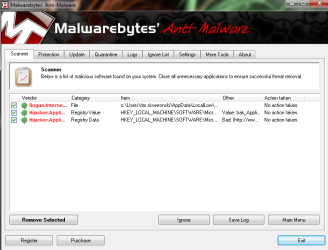
here are the results to the malwarebytes scan
 

Attachments

  • Untitled.png
    Untitled.png
    39.3 KB · Views: 27

My Computer

Computer Manufacturer/Model Number
Dell Studio 1749
OS
Windows 7 Home Premium 64 Bit
CPU
Intel i5 2.40GHz
Internet Speed
university ethernet sucks
You'll need to remove the infections found, then run another Full Scan in Safe Mode .

Many performance problems can be solved by uninstalling MucAfee and installing free MS Security Essentials to run with the Win7 Firewall. Microsoft Security Essentials

As to your slow startup, uncheck all but AV and gadgets in msconfig>Startup to see how things speed up. After a few restarts check if any programs have written themselves back into the Startup list, then find out how to deselect them at Startup in their Preferences. Startup Programs - Change

Next in msconfig>Services Hide all MS Services to see what may be running without your knowing. Turn those programs off in their Preferences or uninstall.

Many of these tips for cleaning factory bloatware preinstalled on laptops may help speed things up and familiarize you better with your options: Clean up factory bloatware
 
Last edited:
the scan is still running and so far nothing is infected (out of 80,000+ objects/files), i will post the complete results when finished scanning

Please follow gregrockers advice and run another scan.
Also download and do a FULL scan with http://superantispyware.com/
Hope this helps
 

My Computer

Computer Manufacturer/Model Number
Custom
OS
Windows 7 ultimate X64
CPU
Core i7 870 Lynnfield
Motherboard
MSI P55-GD55
Memory
4GB Corsair XMS 3 1600Mhz
Graphics Card(s)
GeForce 8800 GTS (for the time being)
Sound Card
Onboard 7.1 digital
Monitor(s) Displays
Dell 19"
Screen Resolution
1280x1024
Hard Drives
Barracuda 750Gb
PSU
Corsair TX 650w
Case
Thermaltake Armour Extreme Edition
Cooling
Corsair H50
Keyboard
Dell XPS slim
Mouse
Dell XPS mouse (only good product)
Internet Speed
100 Mbps +/-
  • Like
Reactions: JMH
Well I think we know what the issue is now.

+1 with everyone else's suggestions.....

I also suggest installing Hitman Pro 3.5 and doing a scan, if it offers to remove them, you can activate the 30-day trial license.
 

My Computer

Computer Manufacturer/Model Number
self built
OS
Windows 8 Pro x64; Win 7 Home Premium x64 SP1 on VirtualBox
CPU
Intel Core i3-2120 @ 3.3GHz
Motherboard
ASUS P8Z68-M Pro
Memory
8GB DDR3
Graphics Card(s)
ZOTAC GeForce GTX 560 Ti
Sound Card
Realteck HD Audio
Monitor(s) Displays
ASUS VS228 21.5" 1080p
Screen Resolution
1920x1080
Hard Drives
120GB SanDisk SSD;
500GB 7200RPM HDD
PSU
500W 80PLUS Bronze Certified
Case
Antec Three Hundred Illusion
Keyboard
Microsoft Comfort Curve Keyboard 2000 v1.0
Mouse
Microsoft Wireless Mobile Mouse 3000
Internet Speed
26/22Mbps Verizon FiOS
Other Info
very first PC build
The scan removes the infection but does not repair any resulting damaged System Files. So run SFC -SCANNOW Command to check System Files.

Then work through the other steps given.

Many performance problems can be solved by uninstalling MucAfee and installing free MS Security Essentials to run with the Win7 Firewall. Microsoft Security Essentials

As to your slow startup, uncheck all but AV and gadgets in msconfig>Startup to see how things speed up. After a few restarts check if any programs have written themselves back into the Startup list, then find out how to deselect them at Startup in their Preferences. Startup Programs - Change

Next in msconfig>Services Hide all MS Services to see what may be running without your knowing. Turn those programs off in their Preferences or uninstall.

Many of these tips for cleaning factory bloatware preinstalled on laptops may help speed things up and familiarize you better with your options: Clean up factory bloatware
 
so far everything is working fine. If any thing progresses i shall return.
 

My Computer

Computer Manufacturer/Model Number
Dell Studio 1749
OS
Windows 7 Home Premium 64 Bit
CPU
Intel i5 2.40GHz
Internet Speed
university ethernet sucks
Back
Top