Slow network speed

Sygron

New member
Member
Local time
2:58 PM
Messages
59
Hello all,

I have a problem with my home network and I can`t figure out where the problem is.
Hope you can help.

I have a NAS with big files on it because of this I want to have a fast intern network.
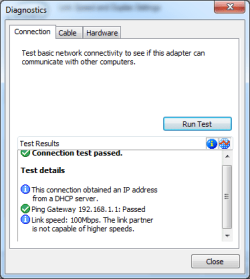
So I bought a gigabit switch (Linksys SE2500), Put this between my computer (motherboard ASUS X79 Deluxe, using the intel port) and my NAS (Iomega ix2-200) all the devices support gigabit speed.
After this it is connected to a HUAWEI HG655d Router/Modem 10-100MBit/sec

If I am correct in this setup it would not use the HUAWEI, as I can connect directly to the NAS trough the switch.

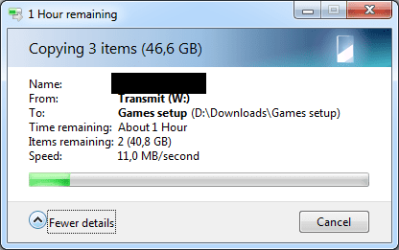
But now I try to get a file from the NAS to the computer and it downloads at 10 Mbit/sec.

How is this possible what am I doing wrong to get it this slow....
I would expect a speed that is 100x faster, or at least 10x faster.

Added a few screenshots of what I have tested and seen.

Any help is greatly appreciated.
 

Attachments
  • Diagnostics.png
    Diagnostics.png
    10.7 KB · Views: 17
  • Download speed.png
    Download speed.png
    11.3 KB · Views: 17
  • Link speed.png
    Link speed.png
    15.3 KB · Views: 17

My Computer

Computer type
PC/Desktop
Computer Manufacturer/Model Number
Custom build
OS
Windows 7 Ultimate Edition (64-bit) Service Pack 1
CPU
Intel(R) Core(TM) i7 CPU 4820K @ 3.70GHz
Motherboard
Asus X79 Deluxe
Memory
16 GB
Graphics Card(s)
NVIDIA GeForce GTX 760
Sound Card
None
Monitor(s) Displays
SyncMaster P2270HD
Screen Resolution
1920 x 1080
Hard Drives
C:\ 128 GB SSD
D:\ 2 TB HDD
PSU
550 Watt
Cooling
Water Cooling
Keyboard
Microsoft Natural Ergonomic Keyboard 4000
Mouse
8 Button Wheel Mouse Present
Internet Speed
Low
Antivirus
Microsoft security essentials
Browser
IE11
I know this may sound like something simple; but; have you tried something as easy as unplugging the power plug(s) to the associated devices and rebooting them to get them to "reset". If not I would go ahead and try that simple idea first. Sometimes just resetting them will get them to reconnect at the proper speed. If not; I would check the adapter properties for the proper settings. I cant tell you specifically what those settings would be since I havent had experience with a lot of networks per say but what i mentioned so far is worth a shot.
 

My Computer

Computer type
PC/Desktop
Computer Manufacturer/Model Number
custom built
OS
Windows 7 ultimate 64-bit
CPU
Intel I7 2600K 3.4ghz
Motherboard
Asus Evo P8P67
Memory
Corsair 16gb ddr3 1600mhz
Graphics Card(s)
Nvidia Geforce gt 430
Sound Card
Sound Blaster Titanium x-fi pci express
Monitor(s) Displays
Dell E198WFP
Hard Drives
1 western digital 2TB drive.
PSU
Antec 1200 watt
Case
Inwin Dragon Rider
Cooling
6 case supplied cooling fans
Keyboard
logitech mk700
Mouse
logitech m705
Internet Speed
25-50mbps download; 10mbps upload(i think)
Antivirus
avg free 2014
Browser
mozilla firefox
Other Info
Also have a pretty bad speaker setup which is a klipsch promedia 5.1 surround speaker setup with huge subwoofer and lg blu ray player/writer. Also a hp officejet pro 8600 plus wireless all in one and a logitech s7500 webcam.
@matts6887: Thanks for the suggestion, however it didn`t work.

Did some testing in the mean while though.
1) Tested with my computer and a different computer, just one cable in between and transfered a large file.
Speed went up till 120 MBit/sec. Looked up on wiki 1 Gigabyte is 0.125 gigabit.
So calculating it back it matches.

2) added the newly purched gigbit switch so Computer -> Switch -> Computer.
Still same numbers so that goes great. (Switch works)

3) Tested my computer with the switch and the NAS, I go back to 10 MBit/sec.
BUT, I tested with the other Computer from test 1 and this gives again ~120 MBit/sec.

So 2 computers that work great together but once seperated they give different speeds...
I know this doesn`t make the problem easier but I can`t get my head around this...
 

My Computer

Computer type
PC/Desktop
Computer Manufacturer/Model Number
Custom build
OS
Windows 7 Ultimate Edition (64-bit) Service Pack 1
CPU
Intel(R) Core(TM) i7 CPU 4820K @ 3.70GHz
Motherboard
Asus X79 Deluxe
Memory
16 GB
Graphics Card(s)
NVIDIA GeForce GTX 760
Sound Card
None
Monitor(s) Displays
SyncMaster P2270HD
Screen Resolution
1920 x 1080
Hard Drives
C:\ 128 GB SSD
D:\ 2 TB HDD
PSU
550 Watt
Cooling
Water Cooling
Keyboard
Microsoft Natural Ergonomic Keyboard 4000
Mouse
8 Button Wheel Mouse Present
Internet Speed
Low
Antivirus
Microsoft security essentials
Browser
IE11
I notice you have an ASUS motherboard, do you by any chance have AI Suite installed?
 

My Computer

Computer type
PC/Desktop
Computer Manufacturer/Model Number
Custom Build
OS
W7 Pro x64 SP1 | W10 Pro IP x64 | W8.1 Pro x64 VM | Linux Mint VM
CPU
i7-4790k @ 4GHz (4.4GHz Boost)
Motherboard
ASUS Sabertooth Z87 (BIOS Rev 2004)
Memory
16GB DDR3 Kingston HyperX Fury @ 1600MHz CL 9-9-9-27
Graphics Card(s)
EVGA GTX 980 Classified
Sound Card
Realtek Onboard
Monitor(s) Displays
Samsung S27D390
Screen Resolution
1920 x 1080
Hard Drives
240GB Intel 520 Series SSD |
Samsung 850 EVO 120GB SSD |
2TB WD Caviar Black |
2TB WD Caviar Green
PSU
Corsair HX850-80 Gold Modular
Case
Cooler Master Silencio 650
Cooling
Corsair H80i w/2 x Corsair SP120 | 2 x 120mm Noctua NF-S12B
Keyboard
Microsoft Sidewinder X4
Mouse
Gigabyte M6900 optical
Internet Speed
152mb
Antivirus
F-Secure
Browser
Firefox 38.0
Other Info
Backup Rig: Win 7 Pro 64-bit | AMD A10-5800k | ASUS F2A85-V Pro | 8GB Samsung DDR3 @1600MHz | 120GB Toshiba SDD | 2TB Seagate HDD | Cooler Master Silencio 550
No I don`t have AI suite installed.
I do use MSI afterburner for logging purposes of the temperature.
Why? can AI suite help solve this problem in any way?
 

My Computer

Computer type
PC/Desktop
Computer Manufacturer/Model Number
Custom build
OS
Windows 7 Ultimate Edition (64-bit) Service Pack 1
CPU
Intel(R) Core(TM) i7 CPU 4820K @ 3.70GHz
Motherboard
Asus X79 Deluxe
Memory
16 GB
Graphics Card(s)
NVIDIA GeForce GTX 760
Sound Card
None
Monitor(s) Displays
SyncMaster P2270HD
Screen Resolution
1920 x 1080
Hard Drives
C:\ 128 GB SSD
D:\ 2 TB HDD
PSU
550 Watt
Cooling
Water Cooling
Keyboard
Microsoft Natural Ergonomic Keyboard 4000
Mouse
8 Button Wheel Mouse Present
Internet Speed
Low
Antivirus
Microsoft security essentials
Browser
IE11
Quite the opposite, the iNetwork Control in AI Suite can seriously cripple network speeds as I found out the hard way. At least that's one possible cause ruled out.
 

My Computer

Computer type
PC/Desktop
Computer Manufacturer/Model Number
Custom Build
OS
W7 Pro x64 SP1 | W10 Pro IP x64 | W8.1 Pro x64 VM | Linux Mint VM
CPU
i7-4790k @ 4GHz (4.4GHz Boost)
Motherboard
ASUS Sabertooth Z87 (BIOS Rev 2004)
Memory
16GB DDR3 Kingston HyperX Fury @ 1600MHz CL 9-9-9-27
Graphics Card(s)
EVGA GTX 980 Classified
Sound Card
Realtek Onboard
Monitor(s) Displays
Samsung S27D390
Screen Resolution
1920 x 1080
Hard Drives
240GB Intel 520 Series SSD |
Samsung 850 EVO 120GB SSD |
2TB WD Caviar Black |
2TB WD Caviar Green
PSU
Corsair HX850-80 Gold Modular
Case
Cooler Master Silencio 650
Cooling
Corsair H80i w/2 x Corsair SP120 | 2 x 120mm Noctua NF-S12B
Keyboard
Microsoft Sidewinder X4
Mouse
Gigabyte M6900 optical
Internet Speed
152mb
Antivirus
F-Secure
Browser
Firefox 38.0
Other Info
Backup Rig: Win 7 Pro 64-bit | AMD A10-5800k | ASUS F2A85-V Pro | 8GB Samsung DDR3 @1600MHz | 120GB Toshiba SDD | 2TB Seagate HDD | Cooler Master Silencio 550
Back
Top